Why VMware vMotion doesn’t break your Network: Understanding RARP and MAC Table Updates
We’ve all watched the vSphere progress bar hit 100% and seen the ‘Migration Successful’ toast, marveling at the fact that not even a single network packet, not even a simple ICMP ping, is lost during the move.
But have you ever wondered how the physical network fabric, the switches and routers that have no idea VMware exists, instantly knows that a MAC address just jumped from one physical port to another?
Today, we’re looking at the RARP mechanism and why it’s the unsung hero of the seamless migration.
If you look at modern networking textbooks, RARP is listed as a retired protocol. However, VMware keeps it on life support for one specific reason: it is the perfect ‘lightweight’ frame to force a physical switch to update its MAC table during a vMotion.
While the Guest OS might send a modern Gratuitous ARP (GARP) to update its neighbors, the ESXi host uses a RARP to talk to the switch fabric immediately.
Catching the Handover: Capturing RARP and GARP During vMotion
We’ve all seen it: a critical Virtual Machine migrates from one physical host to another, and the continuous ping doesn’t skip a single beat.
It feels like magic, but for a network engineer, it raises a stressful question: How did the physical switch know the VM moved?
Physical switches aren’t VM-aware. They rely on a MAC Address Table to know which physical port leads to which device. If you move a VM from Host A to Host B, the switch is still trying to send traffic to the old port.
Here is how VMware prevents that traffic black hole.
The moment a vMotion “cuts over” and the VM wakes up on the destination host, the ESXi hypervisor performs a quick bit of networking trickery. It sends a Reverse ARP (RARP) packet on behalf of the VM.
- The Source: The VM’s MAC address.
- The Destination: A broadcast address (
FF:FF:FF:FF:FF:FF). - The Goal: To “slap” the physical switch and say, “Hey! This MAC address is now over here on this port!”
As soon as that RARP hits the physical switch, the switch updates its CAM table. This redirect happens in milliseconds, ensuring that the very next packet destined for that VM is routed to the new physical host.
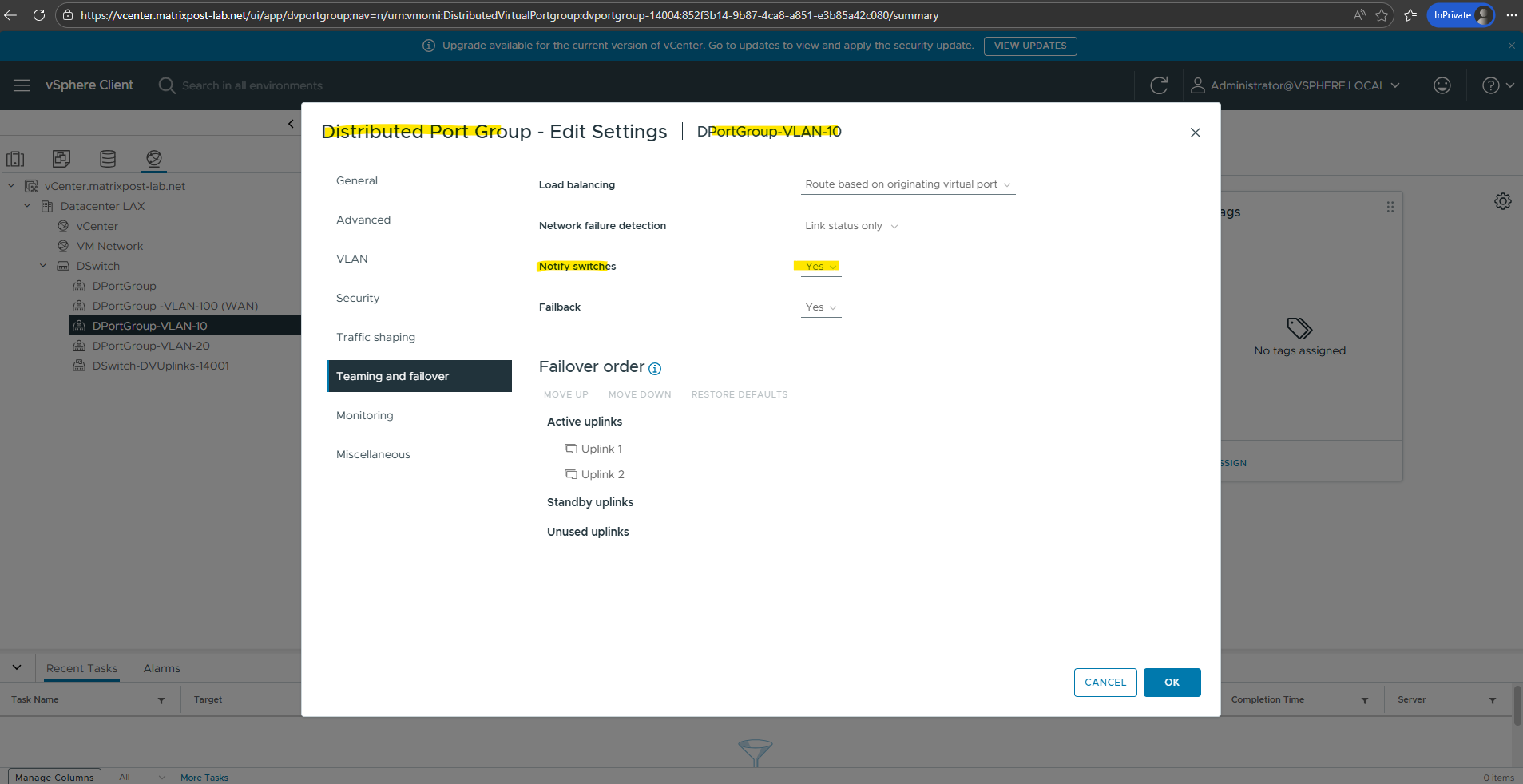
In your vSphere standard or distributed switch settings, there is a specific toggle called Notify Switches and shown in the screenshot below.
If you ever turn this to No, you are essentially telling ESXi to stay quiet after a move. The result? The physical network won’t know the VM has moved until the VM happens to send its own outgoing traffic or the switch’s MAC table entry times out. This usually leads to a massive network drop during migrations.
While the ESXi host handles the RARP, modern operating systems (Windows/Linux) often chip in by sending a Gratuitous ARP (GARP) once they detect the move.
A Gratuitous ARP is an ARP Response that was not prompted by an ARP Request. The Gratuitous ARP is sent as a broadcast, as a way for a node to announce or update its IP to MAC mapping to the entire network.
Source: https://www.packetcoders.io/arp-rarp-proxy-arp-and-garp-explained/
This double-layer approach ensures that both the physical switches and other VMs on the same subnet have their tables updated immediately.
VMware vMotion isn’t just a memory-copying feat; it’s a perfectly timed networking announcement.
Without that humble RARP packet, our high-availability clusters would be a mess of dropped connections and Destination Unreachable errors.
Analyzing Traffic using WireSharek and PKTCAP-UW
Standard ARP & GARP (0x0806)
Both of these use the standard ARP EtherType. The physical switch sees these and thinks, “Okay, this is an ARP packet, let me look at the Source MAC to update my table.”
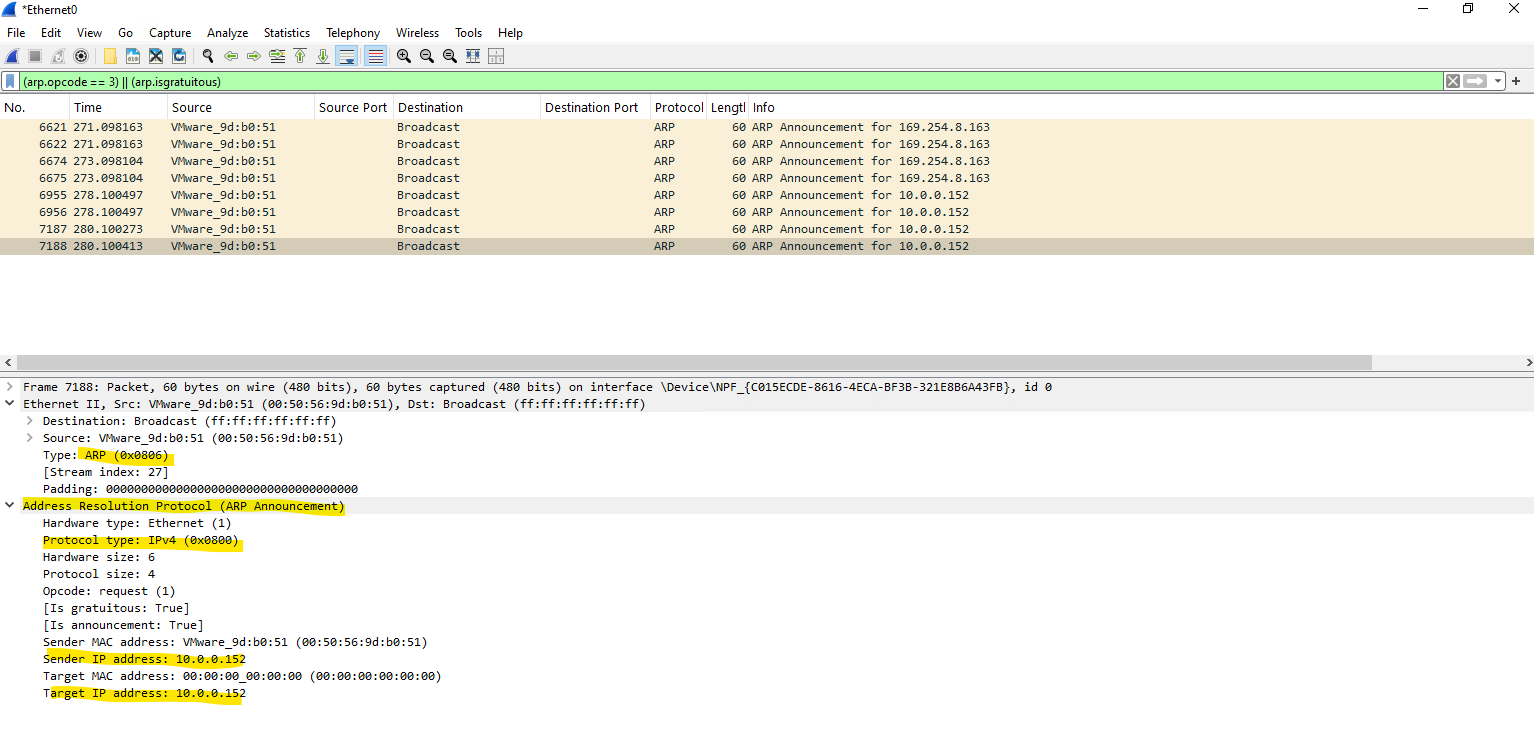
* Distinction: You tell a GARP (Announcement) apart from a regular ARP because the Sender IP and Target IP inside the packet are identical.
RARP (0x8035)
This is the one that is different at the foundational level. It doesn’t even use the 0x0806 EtherType. It uses its own dedicated EtherType 0x8035.
Distinction: Because the Type is different, the switch handles it as a “Reverse” request. Even though it has a field for a “Protocol Type” (where it might say IPv4 / 0x0800), it is functionally a different species of packet.
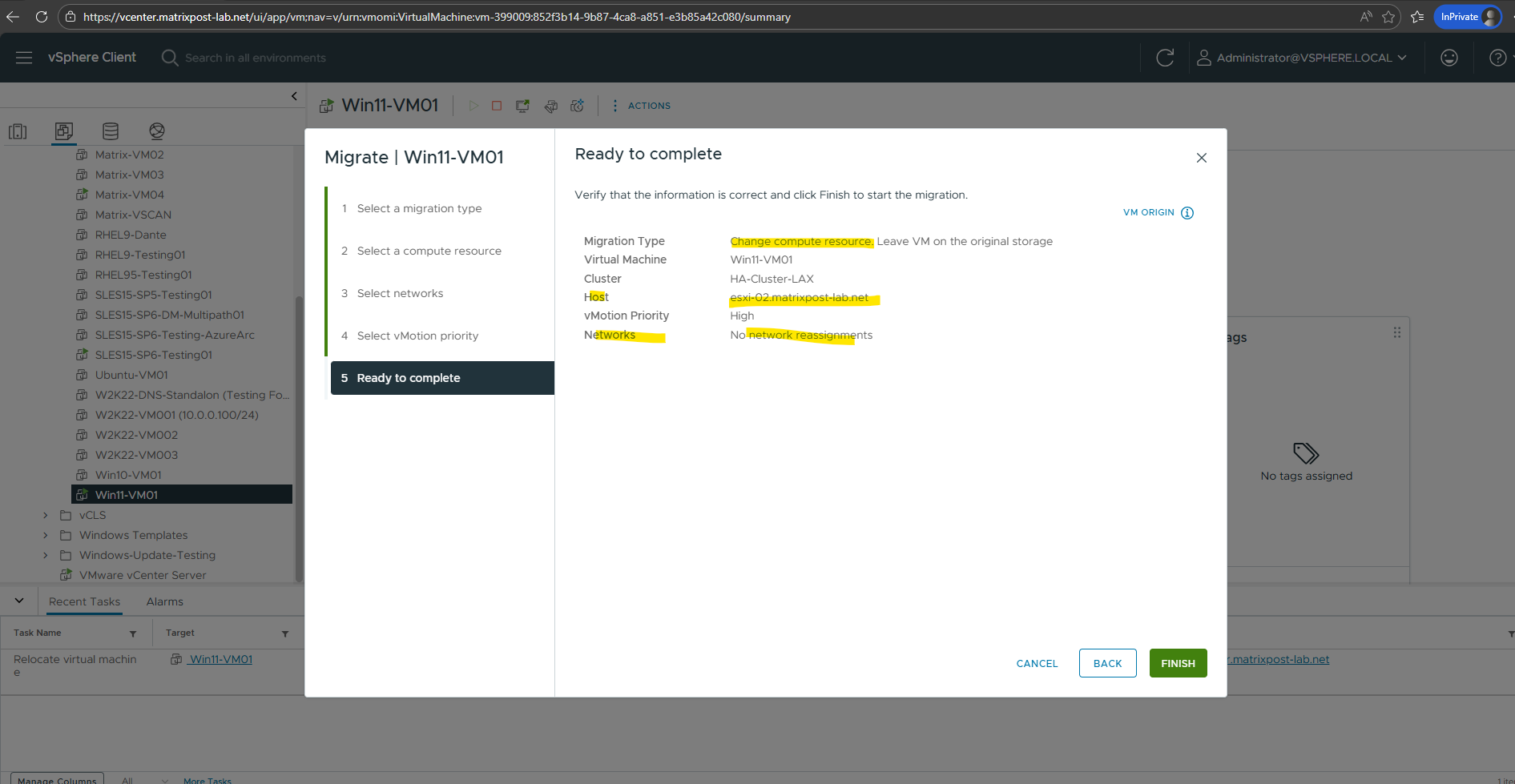
To trigger the network handover, initiate a “Change compute resource only” vMotion by right-clicking the VM in the vSphere Client and selecting Migrate.
Once you select the destination host and the migration reaches 100%, the ESXi kernel instantly fires the RARP burst to update the physical switch, followed by the Guest OS sending its own GARP.
To capture the RARP packets, we must SSH into the destination ESXi host and monitor the physical uplinks where the VM will land.
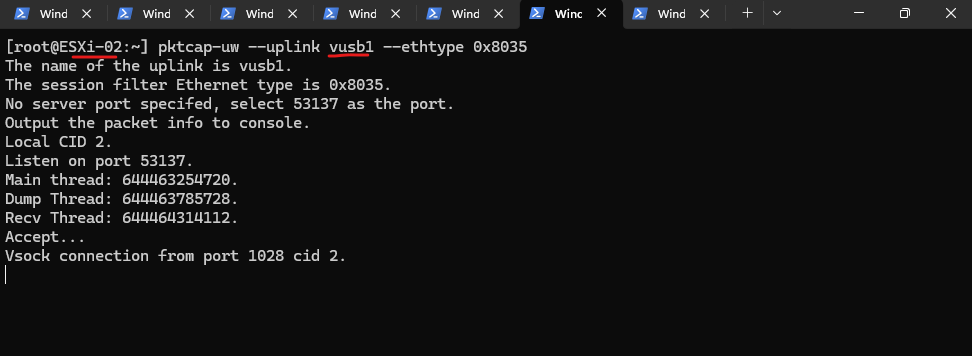
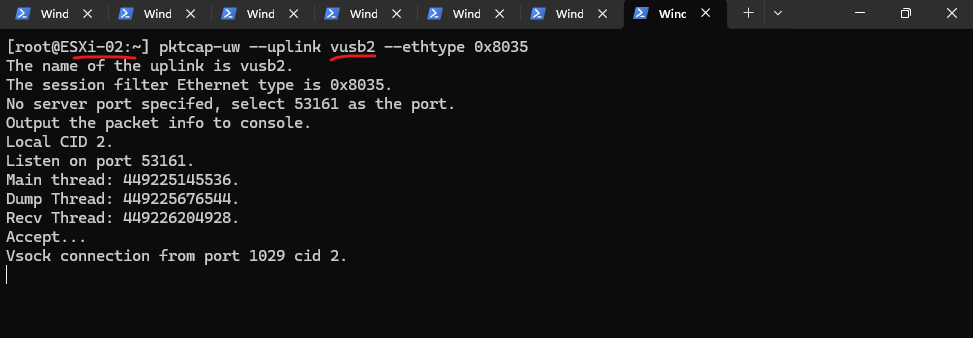
Since a Distributed Switch (vDS) often teams multiple NICs, you should open separate SSH sessions for each active uplink, such as vusb1 and vusb2 in my case, and run the command pktcap-uw --uplink <NIC> --ethtype 0x8035 to ensure you don’t miss the burst on whichever path the host selects.
Standard Wireshark captures running inside a VM are unable to see these RARP packets because they are generated by the ESXi hypervisor itself and sent directly out of the physical uplinks, bypassing the virtual NIC’s traffic stream entirely.
Since RARP (0x8035) operates at a lower hardware-announcement level to update the physical switch fabric, it never enters the Guest OS’s networking stack, making
pktcap-uwon the host the only way to witness the handshake.
[root@ESXi-02:~] pktcap-uw --uplink vusb1 --ethtype 0x8035
The same on my second NIC.
The
pktcap-uwutility is an enhanced packet capture tool native to the ESXi hypervisor that allows administrators to intercept traffic at various points within the virtual network stack, including physical uplinks and virtual machine ports.Unlike standard tools, it can capture “invisible” host-level frames, such as RARP and VLAN tags, that never actually reach the Guest OS’s internal networking drivers.
[root@ESXi-02:~] pktcap-uw --uplink vusb2 --ethtype 0x8035
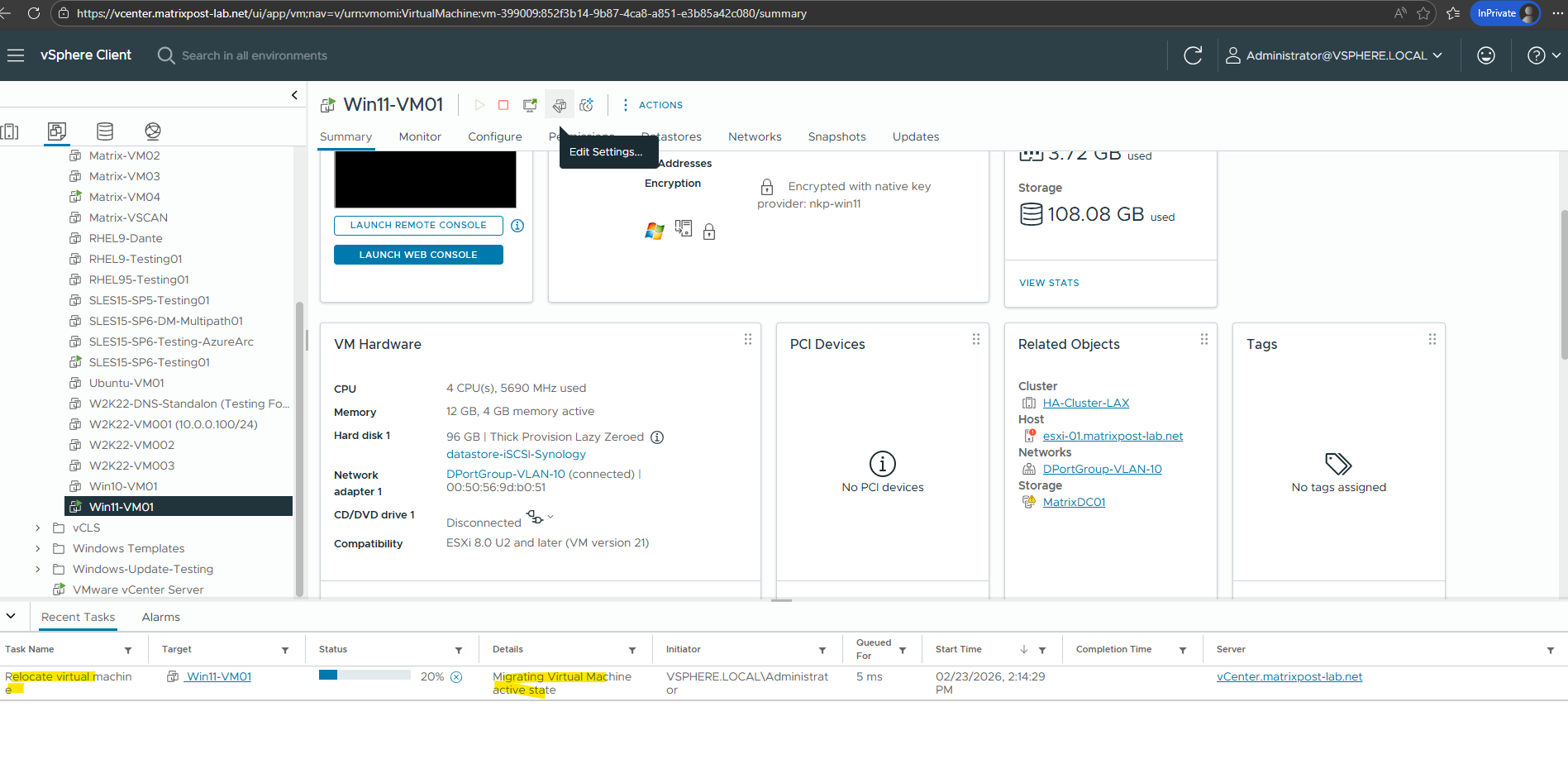
The migration is in progress.
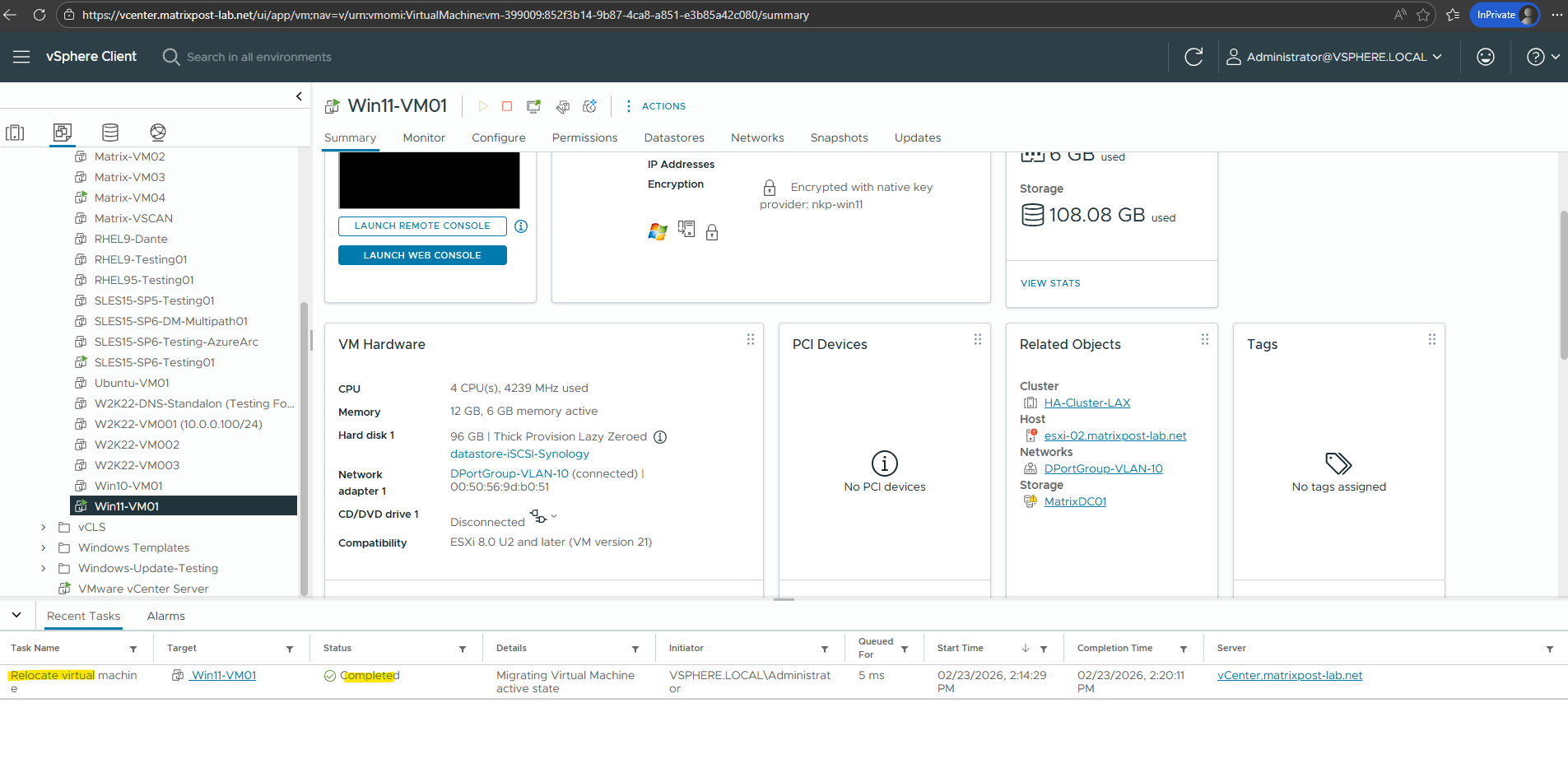
Migration is completed and the computer resource is moved to my second ESXi host successfully.
In my first SSH session, the console remained dead silent, the capture for
vusb1didn’t catch a single byte.It was a perfect reminder that in a teamed network, the RARP is a ‘ghost’ that only walks through one physical pipe at a time.
While the first uplink was silent, my second SSH session hit the jackpot. The moment the migration finalized, the terminal for vusb2 erupted with the ‘missing’ RARP traffic, proving that the hypervisor had chosen this specific physical path for the handover.
Take a look at the first few lines of your capture:
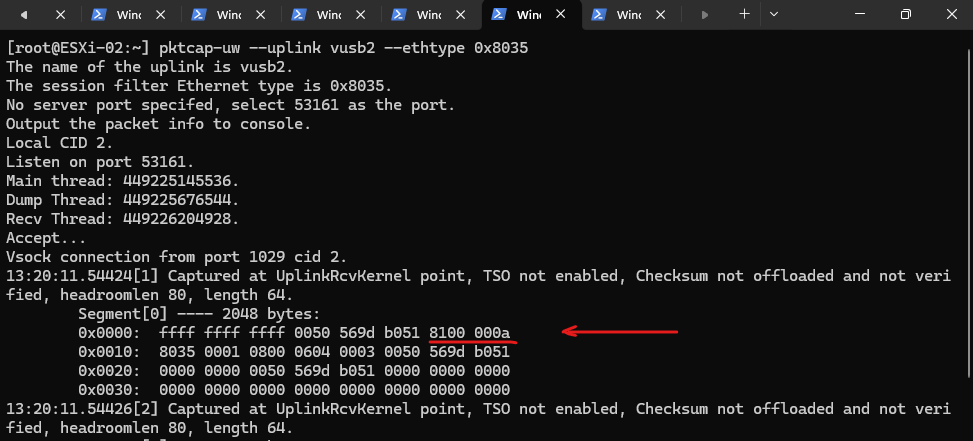
0x0000: ffff ffff ffff 0050 569d b051 8100 000a
0x0010: 8035 ...
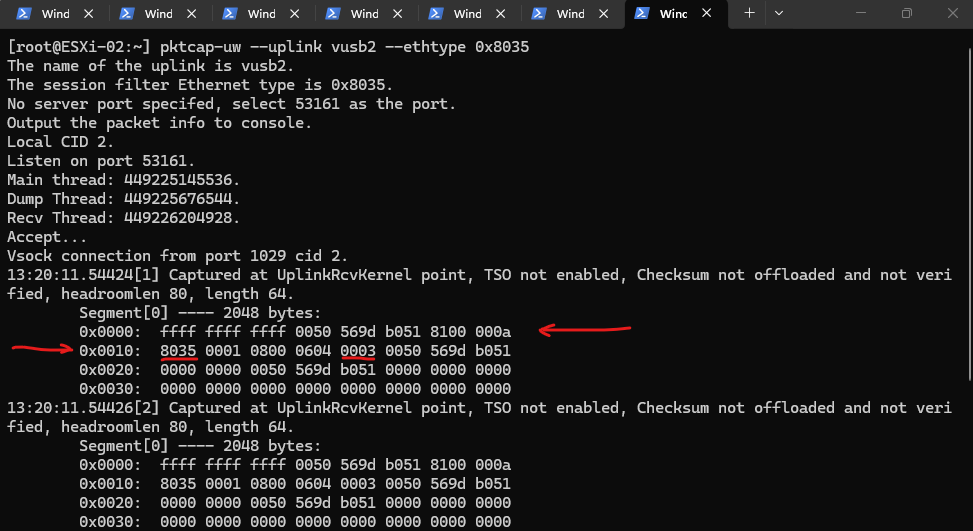
The Destination (The Broadcast) ffff ffff ffff, this is the Layer 2 Broadcast. The host is shouting to every switch in the vicinity.
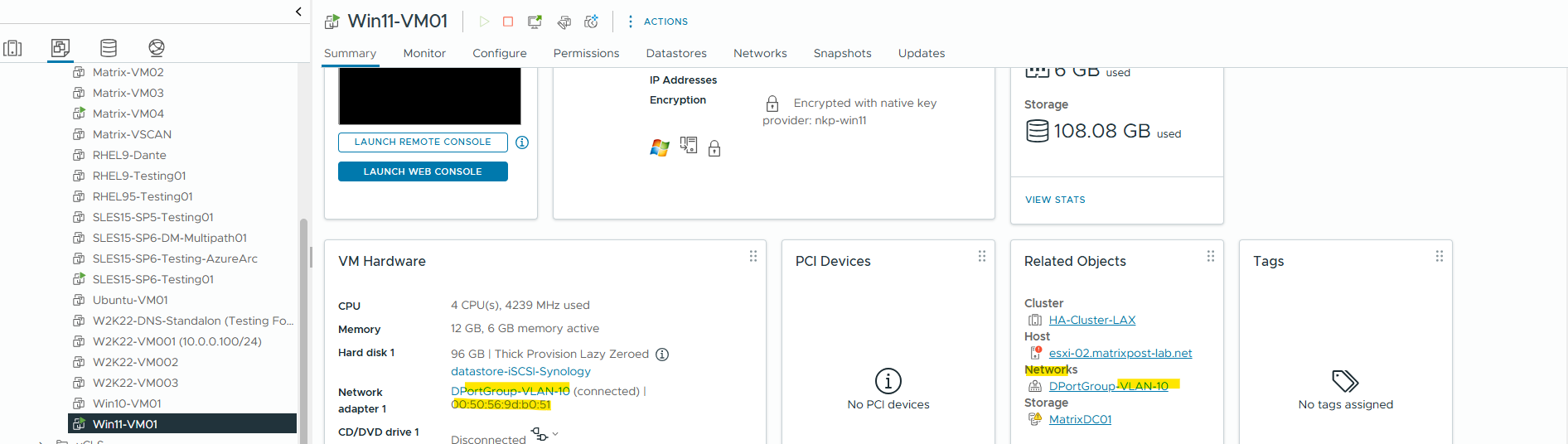
The Source (My VM)
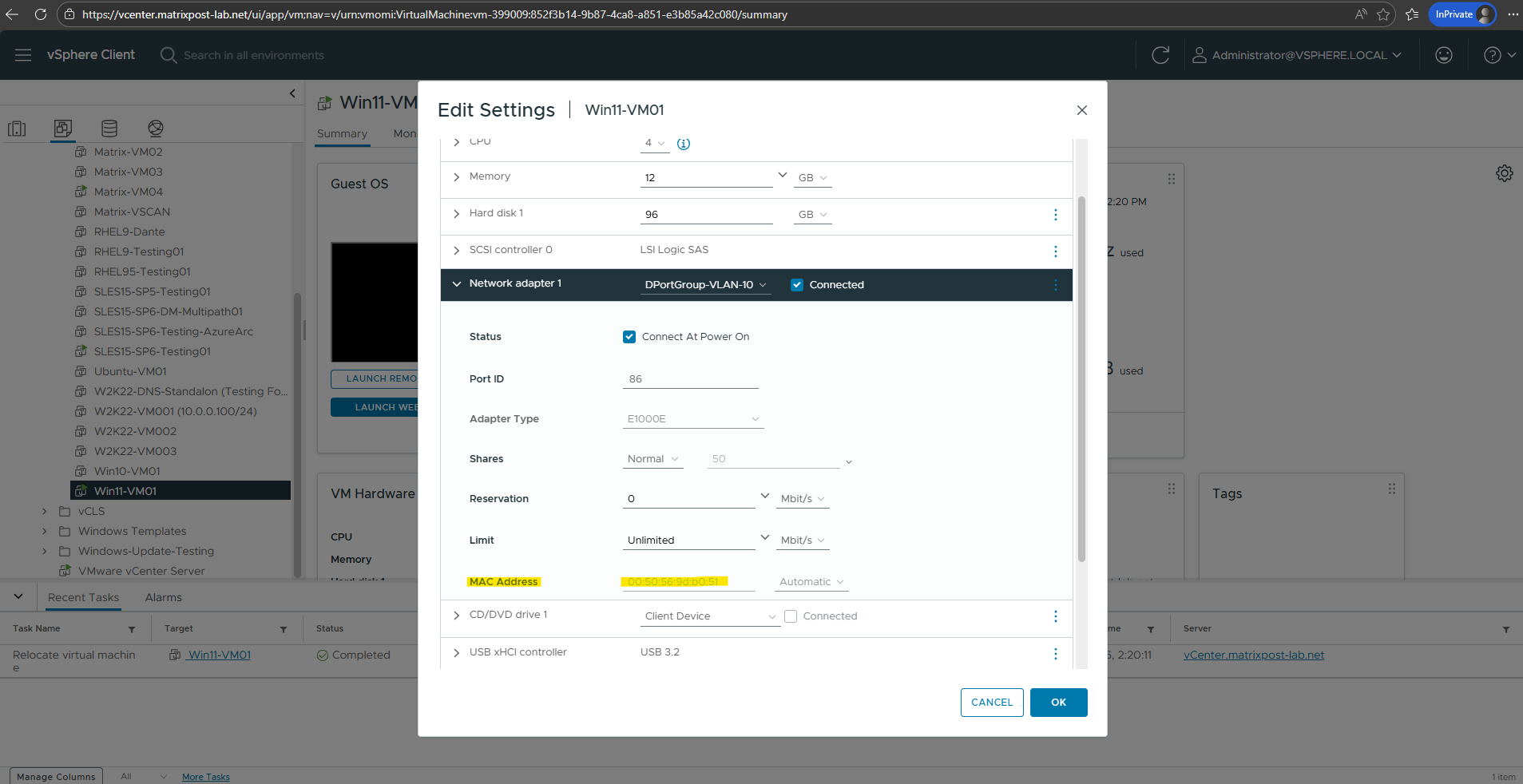
0050 569d b051, This is the MAC Address of the VM I just migrated and shown in the screenshot below.Notice that the ESXi host is “spoofing” this MAC address to trick the physical switch into updating its table.
The VLAN Tag 8100 000a, 8100 tells us there is a VLAN tag attached. 000a in hex is 10. This means my VM is on VLAN 10.
The Opcode
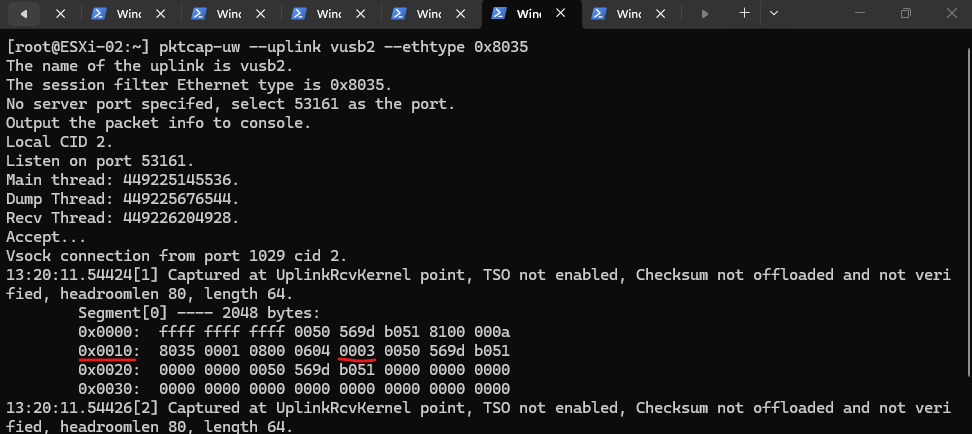
0003, Further down in line0x0010, you see0003. As we discussed, Opcode 3 is the “Reverse ARP Request.”
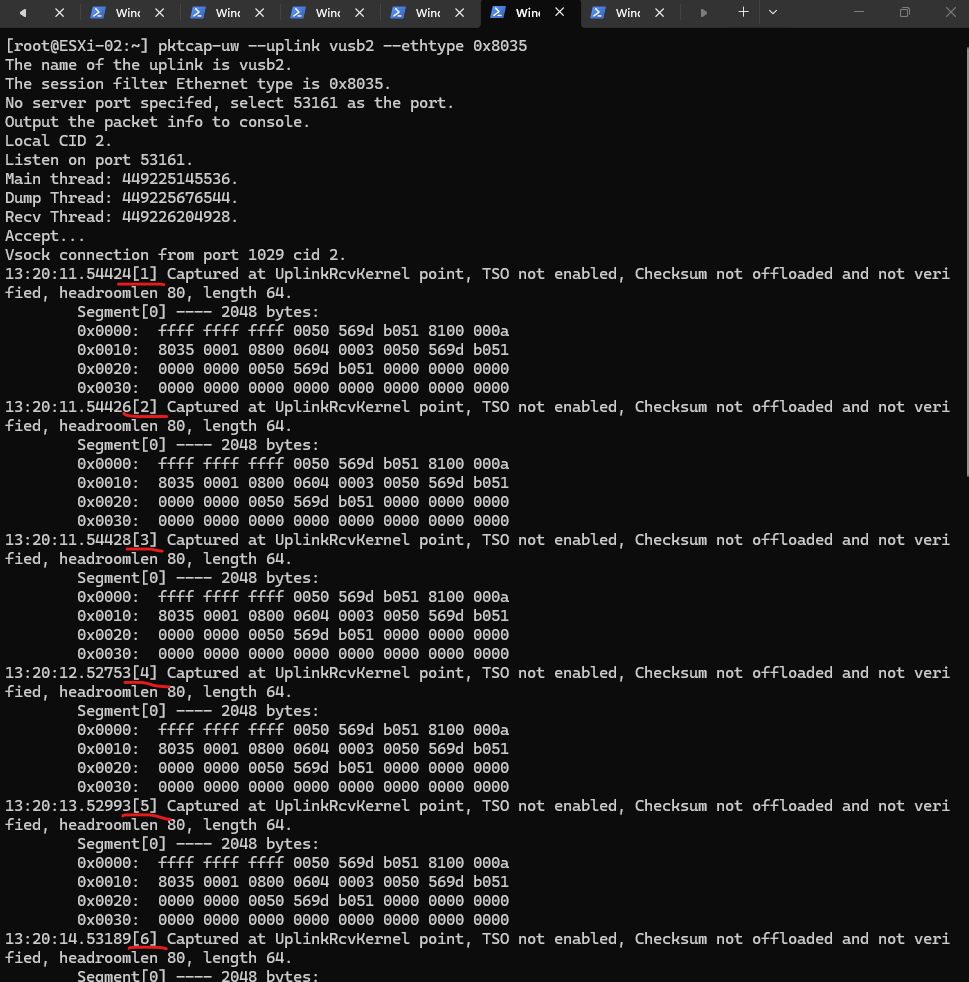
Notice the timestamps and the count
[1]through[12]. VMware doesn’t just send one RARP and hope for the best. It sends a burst.If you look at the timing, it sends a few immediately (within milliseconds) and then spaces the rest out over about 60 seconds. This ensures that even if the physical switch is busy or if there is a brief STP (Spanning Tree) calculation, the switch eventually “hears” the move.
While my sniffer VM only saw the Guest OS’s ARP Announcement like shown in the screenshot below, the ESXi host was actually firing off a burst of 12 RARP packets (EtherType
0x8035) out of thevusb2uplink.While both Standard ARP and Gratuitous ARP (GARP) share the same Layer 2 EtherType (0x0806), they are distinguished by their internal IP logic. A standard ARP is a “question” where the sender and target IPs are different, whereas a GARP is an “announcement” where the sender and target IPs are identical.
Standard ARP (The Question): “I am MAC A (IP 10.0.0.5), and I need to know who has IP 10.0.0.1.”
GARP (The Announcement): “I am MAC A (IP 10.0.0.5), and I am telling everyone my IP is 10.0.0.5.”
For my vSphere lab environment I will use USB network adapter, therefore the vusb NICs as shown in my post here https://blog.matrixpost.net/how-to-create-a-custom-esxi-boot-iso-image-with-vmware-flings-usb-network-drivers-injected/.
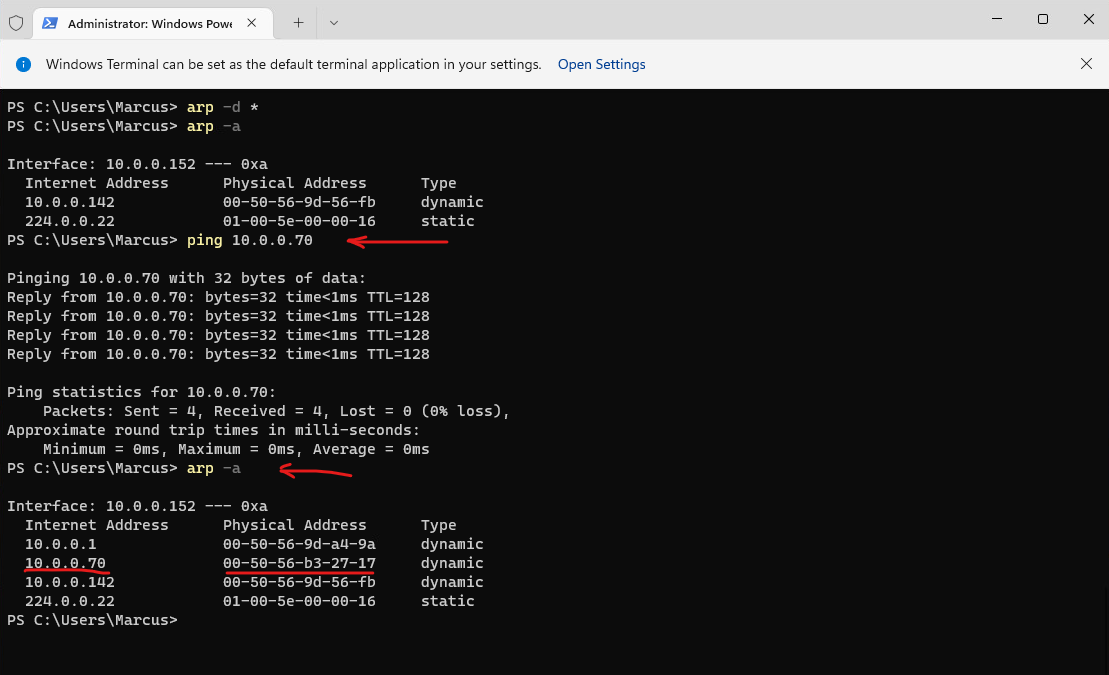
To catch a standard ARP ‘question’ in the wild, we first have to make the client forget what it knows. By wiping the ARP cache, we force 10.0.0.152 to start from scratch and broadcast a fresh query for 10.0.0.70.
PS> arp -d *
PS> arp -a
PS> ping 10.0.0.070
PS> arp -a
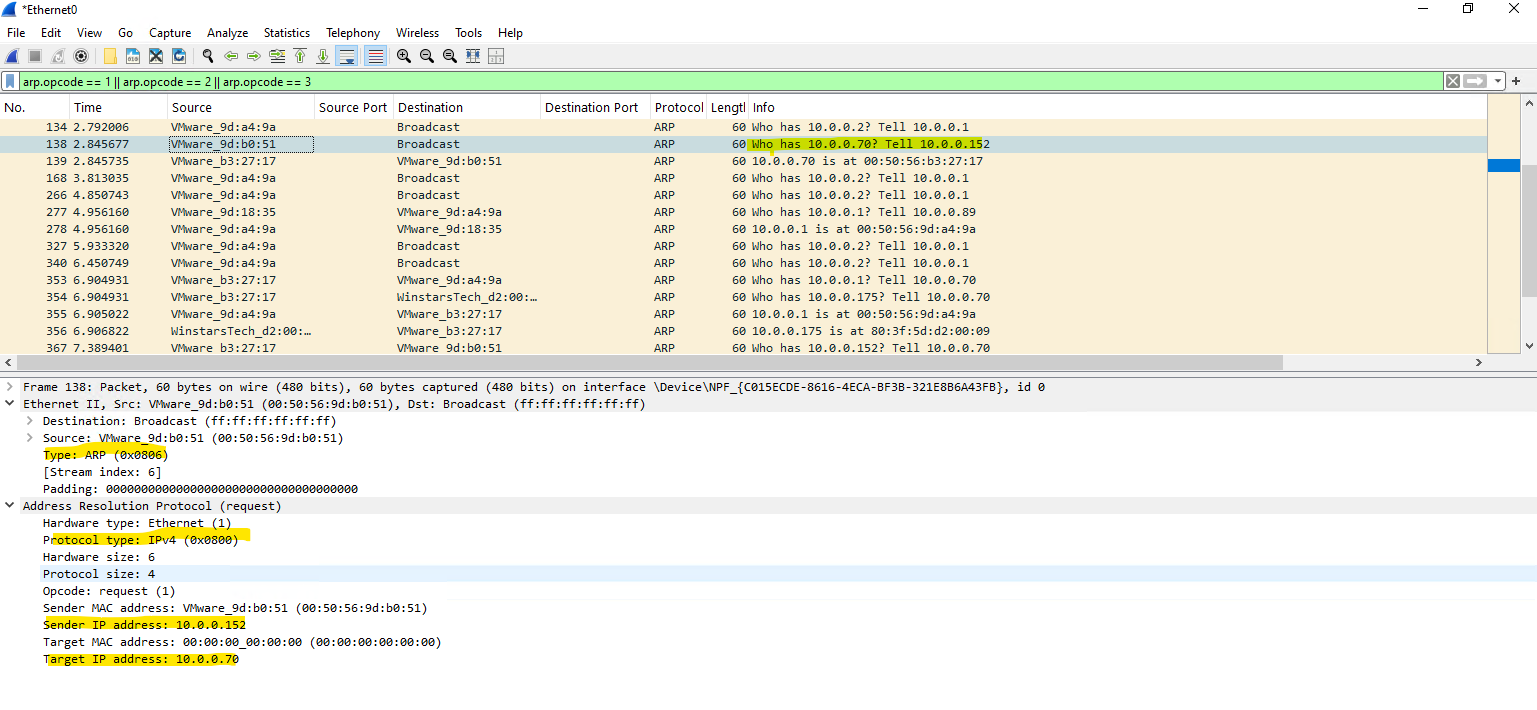
In a Standard ARP request, the Layer 2 Ethernet Type remains 0x0806 and the internal Protocol Type stays 0x0800, identical to a Gratuitous ARP (GARP) shown previously.
The key distinction lies in the address logic: while a GARP is a self-announcement with matching IPs, a Standard ARP is a “question” where the Sender IP and Target IP are different.
Consequently, the Wireshark INFO field shifts from a static announcement to a functional query, such as “Who has 10.0.0.70? Tell 10.0.0.52” instead of “ARP Announcement for 10.0.0.152.”
arp.opcode == 1 || arp.opcode == 2 || arp.opcode == 3
Upstream Impact: LACP, Port-Channels, and the Hashing Update
When your ESXi hosts are connected via LACP (Link Aggregation Control Protocol) or EtherChannel, the physical switch treats multiple physical cables as a single logical “pipe.”
To decide which specific cable to send a packet down, the switch uses a hashing algorithm (typically based on the Source MAC or IP).
When a VM moves to a new host, that host’s RARP burst acts as a “trigger” for the physical switch’s hashing engine.
It forces the switch to instantly re-calculate the hash and re-map the VM’s MAC address to a physical port within the new host’s port-channel bundle.
Without this proactive announcement, the switch might continue to “black-hole” traffic by sending it to the old host’s bundle until the MAC table naturally times out.
Hyper-V: How Microsoft Handles the Handover
While VMware is famous for its use of the RARP (0x8035) “ghost” packet, Microsoft Hyper-V takes a different path during a Live Migration. Instead of the host sending a Reverse ARP, Hyper-V primarily relies on the Gratuitous ARP (GARP).
The moment a VM resumes on the destination Hyper-V host, the virtual switch triggers a broadcast on behalf of the VM.
This packet uses the standard EtherType 0x0806 (Opcode 1), announcing the VM’s IP and MAC address to the network.
Just like the RARP in ESXi, this “unsolicited” announcement forces the physical switch to update its MAC table, ensuring that traffic is instantly redirected to the new host without missing a beat.
Links
A virtual machine loses network connectivity after vMotion
https://knowledge.broadcom.com/external/article/318873/a-virtual-machine-loses-network-connecti.htmlWhat Are the vSphere vMotion Networking Requirements
https://techdocs.broadcom.com/us/en/vmware-cis/vsphere/vsphere/8-0/vmotion-networking-requirements.htmlThe vMotion Process Under the Hood
https://blogs.vmware.com/cloud-foundation/2019/07/09/the-vmotion-process-under-the-hood/ARP, RARP, Proxy ARP and GARP Explained
https://www.packetcoders.io/arp-rarp-proxy-arp-and-garp-explained