ONTAP EMS Notifications: Configuring Email Alerts via SMTP Relay
Configuring email notifications in ONTAP is essential to ensure operational visibility, especially for critical EMS events and AutoSupport alerts.
In NetApp ONTAP, the EMS (Event Management System) and AutoSupport serve different purposes, even though both can trigger email notifications.
EMS messages are real-time event logs generated by ONTAP (e.g.
errors,warnings,state changes) and are mainly used for monitoring and alerting.AutoSupport messages, on the other hand, are structured reports that include system state, logs, and telemetry data, typically sent periodically or on specific triggers to NetApp support (and optionally via email) for diagnostics and proactive support.
About EMS Events and the ONTAP Event Log you can also read my following post.
Configure EMS Email Notification
By default, NetApp ONTAP is configured to send EMS notifications only via SNMP traps using the predefined default-trap-events filter.
A trap is an asynchronous notification sent by a system to a monitoring tool using SNMP. Instead of being polled, the system (e.g. NetApp ONTAP) actively pushes an alert when an event occurs, such as a failure or status change.
No email destinations are configured out of the box, so EMS events are not sent via email unless explicitly set up.
matrixselect::> event notification show
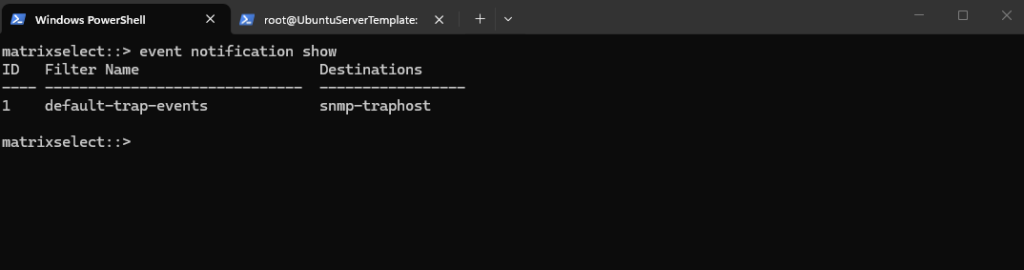
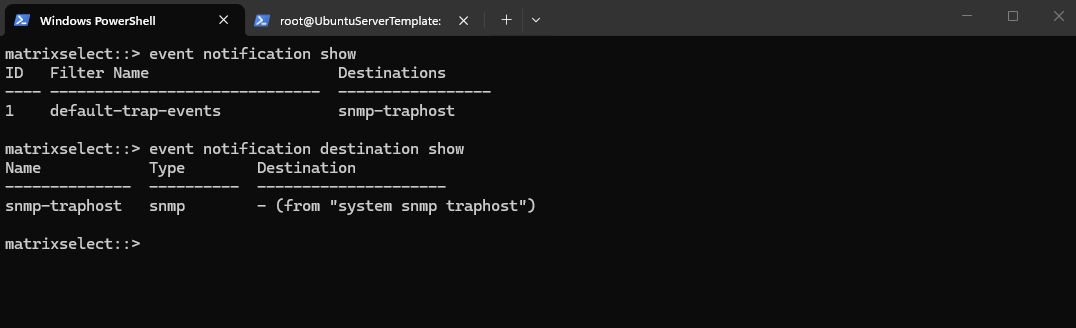
By default, NetApp ONTAP defines only a single notification destination, snmp-traphost, which forwards EMS events via SNMP to configured trap receivers.
No email destinations exist initially, so additional destinations (e.g. SMTP) must be created manually to enable email-based notifications.
matrixselect::> event notification destination show
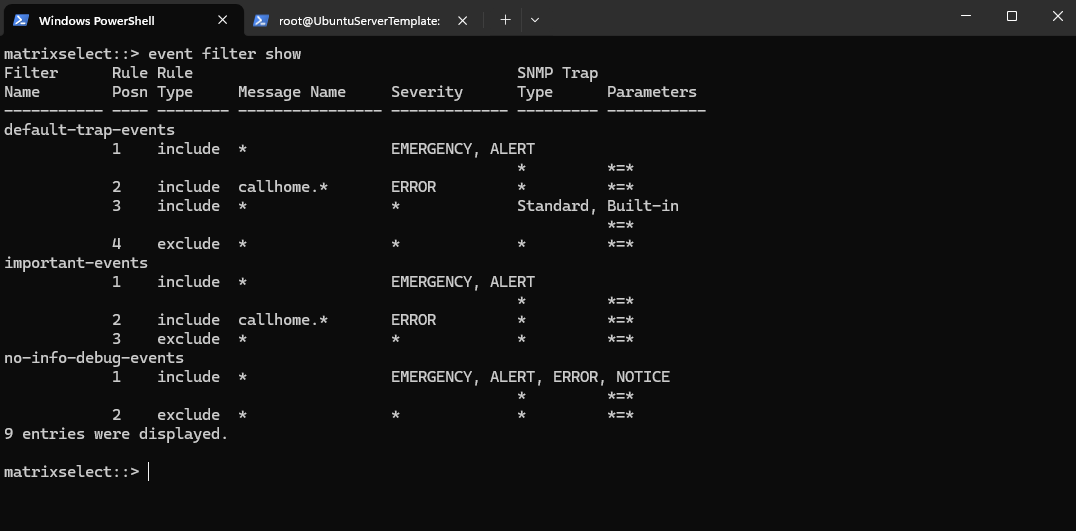
By default, NetApp ONTAP uses the default-trap-events filter to control which EMS events are forwarded as SNMP traps.
This filter includes critical events (EMERGENCY, ALERT), selected error conditions (e.g. callhome.*), and standard built-in notifications, while excluding everything else.
callhome.*messages are EMS events that report the status and behavior of AutoSupport (e.g. triggered, sent, or failed), allowing you to monitor whether ONTAP can successfully “call home” to NetApp.
As a result, only relevant and predefined events are sent via SNMP, reducing noise by filtering out less important messages.*
matrixselect::> event filter show
Creating a Custom Event Notifications and Email Destinations
Below we will see how to create a new custom event notification in NetApp ONTAP, including defining our own filter rules and adding an email destination.
This allows us to control exactly which EMS events are sent and ensure relevant alerts are delivered directly to our inbox.
First, a new custom event filter is created in NetApp ONTAP to define which EMS messages should trigger notifications. This filter serves as the foundation for applying specific rules that determine which events are forwarded (e.g. critical alerts).
matrixselect::> event filter create -filter-name CRITICAL_ALERTS

Next, specific EMS message patterns (event filter rules) are added to the custom filter in NetApp ONTAP to include only relevant critical events, such as failovers, reboots, SnapMirror errors, and snapshot issues.
This ensures that the filter captures important operational problems while avoiding unnecessary noise from less relevant events.
matrixselect::> event filter rule add -filter-name CRITICAL_ALERTS -message-name vsa.scheduledEvent.* -type include
matrixselect::> event filter rule add -filter-name CRITICAL_ALERTS -message-name monitor.shutdown.* -type include
matrixselect::> event filter rule add -filter-name CRITICAL_ALERTS -message-name callhome.reboot.* -type include
matrixselect::> event filter rule add -filter-name CRITICAL_ALERTS -message-name ha.takeover.* -type include
matrixselect::> event filter rule add -filter-name CRITICAL_ALERTS -message-name ha.giveback.* -type include
matrixselect::> event filter rule add -filter-name CRITICAL_ALERTS -message-name wafl.snap.create.skip.reason -type include
matrixselect::> event filter rule add -filter-name CRITICAL_ALERTS -message-name snapmirror.copy.FailedErr -type include
matrixselect::> event filter rule add -filter-name CRITICAL_ALERTS -message-name snapmirror.dst.noSnapshots -type include
matrixselect::> event filter rule add -filter-name CRITICAL_ALERTS -message-name snapmirror.metadata.create.fail -type include
matrixselect::> event filter rule add -filter-name CRITICAL_ALERTS -message-name snapmirror.status.noBaseSnapshot -type include
To list the rules of your custom filter in NetApp ONTAP, use:
This displays all configured rules, including message names, types (include/exclude), and their order within the filter.
matrixselect::> event filter show -filter-name CRITICAL_ALERTS
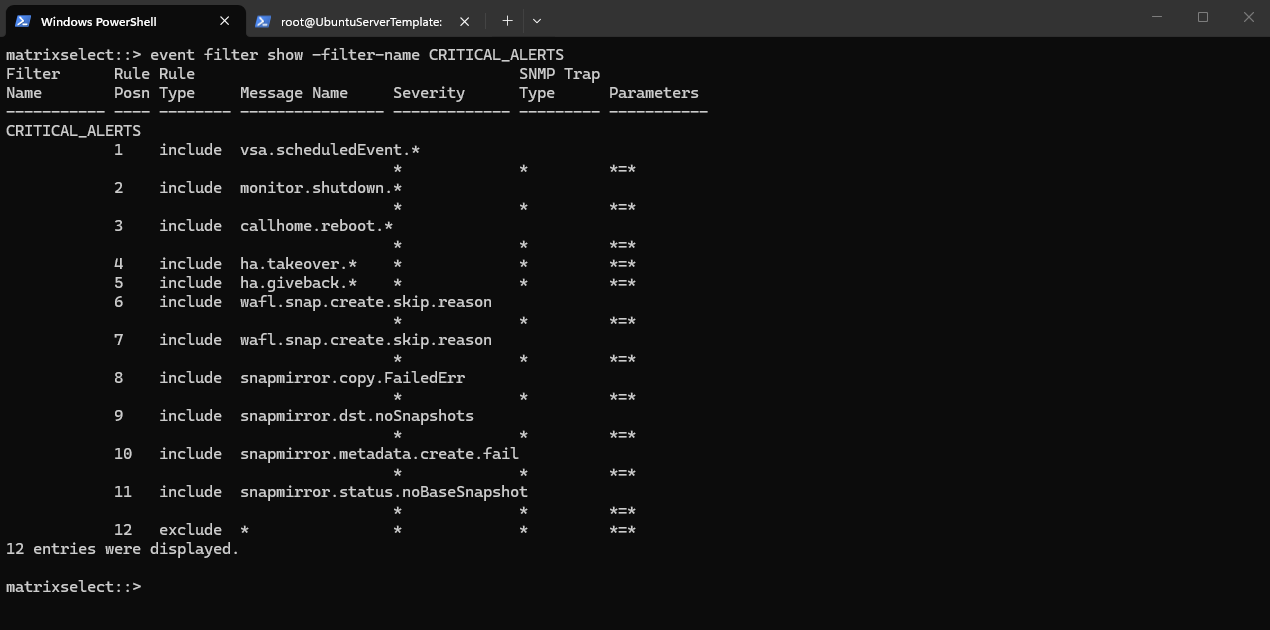
vsa.scheduledEvent.*includes events related to cloud/provider scheduled maintenance events, such as freeze or reboot notifications.monitor.shutdown.*includes shutdown-related EMS events triggered when a node or system shutdown is detected or initiated.callhome.reboot.*includes reboot-related CallHome events, useful for tracking unexpected or relevant node reboots.ha.takeover.*includes HA takeover events, for example when one node takes over its partner.ha.giveback.*includes HA giveback events, for example when aggregates and services are returned to the original node after takeover.wafl.snap.create.skip.reasonincludes alerts where ONTAP skips snapshot creation, for example because the maximum snapshot count has been reached.snapmirror.copy.FailedErrincludes SnapMirror copy or transfer failure events.snapmirror.dst.noSnapshotsincludes events where the SnapMirror destination does not contain the expected snapshots.snapmirror.metadata.create.failincludes failures while creating SnapMirror metadata.snapmirror.status.noBaseSnapshotincludes SnapMirror relationship issues where no valid common base snapshot exists for replication.
Creating Email Destinations and Linking Event Notifications
After defining the custom filter, the next step in NetApp ONTAP is to create an email destination and link it to the filter via an event notification.
This ensures that all matching EMS events are automatically forwarded to the specified email address.
So first we create a new email destination.
matrixselect::> event notification destination create -name admin_email -email <email address>

Next we create a new event notification and link the filter to the destination.
matrixselect::> event notification create -filter-name CRITICAL_ALERTS -destinations admin_email

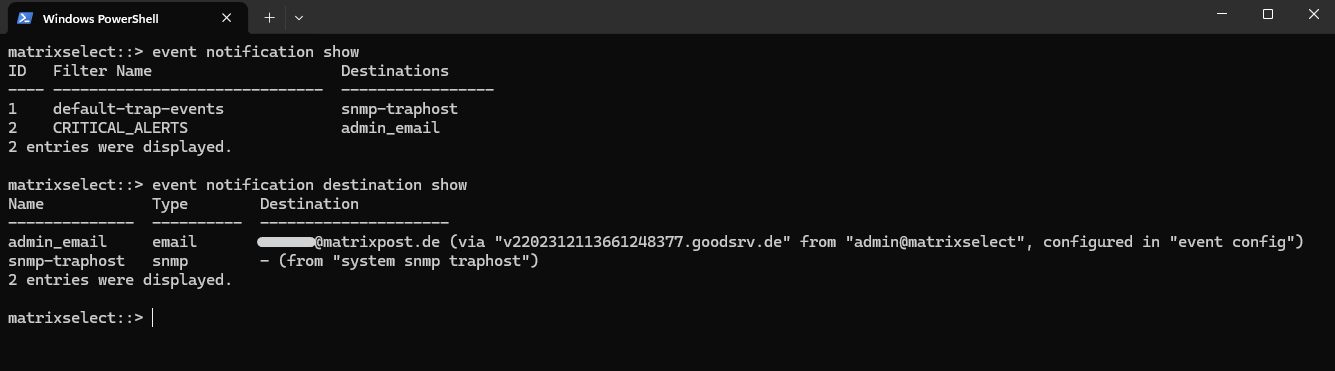
Verify the new configuration.
matrixselect::> event notification show
matrixselect::> event notification destination show
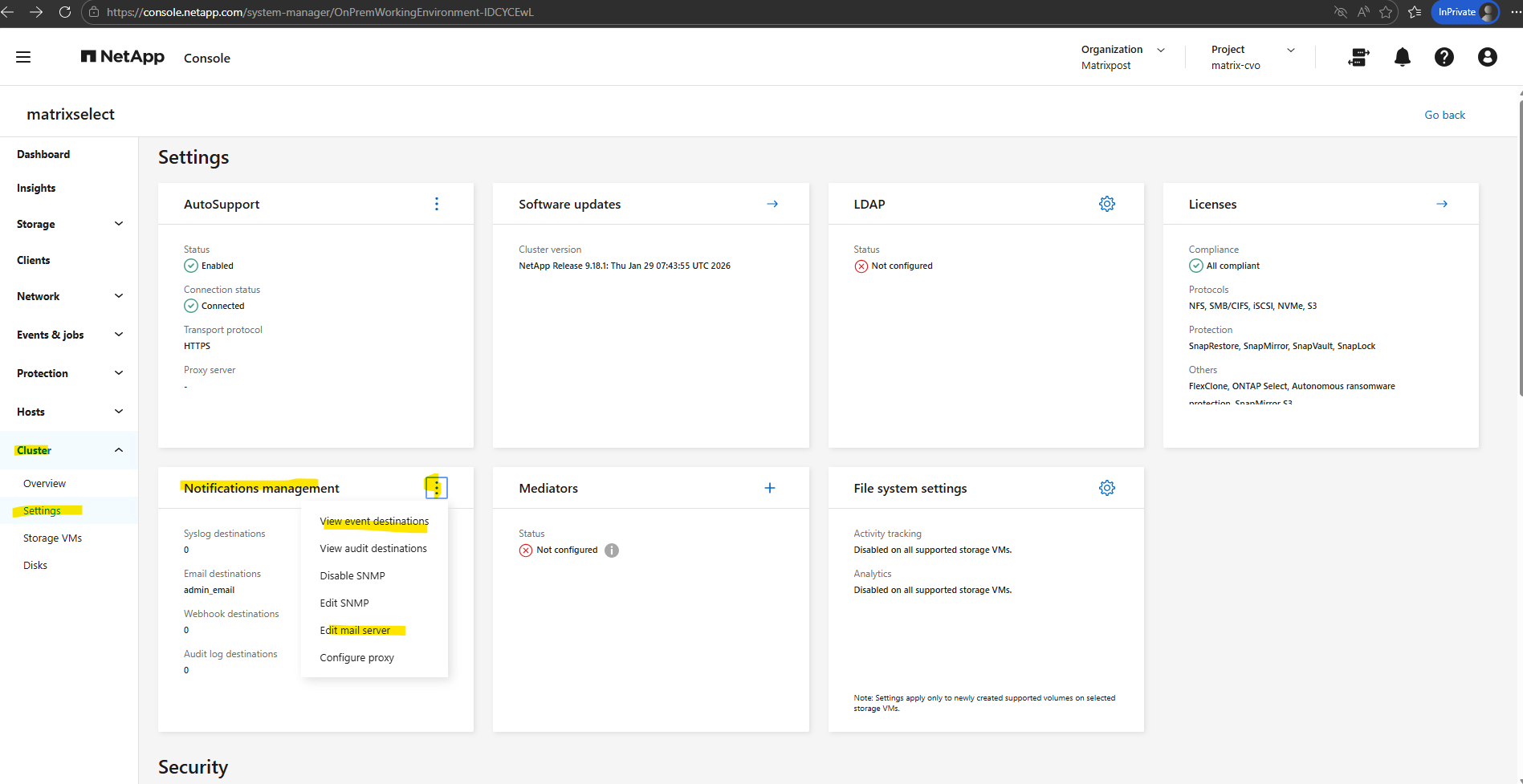
The new configuration we will also see directly in the ONTAP System Manager under Cluster -> Settings.
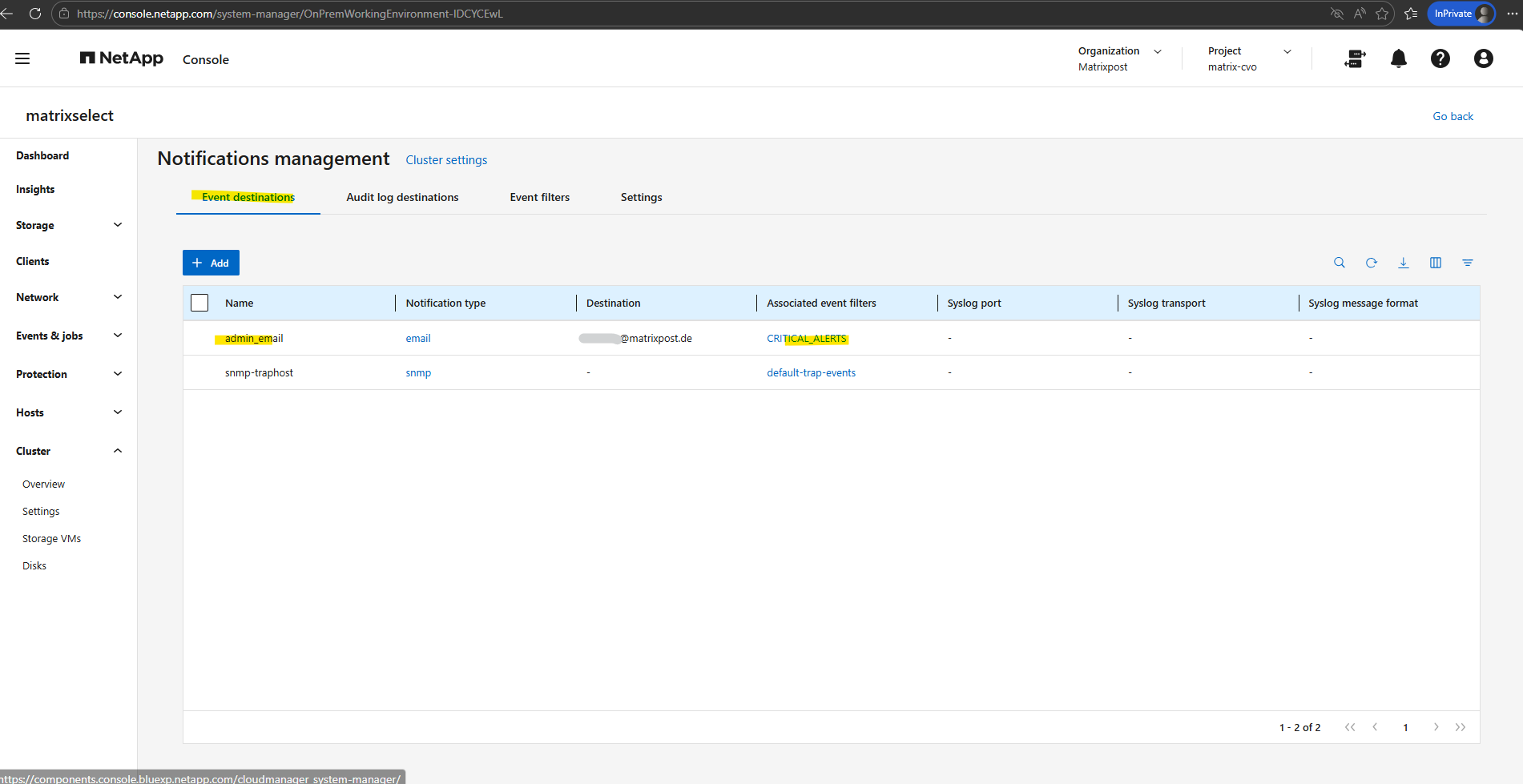
Notification management -> View event distribution
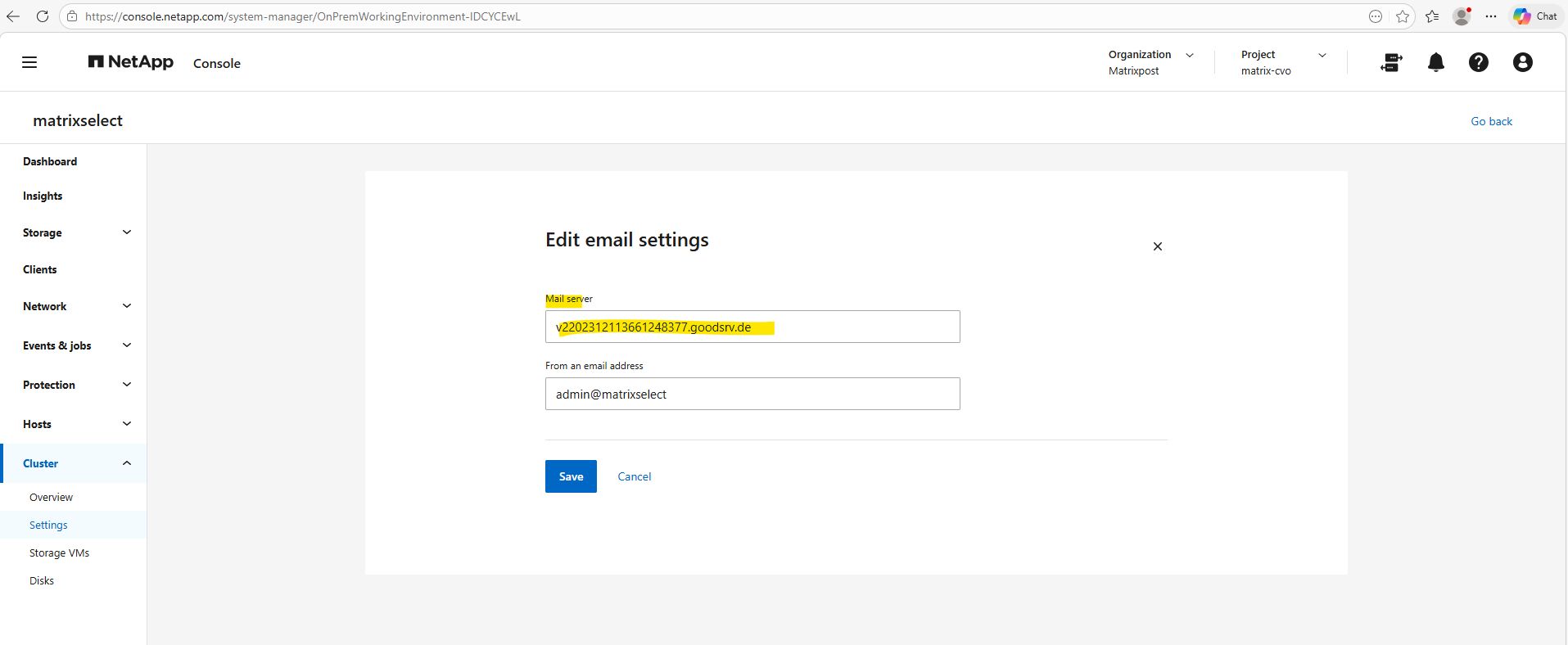
Notification management -> Edit mail server
I will use for my lab environment here a Postfix SMTP Server as SMTP Relay which finally sends the emails to Exchange Online and my email account.
More about Postfix you will also find in my blog under https://blog.matrixpost.net/?category=postfix.
We can set the mail server (SMTP relay) for the EMS event notification framework also by using the ONTAP CLI.
In NetApp ONTAP, the EMS event notification framework is used to send real-time alerts and notifications for specific system events (for example node failures, disk issues, or quota events) to email, SNMP, or syslog destinations.
AutoSupport emails on the other hand are primarily designed to automatically collect and send diagnostic, configuration, and health information to NetApp support or administrators for troubleshooting and proactive support.
About how to configure AutoSupport to send emails we will see in the next section below.
matrixselect::> event config modify -mail-server <FQDN or IP MTA>
Testing EMS Email Notifications
To validate the EMS email notification framework in NetApp ONTAP, we previously configured a custom CRITICAL_ALERTS event filter containing several important EMS events related to scheduled maintenance, HA takeover/giveback operations, SnapMirror failures, and snapshot issues.
To finally trigger and verify the email notification workflow, I intentionally created snapshots until the maximum supported limit of 1023 snapshots per volume was reached, causing ONTAP to generate the wafl.snap.create.skip.reason EMS alert which was then successfully delivered by email.
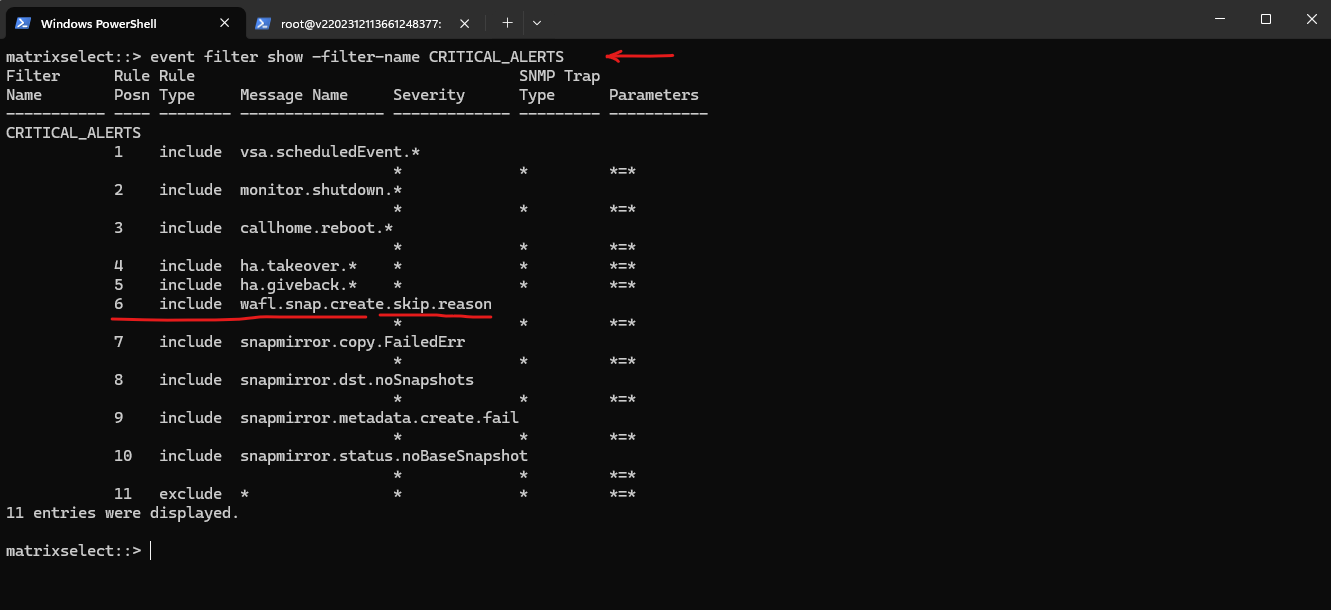
Below we will see the previously configured rule for the custom filter CRITICAL_ALERTS to trigger EMS events in case snapshot creation is skipped because of maximum supported limit of 1023 snapshots.
matrixselect::> event filter show -filter-name CRITICAL_ALERTS
We also configured an EMS event notification destination in NetApp ONTAP, which defines the email recipient used for alert notifications.
These destinations can later be associated with custom EMS event filters to automatically send email alerts whenever matching events are triggered.
matrixselect::> event notification destination create -name admin_email -email <email address>
We also associated our new custom CRITICAL_ALERTS EMS event filter with the previously created admin_email notification destination in NetApp ONTAP.
As a result, ONTAP will automatically send email notifications whenever an EMS event matching one of the configured filter rules is triggered.
matrixselect::> event notification create -filter-name CRITICAL_ALERTS -destinations admin_email
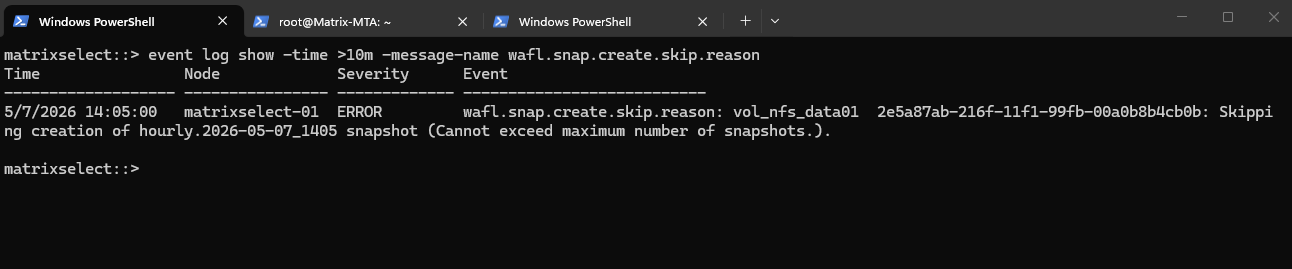
Because the default snapshot policy assigned to the volume attempts to create a new hourly snapshot every hour at minute :05, but the maximum supported snapshot limit of 1023 snapshots is already reached, every scheduled snapshot creation attempt fails and automatically triggers the wafl.snap.create.skip.reason EMS event, which is then sent by email through the configured EMS notification framework.
matrixselect::> event log show -time >10m -message-name wafl.snap.create.skip.reason
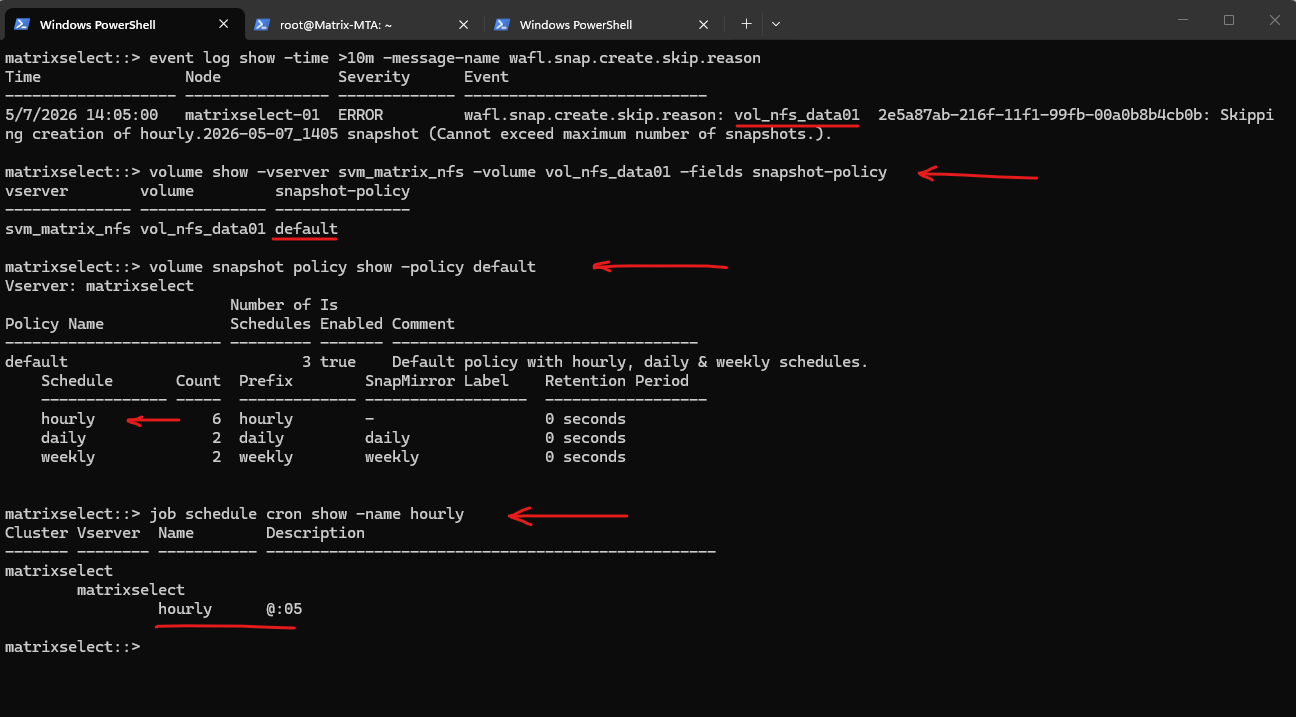
The following output shows the snapshot policy currently assigned to the volume vol_nfs_data01 in NetApp ONTAP, including the configured hourly, daily, and weekly snapshot schedules. It also shows that the hourly snapshot job is configured to run every hour at minute :05.
# Show snapshot policy for the volume
matrixselect::> volume show -vserver svm_matrix_nfs -volume vol_nfs_data01 -fields snapshot-policy

# Show policy details
matrixselect::> volume snapshot policy show -policy default

# Show schedule timing
matrixselect::> job schedule cron show -name hourly
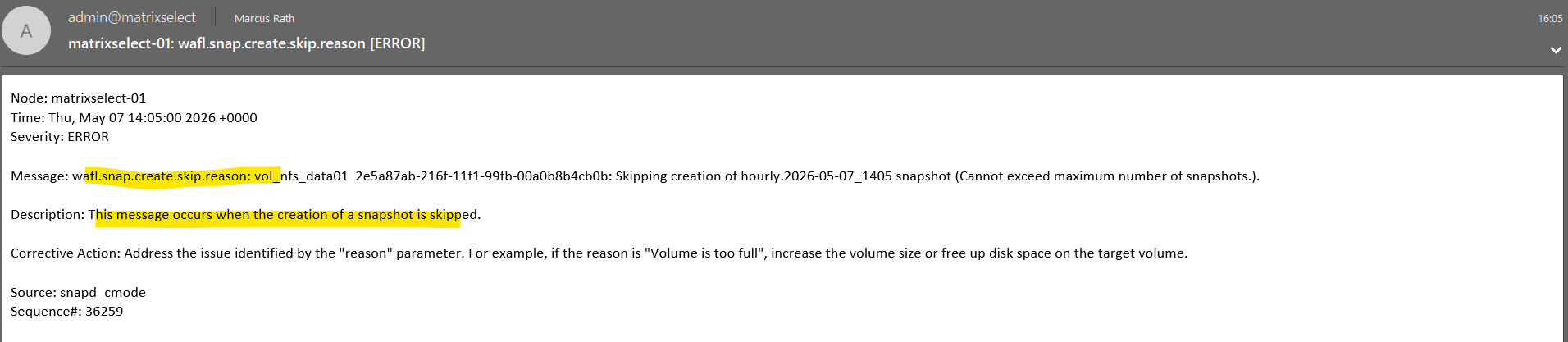
The following screenshot shows the successfully delivered EMS alert email generated by NetApp ONTAP after the scheduled snapshot creation failed because the maximum supported snapshot limit had already been reached.
The email contains detailed information about the triggered EMS event including the node, timestamp, severity, event description, corrective action, and the corresponding EMS message name wafl.snap.create.skip.reason.
Configuring Email Delivery for AutoSupport
In addition to sending AutoSupport messages directly to NetApp support, NetApp ONTAP can also be configured to send AutoSupport emails to one or multiple administrators. This allows administrators to receive the same diagnostic and health information locally for monitoring, troubleshooting, and archival purposes.
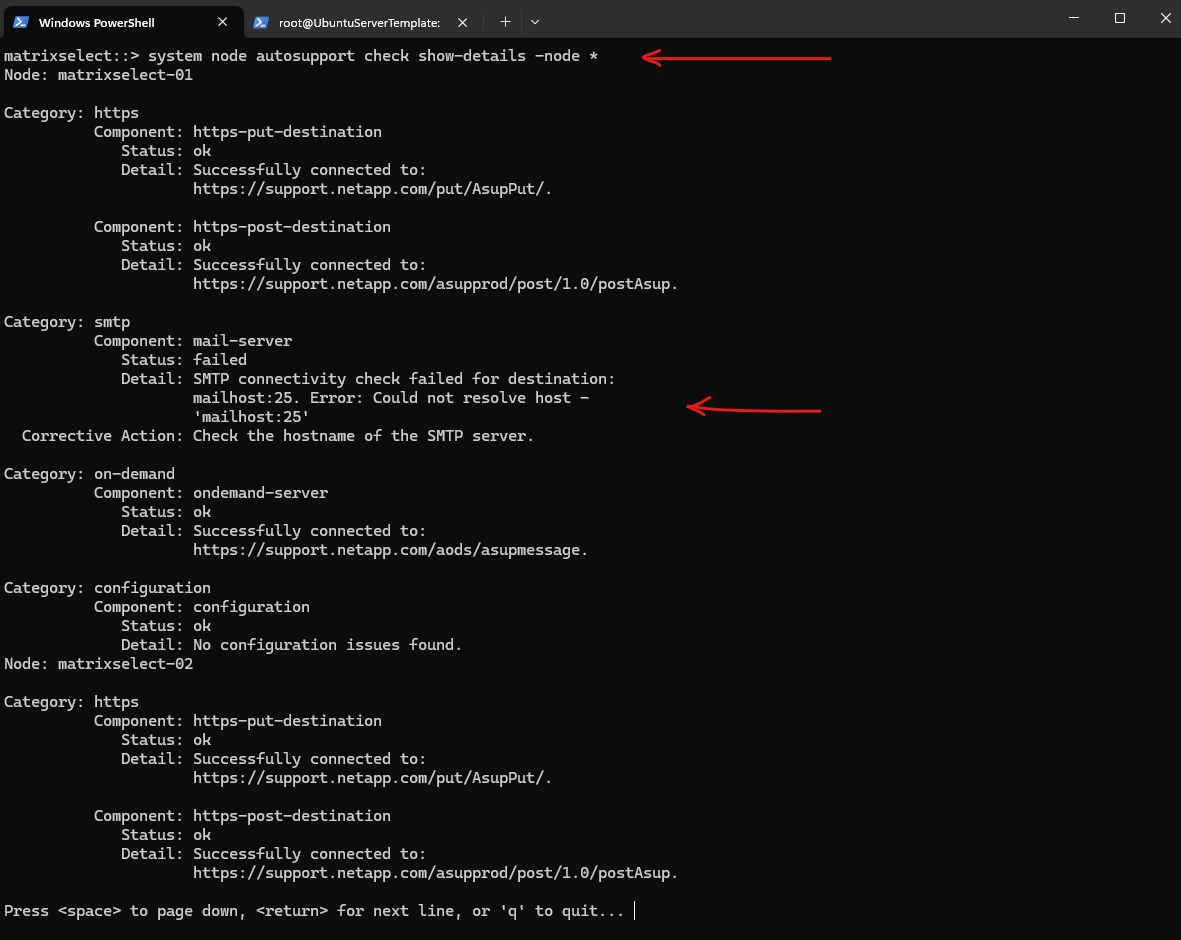
Therefore the SMTP server must also be configured for AutoSupport in NetApp ONTAP. By default, ONTAP uses a placeholder mail host (mailhost), which does not exist in most environments and therefore causes SMTP checks to fail. To enable email delivery, this setting must be updated to point to the configured SMTP relay (e.g. the Postfix server).
matrixselect::> system node autosupport check show-details -node *
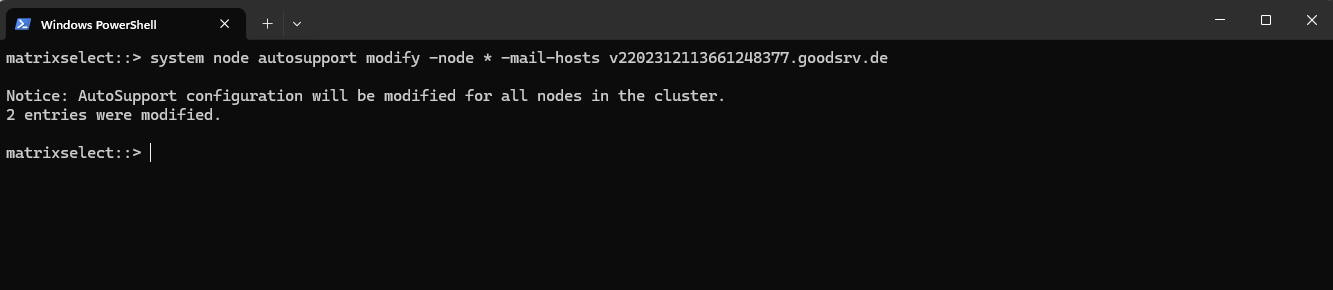
I will set my Postfix SMTP server as mail host for AutoSupport.
matrixselect::> system node autosupport modify -node * -mail-hosts v2202312113661248377.goodsrv.de
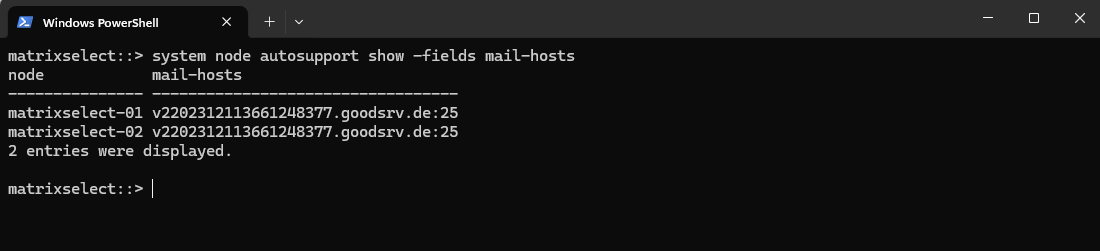
Verify by running:
matrixselect::> system node autosupport show -fields mail-hosts
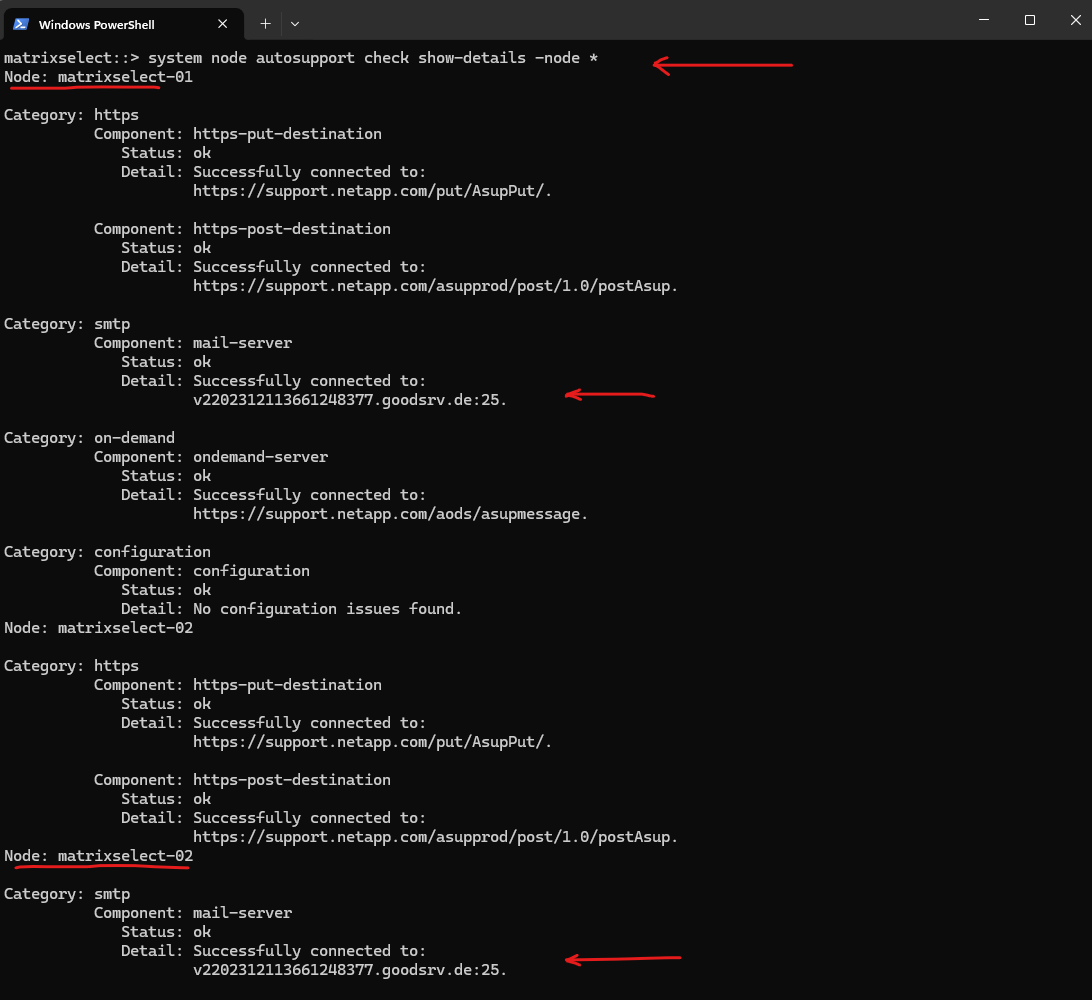
Re-run the check.
matrixselect::> system node autosupport check show-details -node *
We can test if it works by running:
matrixselect::> system node autosupport invoke -node * -type test

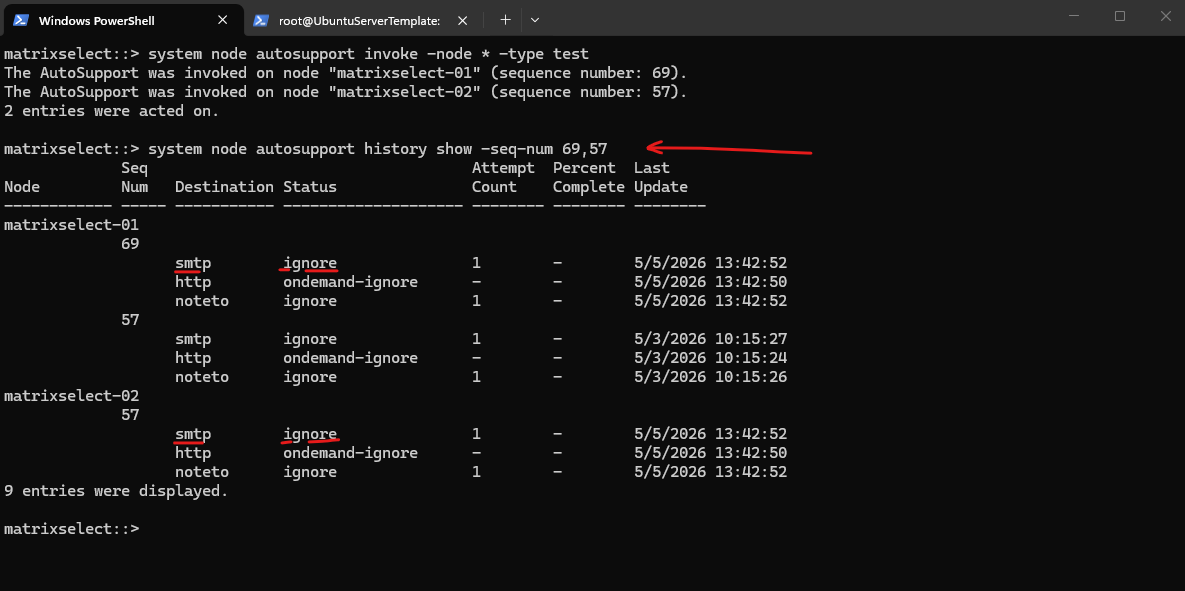
So far we didn’t have configured any recipients, AutoSupport only sends email if you define recipients.
Therefore when running the autosupport history command for the specific test sequences, we will see the status with ignore.
matrixselect::> system node autosupport invoke -node * -type test
matrixselect::> system node autosupport history show -seq-num 69,57
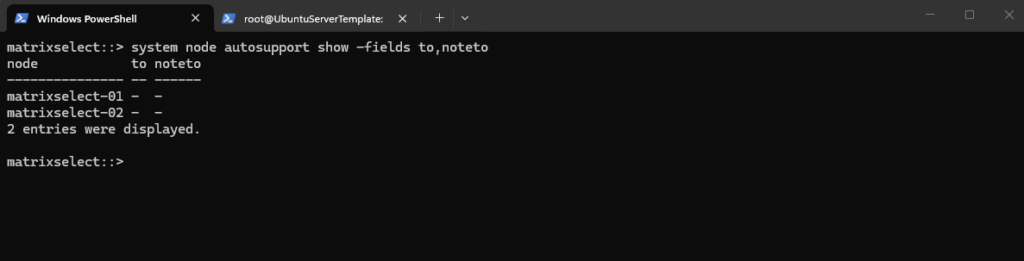
To configure recipients we can run the following command.
The
notetoparameter defines an optional secondary email recipient list for AutoSupport, but in most scenarios only the primarytoaddress is required.
matrixselect::> system node autosupport show -fields to,noteto
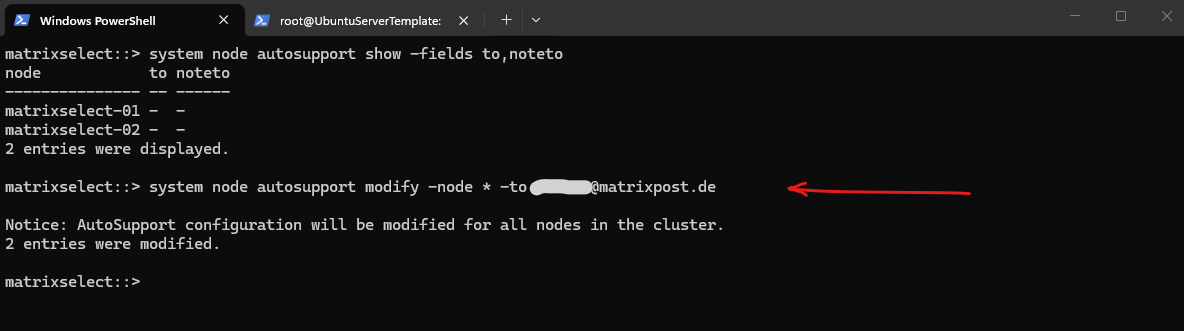
So I will add my email address as recipient by running:
matrixselect::> system node autosupport modify -node * -to <email address>
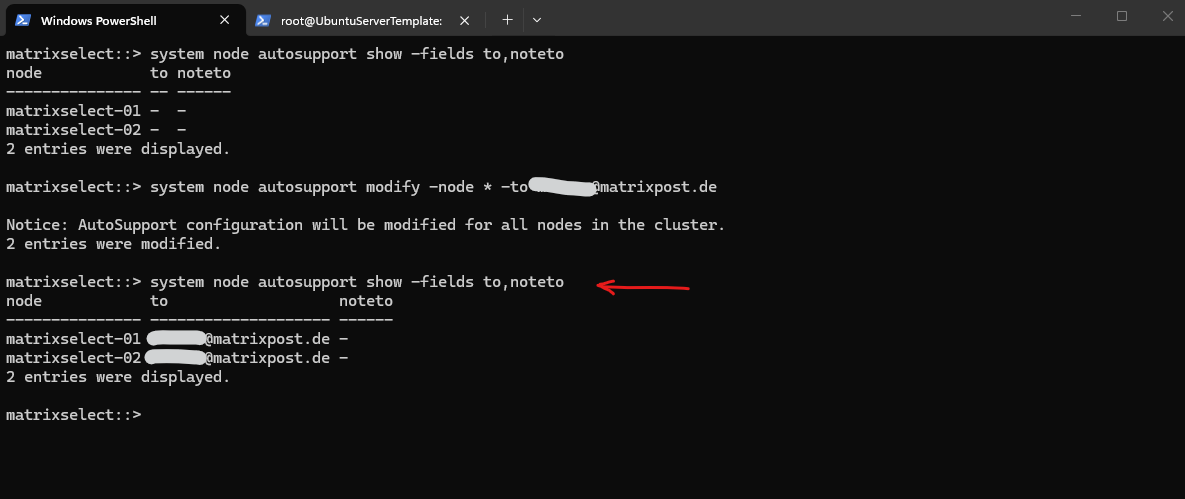
Verify:
matrixselect::> system node autosupport show -fields to,noteto
Now it works and the history output confirms successful transmission via SMTP (sent-successful) for the latest sequence numbers.
matrixselect::> system node autosupport invoke -node * -type test
matrixselect::> system node autosupport history show -seq-num 84,71
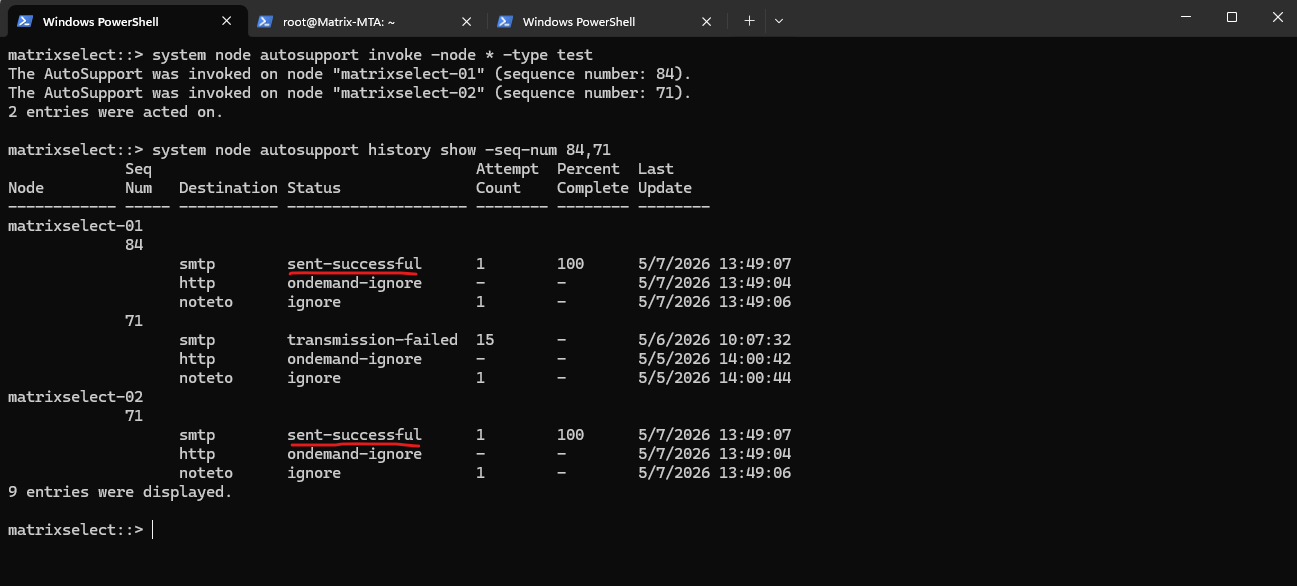
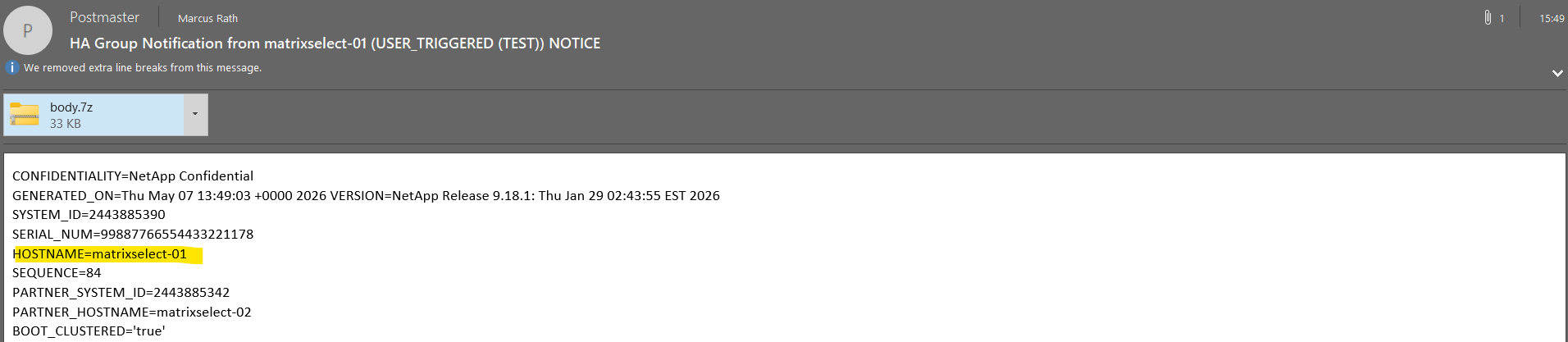
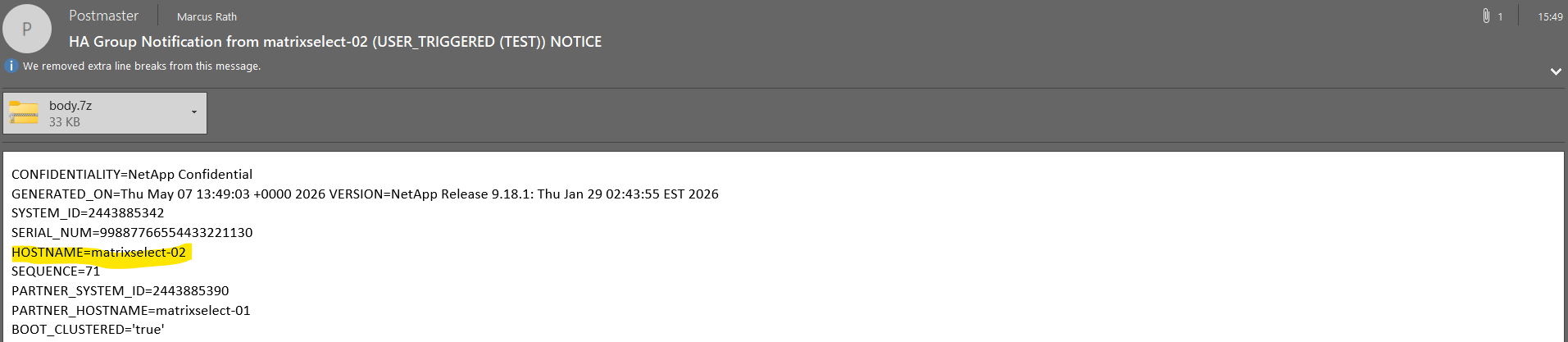
The following screenshots show the successful delivery of AutoSupport emails generated by each node in the NetApp ONTAP cluster.
Each email includes a compressed
body.7zattachment containing detailed diagnostic, configuration, performance, and log information collected by ONTAP, which can be used for troubleshooting and proactive support analysis by administrators or NetApp support.
Troubleshooting
Determine Source IPs NetApp ONTAP using to connect to SMTP Relay
When using an internal SMTP relay server with NetApp ONTAP, it is often necessary to whitelist the source IP addresses of the ONTAP nodes on the mail server or relay.
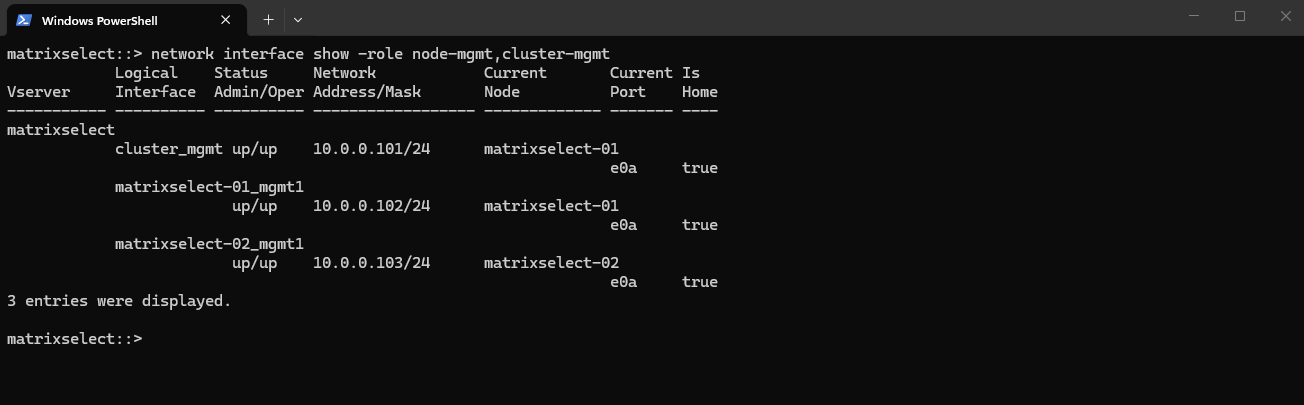
The following command can be used to identify the management LIFs and corresponding IP addresses which are typically used by ONTAP to establish outbound SMTP connections for EMS and AutoSupport emails.
AutoSupport / EMS is node-based. Each node sends mail independently.
In my case, the node management LIFs
10.0.0.102and10.0.0.103will typically be used by NetApp ONTAP here as the source IP addresses. The cluster management LIF10.0.0.101is generally not used for node-based SMTP communication.
matrixselect::> network interface show -role node-mgmt,cluster-mgmt
Verifying SMTP Connectivity from ONTAP to the Mail Relay
To troubleshoot SMTP-related issues in NetApp ONTAP, it can be useful to verify basic network connectivity from the ONTAP nodes to the configured SMTP relay server.
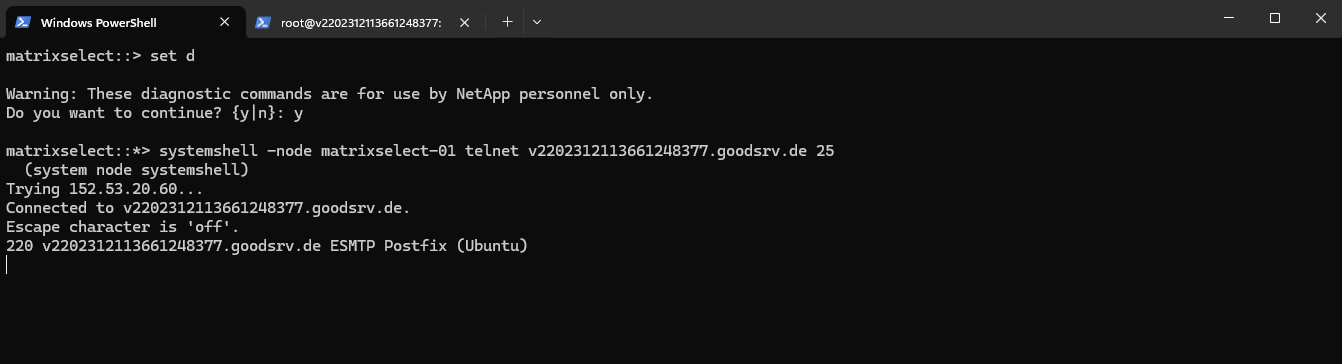
The following example uses the ONTAP systemshell in diagnostic mode to establish a direct TCP connection to the SMTP server on port 25 and confirm that the SMTP service is reachable and responding correctly.
matrixselect::> set d
matrixselect::*> systemshell -node matrixselect-01 telnet v2202312113661248377.goodsrv.de 25
Analyzing Postfix Mail Delivery Problems
When using Postfix as an SMTP relay for NetApp ONTAP, mail delivery issues can usually be diagnosed by inspecting the mail queue and reviewing the Postfix log files in real time.
This is especially useful for identifying connectivity problems, authentication failures, DNS resolution issues, or emails stuck in the deferred queue.
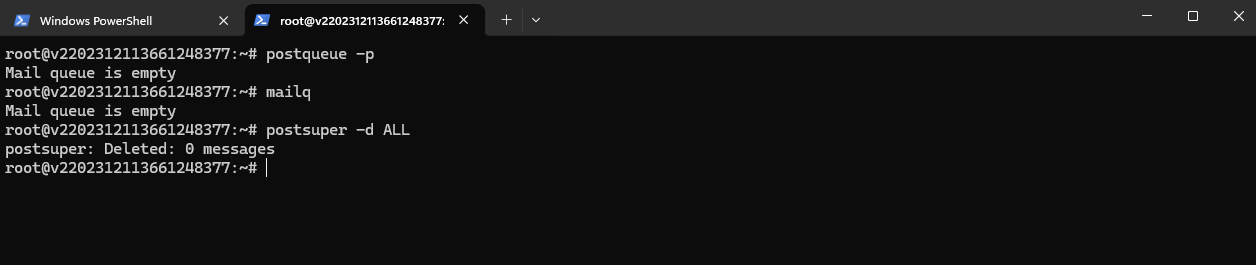
The postqueue -p and mailq commands can be used to display the current Postfix mail queue, including queued, deferred, or undelivered emails waiting to be processed by the Postfix service.
# postqueue -p

or
# mailq

The postsuper -d All and postsuper -d <queue-id> commands can be used to remove all or specific messages from the Postfix mail queue, while postqueue -f forces Postfix to immediately retry the delivery of queued emails.
# postsuper -d All

Delete a specific message
# postsuper -d <queue-id>

Re-queue (retry sending)
# postqueue -f
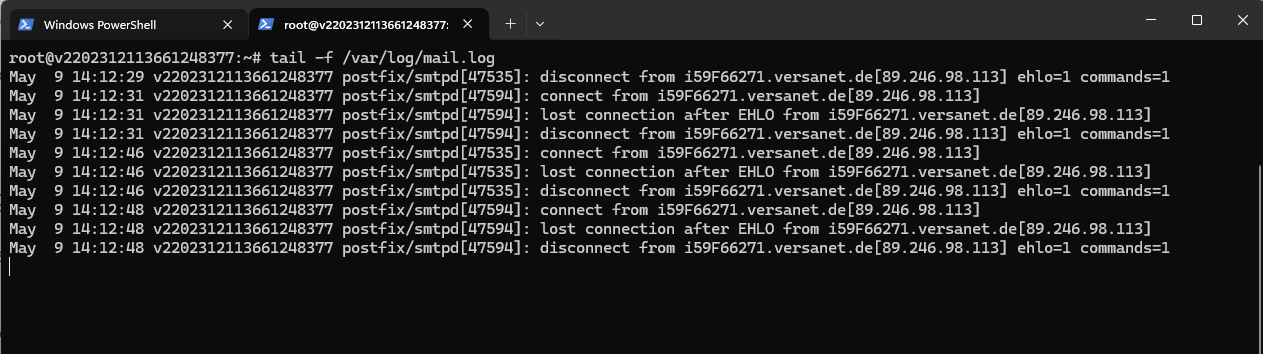
The tail -f /var/log/mail.log command can be used to monitor the Postfix mail log in real time, which is especially useful for troubleshooting SMTP connectivity, authentication, and mail delivery issues.
# tail -f /var/log/mail.log
The following Postfix debug settings can be used to enable detailed SMTP communication logging for a specific client or peer IP address in Postfix. This is especially useful for troubleshooting mail delivery, TLS negotiation, authentication, or SMTP relay issues between ONTAP and the SMTP relay server.
debug_peer_list restricts logging to the given IP address, while debug_peer_level = 3 increases the log detail, allowing you to trace the full SMTP conversation (including STARTTLS negotiation) for troubleshooting.
The ONTAP IP address below is the temporary public IP use by my lab environment.
# Debugging
debug_peer_list = <ONTAP IP address>
debug_peer_level = 3

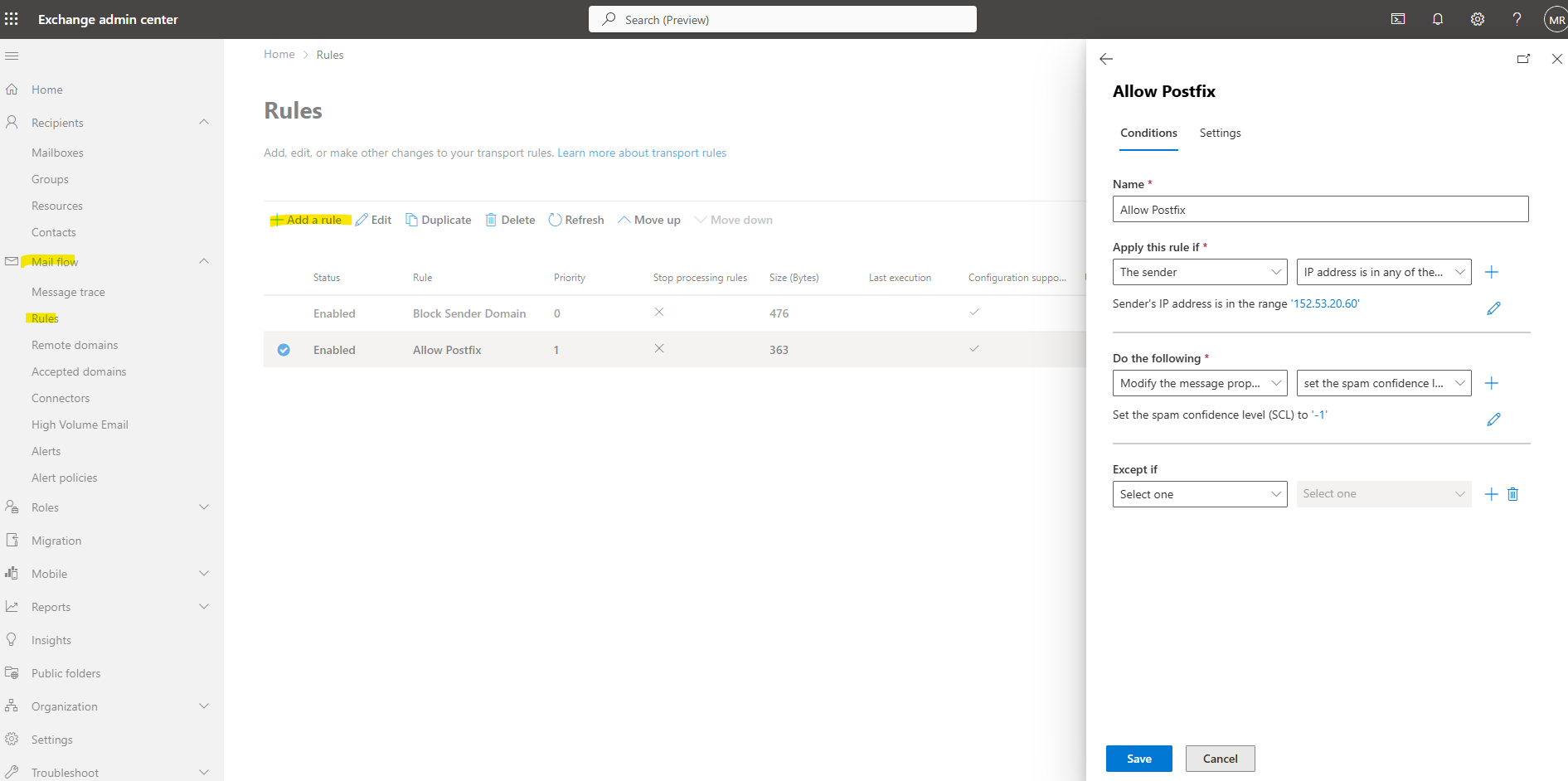
In my case I will also whitelist the IP address of the Postfix server in Exchange Online to bypass spam detection for and to be sure the email will be successfully delivered to my inbox.
ONTAP AutoSupport SMTP authentication over TLS (STARTTLS) is not supported prior to 9.15.1
Starting with ONTAP 9.15.1, SMTP transmission using STARTTLS is supported but not enabled by default. If required, it must be explicitly configured to allow encrypted communication between ONTAP and the SMTP relay.
So my lab system version 9.18.1 already supports SMTP encryption but so far not enabled.
matrixselect::> version
matrixselect::> system node autosupport show -node matrixselect-01
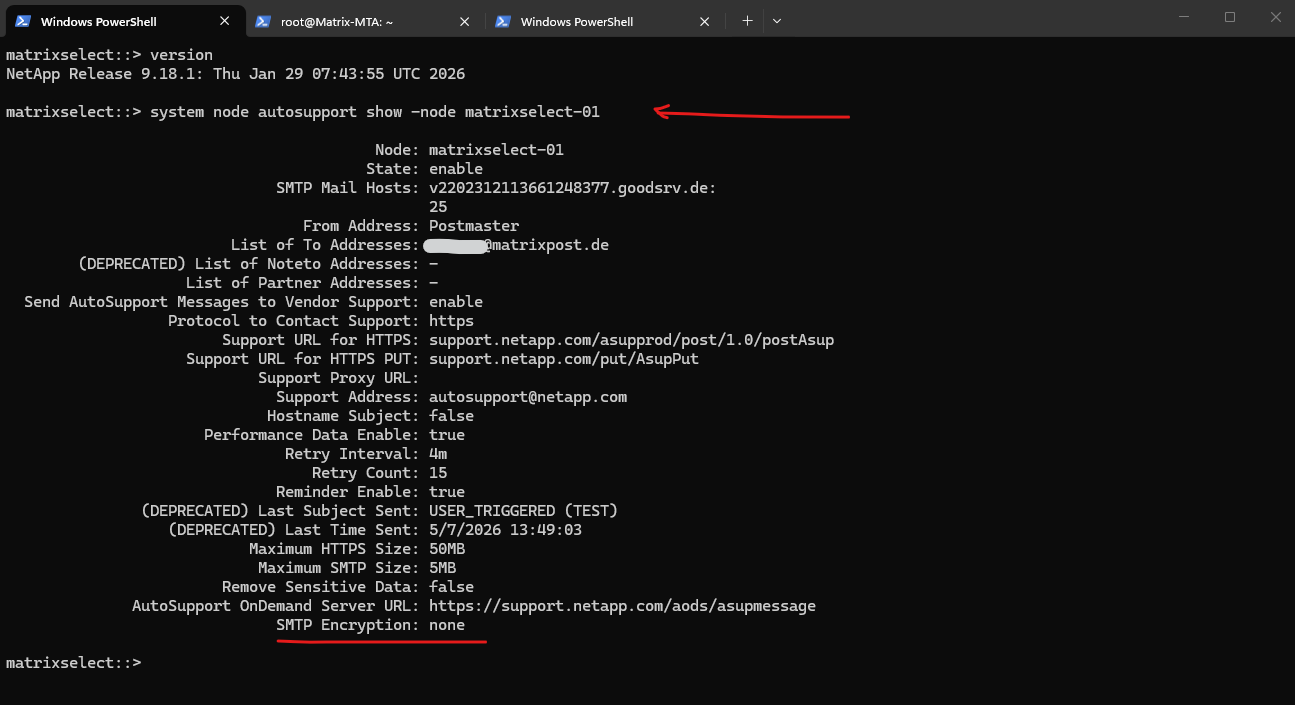
To enable SMTP Encryption we can run:
I will get below a warning message that ONTAP could not connect to my SMTP server on TCP port 587.
Warning: SMTP connectivity check failed for destination: v2202312113661248377.goodsrv.de:587. Error: Could not connect to server –
‘v2202312113661248377.goodsrv.de:587‘
# to enable on all nodes in the cluster
matrixselect::> system node autosupport modify -node * -smtp-encryption start_tls

# Verify:
matrixselect::> system node autosupport show -node matrixselect-01

# to disable
matrixselect::> system node autosupport modify -node * -smtp-encryption none
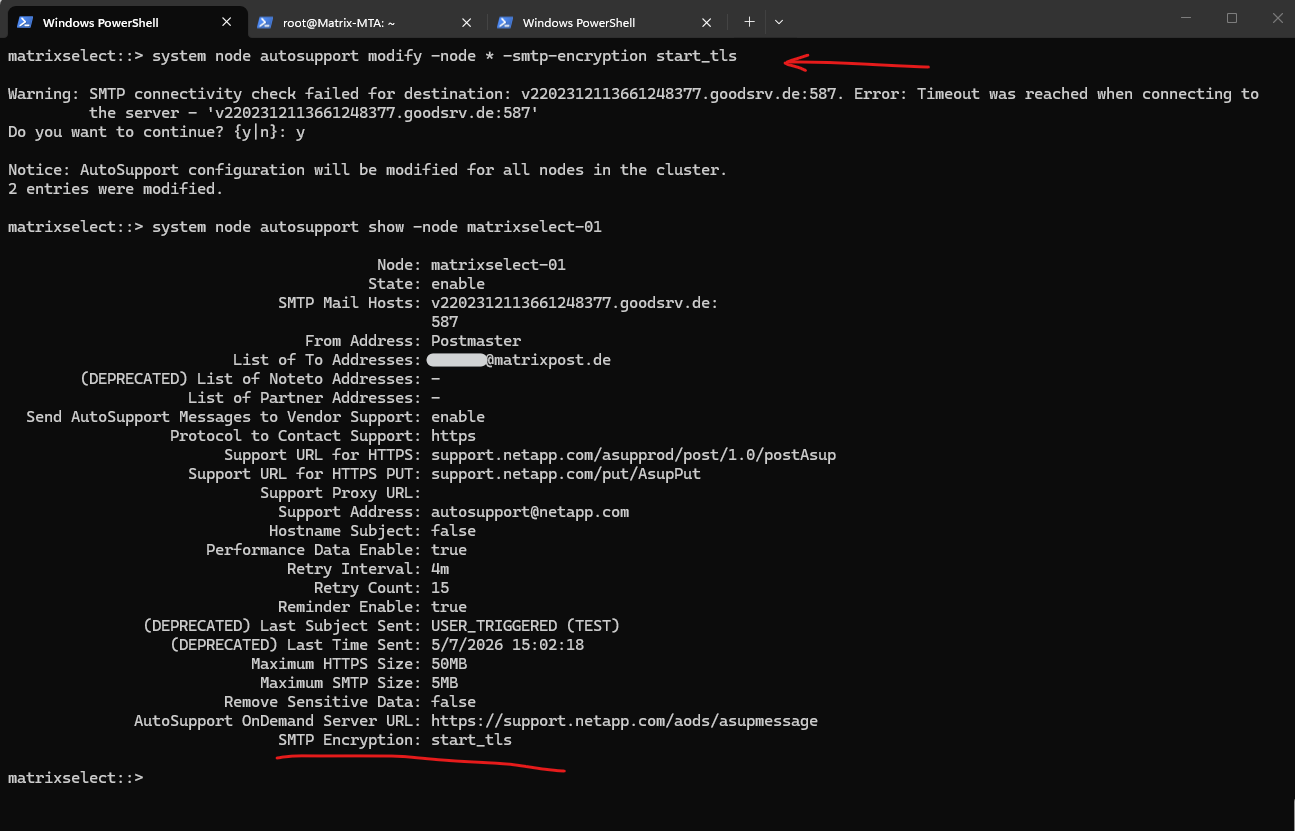
Enabling STARTTLS will switch the listening port from TCP 25 into TCP 587.
When enabling STARTTLS for AutoSupport SMTP in ONTAP, the effective default SMTP port changes from TCP 25 to TCP 587.
This behavior follows modern SMTP submission standards, where TCP 587 is commonly used for encrypted and authenticated SMTP client communication using STARTTLS, while TCP 25 is traditionally used for server-to-server SMTP relay traffic.
This means ONTAP will try to connect to the configured mail host on port 587 unless the configuration is changed back to plain SMTP or the relay is listening on 587.
matrixselect::> system node autosupport show -fields mail-hosts
matrixselect::> system node autosupport check show-details -node *
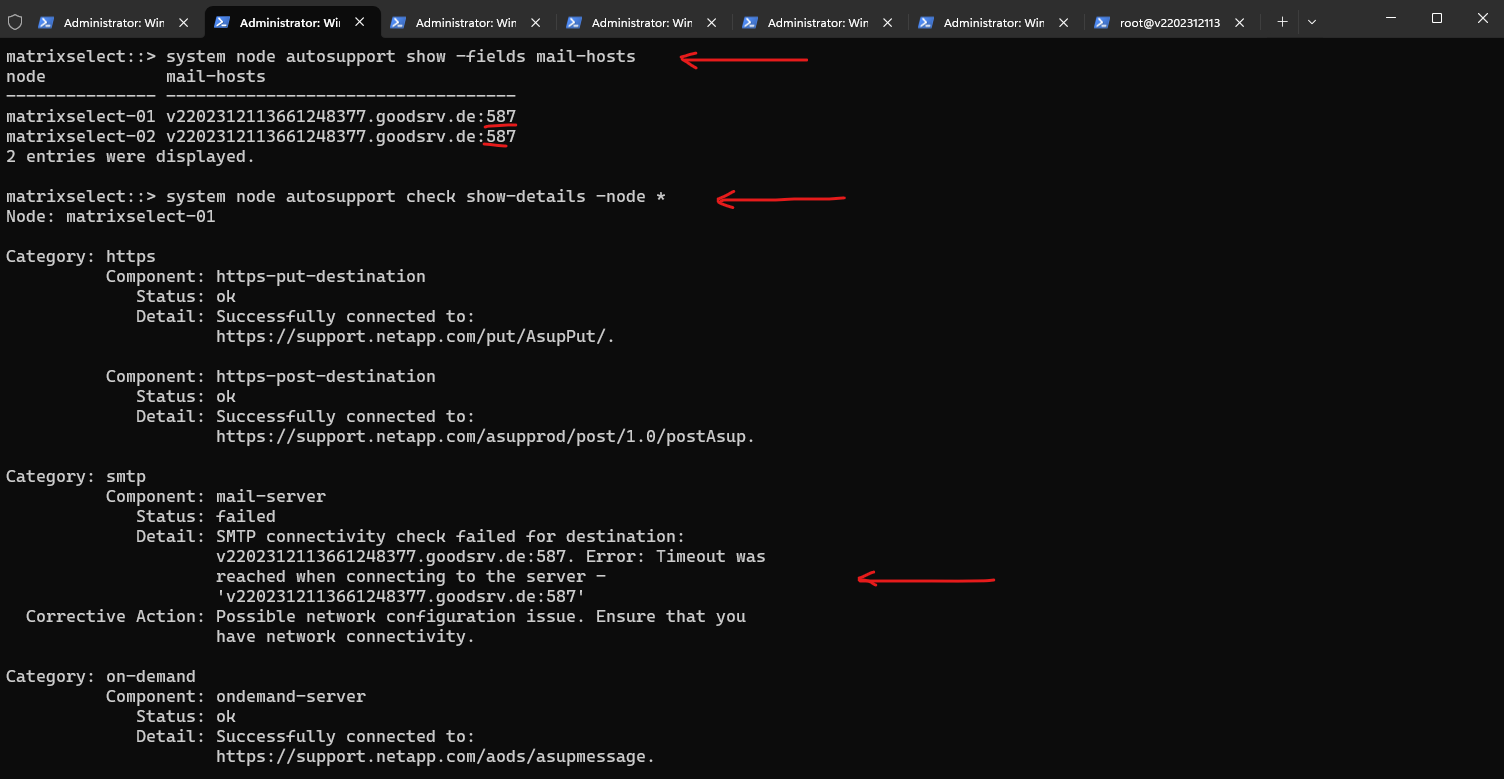
Best practice when using STARTTLS is to keep ONTAP on TCP 587 and configure Postfix to listen on the SMTP submission port as well. This keeps the design aligned with modern SMTP behavior, where TCP 587 is used for client-to-mail-server submission with STARTTLS.
SMTP submission describes the process where a client submits an email to a mail server for further delivery to the final recipient. In this setup, NetApp ONTAP acts as the SMTP client submitting emails to the Postfix relay server using STARTTLS on TCP port 587.
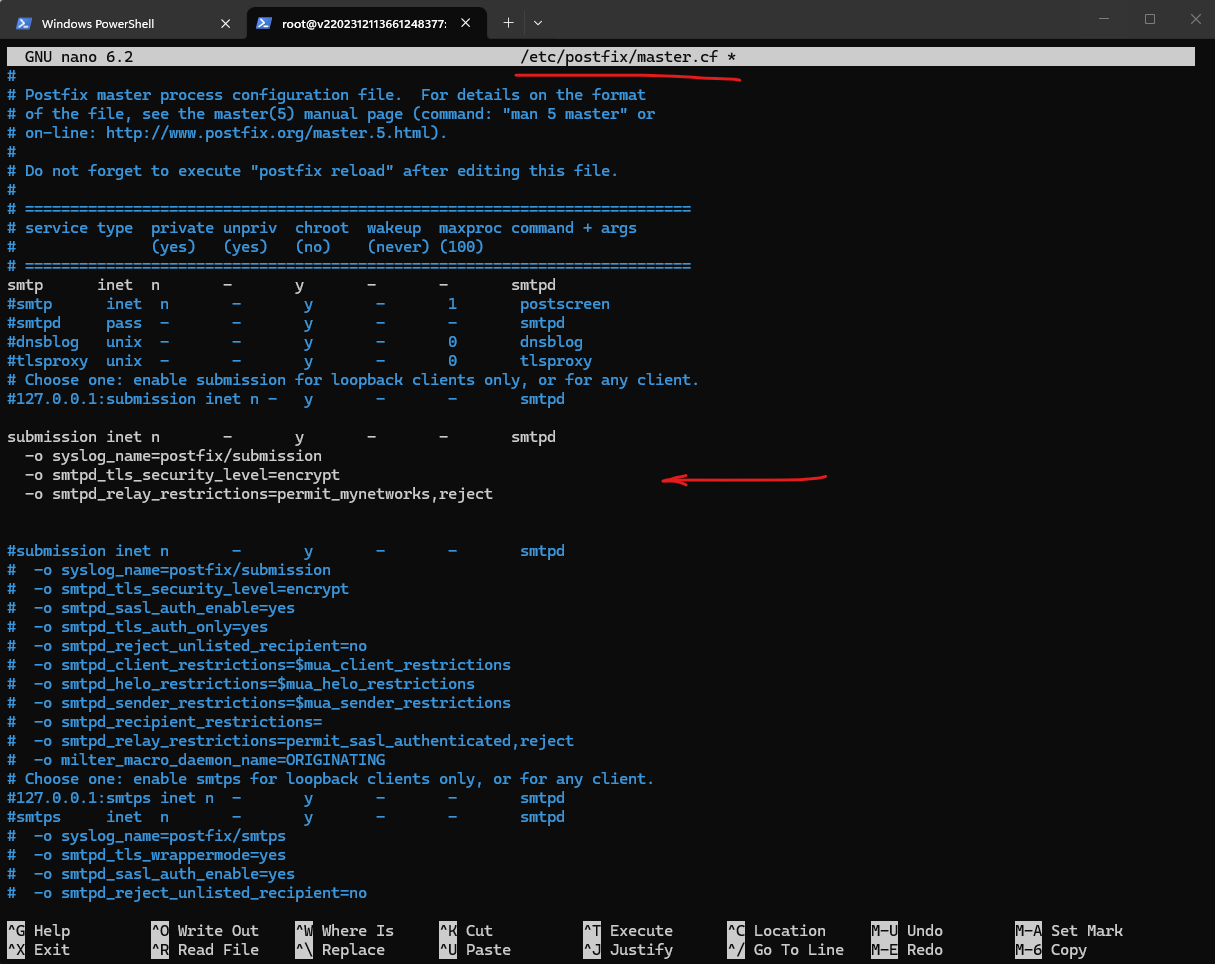
To enable TCP 587 in Postfix we need to add/uncomment the following in /etc/postfix/master.cf and finally reload or restart Postfix.
In Postfix, the
main.cffile contains the global configuration settings for the Postfix mail system, such as hostname, relay settings, TLS configuration, trusted networks, and general SMTP behavior.The
master.cffile on the other hand defines the individual Postfix services and listeners, including which SMTP services should listen on specific TCP ports such as SMTP on TCP 25 or SMTP submission on TCP 587, together with their service-specific options and overrides.
submission inet n       -       y       -       -       smtpd
  -o syslog_name=postfix/submission
  -o smtpd_tls_security_level=encrypt
  -o smtpd_relay_restrictions=permit_mynetworks,reject


Restart/Reload Postfix
# systemctl reload postfix
# systemctl restart postfix
Verify if Postfix now is listening also on TCP 587.
# ss -tlnp | grep :587

The following output confirms that NetApp ONTAP is now configured to use the Postfix SMTP relay server on TCP port 587 for encrypted SMTP communication using STARTTLS. The AutoSupport connectivity check also verifies that both ONTAP nodes can successfully establish SMTP and HTTPS connections to the configured destinations without any configuration or connectivity issues.
matrixselect::> system node autosupport show -fields mail-hosts
matrixselect::> system node autosupport check show-details -node *
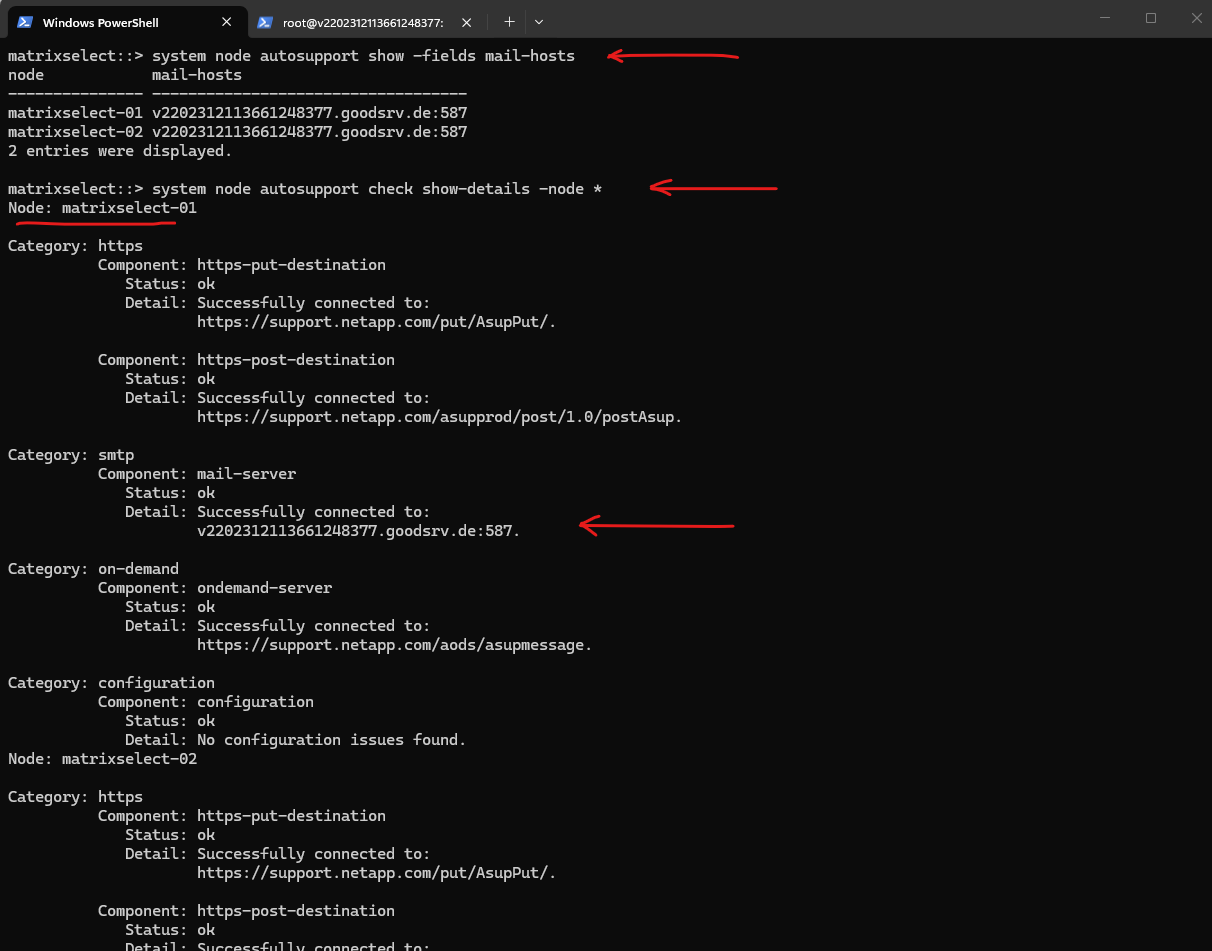
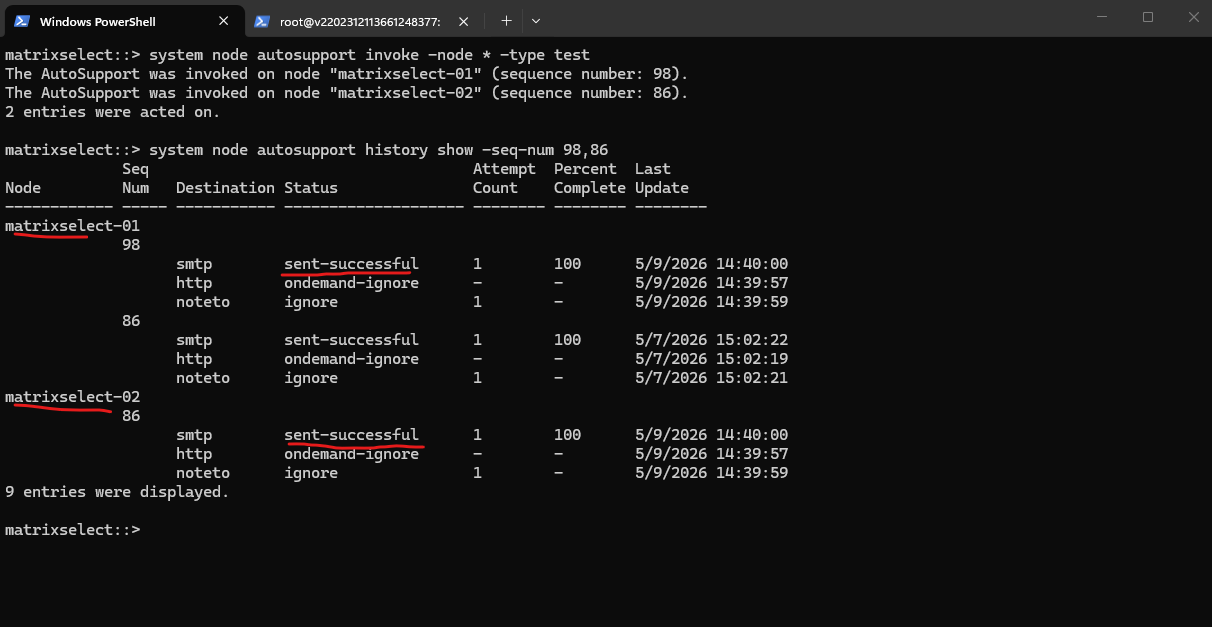
Now after enabling STARTTLS another manually invoked test will show the following output. The AutoSupport history further confirms that the encrypted SMTP delivery using STARTTLS over TCP port 587 to the configured Postfix relay server was completed successfully for both nodes.
matrixselect::> system node autosupport invoke -node * -type test
matrixselect::> system node autosupport history show -seq-num 98,86
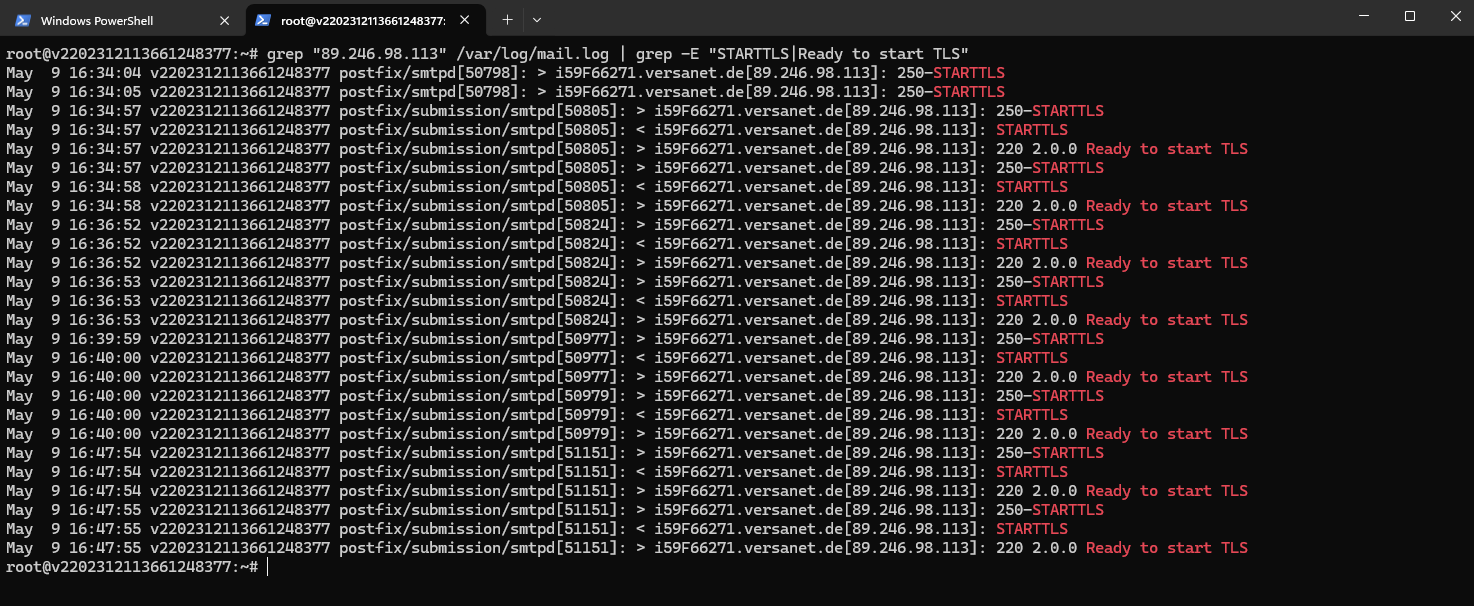
Also the following log output from Postfix confirms that the NetApp ONTAP nodes successfully connected to the SMTP submission service on TCP port 587 and negotiated encrypted SMTP communication using STARTTLS. The log entries show that Postfix advertised STARTTLS support (250-STARTTLS), ONTAP requested the TLS upgrade (STARTTLS), and Postfix finally accepted the encrypted session initialization (220 2.0.0 Ready to start TLS).
root@v2202312113661248377:~# grep "89.246.98.113" /var/log/mail.log | grep -E "STARTTLS|Ready to start TLS"
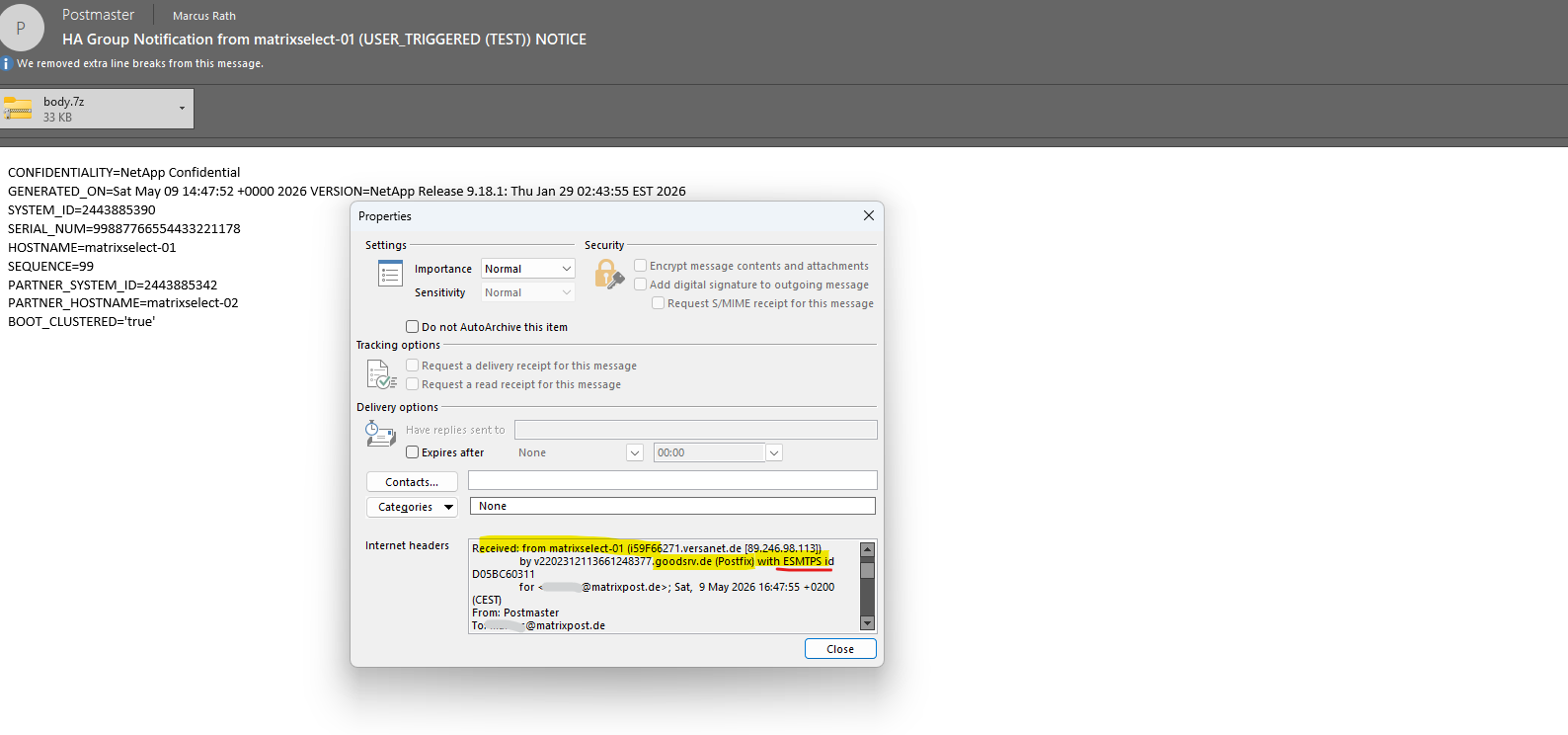
The following section from the email header confirms that the initial SMTP transmission from NetApp ONTAP to the configured Postfix relay server was successfully encrypted.
The keyword
ESMTPSindicates that the SMTP session between the ONTAP nodematrixselect-01and the Postfix relay server was established using TLS encryption after the STARTTLS negotiation.
ESMTPstands for Extended Simple Mail Transfer Protocol and represents the modern extension of the original SMTP protocol supporting additional features such as STARTTLS and SMTP authentication.The keyword
ESMTPSon the other hand indicates that the SMTP session was successfully protected using TLS encryption, whileESMTPalone typically represents unencrypted SMTP communication.
The following commands can be used to clear the existing Postfix log file and monitor SMTP communication in real time, which is especially useful while testing AutoSupport or EMS email delivery from NetApp ONTAP.
This allows immediate verification of SMTP connections, STARTTLS negotiation, and mail delivery processing on the Postfix relay server.
# truncate -s 0 /var/log/mail.log
# tail -f /var/log/mail.log

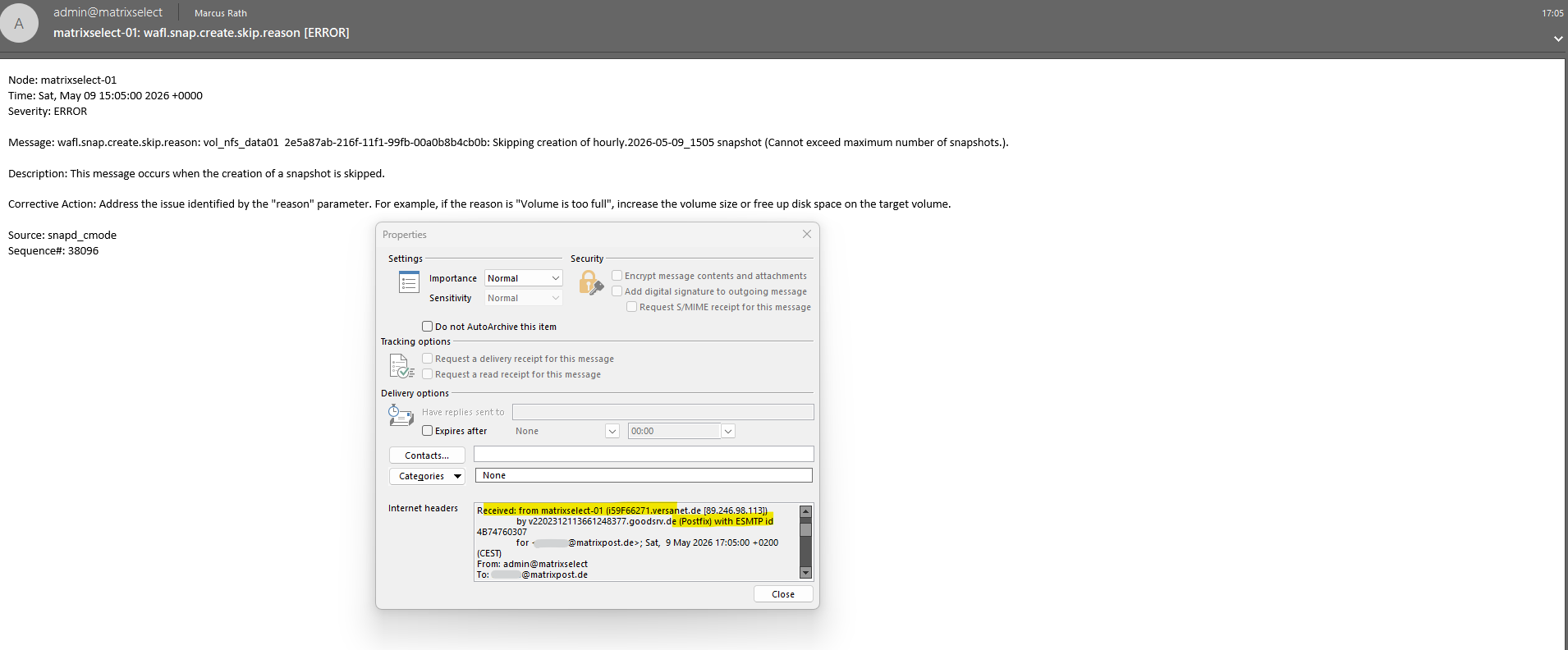
The following email header shows that EMS event notification emails in NetApp ONTAP were still transmitted using plain SMTP without TLS encryption.
Unlike the AutoSupport configuration using STARTTLS on TCP port 587, the EMS email notifications currently use standard SMTP communication indicated by the ESMTP keyword instead of ESMTPS.
At the time of writing, NetApp does not provide dedicated STARTTLS or SMTP encryption settings for the EMS email notification framework in NetApp ONTAP comparable to the AutoSupport SMTP configuration. This behavior can also be observed in the email headers, where EMS notifications are currently transmitted using plain
ESMTPinstead of encryptedESMTPScommunication.
Links
ONTAP 9.18.1 EMS reference
https://docs.netapp.com/us-en/ontap-ems/Configure ONTAP EMS event notifications and filters with System Manager
https://docs.netapp.com/us-en/ontap/error-messages/configure-ems-notifications-sm-task.htmlConfigure important ONTAP EMS events to send email notifications
https://docs.netapp.com/us-en/ontap/error-messages/configure-ems-events-send-email-task.htmlIs it possible to config authentication to mail server for event notification?
https://kb.netapp.com/on-prem/ontap/Ontap_OS/OS-KBs/Is_it_possible_to_config_authentication_to_mail_server_for_event_notification