Understanding Microsoft Azure Network Adapter (MANA) – Azure’s Next-Generation Virtual Networking
Modern cloud platforms rely heavily on software-defined networking, virtualization, and hardware acceleration to deliver high-performance networking at hyperscale.
In Microsoft Azure, one of the key technologies behind this architecture is the Microsoft Azure Network Adapter (MANA), a custom SmartNIC solution designed to offload networking tasks from host CPUs and accelerate virtual machine networking performance.
In this article, we will take a closer look at what MANA actually is, how it works inside Azure, how it relates to Accelerated Networking and SR-IOV, and why Microsoft introduced it for modern Azure workloads.
- What Is Microsoft Azure Network Adapter (MANA)?
- How MANA Relates to Accelerated Networking and SR-IOV
- How to Check Whether an Azure VM Uses MANA
- Can Existing Azure VMs Be Moved to MANA Hardware?
- Real-World Example: NetApp Cloud Volumes ONTAP
- Enabling Accelerated Networking on Azure VMs – MANA-Supported and Unsupported VM Sizes
- Verifying MANA on Ubuntu Linux
- Conclusion
- Links
What Is Microsoft Azure Network Adapter (MANA)?
The Microsoft Azure Network Adapter (MANA) is Microsoft’s next-generation network adapter technology, developed as part of the Azure Boost architecture. It provides high-performance networking for Azure virtual machines by offloading networking operations to dedicated hardware.
Traditionally, Azure has relied on Mellanox network adapters for hardware-accelerated networking. With MANA, Microsoft introduces its own networking technology, allowing tighter integration between Azure’s virtualization platform, networking infrastructure, and hardware acceleration.
MANA is designed to improve network throughput, reduce latency, and decrease CPU overhead, particularly for demanding workloads.
What Is Azure Boost?
Azure Boost is Microsoft’s hardware and software architecture designed to improve the performance and efficiency of Azure virtual machines by offloading networking, storage, and virtualization infrastructure tasks from the host CPU to dedicated hardware.
Traditionally, many of these operations were processed by the Azure hypervisor and host operating system, consuming CPU resources that could otherwise be used for virtual machine workloads.
With Azure Boost, Microsoft moves selected infrastructure operations to specialized hardware, including SmartNICs and hardware accelerators.
The main components and benefits include:
- Networking acceleration: Microsoft Azure Network Adapter (MANA) provides high-performance networking using SR-IOV and hardware offloading.
- Storage acceleration: Azure Boost offloads storage processing to dedicated hardware, improving I/O performance and reducing latency.
- Reduced CPU overhead: Infrastructure processing is shifted away from the host CPU, freeing resources for VM workloads.
- Improved performance and scalability: Hardware acceleration helps Azure deliver higher networking and storage performance for supported VM families.
MANA is therefore one component of the broader Azure Boost architecture, which accelerates not only networking but also storage and other virtualization infrastructure operations.
More about you will find here https://learn.microsoft.com/en-us/azure/azure-boost/overview.
How MANA Relates to Accelerated Networking and SR-IOV
Azure Accelerated Networking uses Single Root I/O Virtualization (SR-IOV) to provide virtual machines with direct access to a virtual function (VF) of a physical network adapter.
This allows network traffic to bypass much of the host’s software-based virtual switching data path, reducing latency and CPU utilization.
MANA builds on this architecture by providing Microsoft’s own hardware and driver implementation.
The important distinction is:
- Accelerated Networking is the Azure feature that enables hardware-accelerated network traffic.
- SR-IOV is the underlying PCIe virtualization technology used to expose virtual functions to VMs.
- MANA is Microsoft’s network adapter technology supporting this accelerated networking architecture.
- Azure Boost is the broader hardware and software architecture that offloads networking, storage, and other virtualization functions.
Therefore, an Azure VM with Accelerated Networking enabled does not necessarily use MANA. It may still use a Mellanox-based network adapter.
How to Check Whether an Azure VM Uses MANA
The actual network adapter can be identified from within the guest operating system.
Windows Server
List all network adapters:
Get-NetAdapter | Format-Table Name, InterfaceDescription, Status, LinkSpeed
Look for an adapter named Microsoft Azure Network Adapter.
To check for the MANA PCI device:
Get-PnpDevice -PresentOnly | Where-Object { $_.InstanceId -match '^PCI\\VEN_1414&DEV_00BA&' }
To inspect traffic statistics:
Get-NetAdapter | Where-Object InterfaceDescription -Like "*Microsoft Azure Network Adapter*" | Get-NetAdapterStatistics
Increasing traffic counters can help confirm that the adapter is actively being used.
Further below, we will demonstrate these commands using actual Azure VMs with Accelerated Networking disabled, Mellanox-based acceleration, and Microsoft Azure Network Adapter (MANA) to compare their network configurations and behavior.
Linux (Ubuntu)
Identify the available PCI network devices:
lspci -nn | grep -Ei 'microsoft|mellanox'
Check whether the MANA kernel module is loaded:
lsmod | grep mana
Identify the driver used by each network interface:
for i in /sys/class/net/*; do echo "=== ${i##*/} ==="; ethtool -i "${i##*/}" 2>/dev/null | grep driver; done
Typical drivers include:
| Driver | Description |
|---|---|
mana | Microsoft Azure Network Adapter |
mlx4_en | Mellanox ConnectX-3 |
mlx5_core | Mellanox ConnectX-4 and newer |
hv_netvsc | Hyper-V synthetic network adapter |
Note that detecting MANA hardware or a loaded driver does not necessarily prove that application traffic is using the accelerated data path.
Can Existing Azure VMs Be Moved to MANA Hardware?
Microsoft is gradually introducing MANA support across additional Azure VM families, including existing VM sizes.
An existing Azure VM may be placed on MANA-capable hardware following an Azure infrastructure maintenance event or after being stopped, deallocated, and started again.
For example, using Azure CLI:
az vm deallocate --resource-group <resource-group> --name <vm-name>
az vm start --resource-group <resource-group> --name <vm-name>
However, deallocating and restarting a VM does not guarantee placement on MANA hardware. Azure controls the underlying physical host allocation.
Before attempting such a migration, verify that the VM size and guest operating system support MANA. Deallocation also causes downtime and may affect resources such as dynamic public IP addresses and temporary disks.
Real-World Example: NetApp Cloud Volumes ONTAP
The introduction of MANA can also affect virtual appliances running in Azure.
NetApp has documented performance issues affecting certain Cloud Volumes ONTAP deployments when their Azure VMs are placed on hosts using Microsoft Azure Network Adapter hardware without the required software support.
This demonstrates why compatibility between the underlying Azure hardware, virtual machine drivers, and appliance software is important.
For affected Cloud Volumes ONTAP deployments, administrators should review NetApp’s compatibility guidance and applicable ONTAP updates before performing host migrations or VM maintenance.
Avoiding MANA Hardware Using the LegacyVMNVA Tag
Microsoft provides a special Azure VM tag called LegacyVMNVA for network virtual appliances (NVAs) that are not yet compatible with MANA-based networking. This allows affected workloads to avoid placement on MANA-capable Azure hosts as a temporary compatibility workaround.
For existing Azure VMs, the documented procedure involves applying the tag through Azure Policy and performing a VM reapply operation to activate the exception.
az vm reapply --resource-group <resource-group> --name <vm-name>
Unlike an Azure VM redeployment, which relocates the VM to another physical host, reapply reapplies its configuration and does not itself guarantee host migration.
Microsoft currently documents this exception until May 31, 2027.
For NetApp Cloud Volumes ONTAP, the procedure should only be considered after confirming compatibility and support with NetApp, particularly for HA deployments where manually modifying Azure VM resources could interfere with ONTAP operations.
More about here https://learn.microsoft.com/en-us/azure/virtual-network/accelerated-networking-mana-network-virtual-appliance-opt-out.
Configuring the LegacyVMNVA Exception Using Azure Policy
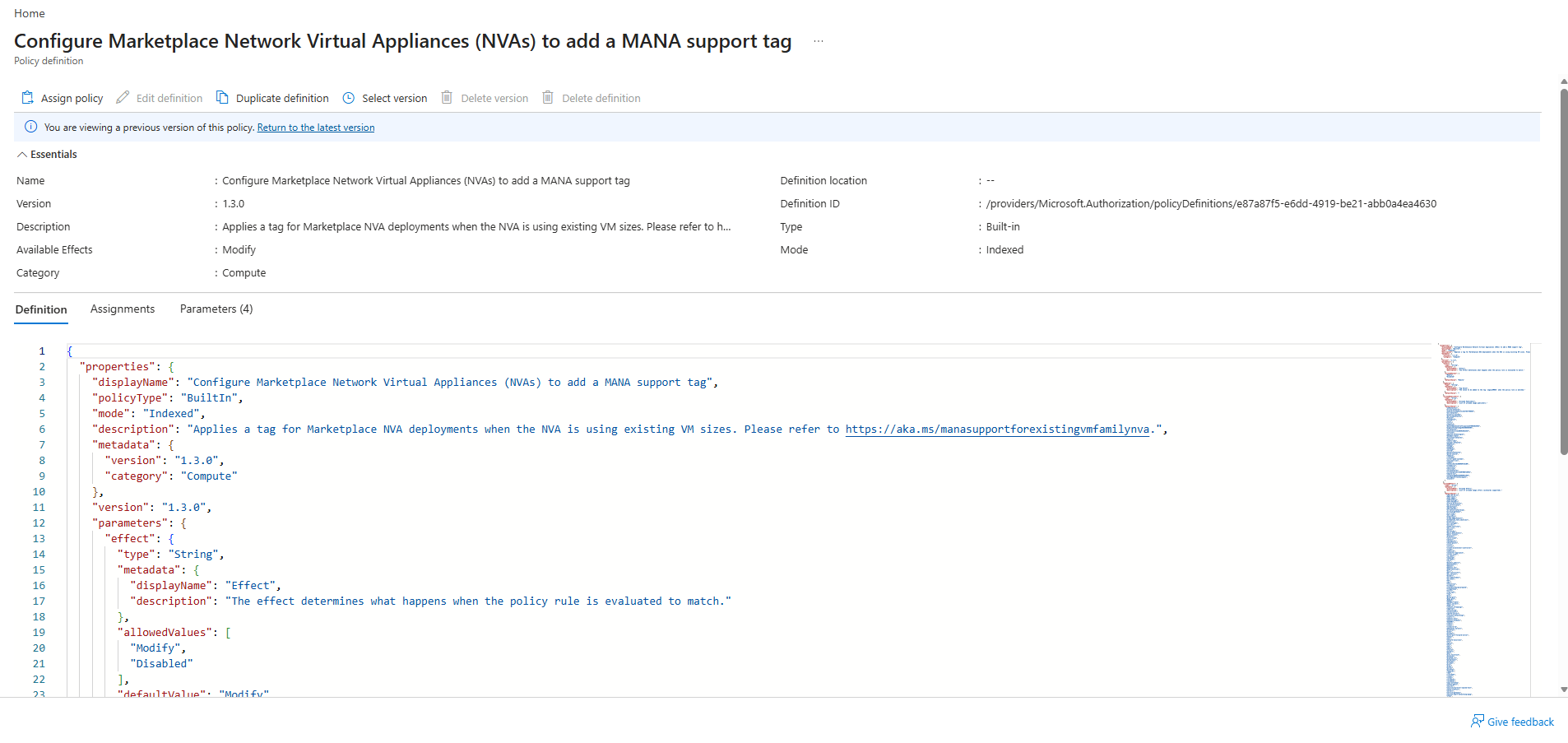
Microsoft provides a built-in Azure Policy named Configure Marketplace Network Virtual Appliances (NVAs) to add a MANA support tag, which can be opened directly from the official Microsoft documentation.
The policy uses the Modify effect to apply the LegacyVMNVA tag to supported Marketplace network virtual appliances, allowing affected workloads to avoid placement on MANA-capable Azure hosts as a temporary compatibility workaround.
The exception is currently supported until May 31, 2027, after which Azure may place eligible VMs on MANA-capable hardware regardless of the tag.
Clicking the LegacyVMNVA Azure Policy link in Microsoft’s official documentation opens the built-in policy definition Configure Marketplace Network Virtual Appliances (NVAs) to add a MANA support tag directly in the Azure Portal.
Here, we can review the policy’s configuration, parameters, and JSON definition before assigning it to an Azure scope.
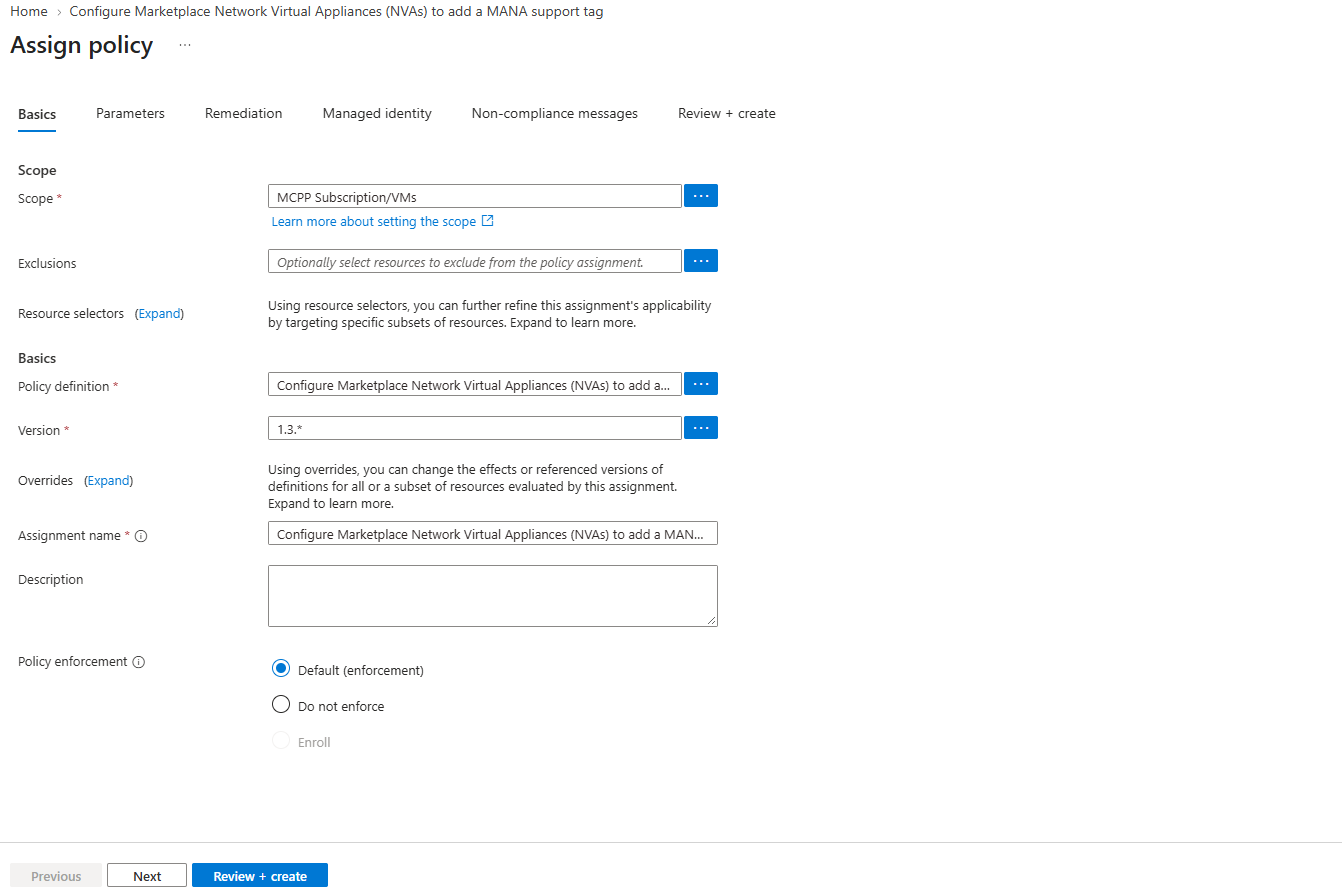
Next, we click Assign policy to open the Azure Policy assignment wizard, where we can select the target subscription or resource group, configure the policy parameters, and define the scope for applying the LegacyVMNVA tag.
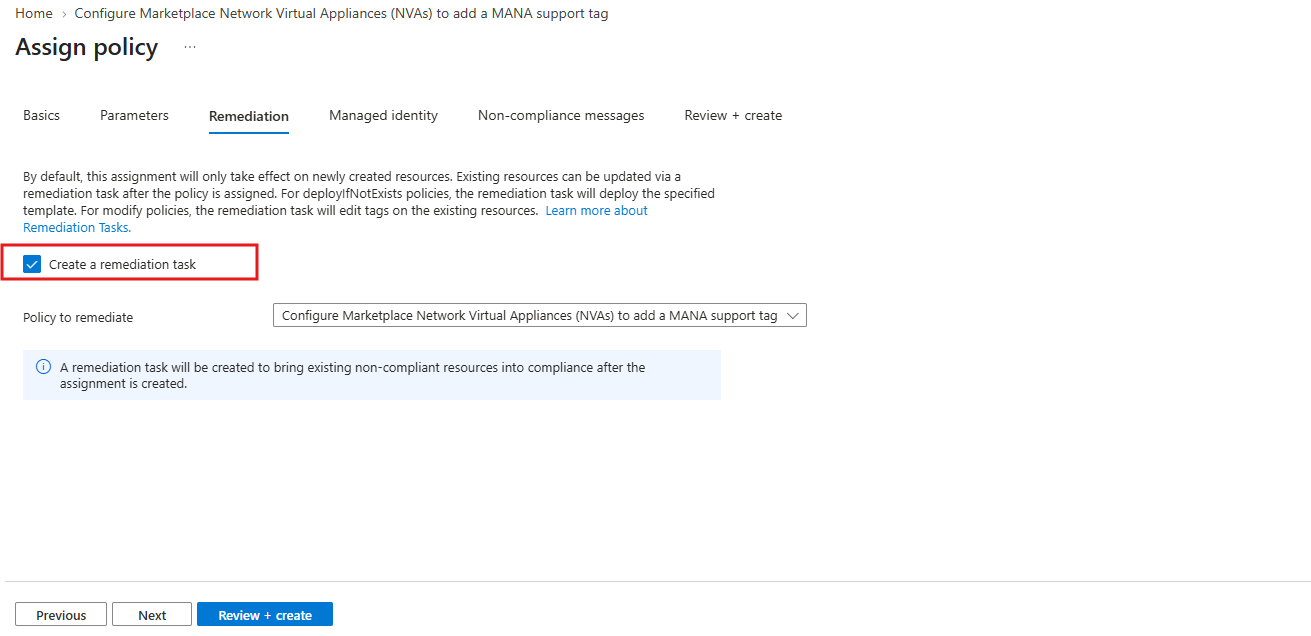
On the Remediation tab, enable Create a remediation task to apply the LegacyVMNVA tag to existing eligible Azure VMs within the selected scope.
Without remediation, the policy primarily affects newly created or updated resources; the remediation task brings existing non-compliant resources into compliance.
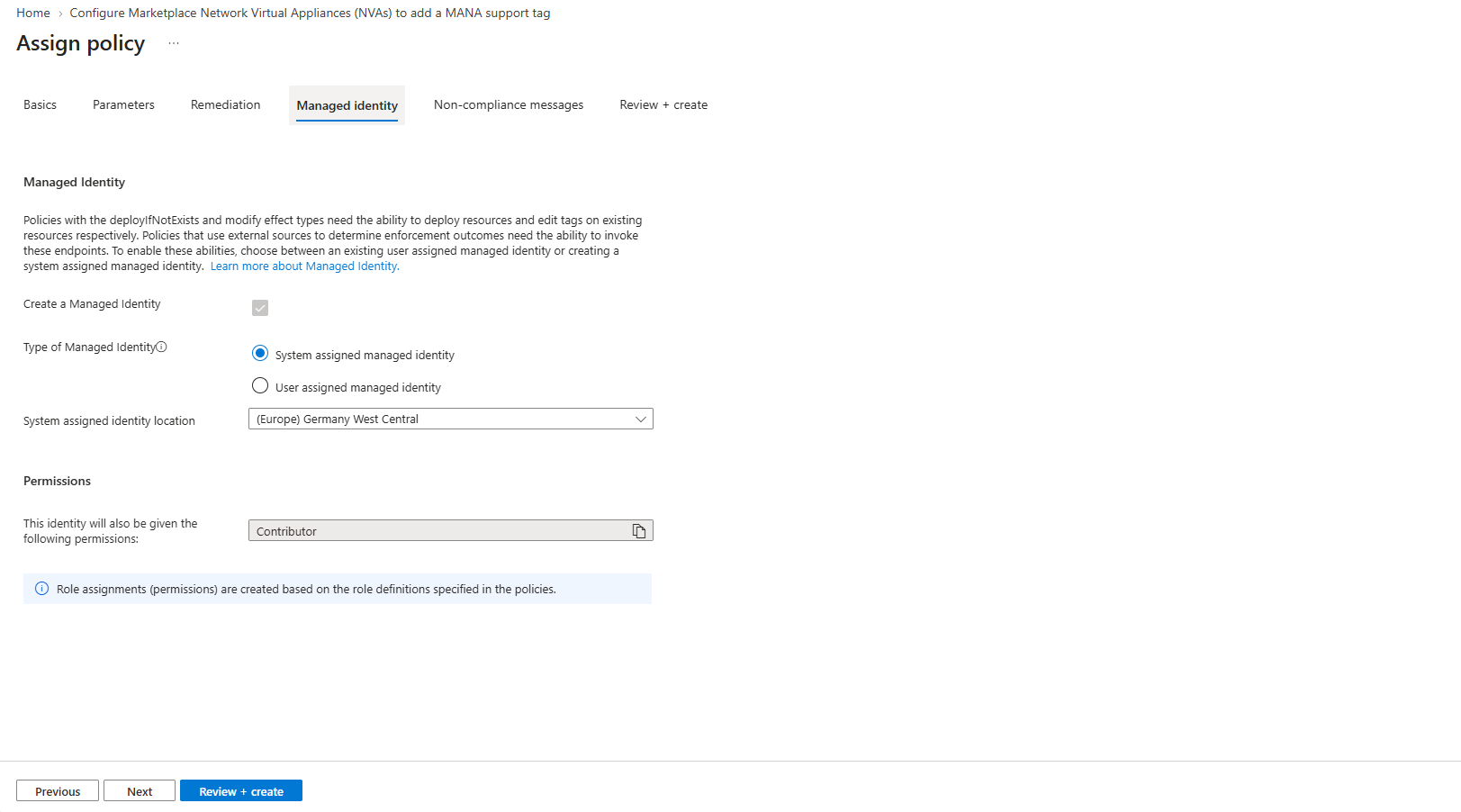
On the Managed identity tab, Azure automatically creates a system-assigned managed identity for the policy assignment.
This identity receives the required Contributor role permissions to modify tags on eligible Azure resources during policy remediation, without requiring separate credentials.
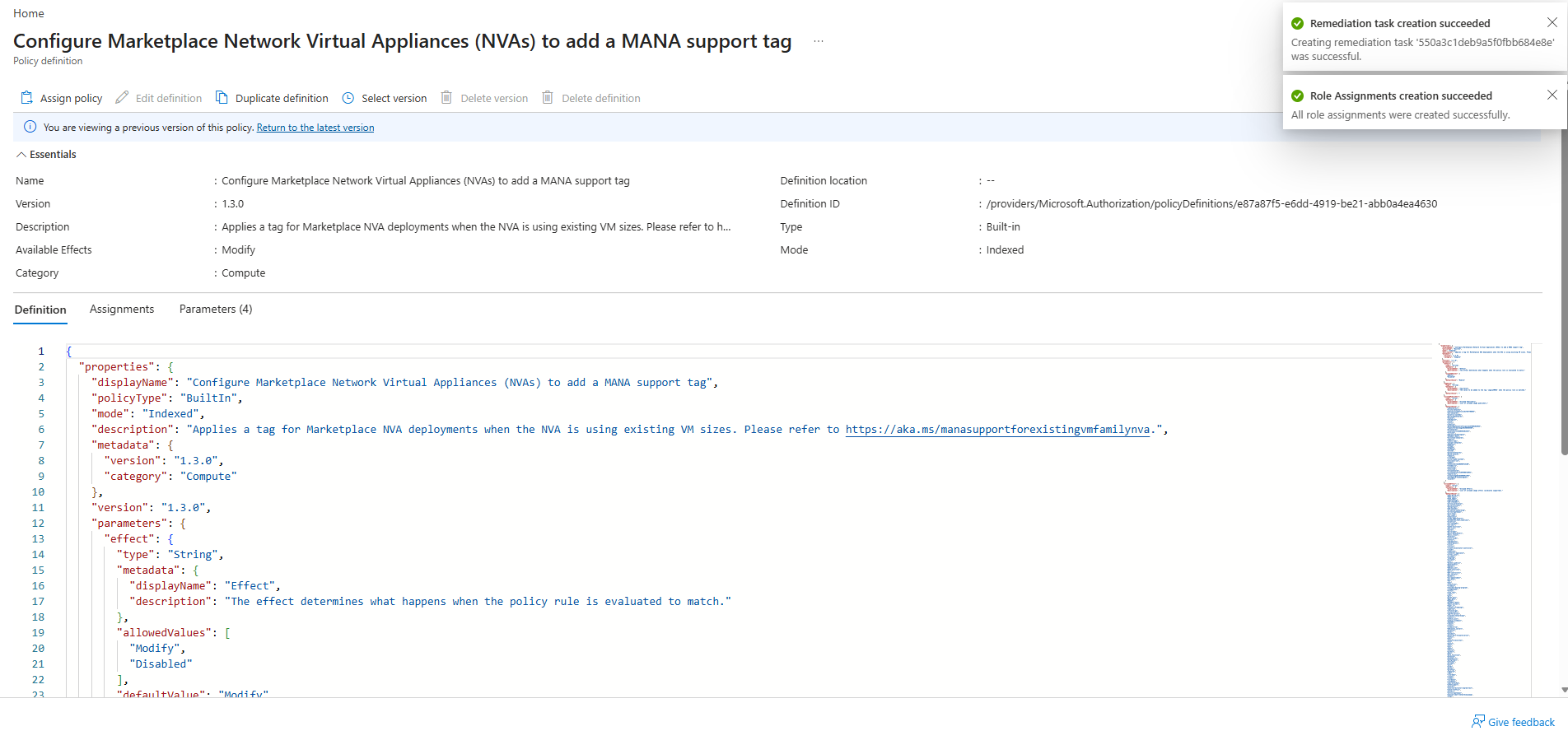
After assigning the Azure Policy, Azure confirms that both the remediation task and the required role assignments were created successfully.
The remediation task can now apply the configured MANA support tag to existing eligible Marketplace Network Virtual Appliances (NVAs) within the selected scope.
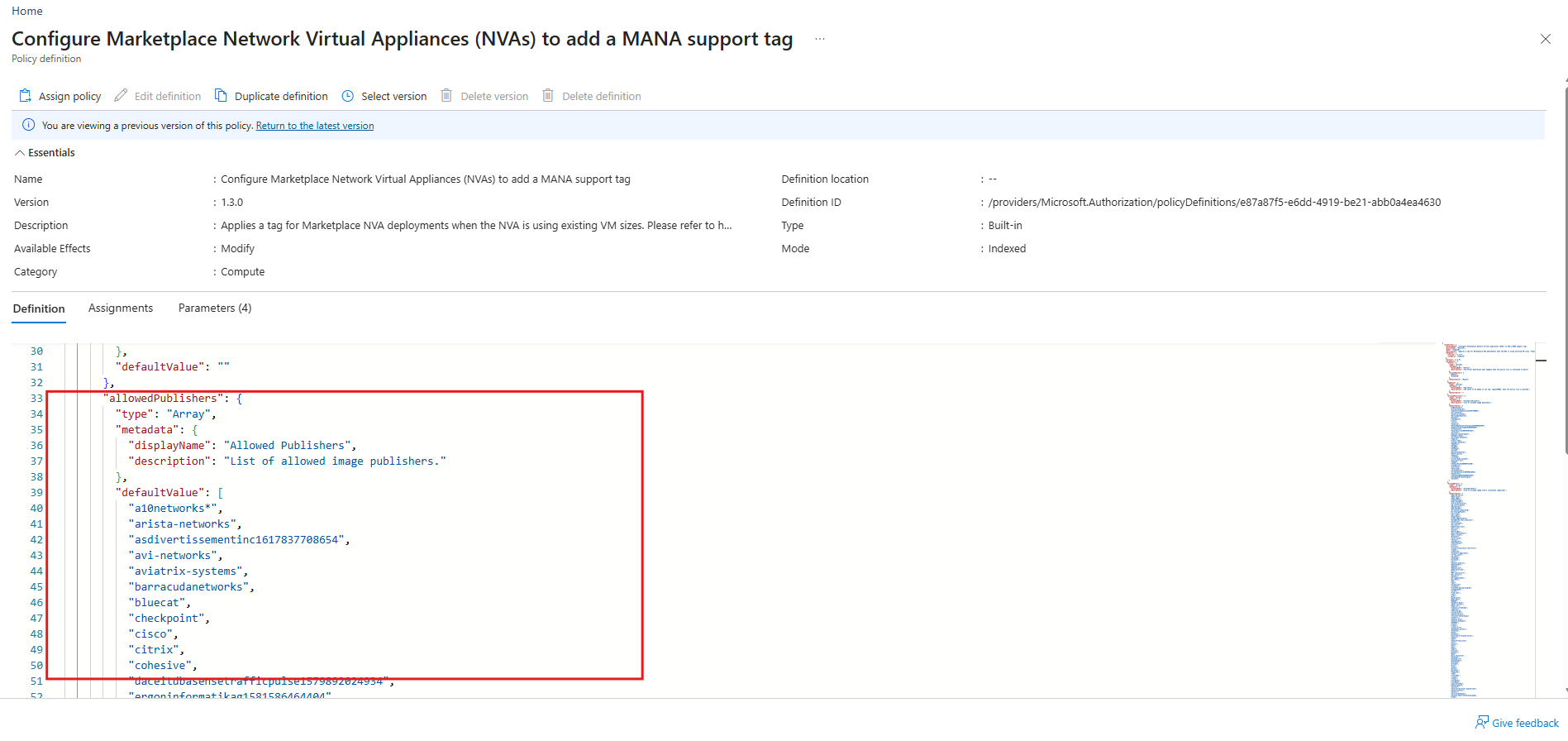
Although the Azure Policy is assigned to the entire resource group, it only applies the LegacyVMNVA tag to VMs matching specific Marketplace image publishers and offers.
Regular Azure VMs are excluded because their image publishers do not match the policy’s predefined criteria.
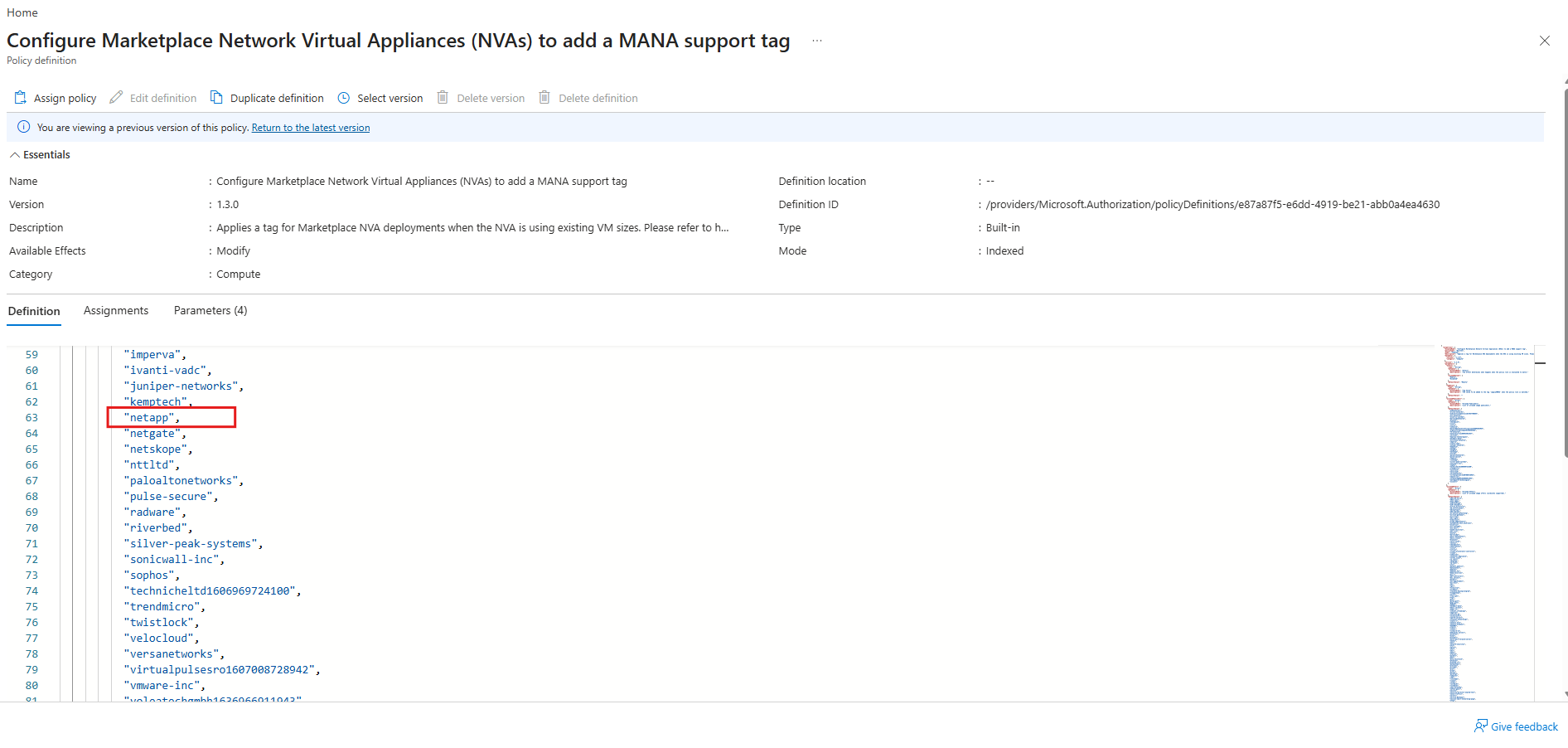
Interestingly, NetApp is explicitly included in the Azure Policy’s list of supported Marketplace publishers (allowedPublishers).
This means that NetApp Cloud Volumes ONTAP (CVO) virtual machines may also qualify for automatic application of the LegacyVMNVA tag, provided their Marketplace image offers match the policy’s additional filtering criteria.
The LegacyVMNVA tag can also be assigned manually to individual Azure VMs through the Azure Portal without configuring Azure Policy.
Azure Policy is primarily useful for automatically applying the tag across multiple eligible Marketplace NVAs; for existing VMs, a subsequent reapply operation is required to activate the MANA placement restriction.
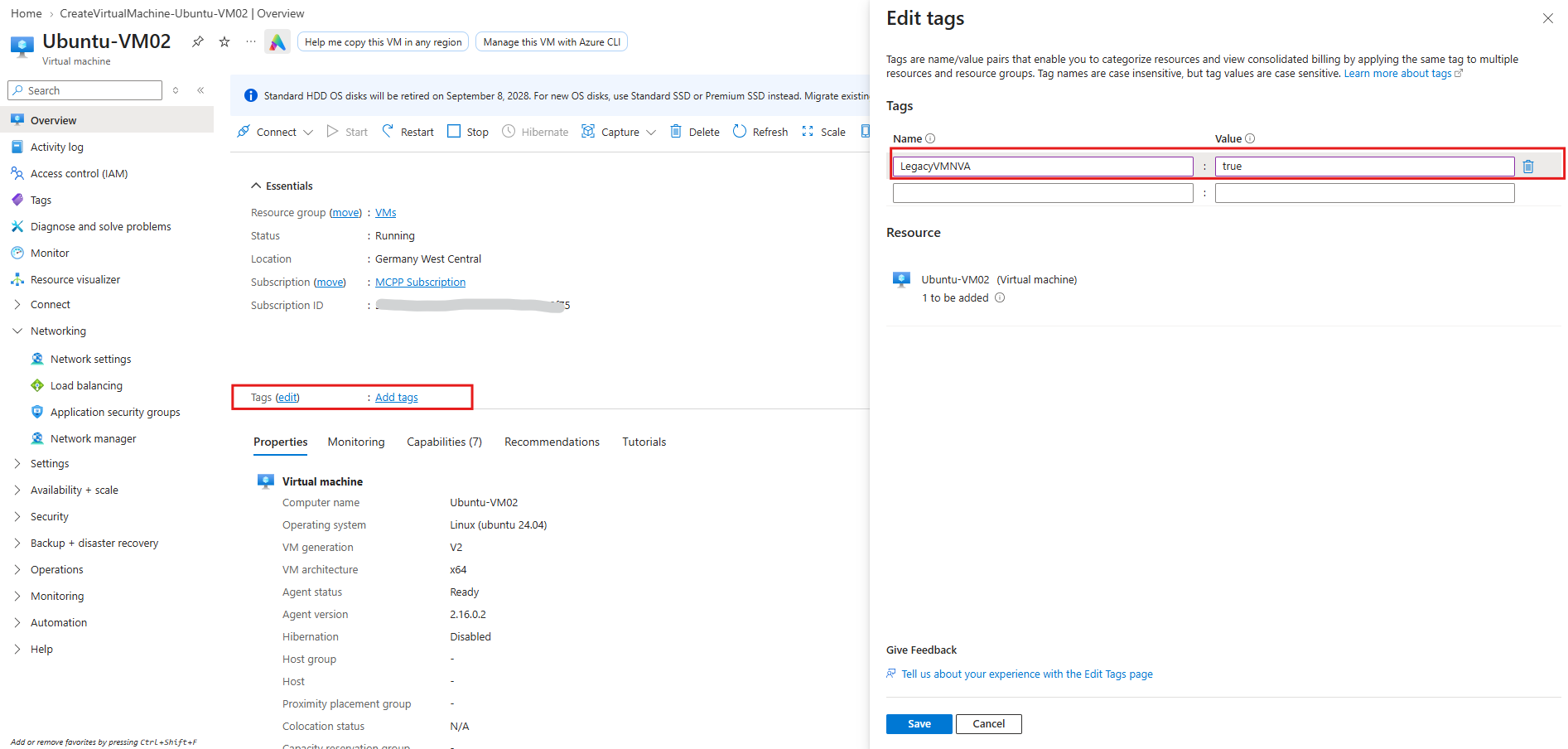
For existing Azure VMs, the LegacyVMNVA tag can be applied either automatically through an Azure Policy remediation task or manually through the Azure Portal.
In both scenarios, an additional VM reapply operation is required to activate the MANA hardware placement restriction. For newly deployed VMs, the tag takes effect during deployment without requiring a separate reapply operation.
az vm reapply --resource-group <resource-group> --name <vm-name>
Enabling Accelerated Networking on Azure VMs – MANA-Supported and Unsupported VM Sizes
Not all Azure VM sizes use the Microsoft Azure Network Adapter (MANA), even when Accelerated Networking is enabled.
In the following examples, we will compare Azure VMs using traditional Mellanox-based SR-IOV acceleration with MANA-capable VM sizes and examine how to identify the underlying network adapter from within the guest operating system.
Unsupported VM Sizes
First, we will deploy a Windows Server 2025 Datacenter: Azure Edition VM using a VM size that does not guarantee MANA hardware.
This allows us to demonstrate the difference between standard virtual networking and Mellanox-based Accelerated Networking before moving on to a MANA-capable VM size.
When creating a new Azure VM, such as Windows Server 2025 Datacenter: Azure Edition, Accelerated Networking can be enabled on the Networking tab.
This enables SR-IOV-based network acceleration, but does not necessarily mean the VM will use MANA, as the actual network adapter depends on the VM size and underlying Azure host.
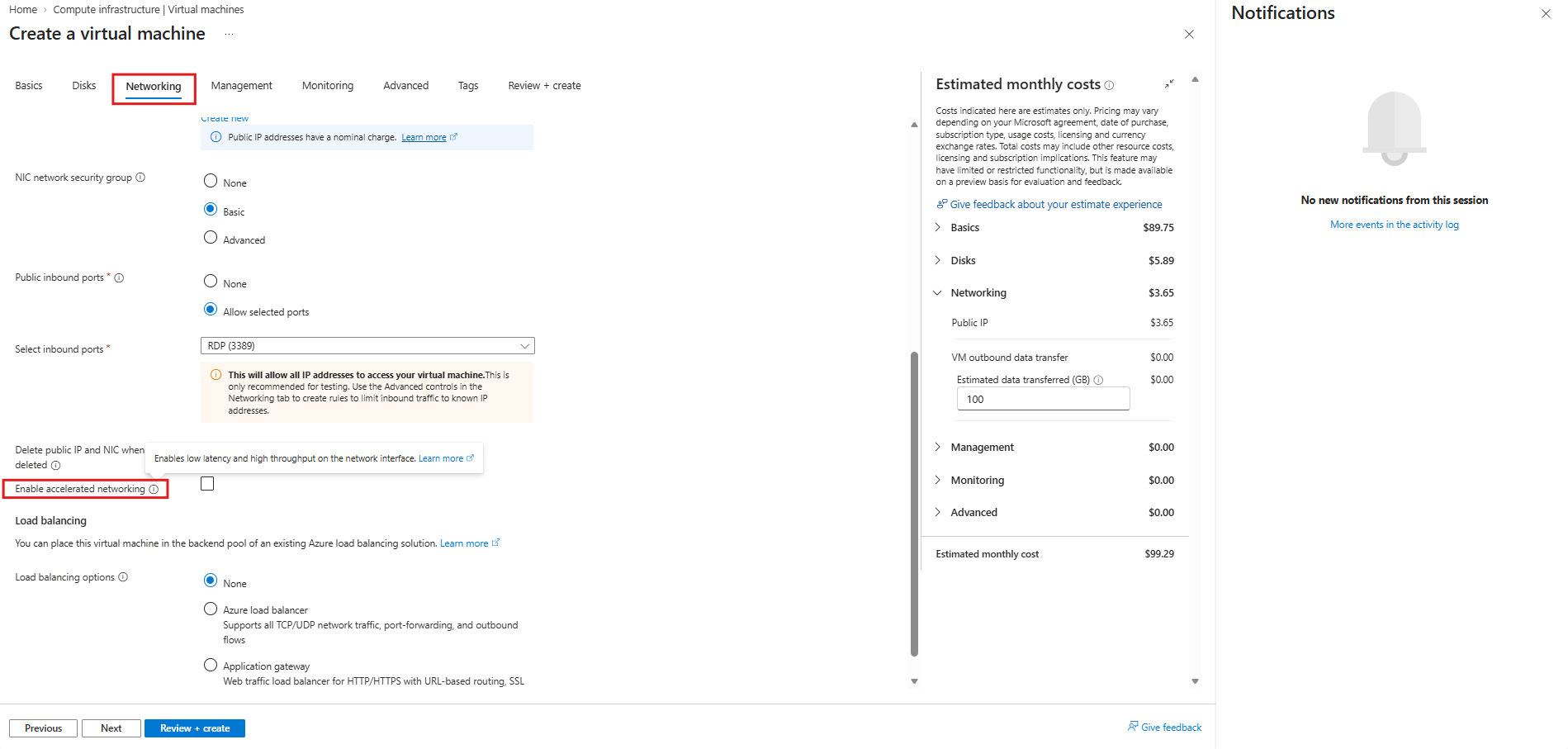
Initially, Accelerated Networking was disabled (not checked above) to examine the default network configuration.
The PowerShell output shows only the Microsoft Hyper-V Network Adapter, while the second command confirms that no MANA PCI device is present.
Get-NetAdapter | Format-Table Name, InterfaceDescription, Status, LinkSpeed
Get-PnpDevice -PresentOnly | Where-Object { $_.InstanceId -match '^PCI\\VEN_1414&DEV_00BA&' }

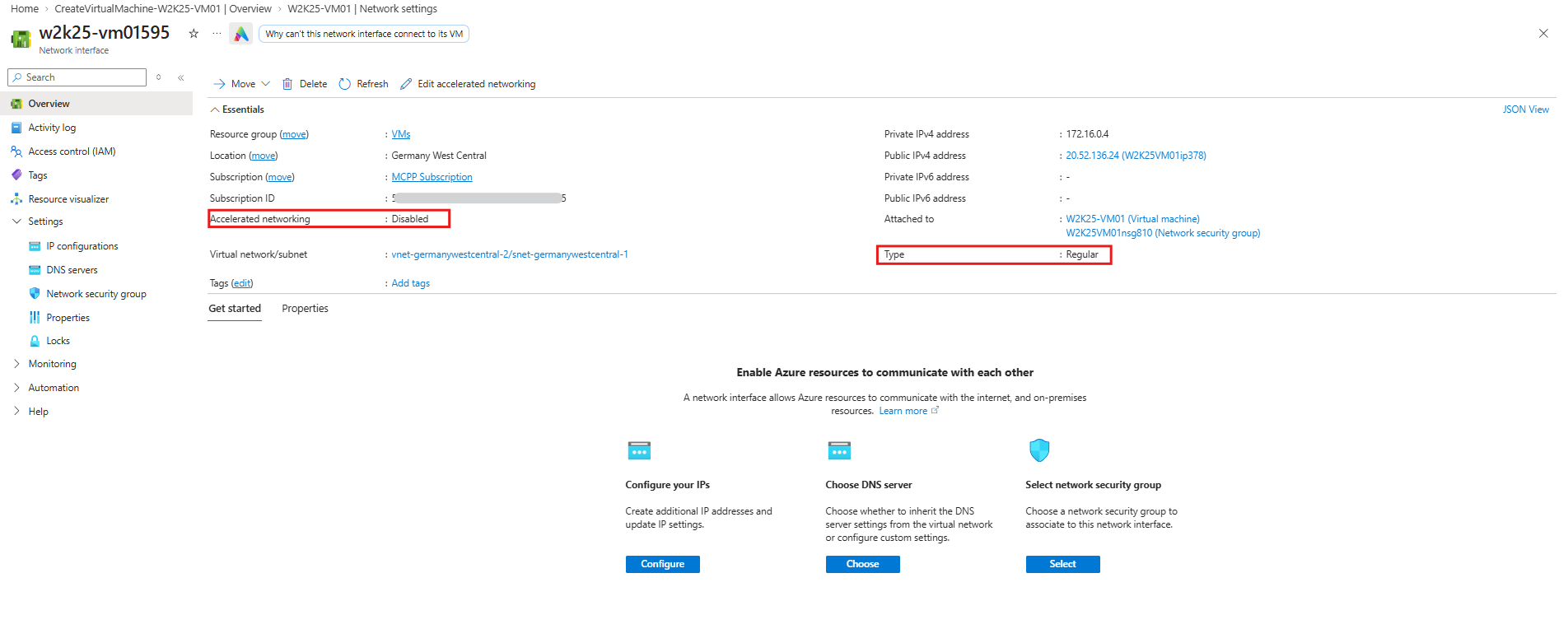
The Azure Portal confirms that Accelerated Networking is disabled for the VM’s network interface.
Consequently, the VM uses the standard synthetic Hyper-V networking path without SR-IOV hardware acceleration.
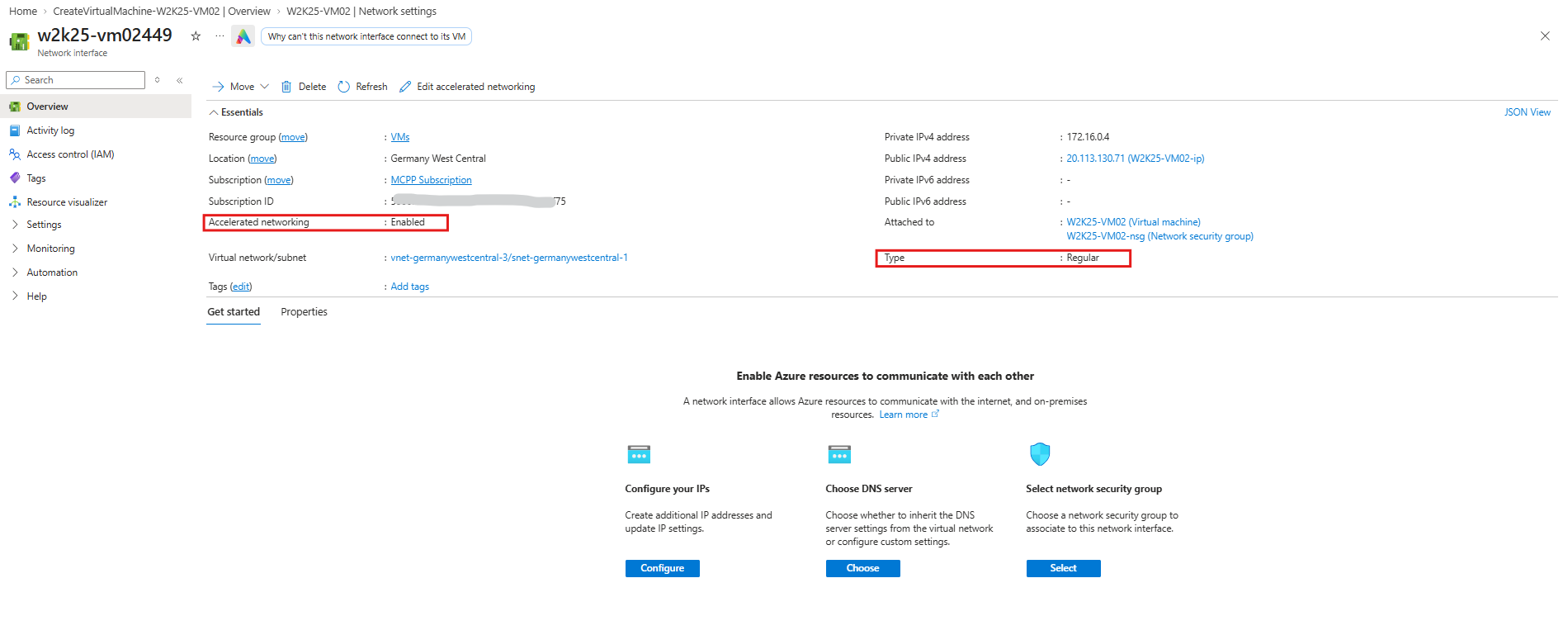
The network interface is classified as Type: Regular, which refers to the Azure NIC resource type and does not indicate whether hardware-accelerated networking is enabled or which physical adapter technology is used.
The main types are:
Regular: Standard Azure network interface used by most VMs, including those with Accelerated Networking enabled.
Elastic: Specialized network interfaces associated with Azure’s elastic networking capabilities, available only for supported VM configurations.
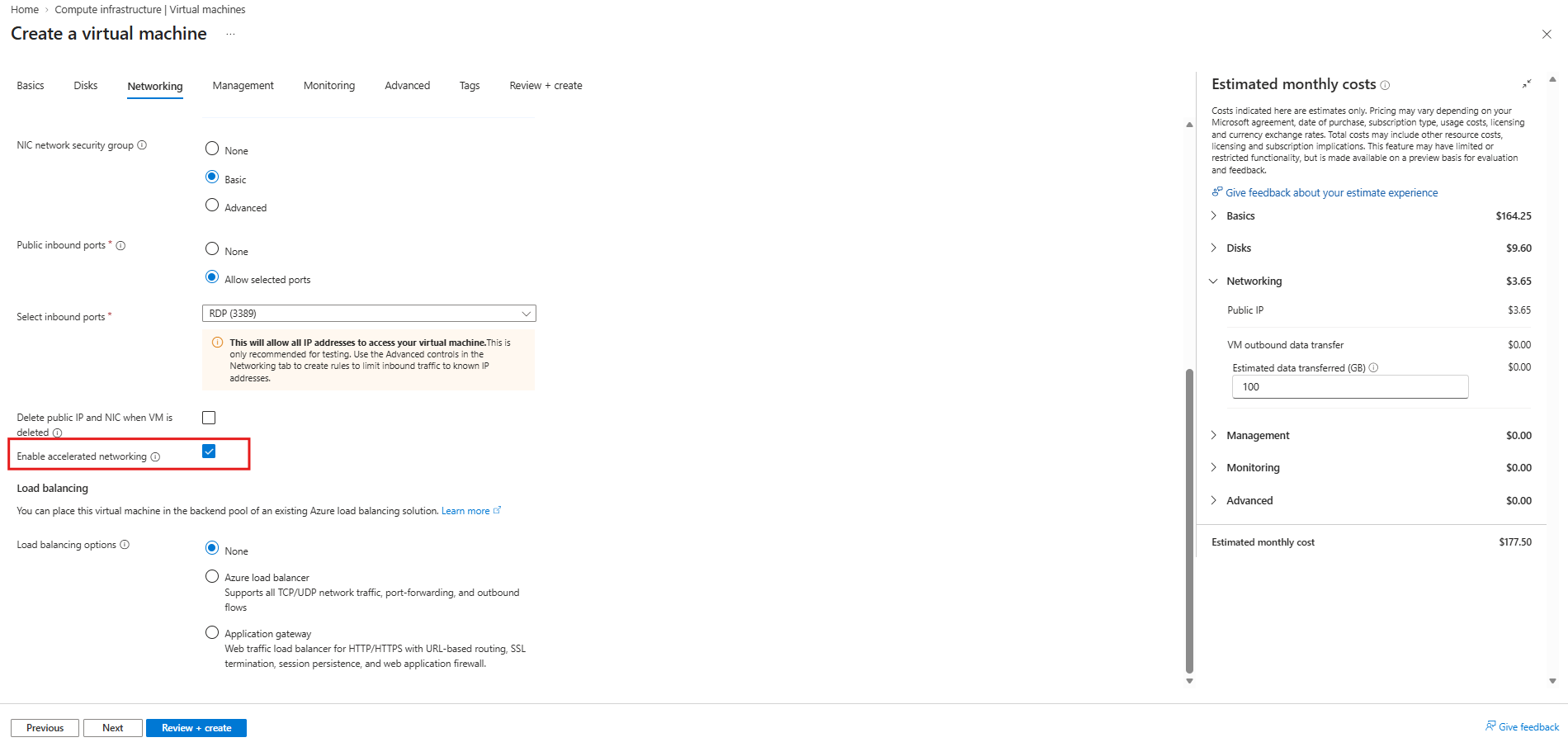
For the next test, Accelerated Networking is enabled during VM creation to determine whether Azure provides a MANA or Mellanox network adapter.
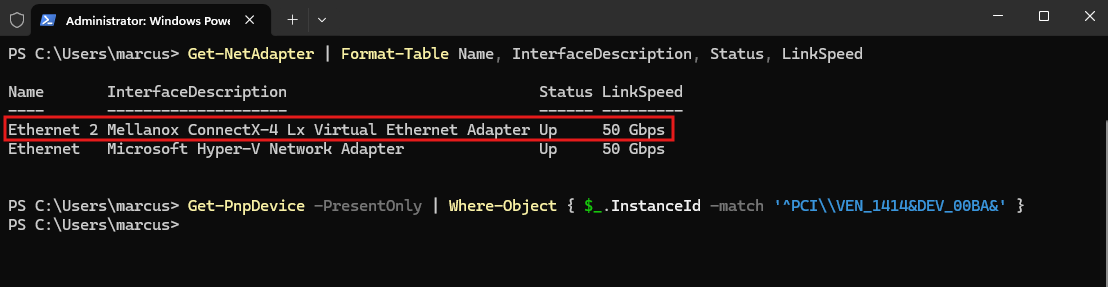
With Accelerated Networking enabled, Windows now detects an additional Mellanox ConnectX-4 Lx Virtual Ethernet Adapter alongside the standard Microsoft Hyper-V Network Adapter.
However, the MANA PCI device detection returns no results, confirming that this VM currently uses Mellanox-based SR-IOV acceleration rather than Microsoft’s MANA adapter.
Using SR-IOV (Single Root I/O Virtualization), the VM accesses a Virtual Function (VF) of the physical Mellanox network adapter on the Azure host. This allows network traffic to bypass much of the host’s software-based networking stack, offloading processing to the physical NIC to reduce CPU overhead and latency while improving throughput.
Get-NetAdapter | Format-Table Name, InterfaceDescription, Status, LinkSpeed
Get-PnpDevice -PresentOnly | Where-Object { $_.InstanceId -match '^PCI\\VEN_1414&DEV_00BA&' }
The Azure Portal now confirms that Accelerated Networking is enabled for the newly deployed Windows Server 2025 VM (WK25-VM02).
MANA-Supported
Next, we will deploy a Windows Server 2025 Datacenter: Azure Edition VM using an Intel v6 VM size, which runs on MANA-capable Azure hardware.
With Accelerated Networking enabled, we will verify whether Windows detects the Microsoft Azure Network Adapter (MANA) instead of the traditional Mellanox adapter.
For our MANA test, we select the Standard_D2s_v6 VM size, featuring 2 vCPUs and 8 GiB RAM. Unlike the previous Mellanox-based deployment, this Intel v6 VM size runs on MANA-capable Azure hardware, allowing us to verify Microsoft’s next-generation network adapter with Accelerated Networking enabled.
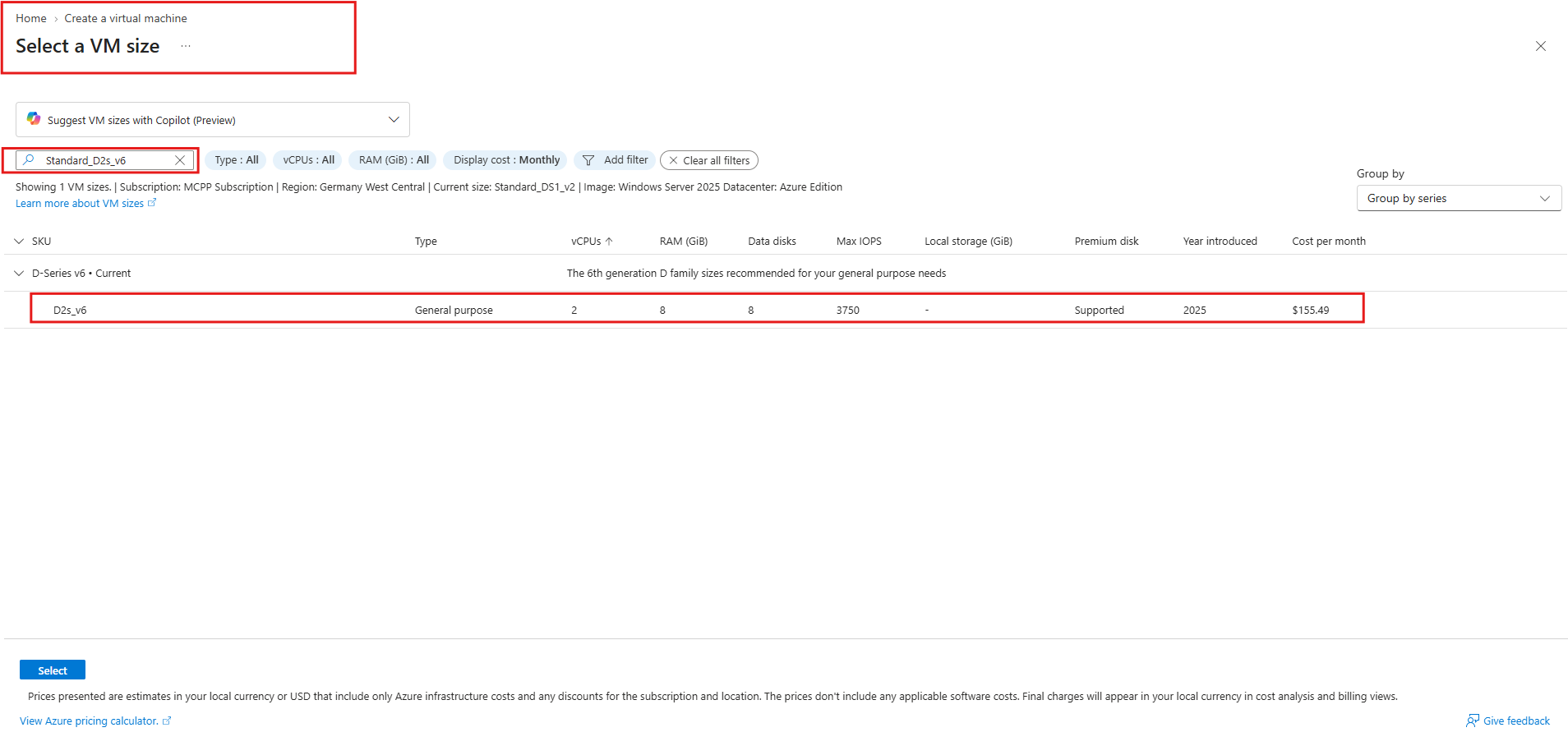
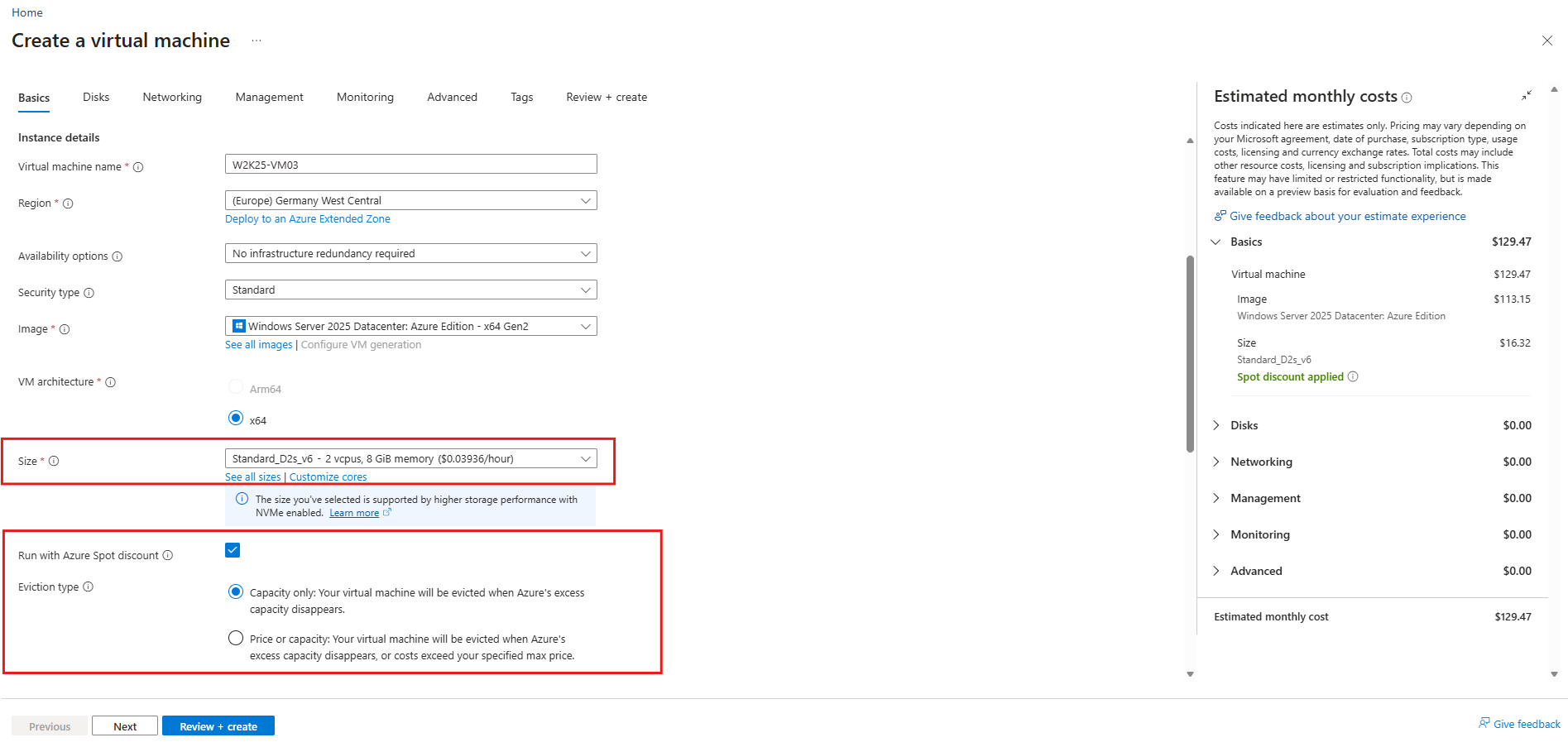
For this test, we also enable Run with Azure Spot discount, which allows us to use spare Azure compute capacity at significantly reduced costs.
This is particularly useful for temporary lab environments and helps preserve in my case my Microsoft Cloud Partner Program (MCPP) Azure credits, although Spot VMs can be evicted whenever Azure needs the capacity.
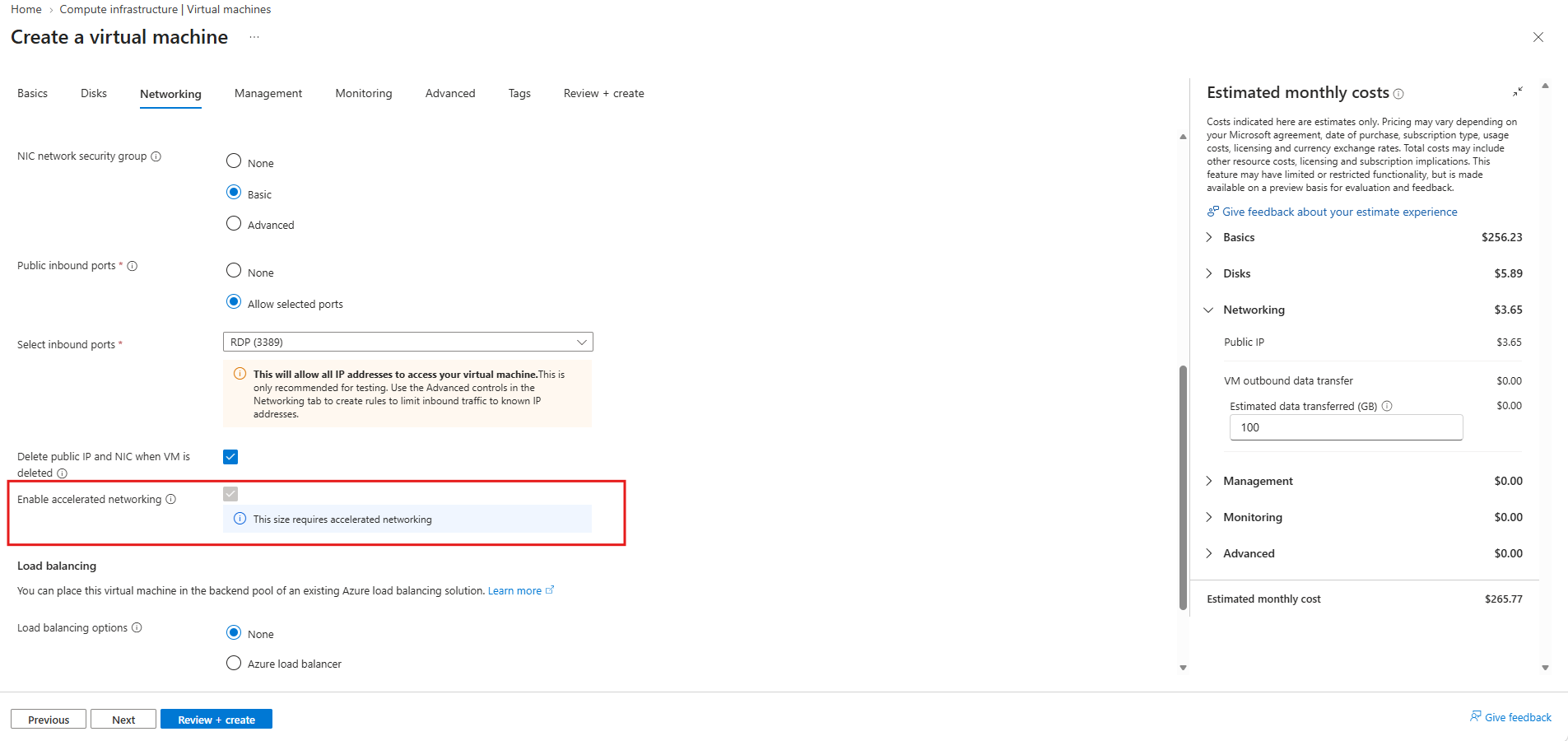
Interestingly, for the Standard_D2s_v6 VM size, Accelerated Networking is mandatory and enabled automatically during deployment.
As shown in the Azure Portal, the option is checked and cannot be disabled, ensuring that the VM uses hardware-accelerated networking.
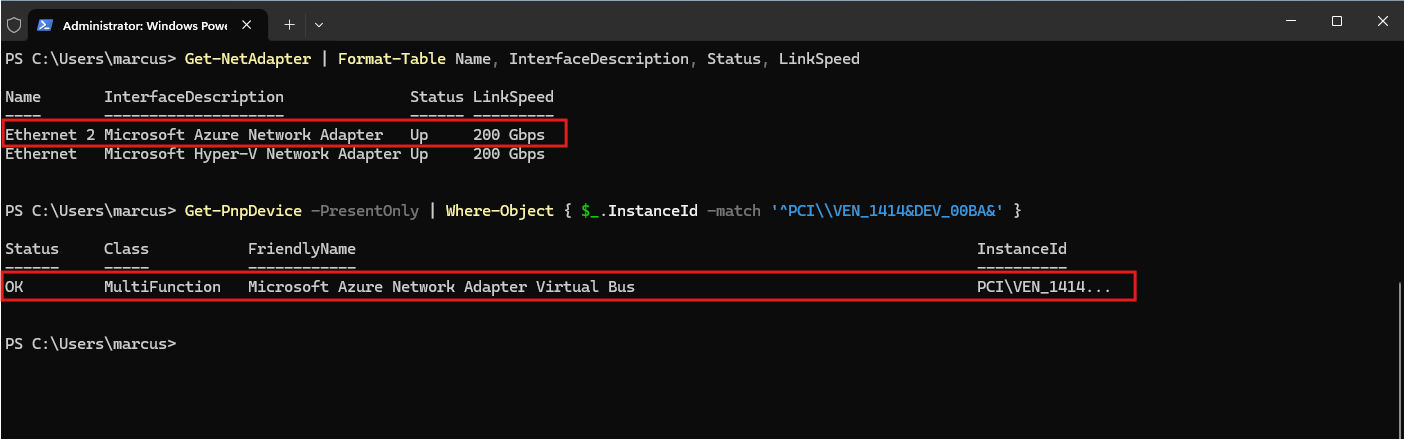
With Accelerated Networking enabled on the Standard_D2s_v6 VM, Windows detects both the Microsoft Hyper-V Network Adapter and the Microsoft Azure Network Adapter (MANA).
The Hyper-V adapter provides the synthetic networking path and fallback connectivity, while MANA uses an SR-IOV Virtual Function to accelerate network traffic directly through the underlying Azure host hardware, reducing CPU overhead and latency.
Get-NetAdapter | Format-Table Name, InterfaceDescription, Status, LinkSpeed
Get-PnpDevice -PresentOnly | Where-Object { $_.InstanceId -match '^PCI\\VEN_1414&DEV_00BA&' }
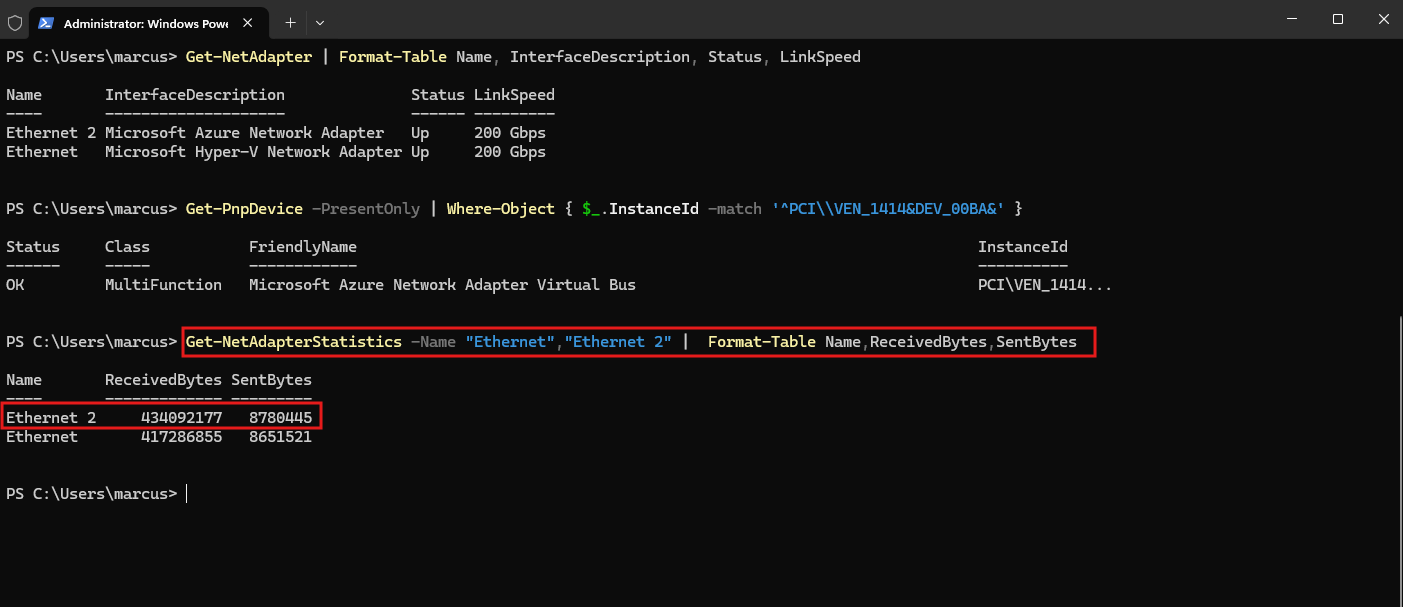
The network statistics show that both the Microsoft Azure Network Adapter (MANA) and the Microsoft Hyper-V Network Adapter report received and transmitted traffic.
This is consistent with the SR-IOV architecture, where MANA provides the hardware-accelerated data path while the synthetic Hyper-V adapter remains available for networking integration and fallback; the counters should not be interpreted as independent traffic totals.
Get-NetAdapterStatistics -Name "Ethernet","Ethernet 2" | Format-Table Name,ReceivedBytes,SentBytes
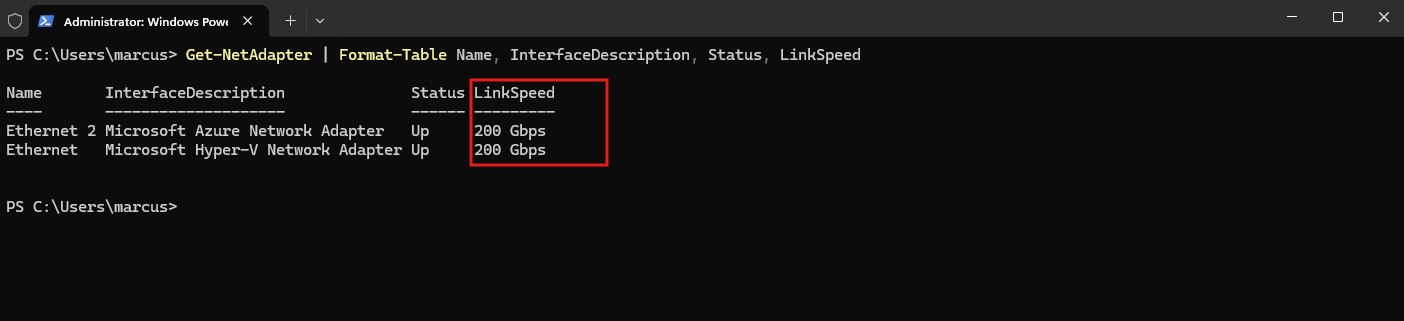
Interestingly, our tests showed reported link speeds of 100 Gbps without Accelerated Networking, 50 Gbps with Mellanox ConnectX-4 Lx, and 200 Gbps with MANA.
Microsoft’s official documentation also demonstrates 200 Gbps for MANA-based virtual adapters, but these values do not represent the actual available bandwidth; Azure enforces network performance limits according to the selected VM size, regardless of the link speed reported by Windows.
Source: https://learn.microsoft.com/en-us/azure/virtual-network/virtual-machine-network-throughput
Get-NetAdapter | Format-Table Name, InterfaceDescription, Status, LinkSpeed
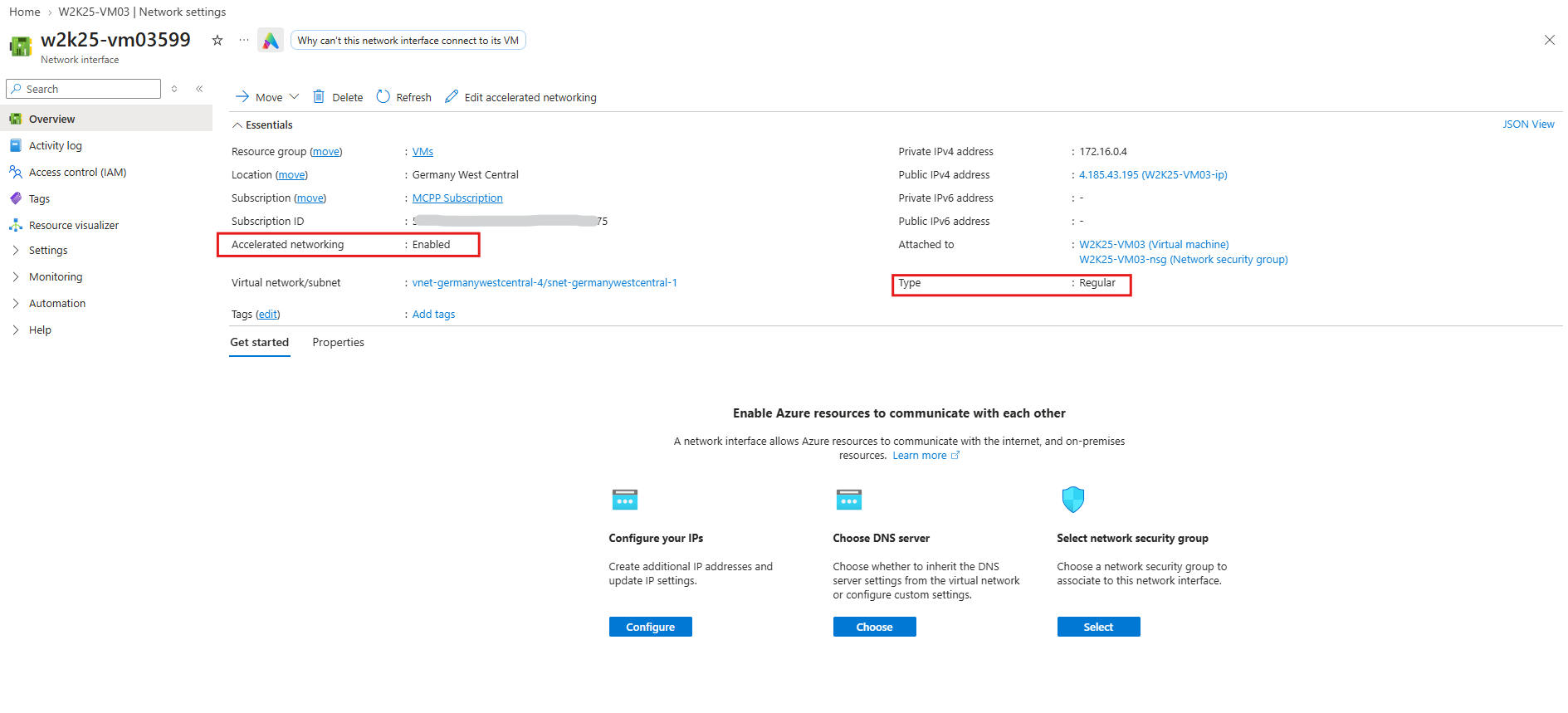
As with our previous Mellanox-based VM, the Azure Portal only confirms that Accelerated Networking is enabled and the network interface is classified as Type: Regular.
It does not indicate whether the VM actually uses MANA or Mellanox, which must be verified from within the guest operating system.
Why does Windows show two network adapters?
With MANA-based Accelerated Networking enabled, Windows detects both the Microsoft Hyper-V Network Adapter and the Microsoft Azure Network Adapter (MANA).
Although both belong to the same logical network connection, they provide different data paths: the synthetic Hyper-V adapter maintains connectivity and provides fallback functionality, while the MANA Virtual Function handles hardware-accelerated network traffic through SR-IOV.
The important distinction is that the Hyper-V adapter does not necessarily forward all traffic through MANA.
Instead, Azure uses a mechanism called Virtual Function association, supported by the Windows networking stack.
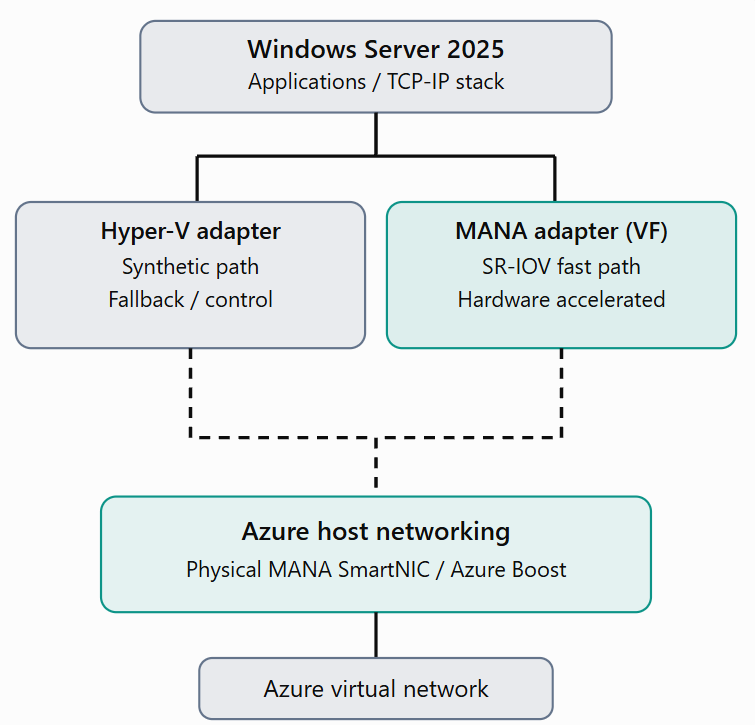
Conceptual data paths: normal accelerated traffic uses the MANA VF; the synthetic path remains available for fallback and platform operations.
Verifying MANA on Ubuntu Linux
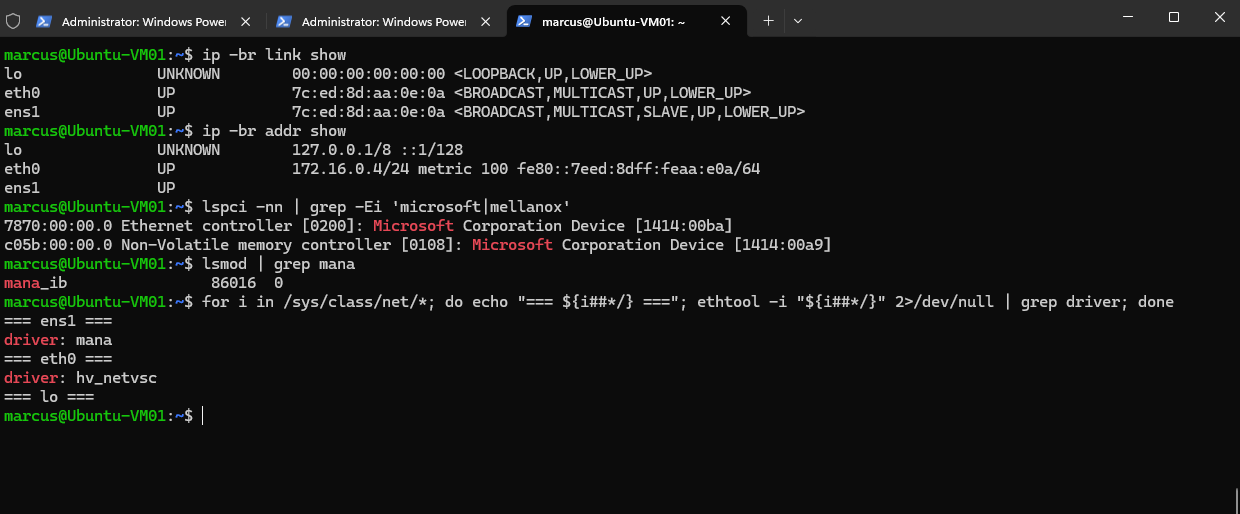
To verify MANA support on Linux, we use an Ubuntu Azure VM with Accelerated Networking enabled.
The following commands identify the available network interfaces, detect the MANA PCI device, and determine which kernel drivers are used.
The output confirms that Ubuntu detects the Microsoft MANA PCI device (1414:00ba) and has the mana kernel module loaded.
The accelerated interface ens1 uses the
manadriver, while eth0 uses thehv_netvscdriver for synthetic Hyper-V networking, confirming that both network paths are available.
ip -br link show
ip -br addr show
lspci -nn | grep -Ei 'microsoft|mellanox'
lsmod | grep mana

for i in /sys/class/net/*; do echo "=== ${i##*/} ==="; ethtool -i "${i##*/}" 2>/dev/null | grep driver; done
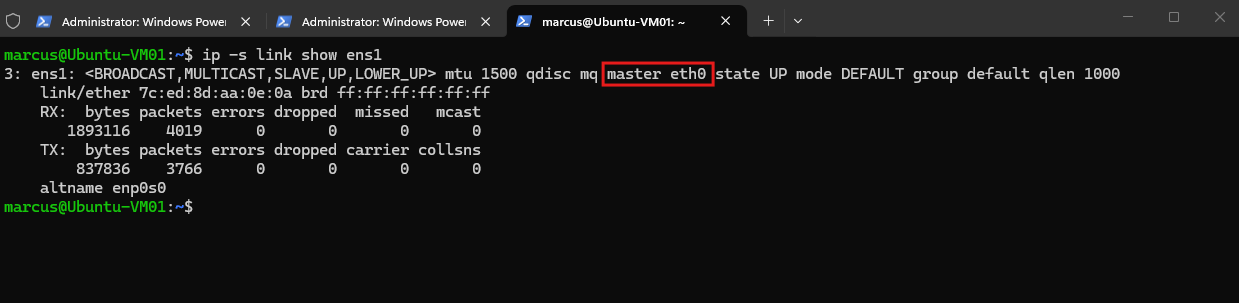
The output confirms that the MANA interface (ens1) is actively processing network traffic, with received and transmitted packets recorded and no errors or dropped packets.
The
master eth0relationship also shows how the MANA Virtual Function is associated with the synthetic Hyper-V network adapter, providing hardware-accelerated networking while retaining the synthetic networking path for fallback.
ip -s link show ens1
Conclusion
Microsoft Azure Network Adapter represents another step toward hardware-accelerated networking in Azure.
Although MANA is designed to improve networking performance and efficiency, its introduction also highlights an important consideration: changes to the underlying cloud infrastructure can affect existing virtual machines and virtual appliances, even without changes to their application configuration.
Understanding which network adapter an Azure VM uses, how Accelerated Networking works, and whether the operating system supports MANA is therefore useful when troubleshooting networking performance or planning infrastructure upgrades.
Links
Windows VMs with the Microsoft Azure Network Adapter
https://learn.microsoft.com/en-us/azure/virtual-network/accelerated-networking-mana-windowsManage accelerated networking for Azure Virtual Machines
https://learn.microsoft.com/en-us/azure/virtual-network/manage-accelerated-networkingMANA support for existing VM series
https://learn.microsoft.com/en-us/azure/virtual-network/accelerated-networking-mana-existing-sizesLinux VMs with the Microsoft Azure Network Adapter
https://learn.microsoft.com/en-us/azure/virtual-network/accelerated-networking-mana-linuxWindows VMs with the Microsoft Azure Network Adapter
https://learn.microsoft.com/en-us/azure/virtual-network/accelerated-networking-mana-windowsVirtual machine network bandwidth
https://learn.microsoft.com/en-us/azure/virtual-network/virtual-machine-network-throughputMicrosoft Azure Network Adapter overview
https://learn.microsoft.com/en-us/azure/virtual-network/accelerated-networking-mana-overviewDoes Microsoft Azure Network Adapter (MANA) affect the NetApp Console?
https://kb.netapp.com/Cloud/ncds/nc/ag/ag_kbs/Does_Microsoft_Azure_Network_Adapter_(MANA)_affect_the_NetApp_Console%3FMicrosoft Azure Boost
https://learn.microsoft.com/en-us/azure/azure-boost/overviewMANA support for Network Virtual Appliances (NVAs)
https://learn.microsoft.com/en-us/azure/virtual-network/accelerated-networking-mana-network-virtual-appliance-opt-out