Modern Azure Deployments with Terraform & GitHub – Part 7 – Securing Azure Authentication with OIDC Federated Credentials
In the previous parts of this series, we built a complete Terraform CI/CD pipeline using GitHub Actions and Microsoft Azure, including automated deployments, environment approvals, and infrastructure drift detection.
Until now, our GitHub Actions workflows have authenticated to Azure using a Microsoft Entra ID service principal with a client secret stored in GitHub Secrets. While this approach works reliably, it requires managing and rotating long-lived credentials and introduces the risk of secret exposure.
In Part 6, we already introduced OpenID Connect (OIDC) federated credentials to authenticate GitHub Actions against Microsoft Graph for our custom drift detection email notifications, eliminating the need for a client secret in that authentication flow.
In this part we will replace client-secret authentication with OpenID Connect (OIDC) federated credentials, allowing GitHub Actions to authenticate securely to Microsoft Azure using short-lived tokens without storing Azure client secrets.
We will keep our existing Terraform infrastructure, service principal, and GitHub Actions workflows, modifying only the authentication configuration to demonstrate how an existing CI/CD pipeline can be migrated to a more secure, secretless authentication model.
- Understanding OIDC Federated Credentials
- Configure Federated Identity Credentials in Microsoft Entra ID
- Update GitHub Actions to Use OIDC Authentication
- Configure OIDC for the Pull Request Validation Service Principal
- Update and Commit the Terraform Workflow
- Troubleshooting OIDC Authentication for Pull Request Validation
- Links
Understanding OIDC Federated Credentials
Traditionally, GitHub Actions authenticates to Microsoft Azure using a Microsoft Entra ID service principal with a client secret stored in GitHub Secrets.
With OpenID Connect (OIDC) federation, GitHub Actions instead requests a short-lived OIDC token from GitHub’s identity provider. Microsoft Entra ID validates this token against the configured federated identity credential and issues an Azure access token.
This eliminates the need to store and rotate long-lived client secrets.
The existing service principal and its Azure RBAC permissions remain unchanged. Only the authentication method changes.
Both approaches use OAuth 2.0 to obtain Azure access tokens. However, instead of authenticating with a stored client secret,
OIDC federationuses a short-lived, cryptographically signed identity token issued by GitHub.
In the following steps, we will configure OIDC federation for our existing sp-terraform-github application and update our GitHub Actions workflows accordingly.
Configure Federated Identity Credentials in Microsoft Entra ID
We will reuse our existing sp-terraform-github application registration. No additional service principal or Azure RBAC assignments are required.
In the Azure portal, navigate to:
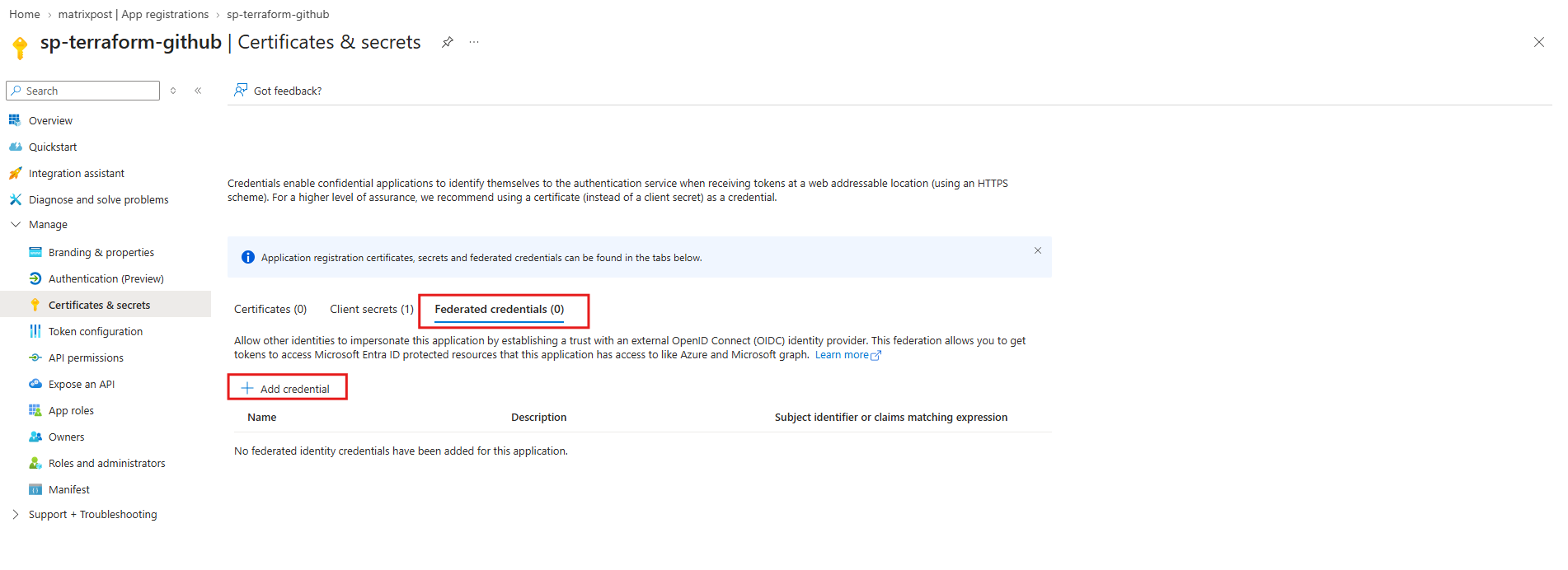
Microsoft Entra ID → App registrations → sp-terraform-github → Certificates & secrets → Federated credentials → Add credential
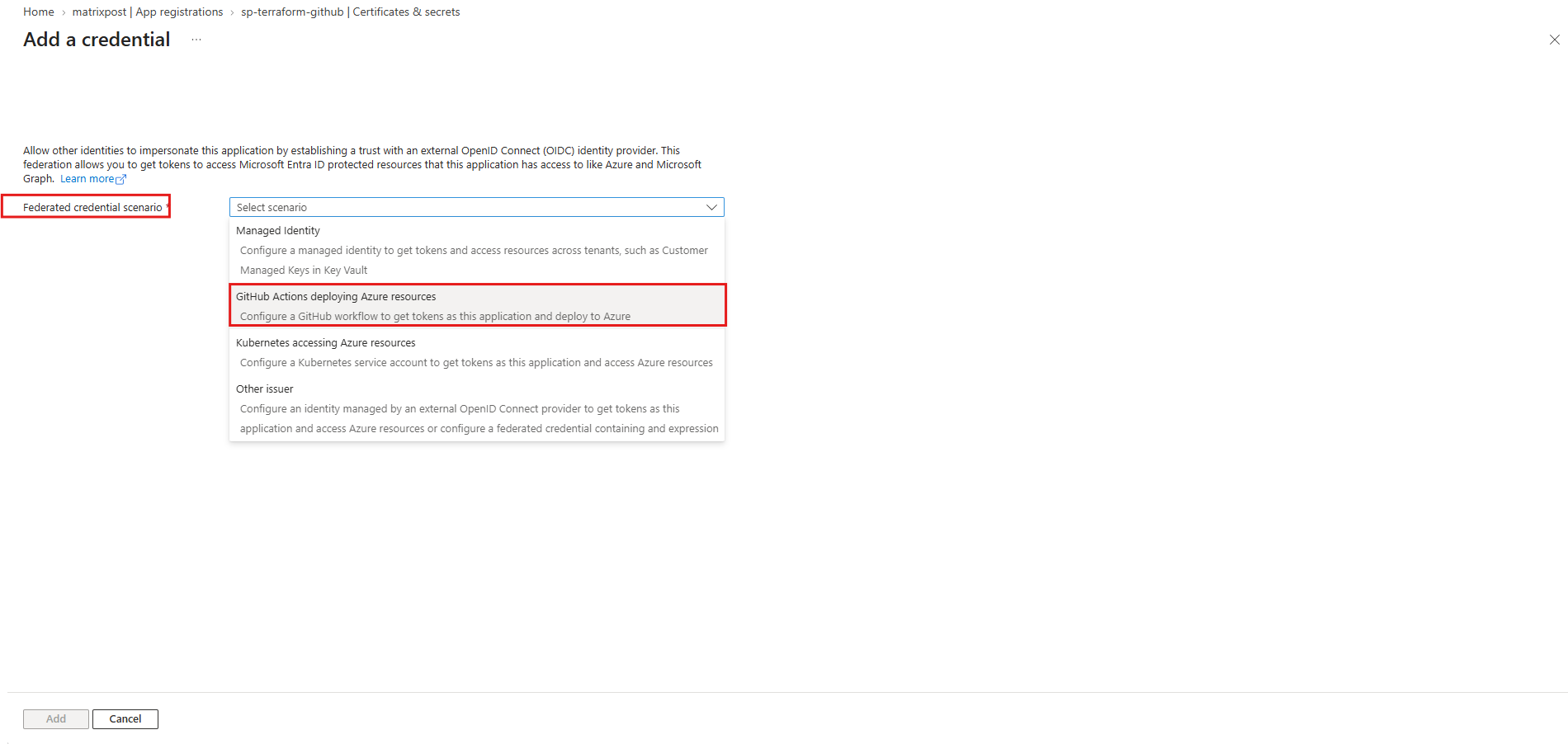
We need to select GitHub Actions deploying Azure resources and configure the credential as shown below:
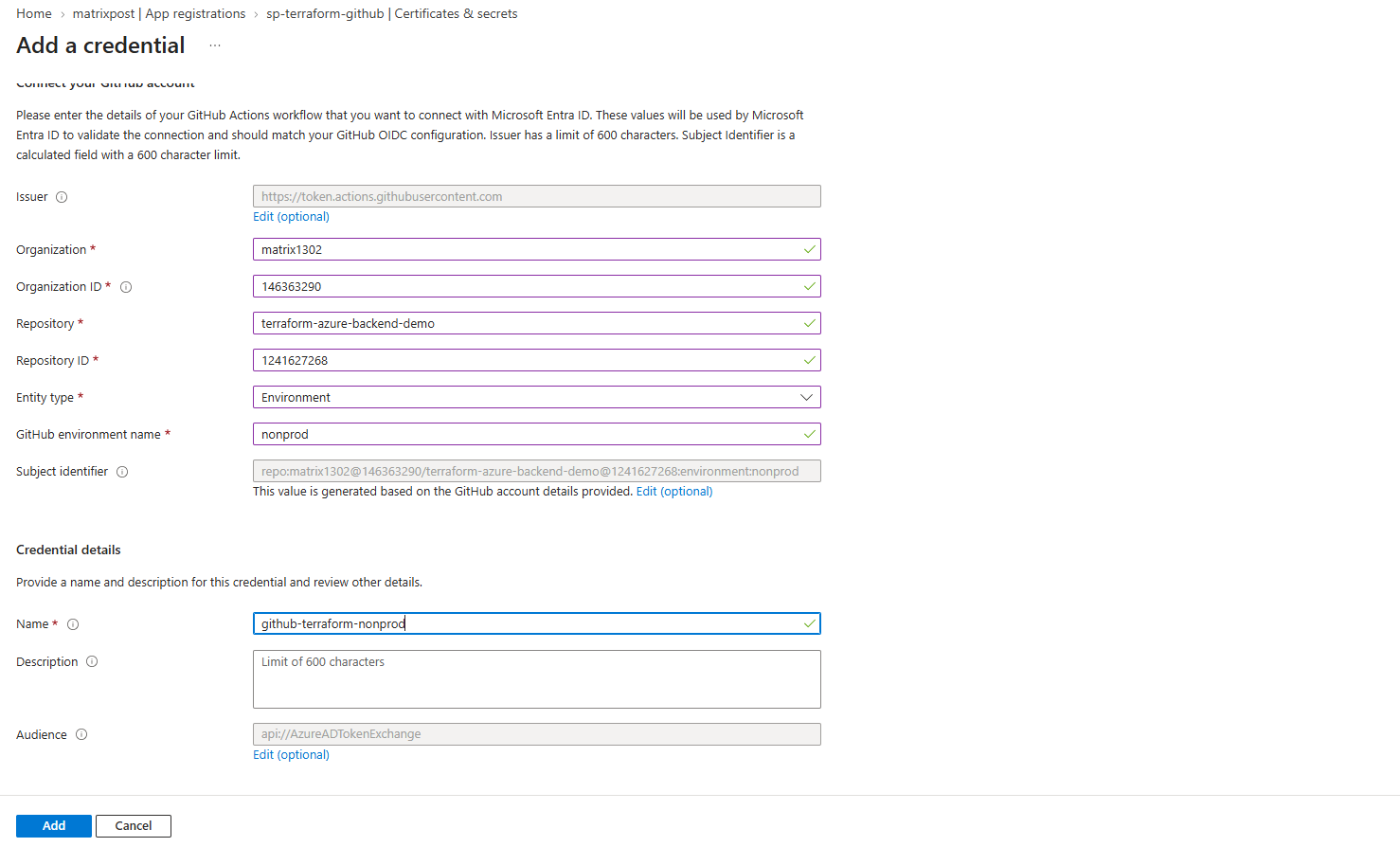
Create finally two for Non-production environment and production environment.
The required GitHub Organization ID and Repository ID can be retrieved using the GitHub REST API.
Open
https://api.github.com/users/matrix1302to obtain the account ID andhttps://api.github.com/repos/matrix1302/terraform-azure-backend-demoto retrieve the repository ID. In both JSON responses, look for the top-levelidproperty.
| Setting | Non-production | Production |
|---|---|---|
| Organization | matrix1302 | matrix1302 |
| Organization ID | 146363290 | 146363290 |
| Repository | terraform-azure-backend-demo | terraform-azure-backend-demo |
| Repository ID | 1241627268 | 1241627268 |
| Entity type | Environment | Environment |
| GitHub environment | nonprod | production |
| Name | github-terraform-nonprod | github-terraform-production |
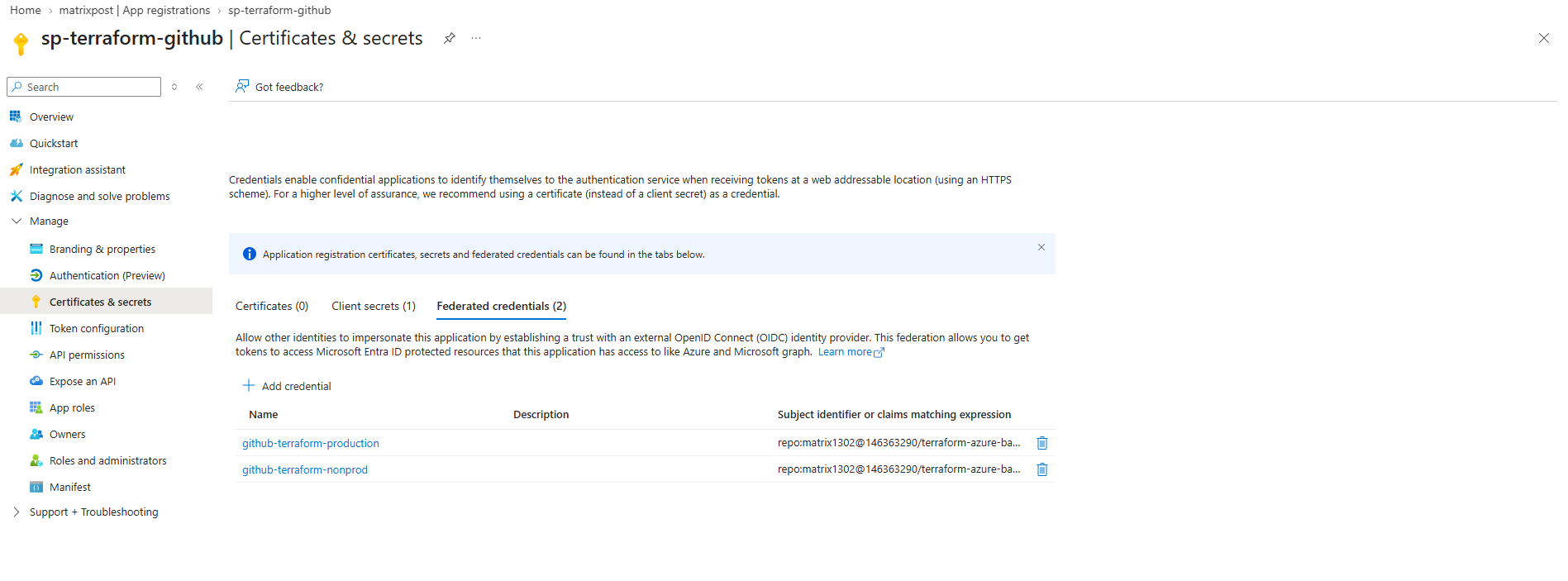
Both federated identity credentials are now configured for our existing sp-terraform-github application, covering the production and nonprod GitHub environments.
The existing client secret remains in place until we have successfully tested OIDC authentication in our GitHub Actions workflows.
Update GitHub Actions to Use OIDC Authentication
With both federated identity credentials configured in Microsoft Entra ID, we can now update our existing GitHub Actions workflows to authenticate using OIDC instead of a client secret.
We will first apply these changes to our develop branch to verify that OIDC authentication works correctly before promoting the updated workflow to the test and main branches through our existing pull request process.
First, ensure the workflow has the following permissions:
The
id-token: writepermission allows GitHub Actions to request a short-lived OIDC token from GitHub’s identity provider.
permissions:
  id-token: write
  contents: read
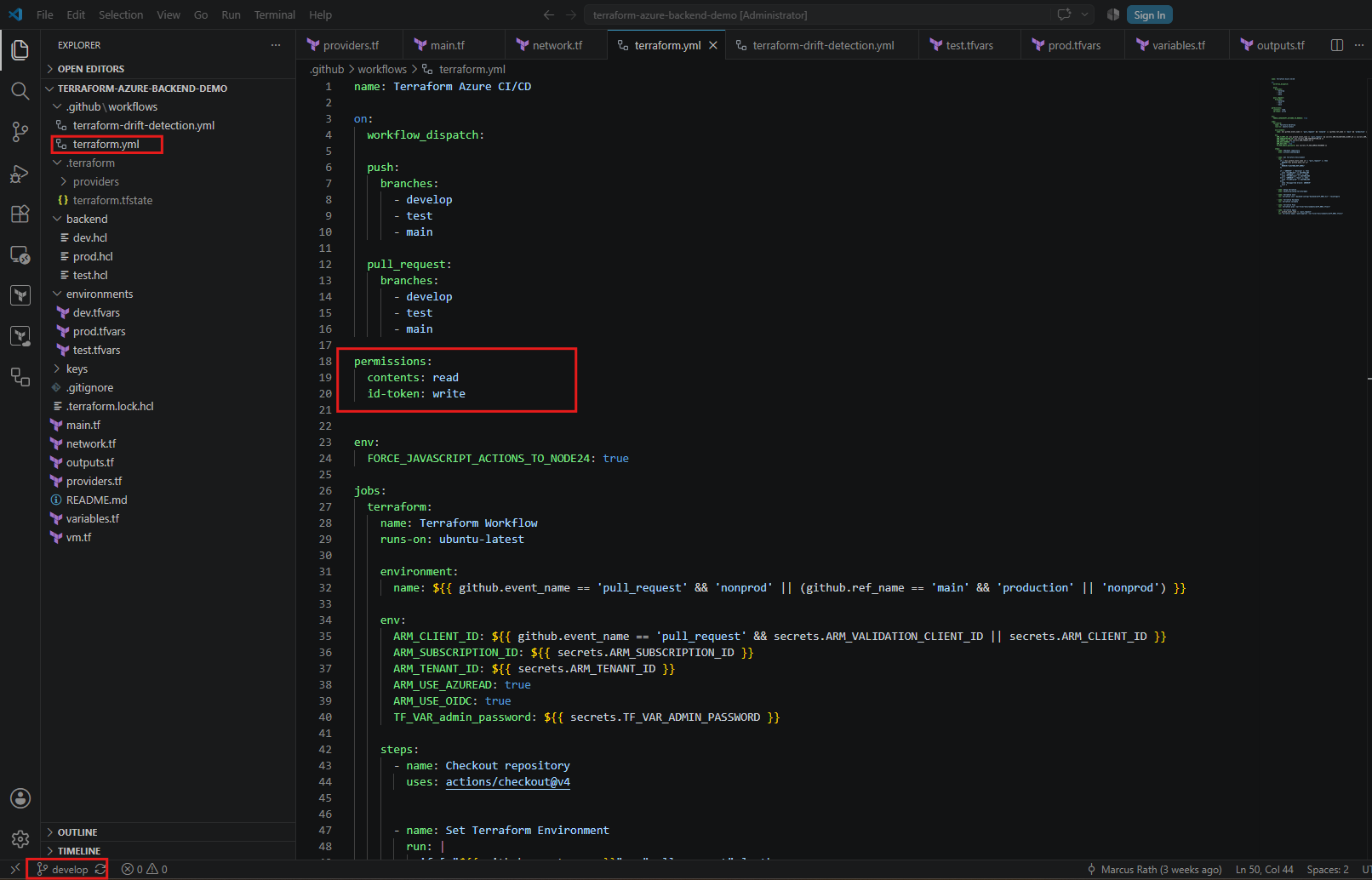
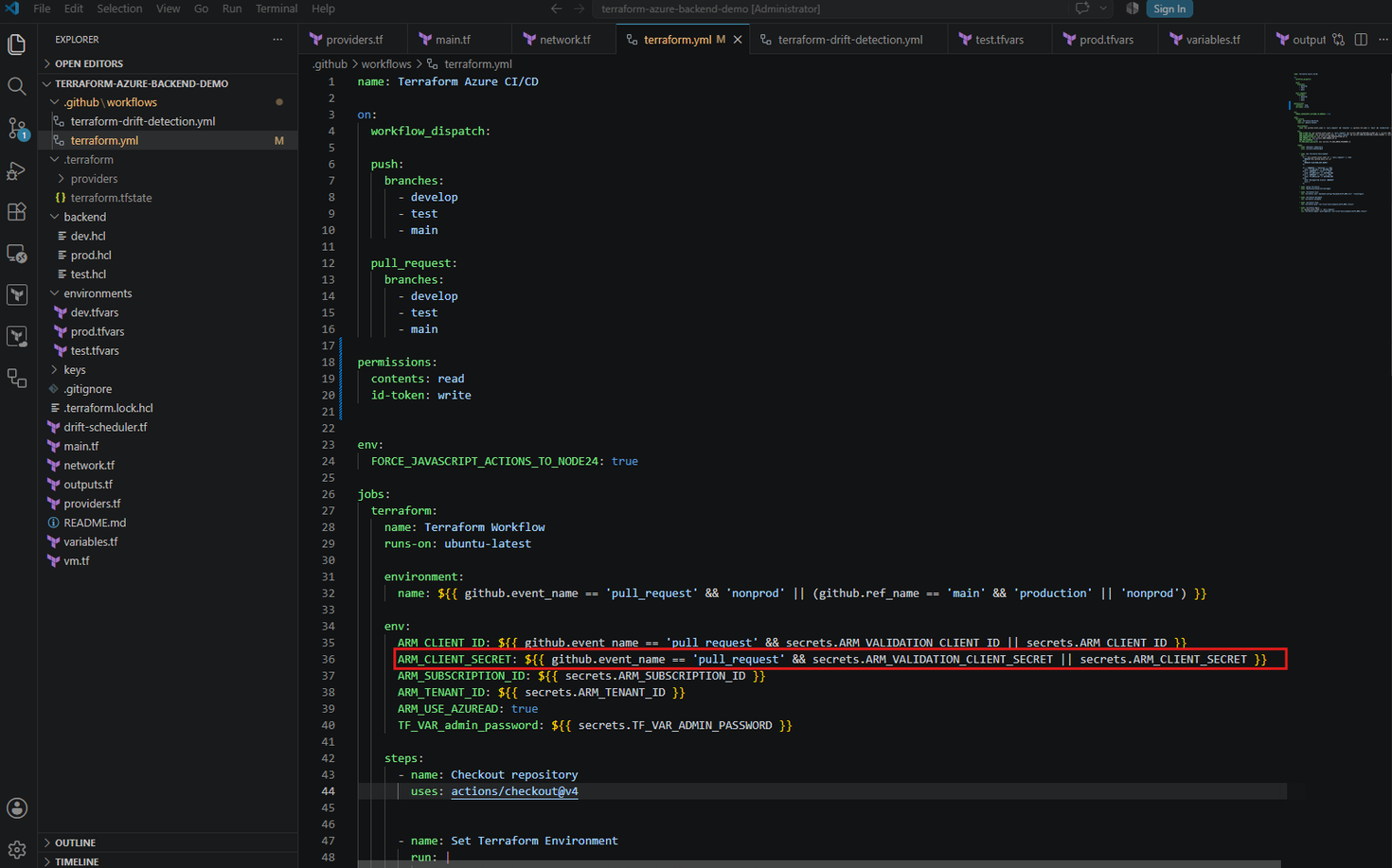
Next, we need to remove this line:
ARM_CLIENT_SECRET: ${{ github.event_name == 'pull_request' && secrets.ARM_VALIDATION_CLIENT_SECRET || secrets.ARM_CLIENT_SECRET }}
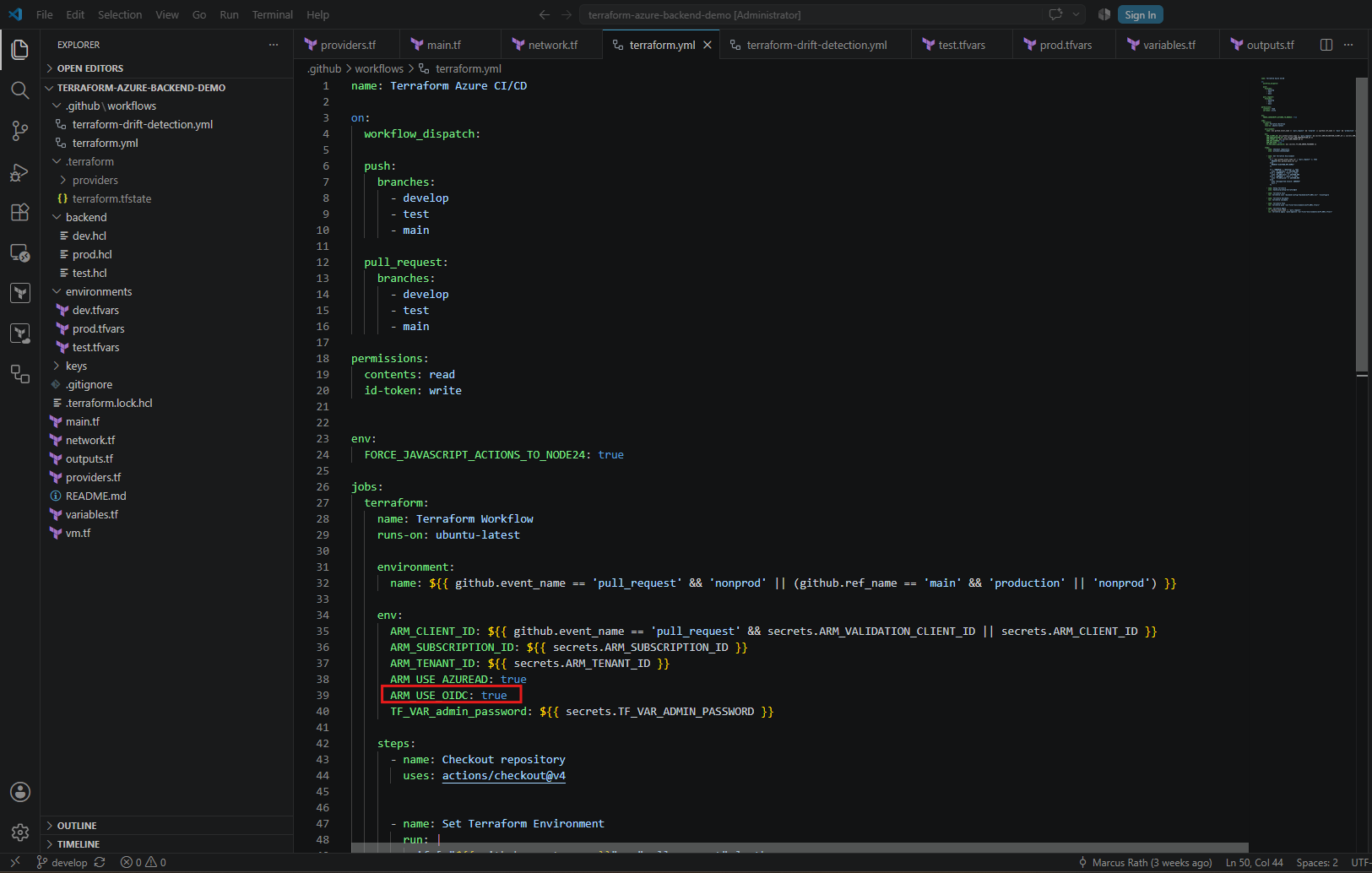
Then add this line below ARM_USE_AZUREAD: true.
ARM_USE_OIDC: true
Terraform’s AzureRM provider and AzureRM backend support OIDC authentication natively, so no additional azure/login action is required.
Our existing service principal, Azure RBAC assignments, and Terraform deployment configuration remain unchanged.
Configure OIDC for the Pull Request Validation Service Principal
Our existing GitHub Actions workflow uses a separate Microsoft Entra ID application, sp-terraform-github-validation, for pull request validation.
Since this application also needs to authenticate using OIDC, we must configure an additional federated identity credential.
Navigate to Microsoft Entra ID → App registrations → sp-terraform-github-validation → Certificates & secrets → Federated credentials → Add credential.
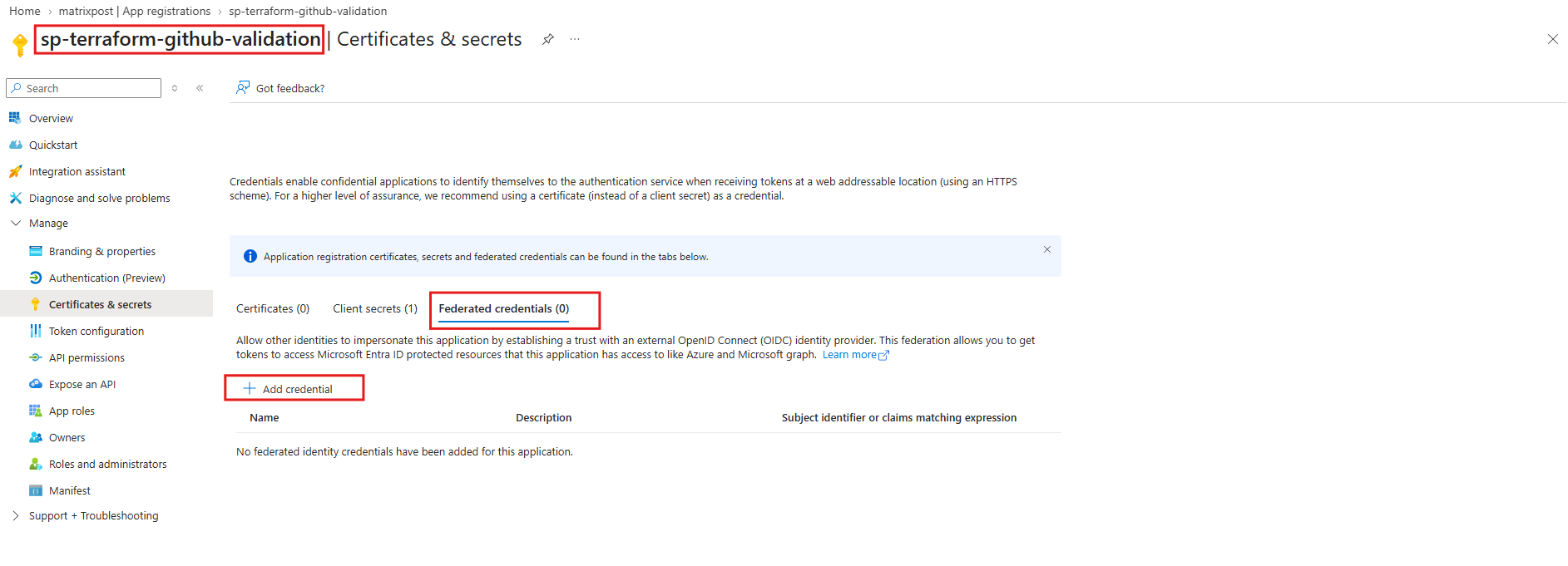
Select GitHub Actions deploying Azure resources and configure the following settings:
| Setting | Value |
|---|---|
| Organization | matrix1302 |
| Organization ID | 146363290 |
| Repository | terraform-azure-backend-demo |
| Repository ID | 1241627268 |
| Entity type | Environment |
| GitHub environment | nonprod |
| Name | github-terraform-validation |
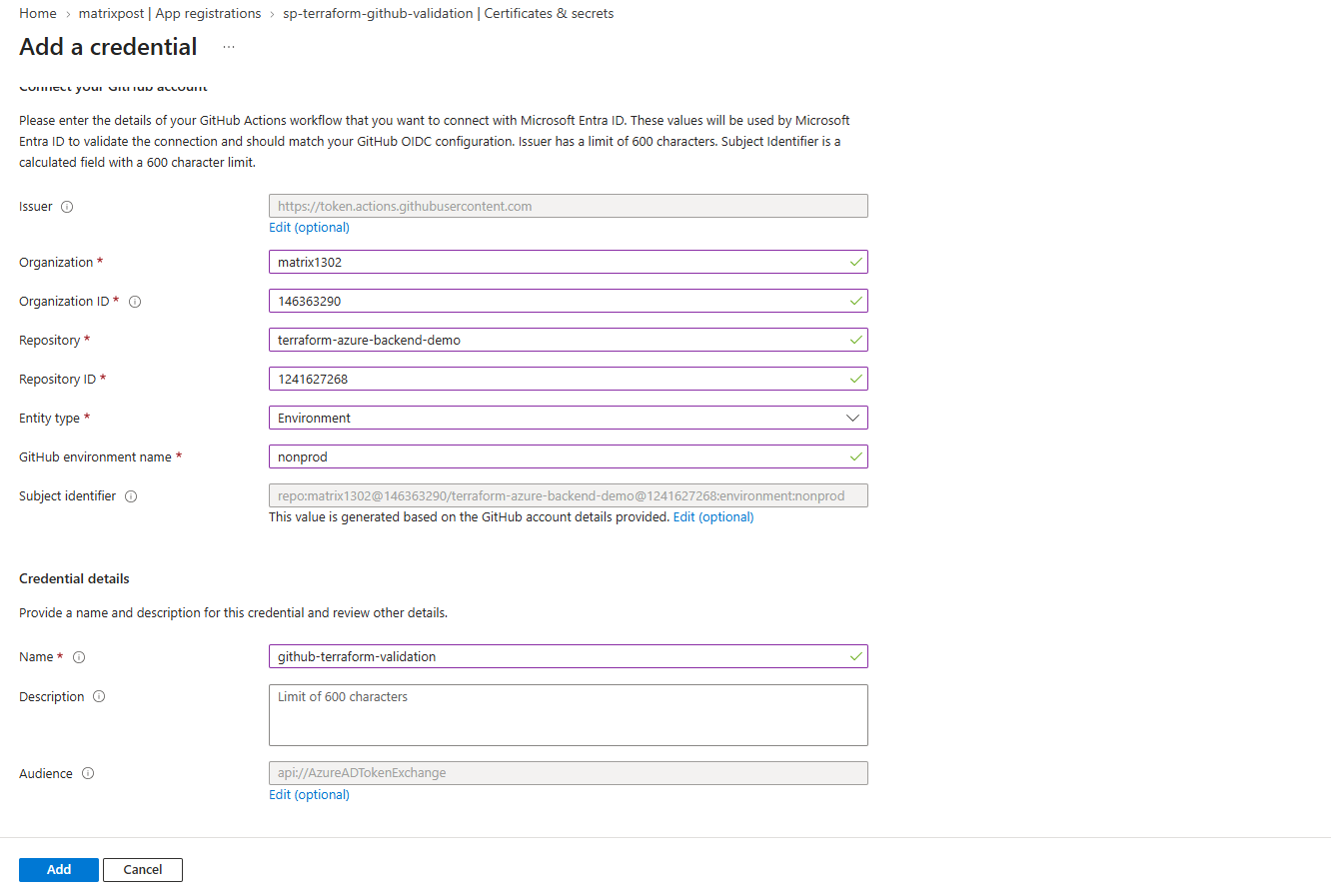
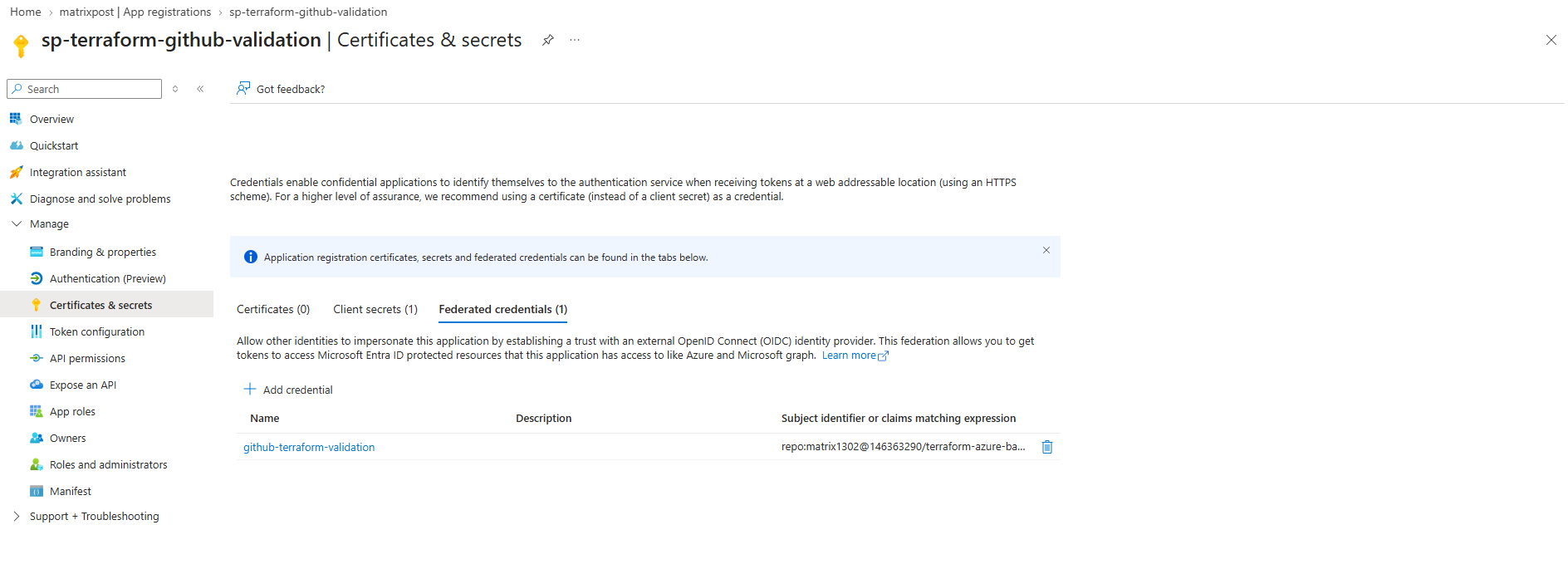
This time only one federated credential is required for this application because all our pull request validation jobs use the
nonprodGitHub environment, regardless of the target branch.
The validation service principal retains its existing Azure RBAC permissions, ensuring that pull request workflows can continue validating Terraform configurations without requiring deployment permissions.
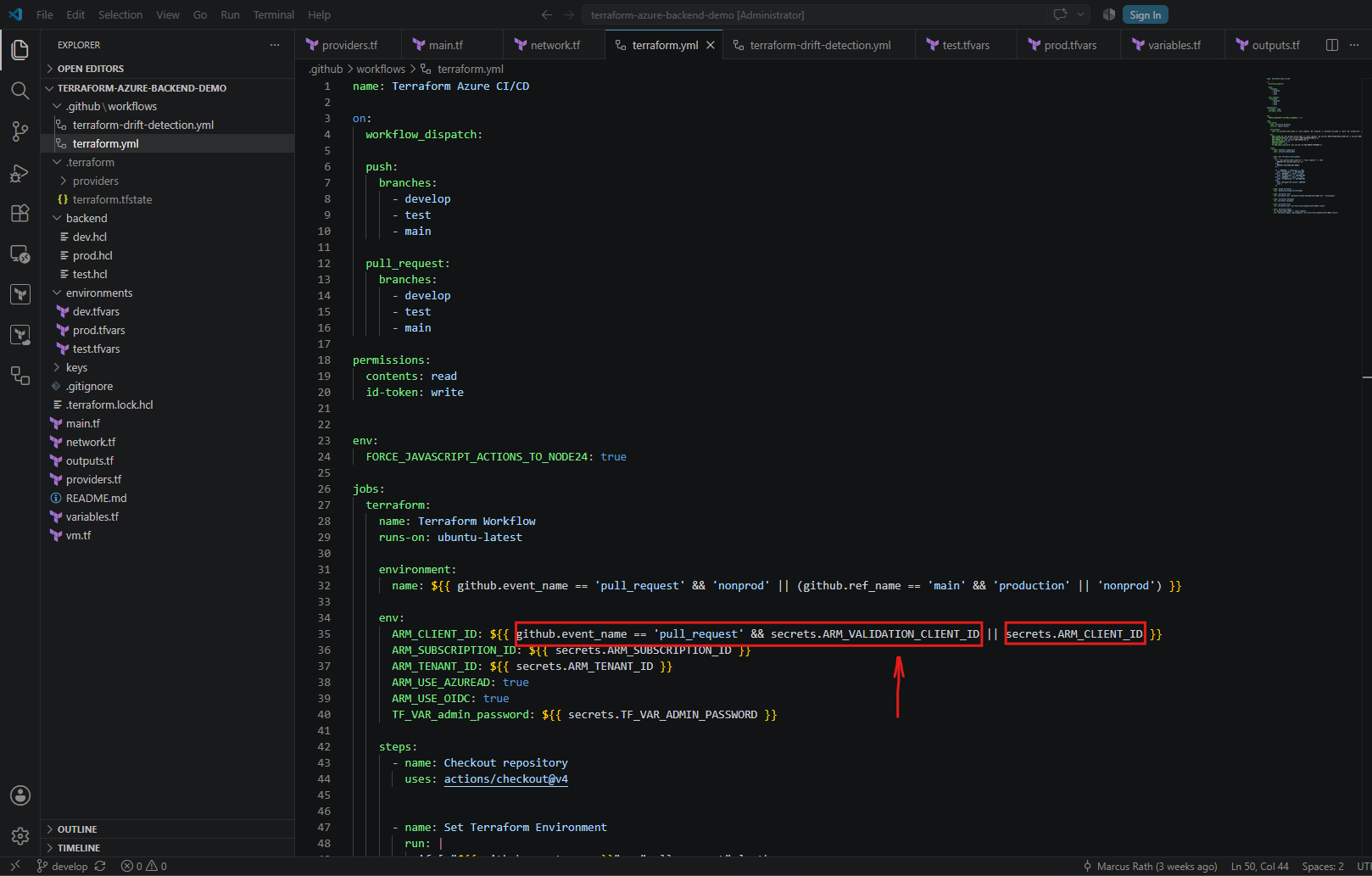
Our existing GitHub Actions workflow automatically selects the appropriate Microsoft Entra ID service principal depending on the event type.
Pull requests use the dedicated validation service principal, while regular push deployments use the deployment service principal.
With
ARM_USE_OIDC: true, Terraform authenticates both identities using OIDC federation. Microsoft Entra ID automatically matches the GitHub-issued token against the federated credentials configured for the selected application, without requiring any additional Terraform configuration.
Update and Commit the Terraform Workflow
Next, we commit and push the updated workflow to our develop branch:
git switch develop
git add .github/workflows/terraform.yml
git commit -m "Switch Terraform Azure authentication to OIDC federation"
git push origin develop
This triggers our existing GitHub Actions pipeline. We can verify that terraform init, terraform validate, and terraform plan complete successfully using OIDC authentication instead of a stored client secret.
To check the execution we can run:
gh run list --workflow terraform.yml --branch develop --limit 3

After committing and pushing the updated workflow to our develop branch, GitHub Actions automatically triggered the Terraform CI/CD pipeline.
The workflow completed successfully using OIDC federated authentication, confirming that our existing Terraform deployment pipeline works without storing an Azure client secret.
Promote the OIDC Configuration to Test and Production
After successfully verifying OIDC authentication in our develop environment, we will promote the changes through our existing branch workflow:
develop → test → main
This time, instead of creating pull requests through the GitHub web interface, we will use the GitHub CLI (gh) directly from PowerShell.
If the GitHub CLI (
gh) is not already installed, we can install it on Windows usingwinget install --id GitHub.cli, then authenticate with your GitHub account by runninggh auth login.
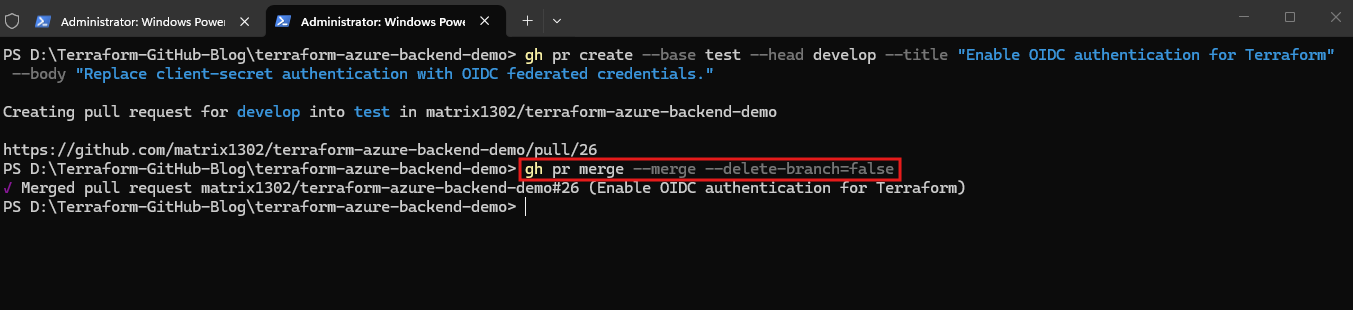
First, we create a pull request from develop into test:
gh pr create --base test --head develop --title "Enable OIDC authentication for Terraform" --body "Replace client-secret authentication with OIDC federated credentials."

After successful validation, we merge the pull request:
gh pr merge --merge --delete-branch=false
Finally, we create a pull request from test into main:
gh pr create --base main --head test --title "Enable OIDC authentication in production" --body "Promote the successfully tested OIDC authentication configuration to production."

Once validation succeeds, we merge the pull request:
gh pr merge 27 --merge --delete-branch=false
Troubleshooting OIDC Authentication for Pull Request Validation
During my initial pull request validation, I encountered the Microsoft Entra ID error AADSTS70025, because I had forgotten to configure a federated identity credential for the separate sp-terraform-github-validation application.
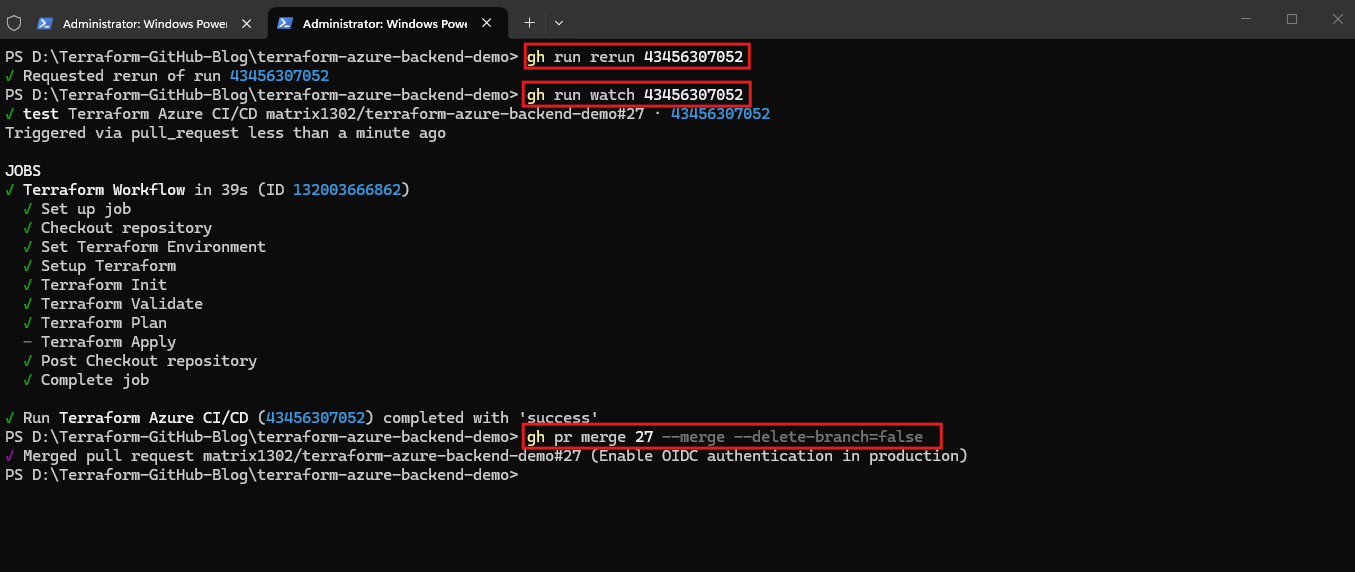
After adding the missing credential for the nonprod GitHub environment, I reran the failed workflow using the GitHub CLI:
We can also use the convenient
gh run watchcommand to monitor the workflow execution directly from our terminal.
gh run rerun 43456307052
gh run watch 43456307052
gh pr merge 27 --merge --delete-branch=false
Links
Workload identity federation concepts
https://learn.microsoft.com/en-us/entra/workload-id/workload-identity-federationConfiguring OpenID Connect in Azure
https://docs.github.com/en/actions/how-tos/secure-your-work/security-harden-deployments/oidc-in-azureMicrosoft Learn – Workload Identity Federation
https://learn.microsoft.com/en-us/entra/workload-id/workload-identity-federationMicrosoft Learn – GitHub Actions and Azure OIDC
https://learn.microsoft.com/en-us/azure/developer/github/connect-from-azure-openid-connectGitHub Docs – Configuring OIDC in Azure
https://docs.github.com/en/actions/how-tos/secure-your-work/security-harden-deployments/oidc-in-azureHashiCorp – AzureRM Provider Authentication
https://registry.terraform.io/providers/hashicorp/azurerm/latest/docs/guides/service_principal_oidcGitHub CLI – Official Manual
https://cli.github.com/manualHashiCorp – AzureRM Backend OIDC Authentication
https://developer.hashicorp.com/terraform/language/backend/azurerm