Understanding Windows-to-UNIX User Mapping with UNIX Security Style in NetApp ONTAP
When Windows users access data stored on a NetApp ONTAP volume using UNIX security style, ONTAP must translate the Windows identity into a corresponding UNIX identity. The resulting UID and GID can then be used to evaluate the traditional UNIX ownership and permission bits on the files and directories.
In this article, we will take a closer look at how this Windows-to-UNIX user mapping works in ONTAP, how Windows identities are resolved and mapped to UNIX users, and how to verify and troubleshoot the resulting credentials and access permissions.
In my previous article below, we examined the opposite mapping direction, where a UNIX identity is mapped to a Windows identity for accessing data using NTFS security style.
For a deeper look at NFSv4 identity mapping, including string-based file ownership, AUTH_SYS (sec=sys), UID/GID handling, and what happens when the NFSv4 ID mapping domains do not match, see my article below.
Preparing the Test Environment – Creating a UNIX Security Style Volume
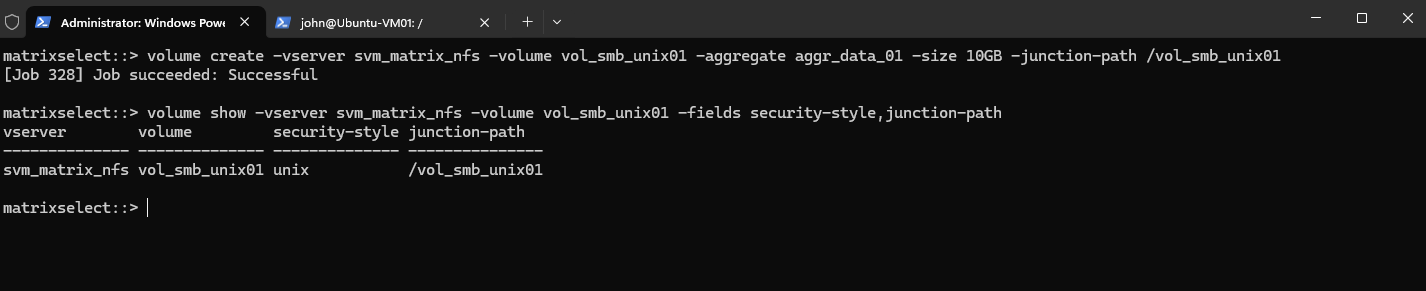
For our test, we create a dedicated volume on svm_matrix_nfs. Because the SVM root volume already uses UNIX security style, ONTAP uses UNIX as the default security style for newly created volumes, so we can omit the -security-style parameter.
volume create -vserver svm_matrix_nfs -volume vol_smb_unix01 -aggregate aggr_data_01 -size 10GB -junction-path /vol_smb_unix01

Then verify:
The output should show
unixas the security style. This means access to the volume will ultimately be evaluated using UNIX ownership and permissions, making it suitable for demonstrating the Windows-to-UNIX mapping process.
volume show -vserver svm_matrix_nfs -volume vol_smb_unix01 -fields security-style,junction-path
Creating an SMB Share for the UNIX Security Style Volume
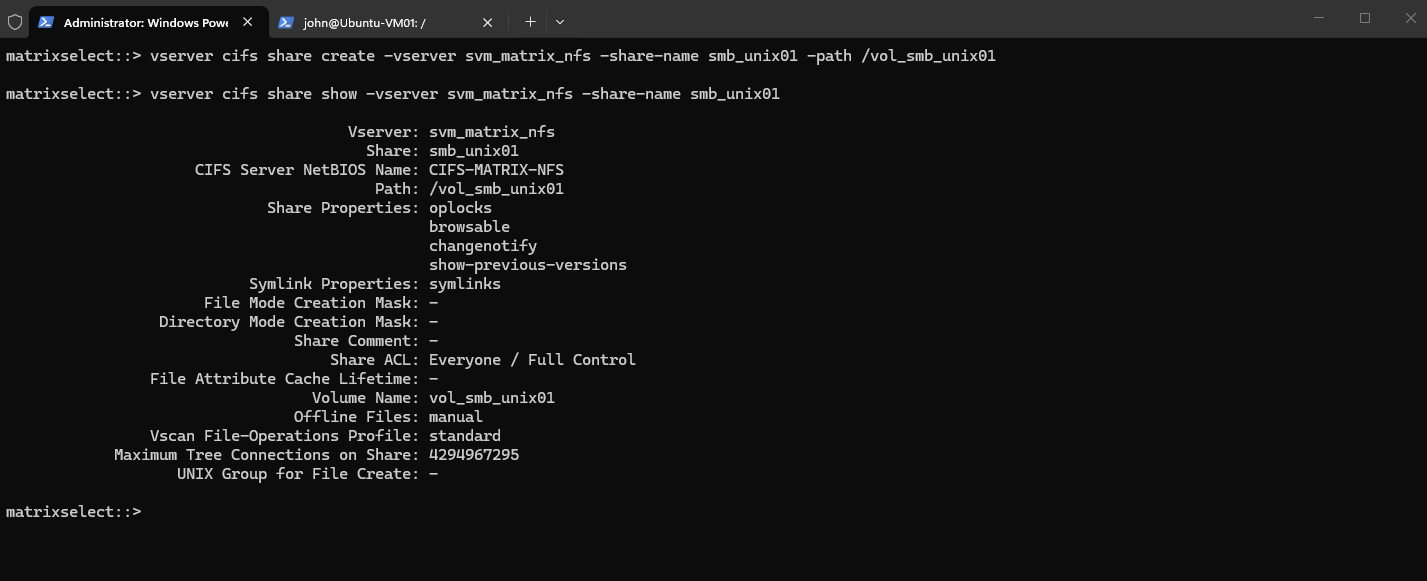
To access the UNIX-style volume from our Windows client, we create an SMB share pointing to /vol_smb_unix01. The SMB connection provides the Windows identity that ONTAP will subsequently map to a UNIX user.
The CIFS server and Active Directory integration for svm_matrix_nfs were already configured in the previous article, so we will not repeat those steps here. We can therefore proceed directly with creating an SMB share for our UNIX-style volume.
vserver cifs share create -vserver svm_matrix_nfs -share-name smb_unix01 -path /vol_smb_unix01

Then verify it:
vserver cifs share show -vserver svm_matrix_nfs -share-name smb_unix01
Testing SMB Share Access before Windows-to-UNIX Mapping
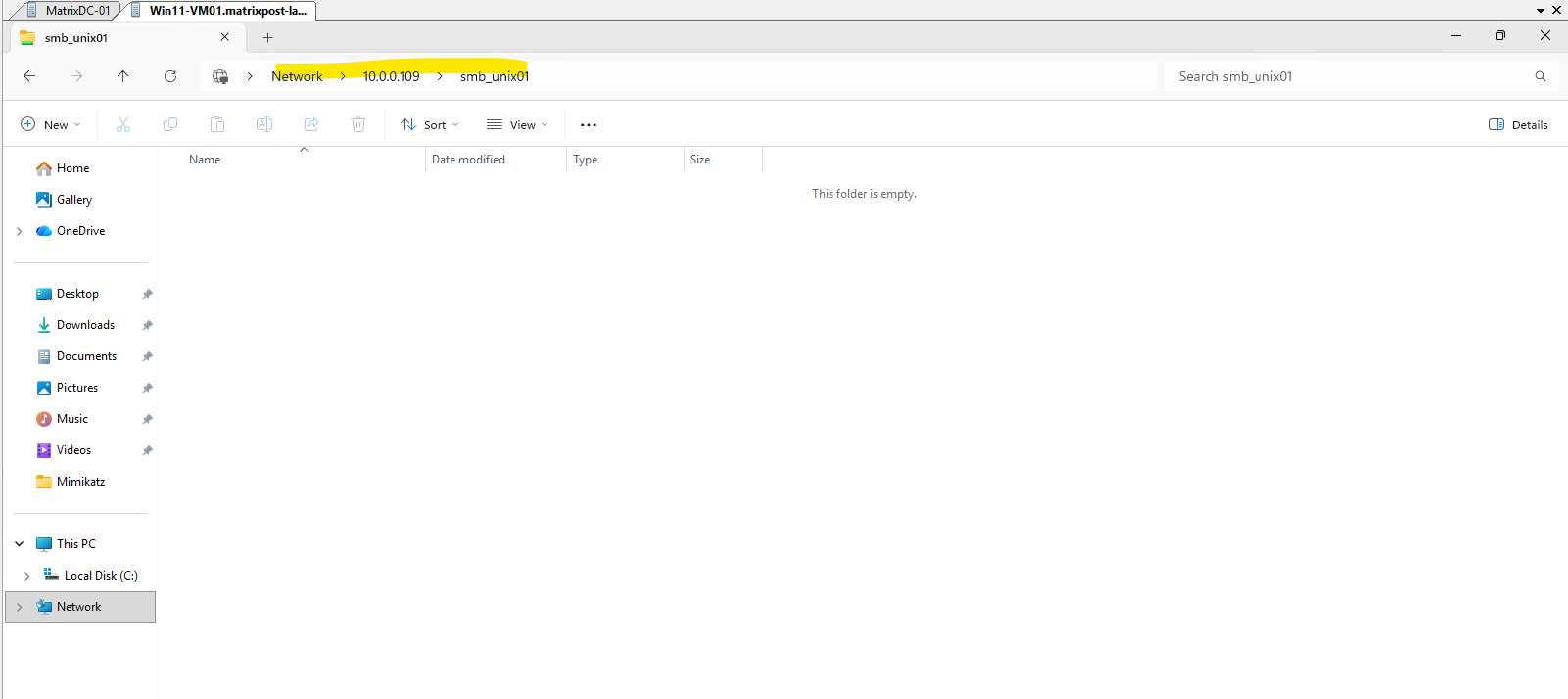
Next, we access the new SMB share from a domain-joined Windows client using our Active Directory user MATRIXPOST\jdoe (John Doe):
\\10.0.0.109\smb_unix01
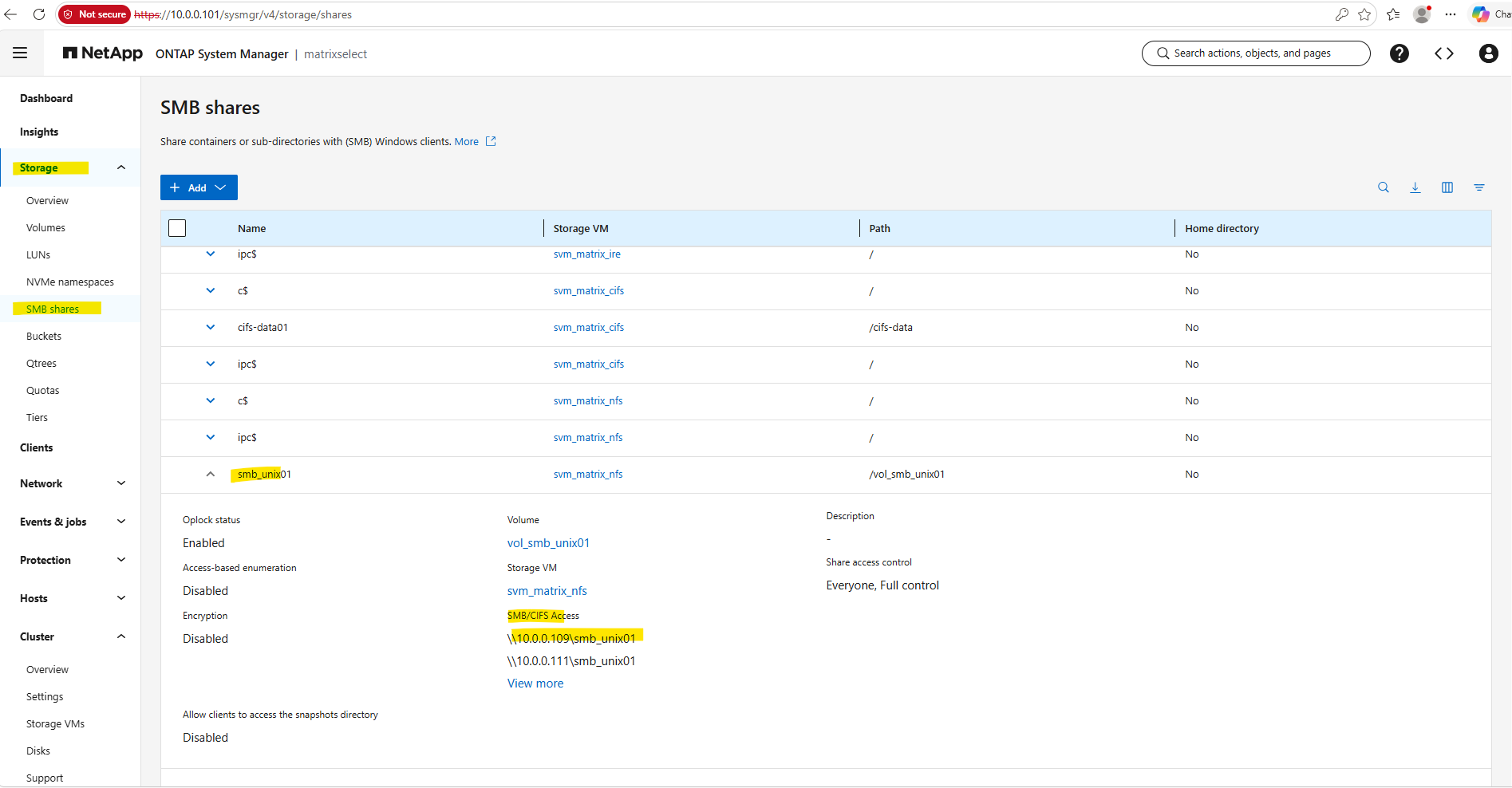
The Windows File Explorer confirms that the smb_unix01 share can be opened successfully and its root directory can be enumerated by our Windows user MATRIXPOST\jdoe.
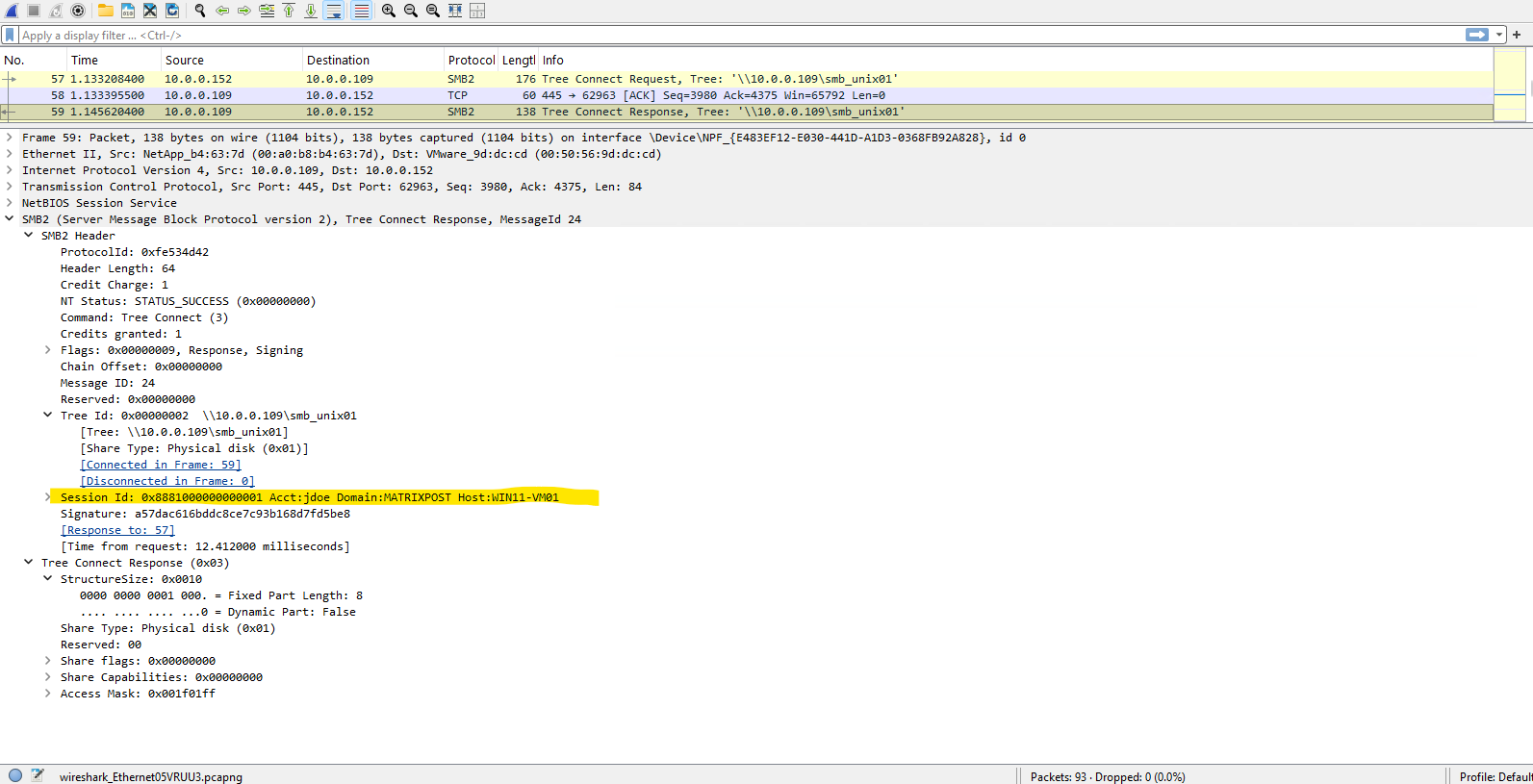
The SMB2 Tree Connect Response confirms that ONTAP successfully accepts the connection to the smb_unix01 share with STATUS_SUCCESS.
Wireshark also associates the SMB session with the Windows account MATRIXPOST\jdoe on our client WIN11-VM01.
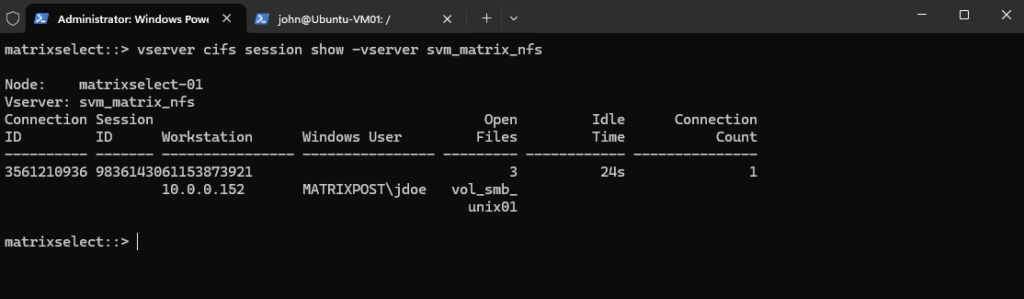
We can verify the active SMB session directly on ONTAP:
The output confirms that our Windows user
MATRIXPOST\jdoe, connecting from10.0.0.152, has an active SMB session accessingvol_smb_unix01.
vserver cifs session show -vserver svm_matrix_nfs
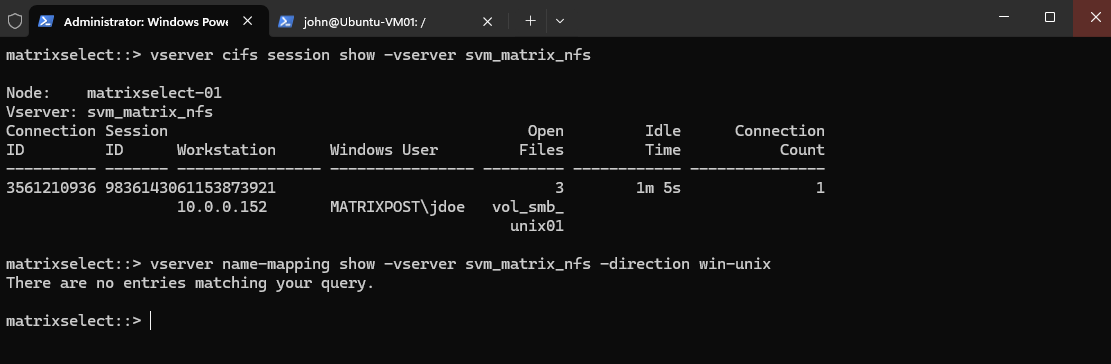
Next, we check whether any explicit Windows-to-UNIX name mappings already exist:
At this point, no explicit
win-unixmapping exists, even thoughMATRIXPOST\jdoecan already access the UNIX-security-style volume. Next, we will determine which UNIX identity ONTAP is currently assigning to this Windows user.
vserver name-mapping show -vserver svm_matrix_nfs -direction win-unix
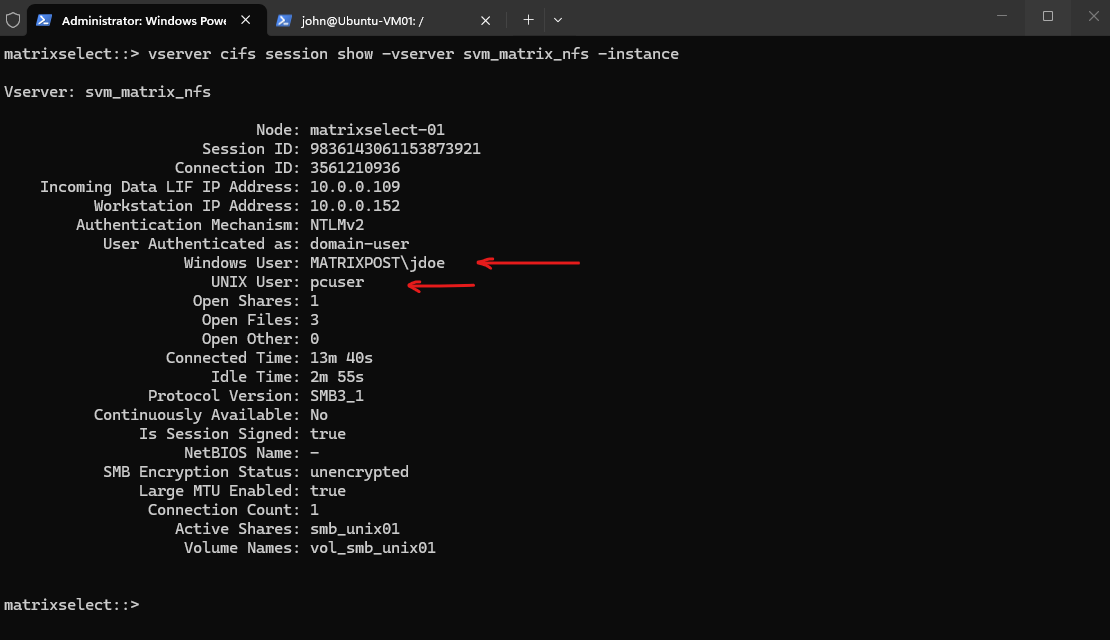
By displaying the SMB session in detail, we can see both the authenticated Windows identity and the UNIX identity ONTAP currently associates with it:
Although
MATRIXPOST\jdoeis successfully authenticated through SMB, no explicit Windows-to-UNIX mapping exists.ONTAP therefore assigns the SVM’s default UNIX user
pcuseras the UNIX security context used for access to the UNIX-security-style volume.
vserver cifs session show -vserver svm_matrix_nfs -instance
Although
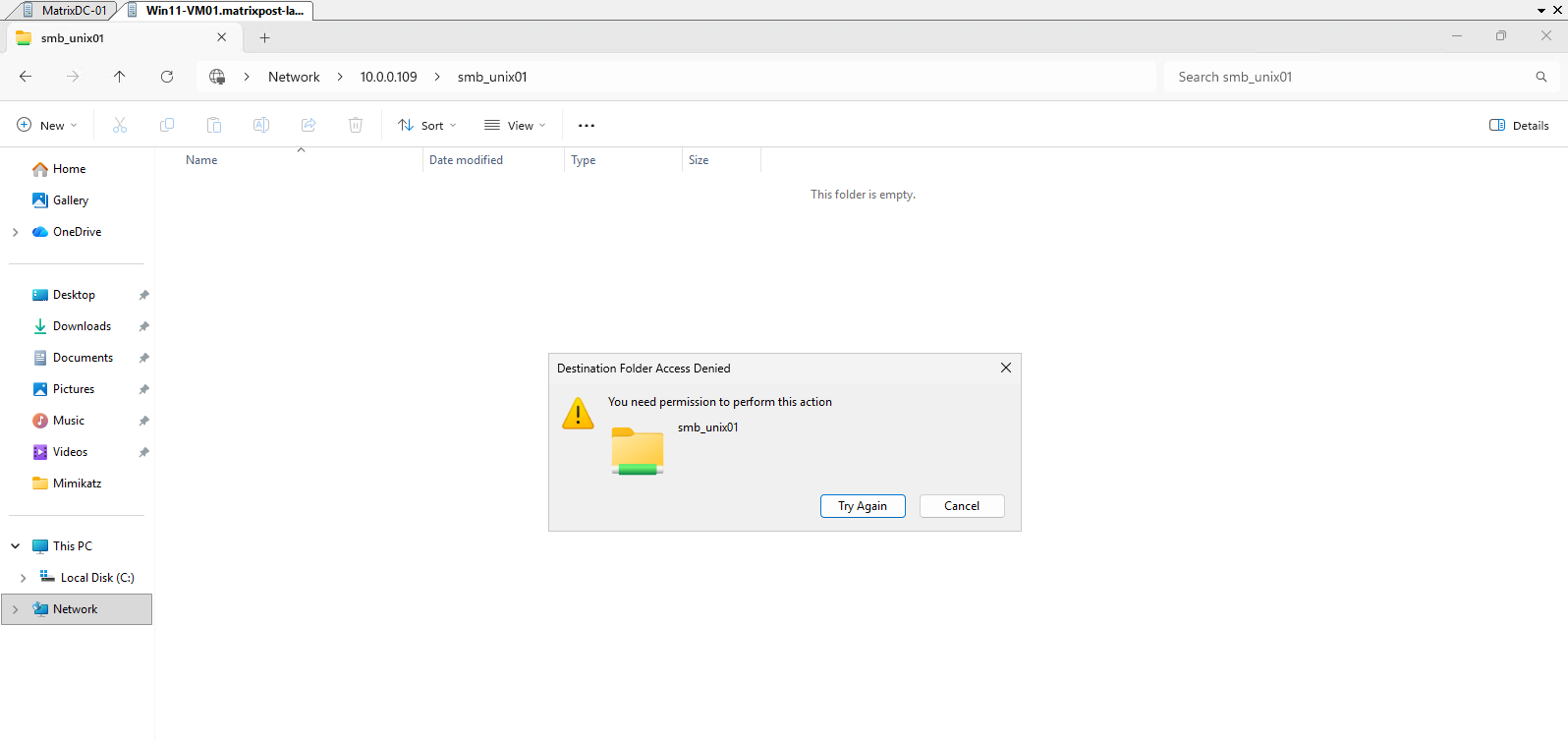
MATRIXPOST\jdoecan successfully connect to and browse the SMB share, attempting to create a new folder is denied. Because no explicit Windows-to-UNIX mapping exists, ONTAP currently usespcuseras John’s UNIX security context, whose UNIX permissions do not provide the required write access to the volume root.
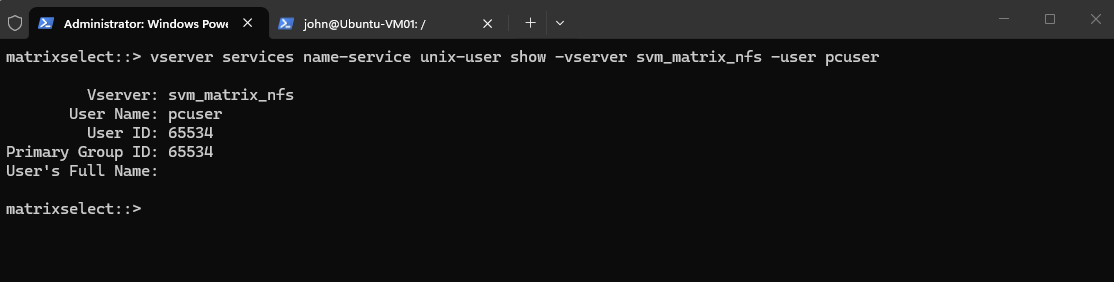
Before configuring an explicit Windows-to-UNIX mapping, we first inspect the pcuser UNIX account that ONTAP currently assigns to John’s SMB session:
The output shows that
pcuserresolves to UID65534and primary GID65534. These are therefore the UNIX credentials currently used when ONTAP evaluates John’s access against the UNIX ownership and permission bits of the volume.
vserver services name-service unix-user show -vserver svm_matrix_nfs -user pcuser
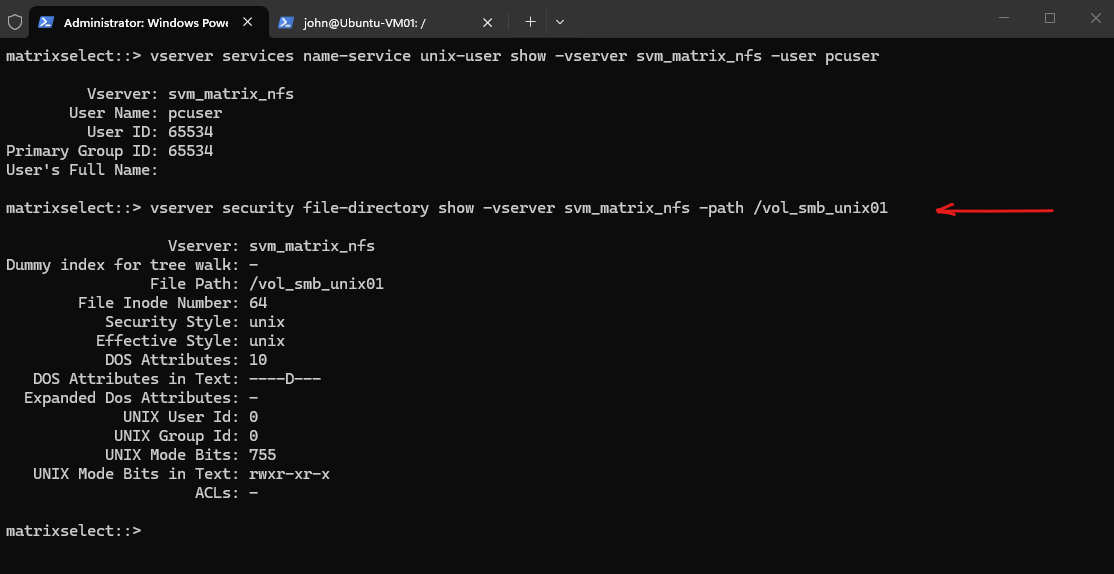
Next, we inspect the UNIX ownership and permissions of the volume root to understand why pcuser can browse the share but cannot create files or directories.
The output shows that
/vol_smb_unix01is owned by UID0/ GID0(root) and has permissions755(rwxr-xr-x).Since
pcuser(UID/GID65534) falls into the other permission class, it receivesr-x: enough to list and traverse the directory, but no write permission, explaining the Access Denied when creating a folder.
vserver security file-directory show -vserver svm_matrix_nfs -path /vol_smb_unix01
Creating the Windows-to-UNIX Name Mapping
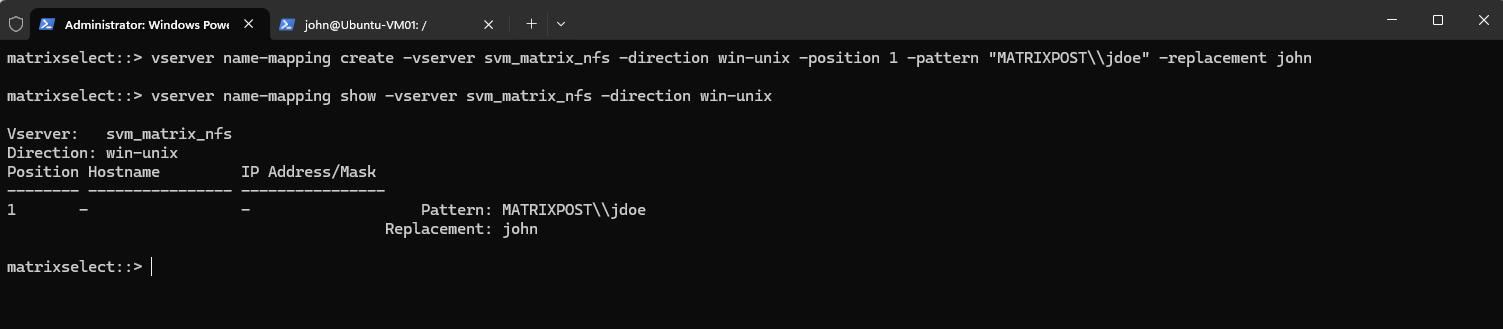
We already created the local UNIX user john with UID/GID 1001 in the previous article. We can therefore explicitly map the Windows account MATRIXPOST\jdoe to this UNIX identity.
vserver name-mapping create -vserver svm_matrix_nfs -direction win-unix -position 1 -pattern "MATRIXPOST\\jdoe" -replacement john

Then verify it:
vserver name-mapping show -vserver svm_matrix_nfs -direction win-unix
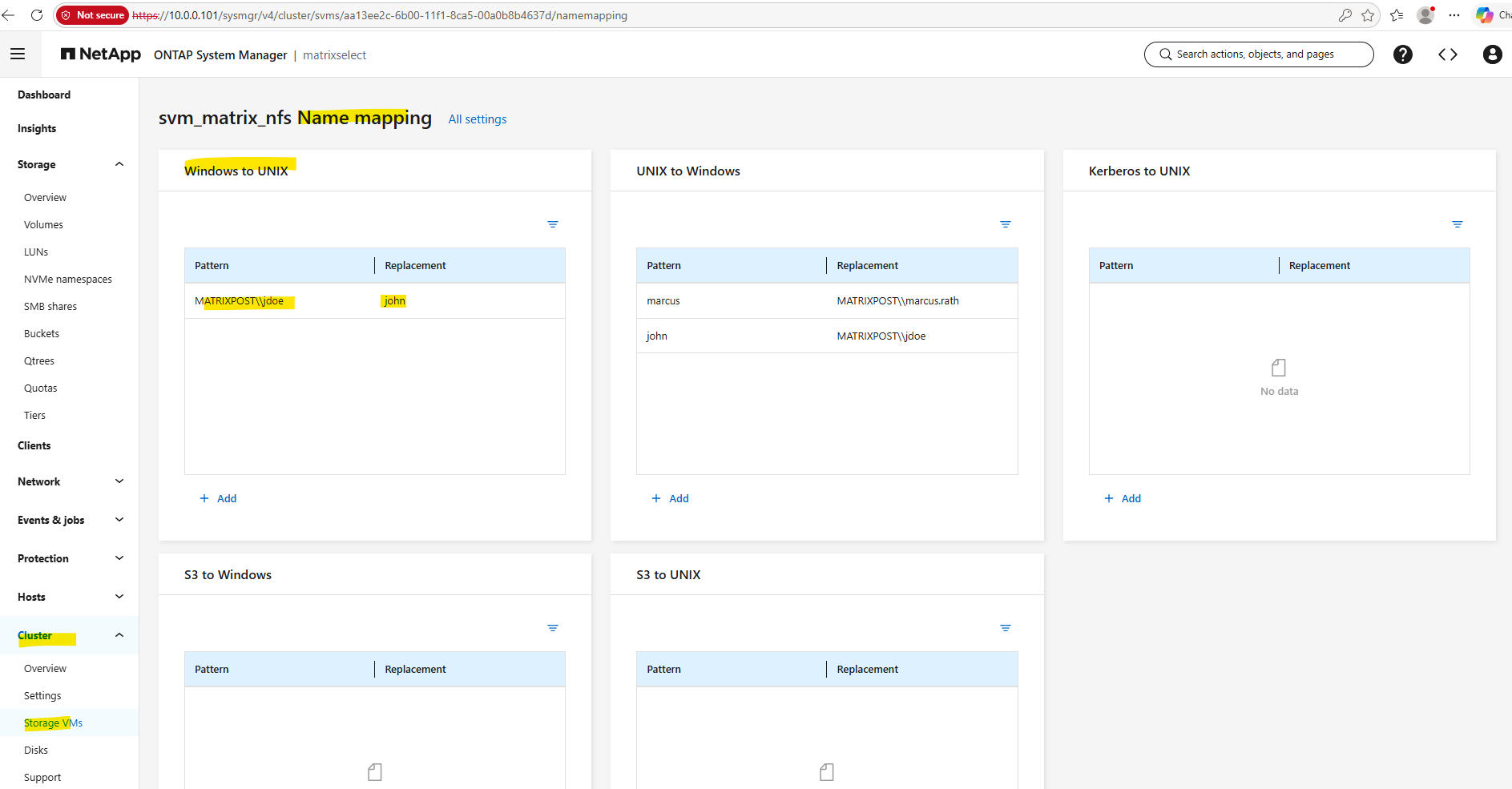
The same mapping can also be verified in ONTAP System Manager under the SVM’s Name mapping settings.
The Windows to UNIX mapping now explicitly translates
MATRIXPOST\jdoeto the UNIX userjohn, while the mappings from our previous article remain visible under UNIX to Windows.
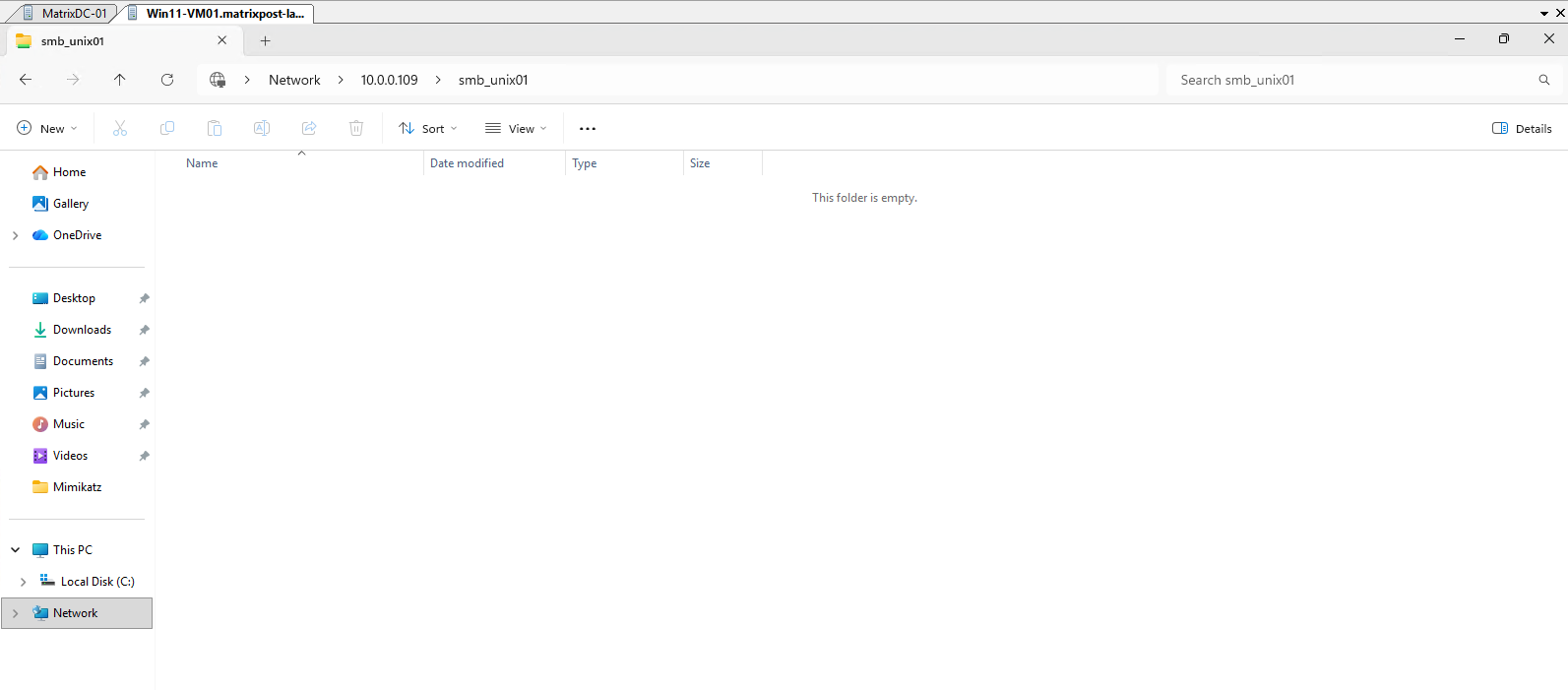
After creating the explicit mapping, we reconnect to the smb_unix01 share from our Windows client so that ONTAP can establish the SMB session using the updated identity mapping.
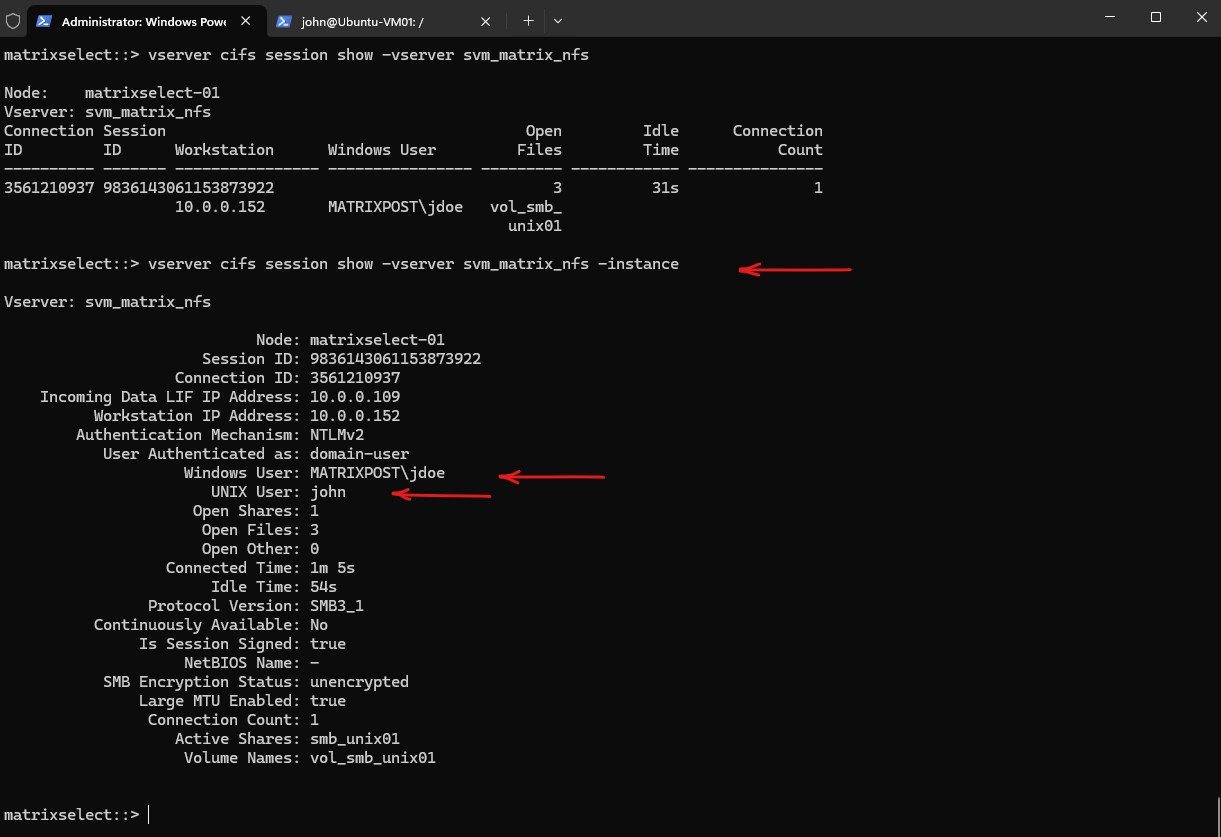
We can then verify whether MATRIXPOST\jdoe is now associated with the UNIX user john instead of the default pcuser.
After reconnecting the SMB share, the detailed session information confirms that the explicit mapping is now being used: the Windows user MATRIXPOST\jdoe is associated with the UNIX user john, rather than the previous fallback user pcuser.
ONTAP will therefore use John’s UNIX UID/GID and group memberships when evaluating access to the UNIX-security-style volume.
vserver cifs session show -vserver svm_matrix_nfs
vserver cifs session show -vserver svm_matrix_nfs -instance
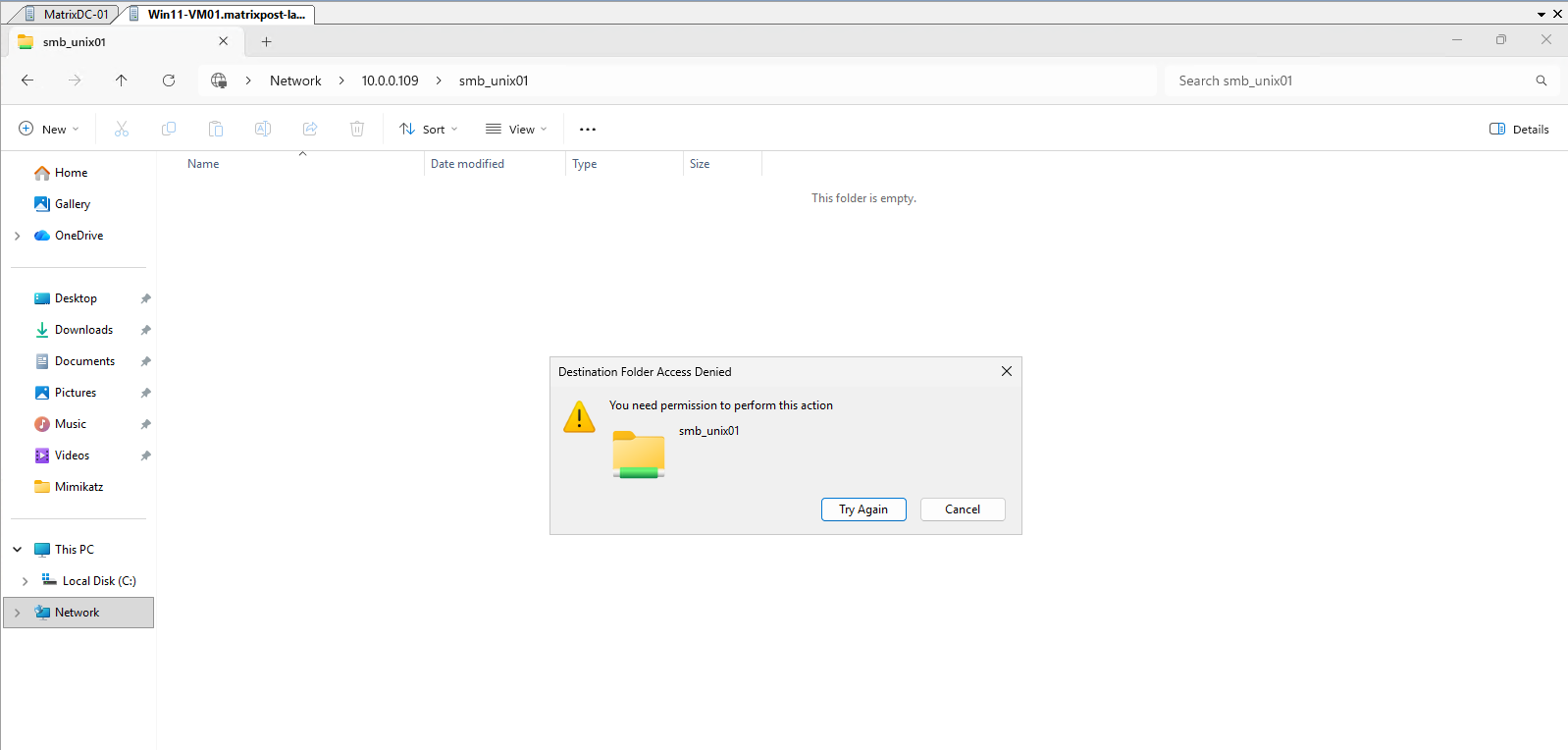
Granting Access Through UNIX Group Membership
Now that the Windows user is correctly mapped to the UNIX user john, we can grant access using standard UNIX group permissions.
The repeated Access Denied confirms that the successful Windows-to-UNIX mapping alone does not grant additional permissions, as the mapped UNIX user john still lacks write permission on the volume root.
For our test, we create a dedicated UNIX group, add john as a member, and configure the volume root so that members of this group receive read, write, and execute (rwx) permissions.
Configuring UNIX Permissions from a Linux NFS Client
Because the volume uses UNIX security style, we can manage its ownership and permissions using the familiar Linux tools chown and chmod.
For this method, we first mount the same vol_smb_unix01 volume on our Ubuntu client over NFS and then configure the UNIX group ownership and permissions directly through the mounted filesystem.
First mount it:
sudo mkdir -p /mnt/vol_smb_unix01
sudo mount -t nfs -o sec=sys 10.0.0.109:/vol_smb_unix01 /mnt/vol_smb_unix01
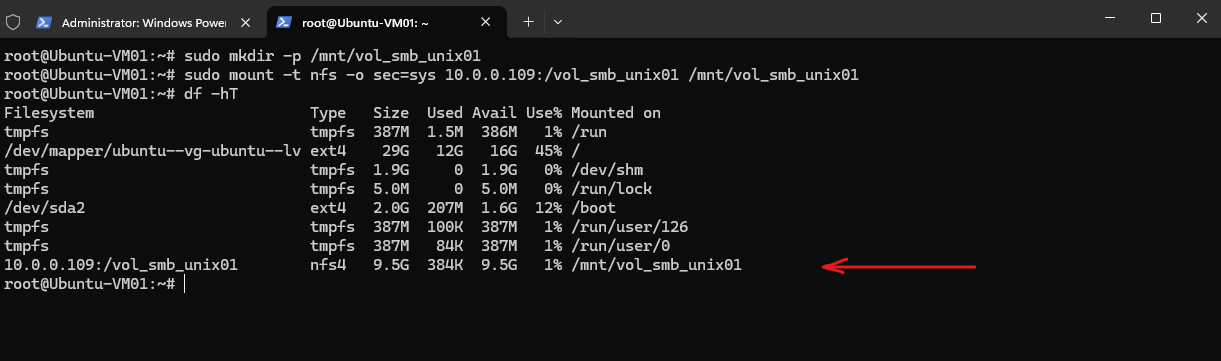
Then we can inspect its current ownership and permissions before making any changes:
After mounting the volume through NFS,
ls -ldshows the current UNIX permissions as755(rwxr-xr-x).The owner and group appear as
nobody:nogroupon our Ubuntu client because the NFSv4 identities returned by ONTAP cannot be mapped to the corresponding local Linux identities. This primarily affects how ownership is resolved and displayed on the client and does not change the numeric UID/GID ownership stored and used by ONTAP for UNIX permission checks with AUTH_SYS (sec=sys).
ls -ld /mnt/vol_smb_unix01

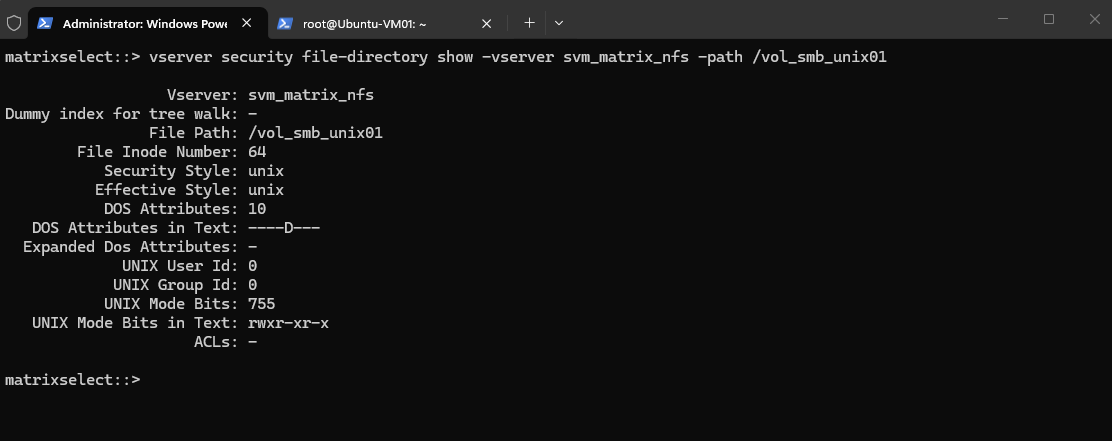
Before examining the behavior on our NFS client, we first verify the UNIX ownership and permissions stored directly on ONTAP:
The output confirms that the volume root uses UNIX security style and is owned by UID
0/ GID0, corresponding toroot:root. The UNIX mode755(rwxr-xr-x) grants full access to the owner, while group members and others receive read and execute permissions only.Despite this displayed identity mismatch on the NFS client, it does not affect the actual file access permissions, because with AUTH_SYS (
sec=sys) ONTAP ultimately evaluates access using the numeric UID/GID credentials and UNIX permission bits.
vserver security file-directory show -vserver svm_matrix_nfs -path /vol_smb_unix01
Next, we verify whether the Ubuntu client can locally resolve the UID 0 and GID 0 reported by ONTAP to their corresponding UNIX user and group:
We can verify that this is not caused by Ubuntu being unable to resolve UID/GID
0, as both IDs are correctly mapped locally toroot:
getent passwd 0
getent group 0
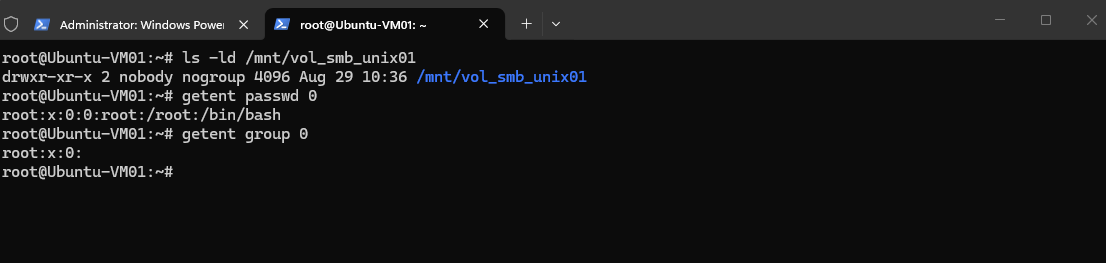
So the interesting question is why the NFS mount presents the ownership as nobody:nogroup despite ONTAP storing 0:0.
Next, we check the mount parameters to determine which NFS protocol version is being used. This is important because NFSv4 handles file owner and group identities differently from NFSv3.
The mount parameters confirm that our Ubuntu client negotiated NFSv4.2 (
vers=4.2) and uses AUTH_SYS (sec=sys) for authentication.This is important because, unlike NFSv3, NFSv4 represents file owner and group attributes as name-based identities that must be mapped between the NFS server and client.
nfsstat -m | grep -A5 vol_smb_unix01

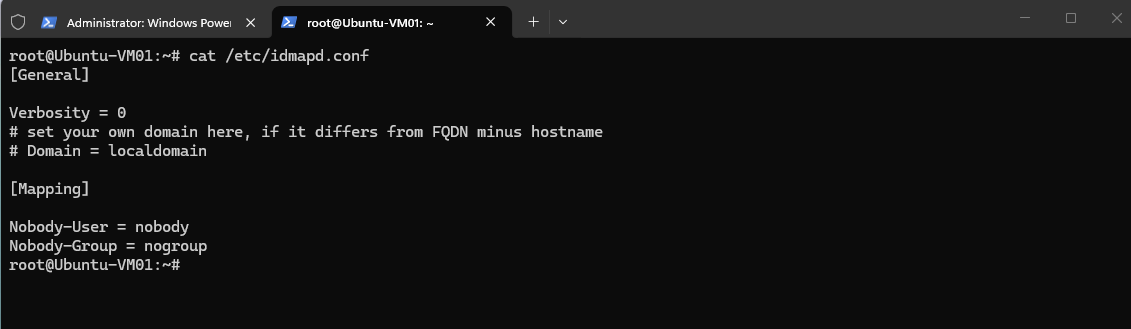
Next, we inspect Ubuntu’s NFSv4 ID-mapping configuration. This configuration controls how NFSv4 owner and group identities are translated between the NFS server and the local Linux user/group namespace:
The configuration shows that no explicit NFSv4 domain is configured on our Ubuntu client. It also defines
nobodyandnogroupas the fallback identities when an NFSv4 owner or group cannot be mapped successfully.This explains why the unresolved NFSv4 ownership is displayed as
nobody:nogroupon our client.
cat /etc/idmapd.conf
Next, let’s determine which NFSv4 domain Ubuntu is actually using when no explicit Domain is configured in idmapd.conf.
Because no explicit domain is configured in
/etc/idmapd.conf, Ubuntu currently uses the default NFSv4 ID-mapping domainlocaldomain.
nfsidmap -d
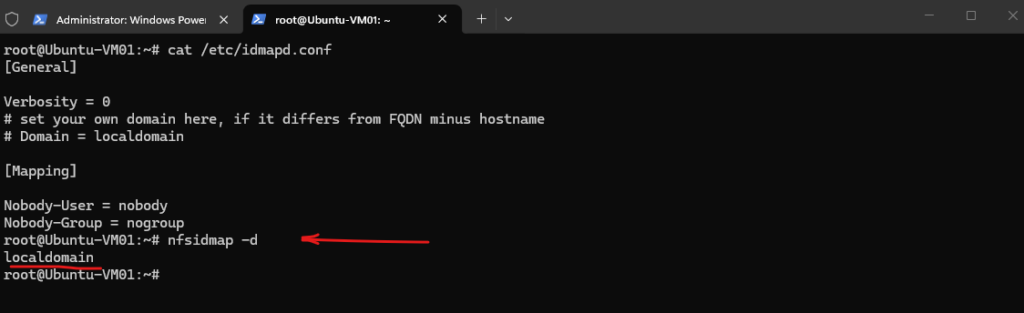
Next, we inspect the NFS configuration on ONTAP to determine which NFSv4 ID-mapping domain the SVM uses and compare it with Ubuntu’s localdomain.
The ONTAP NFS configuration reveals the reason for the failed NFSv4 identity mapping.
ONTAP uses
defaultv4iddomain.comas its NFSv4 ID-mapping domain, while our Ubuntu client useslocaldomain. Because these domains do not match, NFSv4 owner and group identities cannot be mapped correctly and Ubuntu falls back tonobody:nogroup.
vserver nfs show -vserver svm_matrix_nfs -instance
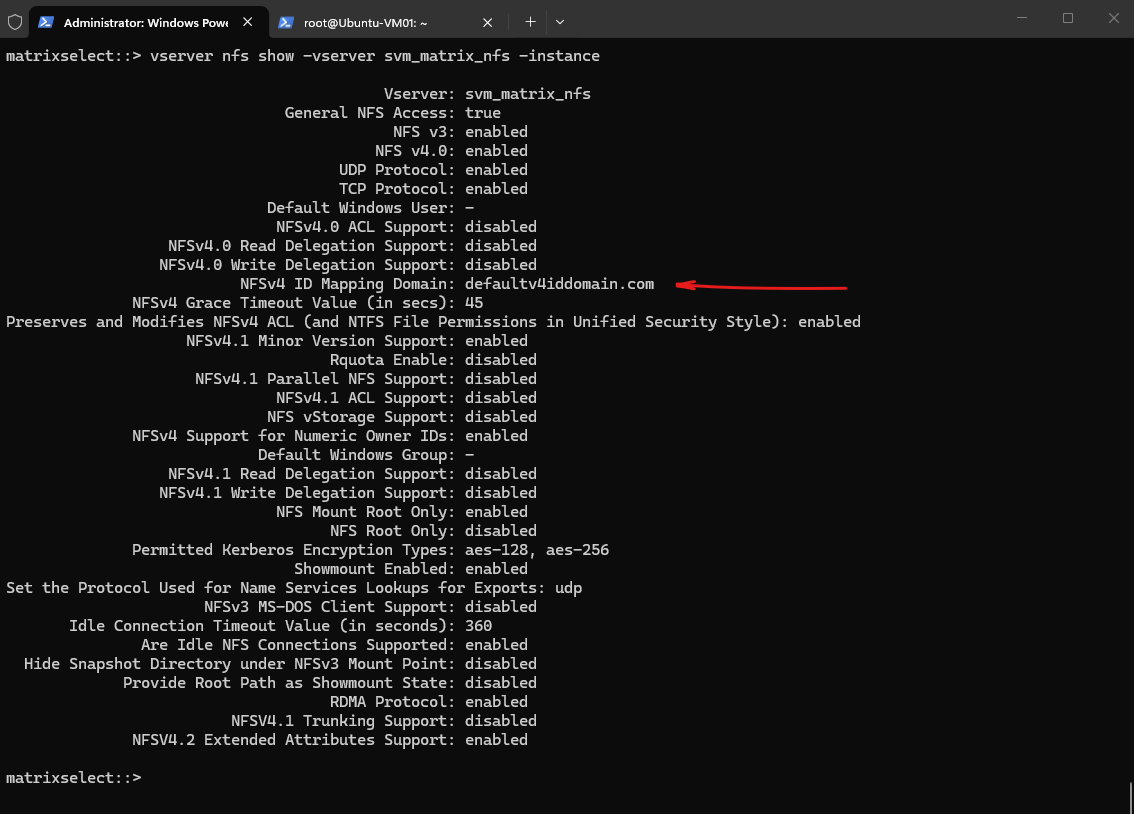
Next, we configure Ubuntu to use the same NFSv4 ID-mapping domain as ONTAP.
To allow NFSv4 identities to be mapped correctly, the Ubuntu client must use the same NFSv4 ID-mapping domain as ONTAP.
We therefore configure
defaultv4iddomain.comin/etc/idmapd.conf.
nano /etc/idmapd.conf
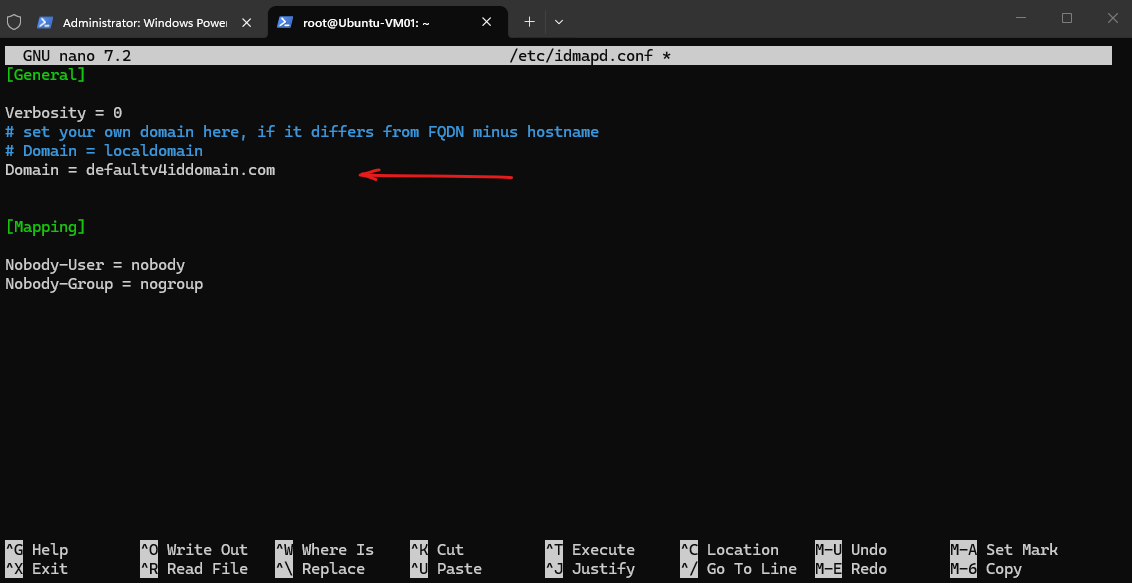
After changing the NFSv4 ID-mapping domain, we clear the existing NFS ID-mapping cache and verify that Ubuntu now uses the same domain as ONTAP.
clear the cached NFSv4 ID mappings:
nfsidmap -c
Then verify that Ubuntu is using the new domain:
Ubuntu and ONTAP now both use
defaultv4iddomain.com, providing a consistent NFSv4 identity-mapping namespace.
nfsidmap -d

Now we check the ownership again:
This confirms that the previous
nobody:nogroupownership was caused by the mismatching NFSv4 ID-mapping domains (localdomainvs.defaultv4iddomain.com), rather than incorrect UNIX ownership on the ONTAP volume.
ls -ld /mnt/vol_smb_unix01

Note: When mounting the same volume using NFSv3, Ubuntu out of the box correctly displays the ONTAP ownership as
root:root, because NFSv3 uses the numeric UID/GID (0:0) directly.With our NFSv4.2 mount, the owner/group identities could not be mapped by the NFSv4 identity-mapping mechanism and were therefore displayed as
nobody:nogroup(65534:65534).
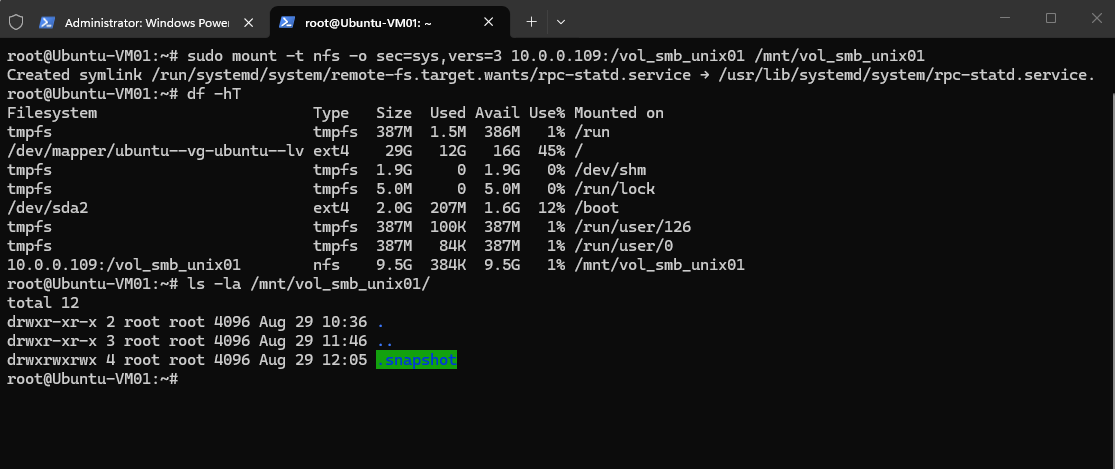
We will take a closer look at why NFSv4 requires this additional identity-mapping mechanism, even when using AUTH_SYS (sec=sys) with numeric UID/GID credentials, in the dedicated Understanding NFSv4 Identity Mapping Under the Hood section at the end of this article.
Now that the NFSv4 identity mapping works correctly and the volume ownership is displayed as root:root, we can configure the UNIX permissions directly from our Linux NFS client.
Because the UNIX identities used for our Windows-to-UNIX mapping are maintained by ONTAP, we create the smbwriters group in the SVM’s local UNIX name service:
vserver services name-service unix-group create -vserver svm_matrix_nfs -name smbwriters -id 2000

We then add the UNIX user john as a member of the new smbwriters group:
vserver services name-service unix-group adduser -vserver svm_matrix_nfs -name smbwriters -username john

Finally, we verify the newly created UNIX group and its membership:
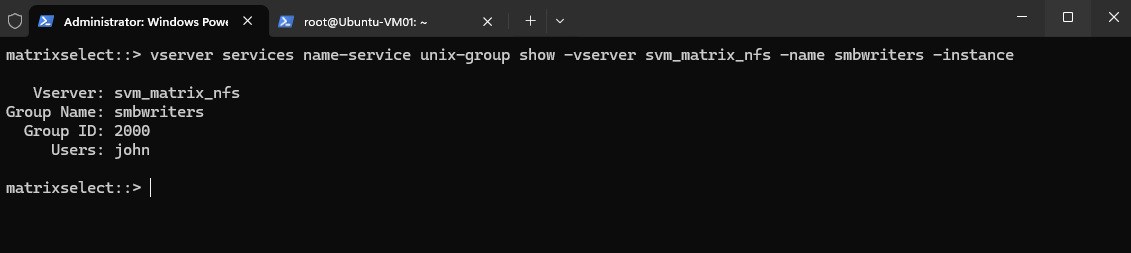
The output confirms that
smbwritersuses GID2000and that our mapped UNIX userjohnis a member of the group. We can now assign this group to the volume root and grant it write permissions from our Linux NFS client.
vserver services name-service unix-group show -vserver svm_matrix_nfs -name smbwriters -instance
Because we are using NFSv4, the group must also be resolvable on our Ubuntu client so that it can be represented correctly when changing the NFSv4 owner_group attribute. We therefore create a local group with the same name and GID (2000) as the group configured on ONTAP:
sudo groupadd -g 2000 smbwriters

Verify:
getent group smbwriters

With the group now resolvable on both ONTAP and Ubuntu, we can assign smbwriters as the group owner of the volume root through our NFSv4 mount:
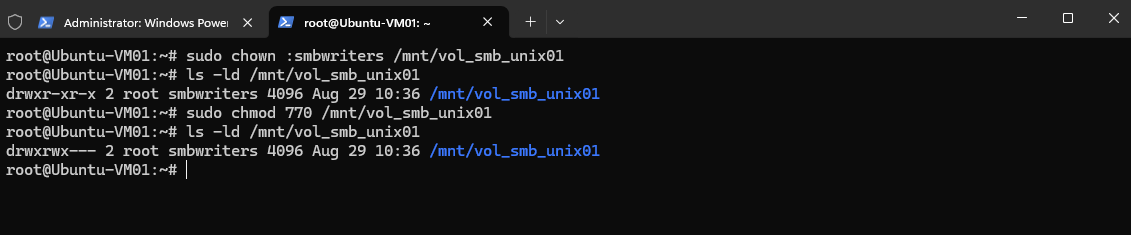
The group ownership of the volume root is now successfully changed from
roottosmbwriters, while the owner remainsroot. The permissions are still755(rwxr-xr-x), however, so members ofsmbwritersstill have read and execute permissions only.
sudo chown :smbwriters /mnt/vol_smb_unix01

Verify:
ls -ld /mnt/vol_smb_unix01

Finally, we grant the owner and the smbwriters group full read, write, and execute permissions, while removing access for all other users:
The resulting permissions are now
rwxrwx---, withrootremaining the owner andsmbwritersas the group owner.Because our mapped UNIX user
johnis a member ofsmbwriters, he now receives the group’srwxpermissions when ONTAP evaluates access to this directory.
sudo chmod 770 /mnt/vol_smb_unix01

Verify:
ls -ld /mnt/vol_smb_unix01
With the UNIX group permissions configured, we return to our Windows client and try to create a folder in the smb_unix01 share again. ONTAP should now authorize the operation through the complete mapping chain: MATRIXPOST\jdoe → UNIX user john → smbwriters group → group rwx permissions.
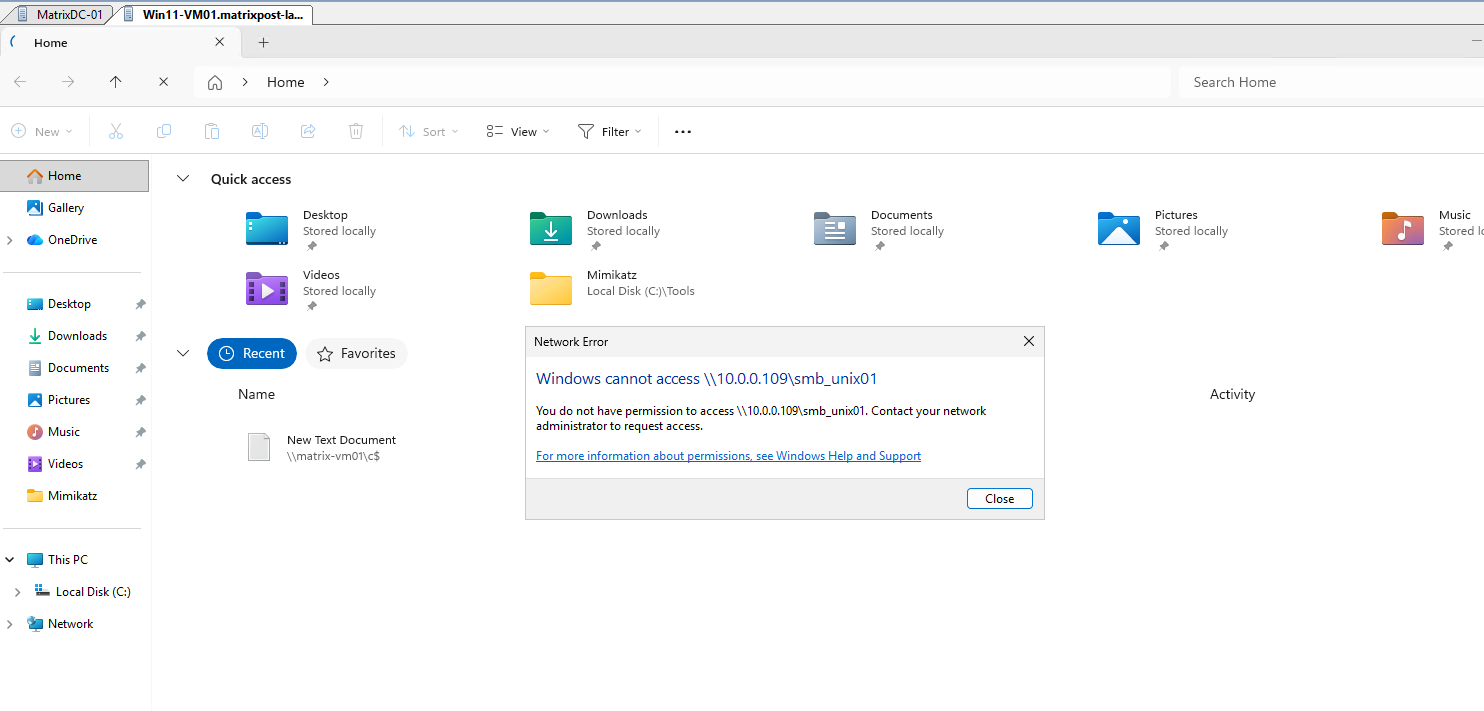
Although the permissions are now
770, Windows access is initially still denied because the existing SMB session was established beforejohnwas added to thesmbwritersgroup and may therefore still be using the previously built UNIX credentials.
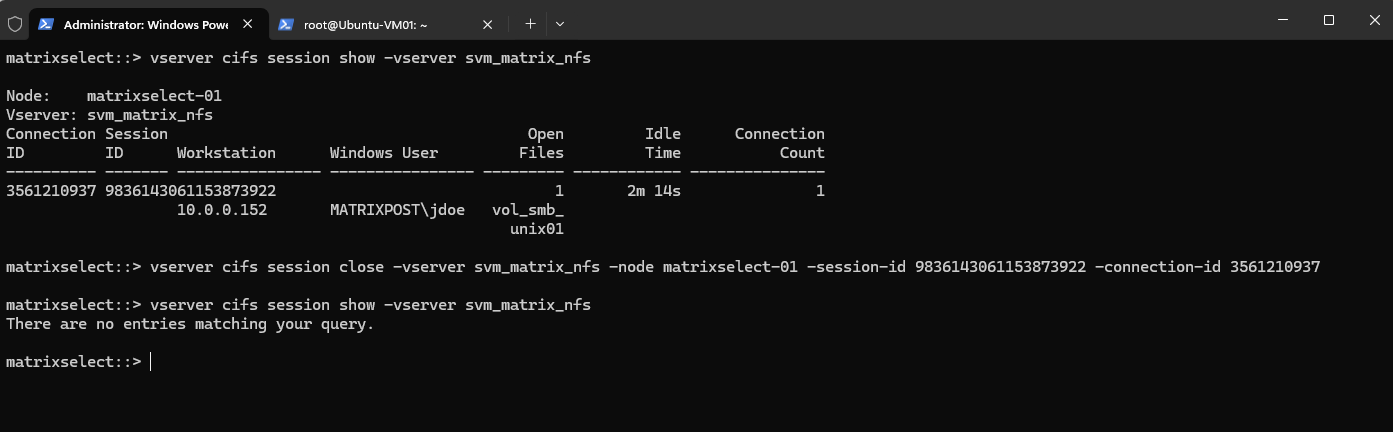
Closing File Explorer alone does not necessarily terminate the SMB session, so we explicitly close the existing session on ONTAP to force the UNIX credentials to be rebuilt on the next connection.
vserver cifs session show -vserver svm_matrix_nfs
vserver cifs session close -vserver svm_matrix_nfs -node matrixselect-01 -session-id 9836143061153873922 -connection-id 3561210937
After reconnecting, Windows can successfully access the SMB share again and create the new folder1 directory.
This confirms that ONTAP rebuilt the UNIX credentials for the new SMB session and now recognizes
johnas a member of thesmbwritersgroup.
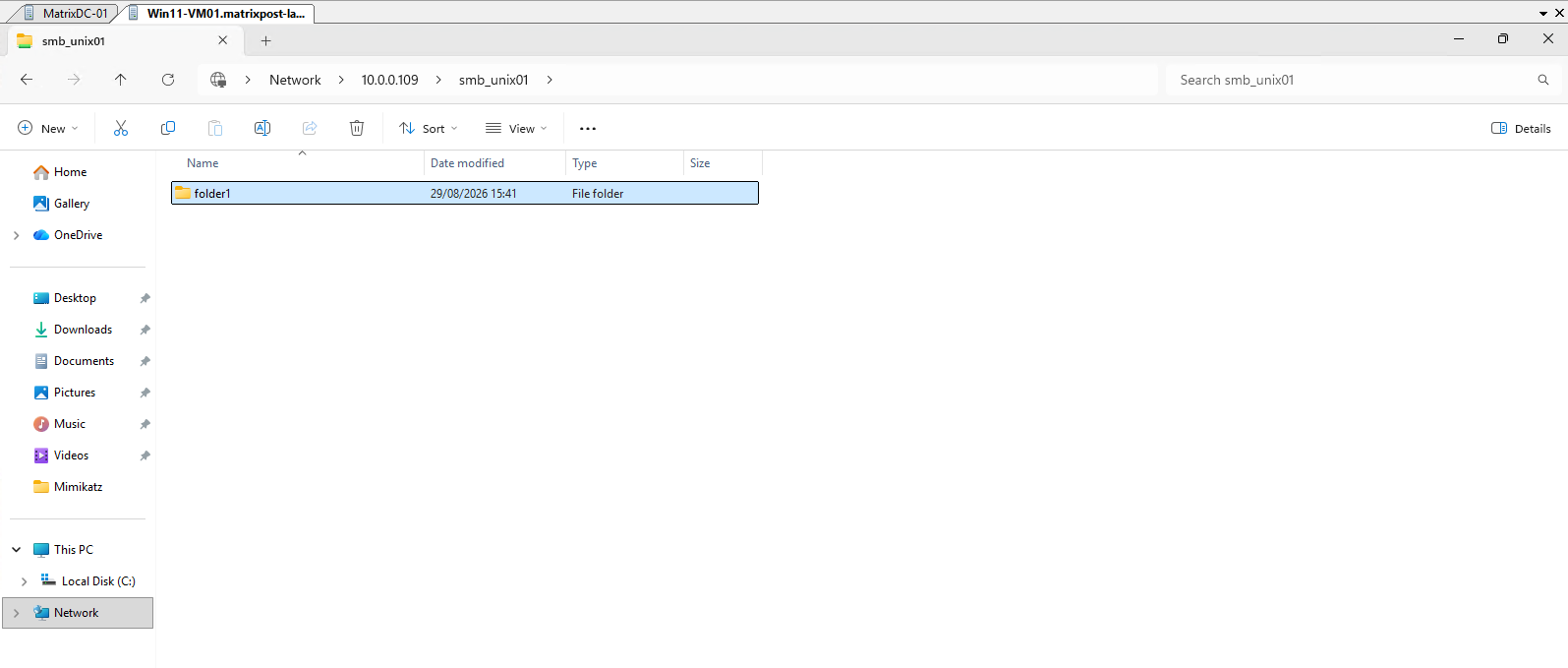
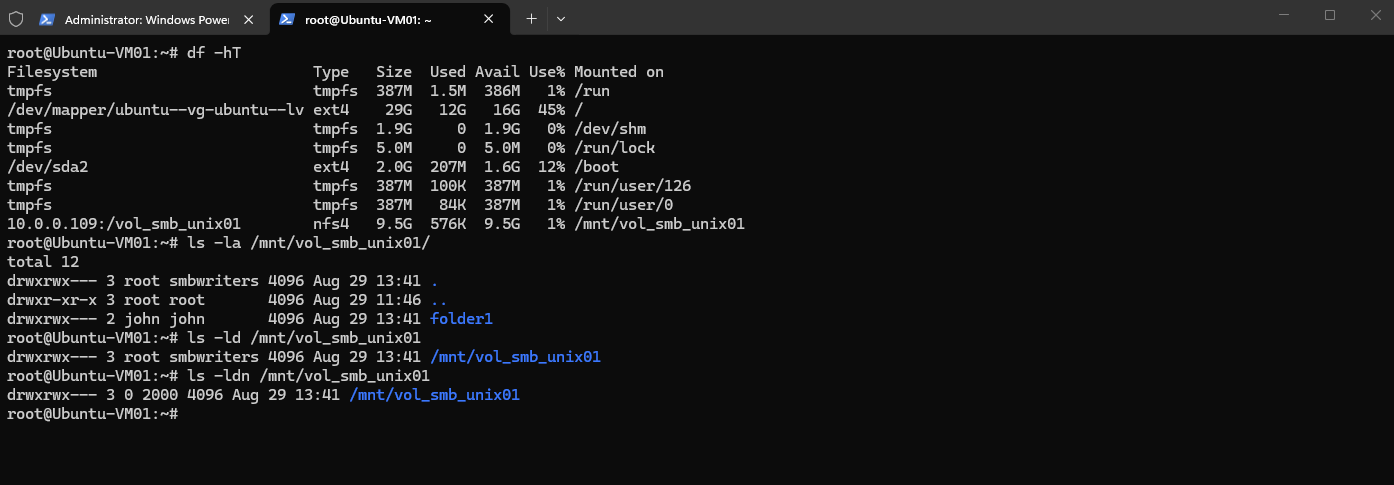
We can also verify the result from our Linux NFS client. The volume root is now owned by root:smbwriters with mode 770, while the folder1 directory created through SMB is owned by john:john:
This is particularly useful confirmation of the Windows-to-UNIX mapping: although
folder1was created by the Windows accountMATRIXPOST\jdoeover SMB, ONTAP records its UNIX owner asjohn, the UNIX identity to which the Windows account is mapped.
Configuring UNIX Permissions Directly in ONTAP
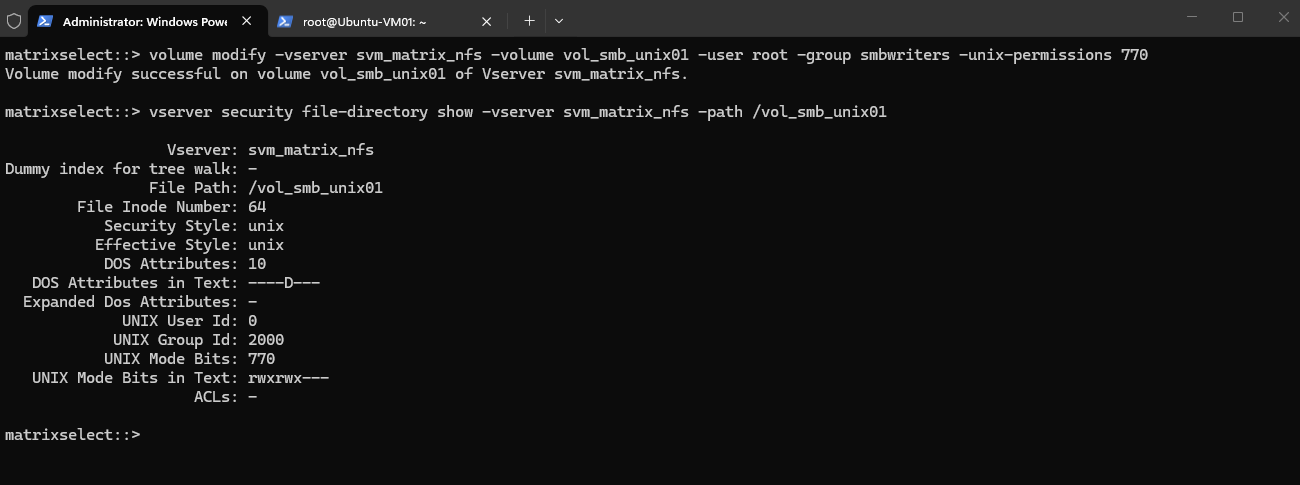
As an alternative to changing the UNIX ownership and mode bits through an NFS client, we can configure the volume root permissions directly in ONTAP. The volume modify command allows us to set the UNIX owner, group, and permission bits without mounting the volume on a Linux system.
To assign the smbwriters group and keep root as the owner, use:
volume modify -vserver svm_matrix_nfs -volume vol_smb_unix01 -user root -group smbwriters -unix-permissions 770
Then verify the result with:
ONTAP confirms that the volume root is now configured with UID
0(root), GID2000(smbwriters), and UNIX mode770(rwxrwx---).This is exactly the same filesystem metadata we previously configured through the Linux NFS client, demonstrating that the volume root UNIX permissions can also be managed directly from ONTAP.
vserver security file-directory show -vserver svm_matrix_nfs -path /vol_smb_unix01
When using NFSv4, the smbwriters group should also exist on the Linux NFS clients with the same GID (2000), allowing the NFSv4 ID-mapping mechanism to correctly resolve the group identity.
Otherwise, the group may be displayed or mapped as the fallback nogroup identity.
Links
Create ONTAP SMB name mapping
https://docs.netapp.com/us-en/ontap/smb-admin/create-name-mapping-task.htmlLearn about ONTAP SMB name mapping
https://docs.netapp.com/us-en/ontap/smb-admin/name-mapping-concept.htmlLearn about UNIX file permissions providing access control when accessing files over ONTAP SMB servers
https://docs.netapp.com/us-en/ontap/smb-admin/unix-file-permissions-provide-access-control-concept.htmlLearn about ONTAP NAS security styles
https://docs.netapp.com/us-en/ontap/nfs-admin/security-styles-their-effects-concept.htmlONTAP commands for managing SMB name mappings
https://docs.netapp.com/us-en/ontap/smb-admin/commands-manage-name-mappings-reference.html