Understanding NFS AUTH_SYS User Mapping with NTFS Security Style in NetApp ONTAP
When NFS clients access data on a NetApp ONTAP volume using NTFS security style, ONTAP cannot simply evaluate the UNIX UID and GID provided through AUTH_SYS against traditional UNIX permissions.
Instead, the UNIX identity must be resolved and mapped to a corresponding Windows identity, whose SID is then used to evaluate the NTFS ACL.
In this article, we will take a closer look at how this UNIX-to-Windows user mapping works in ONTAP, how the different name-mapping mechanisms are involved, and how to verify and troubleshoot the resulting credentials and access permissions.
In my follow-up article below, we examine the opposite mapping direction, where a Windows identity is mapped to a UNIX identity for accessing data using UNIX security style.
For a deeper look at NFSv4 identity mapping, including string-based file ownership, AUTH_SYS (sec=sys), UID/GID handling, and what happens when the NFSv4 ID mapping domains do not match, see my article below.
- Why User Mapping Is Required with NTFS Security Style
- Checking the Security Style of ONTAP Volumes
- Preparing the Test Environment – Creating an NTFS Security Style Volume
- Configuring NFS Access to the NTFS Volume
- Mounting the NTFS Security Style Volume from the NFS Client
- Identifying the UNIX User and AUTH_SYS Credentials
- Testing NFS Access Before Configuring User Mapping
- Adding the UNIX User to the SVM
- Configuring Windows Identity Resolution for NFS
- Retesting NFS Access with the Completed Name Mapping
- Testing Access with User-Specific NTFS Permissions
- Links
Why User Mapping Is Required with NTFS Security Style
With NFS AUTH_SYS, the NFS client identifies the user primarily by numeric UID and GID values. When accessing a volume or qtree using UNIX security style, ONTAP can use these UNIX credentials directly to evaluate the corresponding UNIX permissions.
With NTFS security style, however, access permissions are represented by Windows SIDs and evaluated against an NTFS ACL. ONTAP therefore needs to translate the UNIX identity received from the NFS client into a corresponding Windows identity.
At a high level, the authentication and authorization flow looks like this:
NFS client → UID/GID → UNIX user → Windows user → Windows SID → NTFS ACL
This cross-protocol identity mapping allows an NFS client to access the same NTFS-secured data that can also be accessed through SMB, while ONTAP continues to enforce the Windows-based permissions defined on the files and directories.
Checking the Security Style of ONTAP Volumes
Before looking at NFS user mapping, we first need to determine which security style is configured for our volumes. The security style defines which permission model ONTAP uses for files and directories and therefore determines whether an NFS user’s UNIX credentials can be evaluated directly or must ultimately be mapped to a Windows identity.
We can display the configured security style for all volumes using:
volume show -fields vserver,volume,security-style
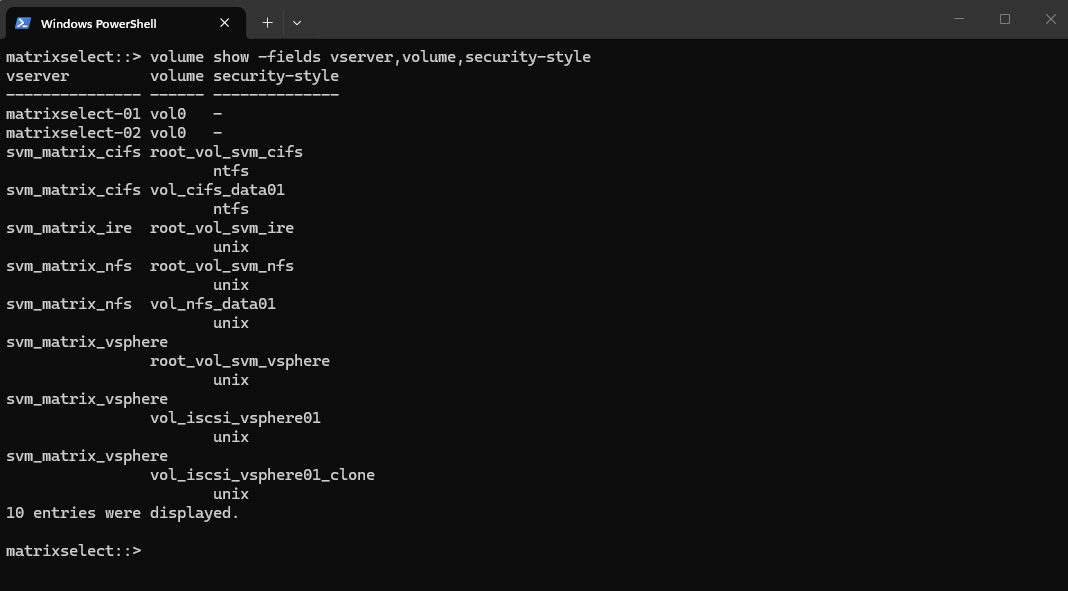
For our NFS AUTH_SYS example, we are particularly interested in volumes using the NTFS security style, as these require ONTAP to evaluate access using Windows security information and NTFS ACLs.
The output above shows a clear separation between the different workloads. The volumes belonging to svm_matrix_cifs use the NTFS security style, while the root and data volumes of svm_matrix_nfs use the UNIX security style.
For our upcoming NFS AUTH_SYS user-mapping test, we therefore need an NFS-accessible volume using NTFS security style. This will allow us to demonstrate how ONTAP translates the UNIX identity received from the NFS client into a Windows identity before evaluating the NTFS permissions.
Preparing the Test Environment – Creating an NTFS Security Style Volume
To demonstrate how NFS AUTH_SYS user mapping works when accessing data protected by NTFS permissions, we will create a dedicated test volume on svm_matrix_nfs using the NTFS security style.
Keeping this test separate from the existing vol_nfs_data01 volume allows us to compare the behavior of a traditional UNIX security style NFS volume with an NTFS security style volume without modifying the existing configuration.
For the test, we will create a new volume named vol_nfs_ntfs01 and explicitly configure its security style as ntfs.
If
-security-styleis omitted when creating a volume, ONTAP uses the security style inherited from the SVM/root-volume context. In our NFS SVM this results in UNIX security style, so we must explicitly specify-security-style ntfsfor our test volume.
volume create -vserver svm_matrix_nfs -volume vol_nfs_ntfs01 -aggregate aggr_data_01 -size 10GB -security-style ntfs -junction-path /vol_nfs_ntfs01

Verify:
volume show -vserver svm_matrix_nfs -volume vol_nfs_ntfs01 -fields security-style,junction-path

Our lab is now ready to demonstrate how an NFS client authenticated with AUTH_SYS is mapped to a Windows identity before ONTAP evaluates the NTFS ACL.
Configuring NFS Access to the NTFS Volume
With the NTFS security style test volume in place, the next step is to make it accessible from our NFS client. For this, we need to verify the export policy assigned to the volume and ensure that the client is permitted to mount and access the volume using NFS with AUTH_SYS.
At this point, we are only establishing NFS access to the volume. We will intentionally leave the UNIX-to-Windows user mapping untouched so that we can first observe how ONTAP behaves when an NFS user attempts to access NTFS-secured data without a suitable Windows identity mapping.
volume show -vserver svm_matrix_nfs -volume vol_nfs_ntfs01 -fields policy
vserver export-policy rule show -vserver svm_matrix_nfs -policyname default
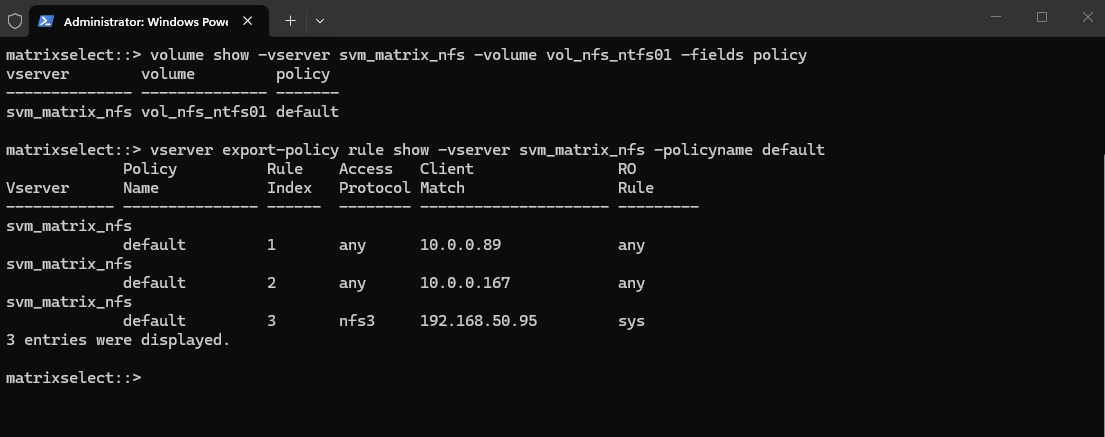
The newly created vol_nfs_ntfs01 volume is currently assigned to the existing default export policy. Before mounting the volume from our NFS client, we should verify that the corresponding export rule permits the required NFS protocol and AUTH_SYS authentication for both read and write access.
Because the standard rule show output displays only a subset of the configured parameters, we will take a closer look at the complete export rule configuration before proceeding with the test.
vserver export-policy rule show -vserver svm_matrix_nfs -policyname default -instance
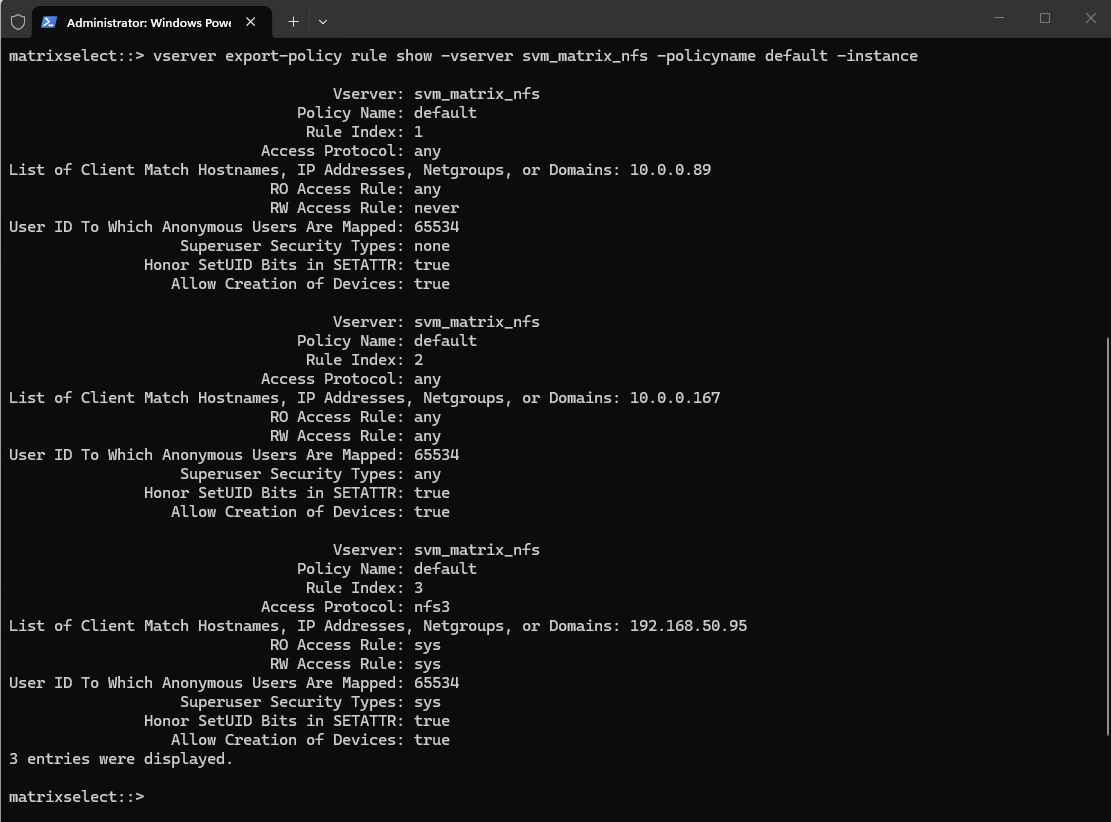
Our Linux test client 10.0.0.167 is already covered by rule 2 of the existing default export policy. The rule permits both read and write access and accepts all supported authentication types, which includes AUTH_SYS (sys).
No changes to the export policy are therefore required for our test.
It is important to distinguish this export-level authorization from the permissions on the actual files and directories. Passing the export policy only allows the NFS request to reach the exported file system.
Because our volume uses NTFS security style, ONTAP must subsequently determine a Windows identity for the UNIX user and evaluate that identity against the corresponding NTFS ACL.
Mounting the NTFS Security Style Volume from the NFS Client
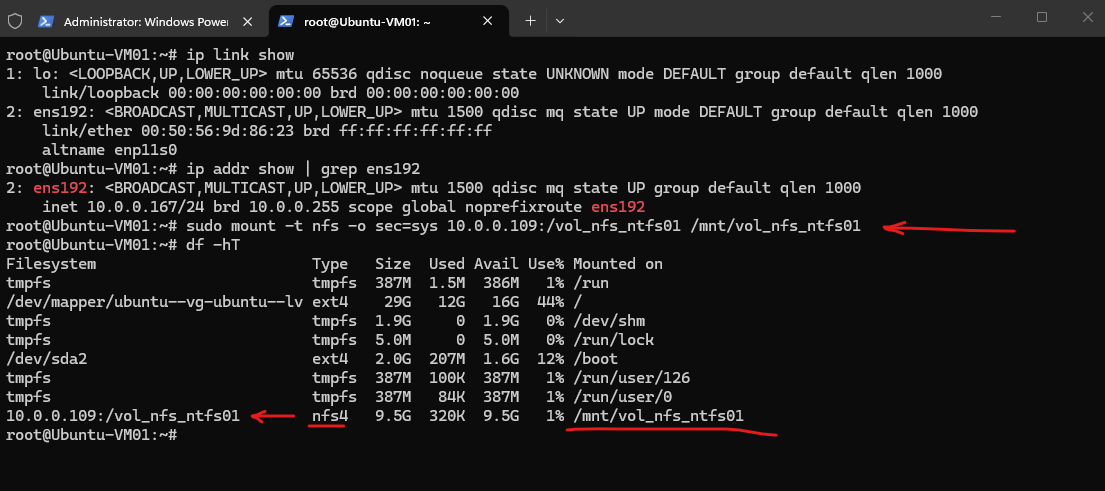
With the export policy already permitting our Linux client 10.0.0.167 to access the volume using NFS, we can now mount the newly created vol_nfs_ntfs01 volume.
At this point, we have not configured any dedicated UNIX-to-Windows name mapping for our test user. This allows us to first observe how ONTAP handles an AUTH_SYS user accessing a volume using NTFS security style with the existing configuration.
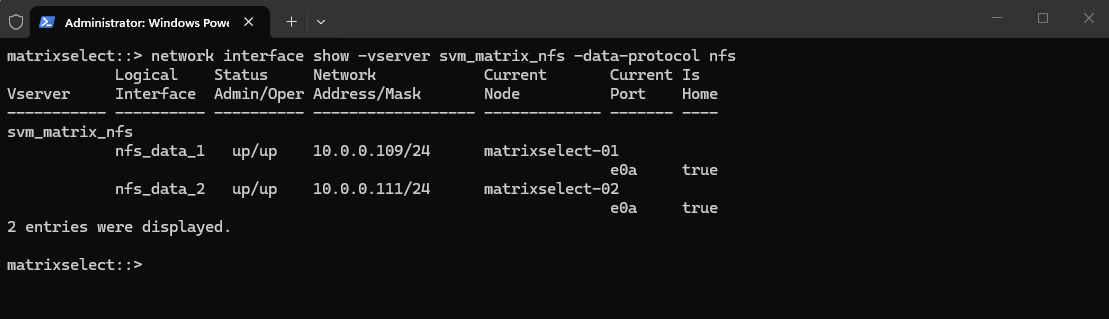
The NFS SVM provides two active NFS data LIFs, 10.0.0.109 and 10.0.0.111; for our test, we will use nfs_data_1 (10.0.0.109).
network interface show -vserver svm_matrix_nfs -data-protocol nfs
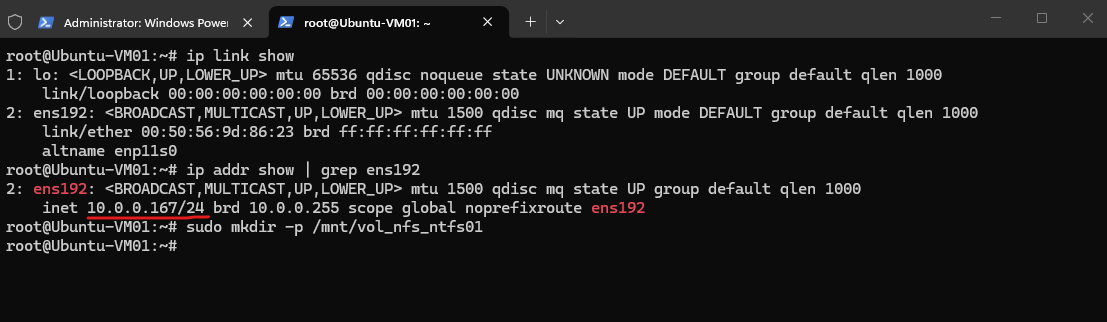
On the Linux client, create a mount point:
sudo mkdir -p /mnt/vol_nfs_ntfs01
Then mount the volume:
For this test, we explicitly select AUTH_SYS (
sec=sys) as the NFS security flavor. With AUTH_SYS, the Linux client supplies the user’s numeric UID and GID in the RPC credentials, which allows us to trace how ONTAP resolves this UNIX identity and subsequently maps it to a Windows identity for authorization against the NTFS ACL.For more details about the differences between NFSv3 and NFSv4 when using AUTH_SYS and the
sec=sysmount option, see my Step-by-Step Guide Part 6: How to build your own NetApp ONTAP 9 LAB – NFSv4 Pitfalls.
sudo mount -t nfs -o sec=sys <NFS-LIF-IP>:/vol_nfs_ntfs01 /mnt/vol_nfs_ntfs01
sudo mount -t nfs -o sec=sys 10.0.0.109:/vol_nfs_ntfs01 /mnt/vol_nfs_ntfs01
Identifying the UNIX User and AUTH_SYS Credentials
Before testing access to the NTFS security style volume, we first determine the UID, primary GID, and supplementary groups of the Linux user. With AUTH_SYS, these numeric values are supplied by the NFS client as part of the RPC authentication credentials.
On 10.0.0.167, run this as the normal user you want to use for the test, not as root:
whoami
id
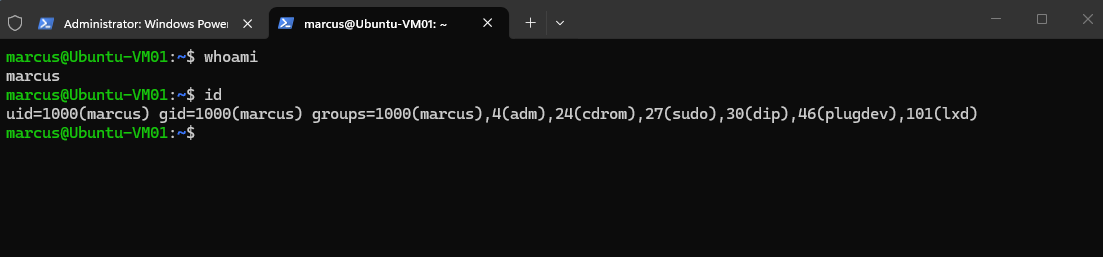
In my case, the user marcus has UID 1000 and primary GID 1000, together with several supplementary group memberships. These credentials provide the starting point for the UNIX-to-Windows identity mapping that ONTAP must perform before access can be evaluated against the NTFS ACL.
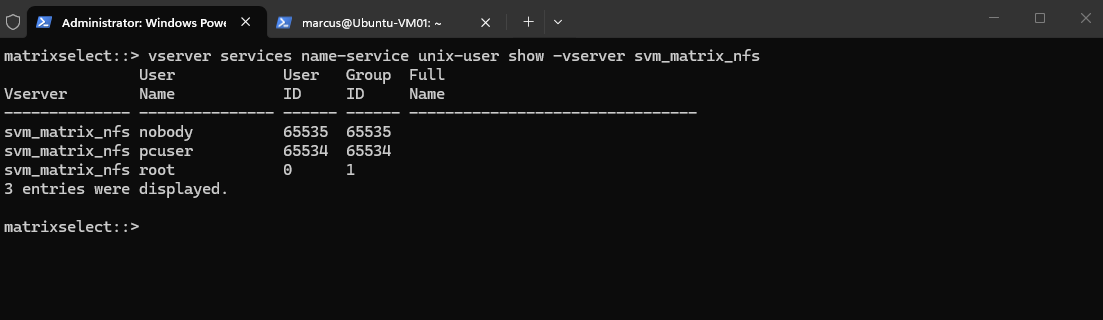
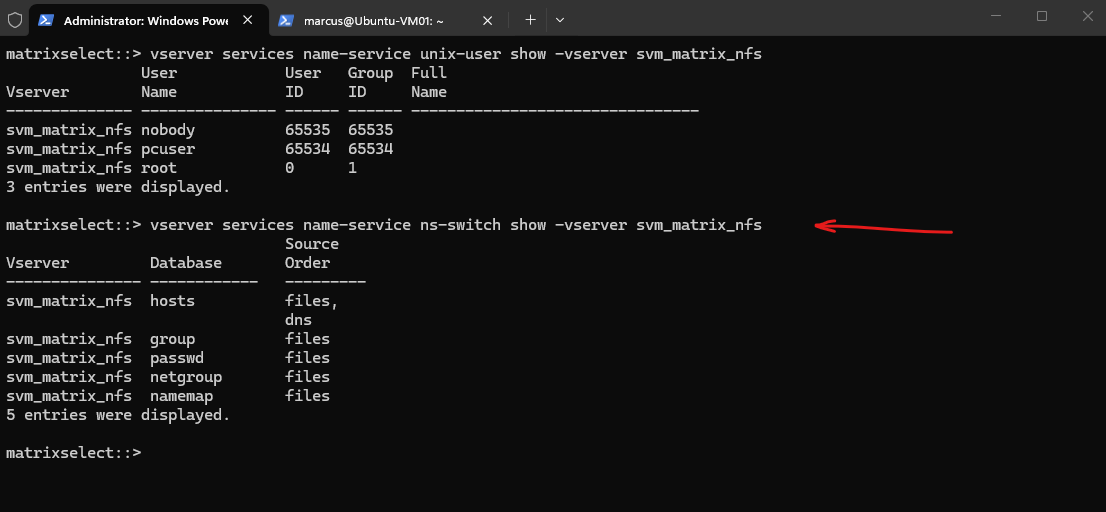
The local UNIX user database of
svm_matrix_nfscurrently contains only the defaultroot,pcuser, andnobodyaccounts. Our Linux test usermarcus(UID 1000) is therefore not locally defined on the SVM.
vserver services name-service unix-user show -vserver svm_matrix_nfs
The name-service switch (ns-switch) configuration defines which sources ONTAP uses to resolve different types of identity and name information and in which order they are queried.
Here, the passwd database uses only local files, meaning UNIX users must exist in the SVM’s local UNIX user database to be resolved.
Because
marcus(UID 1000) is not present in the SVM’s local UNIX user database, ONTAP currently has no configured name-service source from which it can resolve UID1000to the UNIX usernamemarcus.
vserver services name-service ns-switch show -vserver svm_matrix_nfs
Testing NFS Access Before Configuring User Mapping
Before adding the UNIX user or configuring any UNIX-to-Windows name mapping, we will attempt to access the NTFS security style volume as marcus.
This allows us to observe how ONTAP handles an AUTH_SYS request when the supplied UID 1000 cannot currently be resolved through the SVM’s configured UNIX name services.
On Ubuntu, as marcus, first:
Although the volume itself is successfully mounted, the user
marcus(UID 1000) cannot even list its root directory and receivesPermission denied.At this point, ONTAP cannot resolve UID
1000through the SVM’s configuredpasswdname service, so the UNIX identity required for the subsequent UNIX-to-Windows mapping is missing.
ls -la /mnt/vol_nfs_ntfs01

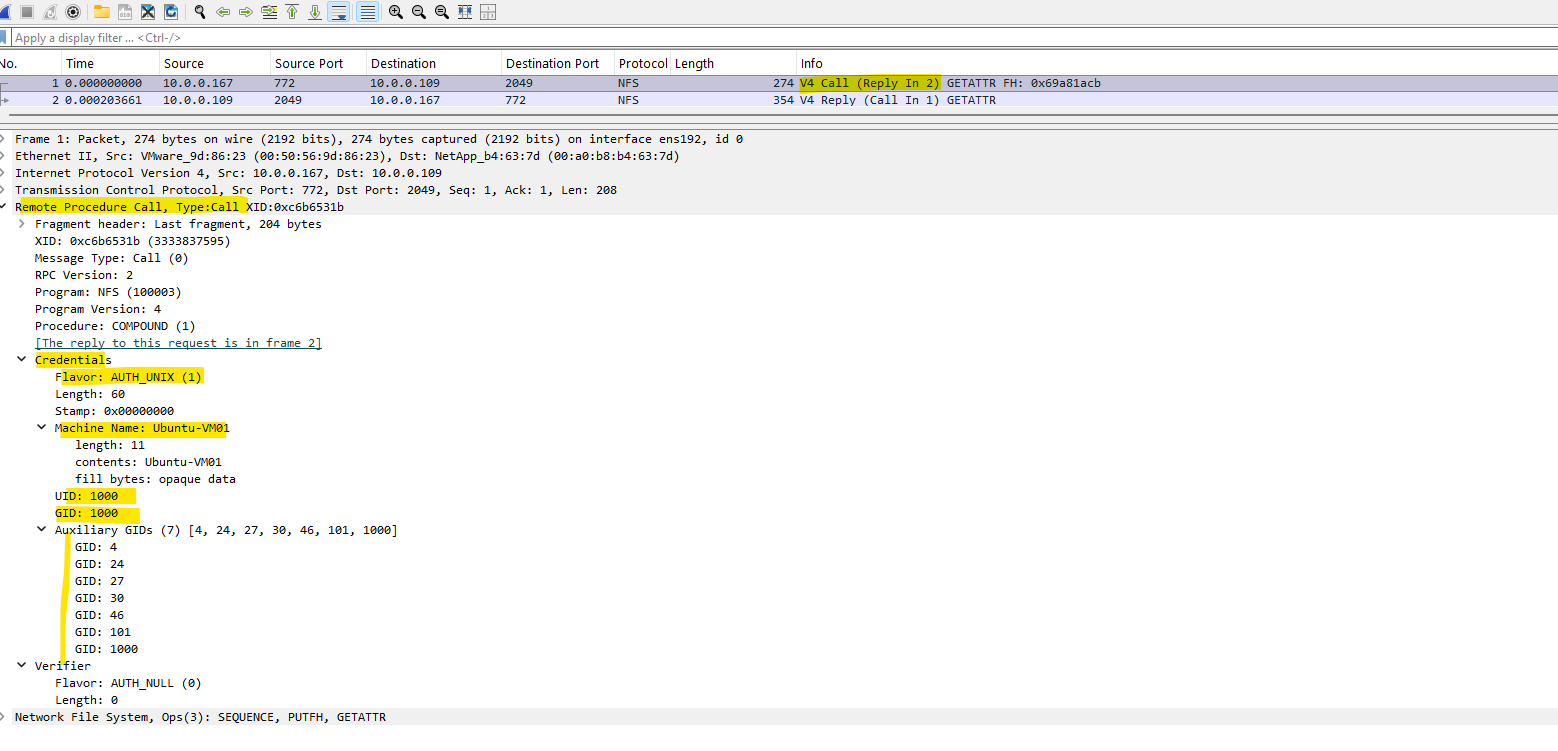
A Wireshark capture confirms that AUTH_SYS (displayed by Wireshark as
AUTH_UNIX) sends the numeric credentials of our Linux user directly within the RPC request.We can see UID
1000, primary GID1000, and the supplementary group IDs, matching the credentials of our test usermarcus.
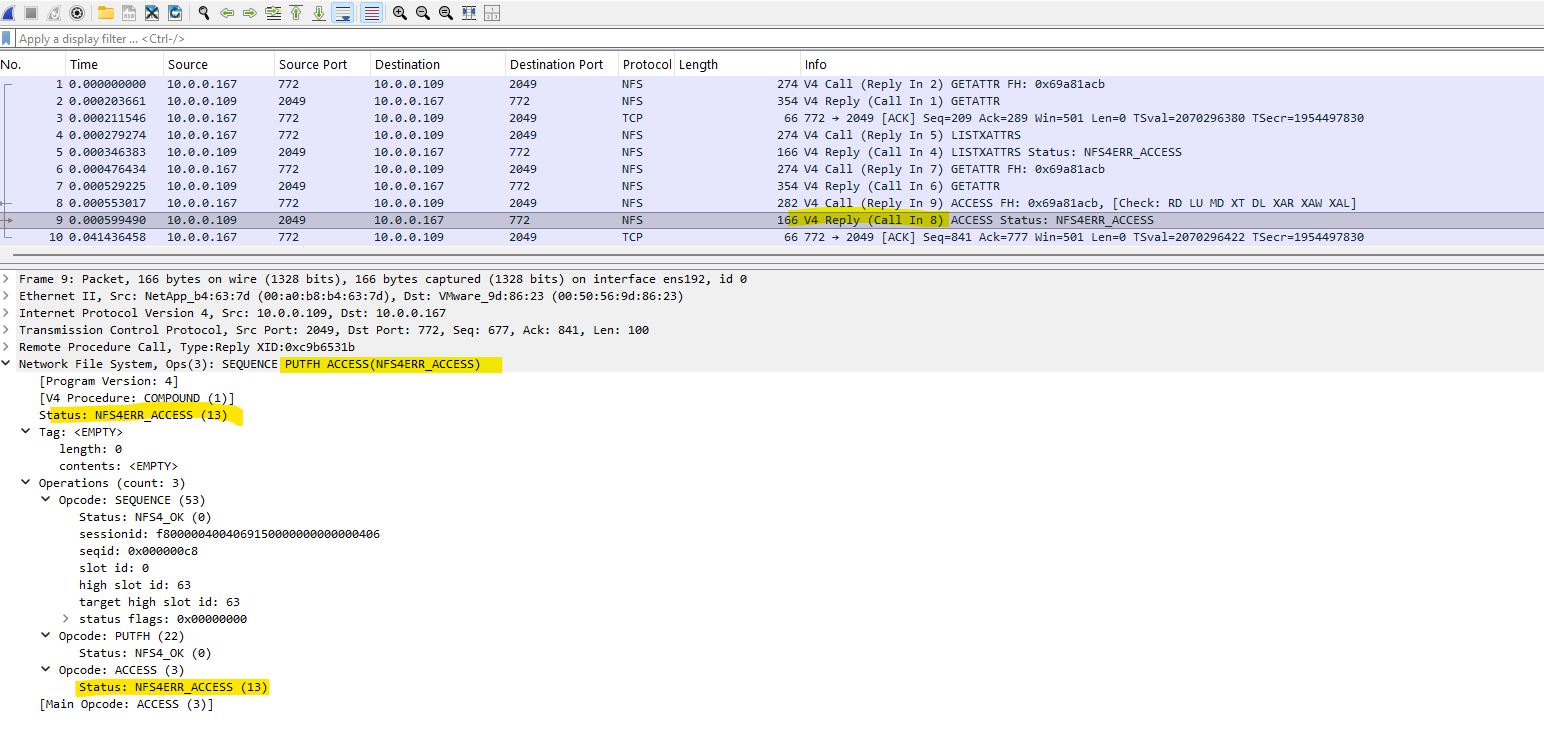
ONTAP receives the NFSv4 request containing the AUTH_SYS credentials of our user, but the subsequent ACCESS operation is rejected with
NFS4ERR_ACCESS.This corresponds to the
Permission deniederror shown on the Linux client and confirms that the failure occurs at the NFS authorization stage rather than during the mount itself.
The ONTAP event log confirms the cause of the failed access: UID 1000 cannot be mapped to a Windows/CIFS identity, and no default Windows user is configured as a fallback.
Consequently, the UNIX-to-Windows name mapping fails and ONTAP denies access to the NTFS-secured volume.
ONTAP automatically attempts to map the UNIX identity received through NFS AUTH_SYS to a corresponding Windows/CIFS identity for NTFS permission evaluation because the volume uses NTFS security style.
matrixselect::> event log show -message-name secd.nfsAuth.noNameMap

Adding the UNIX User to the SVM
We have confirmed that ONTAP receives UID 1000 through AUTH_SYS, but the SVM currently cannot resolve this UID to a UNIX user because its passwd name-service database contains only the default local accounts.
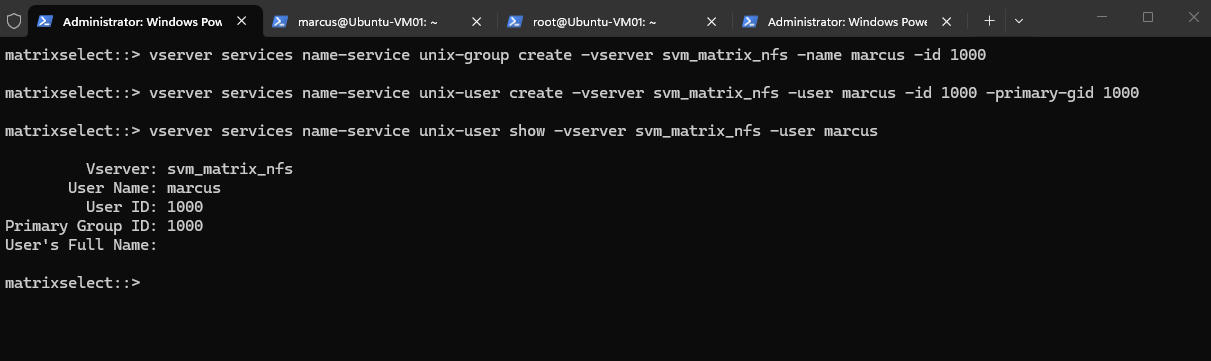
We therefore create a local UNIX group and user matching the UID/GID 1000 used by marcus on our Ubuntu client.
First create the group:
vserver services name-service unix-group create -vserver svm_matrix_nfs -name marcus -id 1000

Then the user:
vserver services name-service unix-user create -vserver svm_matrix_nfs -user marcus -id 1000 -primary-gid 1000

Verify:
vserver services name-service unix-user show -vserver svm_matrix_nfs -user marcus
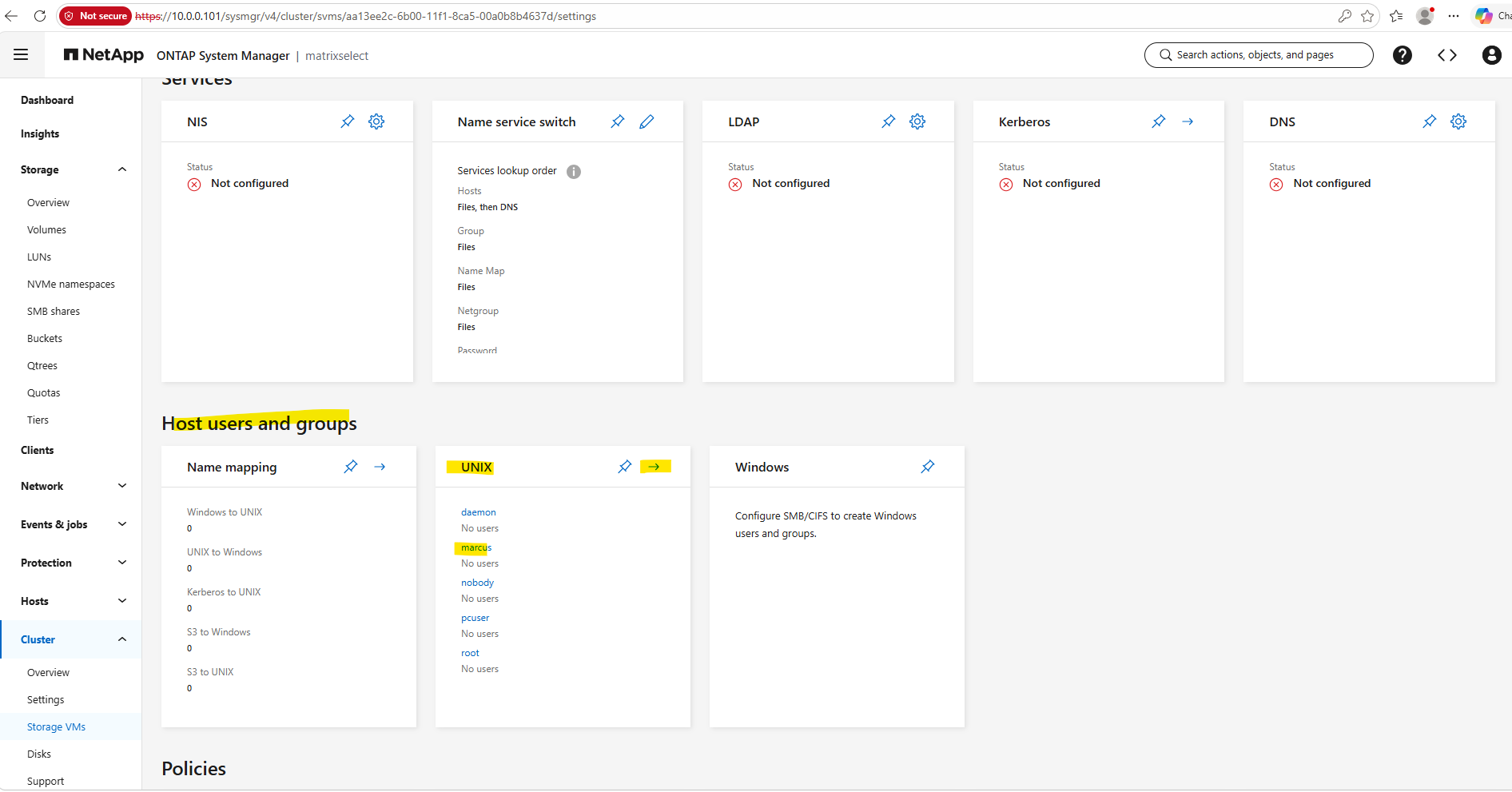
The SVM’s local UNIX users and groups can also be viewed and managed through ONTAP System Manager under Cluster → Storage VMs → SVM → Settings → Host users and groups → UNIX.
Here we can already see our newly created
marcusUNIX group; opening the UNIX configuration allows us to verify the existing UNIX users and groups or create new ones.
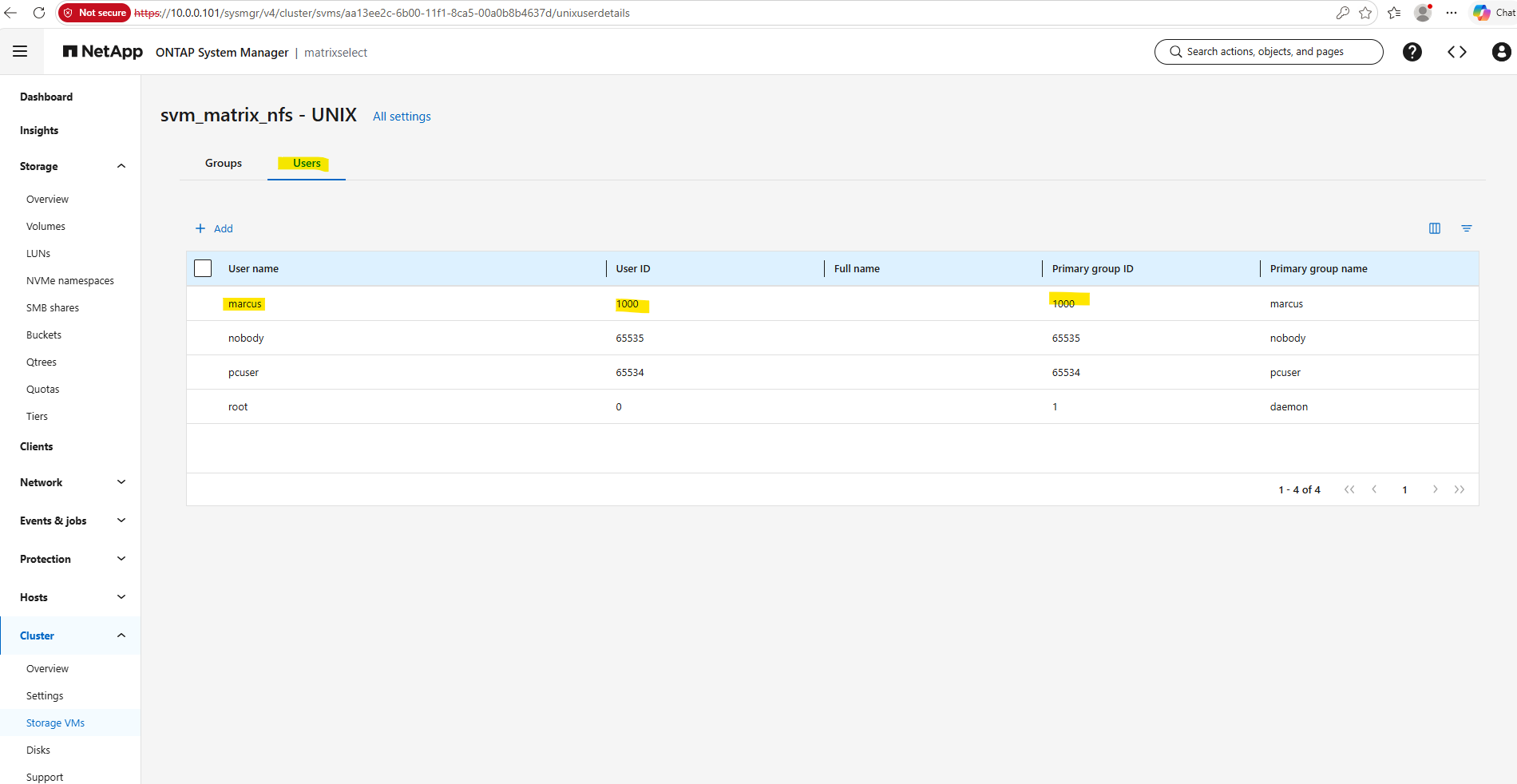
This view confirms that the local UNIX user marcus is now configured on svm_matrix_nfs with UID 1000 and primary GID 1000, matching the credentials sent by our Ubuntu client through AUTH_SYS.
ONTAP can therefore now resolve the received UID
1000to the UNIX usermarcus, completing the first step of the identity-mapping chain.
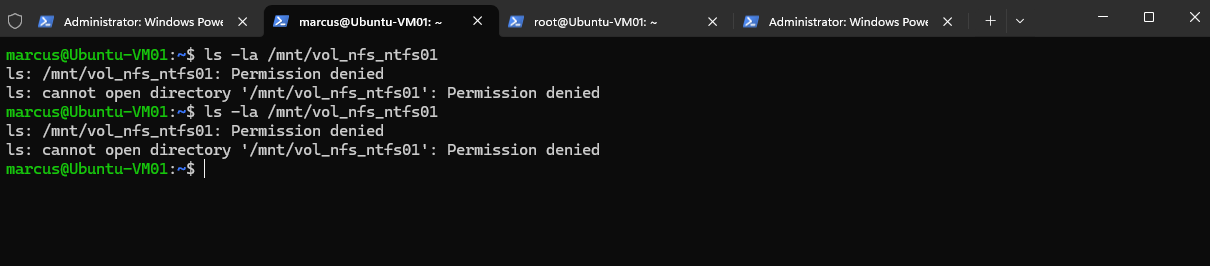
After adding the local UNIX user marcus with UID/GID 1000, we retry accessing the mounted NFS volume using the same user.
Although ONTAP can now resolve the UID to a UNIX username, access is still denied, indicating that another step in the identity-mapping process is failing.
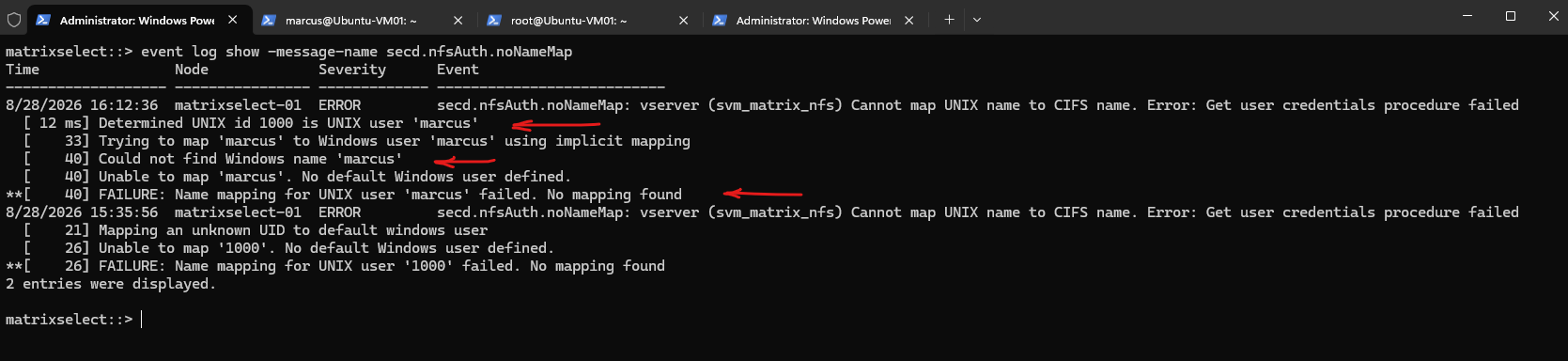
The event log now clearly shows the next stage of the mapping process: ONTAP successfully resolves UID 1000 to UNIX user marcus and then attempts an implicit mapping to a Windows user with the same name.
Because no Windows user
marcuscan be found and no default Windows user is configured, the mapping still fails and access remains denied.
event log show -message-name secd.nfsAuth.noNameMap
Configuring Windows Identity Resolution for NFS
ONTAP has already demonstrated that, if no explicit rule exists, it attempts an implicit mapping using the same username (marcus → marcus). Because such a Windows user does not exist, we now need to map the UNIX user marcus to an actual Windows account that can be used to evaluate the NTFS permissions.
Before creating the rule, let’s first check whether any mappings currently exist:
The result confirms that there are currently no explicit name mappings, which is consistent with the event log: ONTAP therefore fell back to its implicit same-name mapping (
marcus→marcus).
vserver name-mapping show -vserver svm_matrix_nfs

This can also be checked in ONTAP System Manager under Host users and groups → Name mapping.
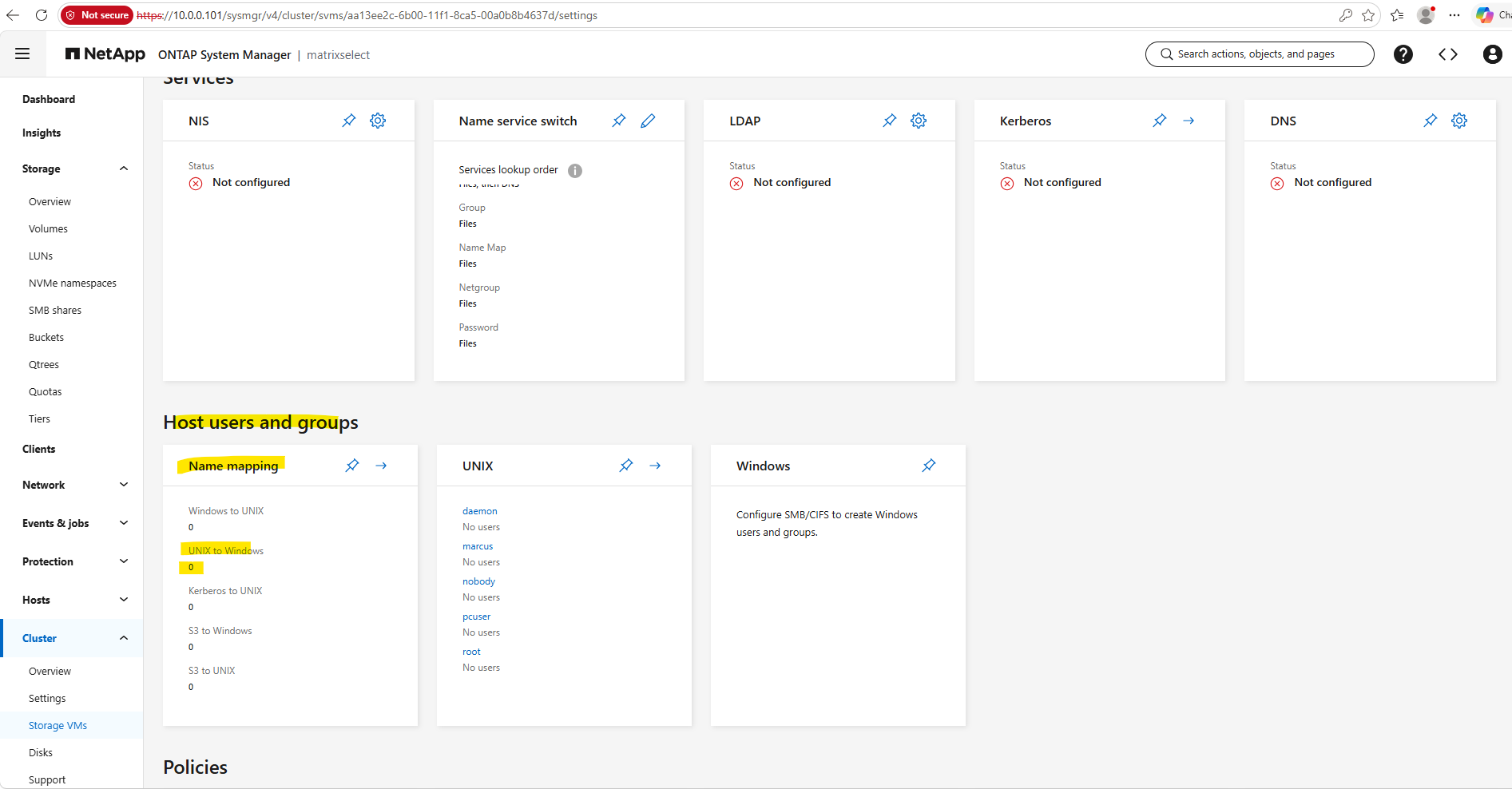
Next we need to establish where the Windows identity will come from before creating the mapping. The System Manager indicates that svm_matrix_nfs currently has no SMB/CIFS configuration, so let’s verify that from the CLI:
The command confirms that no CIFS server is currently configured on
svm_matrix_nfs. Therefore, although ONTAP can now resolve UID1000to UNIX usermarcus, the SVM currently has no connection to a Windows domain from which it could resolve the corresponding Windows identity.
vserver cifs show -vserver svm_matrix_nfs

Configuring the CIFS Server and Joining the SVM to Active Directory
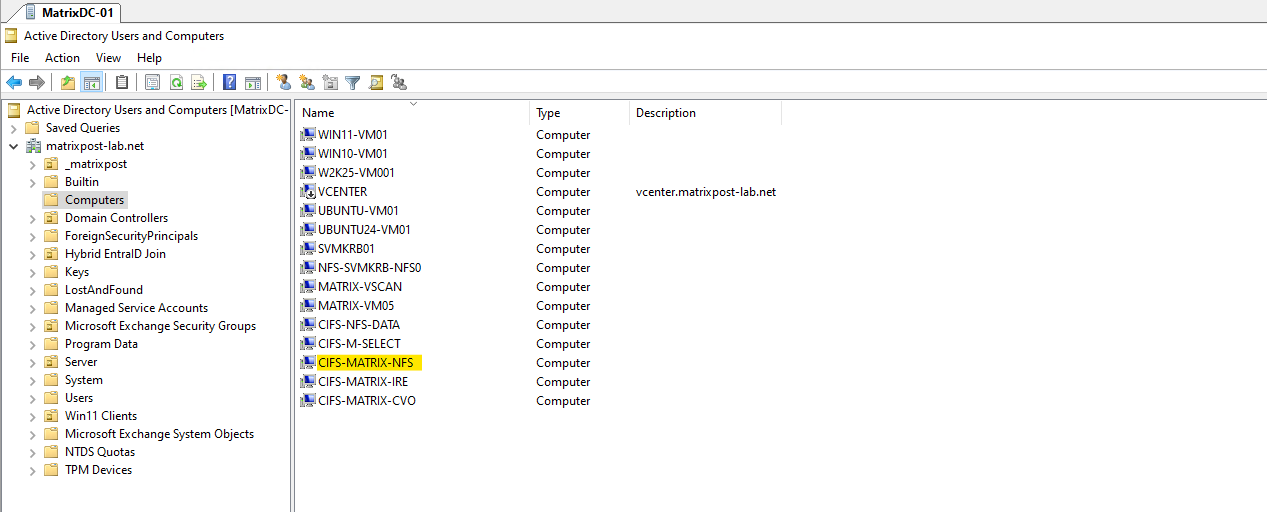
Next, we need to give svm_matrix_nfs access to the Windows identity namespace by configuring a CIFS server and joining the SVM to Active Directory.
This does not mean that we need to create an SMB share; the CIFS server/domain membership is needed here so ONTAP can resolve Windows users and SIDs for the UNIX-to-Windows mapping.
Before creating it, let’s check the DNS configuration for this SVM:
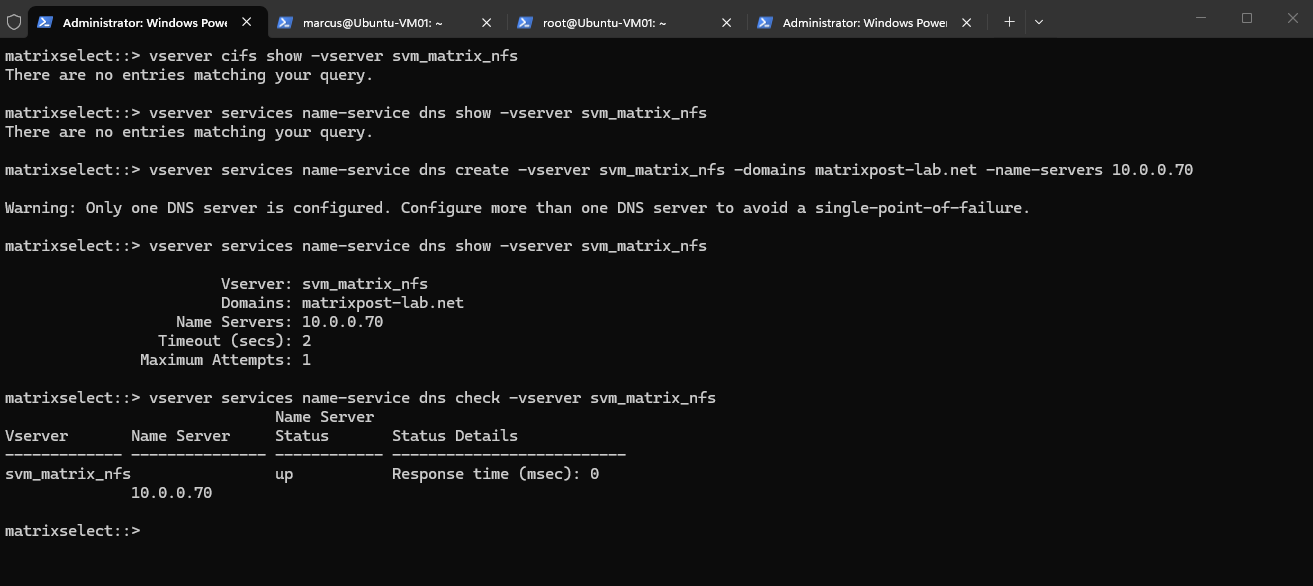
The NFS SVM currently has neither a CIFS server nor DNS name-service configuration. Before joining the SVM to Active Directory, we therefore first need to configure DNS so that ONTAP can resolve the AD domain and its domain controllers.
vserver services name-service dns show -vserver svm_matrix_nfs
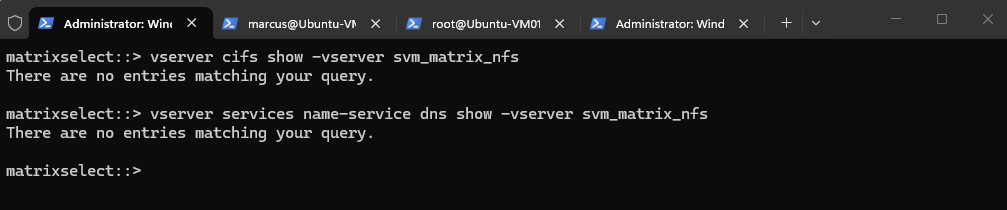
To configure DNS on the NFS SVM we run:
vserver services name-service dns create -vserver svm_matrix_nfs -domains matrixpost-lab.net -name-servers 10.0.0.70
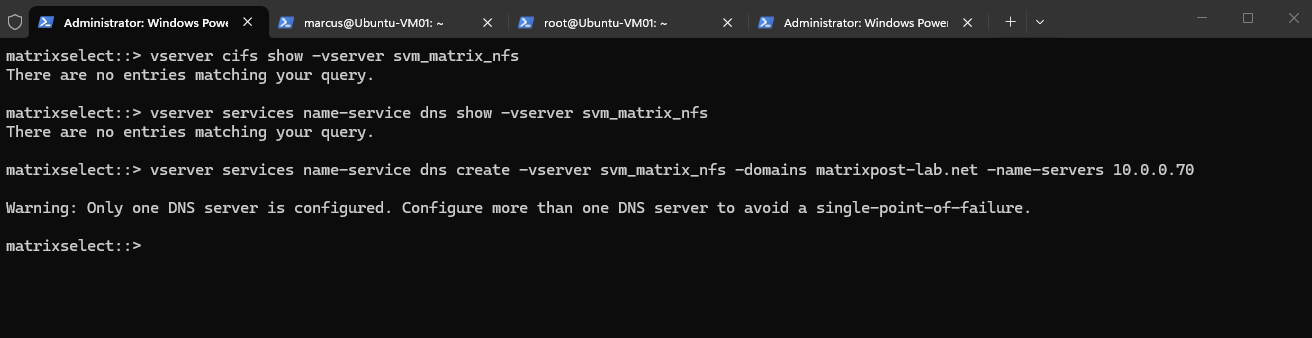
Verify:
vserver services name-service dns show -vserver svm_matrix_nfs
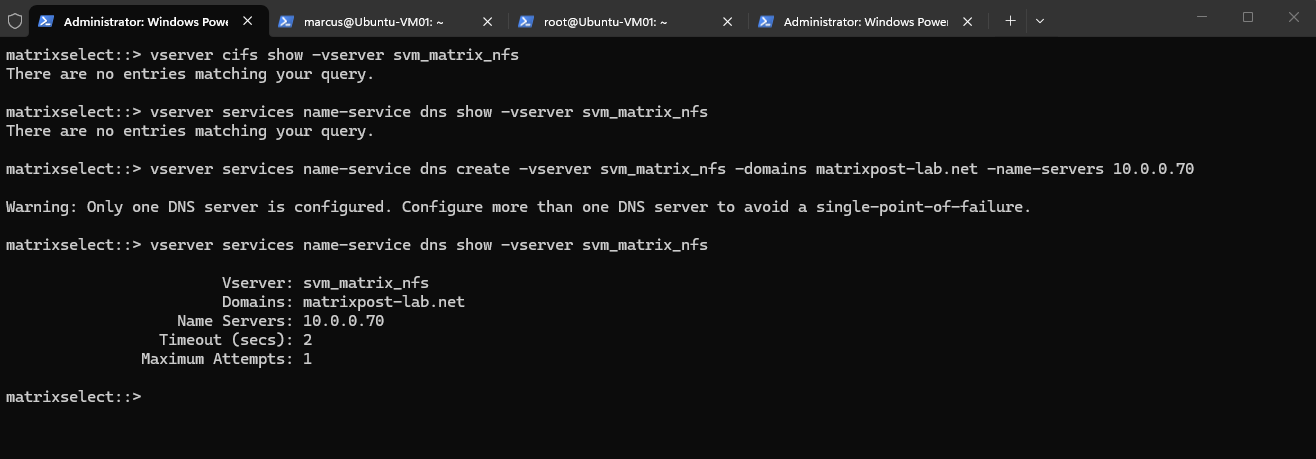
Next we should verify DNS connectivity before creating the CIFS server:
Finally, we verify that the configured DNS server is reachable from
svm_matrix_nfs. The statusupconfirms successful communication with the AD-integrated DNS server10.0.0.70, so the SVM is ready for the next step: joining it to Active Directory.
vserver services name-service dns check -vserver svm_matrix_nfs
With DNS configured and working, we can now create a CIFS server on svm_matrix_nfs and join it to the matrixpost-lab.net Active Directory domain.
We are not doing this to provide SMB shares; the domain membership allows ONTAP to resolve Windows users and SIDs required for our UNIX-to-Windows mapping.
Create the CIFS server and join svm_matrix_nfs to the MATRIXPOST domain:
vserver cifs create -vserver svm_matrix_nfs -cifs-server CIFS-MATRIX-NFS -domain MATRIXPOST-LAB.NET
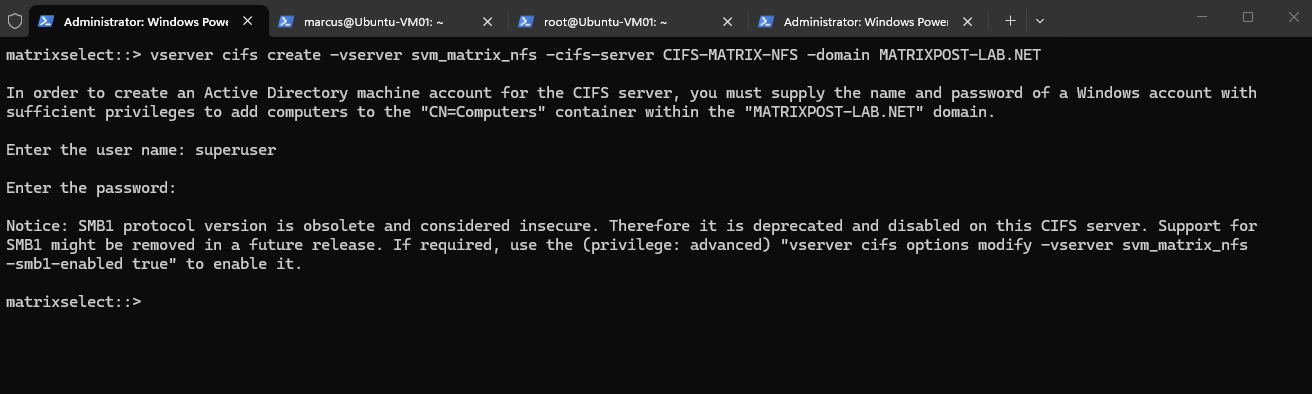
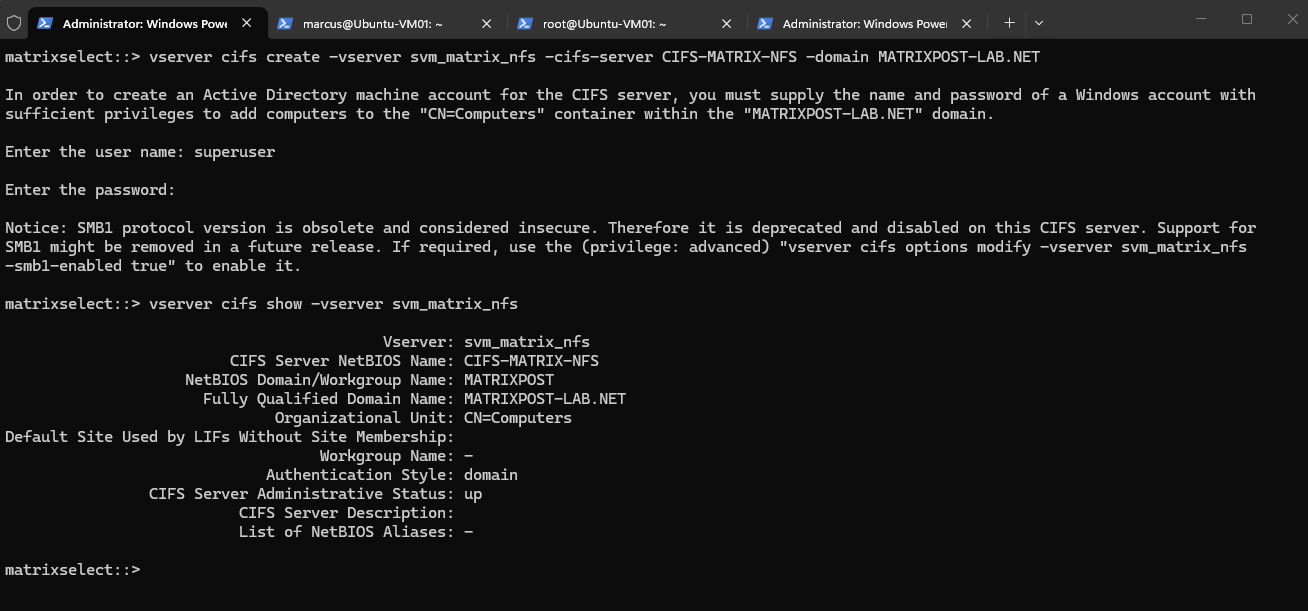
This confirms that
svm_matrix_nfsis now successfully joined to theMATRIXPOST-LAB.NETdomain with the CIFS serverCIFS-MATRIX-NFS, and its administrative status isup.ONTAP can now use the domain connection to resolve Windows users, groups, and SIDs required for our UNIX-to-Windows mapping.
vserver cifs show -vserver svm_matrix_nfs
Creating the UNIX-to-Windows Name Mapping
With Active Directory available to the SVM, ONTAP can now resolve Windows identities. We can therefore explicitly map our UNIX user marcus to the Windows domain account that should provide the NTFS security context.
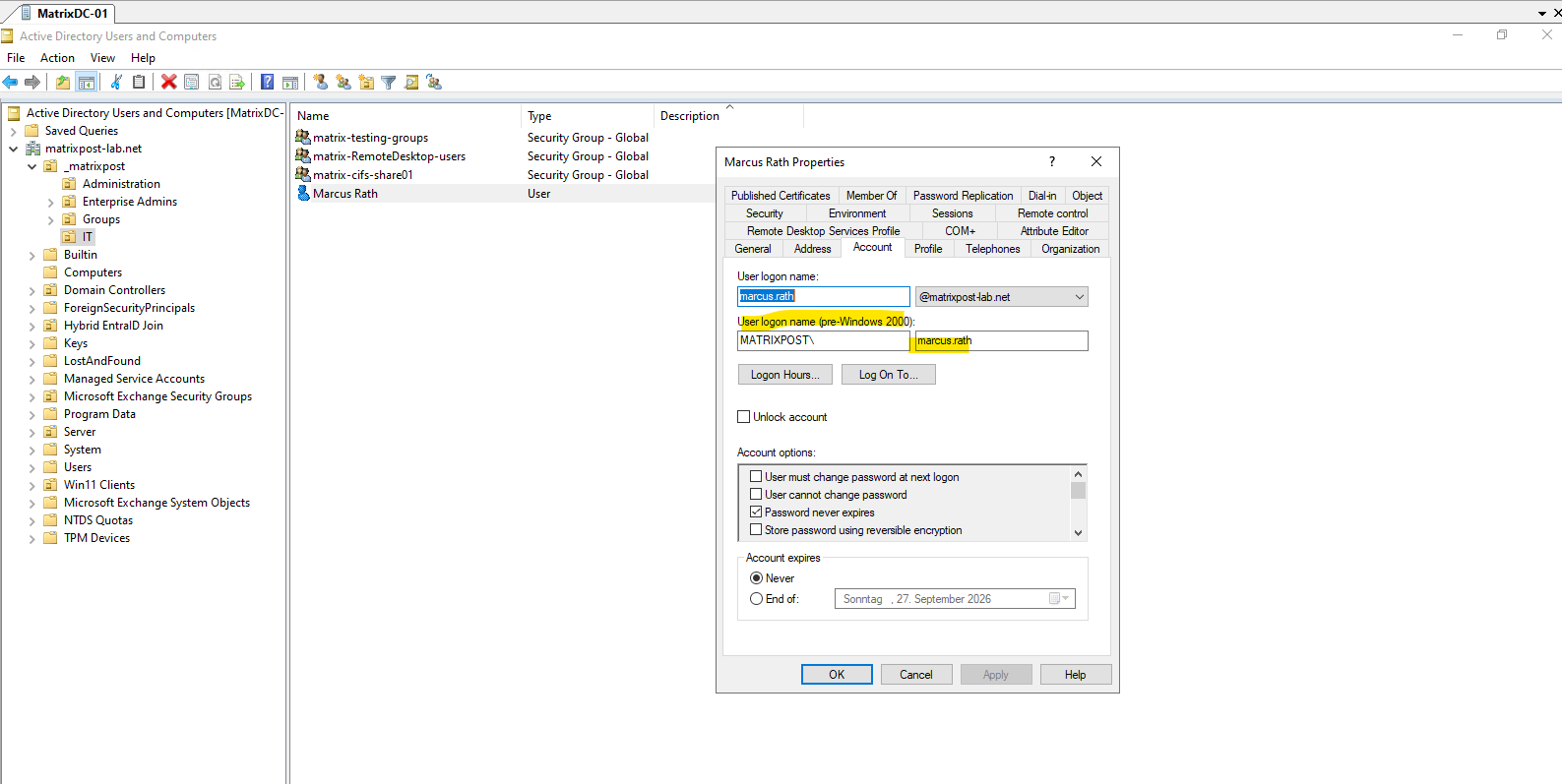
In my lab, the corresponding Windows identity is the Active Directory account MATRIXPOST\marcus.rath, with the UPN marcus.rath@matrixpost-lab.net. We will use this account as the Windows identity to which the UNIX user marcus is mapped.
Note: For ONTAP UNIX-to-Windows name mapping, use the pre-Windows 2000 (down-level) logon name in the format
DOMAIN\sAMAccountName.If the user’s UPN name differs from the
sAMAccountName, likejohn.doe@matrixpost-lab.netversusMATRIXPOST\jdoe, using the UPN username asDOMAIN\john.doewill fail becausejohn.doeis not the account’ssAMAccountName.
Now we create the explicit UNIX-to-Windows name mapping:
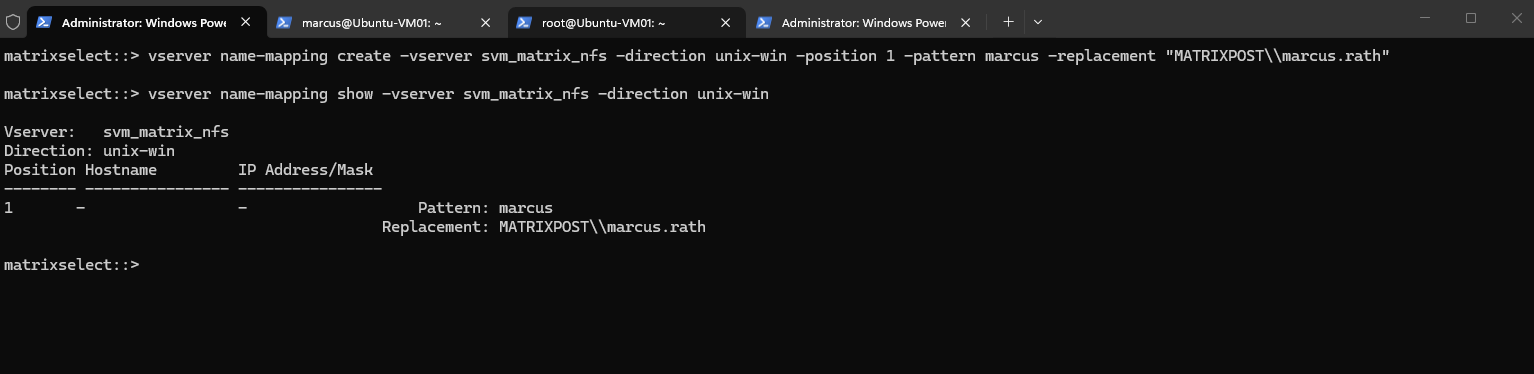
vserver name-mapping create -vserver svm_matrix_nfs -direction unix-win -position 1 -pattern marcus -replacement "MATRIXPOST\\marcus.rath"

Then verify the configured rule:
The explicit UNIX-to-Windows name mapping is now configured at position
1, mapping the UNIX usermarcusto the Active Directory accountMATRIXPOST\marcus.rath.ONTAP can therefore use the Windows account and its associated SID as the security context for evaluating the NTFS permissions on the volume.
vserver name-mapping show -vserver svm_matrix_nfs -direction unix-win
Retesting NFS Access with the Completed Name Mapping
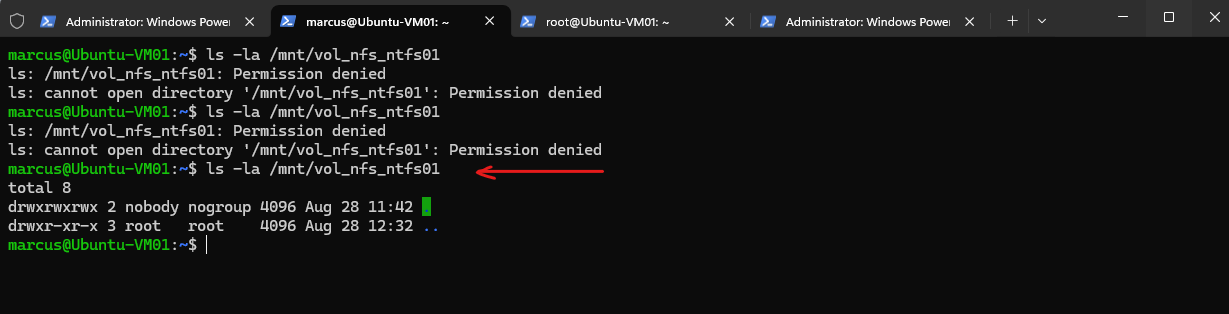
After creating the explicit UNIX-to-Windows mapping, we retry the same access from our Ubuntu client.
After the updated identity information takes effect, access succeeds: ONTAP can now resolve the complete identity chain and evaluate the NTFS permissions using the mapped Windows security context.
AUTH_SYS UID 1000 → UNIX user marcus → MATRIXPOST\marcus.rath → Windows SID → NTFS ACL → Access granted
ls -la /mnt/vol_nfs_ntfs01
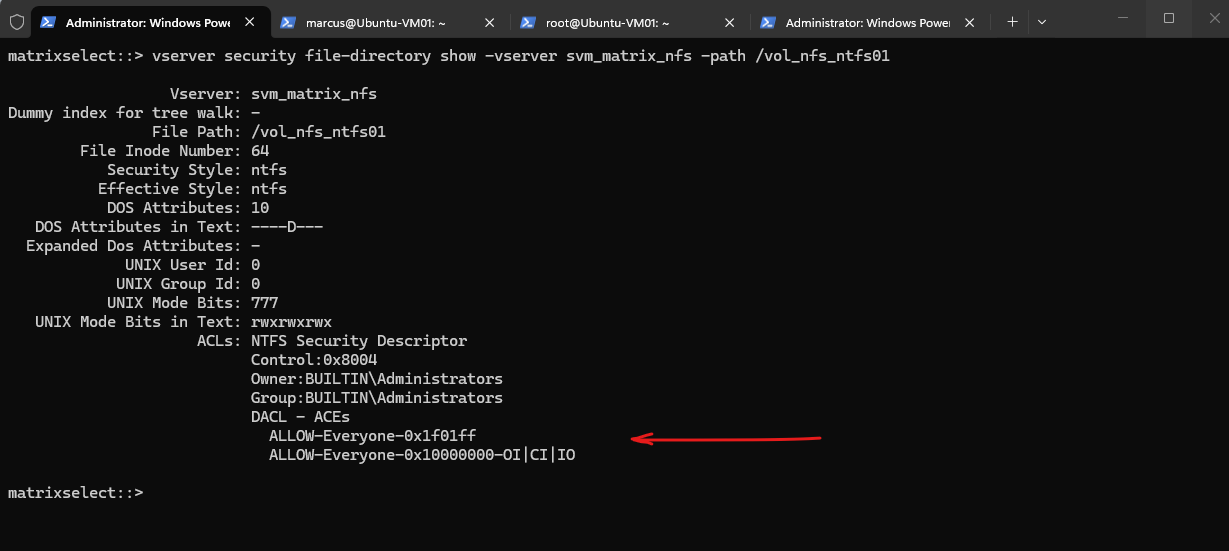
We can verify the effective permissions directly from ONTAP using vserver security file-directory show.
The volume root uses NTFS security style, and its DACL (Discretionary Access Control List) currently grants Everyone Full Control: the first ACE applies to the volume root directory itself, while the second ACE uses Object Inherit (OI), Container Inherit (CI), and Inherit Only (IO) to propagate Full Control to files and subdirectories below it.
This also explains why access to the volume now succeeds: after the UNIX user
marcusis successfully mapped to the Windows accountMATRIXPOST\marcus.rath, ONTAP can build a valid Windows security context and evaluate the NTFS DACL, where the Everyone ACE grants the mapped user access.
vserver security file-directory show -vserver svm_matrix_nfs -path /vol_nfs_ntfs01
A DACL (Discretionary Access Control List) is the part of an NTFS security descriptor that determines which users and groups are allowed or denied access to a file or directory.
It consists of individual Access Control Entries (ACEs), each defining permissions for a specific Windows security principal identified by its SID.
Testing Access with User-Specific NTFS Permissions
So far, the volume root grants Full Control to Everyone, meaning any successfully mapped Windows identity can pass the NTFS ACL check.
To demonstrate the purpose of the UNIX-to-Windows mapping more clearly, we can restrict access to MATRIXPOST\marcus.rath and verify that the NFS request is authorized using this mapped Windows identity.
For this test, I’d configure the NTFS ACL directly through ONTAP rather than introducing an SMB share just to change permissions. We can use the vserver security file-directory commands for that.
First create a named NTFS security descriptor, for example:
vserver security file-directory ntfs create -vserver svm_matrix_nfs -ntfs-sd NTFS-MARCUS -owner "MATRIXPOST\marcus.rath"
Note: When creating a new NTFS security descriptor, ONTAP automatically adds several default ACEs, including
BUILTIN\Userswith Full Control.For our test, we will remove the
BUILTIN\UsersACE afterward so that access is granted specifically through the explicitMATRIXPOST\marcus.rathACE rather than through the broader built-in group.
vserver security file-directory ntfs dacl remove -vserver svm_matrix_nfs -ntfs-sd NTFS-MARCUS -access-type allow -account "BUILTIN\Users"
Then add an ACE granting marcus.rath Full Control:
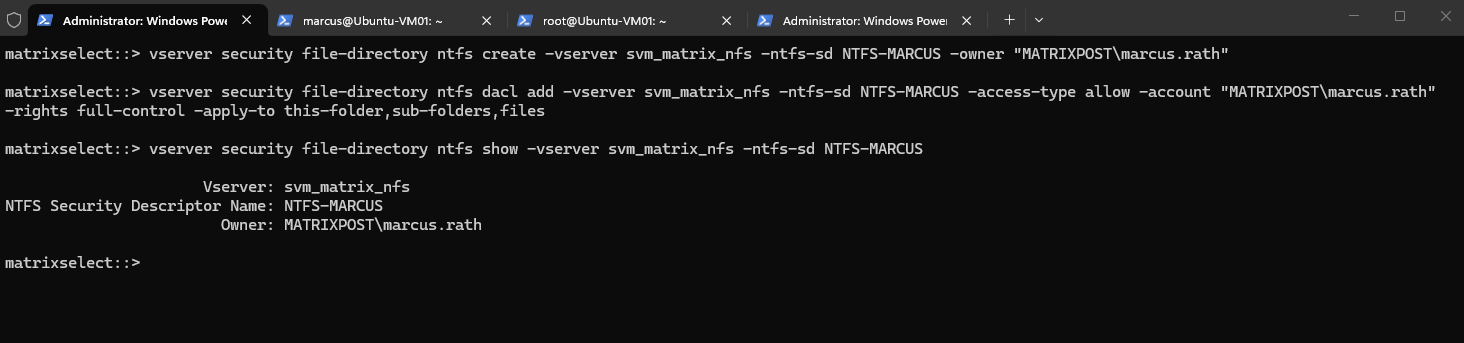
vserver security file-directory ntfs dacl add -vserver svm_matrix_nfs -ntfs-sd NTFS-MARCUS -access-type allow -account "MATRIXPOST\marcus.rath" -rights full-control -apply-to this-folder,sub-folders,files
Verify the descriptor:
vserver security file-directory ntfs show -vserver svm_matrix_nfs -ntfs-sd NTFS-MARCUS
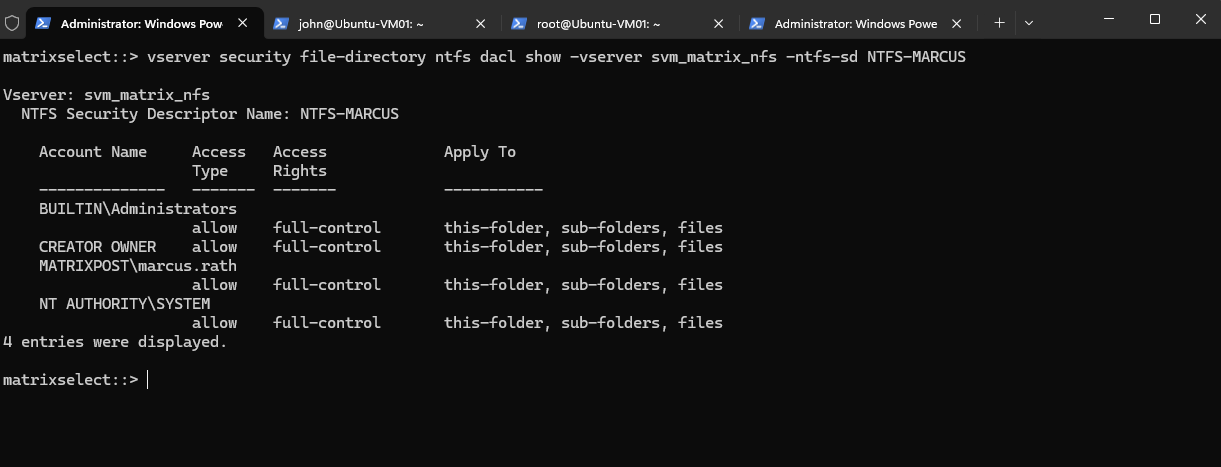
Verify the DACL:
The new NTFS security descriptor
NTFS-MARCUSnow usesMATRIXPOST\marcus.rathas its owner and includes an explicit Full Control ACE for that account.ONTAP also created several default administrative/system ACEs, including
BUILTIN\Administrators,BUILTIN\Users(we explicitly removed earlier),CREATOR OWNER, andNT AUTHORITY\SYSTEM.The remaining
BUILTIN\Administratorsentry represents the well-known Windows built-in Administrators group and is not the same as the Active DirectoryDomain Adminsgroup. Together withCREATOR OWNERandNT AUTHORITY\SYSTEM, it is part of the standard Windows security principals retained in our NTFS security descriptor.
vserver security file-directory ntfs dacl show -vserver svm_matrix_nfs -ntfs-sd NTFS-MARCUS
Next we need to apply NTFS-MARCUS specifically to /vol_nfs_ntfs01. ONTAP does this through a file-security policy.
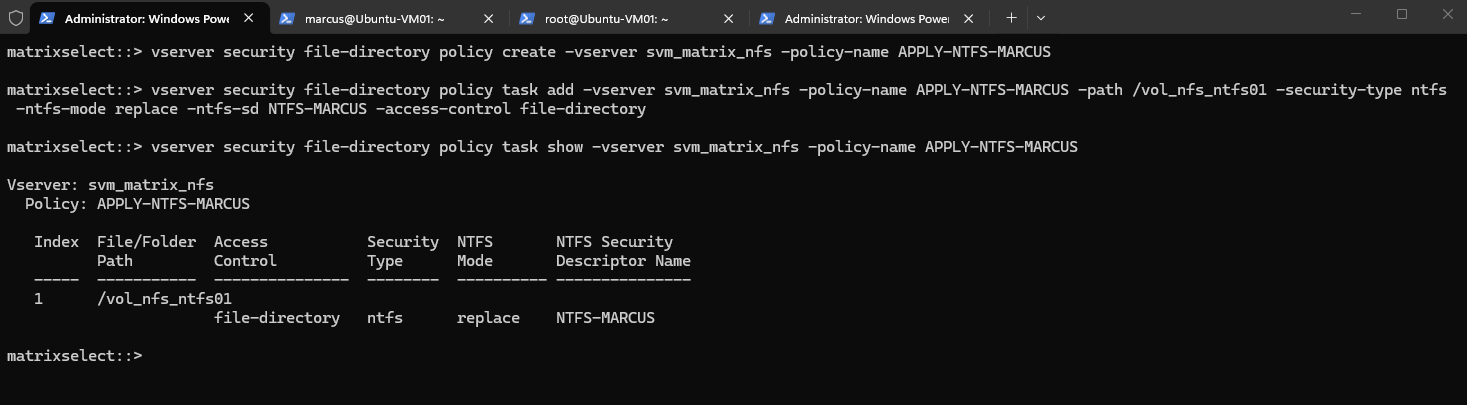
We create a file-security policy and associate the NTFS-MARCUS security descriptor specifically with /vol_nfs_ntfs01. Using ntfs-mode replace instructs ONTAP to replace the existing NTFS security descriptor on the target path when the policy is applied.
vserver security file-directory policy create -vserver svm_matrix_nfs -policy-name APPLY-NTFS-MARCUS
Add the task:
The policy task associates the security policy with the specific path
/vol_nfs_ntfs01and defines which NTFS security descriptor (NTFS-MARCUS) should be applied there.Using
ntfs-mode replacespecifies that the existing NTFS security descriptor on the target path will be replaced when the policy is applied.
vserver security file-directory policy task add -vserver svm_matrix_nfs -policy-name APPLY-NTFS-MARCUS -path /vol_nfs_ntfs01 -security-type ntfs -ntfs-mode replace -ntfs-sd NTFS-MARCUS -access-control file-directory

# Verify the policy task:
vserver security file-directory policy task show -vserver svm_matrix_nfs -policy-name APPLY-NTFS-MARCUS
Now apply the policy:
vserver security file-directory apply -vserver svm_matrix_nfs -policy-name APPLY-NTFS-MARCUS

Once it completes, verify what is actually applied to the volume root:
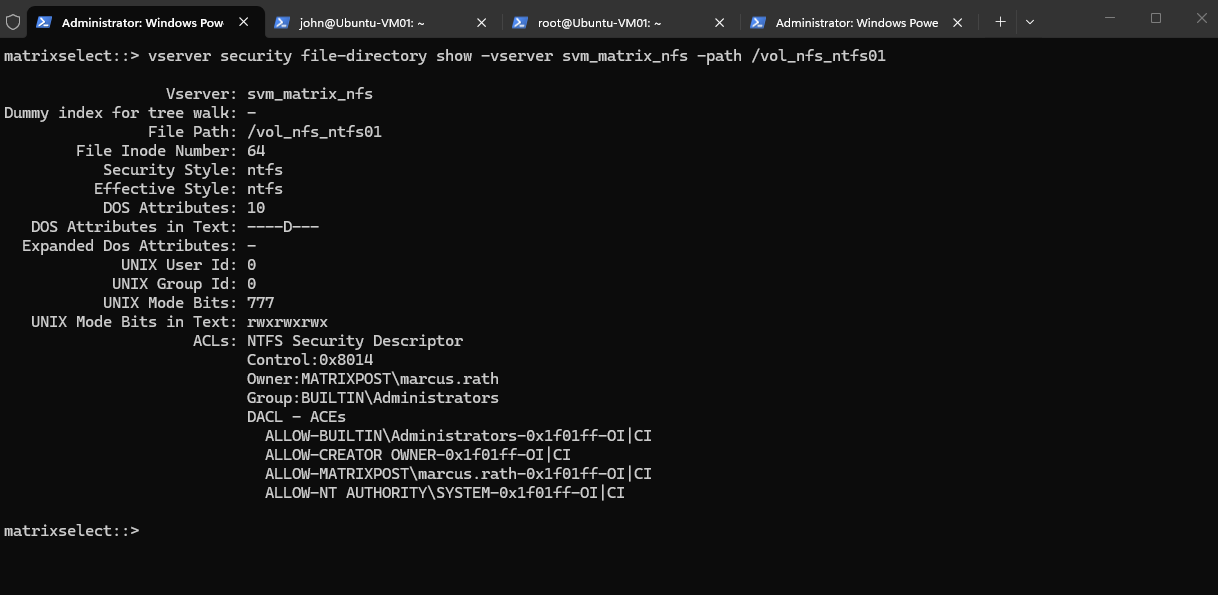
After applying the file-security policy, we verify the resulting security descriptor directly on
/vol_nfs_ntfs01.The volume root is now owned by
MATRIXPOST\marcus.rath, and the previousEveryoneACEs are no longer present; instead, the DACL contains our explicit Full Control ACE forMATRIXPOST\marcus.rath, together with the default system and built-in entries.
vserver security file-directory show -vserver svm_matrix_nfs -path /vol_nfs_ntfs01
Verifying Access with the New NTFS Security Descriptor
After applying the NTFS-MARCUS security descriptor to /vol_nfs_ntfs01, we retry access from Ubuntu using the same UNIX user marcus.
No changes are made on the NFS client, the authorization decision should now be based on the newly applied NTFS DACL and the Windows identity obtained through our UNIX-to-Windows mapping.
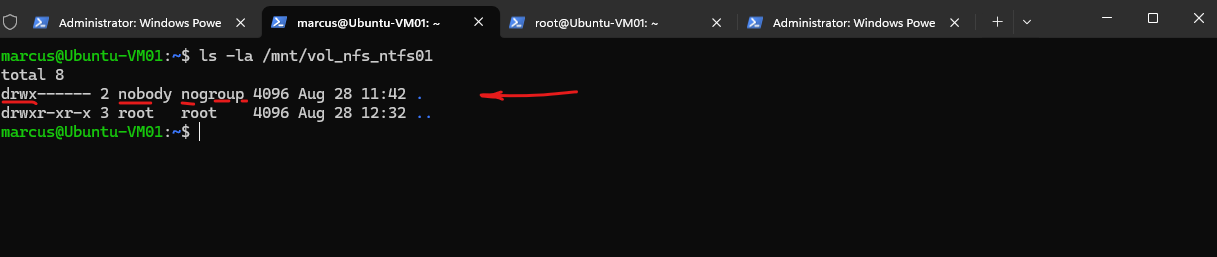
After applying the new NTFS security descriptor, access from our NFS client still succeeds as expected because the UNIX user marcus is mapped to MATRIXPOST\marcus.rath, which has Full Control in the NTFS DACL.
Interestingly, Linux now displays the directory as
drwx------(700). This is ONTAP presenting a UNIX-mode representation derived from the NTFS permissions to the NFS client; it does not mean that a traditional UNIX700mode is controlling access.With NTFS security style, the actual authorization decision is still made against the NTFS DACL using the mapped Windows security context. Therefore,
marcuscan access the directory becauseMATRIXPOST\marcus.rathhas Full Control, while another mapped user without a matching ACE will be denied.
ls -la /mnt/vol_nfs_ntfs01
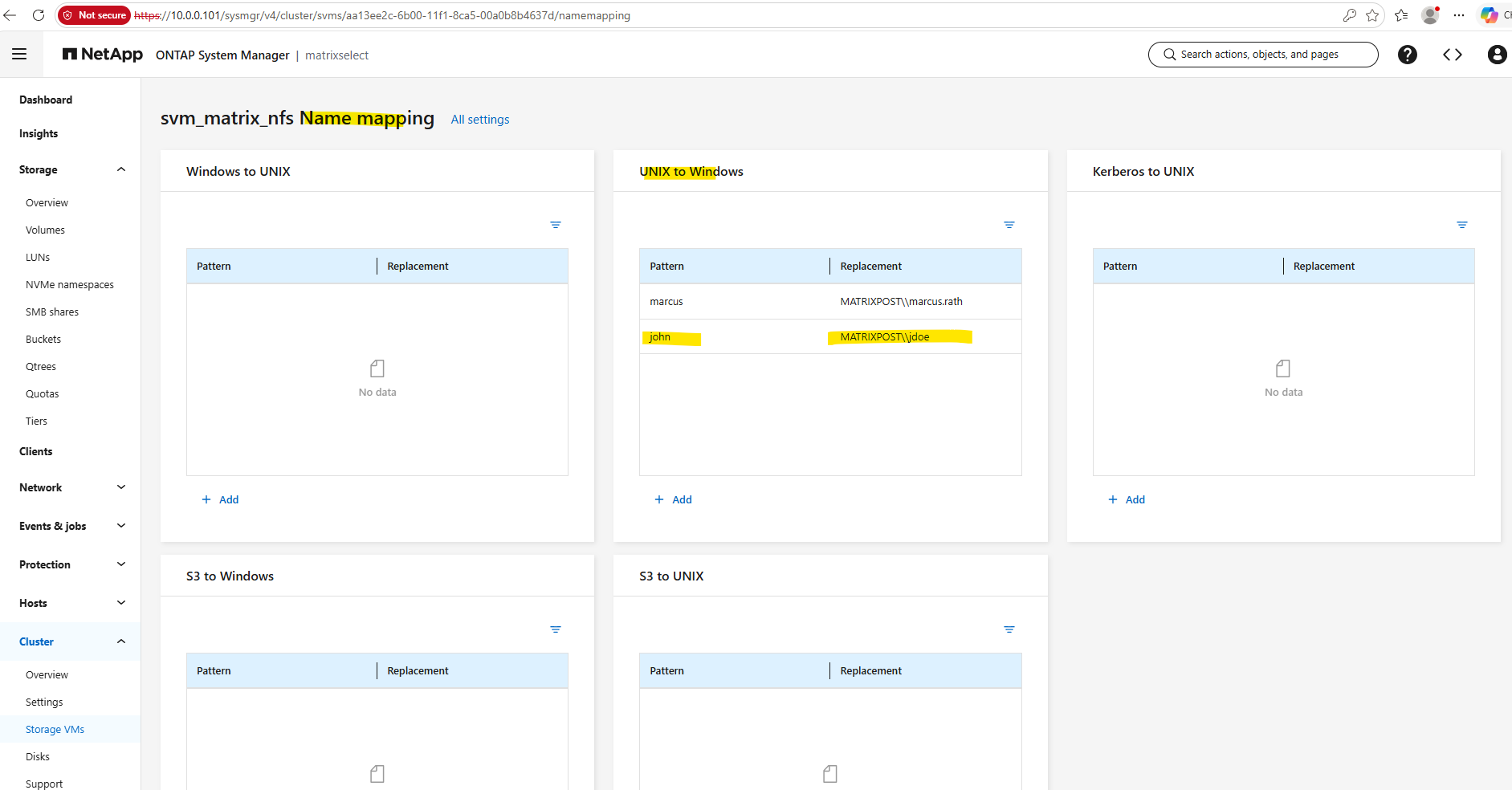
For the negative access test, we use a second Linux user, john, with UID/GID 1001.
As with
marcus, the corresponding UNIX identity and UNIX-to-Windows mapping are configured in ONTAP, butjohnis mapped to a different Windows account that has no ACE in the NTFS DACL of/vol_nfs_ntfs01.
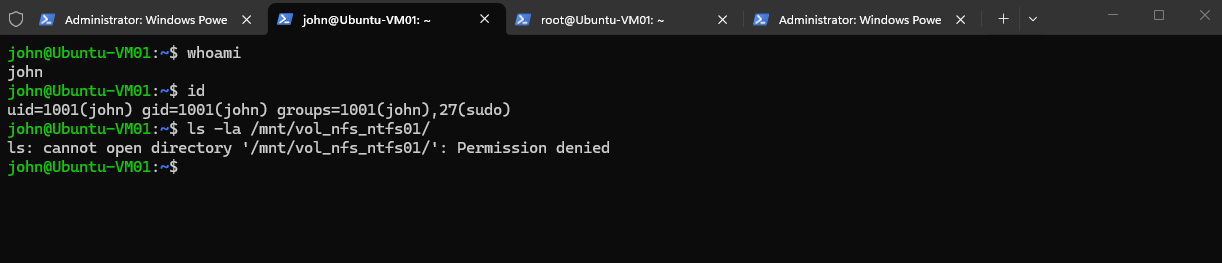
The second Linux user john is successfully identified through AUTH_SYS and mapped in ONTAP, but access to /vol_nfs_ntfs01 is denied because his mapped Windows identity has no matching ACE in the NTFS DACL.
This confirms that successful UNIX-to-Windows mapping alone is not sufficient; the resulting Windows security context must also be explicitly permitted by the NTFS permissions.
Unlike name-mapping failures, a normal NTFS DACL access denial does not generate a corresponding entry in the standard ONTAP event log. Therefore, John’s
Permission deniedis visible on the NFS client but not as an EMS error on ONTAP.
ls -la /mnt/vol_nfs_ntfs01/
Links
Learn about ONTAP NAS security styles
https://docs.netapp.com/us-en/ontap/nfs-admin/security-styles-their-effects-concept.htmlMap UNIX and Windows user names
https://docs.netapp.com/us-en/ontap-system-manager-classic/nas-multiprotocol-config/task_mapping_unix_windows_user_names.htmlCreate name mappings for ONTAP NAS SVMs
https://docs.netapp.com/us-en/ontap/nfs-admin/create-name-mapping-task.htmlONTAP commands for managing SMB NTFS file security, NTFS audit policies, and Storage-Level Access Guard
https://docs.netapp.com/us-en/ontap/smb-admin/manage-ntfs-security-audit-policies-slag-concept.htmlVerify access using security tracing
https://docs.netapp.com/us-en/ontap/pdfs/sidebar/Verify_access_using_security_tracing.pdf