NetApp ONTAP – Delete Large Directory Trees Using Asynchronous File Deletion
Deleting directories containing thousands or even millions of files from an NFS client using rm -rf can take considerable time.
Each file deletion involves filesystem operations sent over the NFS protocol, generating network traffic and metadata operations on the storage system.
NetApp ONTAP provides an alternative: asynchronous directory deletion, which allows ONTAP to process the deletion directly on the storage system without requiring the NFS client to recursively remove every file.
Asynchronous means that the deletion operation is executed independently in the background. Instead of waiting for the entire directory tree to be deleted, ONTAP queues a background job and immediately returns control to the administrator. The actual deletion continues independently until the job completes.
Unlike a conventional
rm -rfoperation over NFS, ONTAP processes the recursive deletion internally, avoiding thousands or millions of individual deletion requests from the NFS client. This can significantly reduce client-side processing and network overhead, although asynchronous execution does not necessarily mean that the deletion itself completes faster.
In this article, we’ll test this functionality using ONTAP 9.18.1 in an
For a step-by-step guide on how to deploy NetApp ONTAP Select on VMware vSphere, see my article
Preparing the NFS Test Environment
Our environment consists of:
| Component | Configuration |
|---|---|
| Storage | NetApp ONTAP Select |
| SVM | svm_matrix_nfs |
| Volume | vol_nfs_data01 |
| NFS server | 10.0.0.109 |
| NFS client | SUSE Linux Enterprise Server 15 SP7 |
| NFS mount point | /SAP/testfiles |
First, we mount the NFS volume on the Linux client:
mkdir -p /SAP/testfiles
mount -t nfs -o sec=sys 10.0.0.109:/vol_nfs_data01 /SAP/testfiles
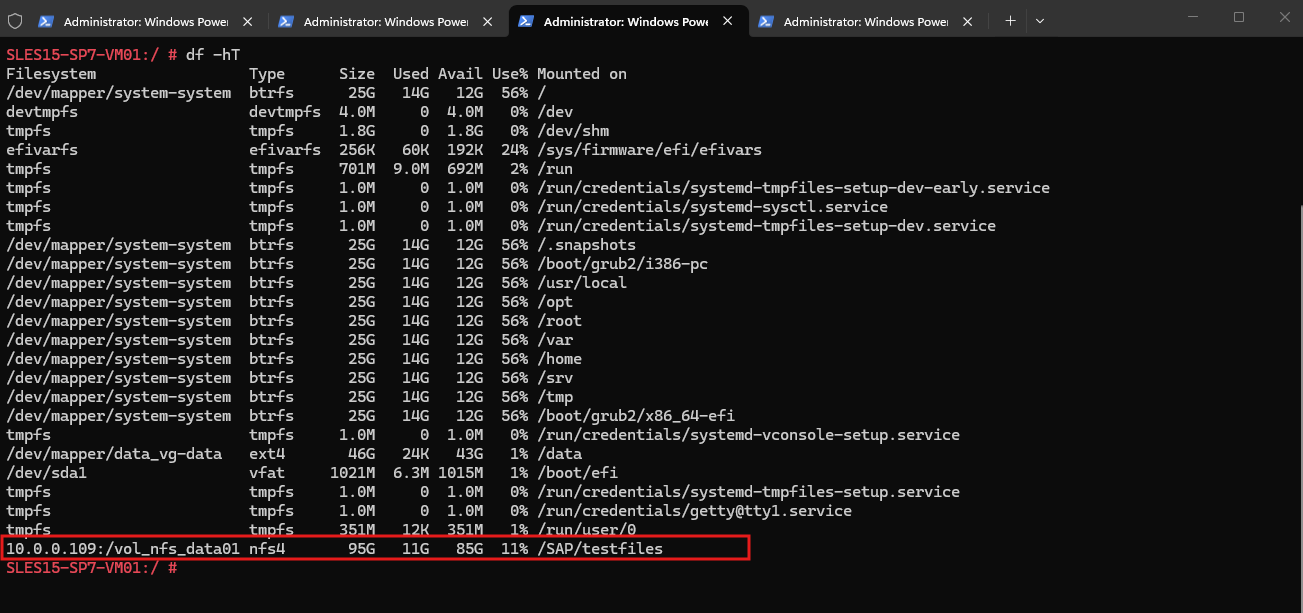
Next, create a test directory containing 100 subdirectories with 100 files each:
mkdir -p /SAP/testfiles/async_delete_test

for d in $(seq -w 1 100); do
    mkdir -p "/SAP/testfiles/async_delete_test/dir_$d"
    for f in $(seq -w 1 100); do
        echo "ONTAP async delete test $d/$f" > "/SAP/testfiles/async_delete_test/dir_$d/file_$f.txt"
    done
done
Verify the number of files:
find /SAP/testfiles/async_delete_test -type f | wc -l

We also create a second directory containing 30 files, which must remain untouched during deletion:
mkdir -p /SAP/testfiles/keep_this_directory/{subdir_01,subdir_02,subdir_03}

for d in /SAP/testfiles/keep_this_directory/subdir_*; do
    for i in $(seq 1 10); do
        echo "DO NOT DELETE - $d - $i" > "$d/file_$i.txt"
    done
done
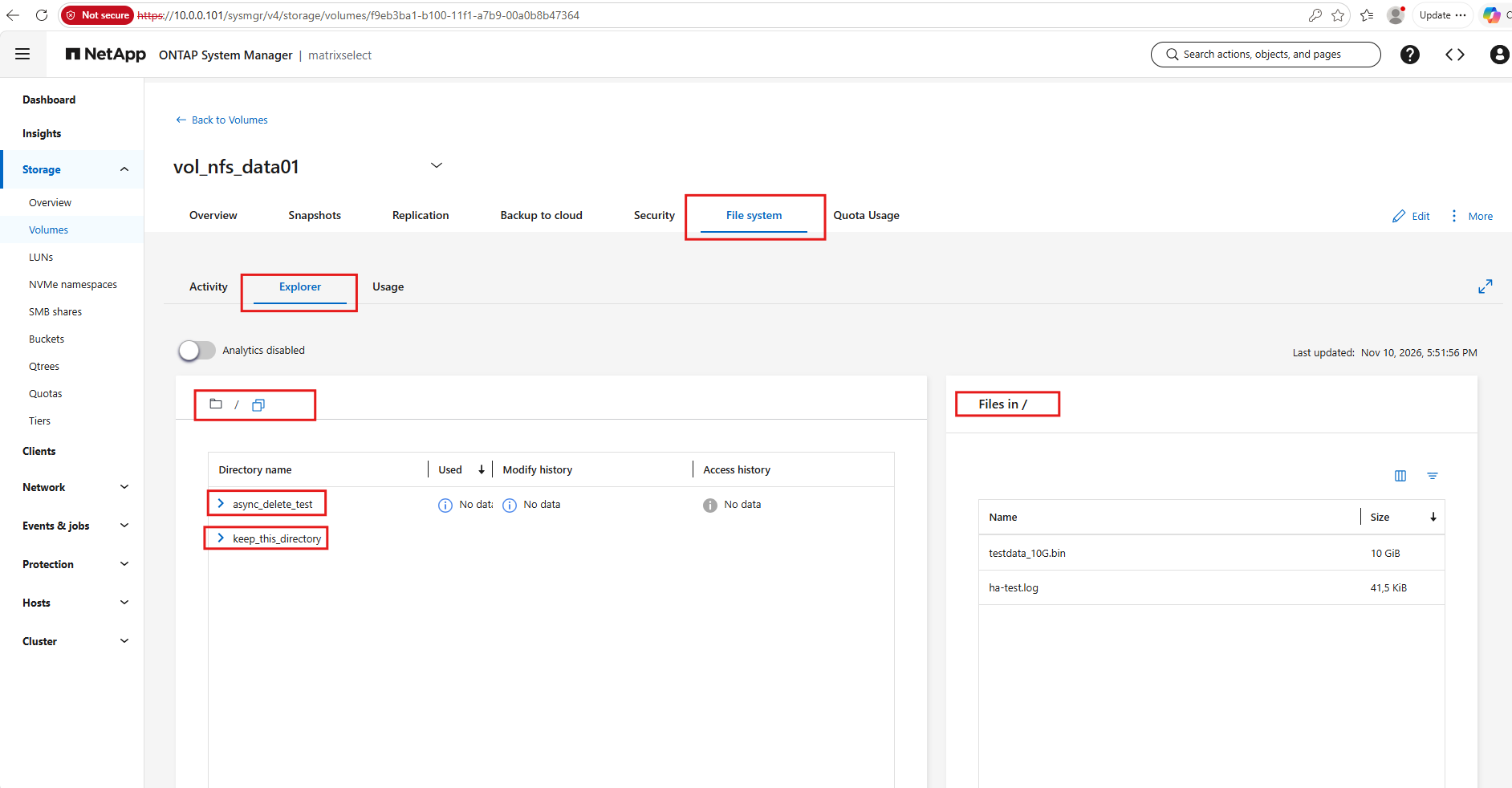
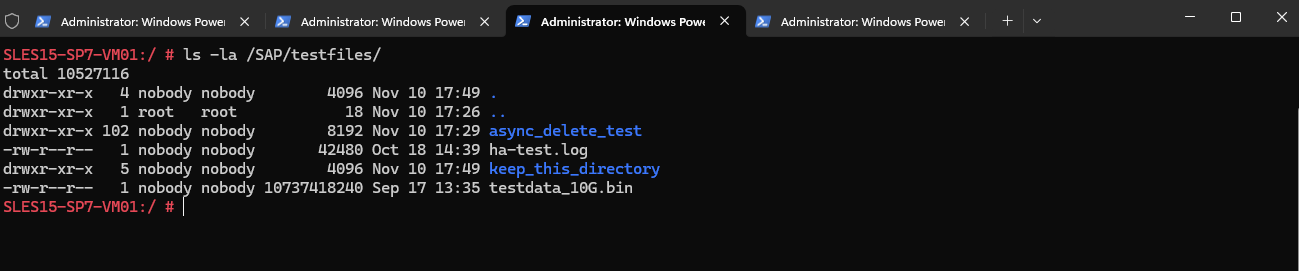
The volume now contains the following directory structure:
vol_nfs_data01/
├── async_delete_test/       ← Delete this directory
│   ├── dir_001/
│   ├── dir_002/
│   └── ... dir_100/
│       10,000 files total
│
├── keep_this_directory/     ← Must remain untouched
│   ├── subdir_01/
│   ├── subdir_02/
│   └── subdir_03/
│       30 files total
│
├── ha-test.log
└── testdata_10G.bin
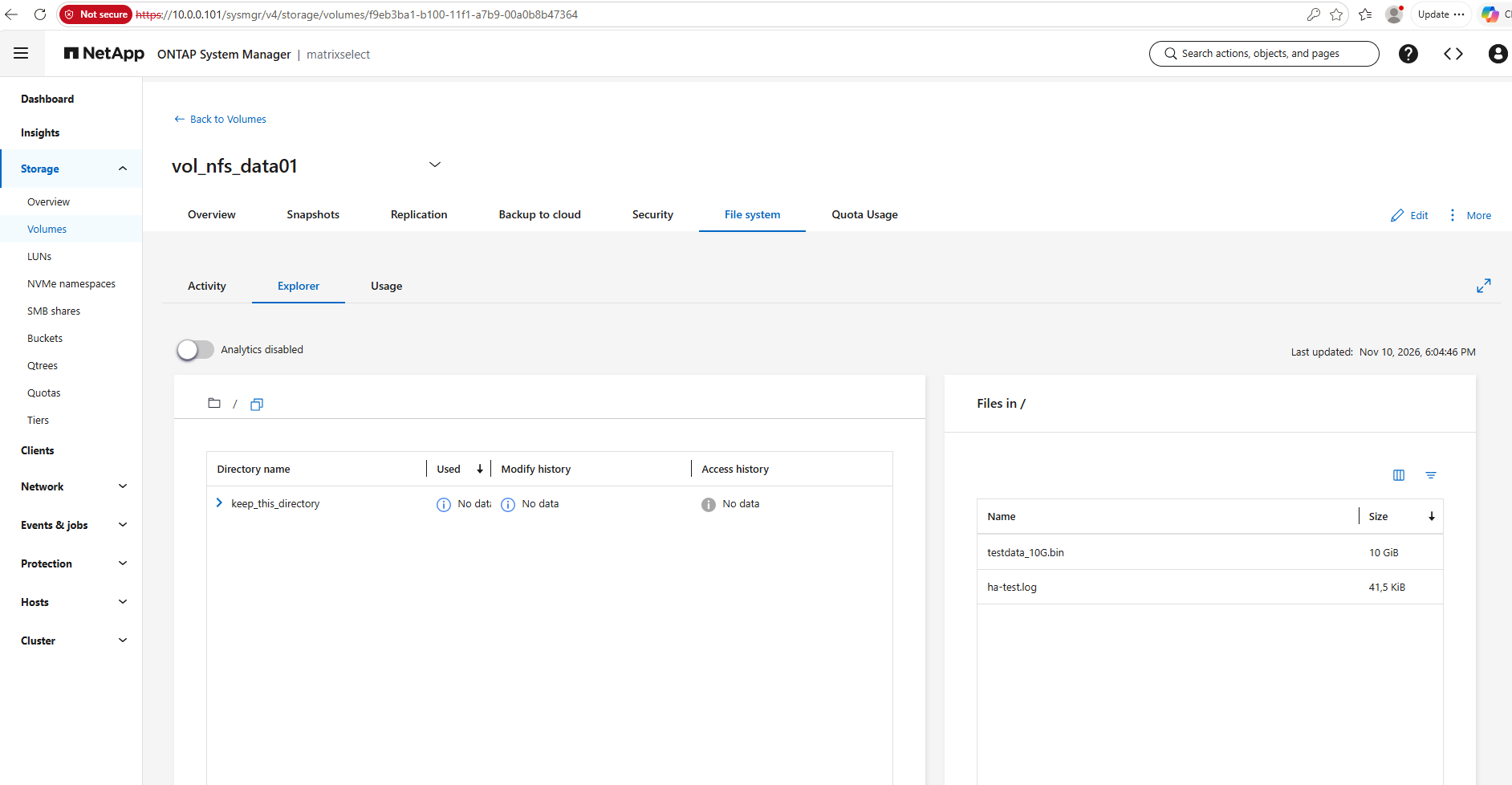
The directory structure can also be inspected through ONTAP System Manager → Storage → Volumes → File system → Explorer.
Starting Asynchronous Directory Deletion
Connect to the ONTAP CLI and switch to advanced privilege mode:
set -privilege advanced
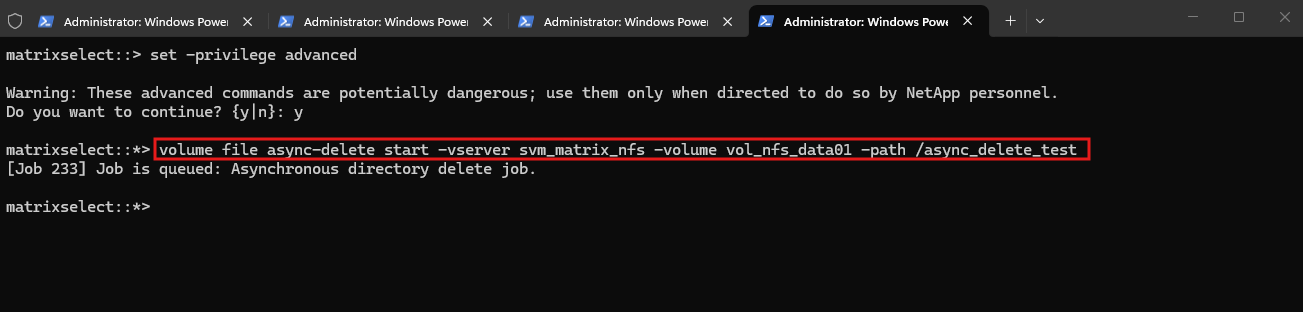
To delete our test directory:
ONTAP successfully accepted the asynchronous deletion request and queued background Job 233 to recursively delete the directory
/async_delete_test, containing 10,000 files.The command returned immediately without waiting for the deletion to complete, allowing us to monitor the operation separately.
volume file async-delete start -vserver svm_matrix_nfs -volume vol_nfs_data01 -path /async_delete_test
Important: The
-pathparameter identifies the directory relative to the specified volume, not the Linux client’s NFS mount point.
Important: The -path parameter identifies the directory relative to the specified volume, not the Linux client’s NFS mount point.
In our example:
| Context | Directory path |
|---|---|
| Linux NFS client | /SAP/testfiles/async_delete_test |
| ONTAP SVM namespace | /vol_nfs_data01/async_delete_test |
| ONTAP async-delete command | /async_delete_test |
ONTAP performs the recursive deletion asynchronously on the storage system, rather than requiring the NFS client to issue individual delete operations.
The operation is destructive, so the directory path must be verified carefully before execution.
Verifying the Deletion
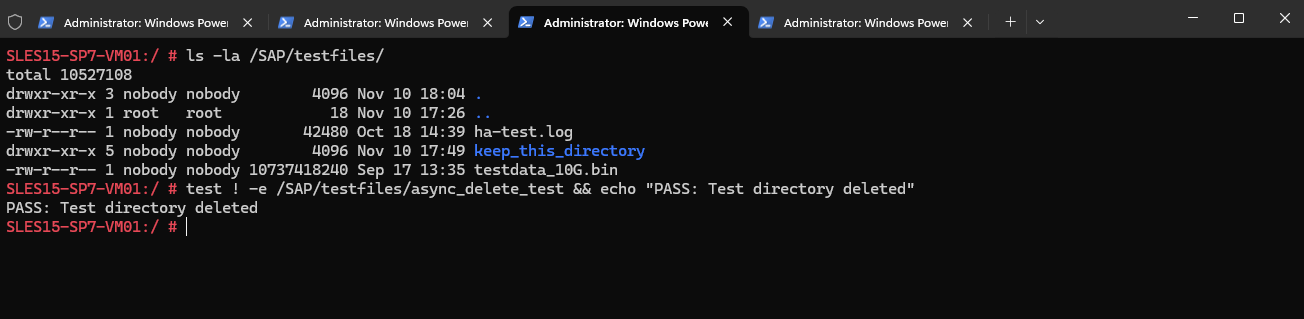
After the asynchronous operation completes, we verify from the Linux NFS client that the target directory has disappeared:
test ! -e /SAP/testfiles/async_delete_test && echo "PASS: Test directory deleted"
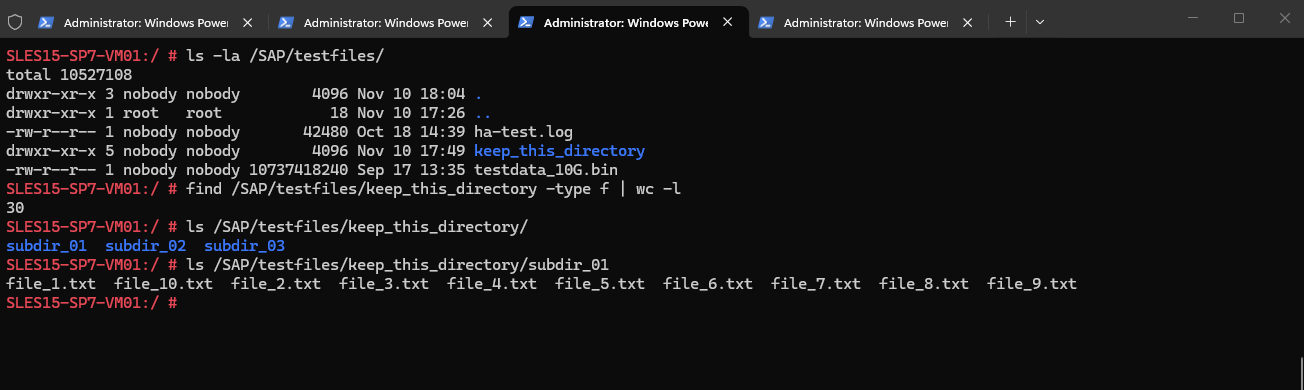
Next, we confirm that our second directory and its 30 files remain intact:
find /SAP/testfiles/keep_this_directory -type f | wc -l
Finally, verify that the two existing files in the volume root are still present:
ls -lh /SAP/testfiles/ha-test.log /SAP/testfiles/testdata_10G.bin

The asynchronous deletion test was successful.
ONTAP removed the entire directory tree containing 10,000 files and 100 subdirectories, while the separate test directory and existing files remained untouched.
The result was verified directly through ONTAP System Manager under Storage → Volumes → File system → Explorer.
Asynchronous Directory Deletion Within Qtrees
Asynchronous directory deletion also works for directories located within NetApp ONTAP qtrees.
Since qtrees are part of a volume’s filesystem namespace, the qtree name is simply included in the directory path specified with the -path parameter.
For example, consider the following directory structure:
vol_nfs_data01/
└── qtree_sap/
    ├── async_delete_test/
    │   ├── dir_001/
    │   └── dir_002/
    └── keep_this_directory/
To asynchronously delete the async_delete_test directory within the qtree, execute:
volume file async-delete start -vserver svm_matrix_nfs -volume vol_nfs_data01 -path /qtree_sap/async_delete_test
ONTAP processes the directory deletion in the background, just as it does for directories located directly in the volume root.
Important: This operation deletes only the specified directory and its contents. The qtree itself remains intact, including its configuration, security settings, and associated quota rules.
The key difference is simply the additional qtree component in the volume-relative directory path.
Conclusion
NetApp ONTAP asynchronous directory deletion provides a useful alternative to conventional recursive deletion from an NFS client, particularly for directories containing very large numbers of files.
The main advantage is that ONTAP handles the recursive deletion internally, avoiding thousands or millions of individual file-removal requests from the NFS client.
For large directory trees, this can significantly reduce client-side processing and network overhead. However, the total deletion time still depends on the number of files, filesystem metadata, and storage workload.
Asynchronous deletion is therefore particularly interesting for cleaning up large application directories, temporary data, or obsolete NFS directory trees.
Note: The example demonstrates the command and verification procedure. Actual completion results and timing measurements should be added after running the lab test.
Links
Delete directories asynchronously from ONTAP FlexVol and FlexGroup volumes
https://docs.netapp.com/us-en/ontap/flexgroup/fast-directory-delete-asynchronous-task.htmlvolume file async-delete start
https://docs.netapp.com/us-en/ontap-cli-9161/volume-file-async-delete-start.htmlHigh-file-count NAS workload best practices
https://docs.netapp.com/us-en/ontap-technical-reports/high-file-count-workloads/high-file-count-workloads-14-best-practices.htmlManage client rights to delete ONTAP directories asynchronously with FlexGroups
https://docs.netapp.com/us-en/ontap/flexgroup/manage-client-async-dir-delete-task.html