Using Active Directory as a Central UNIX Identity Store for NFS with NetApp ONTAP and Linux
In traditional NFS environments, consistent UNIX user and group identities must be available across NFS servers and clients. While these identities can be maintained locally in /etc/passwd and /etc/group, this quickly becomes difficult to manage when multiple Linux clients and NFS servers are involved.
In this article, we will use Microsoft Active Directory as a centralized UNIX/POSIX identity store, providing attributes such as uidNumber and gidNumber through LDAP. Both NetApp ONTAP and our Linux NFS clients can then resolve UNIX users and groups against the same central directory instead of maintaining matching identities locally on every system.
Importantly, the Linux clients do not need to be joined to the Active Directory domain for this scenario. Active Directory is used as an LDAP-based identity source for UNIX/POSIX identities, keeping this mechanism separate from Windows domain membership and authentication.
We will configure the environment step by step and verify how Linux, NFSv4 identity mapping, and ONTAP use these centrally maintained identities when resolving users, groups, UIDs, and GIDs.
For background on NFSv4 identity mapping, AUTH_SYS, and file ownership in ONTAP, see my previous article.
And for the NTFS security-style / UNIX-to-Windows mapping side, see my related article. It shows how ONTAP maps an NFS UNIX identity to a Windows identity before evaluating the NTFS ACL.
And for the opposite mapping direction, where a Windows identity is mapped to a UNIX identity for accessing data with UNIX security style, see my related article.
- Understanding the Central UNIX Identity Architecture
- Preparing Active Directory for UNIX/POSIX Identities
- Checking the Existing POSIX Attributes
- Configuring the Linux Client to Resolve UNIX Identities from Active Directory
- Configuring SSSD for LDAP-Based UNIX Identity Resolution
- Configuring NetApp ONTAP for LDAP-Based UNIX Identity Resolution
- Testing the Centralized Identities with NFSv4
- Analyzing LDAP Identity Resolution with Wireshark
- Links
Understanding the Central UNIX Identity Architecture
Before configuring Active Directory, it is important to understand what we are trying to achieve. In our previous NFSv4 Identity Mapping or Windows-to-UNIX User Mapping articles, UNIX users and groups were defined locally on the Linux client through /etc/passwd and /etc/group. This works well for small environments but requires the same identities to be maintained consistently across all participating systems.
In this setup, Active Directory will become the central source for UNIX/POSIX identity information. Existing AD users and groups will be extended with POSIX attributes such as:
User:
  uidNumber = 1001
  gidNumber = 2000

Group:
  gidNumber = 2000
The Linux NFS client and NetApp ONTAP can then independently query Active Directory over LDAP and resolve the same names to the same UNIX UID and GID values.
                    Active Directory
                 LDAP / POSIX identities
                uidNumber / gidNumber
                         │
                ┌────────┴────────┐
                │                 │
                ▼                 ▼
          Linux NFS Client    NetApp ONTAP
          LDAP/NSS lookup     LDAP lookup
                │                 │
                ▼                 ▼
          User / UID          User / UID
          Group / GID         Group / GID
                │                 │
                └────────┬────────┘
                         │
                        NFS
For this scenario, the Linux client does not need to become an Active Directory domain member.
Active Directory is being used as a centralized LDAP directory for UNIX identity resolution, rather than for Windows domain membership.
Preparing Active Directory for UNIX/POSIX Identities
Active Directory already contains the schema attributes required to store UNIX/POSIX identity information. For our NFS environment, the most important attributes are uidNumber for users and gidNumber for groups.
For example, we will use an existing AD user and group and assign them UNIX identities:
User: jdoe
  uidNumber = 1001
  gidNumber = 2000

Group: smbwriters
  gidNumber = 2000
The important requirement is that UIDs and GIDs are unique and assigned consistently. Active Directory will become the authoritative source for these numeric UNIX identities, allowing both Linux and NetApp ONTAP to resolve the same user or group to the same UID/GID.
Unlike normal Windows authorization, where Active Directory identifies security principals through SIDs, NFS with AUTH_SYS ultimately works with UNIX UID and GID values. The POSIX attributes therefore provide the bridge between our centrally managed AD identities and the UNIX identity namespace used by NFS.
Checking the Existing POSIX Attributes
Before assigning values, we can check whether the attributes are already populated for our test identities from PowerShell:
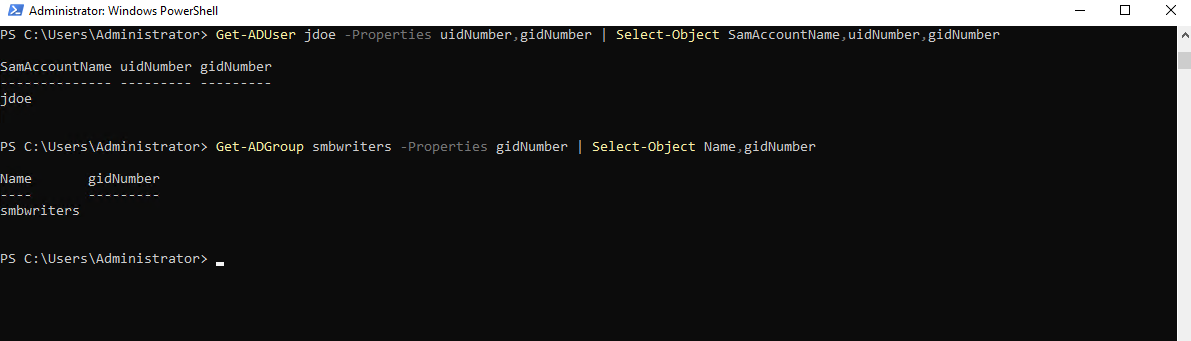
The existing AD user
jdoecurrently has no POSIXuidNumberorgidNumberassigned. To remain consistent with our previous NFS examples, I also created thesmbwriterssecurity group in Active Directory, which likewise does not yet have agidNumberassigned.
Get-ADUser jdoe -Properties uidNumber,gidNumber | Select-Object SamAccountName,uidNumber,gidNumber

Get-ADGroup smbwriters -Properties gidNumber | Select-Object Name,gidNumber
For consistency with our previous NFS lab, I’d actually keep smbwriters = GID 2000, because that’s exactly the GID we already used locally and saw in the NFSv3 packet capture in my article below.
Assign:
Set-ADUser jdoe -Replace @{
    uidNumber = 1001
    gidNumber = 2000
}

Set-ADGroup smbwriters -Replace @{
    gidNumber = 2000
}

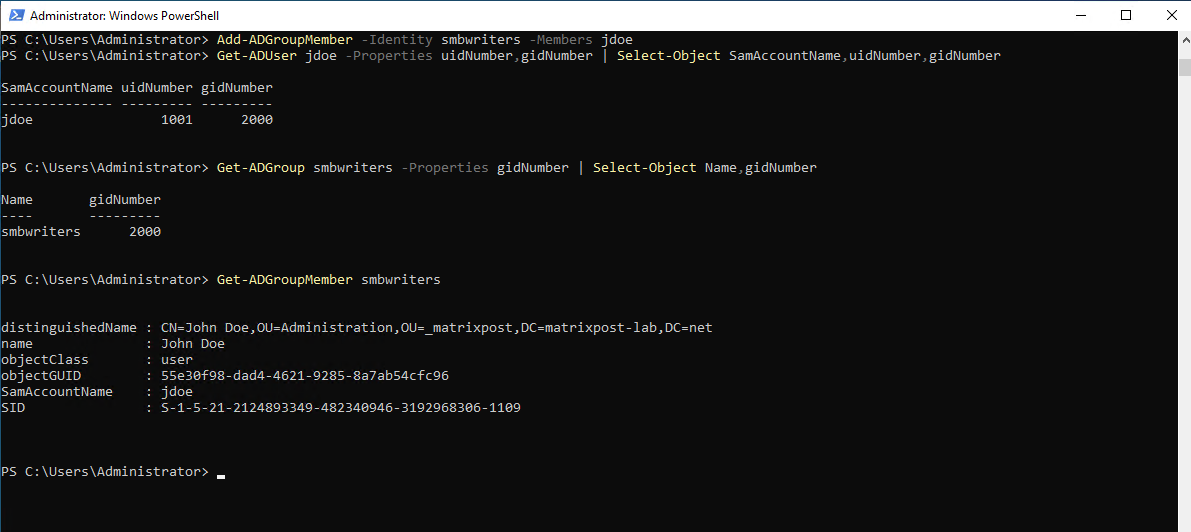
And make sure jdoe is actually a member:
Add-ADGroupMember -Identity smbwriters -Members jdoe

Then verify:
Finally,
jdoeis added as a member ofsmbwriters, giving us a consistent POSIX identity that can later be resolved by both the Linux NFS client and NetApp ONTAP through Active Directory.
Get-ADUser jdoe -Properties uidNumber,gidNumber | Select-Object SamAccountName,uidNumber,gidNumber
Get-ADGroup smbwriters -Properties gidNumber | Select-Object Name,gidNumber
Get-ADGroupMember smbwriters
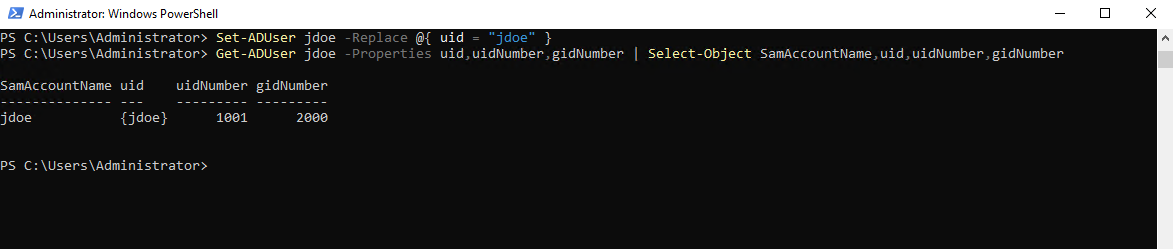
In addition to the numeric uidNumber and gidNumber attributes, the UNIX identity also requires a uid attribute containing the UNIX user name.
This attribute is particularly important for our later ONTAP LDAP configuration, because the built-in MS-AD-BIS schema uses uid as the RFC 2307 user-name attribute.
For our jdoe account, we therefore configure uid with the same UNIX user name:
Set-ADUser jdoe -Replace @{ uid = "jdoe" }
The complete POSIX identity stored in Active Directory is now:
uid       = jdoe
uidNumber = 1001
gidNumber = 2000
We can verify all three attributes with:
Get-ADUser jdoe -Properties uid,uidNumber,gidNumber | Select-Object SamAccountName,uid,uidNumber,gidNumber
Configuring the Linux Client to Resolve UNIX Identities from Active Directory
With the POSIX attributes now stored in Active Directory, the next step is to configure our Ubuntu NFS client to use Active Directory as an LDAP identity source.
The Linux system will remain outside the AD domain; we only want to use LDAP for centralized user and group resolution.
Before installing or configuring anything, verify DNS and LDAP connectivity to our domain controller.
getent hosts matrixpost-lab.netasks the Linux Name Service Switch (NSS) to resolve the hostnamematrixpost-lab.net.So Ubuntu can resolve our AD domain name to the IP addresses of our two domain controllers/DNS servers.
getent hosts matrixpost-lab.net

Next we verify that Ubuntu can discover the AD LDAP service through DNS SRV records.
Although the Linux client is not joined to the Active Directory domain, it uses the domain controller as its DNS server.
It can therefore resolve the AD DNS namespace and use the
_ldap._tcp.dc._msdcs.matrixpost-lab.netSRV record to discover the domain controllers providing the LDAP service.
nslookup -type=SRV _ldap._tcp.dc._msdcs.matrixpost-lab.net
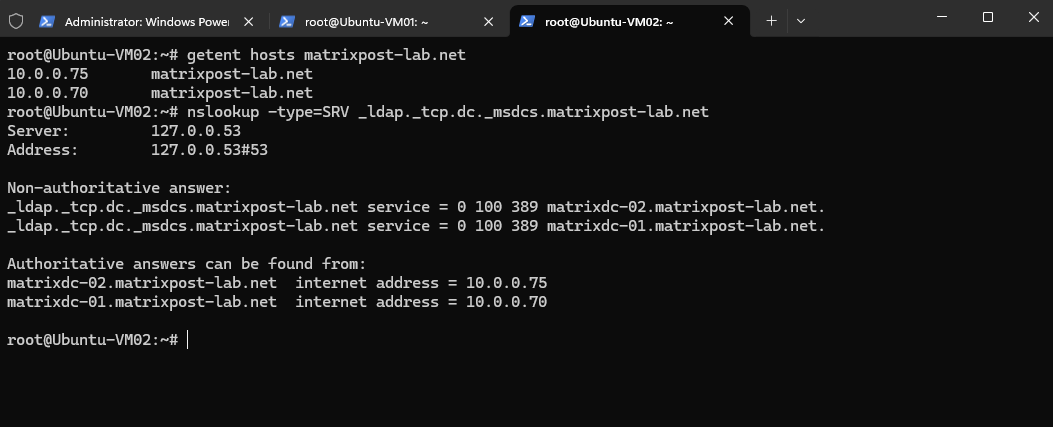
The Linux client can successfully resolve the Active Directory DNS namespace and discover both domain controllers providing the LDAP service on TCP port 389.
At the same time,
realm listreturns no domain membership, confirming that the client is not joined to Active Directory, AD is only being used as our DNS infrastructure and, in the following steps, as an LDAP-based UNIX identity source.
realm list
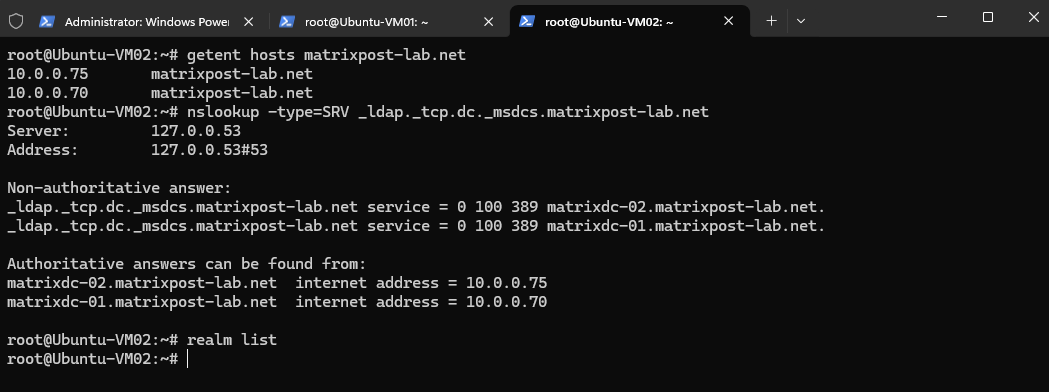
Verify actual LDAP connectivity:
nc -vz matrixdc-01.matrixpost-lab.net 389
nc -vz matrixdc-02.matrixpost-lab.net 389

To query Active Directory directly over LDAP from the Linux client, we first install the ldap-utils package.
It provides command-line tools such as ldapsearch, which we will use in the next section to verify that the POSIX uidNumber and gidNumber attributes can be retrieved from Active Directory.
apt update
apt install ldap-utils
Query Active Directory directly
Before configuring the Linux client to use Active Directory as its central UNIX identity source, we first verify that the required POSIX attributes can be queried directly over LDAP.
For this test, we perform an authenticated LDAP bind using an existing AD account with permission to read the directory and query the jdoe object for its uidNumber and gidNumber attributes.
The -W option prompts for the account password interactively, so the password does not need to be included directly in the command.
ldapsearch -x \
  -H ldap://matrixdc-01.matrixpost-lab.net \
  -D "superuser@matrixpost-lab.net" \
  -W \
  -b "DC=matrixpost-lab,DC=net" \
  "(sAMAccountName=jdoe)" \
  sAMAccountName uidNumber gidNumber
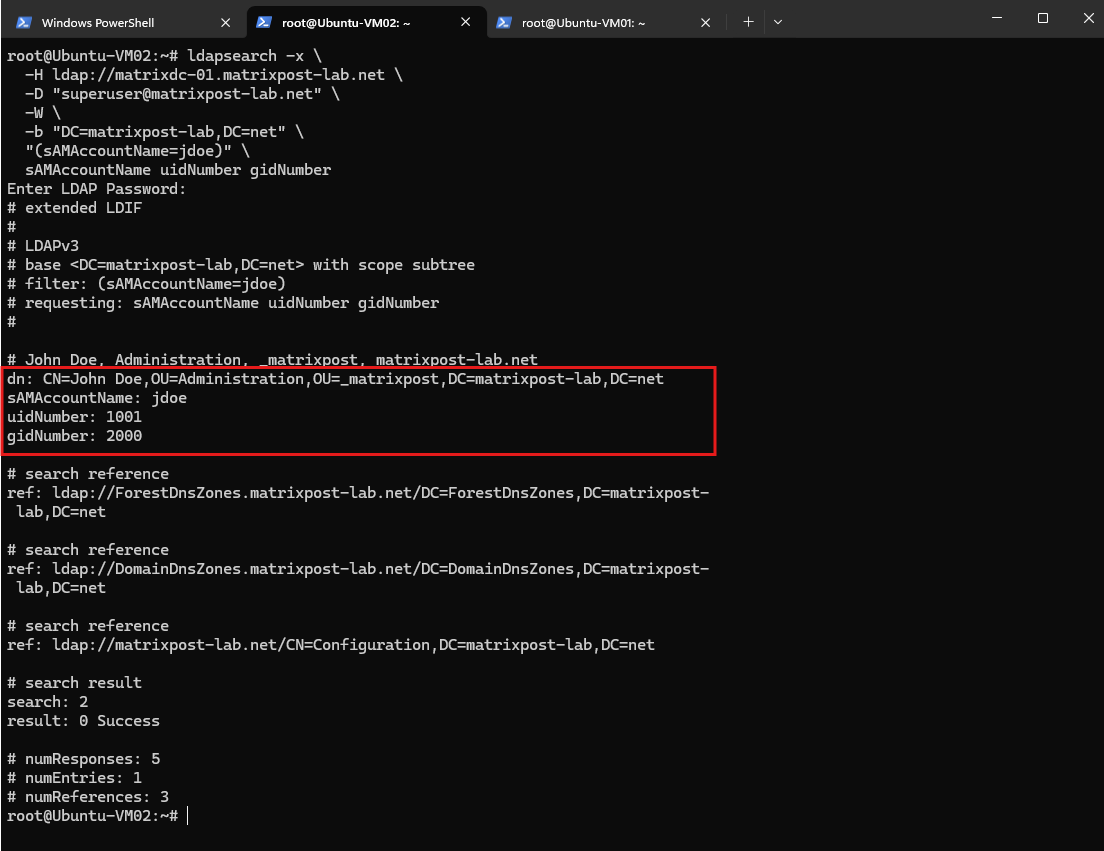
The LDAP query succeeds and returns the POSIX attributes stored for jdoe directly from Active Directory. The non-domain-joined Linux client can now see uidNumber: 1001 and gidNumber: 2000, confirming that Active Directory can provide the centralized UNIX identity information required for our NFS environment.
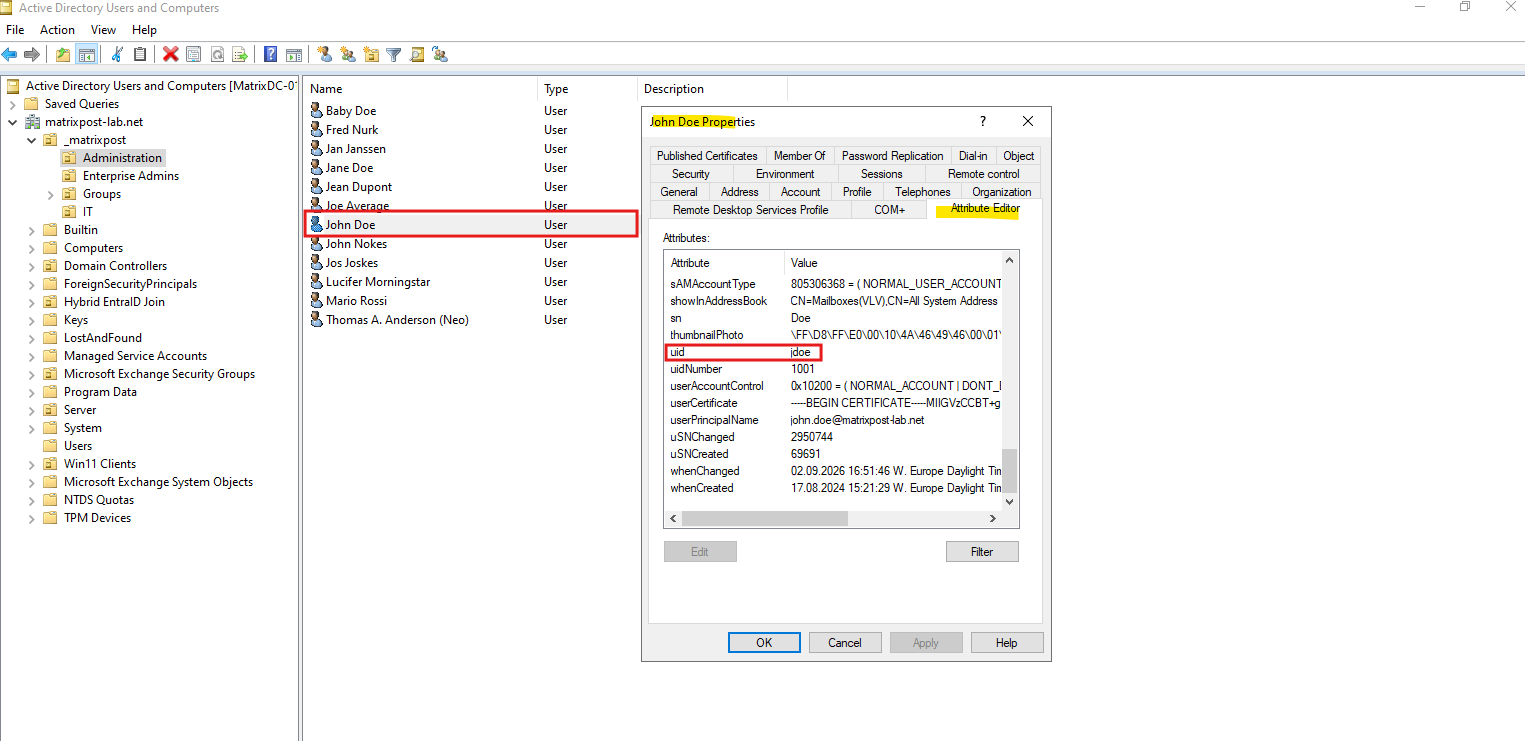
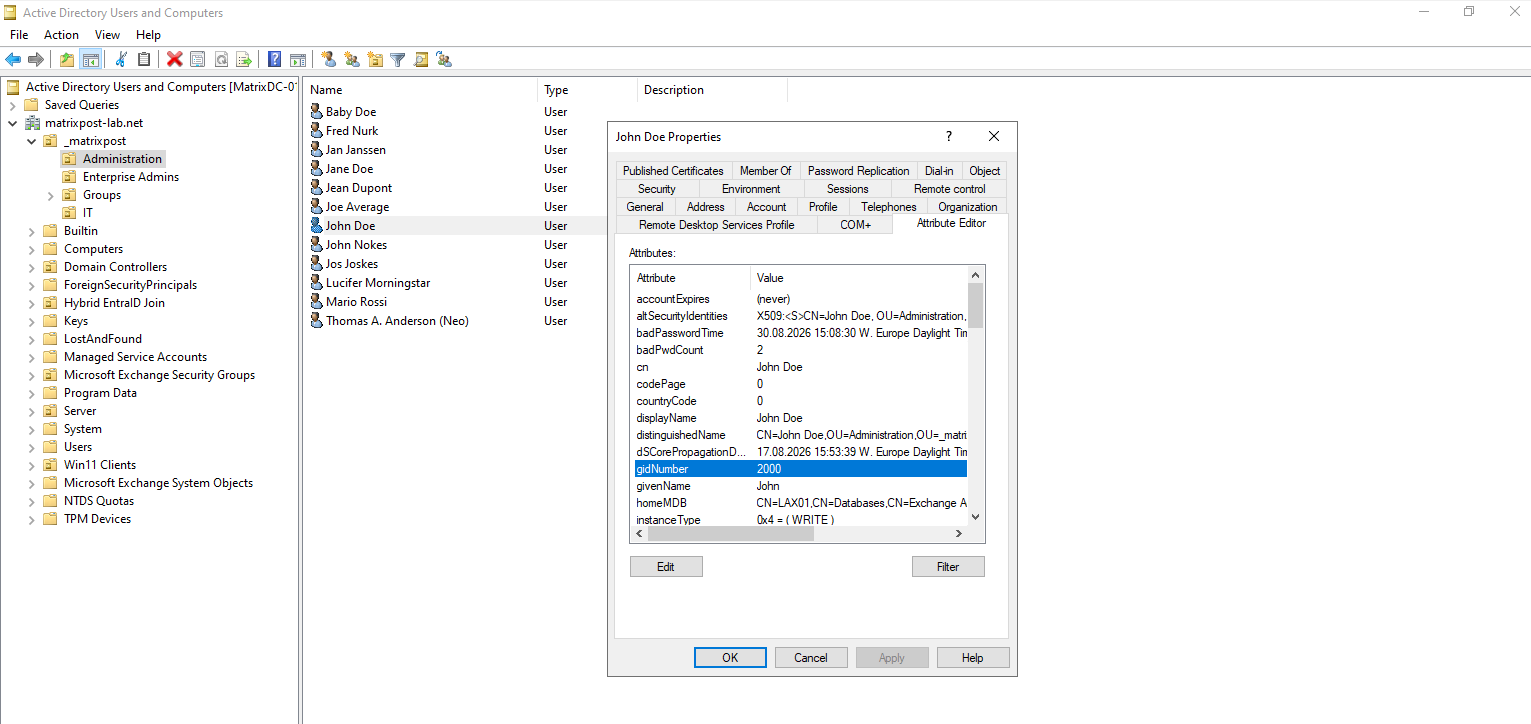
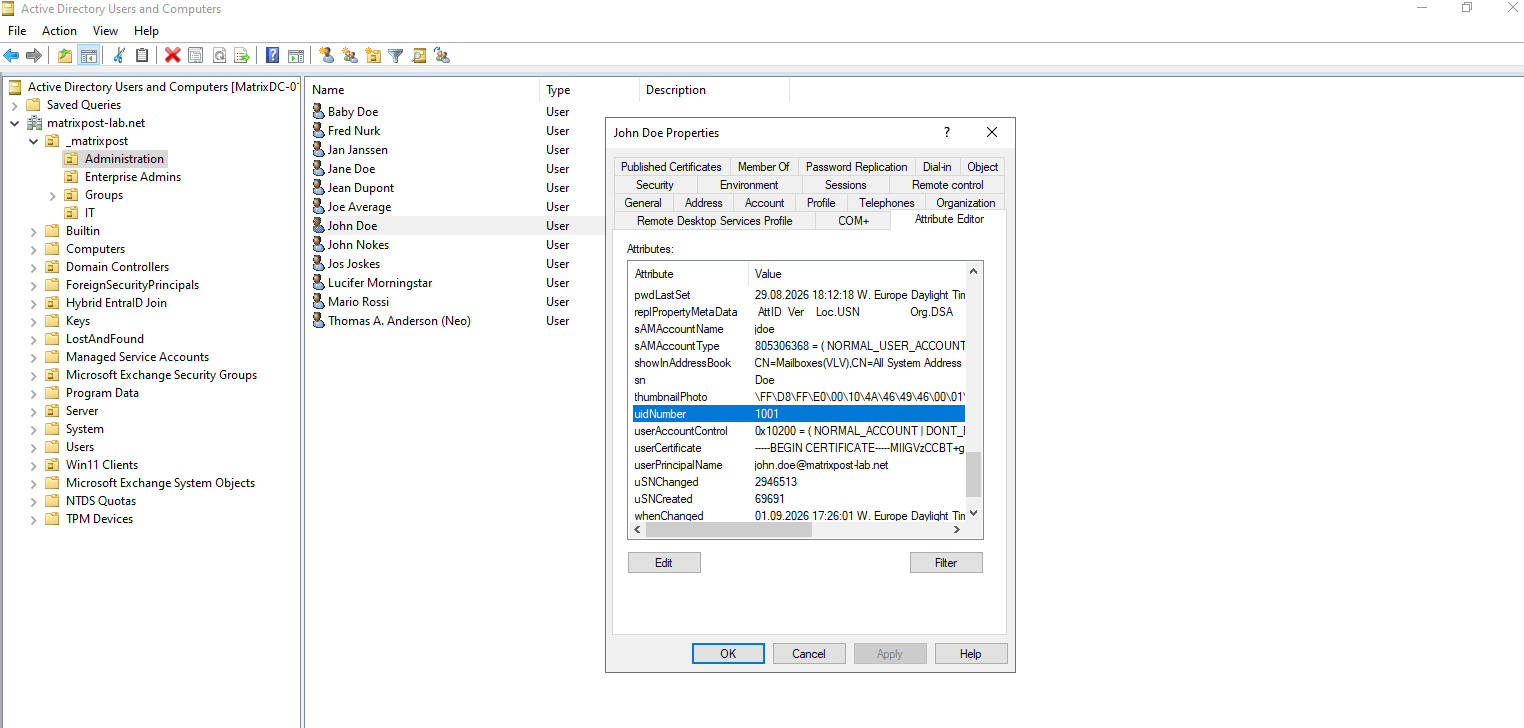
The POSIX attributes can also be verified directly in Active Directory Users and Computers (ADUC) using the Attribute Editor tab.
Our
jdoeaccount hasuidNumber1001 andgidNumber2000, matching the values returned by the LDAP query from the Linux client.
In addition to the user identity, the Linux client must also be able to resolve the corresponding UNIX group. We therefore query the smbwriters AD group and retrieve its assigned gidNumber:
ldapsearch -x \
  -H ldap://matrixdc-01.matrixpost-lab.net \
  -D "superuser@matrixpost-lab.net" \
  -W \
  -b "DC=matrixpost-lab,DC=net" \
  "(sAMAccountName=smbwriters)" \
  sAMAccountName gidNumber
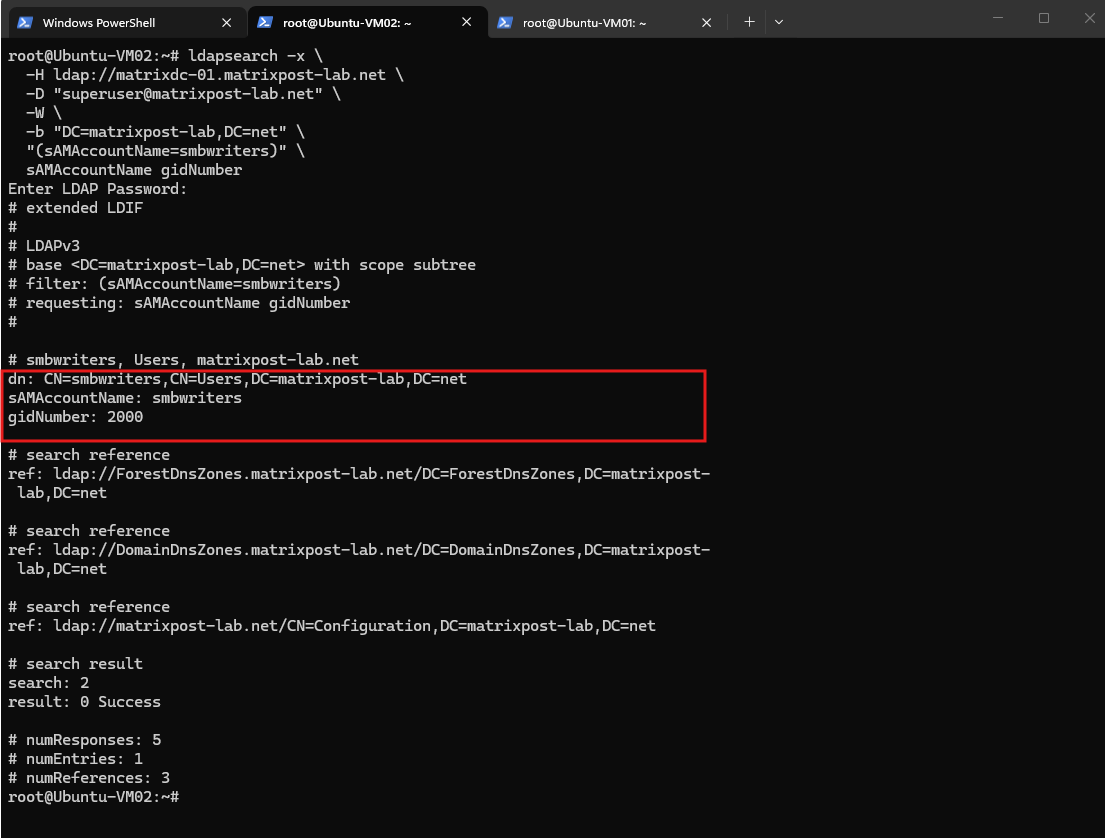
The second LDAP query confirms that Active Directory also returns gidNumber: 2000 for the smbwriters group. Together with the previous jdoe lookup, we have now verified that both the UNIX user and group identities can be retrieved directly from Active Directory over LDAP.
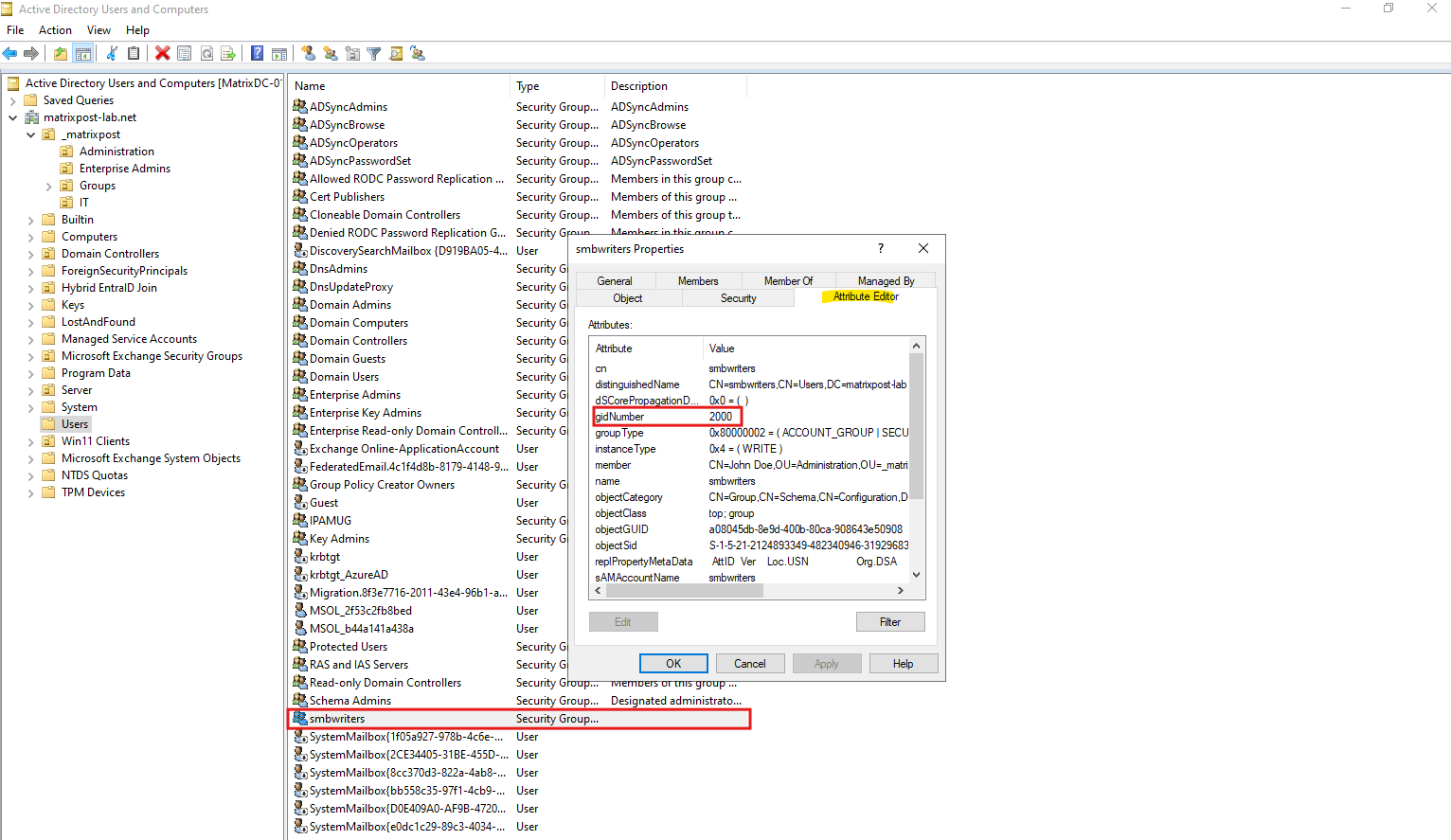
The same POSIX group information can also be verified directly on the smbwriters object in Active Directory Users and Computers. The Attribute Editor shows the configured gidNumber 2000, matching the value returned by our LDAP query from the Linux client.
At this point, we have verified both sides independently: the POSIX attributes are stored directly in Active Directory, and our non-domain-joined Linux client can retrieve them over LDAP.
Next, we will integrate these LDAP lookups into the Linux Name Service Switch (NSS) through SSSD (System Security Services Daemon), allowing applications to resolve the AD-backed UNIX identities transparently.
SSSD does not imply Active Directory domain membership. In this configuration, SSSD uses its LDAP provider only to integrate the POSIX identities stored in Active Directory into the Linux Name Service Switch (NSS); the Linux client itself remains not joined to the AD domain.
Configuring SSSD for LDAP-Based UNIX Identity Resolution
With the POSIX attributes successfully retrieved from Active Directory, we can configure SSSD (System Security Services Daemon) to provide these identities to the Linux Name Service Switch (NSS). This allows normal Linux tools and applications to resolve AD-backed UNIX users and groups without maintaining corresponding entries in /etc/passwd and /etc/group.
Importantly, we are not joining Ubuntu-VM02 to Active Directory. SSSD will use its LDAP provider to query Active Directory purely as a centralized identity source.
First, install the required packages:
apt update
apt install sssd sssd-ldap libnss-sss libpam-sss
SSSD (System Security Services Daemon) is essentially an identity/authentication service for Linux. It can talk to different backend providers, including:
SSSD
 ├── AD provider
 ├── LDAP provider   ← what we're using
 ├── Kerberos
 └── others
In our case we’re using:
Linux application / ls / id
          │
          ▼
         NSS
          │
          ▼
         SSSD
          │
          │ LDAP
          ▼
 Active Directory
 uidNumber / gidNumber
So SSSD is not needed because of an AD domain join. We need some mechanism that integrates the LDAP identities into Linux NSS. Thefore we use SSSD for this mechanis.
Before configuring SSSD, we verify the current Linux identity resolution using getent.
As expected, neither
jdoenorsmbwriterscan currently be resolved because they do not exist locally in/etc/passwdor/etc/group, and the client has not yet been configured to use Active Directory as an LDAP identity source.
getent passwd jdoe
getent group smbwriters

Next we create the SSSD configuration.
nano /etc/sssd/sssd.conf
For our lab, start with:
[sssd]
config_file_version = 2
services = nss
domains = matrixpost-lab.net

[nss]

[domain/matrixpost-lab.net]
id_provider = ldap

ldap_uri = ldap://matrixdc-01.matrixpost-lab.net
ldap_search_base = DC=matrixpost-lab,DC=net

ldap_schema = rfc2307bis
ldap_referrals = false

ldap_user_object_class = user
ldap_user_name = sAMAccountName
ldap_user_uid_number = uidNumber
ldap_user_gid_number = gidNumber

ldap_group_object_class = group
ldap_group_name = sAMAccountName
ldap_group_gid_number = gidNumber
ldap_group_member = member

ldap_default_bind_dn = <bind-user-DN>
ldap_default_authtok_type = password
ldap_default_authtok = <bind-user-password>

ldap_id_mapping = false
For the persistent LDAP connection, I will create a dedicated service account (
svc_ldap_nfs) instead of using the privilegedsuperuseraccount.SSSD will use the account’s Distinguished Name (DN) as the LDAP bind identity in the
ldap_default_bind_dnsetting
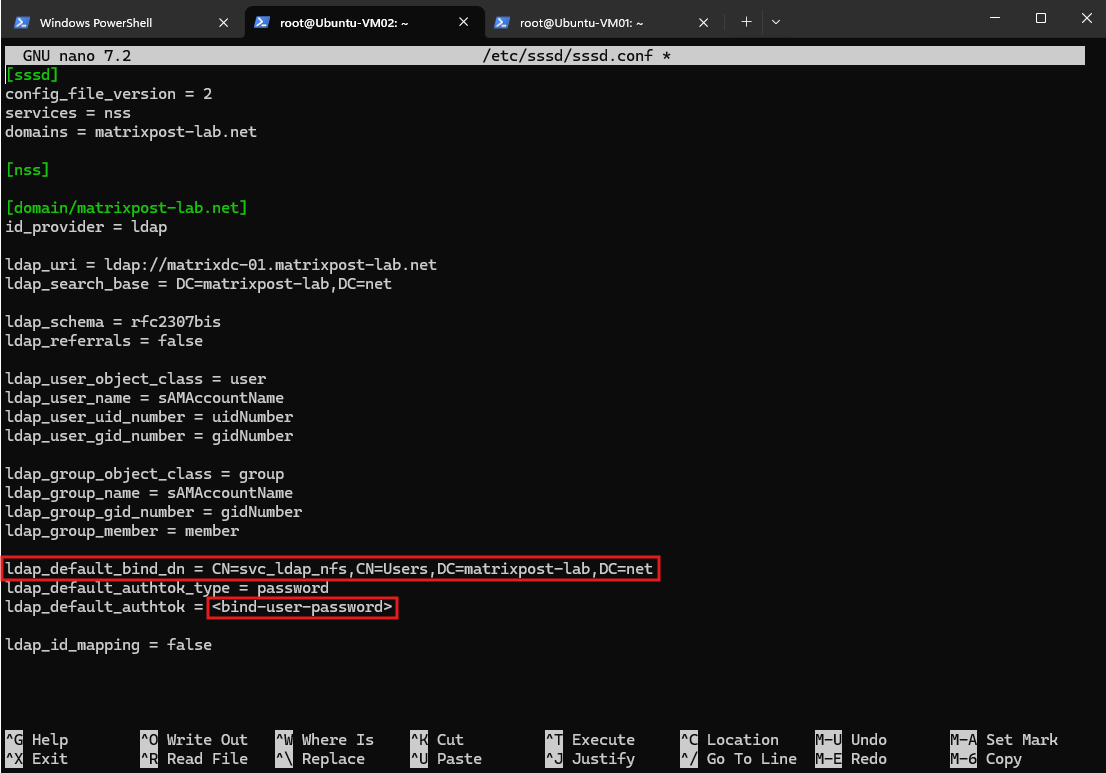
There are two particularly important settings here.
ldap_schema = rfc2307bis fits AD-style groups because membership is represented using the member attribute containing user DNs. SSSD’s example configuration distinguishes this from RFC2307’s memberUid model.
And ldap_id_mapping = false is critical for our experiment. It tells SSSD to use the explicitly stored uidNumber and gidNumber values instead of generating numeric IDs from the AD objectSID.
SSSD documents that when ID mapping is enabled, the manually assigned uidNumber and gidNumber attributes are ignored.
SSSD requires strict permissions on its configuration:
Ubuntu explicitly notes that an incorrectly protected
sssd.confcan prevent SSSD from starting.
Source: https://ubuntu.com/server/docs/how-to/sssd/with-active-directory
chown root:root /etc/sssd/sssd.conf
chmod 600 /etc/sssd/sssd.conf

systemctl restart sssd
systemctl status sssd
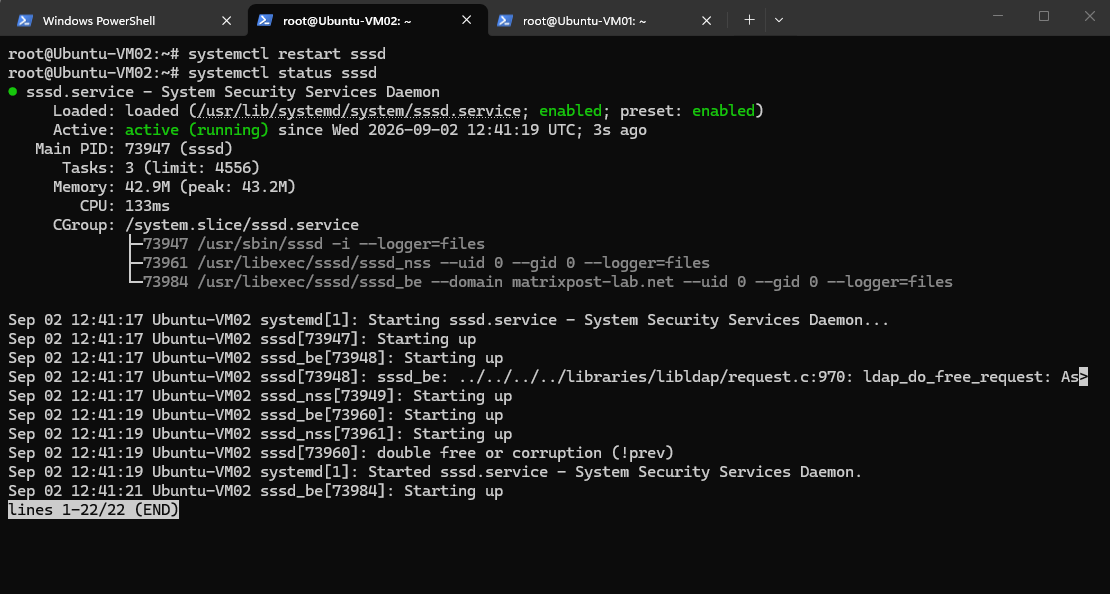
After protecting the SSSD configuration file, we restart the service and verify its status. SSSD is now running with the NSS responder and our matrixpost-lab.net LDAP identity domain, ready to provide the centrally stored UNIX identities to the Linux NSS stack.
The getent queries now successfully resolve the centrally stored POSIX identities from Active Directory through SSSD and NSS.
The user
jdoeis returned with UID 1001 / GID 2000, while thesmbwritersgroup is resolved with GID 2000 and correctly listsjdoeas a member.
getent passwd jdoe
getent group smbwriters

Importantly, these identities do not exist locally in
/etc/passwdor/etc/group, and Ubuntu-VM02 is still not joined to the Active Directory domain.
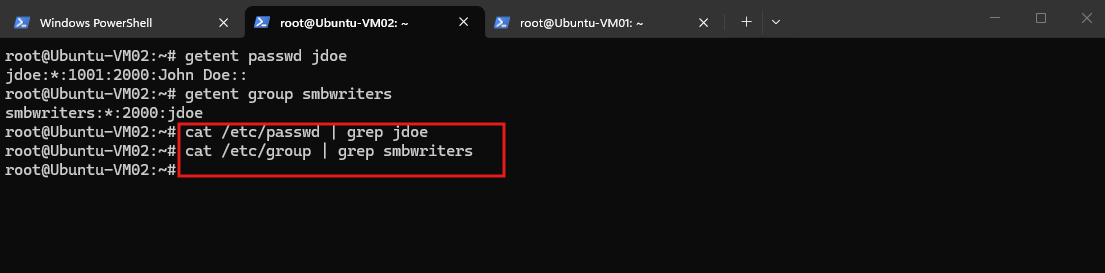
Now that the Linux side can resolve the POSIX identities centrally, the next step is to configure NetApp ONTAP to use the same Active Directory LDAP directory.
Configuring NetApp ONTAP for LDAP-Based UNIX Identity Resolution
So far, only the Linux client knows how to resolve jdoe and smbwriters through Active Directory. For consistent NFS identity handling, ONTAP must also be able to resolve the same names to the same numeric IDs:
jdoe        → UID 1001 / GID 2000
smbwriters  → GID 2000
This gives us the architecture we wanted:
             Active Directory
              LDAP / POSIX
                   │
          ┌────────┴────────┐
          │                 │
        SSSD              ONTAP
          │                 │
     Linux Client       NFS Server
Before creating anything, let’s see what’s already configured on our NFS SVM:
The NFS SVM currently has no LDAP configuration. Both the
passwdandgroupname-service databases use only the localfilessource, and no LDAP client configuration exists, meaning ONTAP can currently resolve UNIX identities only from its locally maintained users and groups.
vserver services name-service ldap show -vserver svm_matrix_nfs
vserver services name-service ns-switch show -vserver svm_matrix_nfs

# check whether an LDAP client configuration already exists:
vserver services name-service ldap client show
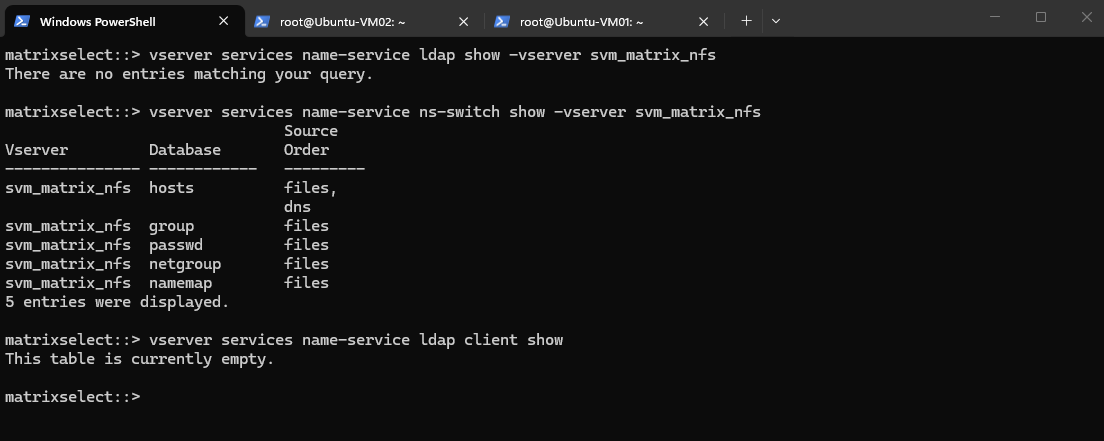
Creating the ONTAP LDAP Client Configuration
Now we need to define how ONTAP connects to Active Directory and how the AD attributes map to UNIX users and groups.
ONTAP provides several predefined, read-only LDAP schema templates. Because our Active Directory environment stores POSIX attributes such as
uidNumberandgidNumberand uses normal AD group membership, we will use theMS-AD-BISschema, which NetApp recommends for most modern Active Directory environments and which is based on RFC2307bis.
vserver services name-service ldap client schema show
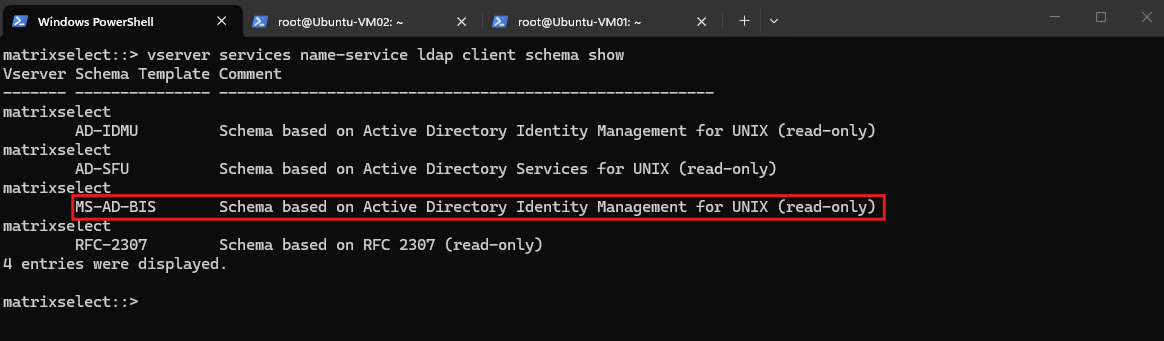
We now create the ONTAP LDAP client configuration using the MS-AD-BIS schema and our dedicated svc_ldap_nfs service account. The bind password is entered interactively and therefore does not appear as part of the ONTAP command.
vserver services name-service ldap client create -vserver svm_matrix_nfs -client-config ldap_matrix_ad -ldap-servers matrixdc-01.matrixpost-lab.net,matrixdc-02.matrixpost-lab.net -schema MS-AD-BIS -port 389 -min-bind-level simple -bind-dn "svc_ldap_nfs@matrixpost-lab.net" -base-dn "DC=matrixpost-lab,DC=net" -base-scope subtree -referral-enabled false

Creating the LDAP client configuration only defines how ONTAP connects to Active Directory. We must now associate this configuration with our NFS SVM so that svm_matrix_nfs can actually use it for LDAP-based UNIX identity lookups.
ONTAP accepts the LDAP configuration but warns that LDAP is not yet configured as a name-service source for any of the SVM’s databases. The LDAP connection therefore exists, but the
passwdandgroupdatabases still use only their localfilessource.
vserver services name-service ldap create -vserver svm_matrix_nfs -client-config ldap_matrix_ad

We can verify the assigned LDAP configuration with:
vserver services name-service ldap show -vserver svm_matrix_nfs
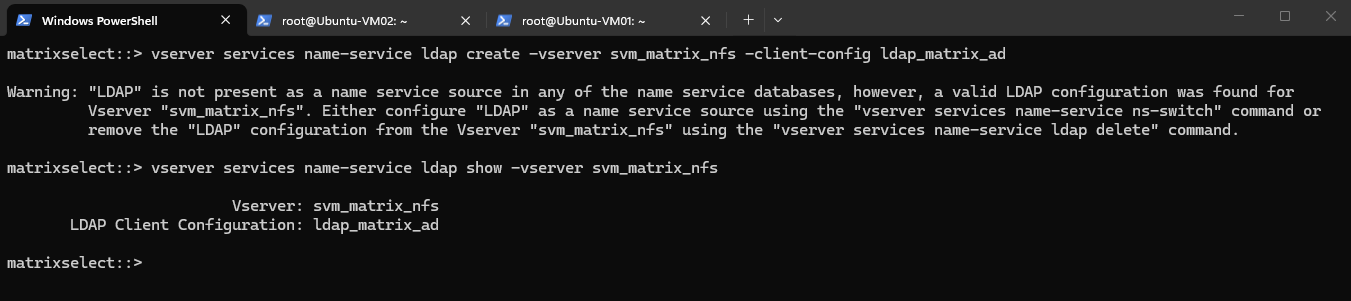
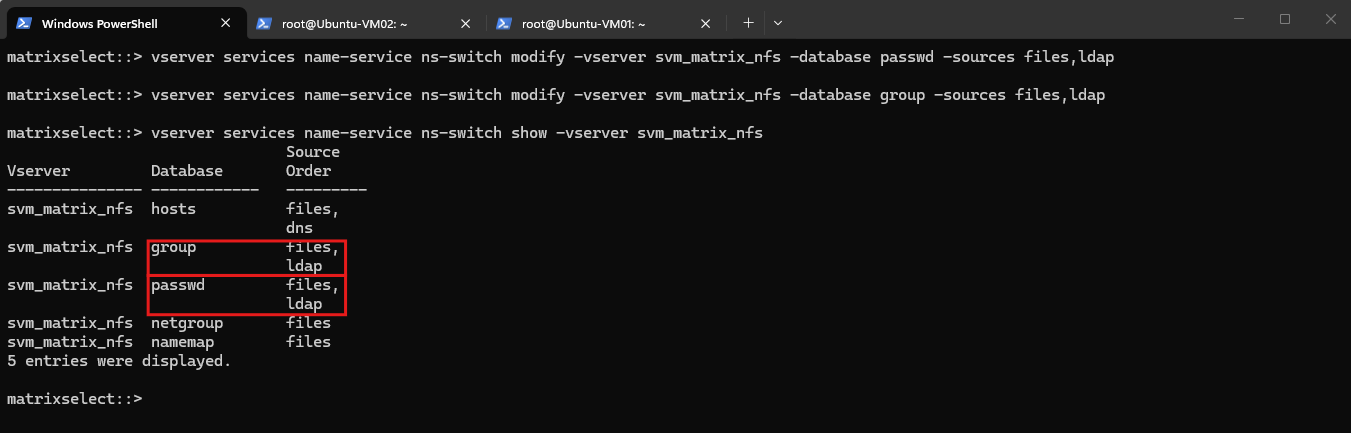
We now add LDAP as a secondary source for both UNIX users and groups, while keeping the local ONTAP files database first in the lookup order:
The ONTAP name-service switch now uses
files,ldapfor both thepasswdandgroupdatabases.Local UNIX identities are therefore resolved first from the SVM’s local database, while identities not found there can be retrieved centrally from Active Directory through LDAP.
vserver services name-service ns-switch modify -vserver svm_matrix_nfs -database passwd -sources files,ldap
vserver services name-service ns-switch modify -vserver svm_matrix_nfs -database group -sources files,ldap

# verify:
vserver services name-service ns-switch show -vserver svm_matrix_nfs
Verifying LDAP-Based UNIX Identity Resolution on ONTAP
With LDAP enabled for the passwd and group databases, ONTAP should now resolve the same POSIX identities that our Linux client retrieves through SSSD.
With LDAP configured as a name-service source, we can now verify that ONTAP resolves our centrally maintained UNIX user directly from Active Directory.
The following lookup is performed from ONTAP’s name-service layer and explicitly displays the source used for the lookup.
The result confirms that LDAP was used and that ONTAP resolves
jdoewith the same POSIX identity we previously retrieved on our Linux client.
set advanced;
vserver services name-service getxxbyyy getpwbyname -node matrixselect-01 -vserver svm_matrix_nfs -username jdoe -show-source true
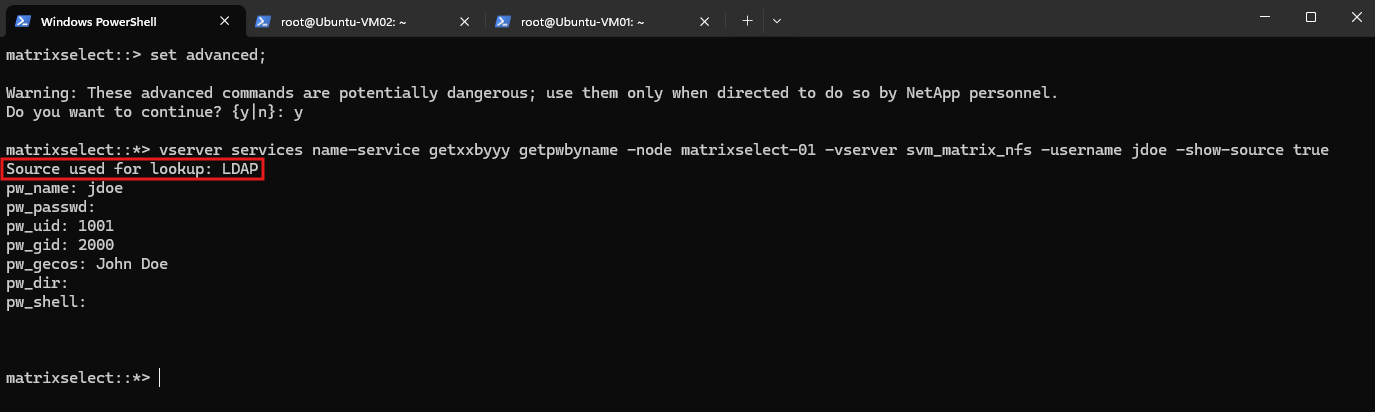
This confirms that both Ubuntu through SSSD/NSS and ONTAP through its LDAP name service independently resolve jdoe from Active Directory as UID 1001 / GID 2000.
We can perform the same name-service lookup for our smbwriters UNIX group and use -show-source true to verify from which configured name-service source ONTAP resolves the group:
The user
jdoeis successfully resolved from LDAP with UID 1001 / GID 2000. Thesmbwritersgroup, however, is currently resolved from the local Files database because the same group also exists locally on the SVM andfileshas precedence overldapin our configuredfiles,ldaplookup order.
set advanced;
vserver services name-service getxxbyyy getgrbyname -node matrixselect-01 -vserver svm_matrix_nfs -groupname smbwriters -show-source true
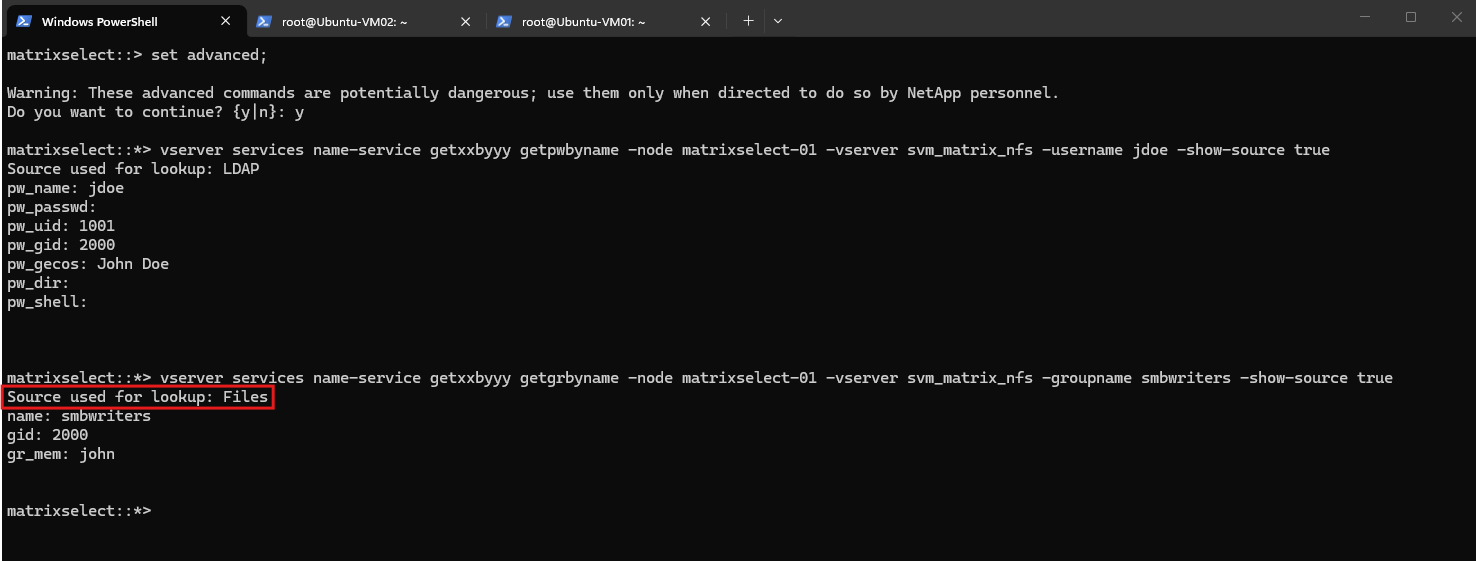
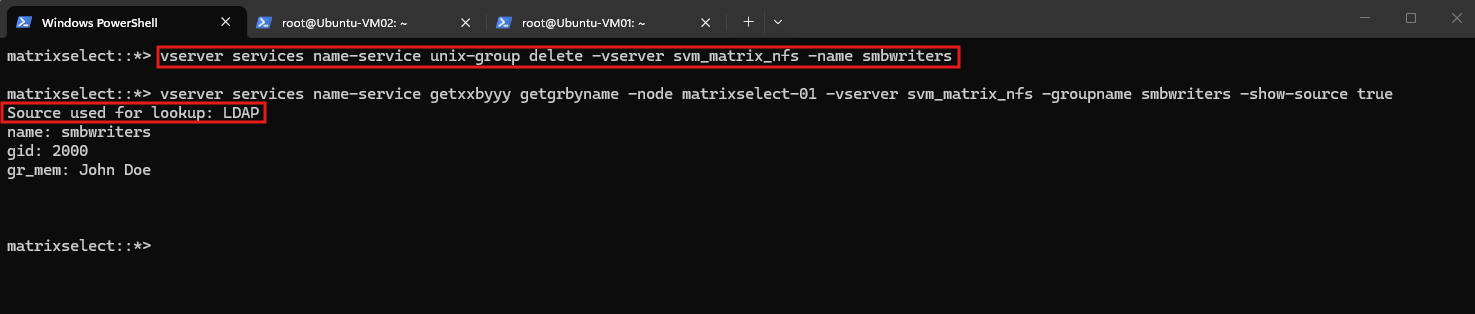
To demonstrate that ONTAP falls back to LDAP when no matching local group exists, we first remove the local smbwriters entry from the SVM:
vserver services name-service unix-group delete -vserver svm_matrix_nfs -name smbwriters
Then we can repeat exactly the same getgrbyname lookup and should see the source change from Files to LDAP.
After removing the local
smbwritersgroup from the SVM, we repeat exactly the same name-service lookup.ONTAP now falls back to the next configured source, LDAP, and successfully resolves the group from Active Directory with GID 2000 and John Doe (
jdoe) as a member.
vserver services name-service getxxbyyy getgrbyname -node matrixselect-01 -vserver svm_matrix_nfs -groupname smbwriters -show-source true
Testing the Centralized Identities with NFSv4
With both Ubuntu and ONTAP now resolving the same UNIX identities from Active Directory, we can test how these centrally maintained identities are used during actual NFS access.
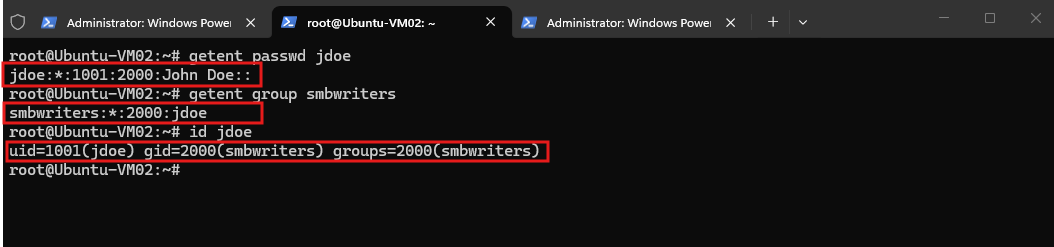
First, on Ubuntu-VM02, let’s verify one more time that our user and group resolve correctly through NSS/SSSD:
The results confirm that
jdoeis resolved as UID 1001 with the primary groupsmbwritersusing GID 2000. These are the same POSIX IDs that ONTAP previously resolved from Active Directory through LDAP.
getent passwd jdoe
getent group smbwriters
id jdoe
Our Linux client already resolves jdoe and smbwriters through SSSD/NSS, but NFSv4 owner and group attributes use string identities such as jdoe@domain.
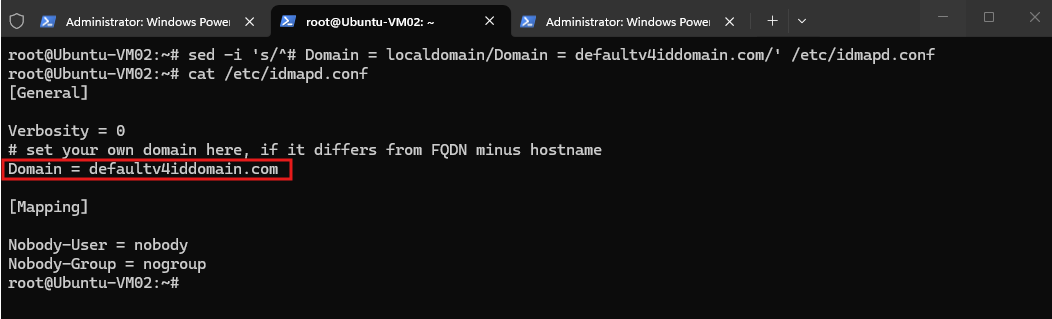
We therefore configure the Linux NFSv4 identity-mapping domain to match the value configured on the ONTAP SVM:
We explicitly configure the Linux NFSv4 identity-mapping domain as defaultv4iddomain.com, matching the v4-id-domain configured on the ONTAP SVM. This allows NFSv4 owner and group strings such as jdoe@defaultv4iddomain.com to be mapped to the corresponding UNIX identities resolved through NSS/SSSD.
sed -i 's/^# Domain = localdomain/Domain = defaultv4iddomain.com/' /etc/idmapd.conf

# verify:
cat /etc/idmapd.conf
With the centralized UNIX identities and matching NFSv4 identity-mapping domain configured, we can now mount our ONTAP NFS volume and test the complete identity flow.
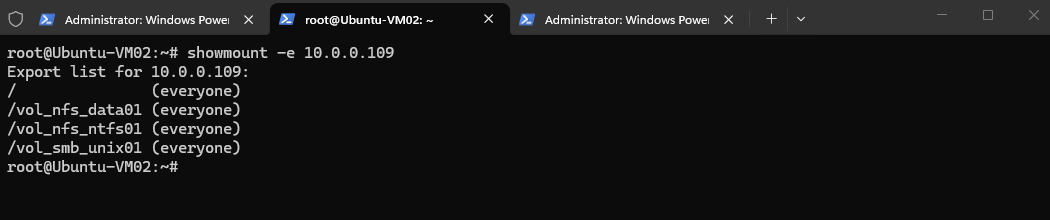
First, we can display the exports currently available from the ONTAP NFS server:
showmount -e 10.0.0.109
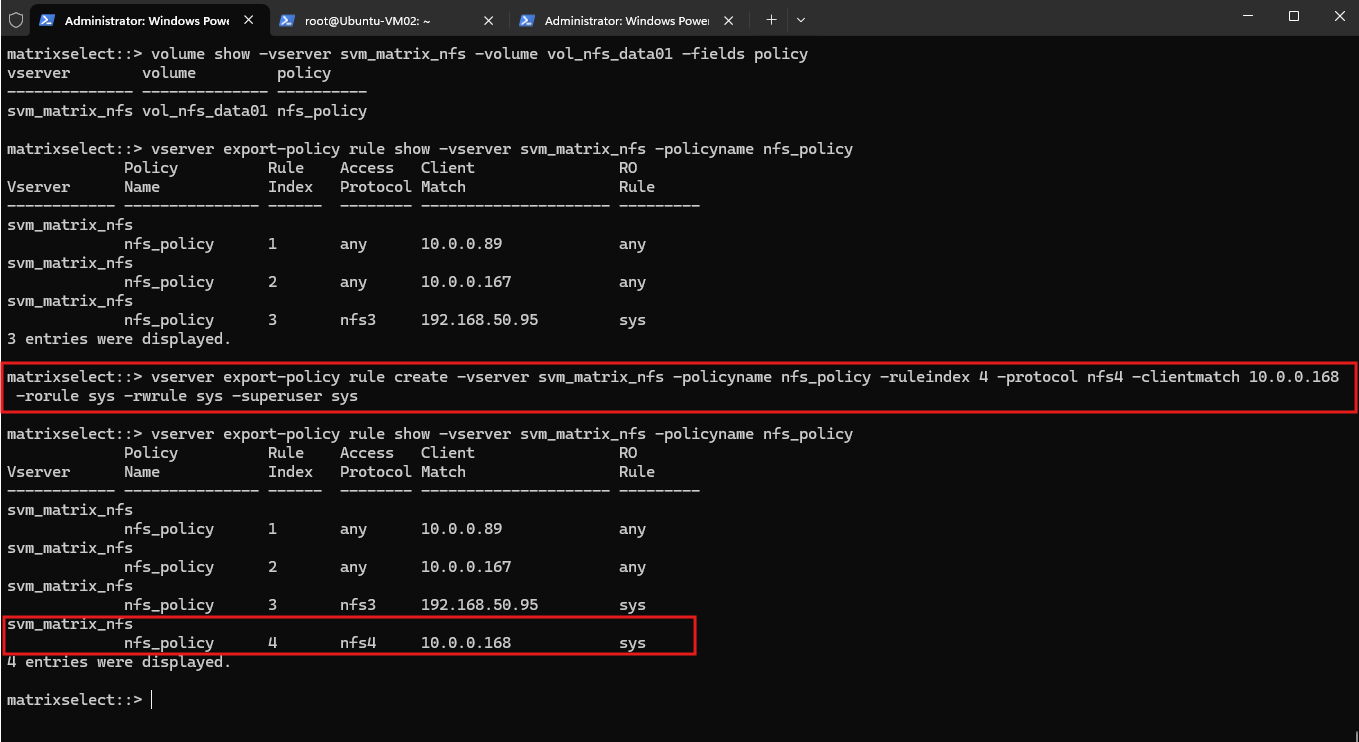
Before mounting the NFS export, we first need to allow our new Ubuntu-VM02 (10.0.0.168) client in the ONTAP export policy with NFSv4 and AUTH_SYS access.
volume show -vserver svm_matrix_nfs -volume vol_nfs_data01 -fields policy
vserver export-policy rule show -vserver svm_matrix_nfs -policyname nfs_policy
vserver export-policy rule create -vserver svm_matrix_nfs -policyname nfs_policy -ruleindex 4 -protocol nfs4 -clientmatch 10.0.0.168 -rorule sys -rwrule sys -superuser sys
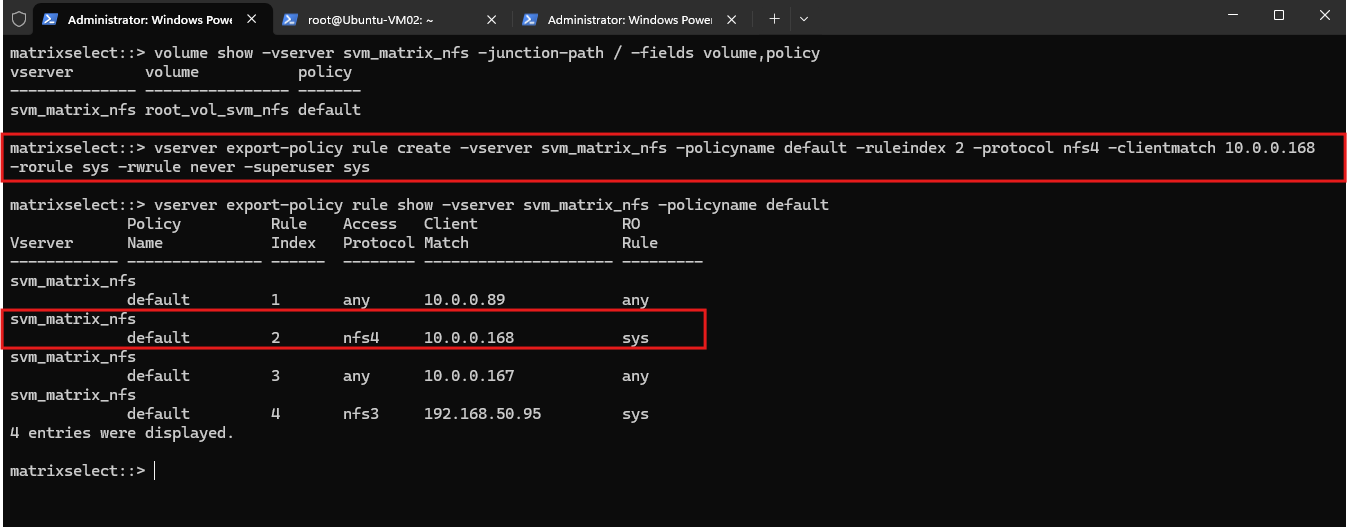
Then the SVM root uses the default export policy. We need to add our VM there as well, preferably with read-only traversal access:
vserver export-policy rule create -vserver svm_matrix_nfs -policyname default -ruleindex 2 -protocol nfs4 -clientmatch 10.0.0.168 -rorule sys -rwrule never -superuser sys
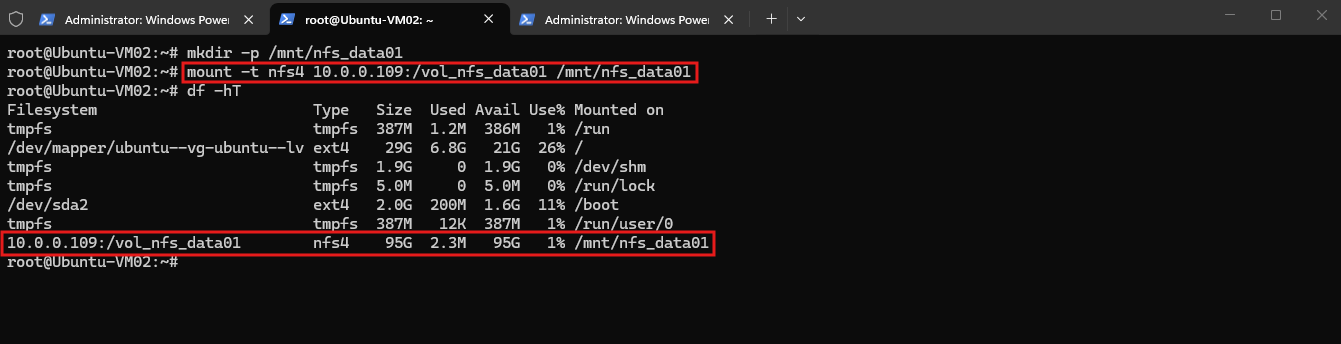
For our test, we will use the UNIX security-style volume /vol_nfs_data01. Create a mount point and mount the export explicitly using NFSv4:
After allowing Ubuntu-VM02 in both the volume and SVM root export policies, the NFSv4 mount succeeds and
df -hTconfirms that/vol_nfs_data01is mounted using NFSv4.
mkdir -p /mnt/nfs_data01
mount -t nfs4 10.0.0.109:/vol_nfs_data01 /mnt/nfs_data01
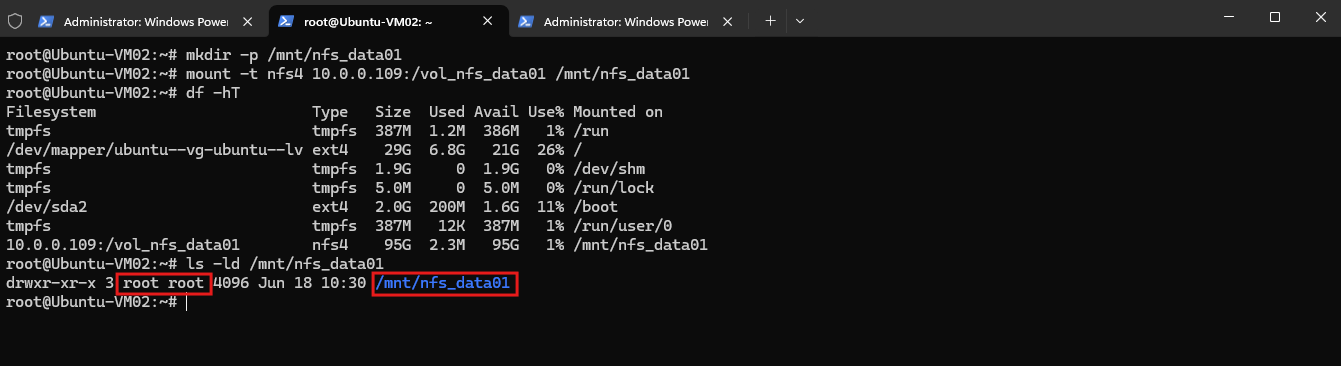
Now comes the important test. First check the existing ownership and permissions:
The
ls -ld /mnt/nfs_data01command displays the permissions and ownership of the mounted volume root itself rather than listing its contents.In our case, it is owned by
root:rootand has755(drwxr-xr-x) permissions, meaning onlyrootcurrently has write access.
ls -ld /mnt/nfs_data01
To test actual NFS access with our centrally maintained UNIX identity, we first create a dedicated test directory and assign it to John Doe (jdoe) and the smbwriters group:
mkdir /mnt/nfs_data01/ldap-test
chown jdoe:smbwriters /mnt/nfs_data01/ldap-test
chmod 770 /mnt/nfs_data01/ldap-test
We can verify both the resolved names and their underlying numeric UNIX IDs:
Before testing the centrally maintained identity over NFSv4, we remove the local ONTAP user
john, which also uses UID 1001.This avoids a duplicate
UIDbetween the localfilesdatabase and our Active Directory userjdoe, ensuring that UID 1001 can be resolved unambiguously through LDAP.The output confirms the expected mapping:
jdoe:smbwriterscorresponds to UID 1001 / GID 2000. Both Linux and ONTAP can therefore work with the same centrally maintained UNIX identities stored in Active Directory.
ls -ld /mnt/nfs_data01/ldap-test
ls -ldn /mnt/nfs_data01/ldap-test
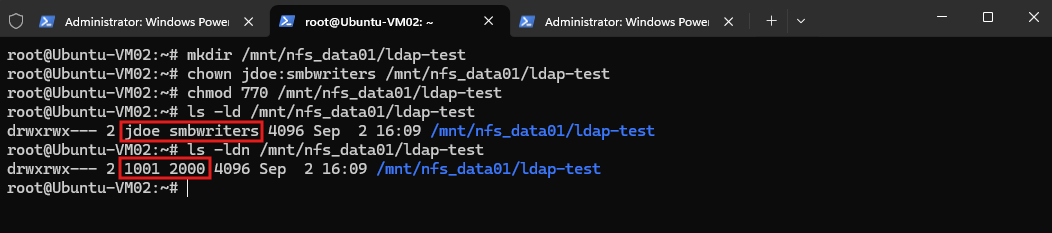
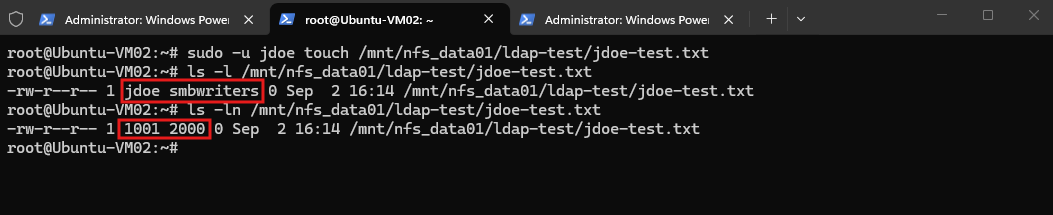
With the test directory owned by jdoe:smbwriters and configured with 770 permissions, we can now create a file while explicitly running the command as jdoe:
sudo -u jdoe touch /mnt/nfs_data01/ldap-test/jdoe-test.txt
We can then verify the resulting ownership using both names and numeric UNIX IDs:
The resulting file is owned by
jdoe:smbwriters, corresponding to UID 1001 / GID 2000. This confirms the complete end-to-end setup: Ubuntu resolves the centrally maintained POSIX identity from Active Directory through SSSD/NSS, uses these credentials for the NFS request, and ONTAP can resolve the same UNIX user and group through LDAP.
ls -l /mnt/nfs_data01/ldap-test/jdoe-test.txt
ls -ln /mnt/nfs_data01/ldap-test/jdoe-test.txt
Analyzing LDAP Identity Resolution with Wireshark
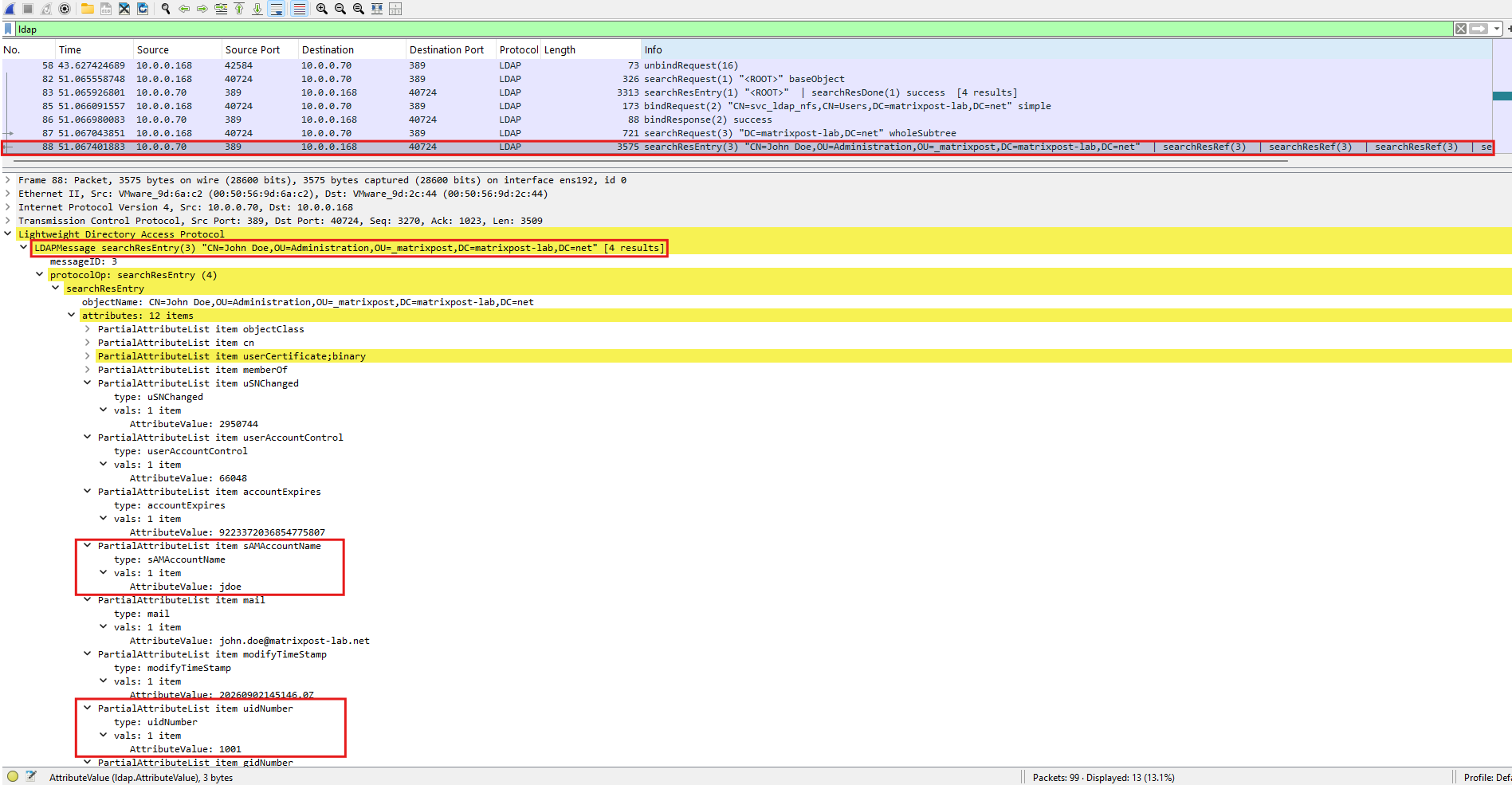
To verify the identity resolution process at the network level, we can use Wireshark to capture the LDAP communication between our Linux NFS client and Active Directory.
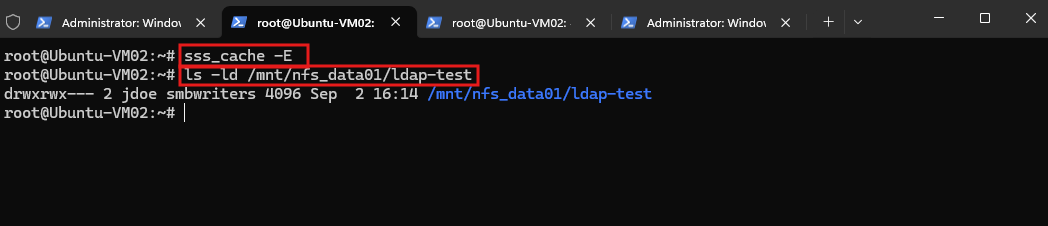
After clearing the SSSD cache, accessing the NFSv4 directory with ls -ld forces Linux to resolve the displayed UNIX owner and group identities, allowing us to observe the corresponding LDAP queries to the domain controller and the POSIX identity information returned by Active Directory.
sss_cache -E
ls -ld /mnt/nfs_data01/ldap-test
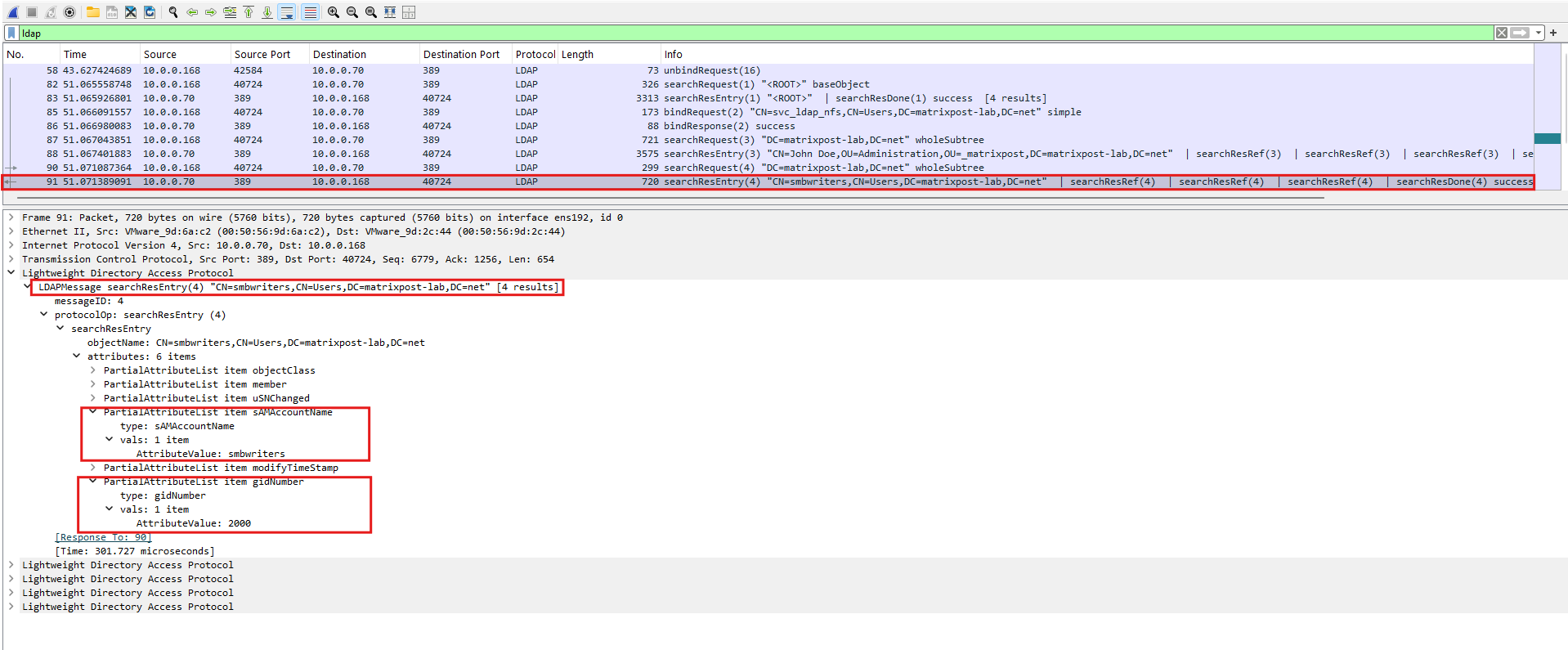
In the LDAP SearchResultEntry returned by the domain controller (10.0.0.70), we can see the Active Directory object for John Doe.
Besides identifying the account as
jdoe, the response contains the POSIXuidNumberattribute with the value1001, which SSSD uses to represent the user as UNIX UID 1001 on the Linux client.
Then, in the corresponding LDAP SearchResultEntry for the smbwriters Active Directory group, we can see its POSIX gidNumber attribute set to 2000.
This matches the primary GID returned for
jdoeand is the same GID that SSSD/NSS exposes to Linux for thesmbwritersUNIX group.
For more details about capturing and analyzing network traffic with TShark and Wireshark on Linux, see my article below, which covers packet capturing, capture filters, host-specific captures, and analyzing the resulting capture files in Wireshark.
Links
Learn about using LDAP name services on ONTAP NFS SVMs
https://docs.netapp.com/us-en/ontap/nfs-config/using-ldap-concept.htmlHow to set up SSSD with LDAP
https://ubuntu.com/server/docs/how-to/sssd/with-ldapMicrosoft Active Directory Technical Specification — Attributes
https://learn.microsoft.com/en-us/openspecs/windows_protocols/ms-adts/216e01b1-4f6d-40d9-b7b1-22c5ba836d4a