Understanding and Setting Up NFSv4 Kerberos Authentication in NetApp ONTAP
In previous articles, we explored how NFSv4 identity mapping works in NetApp ONTAP and how Microsoft Active Directory can be used as a central UNIX identity store for Linux and ONTAP by providing POSIX attributes such as uidNumber and gidNumber.
So far, however, our NFS clients have primarily used AUTH_SYS (sec=sys) for authentication. With AUTH_SYS, the client sends the user’s UID and GID information with the NFS request, which means the NFS server ultimately has to trust the identity information supplied by the client.
In this article, we will take the next step and configure Kerberos authentication for NFSv4 in NetApp ONTAP. Instead of simply trusting UID and GID values supplied by the client, Kerberos provides cryptographic authentication based on tickets issued by a trusted Key Distribution Center (KDC). In our lab environment, Microsoft Active Directory will provide both the Kerberos infrastructure and the central UNIX identities used by ONTAP and our Linux clients.
We will configure Kerberos on our ONTAP Select NFS SVM, prepare an Ubuntu Linux client, and compare the three available Kerberos security modes: krb5, krb5i, and krb5p. Finally, we will take a look at the authentication process on the wire to better understand what actually happens when a Linux user accesses an NFSv4 export protected by Kerberos.
For details on how Active Directory can be used as a central UNIX identity store for both Linux and NetApp ONTAP using POSIX attributes such as uidNumber and gidNumber, see my previous article.
For background on NFSv4 identity mapping, AUTH_SYS, and file ownership in ONTAP, see my previous article.
We already encountered the practical impact of NFSv4 ID mapping in my previous article below, where a mismatching ID-mapping domain caused the NFSv4 client to display the ONTAP ownership as nobody:nogroup instead of root:root.
For a deeper look at how AUTH_SYS (sec=sys) credentials are mapped to a Windows identity when accessing NTFS security-style data through NFS, see the following article.
- From AUTH_SYS to Kerberos Authentication
- Lab Environment and Prerequisites
- Verify the Existing ONTAP NFS Configuration
- Verify NFSv4 and Kerberos Encryption Support
- Verify the NFS Data LIFs
- Verify DNS Configuration and Connectivity
- Verify the Existing NFSv4 Export Policies
- Configure and Verify DNS Records for the NFS Data LIFs
- Verify Time Synchronization for Kerberos
- Verify Time Synchronization on ONTAP
- Verify Time Synchronization on the Active Directory Domain Controller
- Verify Time Synchronization on the Linux NFS Client
- Configure Kerberos for NFS on ONTAP
- Prepare the Linux Client for NFS Kerberos
- Testing Kerberos Authentication for NFS Access
- Testing krb5p
- Kerberos vs. AUTH_SYS – Is the Additional Complexity Worth It?
- Troubleshooting Kerberos NFS Access
- Links
From AUTH_SYS to Kerberos Authentication
With traditional NFS AUTH_SYS (sec=sys), authentication is based on the UID and GID values supplied by the NFS client. When a user accesses an NFS export, the client includes the user’s numeric UID, primary GID, and supplementary group IDs in the RPC credentials. The NFS server uses these values when evaluating access to files and directories.
A Wireshark capture confirms that AUTH_SYS (displayed by Wireshark as
AUTH_UNIX) sends the numeric credentials of our Linux user directly within the RPC request.We can see UID
1000, primary GID1000, and the supplementary group IDs, matching the credentials of my test usermarcus.
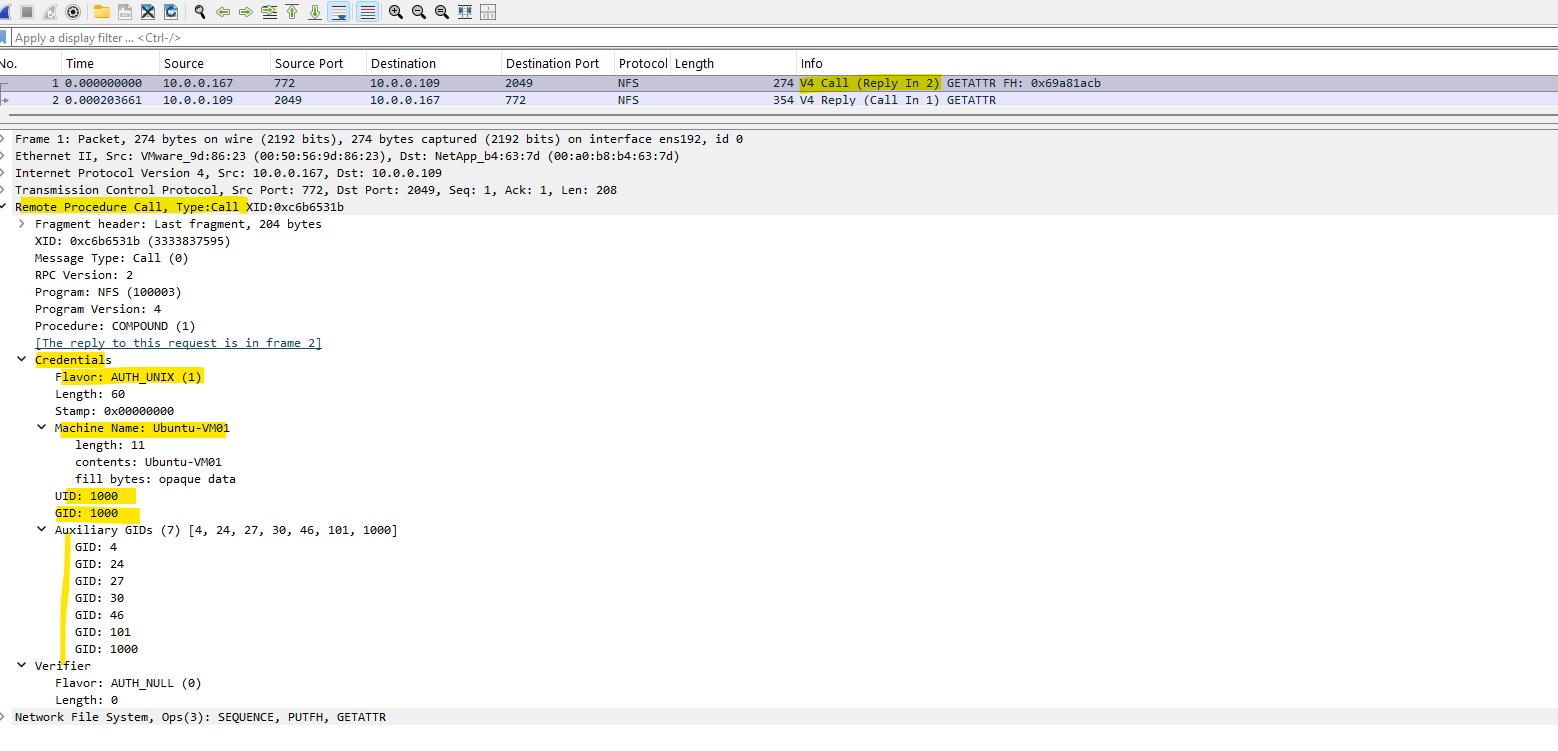
The important point is that AUTH_SYS does not cryptographically verify the identity of the user. The NFS server essentially trusts the client to provide the correct UID and GID. A privileged user who controls an NFS client could therefore potentially impersonate another UNIX user by using the corresponding UID.
With Kerberos authentication, NFS uses RPCSEC_GSS instead of relying solely on AUTH_SYS credentials. The user authenticates against a trusted Kerberos Key Distribution Center (KDC) and receives a Ticket Granting Ticket (TGT). When the user accesses the NFS server, the client obtains a service ticket for the NFS service and uses it to establish an authenticated RPCSEC_GSS security context with the NFS server.
In our environment, Microsoft Active Directory Domain Services (AD DS) acts as the Kerberos KDC. This allows the same Active Directory infrastructure that provides our central UNIX identities and POSIX attributes to also provide cryptographic authentication for NFSv4.
NFS Kerberos supports three security modes:
krb5– Provides Kerberos authentication.krb5i– Provides Kerberos authentication and integrity protection, protecting NFS requests against modification in transit.krb5p– Provides Kerberos authentication, integrity, and privacy by encrypting the NFS traffic.
This changes the fundamental trust model of NFS: instead of simply trusting the UID and GID asserted by the client, ONTAP can authenticate the user’s identity through Kerberos before allowing access to the NFS export.
Lab Environment and Prerequisites
For this article, we will reuse the lab environment from the previous NFS and Active Directory articles shown at the beginning. Microsoft Active Directory Domain Services (AD DS) provides the central identity infrastructure and also acts as the Kerberos Key Distribution Center (KDC).
The environment consists of:
- NetApp ONTAP Select with an NFS-enabled SVM
- Ubuntu Linux as the NFS client
- Microsoft Active Directory Domain Services
- Active Directory-integrated DNS
- UNIX users and groups stored in Active Directory using the POSIX attributes
uidNumberandgidNumber - Working DNS name resolution between the Linux client, ONTAP, and the Active Directory domain controllers
- Synchronized system clocks between all participating systems
Kerberos is particularly sensitive to DNS configuration and time synchronization. The NFS server must be reachable using the hostname associated with its Kerberos service principal, and the clocks of the Linux client, ONTAP, and the domain controllers must be synchronized within the permitted Kerberos clock skew.
Before enabling Kerberos for NFS, we will therefore first verify the existing ONTAP NFS configuration, DNS resolution, time synchronization, and Active Directory connectivity. Once these prerequisites are confirmed, we can configure the Kerberos realm and enable Kerberos authentication on the NFS SVM.
Verify the Existing ONTAP NFS Configuration
Before configuring Kerberos, we will first verify the existing NFS configuration on our ONTAP SVM and make sure that the basic network and name service prerequisites are working correctly.
Verify NFSv4 and Kerberos Encryption Support
First, we can verify that NFS is enabled on the SVM:
The output confirms that NFSv4.0 and NFSv4.1 are already enabled on our NFS SVM. It also shows that ONTAP permits the modern AES-128 and AES-256 Kerberos encryption types, so the basic NFS server prerequisites for our Kerberos configuration are already in place.
vserver nfs show -vserver svm_matrix_nfs
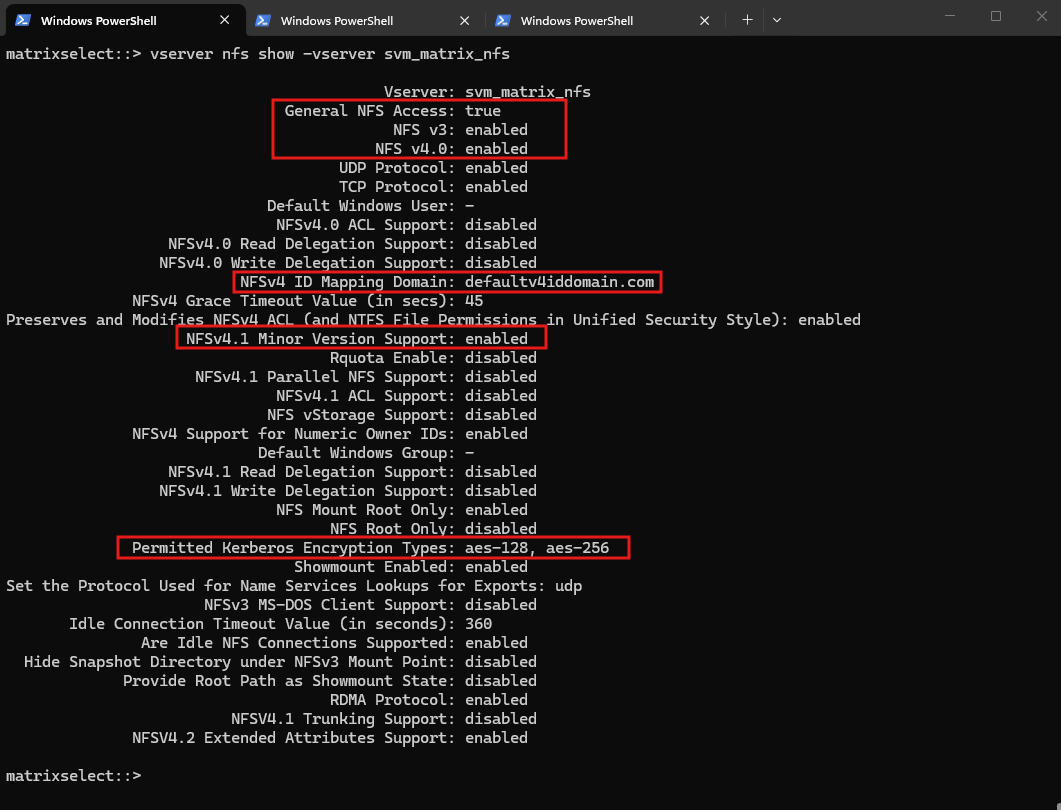
The output also shows that our NFSv4 ID mapping domain is currently set to defaultv4iddomain.com, which we previously configured identically on our Linux clients.
Although the NFSv4 ID mapping domain, Active Directory DNS domain, and Kerberos realm serve different purposes and technically do not have to be identical, using a common namespace such as
matrixpost-lab.netprovides a more consistent and easier-to-understand identity configuration across Linux, ONTAP, Active Directory, and Kerberos.
Verify the NFS Data LIFs
Next, we check the data LIFs that will be used by our NFS clients:
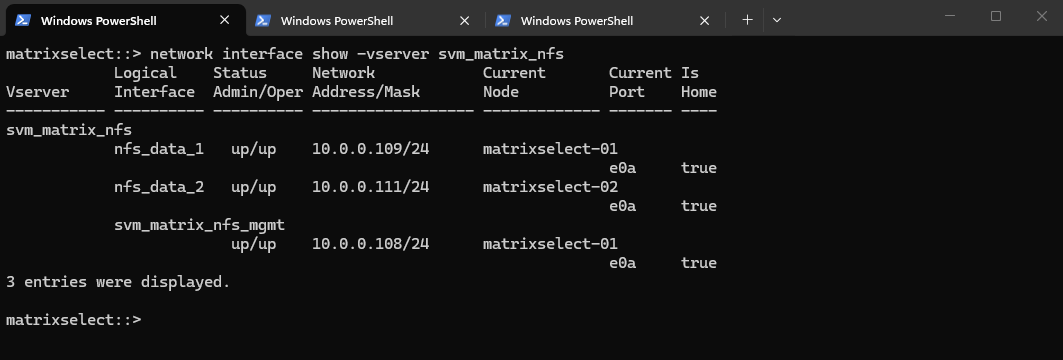
Our NFS SVM provides two NFS data LIFs,
nfs_data_1(10.0.0.109) andnfs_data_2(10.0.0.111), located on the two ONTAP Select nodes.Since Kerberos for NFS is configured on the data LIF level in ONTAP, these interfaces will become important when we enable Kerberos and associate them with their corresponding DNS names and Kerberos service principals.
network interface show -vserver svm_matrix_nfs
Verify DNS Configuration and Connectivity
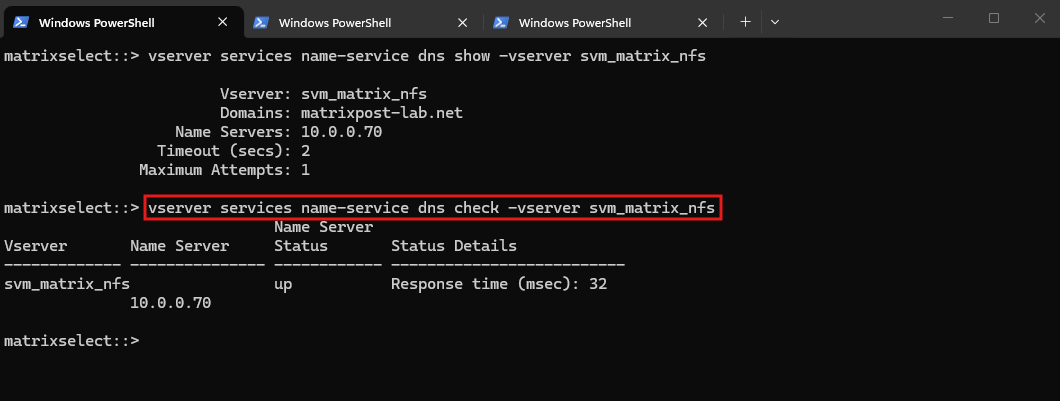
Because Kerberos relies heavily on DNS, we should also verify the DNS configuration of the SVM:
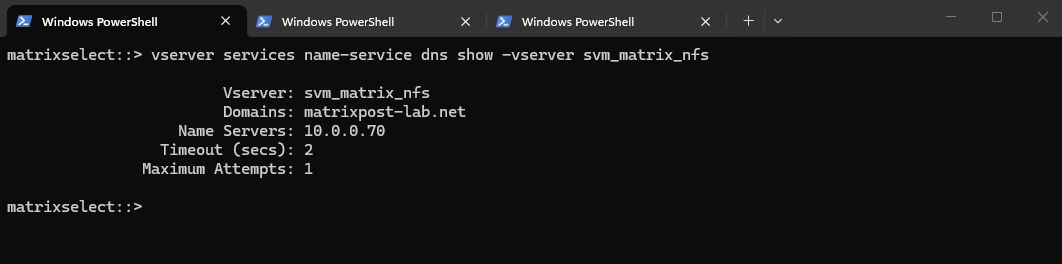
The NFS SVM is configured to use our Active Directory DNS domain
matrixpost-lab.netand the domain controller at10.0.0.70as its DNS server. Correct forward and reverse DNS resolution is especially important for Kerberos, as the NFS service principal will be associated with the DNS hostname of the NFS server.The configured DNS servers should point to DNS servers capable of resolving the Active Directory domain, which in our environment are the Active Directory domain controllers.
vserver services name-service dns show -vserver svm_matrix_nfs
The successful DNS check confirms that the name server is reachable from the SVM, providing an important prerequisite for the subsequent Kerberos configuration.
vserver services name-service dns check -vserver svm_matrix_nfs
Verify the Existing NFSv4 Export Policies
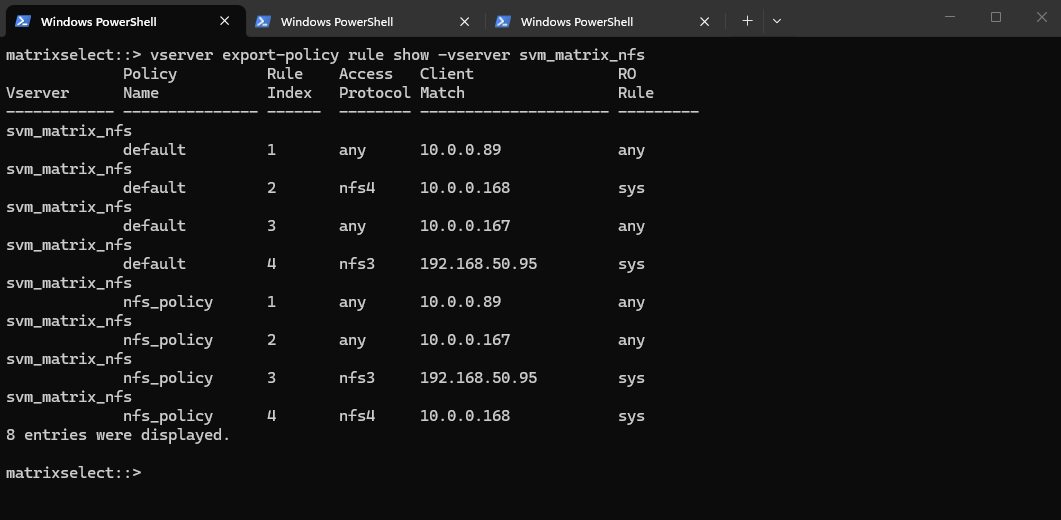
Finally, we should verify the current export policies and security flavors before introducing Kerberos:
The current export policies still authorize our NFSv4 client
10.0.0.168using AUTH_SYS (sys). This provides our baseline configuration; after Kerberos has been enabled on the SVM, we will modify the corresponding export rule to permitkrb5,krb5i, andkrb5pand compare their behavior with the existing AUTH_SYS authentication.
vserver export-policy rule show -vserver svm_matrix_nfs
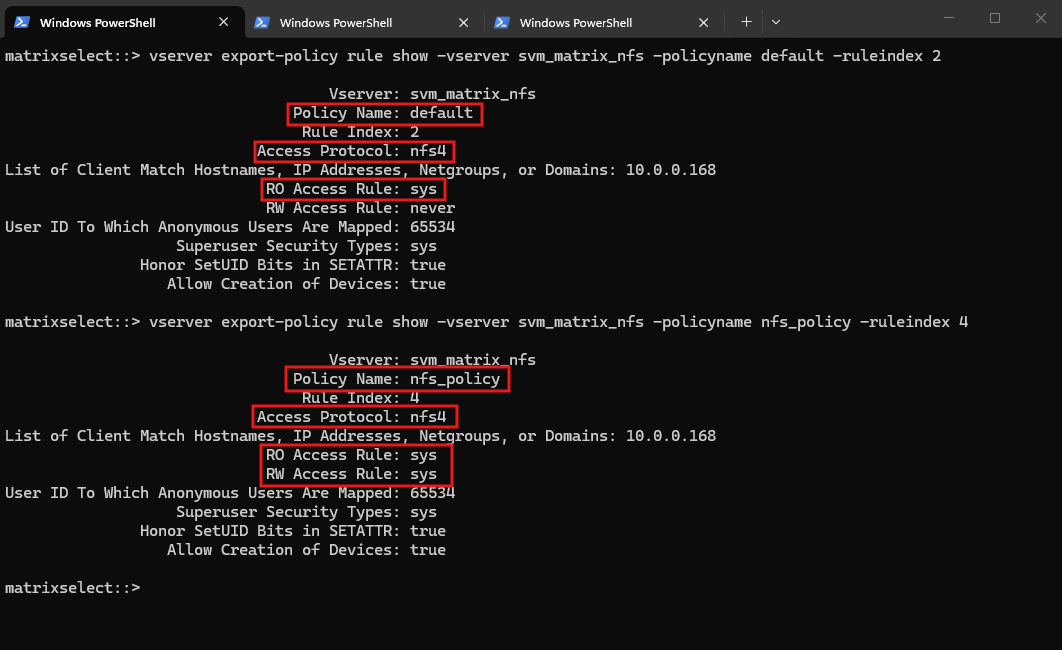
To examine the existing NFSv4 access configuration in more detail, we display the corresponding rules from both the default and nfs_policy export policies.
Both currently use AUTH_SYS (
sys), with thedefaultpolicy providing read-only access, whilenfs_policypermits read-write access for the same NFSv4 client (10.0.0.168).
vserver export-policy rule show -vserver svm_matrix_nfs -policyname default -ruleindex 2
vserver export-policy rule show -vserver svm_matrix_nfs -policyname nfs_policy -ruleindex 4
Configure and Verify DNS Records for the NFS Data LIFs
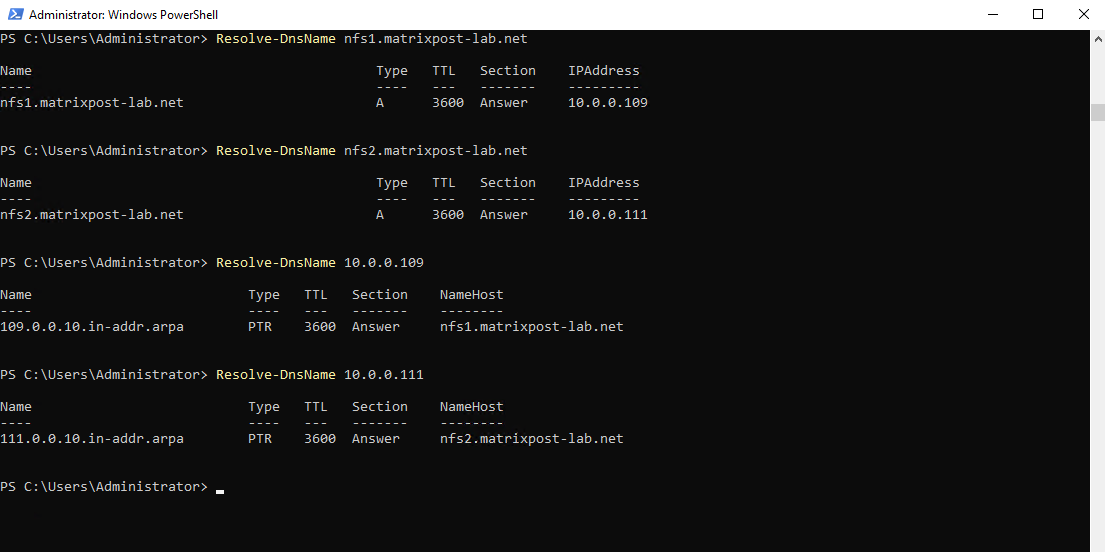
Before configuring Kerberos, we first create dedicated forward (A) and reverse (PTR) DNS records for both ONTAP NFS data LIFs, using nfs1.matrixpost-lab.net and nfs2.matrixpost-lab.net.
Consistent forward and reverse DNS resolution is important for Kerberos service principal identification, ensuring that the hostname used by the NFS client can be correctly associated with the corresponding NFS Kerberos service principal (
nfs/<FQDN>).
We can now verify both forward and reverse DNS resolution for our NFS data LIFs. The FQDNs nfs1.matrixpost-lab.net and nfs2.matrixpost-lab.net resolve to 10.0.0.109 and 10.0.0.111 respectively, while the corresponding PTR lookups resolve the IP addresses back to the same FQDNs, providing consistent DNS resolution for our subsequent Kerberos configuration.
Resolve-DnsName nfs1.matrixpost-lab.net
Resolve-DnsName nfs2.matrixpost-lab.net
Resolve-DnsName 10.0.0.109
Resolve-DnsName 10.0.0.111
Verify Time Synchronization for Kerberos
Kerberos relies on time-limited tickets and therefore requires the clocks of all participating systems to be closely synchronized.
Before configuring Kerberos for NFS, we verify the time synchronization of our ONTAP cluster, Active Directory domain controllers, and Linux NFS client to avoid authentication failures caused by excessive clock skew.
Verify Time Synchronization on ONTAP
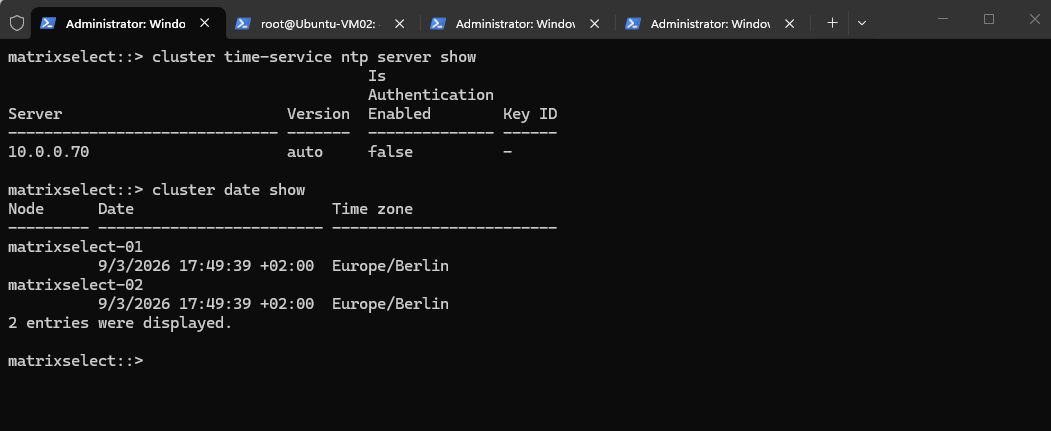
We first verify the NTP configuration and current system time on ONTAP. The cluster uses our Active Directory domain controller 10.0.0.70 (MatrixDC-01) as its NTP server, and both ONTAP Select nodes report the same system time and Europe/Berlin time zone, providing a consistent time base for Kerberos authentication.
cluster time-service ntp server show
cluster date show
Verify Time Synchronization on the Active Directory Domain Controller
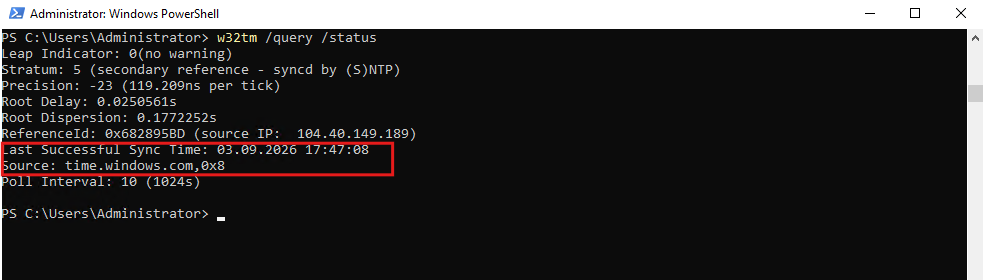
Next, we verify the time synchronization of our Active Directory domain controller MatrixDC-01. The Windows Time Service reports a successful synchronization and currently uses time.windows.com as its upstream time source, while ONTAP in turn synchronizes its clock against this domain controller, providing a consistent time chain for Kerberos authentication.
w32tm /query /status
Verify Time Synchronization on the Linux NFS Client
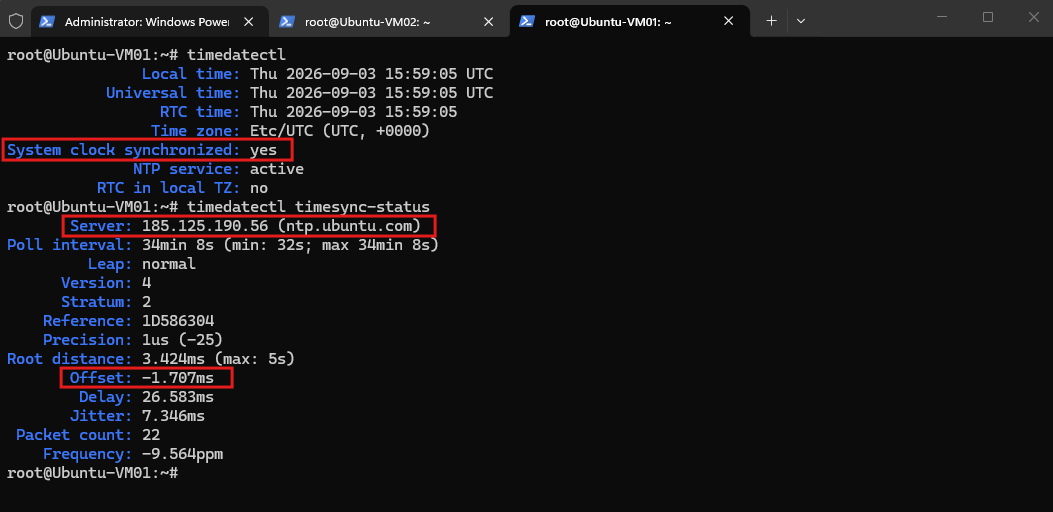
Finally, we verify time synchronization on our Linux NFS client Ubuntu-VM01. The system clock is synchronized and NTP is active, with ntp.ubuntu.com currently providing the upstream time source; the very small reported offset of approximately 1.7 ms confirms that the client clock is closely synchronized.
Note: The Linux client uses the
UTCtime zone while ONTAP usesEurope/Berlin. Different local time zones do not cause problems for Kerberos as long as the underlying system clocks are correctly synchronized.
timedatectl
timedatectl timesync-status
Configure the Domain Controller as NTP Source on the Linux Client
Although Kerberos does not require all participating systems to use the same NTP server or time zone, we will make the configuration of our lab more consistent by configuring the Linux client to use the same Active Directory domain controller (10.0.0.70) as its NTP source that is already used by ONTAP.
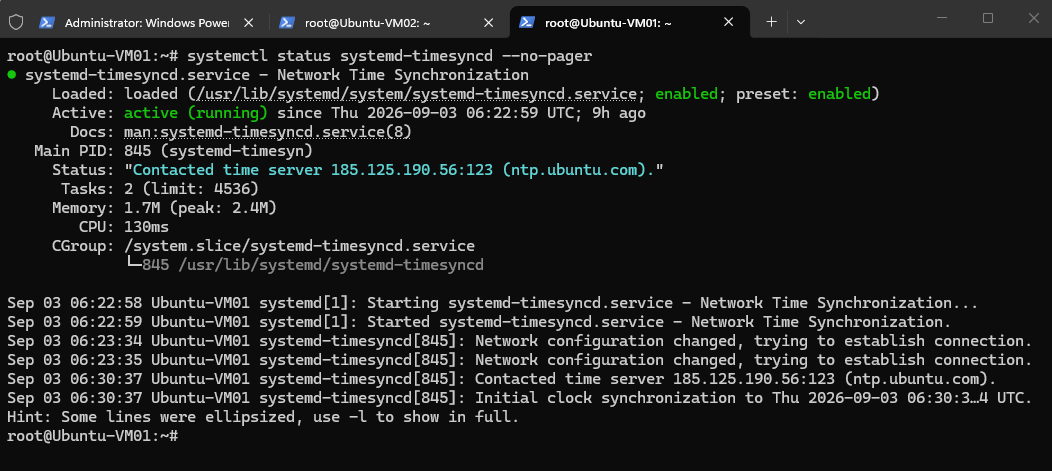
First, we verify that systemd-timesyncd is running and providing time synchronization on our Ubuntu client.
The output also shows that the client currently synchronizes its clock against
ntp.ubuntu.com(185.125.190.56), which we will now replace with our Active Directory domain controller as the primary NTP source.
systemctl status systemd-timesyncd --no-pager
Next, we edit the systemd-timesyncd configuration:
Under the
[Time]section, we configure our domain controller as the primary NTP server and retain the Ubuntu NTP service as a fallback:
nano /etc/systemd/timesyncd.conf
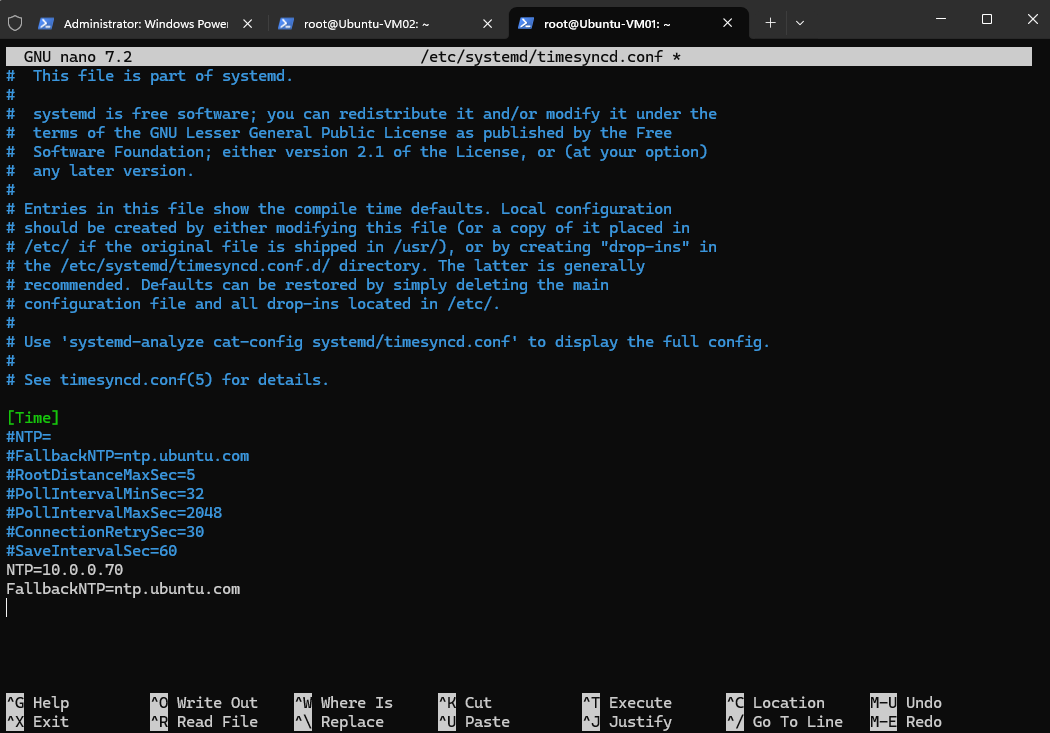
After changing the configuration, we restart systemd-timesyncd to apply the new NTP settings:
systemctl restart systemd-timesyncd
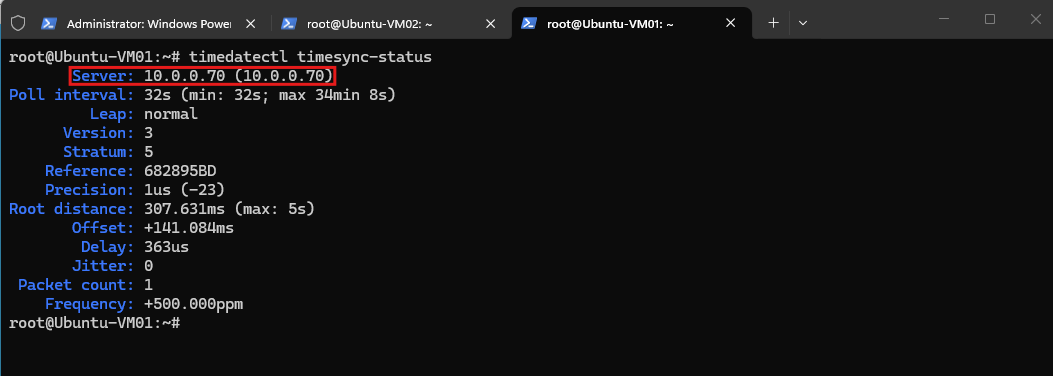
We can then verify which NTP server is currently being used:
After restarting
systemd-timesyncd, we verify the active synchronization source usingtimedatectl timesync-status. The output now shows our Active Directory domain controller10.0.0.70(MatrixDC-01) as the active NTP server, meaning that both our ONTAP cluster and Ubuntu NFS client synchronize their clocks against the same source.
timedatectl timesync-status
Configure the Time Zone on the Linux Client
Our Ubuntu client currently uses the Etc/UTC time zone. While the configured time zone itself does not affect Kerberos authentication as long as the underlying clocks are synchronized, we will also change it to Europe/Berlin to keep the displayed local time consistent with our ONTAP systems.
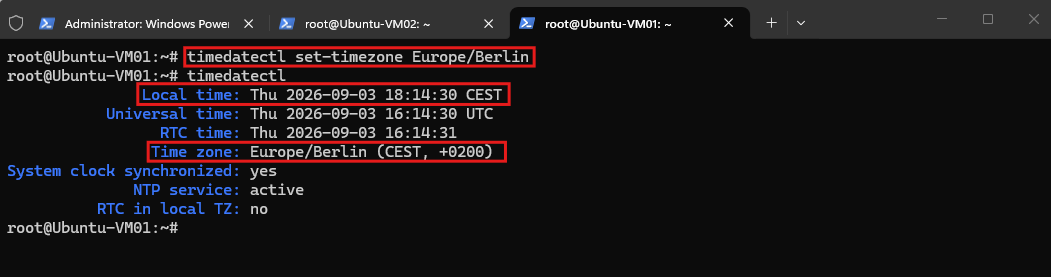
Finally, we change the Linux client’s time zone from
Etc/UTCtoEurope/Berlinto keep the displayed local time consistent with our ONTAP systems. The finaltimedatectloutput confirms the correct time zone, an active NTP service, and a synchronized system clock, completing the time synchronization prerequisites for Kerberos.
timedatectl set-timezone Europe/Berlin

verify:
timedatectl
Configure Kerberos for NFS on ONTAP
With DNS and time synchronization prerequisites in place, we can now configure our NFS SVM to use Active Directory as its Kerberos KDC. We will first configure the Kerberos realm and then enable Kerberos authentication on the individual NFS data LIFs.
Verify Existing Kerberos Realm Configuration
We first verify whether a Kerberos realm is already configured on our NFS SVM.
Since no entries are returned,
svm_matrix_nfscurrently has no Kerberos realm configuration and we can proceed with creating one for our Active Directory realmMATRIXPOST-LAB.NET.
vserver nfs kerberos realm show -vserver svm_matrix_nfs

Create the Kerberos Realm on the NFS SVM
We now create the Kerberos realm MATRIXPOST-LAB.NET on our NFS SVM and configure MatrixDC-01 (10.0.0.70) as the Microsoft KDC and Active Directory server. We retain ONTAP’s default Kerberos port 88 and the default permitted clock skew of 5 minutes.
The five-minute clock skew is not ONTAP-specific, but represents the commonly used default tolerance in Kerberos environments, including Active Directory, within which the clocks of the client and Kerberos services may differ before authentication can fail due to time differences.
This value can be changed using the
-clock-skewparameter below if required; five minutes also corresponds to the commonly used default tolerance in Active Directory Kerberos environments.
vserver nfs kerberos realm create -vserver svm_matrix_nfs -realm MATRIXPOST-LAB.NET -kdc-vendor Microsoft -kdc-ip 10.0.0.70 -adserver-name MatrixDC-01 -adserver-ip 10.0.0.70

After creating the realm, we verify the resulting Kerberos configuration on the NFS SVM. This allows us to confirm the configured realm, KDC, Active Directory server, and effective clock-skew setting before enabling Kerberos on the NFS data LIFs.
vserver nfs kerberos realm show -vserver svm_matrix_nfs

Enable Kerberos on the NFS Data LIFs
We now enable Kerberos on our first NFS data LIF nfs_data_1 (10.0.0.109). The service principal name (SPN) identifies the NFS service using the FQDN nfs1.matrixpost-lab.net within our Kerberos realm MATRIXPOST-LAB.NET.
ONTAP prompts interactively for the password of our Active Directory account
superuser; after authentication, the command completes without an error.The SPN uniquely identifies the NFS service on
nfs1.matrixpost-lab.netto the Kerberos infrastructure and allows clients to request a service ticket for this NFS endpoint.
vserver nfs kerberos interface enable -vserver svm_matrix_nfs -lif nfs_data_1 -spn nfs/nfs1.matrixpost-lab.net@MATRIXPOST-LAB.NET -admin-username superuser

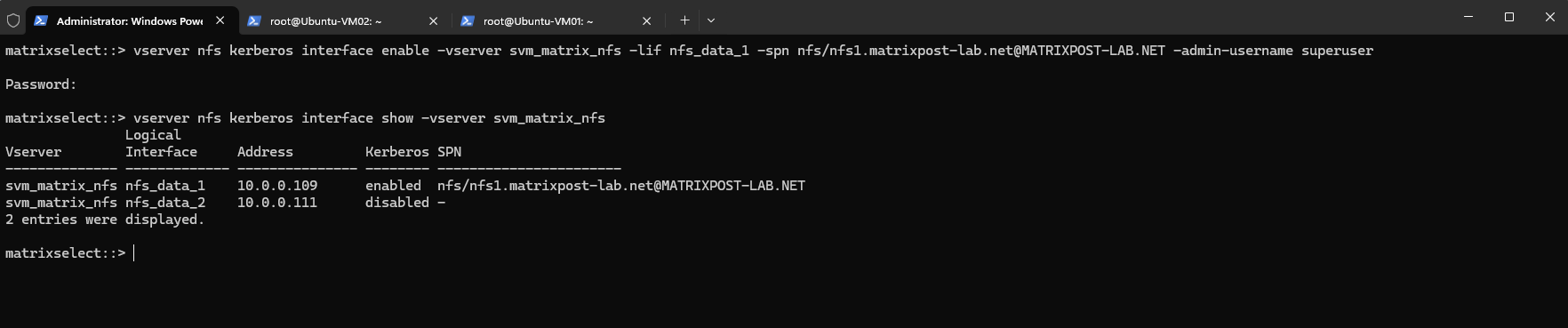
We verify the Kerberos status of both NFS data LIFs using vserver nfs kerberos interface show.
Kerberos is now enabled on
nfs_data_1(10.0.0.109) and associated with the SPNnfs/nfs1.matrixpost-lab.net@MATRIXPOST-LAB.NET, while Kerberos on our second data LIFnfs_data_2(10.0.0.111) remains disabled.
vserver nfs kerberos interface show -vserver svm_matrix_nfs
After enabling Kerberos on nfs_data_1, ONTAP automatically creates the Active Directory computer account NFS-NFS1-MATRIX and registers several service principal names on it.
Besides the explicit nfs/nfs1.matrixpost-lab.net SPN we configured, ONTAP also registers additional NFS and HOST SPNs for the generated machine-account name so the service can be identified through both its configured NFS FQDN and the corresponding AD computer account.
Get-ADComputer -Filter * -Properties ServicePrincipalName | Where-Object {$_.ServicePrincipalName -match 'nfs/nfs1'} | ForEach-Object {"Computer Account: $($_.Name)"; "Distinguished Name: $($_.DistinguishedName)"; "Service Principal Names:"; $_.ServicePrincipalName | ForEach-Object {" $_"}}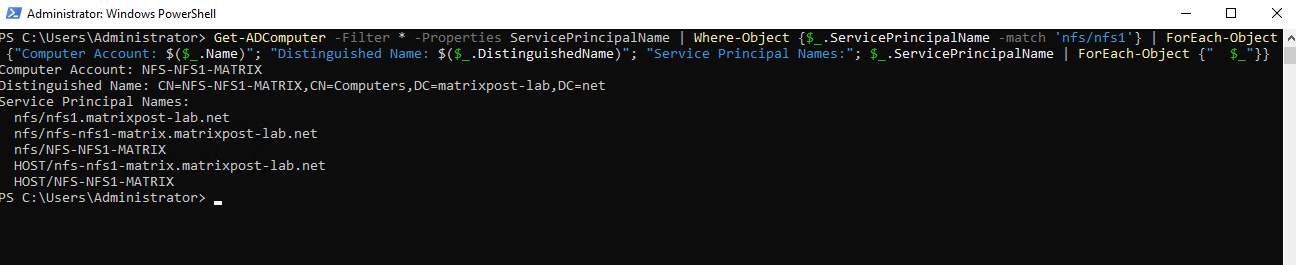
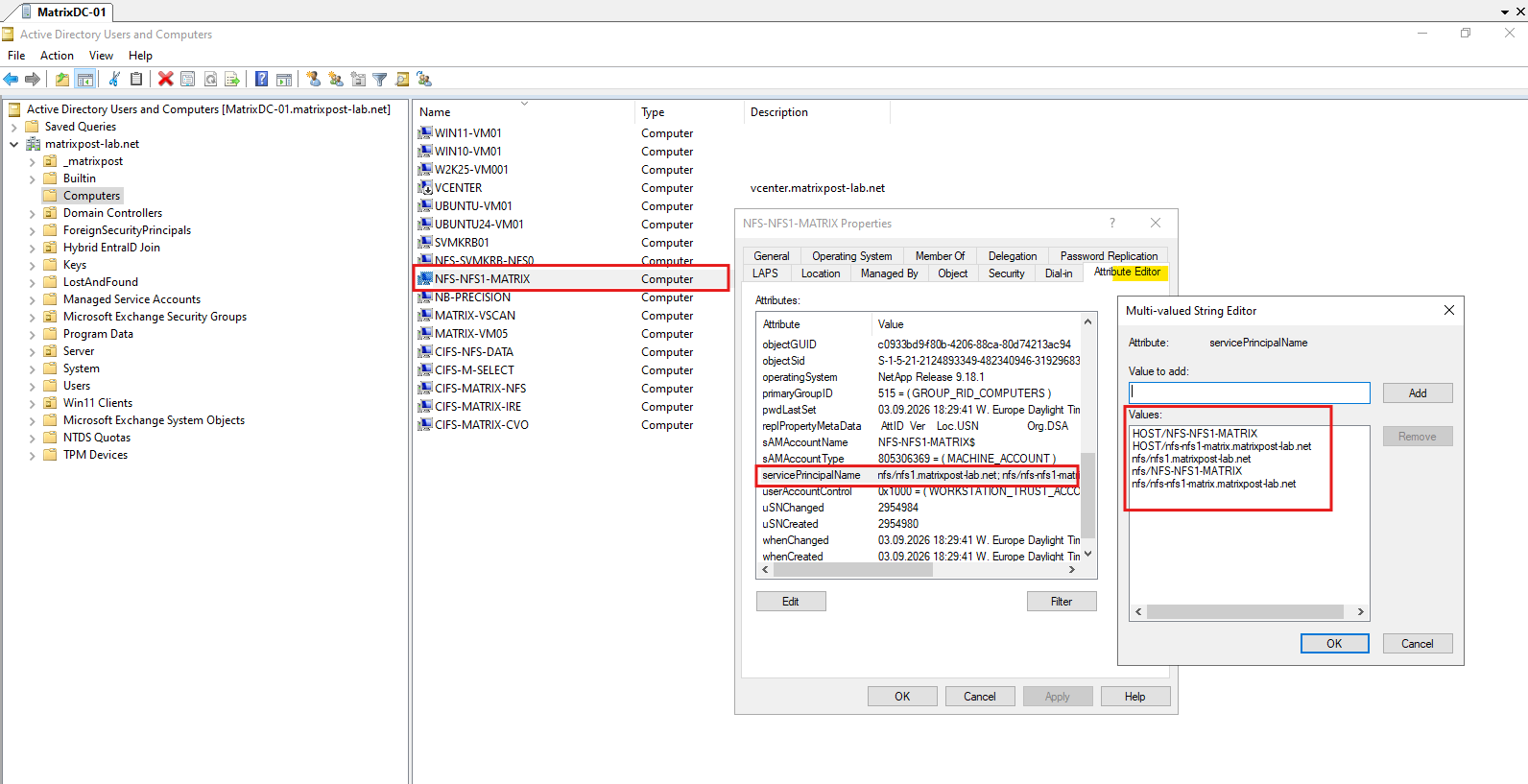
We can also verify the automatically created NFS-NFS1-MATRIX computer account directly in Active Directory Users and Computers.
Using the Attribute Editor, the multi-valued
servicePrincipalNameattribute shows the HOST and NFS service principals registered by ONTAP, including our explicitly configurednfs/nfs1.matrixpost-lab.netSPN.
We repeat the same procedure for our second NFS data LIF nfs_data_2 (10.0.0.111), using the SPN nfs/nfs2.matrixpost-lab.net@MATRIXPOST-LAB.NET. This ensures that both NFS data LIFs can participate in Kerberos-authenticated NFS access.
Both nfs_data_1 (10.0.0.109) and nfs_data_2 (10.0.0.111) now have Kerberos enabled and are associated with their respective NFS service principals in the MATRIXPOST-LAB.NET realm.
vserver nfs kerberos interface enable -vserver svm_matrix_nfs -lif nfs_data_2 -spn nfs/nfs2.matrixpost-lab.net@MATRIXPOST-LAB.NET -admin-username superuser

verify:
vserver nfs kerberos interface show -vserver svm_matrix_nfs

Configure the Export Policy for Kerberos
Although Kerberos is now enabled on both NFS data LIFs, the export policies still determine which NFS security flavors clients are allowed to use.
Our domain-joined Linux client Ubuntu-VM01 (10.0.0.167) currently has any configured for read-only, read-write, and superuser access, so AUTH_SYS would still be accepted and would not enforce Kerberos authentication.
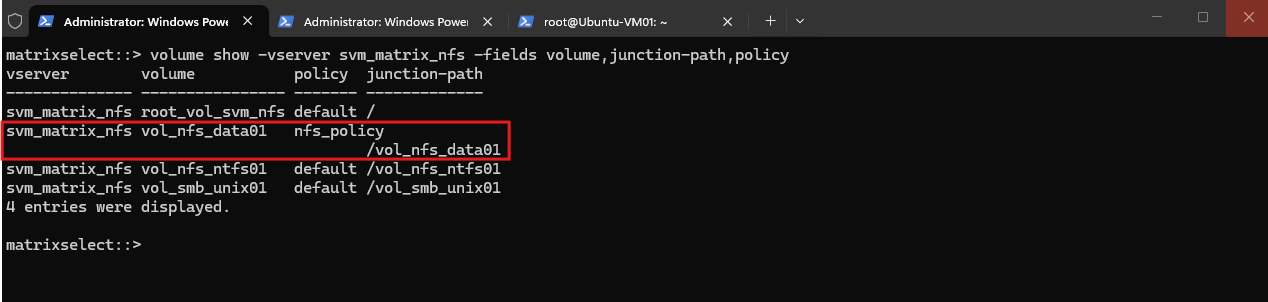
From the volume configuration, we select
vol_nfs_data01, mounted at/vol_nfs_data01, as our Kerberos test volume because it already uses the dedicatednfs_policyexport policy. This allows us to modify the Kerberos security flavors without affecting the SVM root volume or our other NFS test volumes.
volume show -vserver svm_matrix_nfs -fields volume,junction-path,policy
We now restrict the export rule for our domain-joined Linux client 10.0.0.167 to NFSv4 and allow the three Kerberos security flavors krb5, krb5i, and krb5p for read-only, read-write, and superuser access.
Because
sysis no longer included, AUTH_SYS credentials from this client will no longer satisfy this export rule.
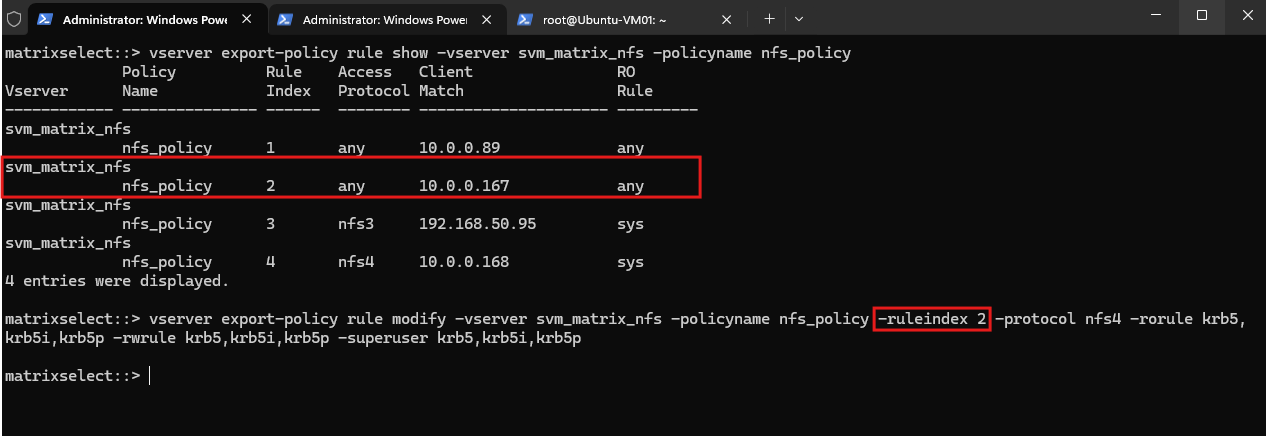
Since rule 2 is specifically for Ubuntu-VM01 (10.0.0.167), we change it to NFSv4 and allow all three Kerberos flavors:
vserver export-policy rule show -vserver svm_matrix_nfs -policyname nfs_policy
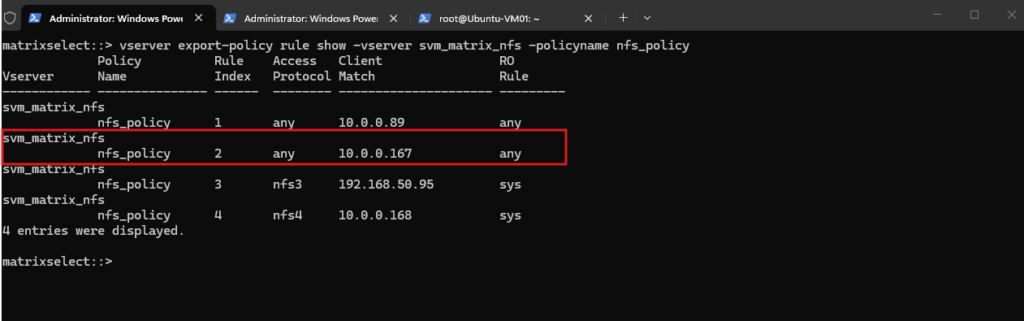
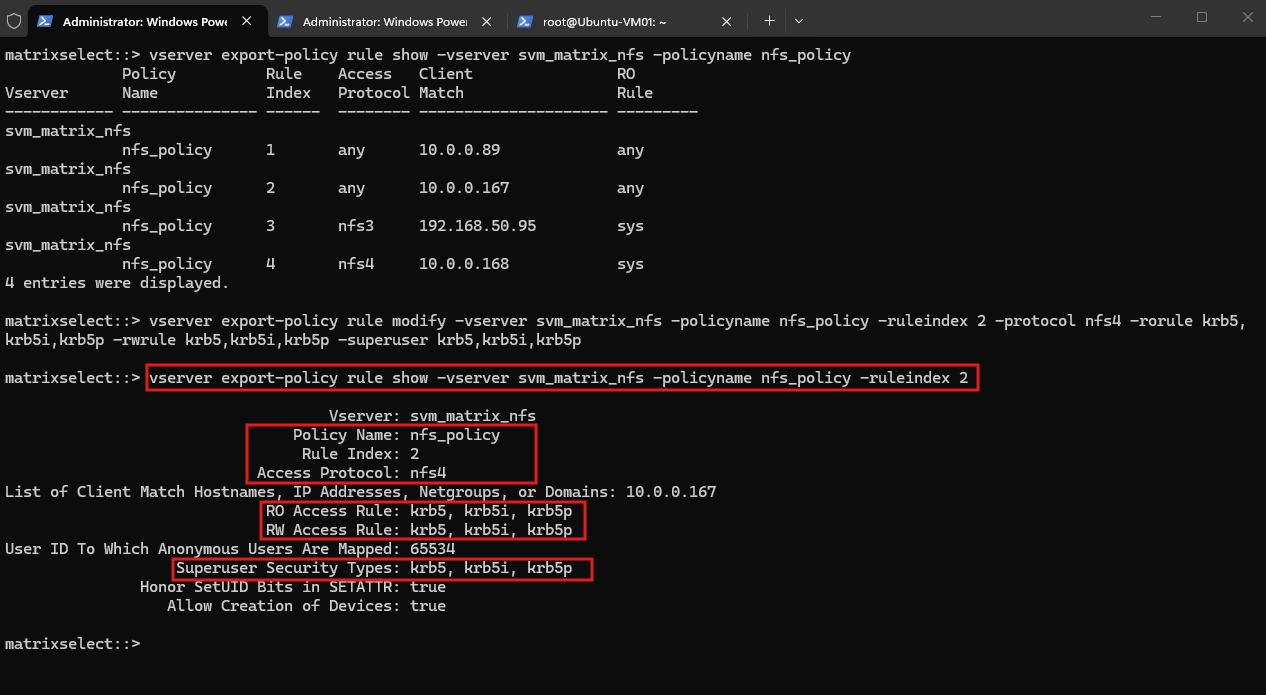
This command restricts the export rule for our Linux client to NFSv4 and permits only the Kerberos security flavors krb5, krb5i, and krb5p for read, write, and superuser access, thereby excluding AUTH_SYS (sys).
vserver export-policy rule modify -vserver svm_matrix_nfs -policyname nfs_policy -ruleindex 2 -protocol nfs4 -rorule krb5,krb5i,krb5p -rwrule krb5,krb5i,krb5p -superuser krb5,krb5i,krb5p
Verify:
vserver export-policy rule show -vserver svm_matrix_nfs -policyname nfs_policy -ruleindex 2
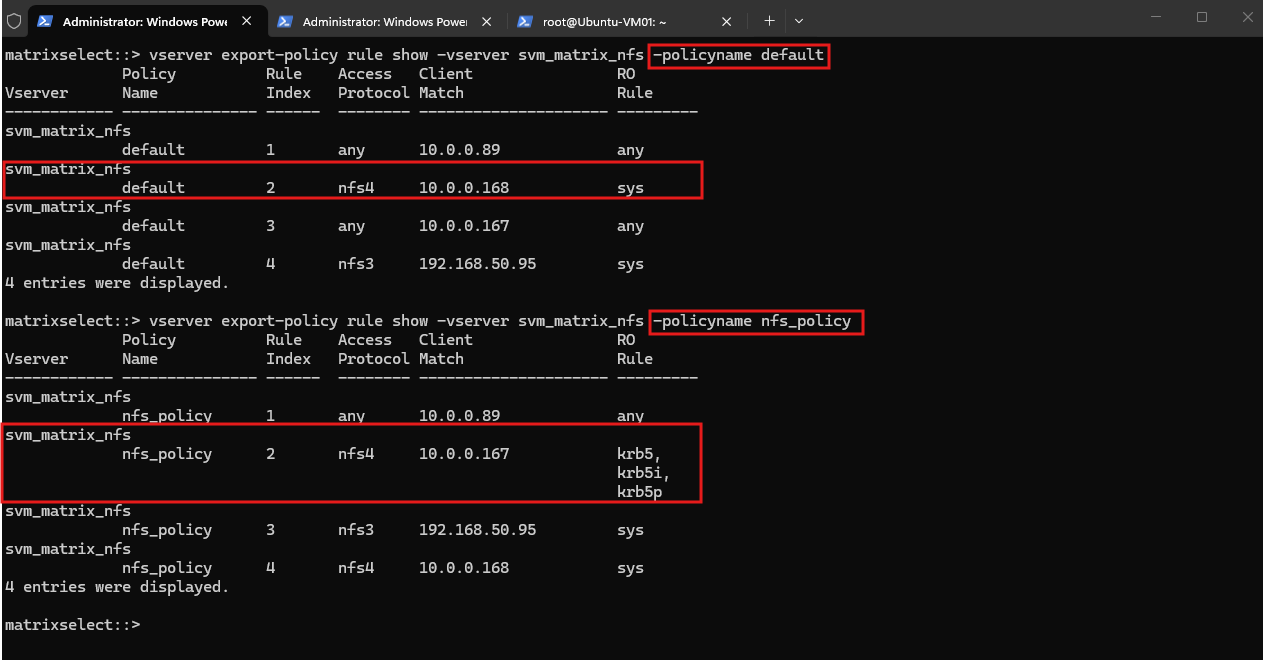
Note: The SVM root volume
/uses thedefaultexport policy, where our client10.0.0.167is still permitted with the security flavorany.Since an NFSv4 client traverses the SVM namespace from the pseudo-filesystem root to the target volume, we leave this rule unchanged initially and restrict Kerberos specifically on the
vol_nfs_data01export throughnfs_policy.
vserver export-policy rule show -vserver svm_matrix_nfs -policyname default
vserver export-policy rule show -vserver svm_matrix_nfs -policyname nfs_policy
Configure the Kerberos-to-UNIX Name Mapping
During the initial NFSv4 RPCSEC_GSS context establishment, the Linux client can authenticate using its machine principal, in our case UBUNTU-VM01$@MATRIXPOST-LAB.NET.
ONTAP must map this authenticated Kerberos principal to a valid UNIX identity before it can authorize the NFS request.
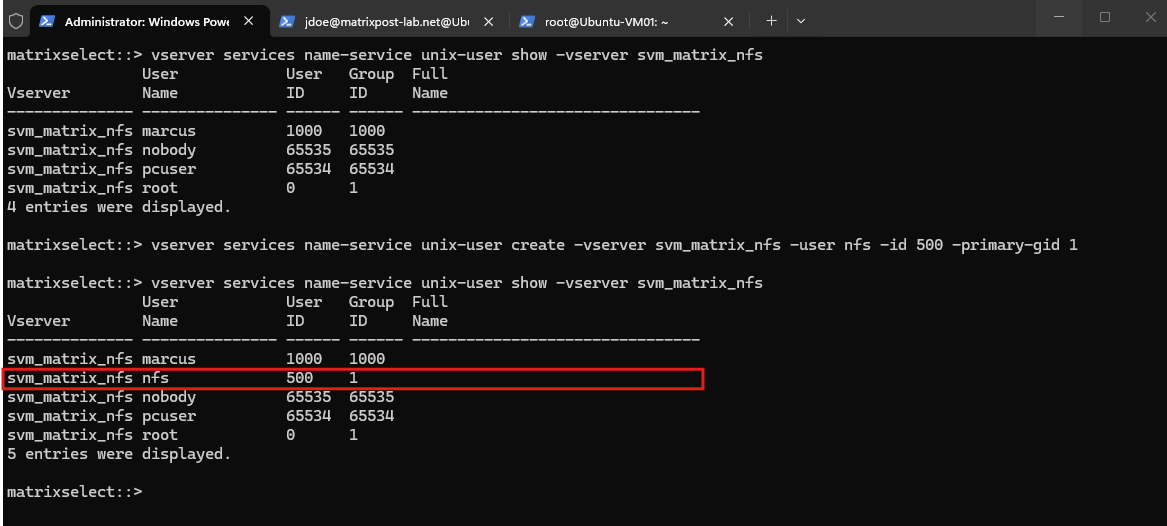
For this purpose, ONTAP uses a dedicated nfs UNIX user with UID 500 during the GSS initialization process. We first create this user and assign it to the existing daemon group (GID 1):
vserver services name-service unix-user create -vserver svm_matrix_nfs -user nfs -id 500 -primary-gid 1
We can verify the UNIX user with:
vserver services name-service unix-user show -vserver svm_matrix_nfs -user nfs
Next, we create an explicit Kerberos-to-UNIX (krb-unix) name mapping that maps our Ubuntu client’s machine principal to this nfs UNIX identity:
vserver name-mapping create -vserver svm_matrix_nfs -direction krb-unix -position 1 -pattern "UBUNTU-VM01\$@MATRIXPOST-LAB.NET" -replacement nfs
Finally, we verify the resulting mapping:
vserver name-mapping show -vserver svm_matrix_nfs -direction krb-unix
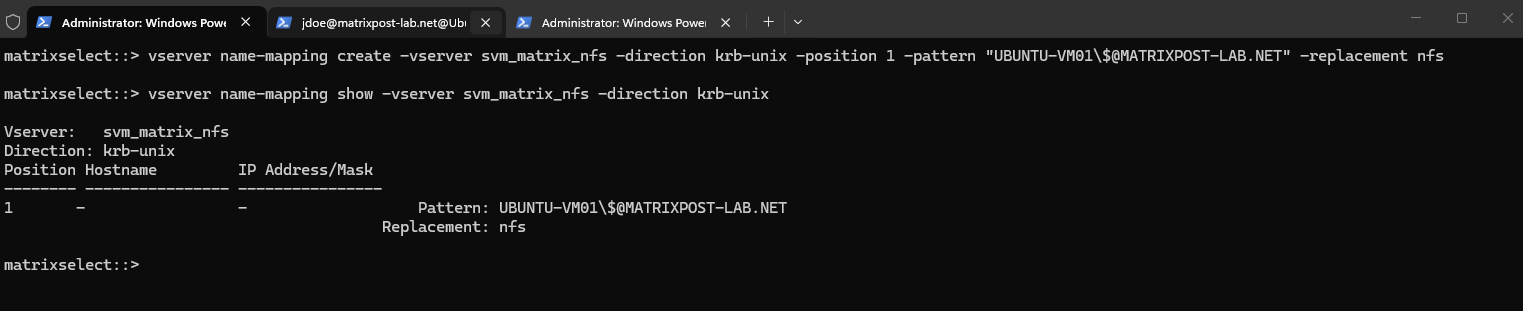
The mapping ensures that when ONTAP receives UBUNTU-VM01$@MATRIXPOST-LAB.NET during RPCSEC_GSS initialization, it can translate the authenticated machine principal to the valid local UNIX identity nfs (UID 500).
Without this mapping, ONTAP would implicitly look for a UNIX user named UBUNTU-VM01$ and reject the GSS context when that identity cannot be found.
The importance of this mapping is easy to overlook during the initial Kerberos configuration. In the Troubleshooting Kerberos NFS Access section later in this article, we deliberately walk through our initial failed sec=krb5 mount and use the ONTAP event log to identify exactly how the missing krb-unix mapping causes RPCSEC_GSS initialization to fail.
Configure the NFSv4 ID-Mapping Domain
Kerberos authentication and NFSv4 identity mapping are separate mechanisms. Kerberos authenticates the identity accessing the NFS service, while the NFSv4 ID-mapping domain is used to consistently represent and resolve file owner and group identities between ONTAP and the Linux NFS client.
To keep the identity configuration consistent with our Active Directory and DNS namespace, we configure matrixpost-lab.net as the NFSv4 ID-mapping domain on the ONTAP SVM:
vserver nfs modify -vserver svm_matrix_nfs -v4-id-domain matrixpost-lab.net
We then verify the configured domain:
vserver nfs show -vserver svm_matrix_nfs -fields v4-id-domain
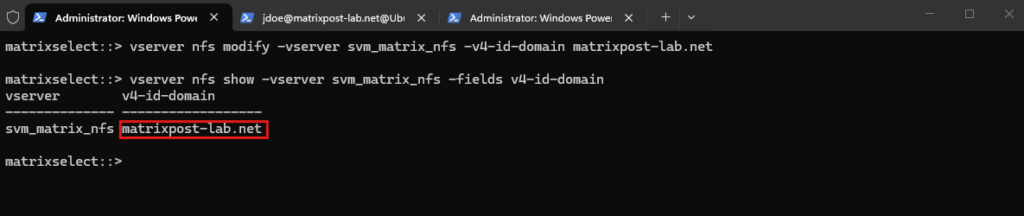
The Linux NFS client must use the same NFSv4 ID-mapping domain. We will configure the corresponding Domain = matrixpost-lab.net setting in /etc/idmapd.conf when preparing our Ubuntu client.
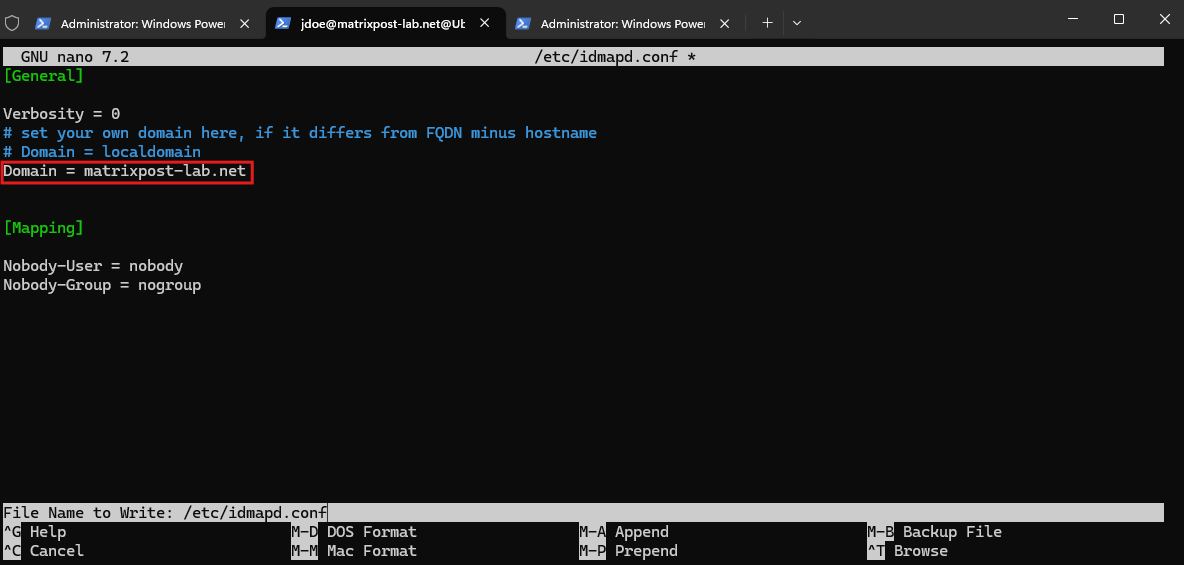
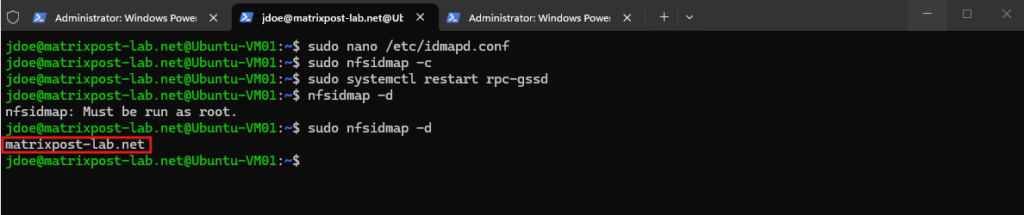
We then clear the existing NFSv4 ID-mapping cache, restart rpc-gssd, and verify the effective domain:
After clearing the NFSv4 ID-mapping cache and restarting rpc-gssd, nfsidmap -d confirms that the Ubuntu client now uses matrixpost-lab.net as its effective NFSv4 ID-mapping domain, matching the configuration on ONTAP.
sudo nfsidmap -c
sudo systemctl restart rpc-gssd
nfsidmap -d
Although we deliberately use the same matrixpost-lab.net namespace here, the NFSv4 ID-mapping domain, Active Directory DNS domain, and Kerberos realm are conceptually separate settings and do not technically have to be identical. Using the same namespace simply provides a consistent identity configuration across our lab environment.
As shown later in the Troubleshooting Kerberos NFS Access section, a mismatched NFSv4 ID-mapping domain does not prevent the Kerberos-protected export from being mounted. Instead, unresolved NFSv4 owner and group identities may appear as nobody:nogroup, which is primarily a name-display/mapping issue rather than a failure of Kerberos authentication or NFS access.
For a deeper look at how NFSv4 owner and group identity mapping works between Linux and NetApp ONTAP, including the role of the NFSv4 ID-mapping domain and why unresolved identities appear as nobody:nogroup, see my previous article.
Prepare the Linux Client for NFS Kerberos
Before testing the Kerberos-protected NFS export, we prepare our domain-joined Ubuntu-VM01 (10.0.0.167) and verify that the required Kerberos and NFS client components are available.
First, we check the existing Kerberos configuration:
Our Ubuntu client already defines
MATRIXPOST-LAB.NETas its default Kerberos realm, which was configured as part of the existing Active Directory integration.
cat /etc/krb5.conf

Next, we verify whether the required Kerberos and NFS client packages are installed:
In omy case, nfs-common was already installed, but the krb5-user package was still missing. We can install it by running: apt install krb5-user
dpkg -l | grep -E 'krb5-user|nfs-common'

The krb5-user package provides Kerberos client utilities such as kinit and klist, while nfs-common provides the Linux NFS client components required for Kerberos-protected NFS access.
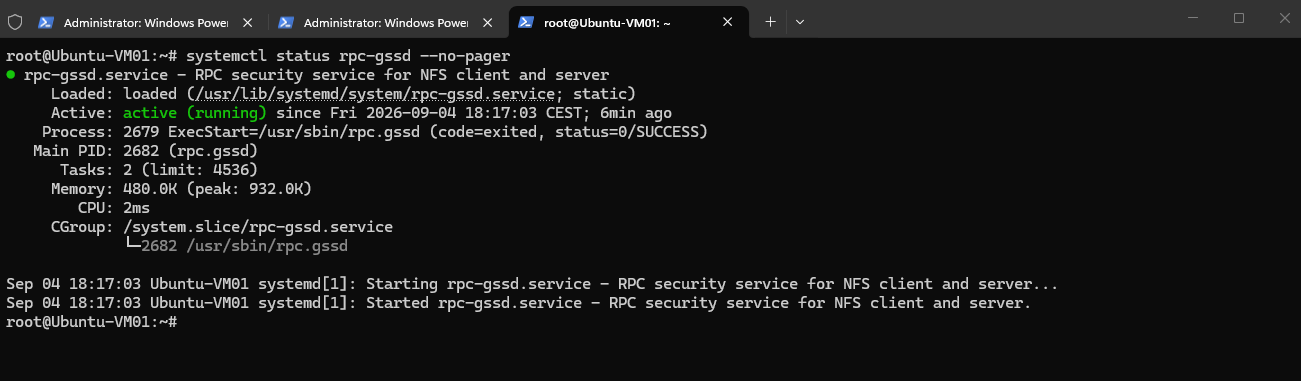
Finally, we verify the RPCSEC_GSS client service:
The
rpc.gssdservice is active and running. It provides the client-sideRPCSEC_GSSfunctionality used by NFS to establish Kerberos-authenticated security contexts with the NFS server.
systemctl status rpc-gssd --no-pager
RPCSEC_GSS is basically the security framework that allows RPC-based protocols such as NFS to use Kerberos.
The layers are:
RPCSEC_GSS = Remote Procedure Call Security using GSS-API.
NFSv4
  │
  └── RPC
       │
       └── RPCSEC_GSS
             │
             └── Kerberos V5
he important distinction is:
- Kerberos provides the actual authentication mechanism and tickets.
- GSS-API provides a standardized API for applications/protocols to use security mechanisms such as Kerberos.
- RPCSEC_GSS integrates GSS-API security into RPC.
- NFS runs on RPC and therefore uses RPCSEC_GSS to get Kerberos protection.
- On Linux,
rpc.gssdparticipates in establishing these RPCSEC_GSS security contexts.
That’s also where the three NFS Kerberos modes fit:
sec= | Authentication | Integrity | Encryption |
|---|---|---|---|
krb5 | ✅ | ❌ | ❌ |
krb5i | ✅ | ✅ | ❌ |
krb5p | ✅ | ✅ | ✅ |
So when we say:
We’re not really telling NFS
“speak Kerberos directly.”We’re telling NFS to use RPCSEC_GSS with Kerberos V5 as its security mechanism.Authenticate the user with Kerberos, but do not cryptographically protect the NFS payload against
mount -t nfs4 -o sec=krb5 ...
To use Kerberos authentication + integrity + privacy/encryption (p = privacy) we run:
The reason we configured ONTAP with:
-rorule krb5,krb5i,krb5p -rwrule krb5,krb5i,krb5p
mount -t nfs4 -o sec=krb5p ...
From a security perspective, krb5p provides the strongest protection and should be preferred when confidentiality of NFS traffic is required, as it provides authentication, integrity protection, and encryption.
krb5i can provide a useful compromise between security and performance, while plain krb5 should generally be used only when Kerberos authentication is required but the network traffic is already sufficiently protected or confidentiality and integrity protection are not required.
Since NFS itself is built on Remote Procedure Calls (RPC), understanding the underlying RPC communication also helps to understand where RPCSEC_GSS fits into the NFS protocol stack.
For a deeper look at RPC and its network communication, see my following articles.
Testing Kerberos Authentication for NFS Access
With the ONTAP Kerberos configuration, export policies, and Ubuntu client prerequisites in place, we can now test Kerberos authentication for actual NFS access.
We will first obtain and verify a Kerberos ticket for our Active Directory user jdoe and then mount the NFS export using the different Kerberos security modes krb5, krb5i, and krb5p.
Obtain and Verify a Kerberos Ticket
Before accessing the NFS export, we first obtain a Kerberos Ticket Granting Ticket (TGT) for our Active Directory user jdoe. This verifies that Kerberos authentication between the Ubuntu client and our Active Directory KDC works independently of NFS.
I will switch to jdoe on the Ubuntu-VM01 (10.0.0.167):
su - 'jdoe@matrixpost-lab.net'

Next we use kinit to authenticate against the Kerberos KDC and obtain a Ticket Granting Ticket (TGT).
Note: The misleading “Your password will expire in less than one hour” warning with an expiration date in September 2100 is caused by a known Kerberos client issue when interacting with Windows Server 2025 Active Directory.
Although our environment also contains a Windows Server 2022 domain controller, a TShark capture below confirmed that Kerberos KDC discovery selected
MatrixDC-02(10.0.0.75) running Windows Server 2025 for this authentication request; the warning itself does not indicate that Kerberos authentication failed.
kinit jdoe@MATRIXPOST-LAB.NET

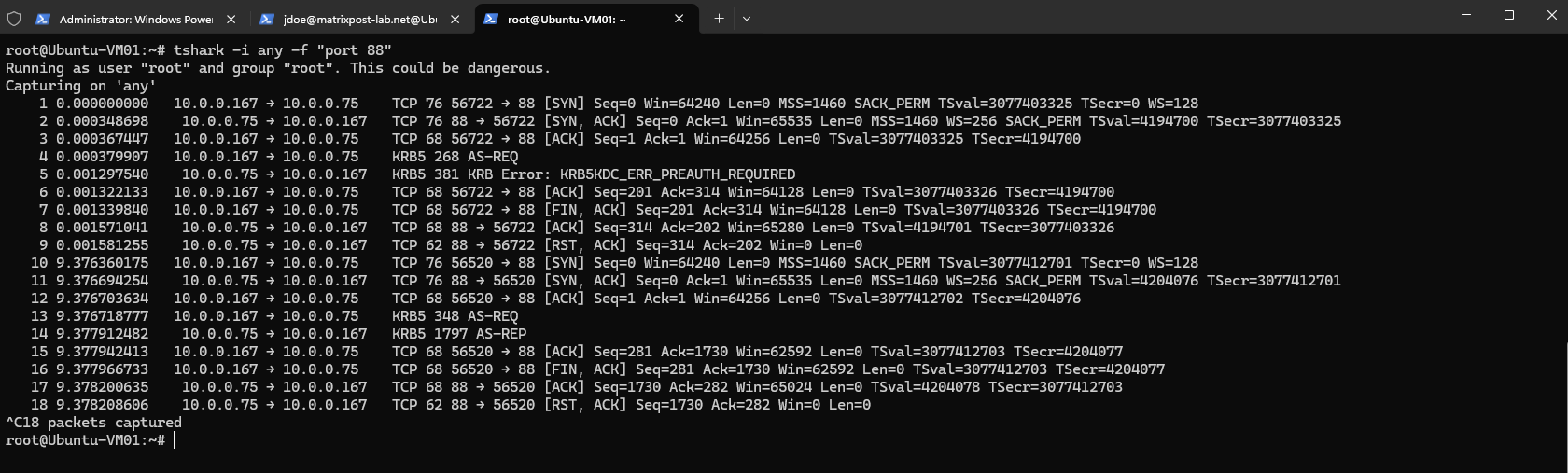
A TShark capture of TCP port 88, the standard Kerberos service port, confirms that our Ubuntu client communicates with
10.0.0.75, which is ourMatrixDC-02domain controller running Windows Server 2025.In our environment, Kerberos uses TCP/88 because
udp_preference_limit = 0is configured in/etc/krb5.conf.The capture shows the normal Kerberos exchange consisting of an initial AS-REQ, the expected KRB5KDC_ERR_PREAUTH_REQUIRED, a second pre-authenticated AS-REQ, and finally the successful AS-REP required to obtain the TGT.
tshark -i any -f "port 88"
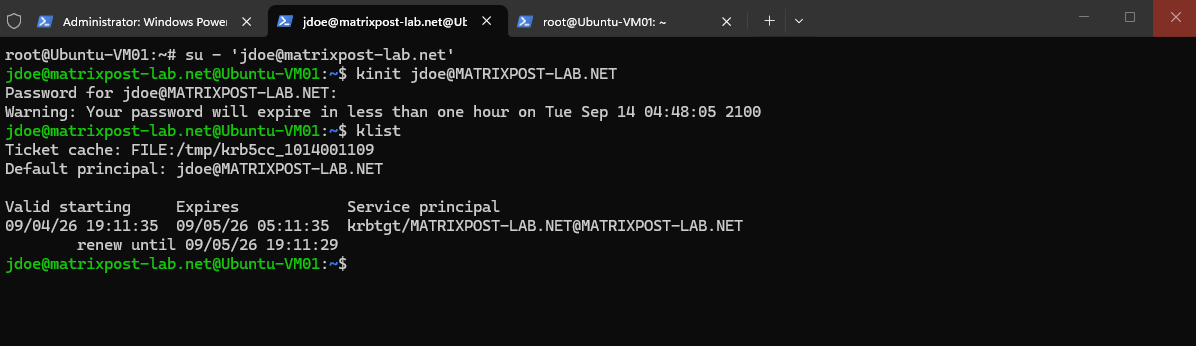
We then use klist to verify the Kerberos tickets currently stored in the user’s credential cache.
The subsequent
klistoutput confirms that Kerberos authentication was successful and that a Ticket Granting Ticket (TGT) forjdoe@MATRIXPOST-LAB.NETis stored in the user’s credential cache.At this point, only the
krbtgt/MATRIXPOST-LAB.NETticket exists because the client has not yet accessed the NFS service and therefore has not requested an NFS service ticket.The Ticket Granting Ticket (TGT) is used by the Kerberos client to request service tickets for individual services from the KDC without having to authenticate again with the user’s password.
klist
Mount the NFS Export with krb5
With a valid TGT available, we can now mount the NFS export using krb5 as the security flavor. This causes the NFS client to request a Kerberos service ticket for the NFS service and use it to establish an authenticated RPCSEC_GSS security context with ONTAP.
First, we create a local mount point for our NFS volume:
Before creating the mount point as our domain user, we first had to add
jdoe@matrixpost-lab.netto the localsudogroup.As
root, we run:usermod -aG sudo 'jdoe@matrixpost-lab.net'
sudo mkdir -p /mnt/vol_nfs_data01

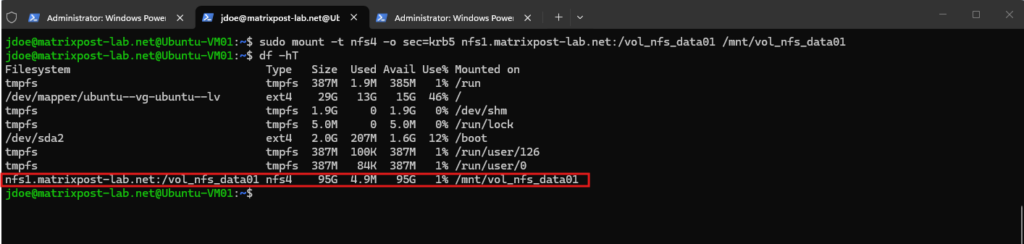
We then mount the export using NFSv4 with the krb5 security flavor:
Unlike
sec=sys, thekrb5security flavor uses Kerberos authentication through RPCSEC_GSS instead of trusting UID and GID credentials supplied by the NFS client.This confirms that our Kerberos-protected NFS mount is working successfully.
sudo mount -t nfs4 -o sec=krb5 nfs1.matrixpost-lab.net:/vol_nfs_data01 /mnt/vol_nfs_data01
Verify That the NFS Mount Uses Kerberos Authentication
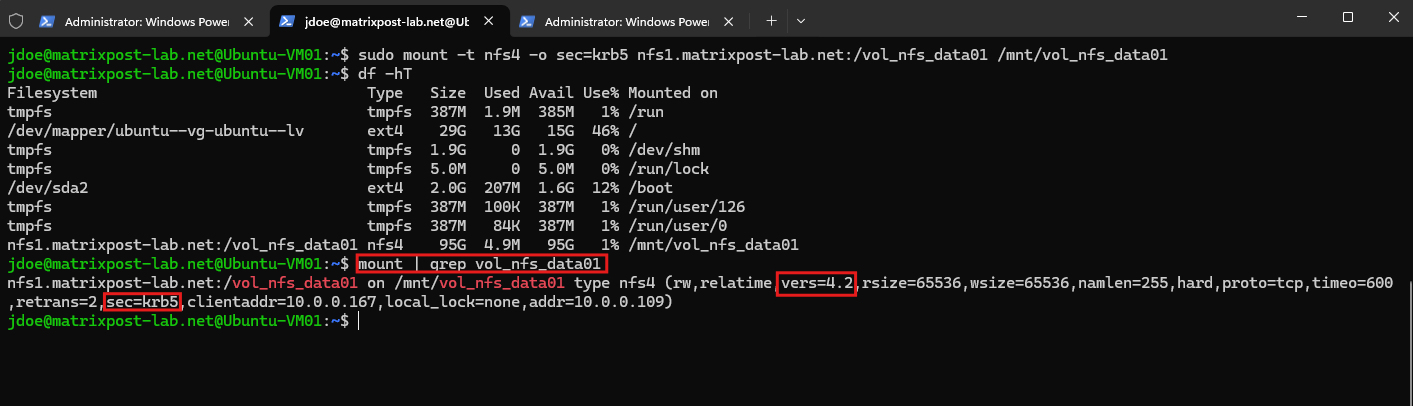
After mounting the export, we can verify the negotiated NFS version and security flavor:
The output shows that the export is mounted using NFSv4.2 (
vers=4.2) and thesec=krb5security flavor.This confirms that the active NFS connection uses Kerberos authentication through RPCSEC_GSS rather than AUTH_SYS (
sec=sys).
mount | grep vol_nfs_data01
We can also inspect the user’s Kerberos credential cache:
In addition to the existing Ticket Granting Ticket (TGT) for jdoe@MATRIXPOST-LAB.NET, the cache now contains an NFS service ticket for: nfs/nfs1.matrixpost-lab.net@MATRIXPOST-LAB.NET.
This service ticket is obtained from the KDC for the NFS service running on nfs1.matrixpost-lab.net and is used by RPCSEC_GSS to establish the Kerberos-authenticated security context with ONTAP.
klist
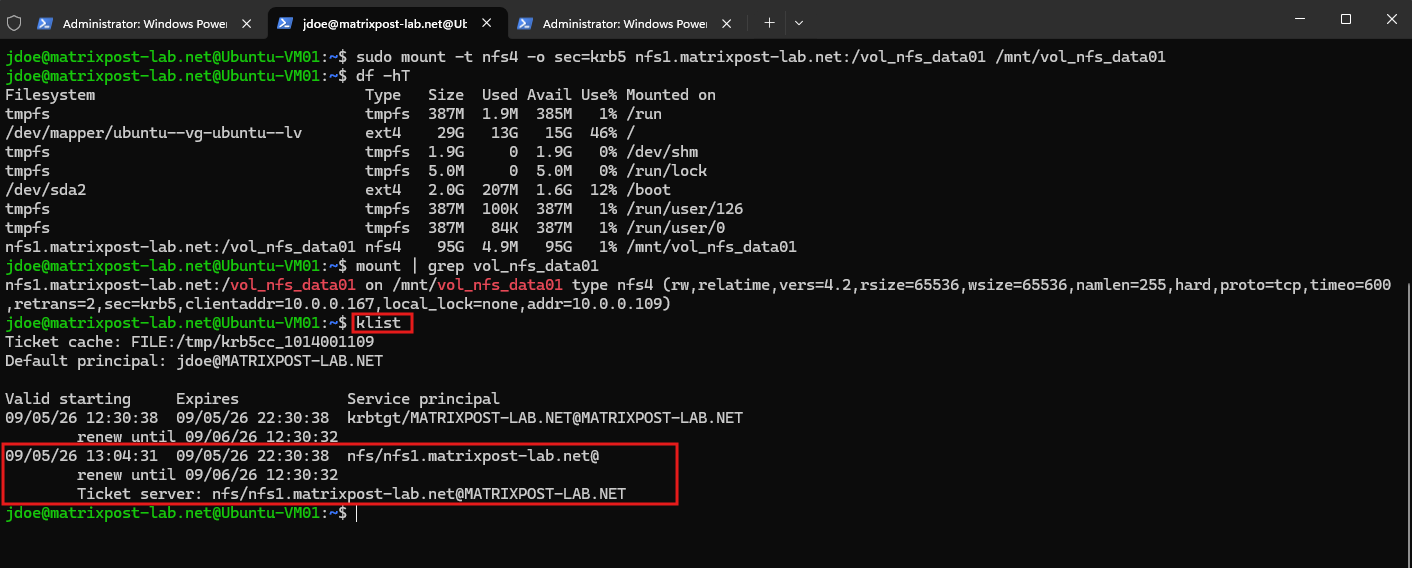
The screenshot therefore confirms the complete chain: the user has a valid Kerberos TGT, an NFS-specific service ticket has been obtained, and the NFS export is actively mounted using sec=krb5.
Verify NFSv4 Owner and Group Identity Mapping
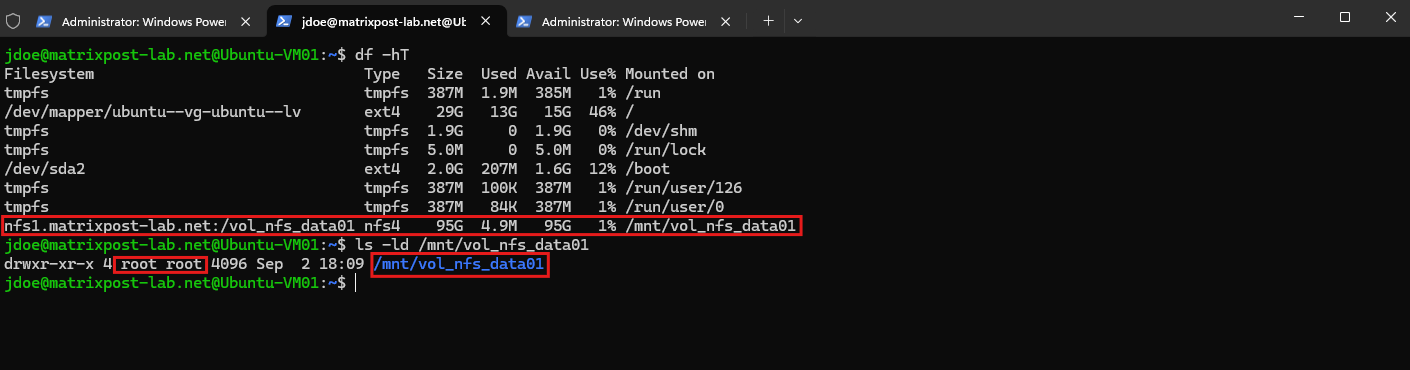
Finally, we verify that the NFSv4 owner and group identities are correctly resolved on the Linux client:
The volume root correctly displayed as root:root rather than nobody:nogroup:
This confirms that the matching NFSv4 ID-mapping domain matrixpost-lab.net configured on both ONTAP and the Ubuntu client is working correctly. The owner and group identities transported by NFSv4 can therefore be resolved to their corresponding local UNIX names.
ls -ld /mnt/vol_nfs_data01
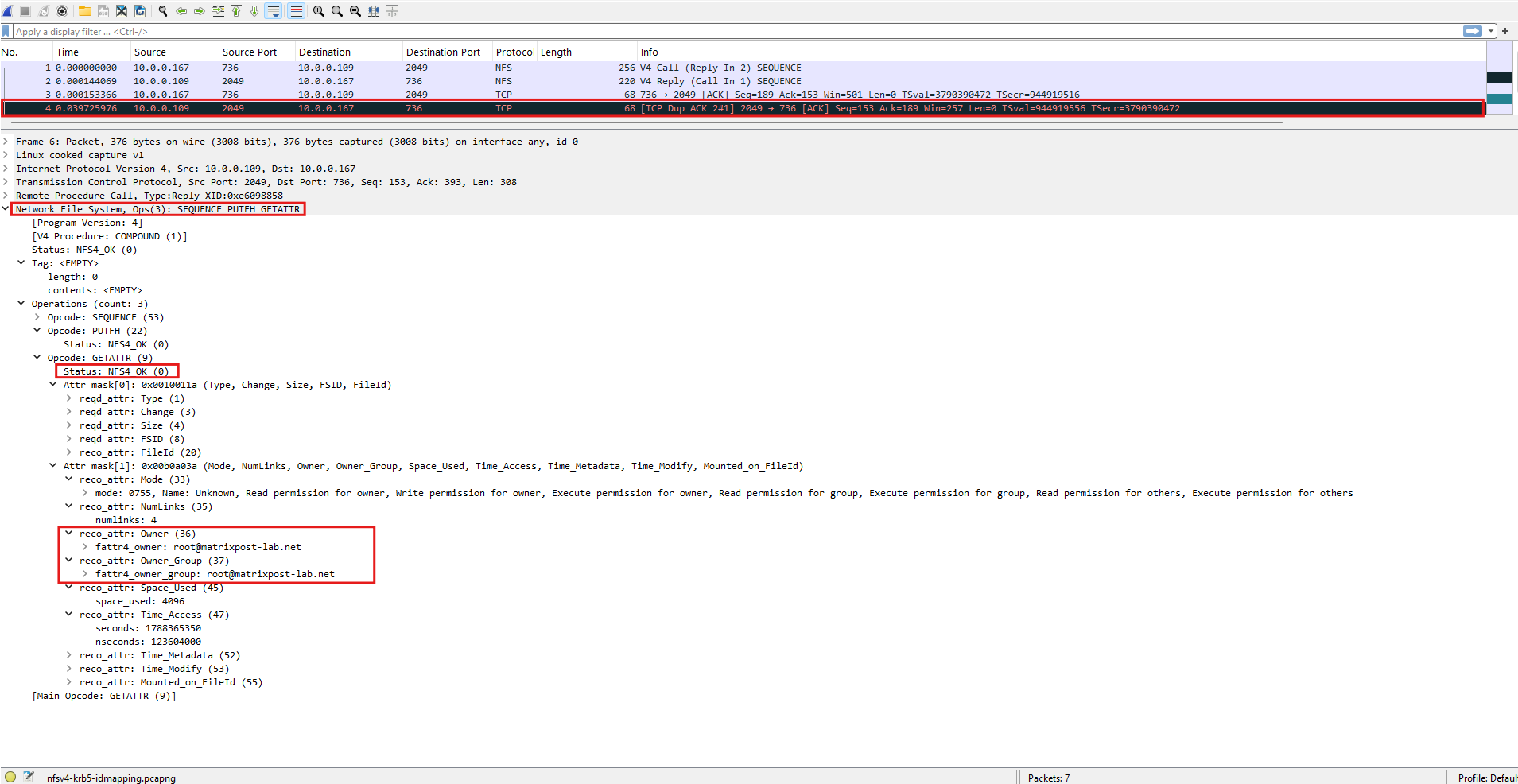
To verify the NFSv4 identity mapping under the hood, we can capture the NFS traffic while requesting the directory attributes from the mounted export.
Start a TShark capture on the Ubuntu client:
sudo tshark -i any -f "host 10.0.0.109 and port 2049" -w /tmp/nfsv4-krb5-idmapping.pcapng
In another terminal, trigger an attribute lookup:
ls -ld /mnt/vol_nfs_data01
The packet capture confirms how NFSv4 represents file ownership on the wire. In the GETATTR response, ONTAP returns the Owner and Owner_Group attributes as the string-based NFSv4 identities root@matrixpost-lab.net, rather than simply transmitting numeric UID and GID values.
The Ubuntu NFS client uses the configured NFSv4 ID-mapping domain matrixpost-lab.net to resolve these identities, which is why ls -ld displays the directory owner and group correctly as root:root.
Because we are currently using
sec=krb5, Kerberos provides authentication but does not encrypt the NFS payload. We can therefore still inspect the NFSv4GETATTRoperation and itsOwnerandOwner_Groupattributes directly in Wireshark.This will become particularly interesting when we later compare the capture with
krb5iandkrb5p.
For a more detailed look at this NFSv4 identity-mapping process, see my previous article.
For more details about capturing and analyzing network traffic with TShark and Wireshark on Linux, including capture filters and writing packet captures to .pcapng files, see my following article.
Authorize the Kerberos User to Create Files and Directories
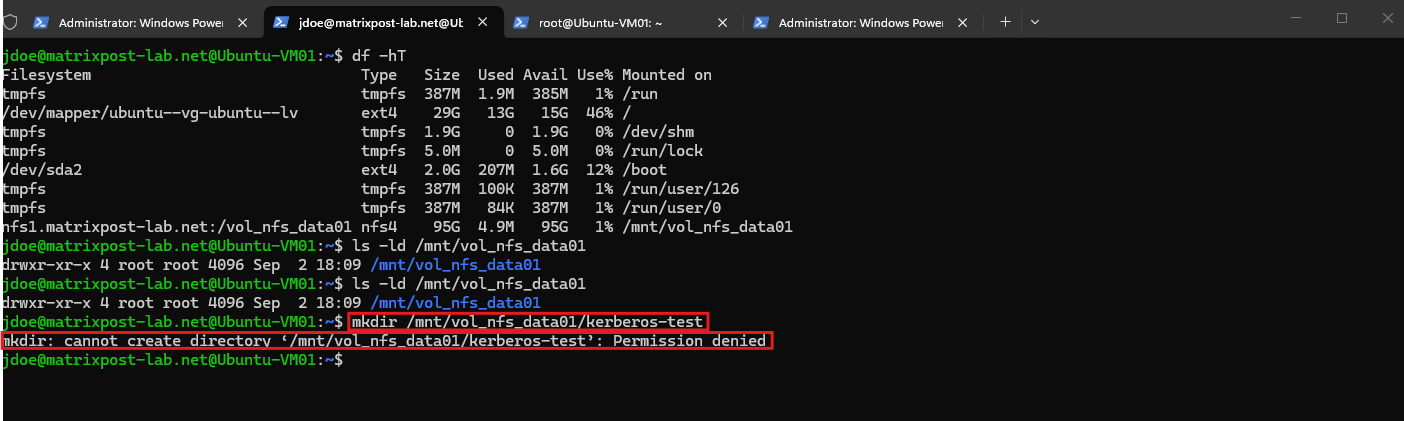
Although jdoe is now successfully authenticated through Kerberos, the root of our NFS volume is currently owned by root:root with UNIX permissions 755. Therefore, jdoe can access and read the directory but cannot create files or directories within it.
We can demonstrate this by attempting to create a directory as jdoe:
As expected, the operation fails with Permission denied
mkdir /mnt/vol_nfs_data01/kerberos-test
In my lab environment, the UNIX/POSIX identity for John Doe (jdoe) is maintained centrally in Active Directory, where jdoe has UID 1001 / GID 2000 and the smbwriters group uses GID 2000.
Both Linux and ONTAP can resolve these identities through the central directory. For the complete configuration, see my previous article.
Rather than changing the ownership of the NFS volume root, we create a dedicated directory for our Kerberos user and assign it to jdoe and the smbwriters group:
Note: With the export mounted using
sec=krb5, becomingrootlocally on the Linux client does not automatically provide root privileges on the NFS export.As shown below, even
rootreceivesPermission deniedbecause the local root user does not have an appropriate Kerberos user credential that grants it access to the protected NFS filesystem.
sudo mkdir /mnt/vol_nfs_data01/kerberos-test
sudo chown jdoe:smbwriters /mnt/vol_nfs_data01/kerberos-test
sudo chmod 770 /mnt/vol_nfs_data01/kerberos-test

In production environments, this is generally desirable: administrative access to a Kerberos-protected NFS filesystem should not depend simply on whether someone has obtained root privileges on an NFS client. Instead, access should be explicitly granted to Kerberos-authenticated identities and controlled through the corresponding UNIX/POSIX permissions or ACLs.
For administrative or shared write access, a dedicated Kerberos-authenticated group is generally preferable to granting permissions to an individual user. The corresponding UNIX/POSIX group can be given the required permissions on the directory, for example rwx for full read, write, and traversal access, and authorized users such as jdoe can then be added to that group.
This provides a much cleaner authorization model: Kerberos determines who the user is, while UNIX permissions and group membership determine what that authenticated user is allowed to do.
We create a dedicated Active Directory security group named nfswriters, which we will use to grant write access to our Kerberos-protected NFS volume.
Using a group rather than assigning permissions directly to individual users provides a more scalable approach, as access can later be managed simply through group membership.
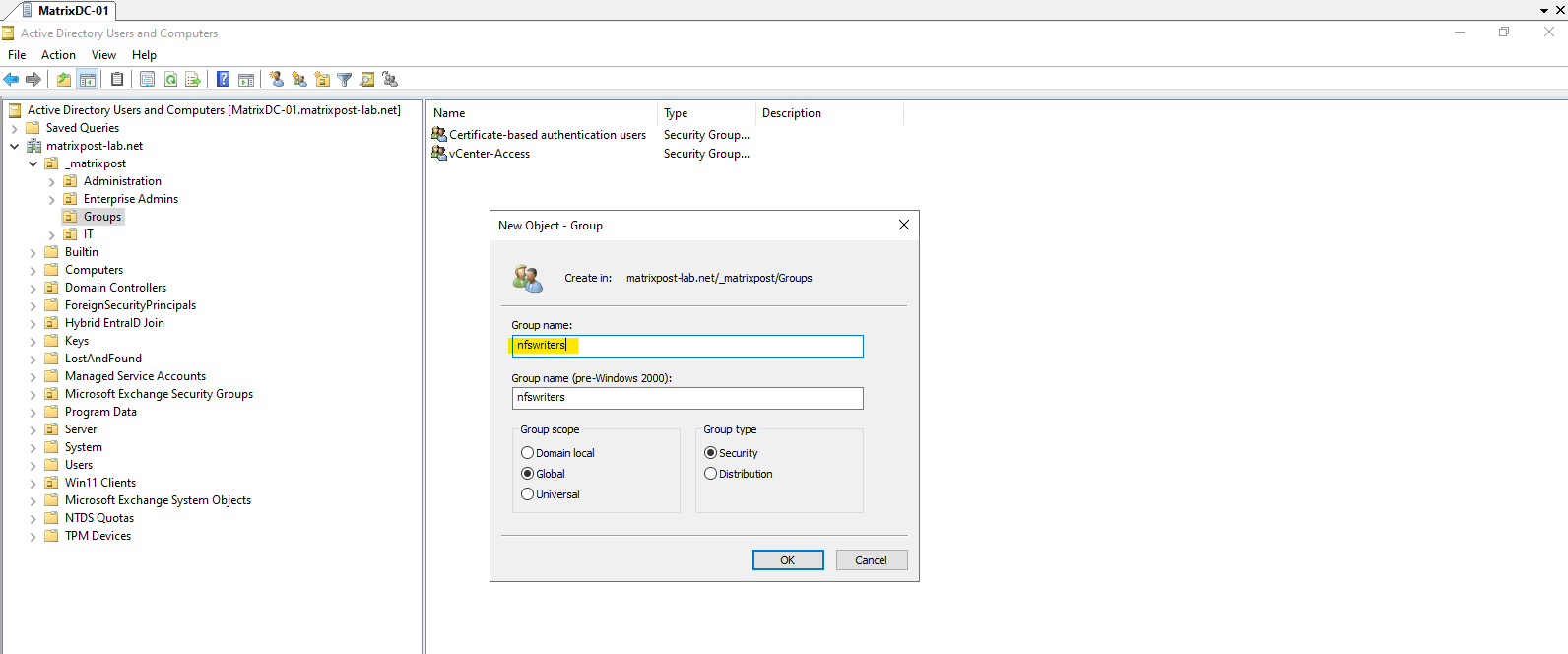
The nfswriters Global Security Group is now available in Active Directory. Because we also use Active Directory as our central UNIX identity store, the group needs a unique POSIX gidNumber so that both ONTAP and our Linux clients can resolve it as a UNIX group.
We assign GID 2001 to the new group:
Set-ADGroup nfswriters -Add @{gidNumber="2001"}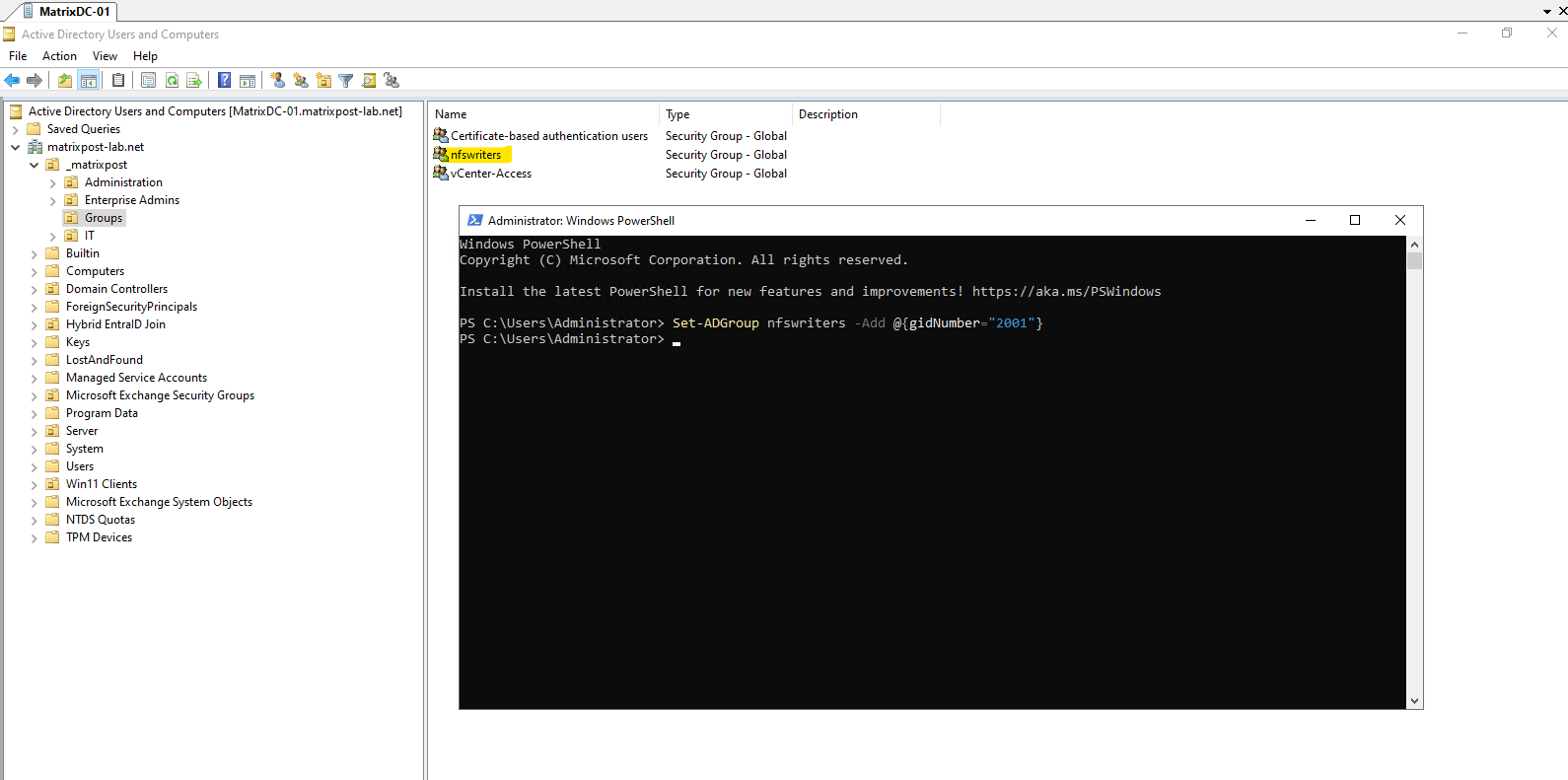
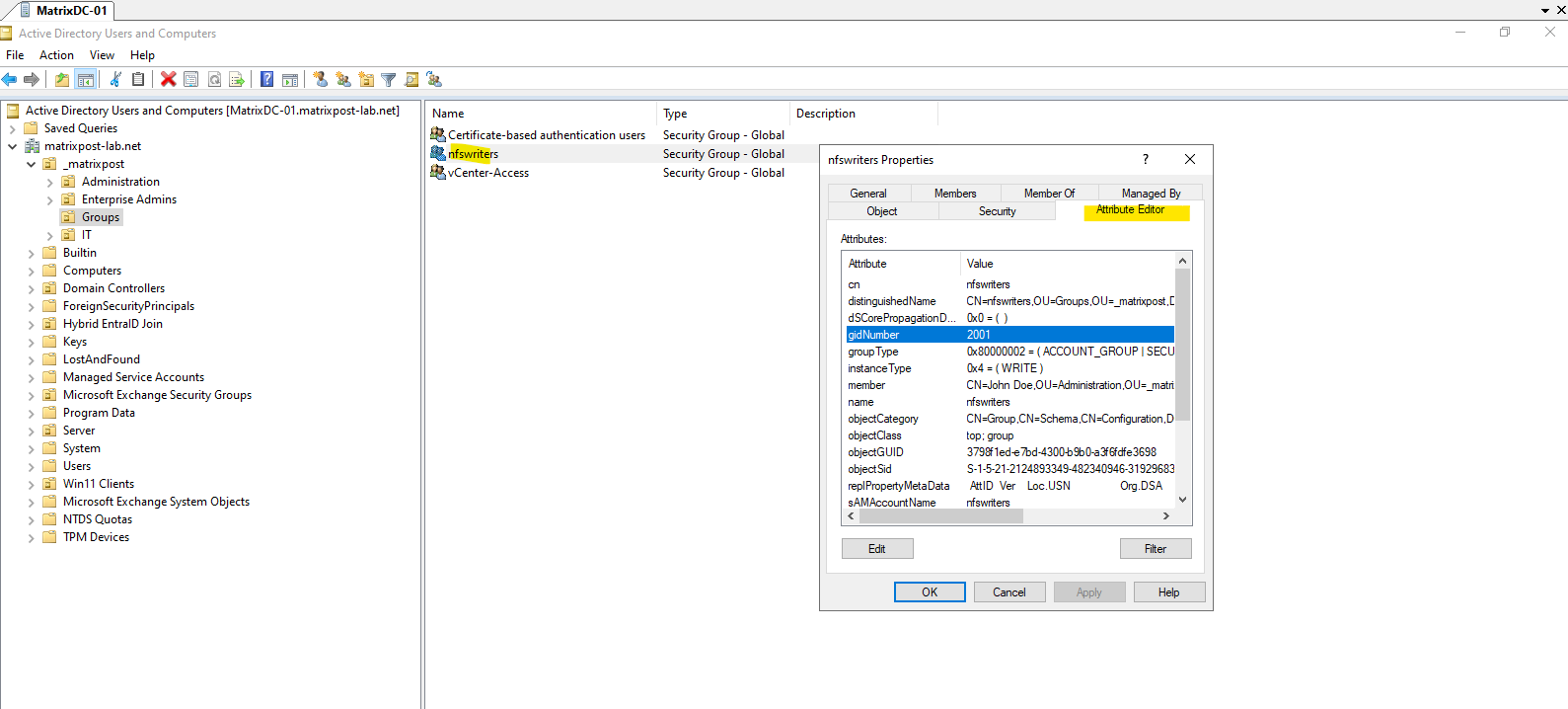
Next, we add our Kerberos test user jdoe to the nfswriters group:
Add-ADGroupMember -Identity nfswriters -Members jdoe
Finally, we verify the configured POSIX GID and group membership:
Get-ADGroup nfswriters -Properties gidNumber,members | Select-Object Name,gidNumber,members
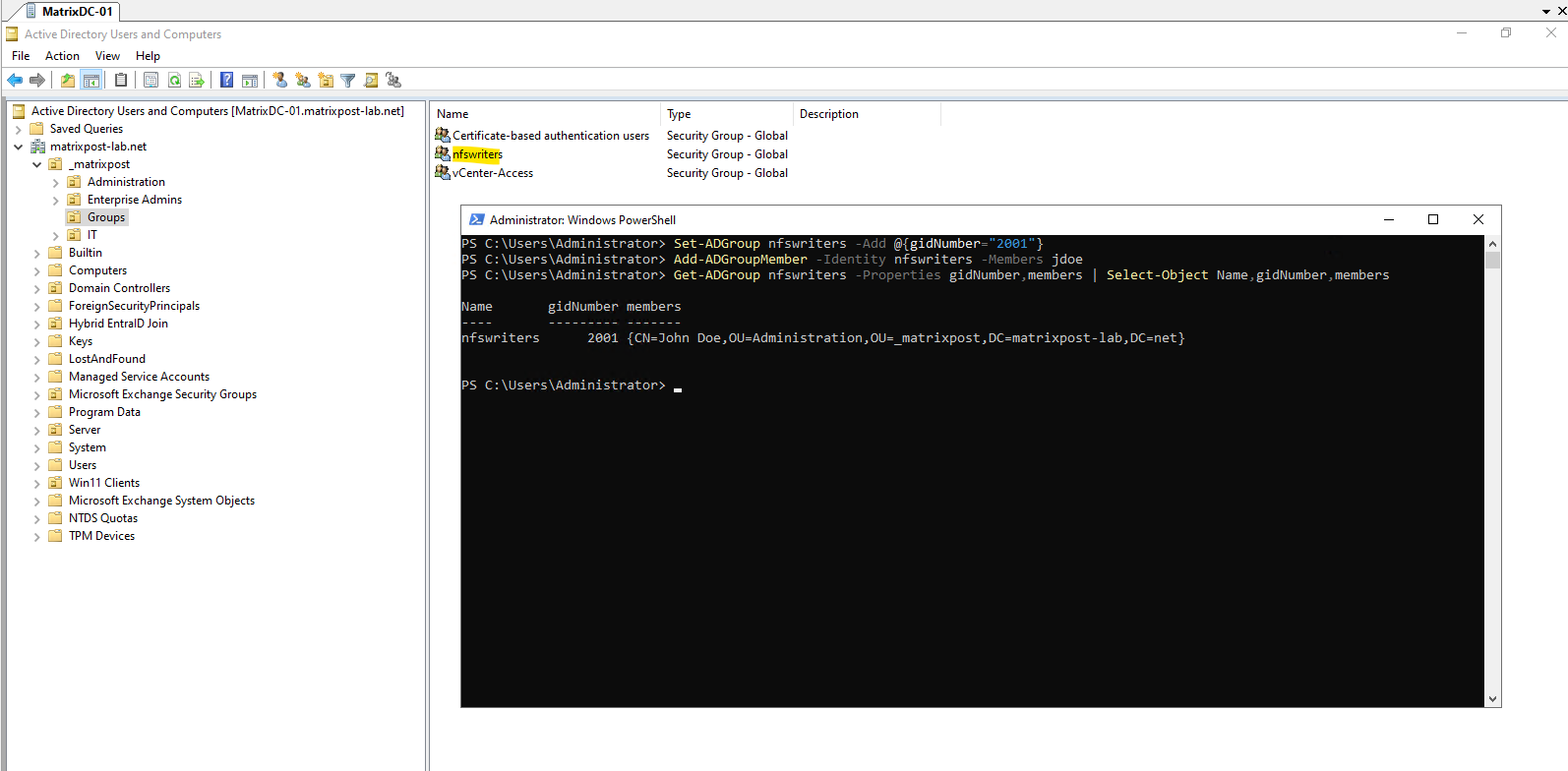
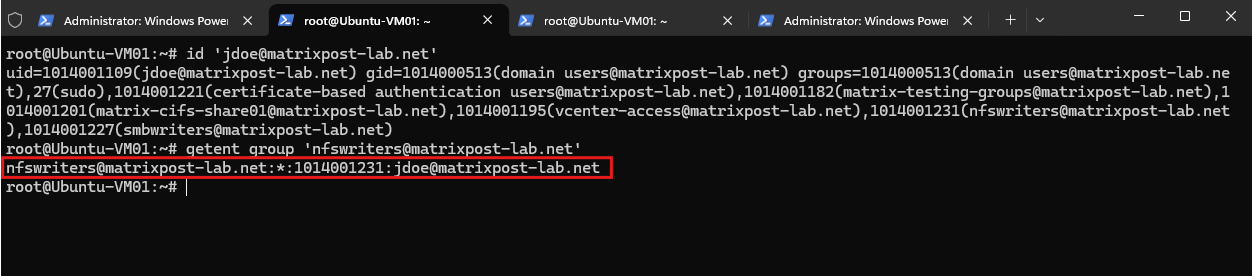
After creating the group and assigning its POSIX attributes in Active Directory, we verify that our Ubuntu client can resolve the new nfswriters group through SSSD:
id 'jdoe@matrixpost-lab.net'

We can also resolve the group directly through SSSD:
This confirms that the Ubuntu client successfully resolves the new Active Directory group and recognizes
jdoeas a member.
getent group 'nfswriters@matrixpost-lab.net'
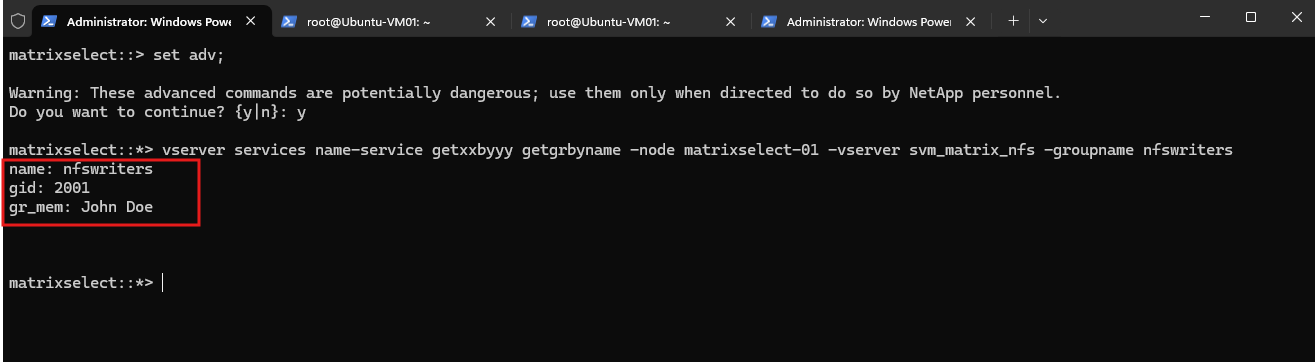
Next, we verify that ONTAP can also resolve the new nfswriters group through its Active Directory-backed LDAP name service:
ONTAP successfully resolves the
nfswritersgroup from Active Directory with the expected POSIX GID 2001. Thegr_memfield also confirms that John Doe is a member of the group.With the same centrally managed group now available to ONTAP for UNIX authorization, we can use
nfswritersto grant write access to our Kerberos-authenticated users without granting additional privileges to the Linuxrootaccount.
set adv;
vserver services name-service getxxbyyy getgrbyname -node matrixselect-01 -vserver svm_matrix_nfs -groupname nfswriters
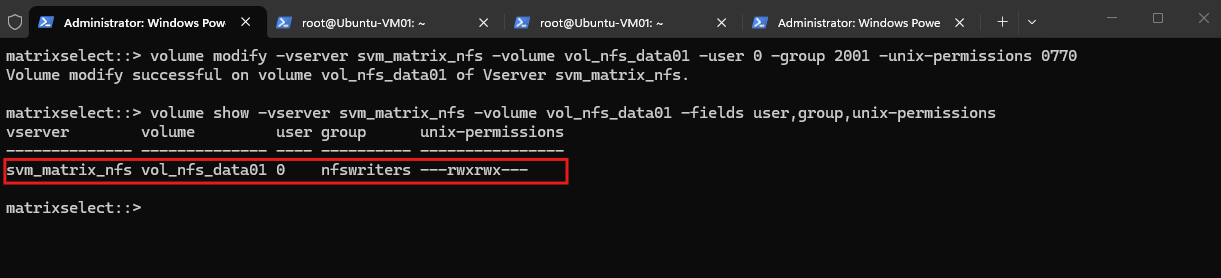
We can now assign the root directory of our NFS volume to the nfswriters group while keeping root as the owner. We also change the UNIX permissions from 755 to 770, granting full rwx permissions to both the owner and the nfswriters group while removing access for others.
volume modify -vserver svm_matrix_nfs -volume vol_nfs_data01 -user 0 -group 2001 -unix-permissions 0770

Then verify:
ONTAP now shows the volume root as owned by UID 0 (root) and the nfswriters group, with permissions rwxrwx---.
This keeps root as the owner of the volume while granting members of the centrally managed nfswriters group full read, write, and execute permissions.
volume show -vserver svm_matrix_nfs -volume vol_nfs_data01 -fields user,group,unix-permissions
Next, from Ubuntu, verify with:
Although ONTAP correctly resolves
nfswritersas GID 2001, the Ubuntu client initially displays the group asnogroup.The reason is that this client was originally joined to Active Directory using SSSD’s default SID-based ID mapping, while ONTAP uses the explicit POSIX
uidNumberandgidNumberattributes stored in Active Directory.
ls -ld /mnt/vol_nfs_data01

We can see the relevant settings in /etc/sssd/sssd.conf:
ldap_id_mapping = True
use_fully_qualified_names = True
With ldap_id_mapping = True, SSSD derives UNIX IDs from the Active Directory SID. Consequently, our newly created group was initially represented on Ubuntu with an SSSD-generated GID instead of the GID 2001 configured in Active Directory.
For NFS authorization, Linux and ONTAP need to use the same POSIX identities. We therefore change the setting to:
ldap_id_mapping = False
This instructs SSSD to use the POSIX uidNumber and gidNumber attributes stored in Active Directory instead of generating IDs from the AD SID.
Because NFSv4 identity mapping also needs to resolve the UNIX name nfswriters through NSS, we additionally change:
use_fully_qualified_names = False
With this setting, SSSD exposes the UNIX identities using their short names, allowing lookups such as:
getent group nfswriters
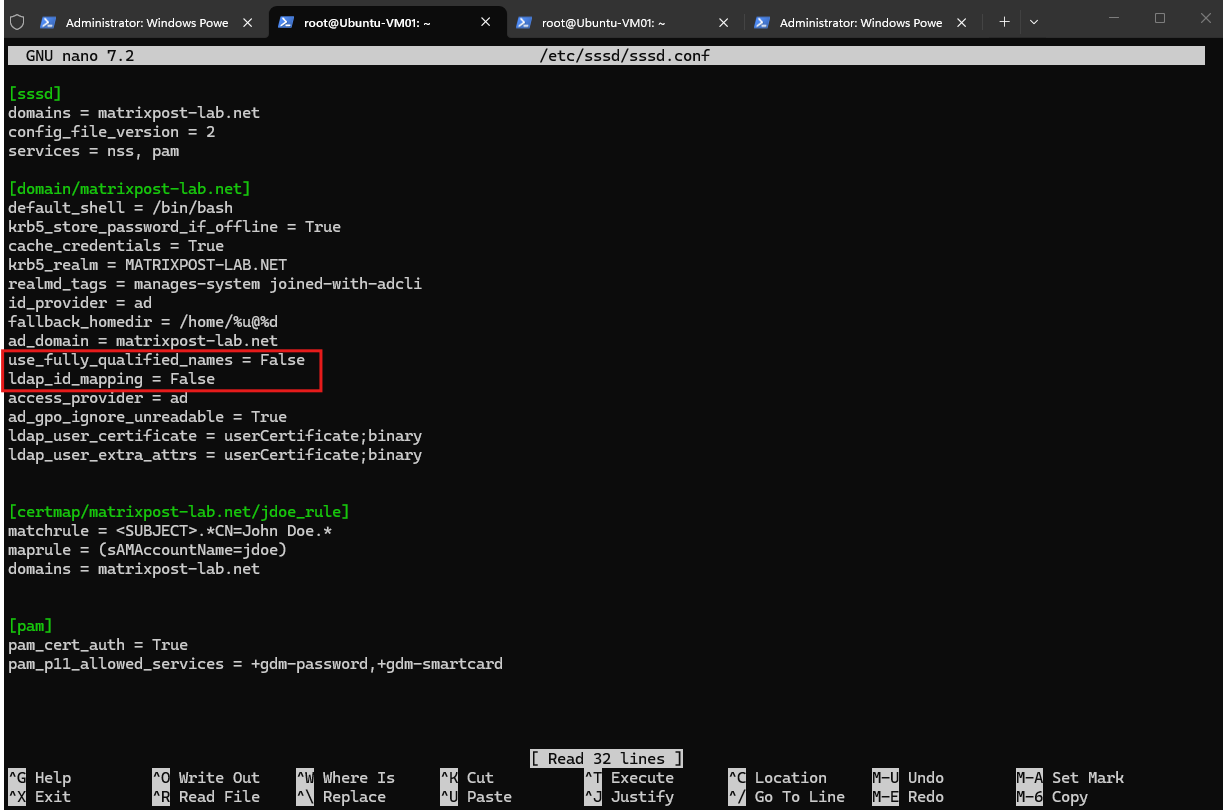
After changing /etc/sssd/sssd.conf, we clear the SSSD cache, restart SSSD, and also clear the NFSv4 ID-mapping cache:
sss_cache -E
systemctl restart sssd
nfsidmap -c
We can now verify the new group:
The group is resolved using the POSIX GID stored in Active Directory:
getent group nfswriters

We also verify the UNIX identity of John Doe:
The output now includes GID 2001 (
nfswriters) among the supplementary groups ofjdoe.
id jdoe

Finally, we check the NFS volume again:
The previous
root:nogroupoutput was therefore not caused by the ONTAP volume permissions themselves. ONTAP already knewnfswritersas GID 2001, but the Ubuntu client was using a different AD-to-UNIX identity model.After configuring SSSD to consume the same POSIX identities from Active Directory and allowing the corresponding short UNIX names to be resolved, both systems use the same identity namespace.
ls -ld /mnt/vol_nfs_data01

Note: The earlier NFSv4 mapping of
root@matrixpost-lab.nettorootworked even with the previous SSSD configuration becauserootis a local UNIX identity available through/etc/passwdand does not depend on Active Directory or SSSD.The new
nfswritersgroup, however, exists only in Active Directory and therefore depends on correct SSSD/NSS resolution.
Because we configured SSSD with use_fully_qualified_names = False, Active Directory users are now exposed to the Linux system using their short UNIX names. We can therefore start the session simply with:
su - jdoe

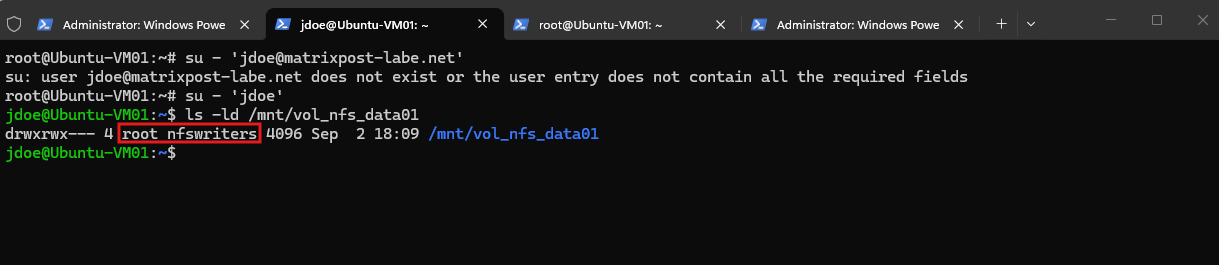
The NFS volume root is also correctly resolved as root:nfswriters and provides read, write, and execute permissions to the nfswriters group.
Since
jdoeis a member of this group, the user should now be authorized to create files and directories on the Kerberos-protected NFS export.
ls -ld /mnt/vol_nfs_data01
Now let’s prove it. As jdoe, first show the group membership and then create a directory and file:
The final test confirms that our Kerberos-authenticated user can now successfully write to the NFS volume. The
idcommand shows thatjdoeresolves to the centrally managed POSIX identity UID 1001 / GID 2000 and is also a member of thenfswritersgroup (GID 2001).
id
mkdir /mnt/vol_nfs_data01/kerberos-test
echo "Kerberos NFS write test" > /mnt/vol_nfs_data01/kerberos-test/test.txt
ls -ld /mnt/vol_nfs_data01/kerberos-test
ls -l /mnt/vol_nfs_data01/kerberos-test/test.txt
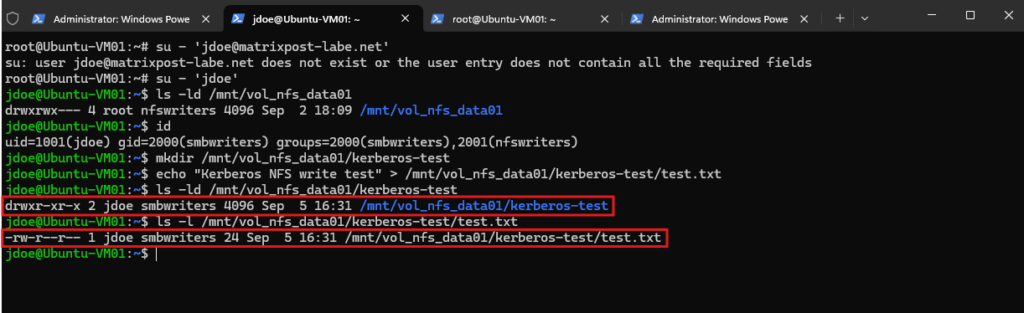
Since the NFS volume root is owned by root:nfswriters with UNIX permissions 0770, jdoe receives write access through the group permissions. The user can therefore successfully create both the kerberos-test directory and a file inside it.
Notice that the newly created objects are owned by
jdoe:smbwriters. This is expected:smbwritersis the user’s primary UNIX group (GID 2000), whilenfswritersis a supplementary group used to authorize access to the parent directory. Unless the setgid bit is configured on the parent directory, newly created objects normally inherit the user’s effective group rather than the parent directory’s group.
Testing krb5p
After successfully testing krb5, we will now switch directly to krb5p, which provides the strongest Kerberos security mode for NFS by adding both integrity protection and encryption of the NFS payload.
This also gives us a useful comparison for the later packet capture: with krb5, the NFS operations and attributes were still visible in Wireshark, while with krb5p the NFS payload should be protected from inspection.
First, we unmount our existing krb5 mount:
sudo umount /mnt/vol_nfs_data01
We can then mount the same NFSv4 export using krb5p:
sudo mount -t nfs4 -o sec=krb5p nfs1.matrixpost-lab.net:/vol_nfs_data01 /mnt/vol_nfs_data01
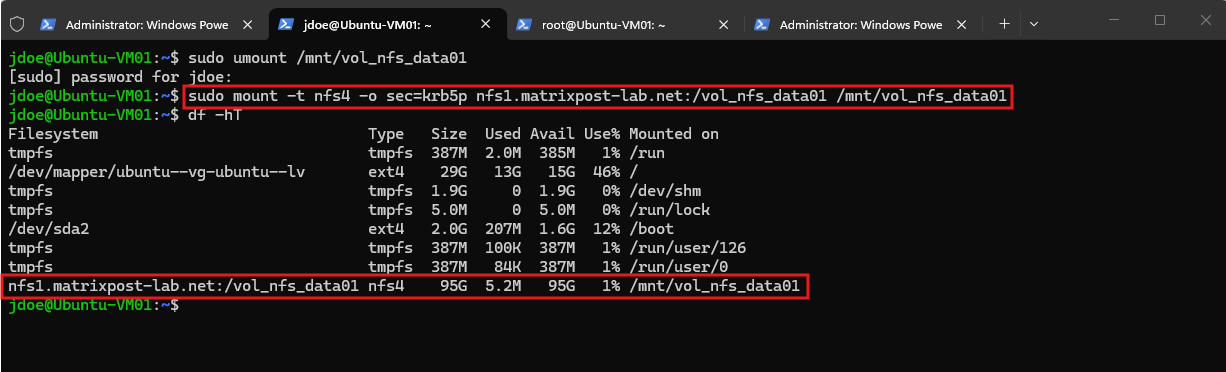
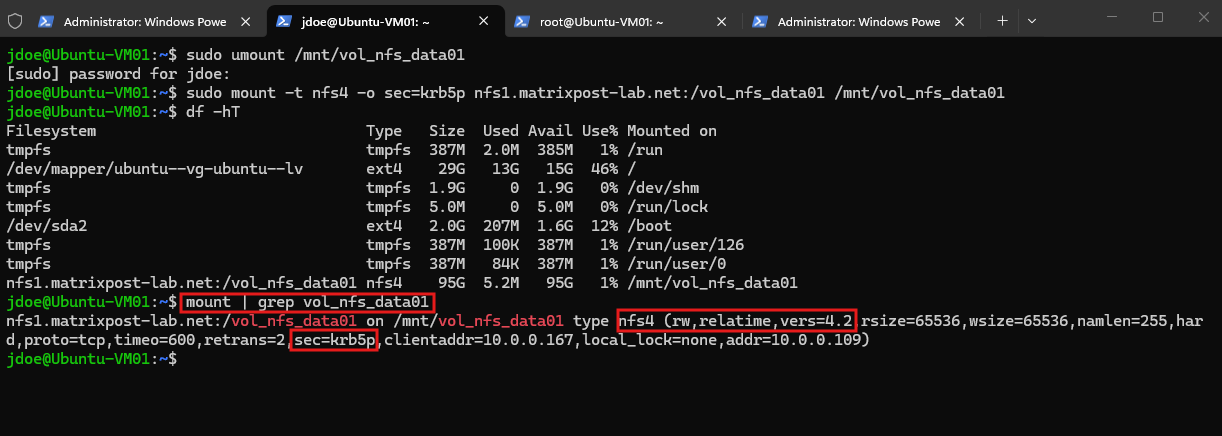
Finally, we verify the negotiated security flavor:
The mount completes successfully, and df -hT confirms that the NFSv4 filesystem is available as expected. More importantly, the mount options now show sec=krb5p, confirming that the NFS connection uses the Kerberos privacy security flavor.
With krb5p, Kerberos not only authenticates the user but also provides integrity protection and encryption of the NFS payload.
mount | grep vol_nfs_data01
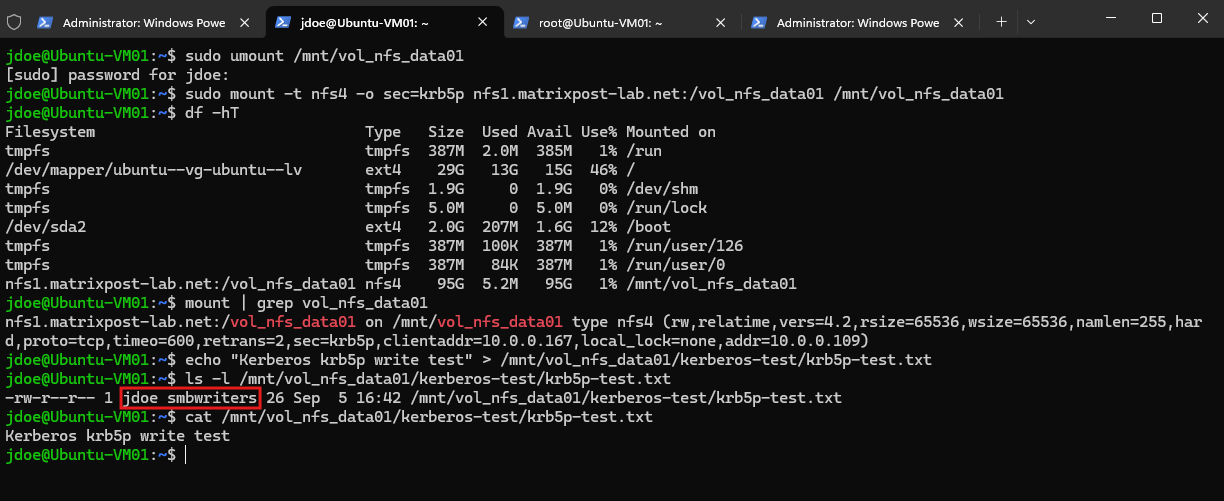
To verify that normal file operations still work with krb5p, we perform another write test as our Kerberos-authenticated jdoe user:
echo "Kerberos krb5p write test" > /mnt/vol_nfs_data01/kerberos-test/krb5p-test.txt
We then verify the newly created file and its contents:
The write test also succeeds with
krb5p. Our Kerberos-authenticatedjdoeuser can create and read the new file, while the existing UNIX authorization remains unchanged. The file is created asjdoe:smbwriters, corresponding to the user’s POSIX UID and primary GID.The important difference is now on the wire: with
krb5p, the NFS payload is encrypted.
ls -l /mnt/vol_nfs_data01/kerberos-test/krb5p-test.txt
cat /mnt/vol_nfs_data01/kerberos-test/krb5p-test.txt
Let’s take a packet capture and compare it with the previously tested krb5 connection.
Next we capture the krb5p NFS traffic. Start TShark on Ubuntu:
sudo tshark -i any -f "host 10.0.0.109 and port 2049" -w /tmp/nfsv4-krb5p.pcapng
While the capture is running, generate a few NFS operations from another terminal:
ls -l /mnt/vol_nfs_data01/kerberos-test
cat /mnt/vol_nfs_data01/kerberos-test/krb5p-test.txt
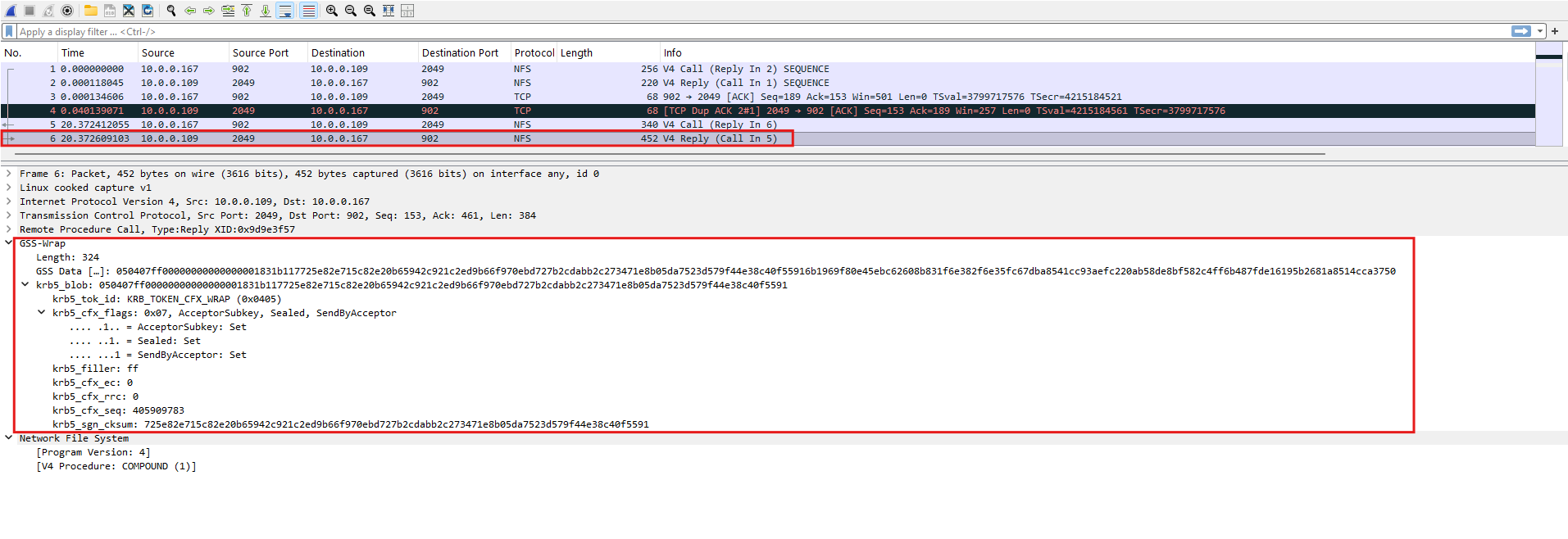
Wireshark still recognizes the traffic as NFSv4 and identifies the outer NFSv4 COMPOUND procedure. However, the actual RPCSEC_GSS-protected payload is contained inside GSS-Wrap.
The Kerberos flags show
Sealed: Set, confirming that privacy protection is active. As a result, Wireshark cannot decode the individual NFSv4 operations, file names, contents, or file attributes contained in the protected payload.Below the red box, Wireshark only gets as far as
V4 Procedure: COMPOUND, it cannot dissect the protected operations and attributes inside.
For more details about capturing and analyzing network traffic with TShark and Wireshark on Linux, including capture filters and writing packet captures to .pcapng files, see my following article.
Kerberos vs. AUTH_SYS – Is the Additional Complexity Worth It?
As we have seen throughout this article, configuring Kerberos for NFS involves considerably more effort than using traditional AUTH_SYS (sec=sys).
DNS and time synchronization must be correct, Kerberos realms and service principals need to be configured, the Linux clients require appropriate Kerberos credentials, and ONTAP must correctly map the authenticated Kerberos identities to UNIX users and groups.
This trade-off is also explicitly acknowledged by NetApp. In its documentation about NFS encryption over the wire, NetApp describes NFS with Kerberos as providing the most security features, but also involving the most configuration complexity and the largest performance impact among the discussed NFS encryption options.
In practice, this helps explain why many traditional enterprise NFS environments continue to rely on AUTH_SYS, particularly when NFS is confined to trusted storage networks and access is additionally controlled through export policies, network segmentation, and UNIX permissions.
Kerberos provides a significantly stronger security model, but that security comes with additional infrastructure, operational complexity, and potentially a performance cost.
Whether this trade-off is worthwhile ultimately depends on the security requirements of the environment. Where strong user authentication and protection of NFS traffic in transit are required, Kerberos, particularly krb5p, provides substantial security benefits. In tightly controlled storage networks, organizations may instead decide that the simplicity of sec=sys remains an acceptable trade-off.
NetApp pNFS documentation shows a 70% performance degradation for krb5p versus krb5 in one RHEL 9.5 parallel-read test.
NetApp explicitly cautions that Kerberos encryption/decryption can incur a performance penalty and recommends workload testing.
More about here https://docs.netapp.com/us-en/ontap/pnfs/pnfs-tuning-performance-concept.html.
Troubleshooting Kerberos NFS Access
Our first attempt to mount the NFS export using sec=krb5 fails with an access denied by server error:
mount.nfs4: access denied by server while mounting nfs1.matrixpost-lab.net:/vol_nfs_data01
sudo mount -t nfs4 -o sec=krb5 nfs1.matrixpost-lab.net:/vol_nfs_data01 /mnt/vol_nfs_data01

Since Kerberos authentication for jdoe itself already works, we now verify the Linux NFS Kerberos configuration and ONTAP export-policy evaluation separately to determine where the NFS access is being rejected.
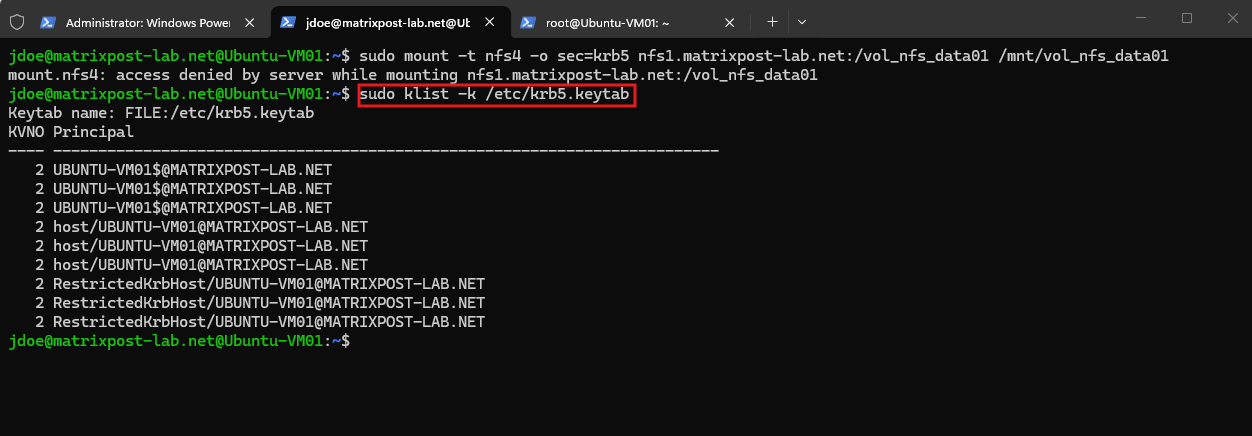
The Linux client already has a populated Kerberos keytab (
/etc/krb5.keytab), including the machine andhost/UBUNTU-VM01@MATRIXPOST-LAB.NETprincipals created during the Active Directory domain join.This confirms that the client has the machine credentials required by
rpc.gssd, so a missing client keytab is not the cause of the failed NFS mount.The Kerberos keytab (
/etc/krb5.keytab) contains long-term cryptographic keys rather than Kerberos tickets. These keys allow services such asrpc.gssdto authenticate the Linux machine to the KDC and obtain the required Kerberos tickets without interactive password authentication.
sudo klist -k /etc/krb5.keytab
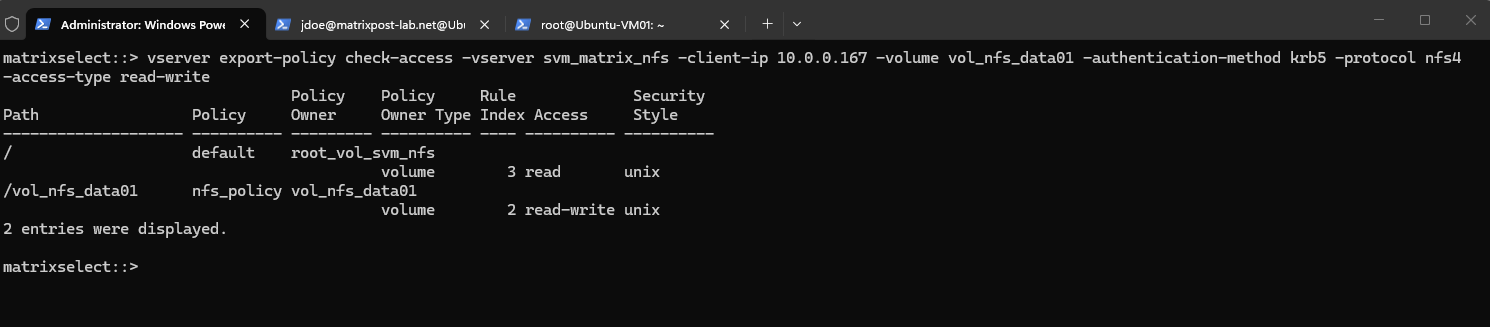
Next, we use ONTAP’s vserver export-policy check-access command to verify how the export policies are evaluated for our Ubuntu client when accessing vol_nfs_data01 using NFSv4 with krb5 authentication.
This also allows us to verify whether access through the SVM root / to the target volume is permitted.
The
check-accessresult confirms that ONTAP permits our client to traverse the SVM root/with read access and grants read-write access to/vol_nfs_data01usingkrb5. We can therefore rule out the ONTAP export-policy configuration as the cause of theaccess deniederror.
vserver export-policy check-access -vserver svm_matrix_nfs -client-ip 10.0.0.167 -volume vol_nfs_data01 -authentication-method krb5 -protocol nfs4 -access-type read-write
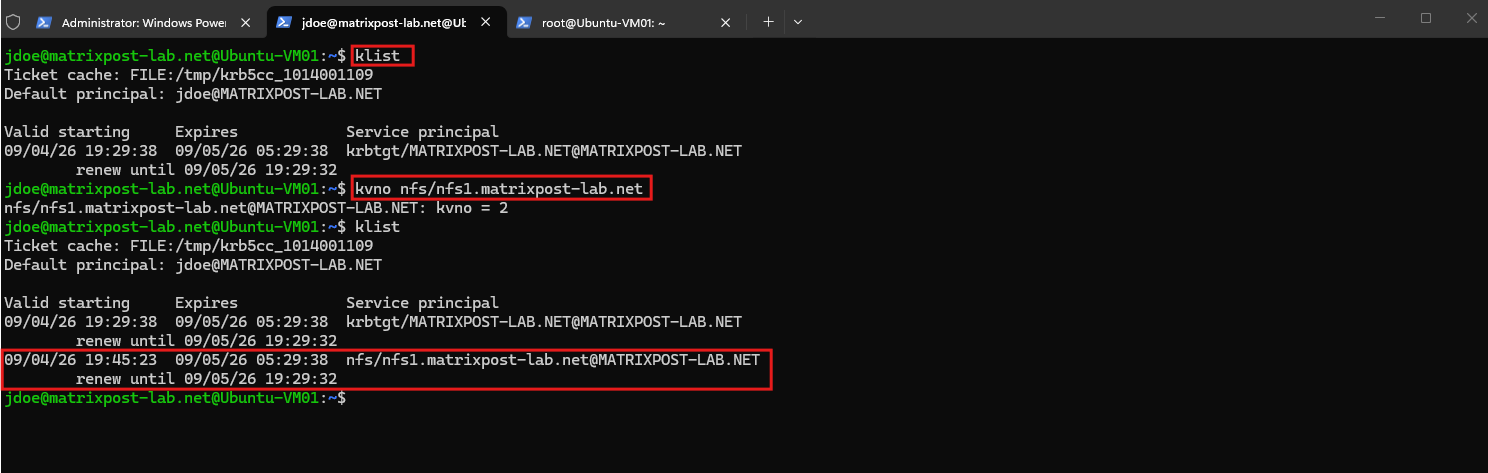
To further isolate the problem, we first use klist to verify that the user’s credential cache still contains only the TGT.
We then use kvno to explicitly request a service ticket for our NFS SPN and finally run klist again to confirm that the NFS service ticket was successfully issued and added to the credential cache.
The successful
kvnorequest and the subsequent appearance ofnfs/nfs1.matrixpost-lab.net@MATRIXPOST-LAB.NETconfirm that the NFS SPN is valid and that the KDC can successfully issue the required NFS service ticket usingjdoe‘s existing TGT.
klist
kvno nfs/nfs1.matrixpost-lab.net
klist
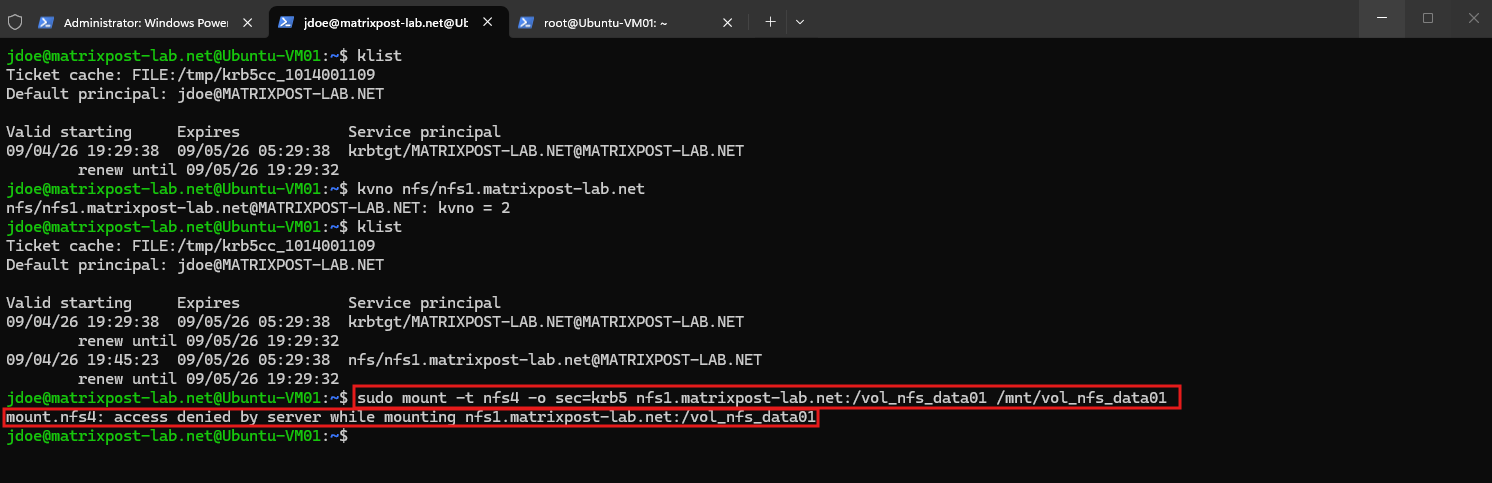
With a valid NFS service ticket now present in the user’s credential cache, we retry the sec=krb5 mount.
This helps determine whether the original failure was caused simply by the NFS client failing to obtain the service ticket automatically or whether the problem occurs later while establishing the RPCSEC_GSS security context with ONTAP.
Even with a valid NFS service ticket present in
jdoe‘s credential cache, the mount still fails withaccess denied by server.Since we have already verified the export policy, client keytab, NFS SPN, and successful service-ticket issuance, we next inspect the RPCSEC_GSS processing and ONTAP-side Kerberos requirements.
sudo mount -t nfs4 -o sec=krb5 nfs1.matrixpost-lab.net:/vol_nfs_data01 /mnt/vol_nfs_data01
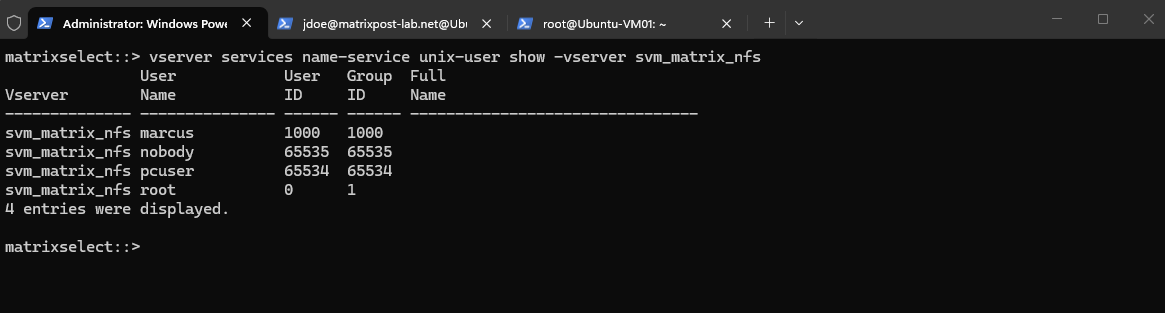
Checking the local UNIX users on our NFS SVM reveals that the nfs user is missing.
ONTAP requires an nfs UNIX user with UID 500 for the Kerberos GSS initialization phase unless an appropriate Kerberos-to-UNIX name mapping is configured, making this a likely cause of our failed Kerberos NFS mount.
vserver services name-service unix-user show -vserver svm_matrix_nfs
Let’s add it:
vserver services name-service unix-user create -vserver svm_matrix_nfs -user nfs -id 500 -primary-gid 1
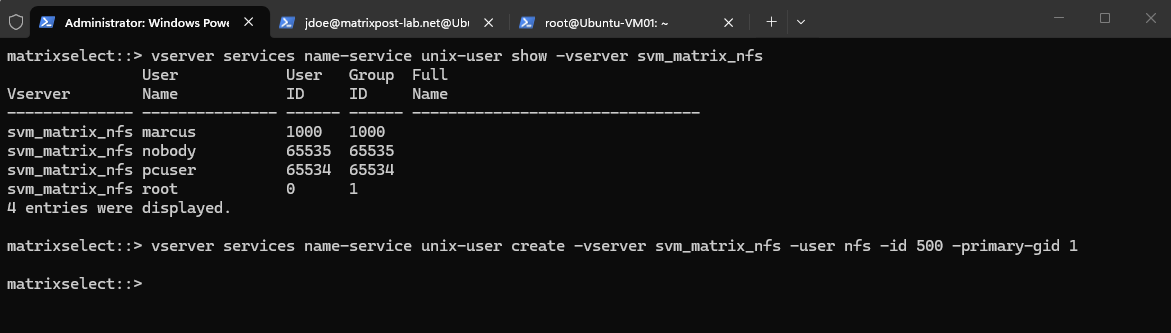
Then verify:
vserver services name-service unix-user show -vserver svm_matrix_nfs
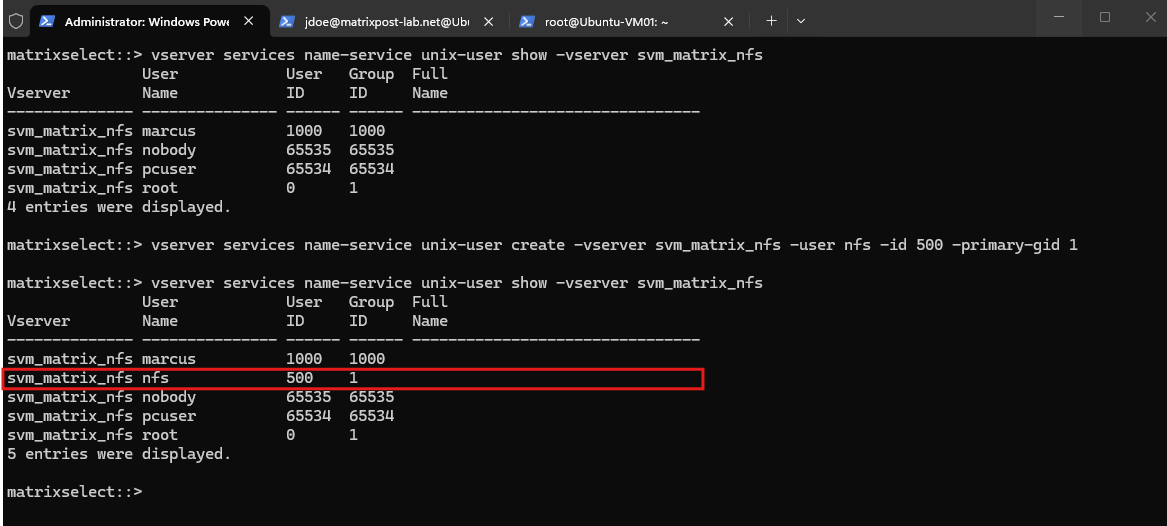
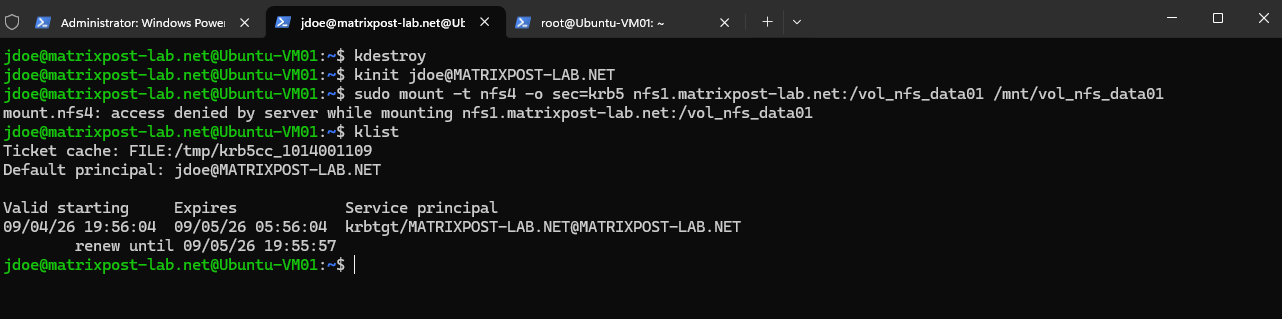
After creating the required nfs UNIX user, we clear the existing Kerberos credential cache with kdestroy, obtain a fresh TGT for jdoe, and retry the NFS mount from a clean Kerberos session:
The mount, however, still fails with
access denied by server, andklistagain shows only the TGT without an automatically obtained NFS service ticket.This confirms that the missing
nfsuser was not the only issue, so we continue by verifying the remaining ONTAP Kerberos and UNIX identity prerequisites.
kdestroy
kinit jdoe@MATRIXPOST-LAB.NET
sudo mount -t nfs4 -o sec=krb5 nfs1.matrixpost-lab.net:/vol_nfs_data01 /mnt/vol_nfs_data01
klist
Verify the ONTAP UNIX Prerequisites
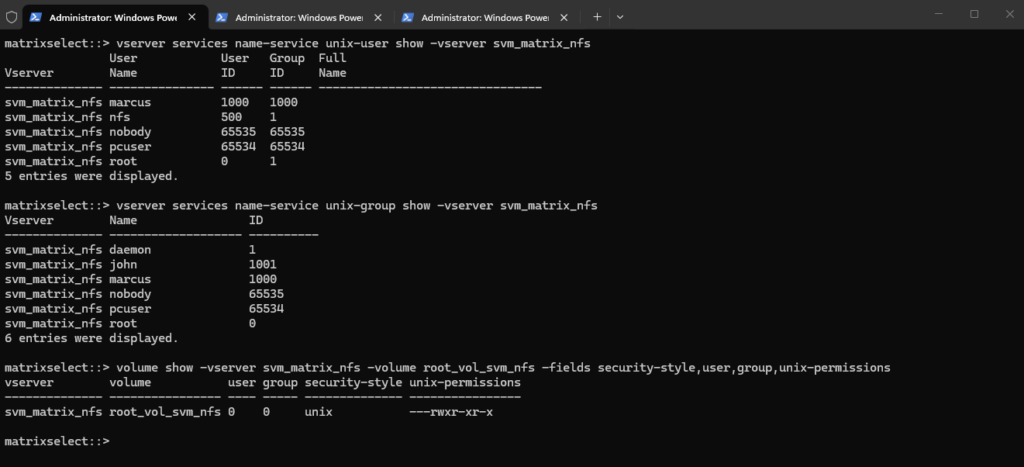
Next, we verify the local UNIX users and groups required by ONTAP for Kerberos, as well as the ownership and permissions of the SVM root volume:
The output confirms that the required
nfs(UID 500),root(UID 0),root(GID 0), anddaemon(GID 1) UNIX identities exist.The SVM root volume also uses the UNIX security style, is owned by UID/GID
0:0, and has755(rwxr-xr-x) permissions, confirming that these ONTAP-side prerequisites are in place.The
daemongroup (GID 1) is a traditional UNIX system group used for service accounts and is separate from thenfsuser. In our configuration, thenfsuser (UID 500) usesdaemonas its primary group through GID 1.
vserver services name-service unix-user show -vserver svm_matrix_nfs
vserver services name-service unix-group show -vserver svm_matrix_nfs
volume show -vserver svm_matrix_nfs -volume root_vol_svm_nfs -fields security-style,user,group,unix-permissions
Verify DNS Resolution from the NFS Client
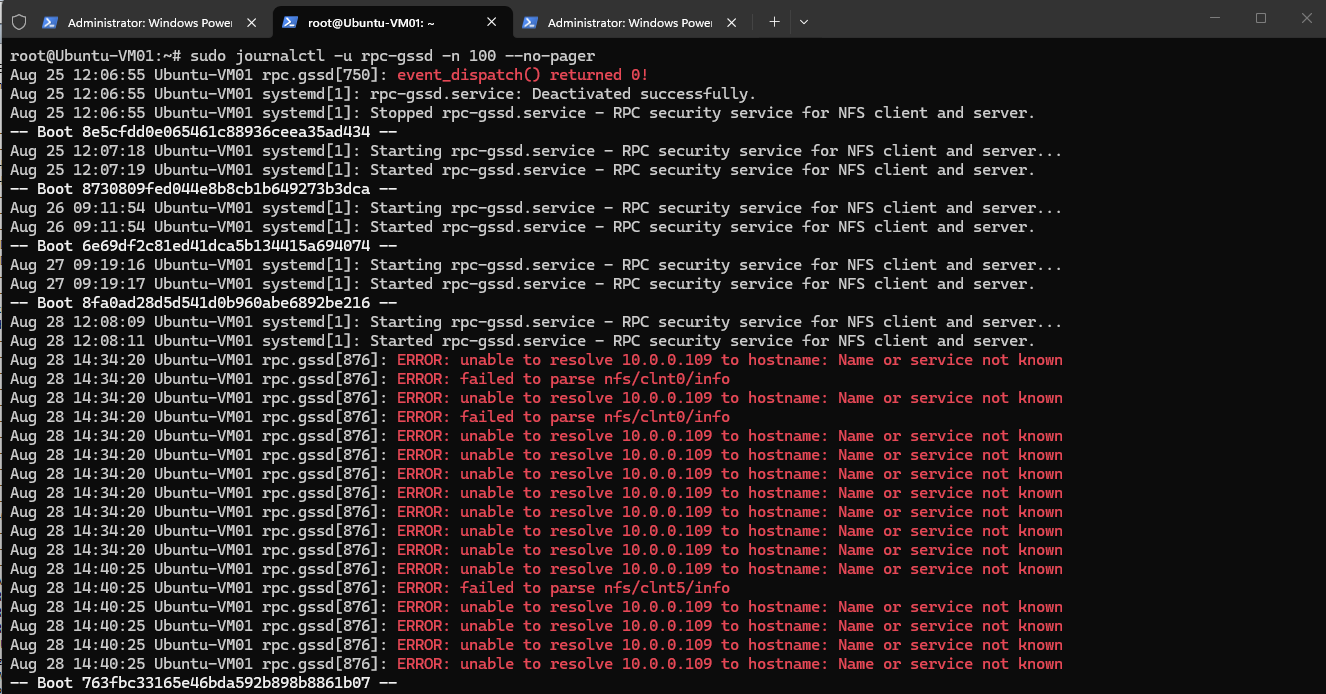
Since the rpc.gssd logs contained earlier messages indicating that the NFS data LIF IP address 10.0.0.109 could not be resolved to a hostname, we verify both forward and reverse DNS resolution directly from the Ubuntu client.
The
rpc.gssdDNS resolution errors shown earlier were historical log entries from previous NFS tests and were not generated by our current Kerberos mount attempt.
sudo journalctl -u rpc-gssd -n 100 --no-pager
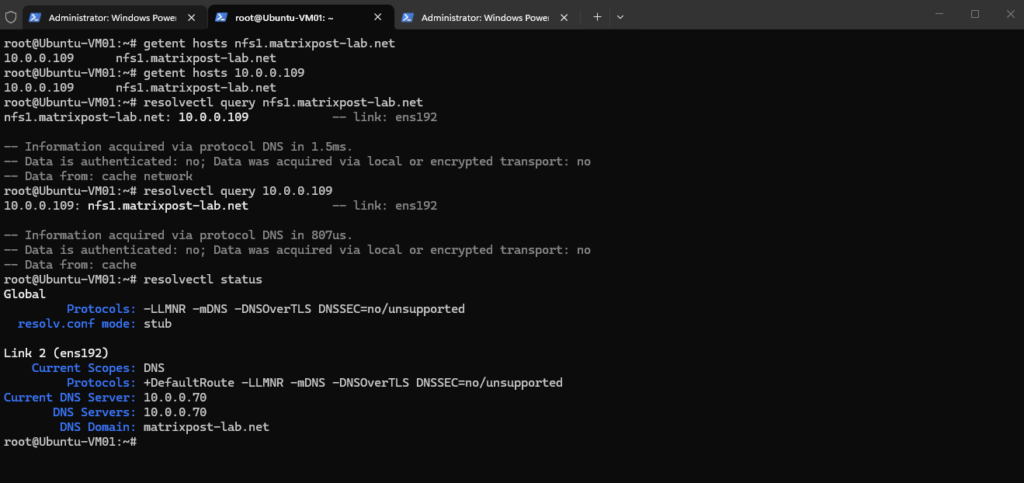
Both forward and reverse lookups now resolve correctly between
nfs1.matrixpost-lab.netand10.0.0.109.resolvectl statusalso confirms that Ubuntu is using our Active Directory DNS server10.0.0.70and the DNS domainmatrixpost-lab.net, allowing us to rule out the current DNS configuration as the cause of the failed Kerberos mount.
getent hosts nfs1.matrixpost-lab.net
getent hosts 10.0.0.109
resolvectl query nfs1.matrixpost-lab.net
resolvectl query 10.0.0.109
resolvectl status
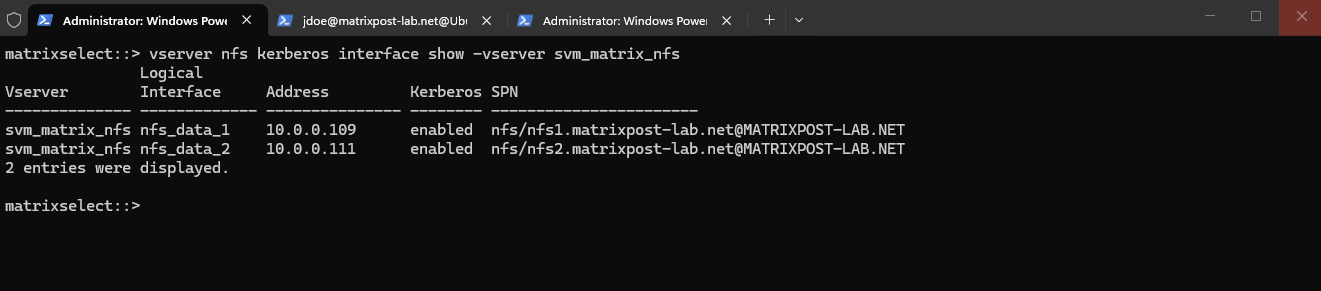
Next, we verify that Kerberos is still enabled on both NFS data LIFs and that the expected service principals are still assigned:
The output confirms that Kerberos remains enabled on both
nfs_data_1andnfs_data_2, with each LIF associated with its correctnfs/<FQDN>@MATRIXPOST-LAB.NETservice principal. We can therefore rule out the ONTAP Kerberos interface configuration as the cause of the failed mount.
vserver nfs kerberos interface show -vserver svm_matrix_nfs
Check the ONTAP Event Log – Kerberos-to-UNIX Name Mapping Failure
To determine why ONTAP rejects the Kerberos mount, we reproduce the failed mount and immediately inspect the ONTAP event log:
event log show -time >5m
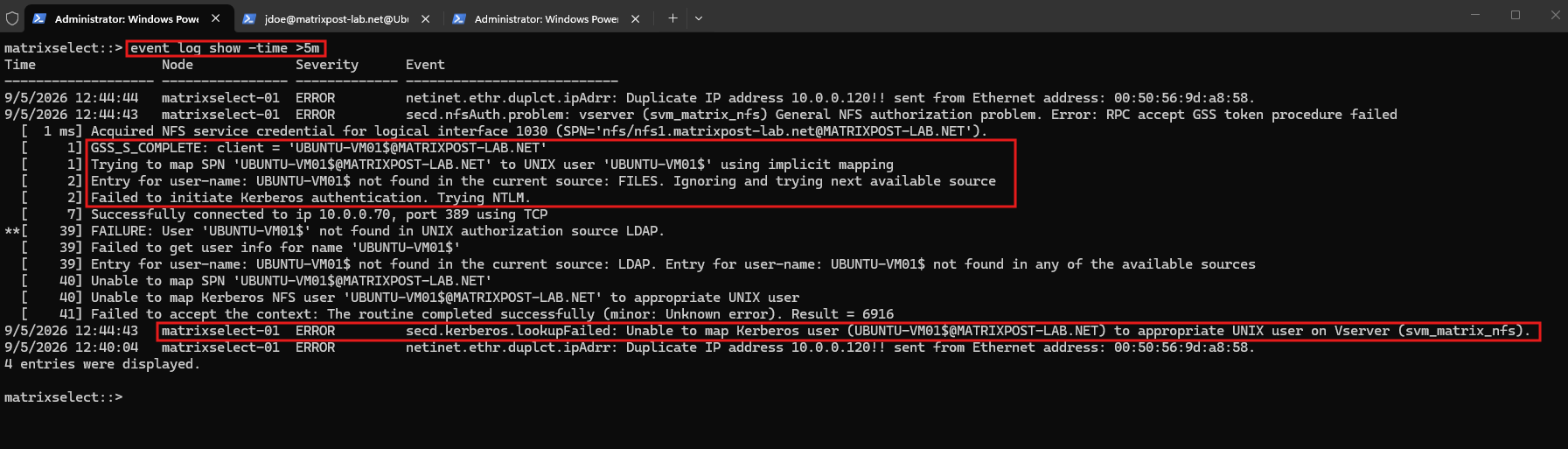
The event log finally reveals the actual cause. Kerberos authentication itself succeeds (GSS_S_COMPLETE), but the initial RPCSEC_GSS context is established using the Linux client’s machine principal UBUNTU-VM01$@MATRIXPOST-LAB.NET.
ONTAP then attempts to map this Kerberos principal to a corresponding UNIX user.
ONTAP searches both the local FILES source and our Active Directory-backed LDAP UNIX identity source, but neither contains a UNIX user named UBUNTU-VM01$. Consequently, the Kerberos-to-UNIX mapping fails and ONTAP rejects the GSS context:
Unable to map Kerberos NFS user ‘UBUNTU-VM01$@MATRIXPOST-LAB.NET’ to appropriate UNIX user
This also confirms that the initial NFSv4 mount operation uses the Linux client’s machine credentials from its Kerberos keytab, rather than jdoe‘s user principal.
We therefore need to configure an appropriate Kerberos-to-UNIX name mapping on ONTAP for the client machine principal.
For a deeper understanding of how ONTAP maps identities between UNIX and Windows/Active Directory environments, see my previous articles.
Configure the Kerberos-to-UNIX Name Mapping
Before creating a new mapping for the Linux client’s Kerberos machine principal, we first check whether any Kerberos-to-UNIX mappings already exist on the NFS SVM:
The output confirms that no Kerberos-to-UNIX (
krb-unix) mappings currently exist on the SVM.
vserver name-mapping show -vserver svm_matrix_nfs -direction krb-unix

We can also display all existing name-mapping rules to ensure that the new rule does not conflict with mappings created during our previous NFS identity-mapping tests:
The displayed
win-unixandunix-winentries belong to our previous Windows/UNIX name-mapping configuration and are independent of the Kerberos mapping we need here.
vserver name-mapping show -vserver svm_matrix_nfs
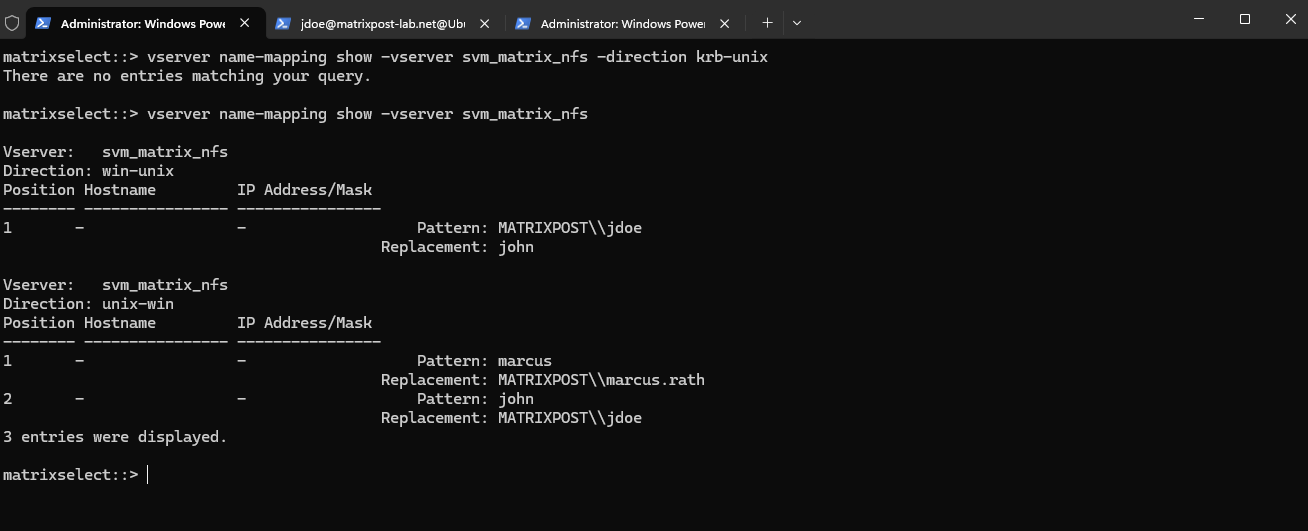
Since no krb-unix mapping currently exists, we now create an explicit mapping for the Ubuntu client’s machine principal UBUNTU-VM01$@MATRIXPOST-LAB.NET to the local ONTAP UNIX user nfs.
ONTAP supports krb-unix mappings using regular-expression patterns, and the $ in the machine account name must be escaped because it otherwise has a special meaning in a regular expression.
Run:
vserver name-mapping create -vserver svm_matrix_nfs -direction krb-unix -position 1 -pattern "UBUNTU-VM01\$@MATRIXPOST-LAB.NET" -replacement nfs
Then verify:
We create an explicit Kerberos-to-UNIX (
krb-unix) name mapping for the Ubuntu client’s machine principal and map it to the local ONTAP UNIX usernfs.The subsequent verification confirms that the rule is active and that ONTAP can now translate
UBUNTU-VM01$@MATRIXPOST-LAB.NETto the UNIX identity required during the initial GSS authentication phase.
vserver name-mapping show -vserver svm_matrix_nfs -direction krb-unix
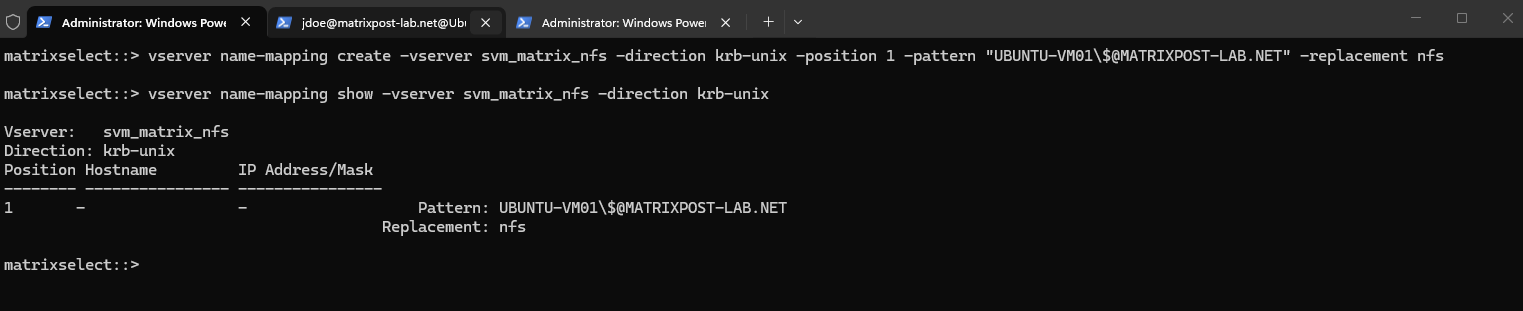
This mapping is required because the initial NFSv4 RPCSEC_GSS context is established using the Linux client’s machine principal UBUNTU-VM01$@MATRIXPOST-LAB.NET.
ONTAP must translate every authenticated Kerberos principal into a valid UNIX identity for NFS authorization; because no UNIX user named UBUNTU-VM01$ exists, we explicitly map the machine principal to the dedicated nfs UNIX user (UID 500) used for this GSS initialization phase.
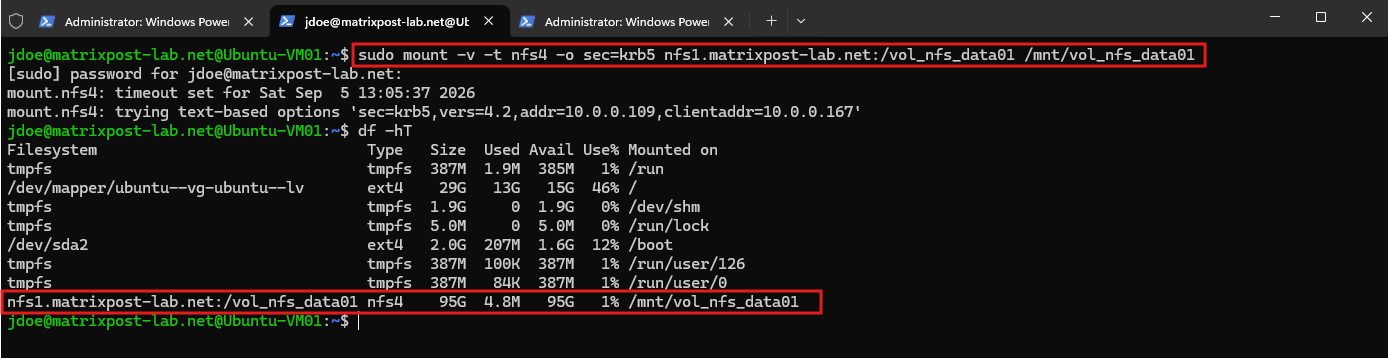
After adding the required Kerberos-to-UNIX mapping for the Linux machine principal, we retry the NFSv4 mount using sec=krb5:
This time the mount completes successfully. The previous access denied by server error is gone, confirming that the missing mapping of UBUNTU-VM01$@MATRIXPOST-LAB.NET to the local UNIX user nfs was the actual cause of the failed RPCSEC_GSS initialization.
sudo mount -v -t nfs4 -o sec=krb5 nfs1.matrixpost-lab.net:/vol_nfs_data01 /mnt/vol_nfs_data01
Verify the Successful Kerberos NFS Mount
We finally verify the successfully mounted NFS filesystem, the negotiated security flavor, and the Kerberos credentials obtained for our user:
df -hT
mount | grep vol_nfs_data01
klist
ls -ld /mnt/vol_nfs_data01
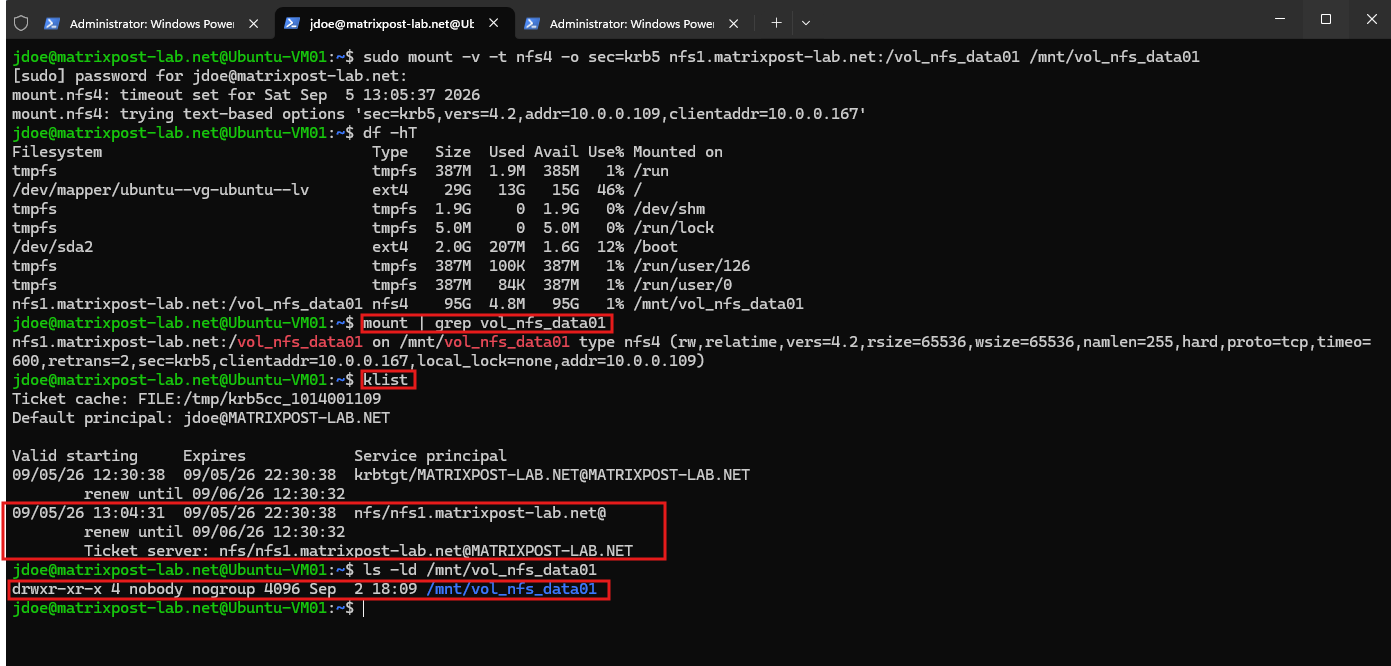
The mount output confirms that the export is mounted using NFSv4.2 with sec=krb5, while klist now shows both the user’s TGT and the automatically obtained NFS service ticket for nfs/nfs1.matrixpost-lab.net.
This demonstrates that the Linux NFS client can now successfully establish the RPCSEC_GSS context and obtain the required service ticket automatically.
The directory itself currently appears as nobody:nogroup. This is a separate NFSv4 identity-mapping issue and does not indicate a Kerberos authentication failure, the Kerberos-protected mount itself is working correctly.
For a detailed explanation of NFSv4 owner and owner_group mapping and why unresolved identities are displayed as nobody:nogroup, see my previous article.
Correct the NFSv4 Owner and Group Mapping
Although our Kerberos-protected NFS mount is now working, the mounted directory is still displayed as nobody:nogroup. This is a separate NFSv4 identity-mapping issue, so we also correct the NFSv4 ID-mapping configuration to display the actual owner and group names.
Both systems should use the same NFSv4 ID-mapping domain, in our case
matrixpost-lab.net. After correcting any mismatch, we remount the export and verify the ownership again.
First, we verify the currently configured NFSv4 ID-mapping domains on ONTAP and Ubuntu:

On Ubuntu:
cat /etc/idmapd.conf
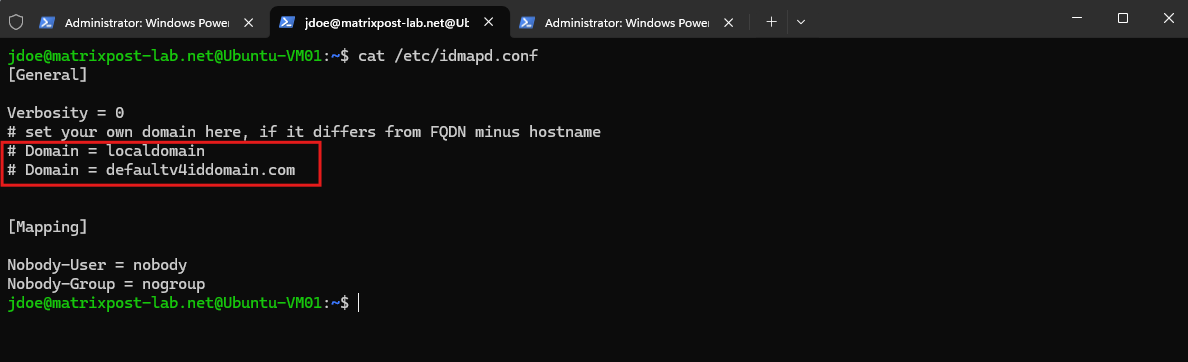
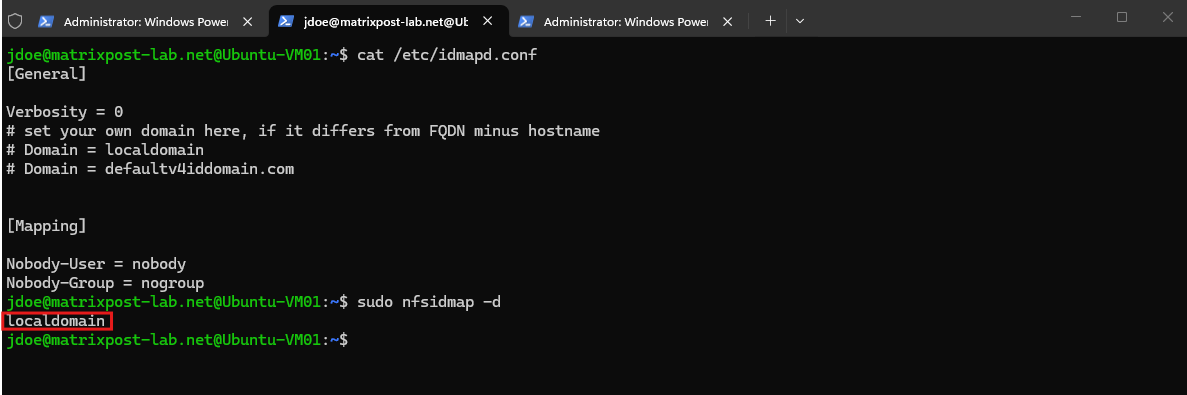
Since no Domain is explicitly configured in /etc/idmapd.conf, we use nfsidmap -d to determine the NFSv4 ID-mapping domain actually used by the Linux client:
The command returns
localdomain, while our ONTAP SVM usesdefaultv4iddomain.com. This domain mismatch explains why NFSv4 cannot correctly translate the owner and group identities and therefore displays them asnobody:nogroup.As already demonstrated in my previous NFSv4 identity-mapping article, this is primarily a cosmetic name-resolution issue and does not affect the actual NFS access or file operations, since the underlying numeric identities are still used for authorization.
sudo nfsidmap -d
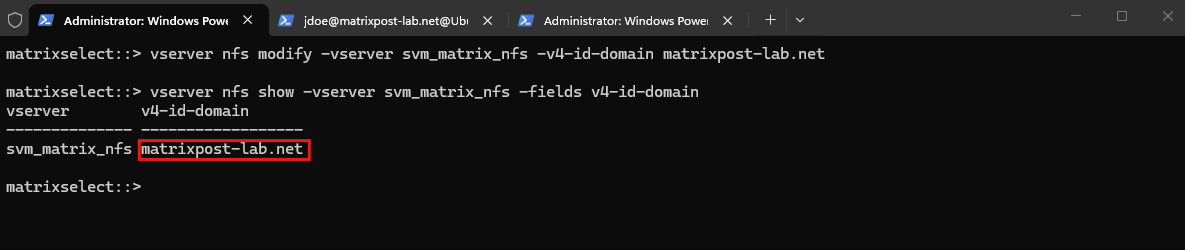
To avoid the nobody:nogroup display and make the NFSv4 identity configuration consistent with the rest of our Active Directory environment, we now configure matrixpost-lab.net as the NFSv4 ID-mapping domain on both ONTAP and Ubuntu.
On ONTAP, we change and verify the domain:
vserver nfs modify -vserver svm_matrix_nfs -v4-id-domain matrixpost-lab.net
vserver nfs show -vserver svm_matrix_nfs -fields v4-id-domain
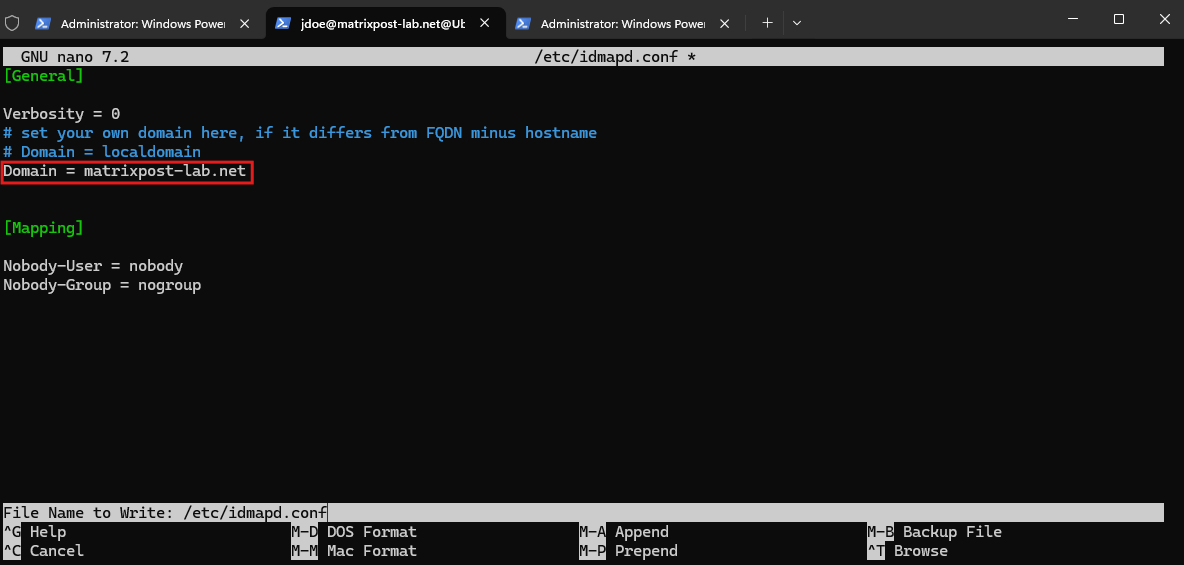
On the Ubuntu client, we explicitly configure the same domain in /etc/idmapd.conf:
Domain = matrixpost-lab.net
We then clear the existing NFSv4 ID-mapping cache, restart rpc-gssd, and verify the effective domain:
After clearing the NFSv4 ID-mapping cache and restarting rpc-gssd, nfsidmap -d confirms that the Ubuntu client now uses matrixpost-lab.net as its effective NFSv4 ID-mapping domain, matching the configuration on ONTAP.
sudo nfsidmap -c
sudo systemctl restart rpc-gssd
nfsidmap -d
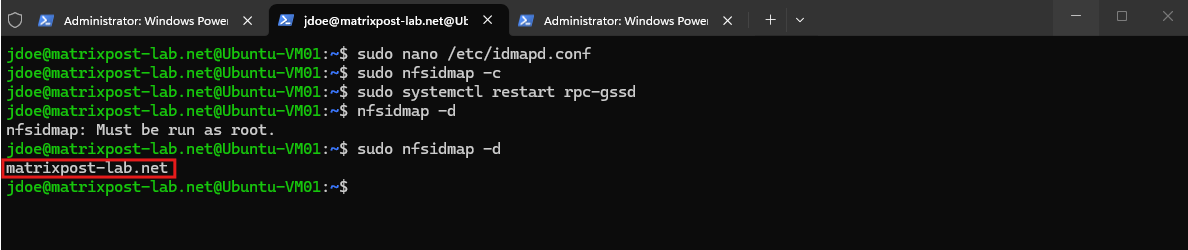
After configuring the common NFSv4 ID-mapping domain and clearing the client-side mapping cache,
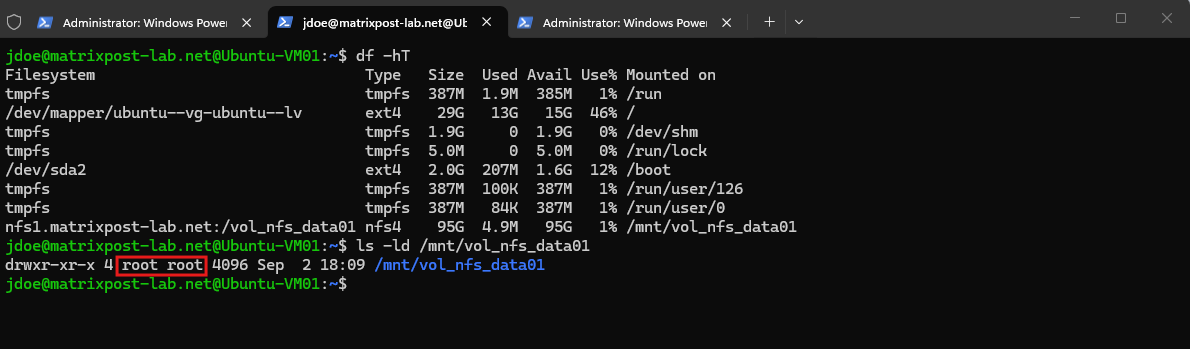
ls -ldimmediately resolves the previously displayednobody:nogroupownership correctly asroot:root:
ls -ld /mnt/vol_nfs_data01
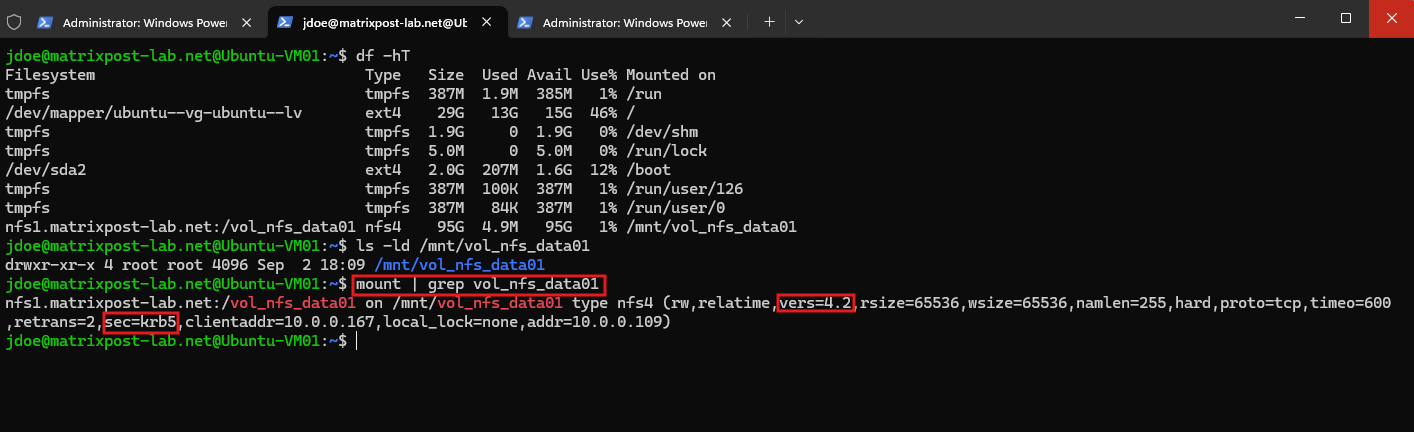
Finally, we verify the active NFS mount and confirm that it is actually configured to use Kerberos authentication:
The output confirms that the export is mounted using NFSv4.2 (
vers=4.2) with the security flavorsec=krb5.This verifies that the active NFS connection uses Kerberos authentication through RPCSEC_GSS rather than AUTH_SYS (
sec=sys).
mount | grep vol_nfs_data01
Links
kinit: Warns about password expiry for Windows Server 2025 DC
https://bugs.launchpad.net/ubuntu/+source/krb5/+bug/2162744pNFS tuning and performance best practices
https://docs.netapp.com/us-en/ontap/pnfs/pnfs-tuning-performance-concept.htmlRequirements for configuring Kerberos with ONTAP NFS
https://docs.netapp.com/us-en/ontap/nfs-admin/requirements-configuring-kerberos-concept.htmlLearn about using Kerberos with ONTAP NFS for security authentication
https://docs.netapp.com/us-en/ontap/nfs-config/kerberos-nfs-strong-security-concept.htmlONTAP NFS support for Kerberos
https://docs.netapp.com/us-en/ontap/nfs-admin/ontap-support-kerberos-concept.html