Detecting and Blocking HTTP Referrer Spam on Apache – A Real-World Example
While reviewing the Google Analytics 4 (GA4) statistics for my WordPress blog, I noticed an unexpected and significant increase in website traffic.
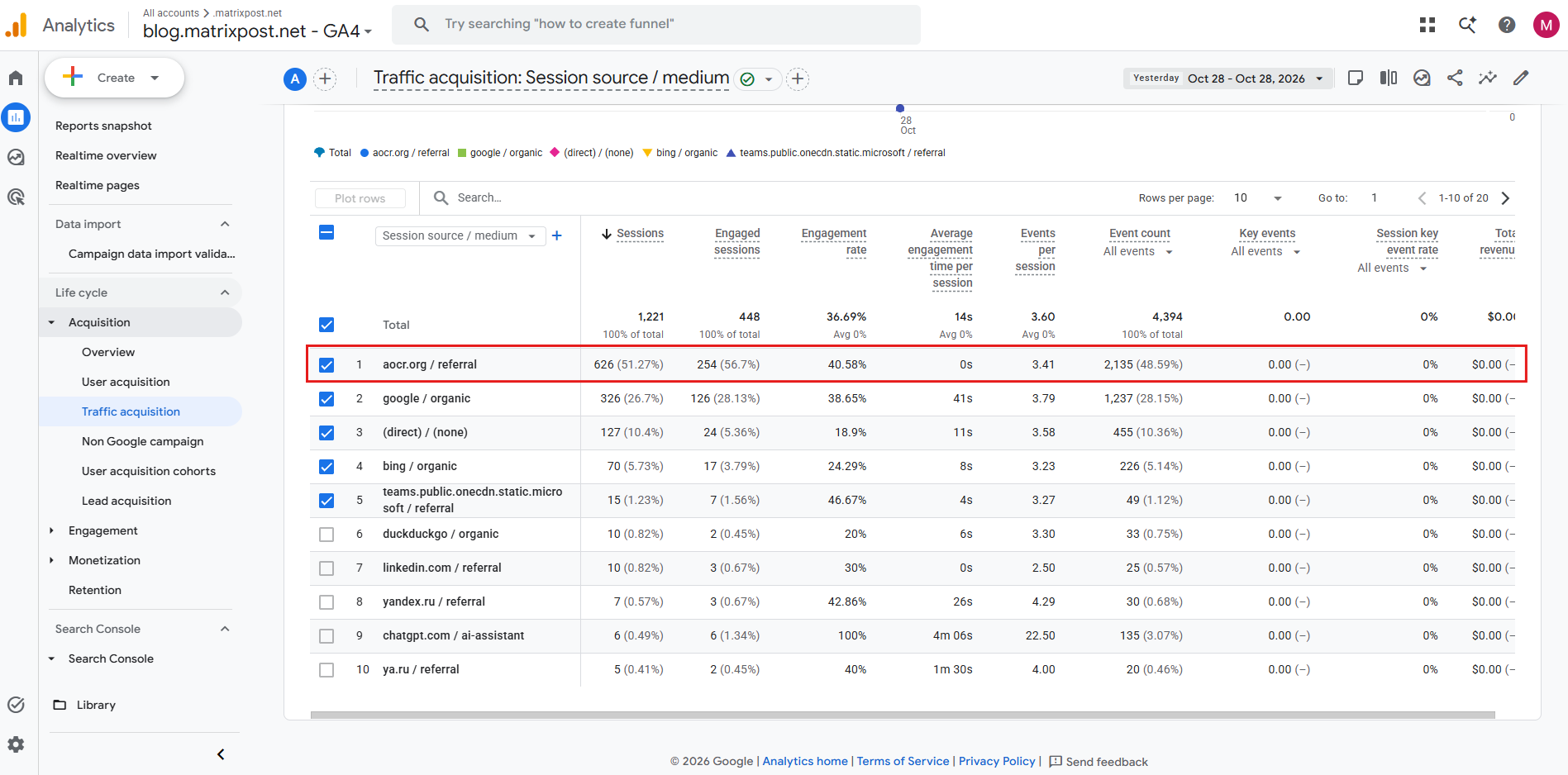
A closer look at the traffic acquisition reports revealed that a large proportion of the visits originated from an unfamiliar referral source, aocr.org, which had no apparent connection to the technical content published on my blog.
In this article, we will investigate the suspicious traffic using Apache access logs, check the Linux server’s resource utilization, and implement an Apache rewrite rule to block the unwanted requests.
Understanding the HTTP Referer Header
The HTTP Referer header identifies the web page from which a visitor navigated to another resource.
Browsers typically include this header when users follow links, allowing the destination website to identify where incoming traffic originated.
For example, when a visitor follows a link from another website to our blog, the HTTP request might contain:
GET /example-article/ HTTP/1.1
Host: blog.matrixpost.net
Referer: https://www.example.com/
User-Agent: Mozilla/5.0
However, the Referer header is not a trustworthy indicator of a visitor’s actual origin, as HTTP clients and automated bots can easily modify or spoof its value.
This makes it possible to generate large amounts of artificial referral traffic, potentially distorting website analytics and producing misleading traffic statistics.
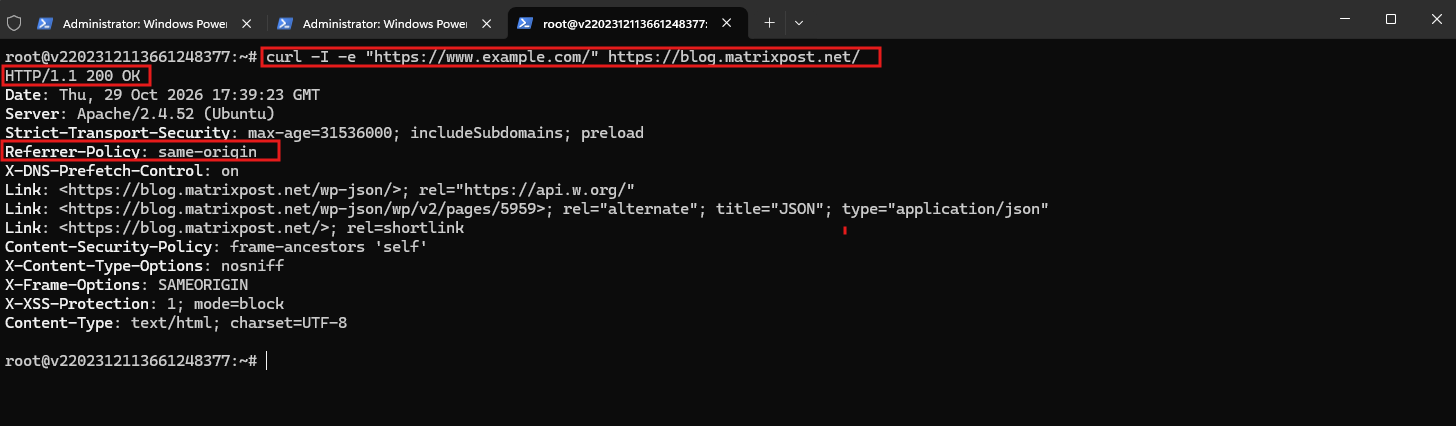
Using curl, we manually specify a Referer header pointing to https://www.example.com/. The web server processes the request successfully and returns HTTP 200 OK, along with our configured Referrer-Policy: same-origin response header.
curl -I -e "https://www.example.com/" https://blog.matrixpost.net/
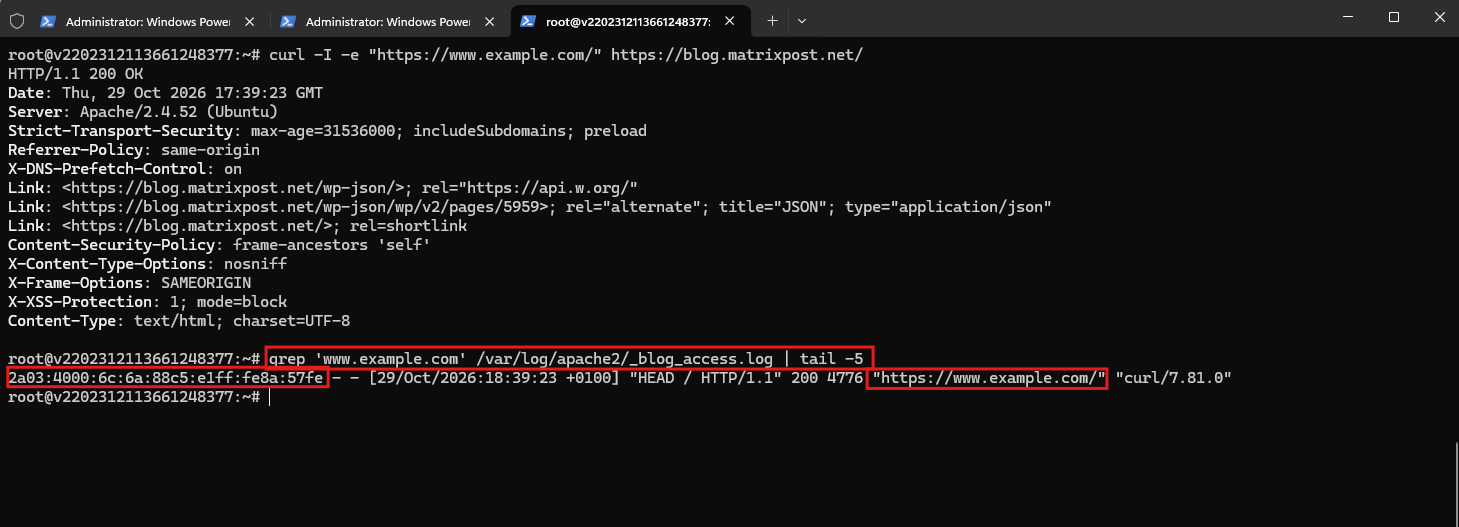
The Apache access log confirms that the manually supplied Referer header was recorded, demonstrating how easily referral information can be spoofed without actually visiting the referring website.
grep 'www.example.com' /var/log/apache2/_blog_access.log | tail -5
My Apache virtual host is configured with Referrer-Policy: same-origin, instructing browsers to include the Referer header only for requests within the same origin and omit it when navigating to external websites.
This protects visitors’ browsing privacy but does not prevent clients from sending spoofed Referer headers to our server.no

The Referrer-Policy HTTP response header controls when browsers include the Referer header in outgoing requests.
While my configured same-origin policy restricts it to requests within our website, strict-origin-when-cross-origin also allows external HTTPS websites to receive our website’s origin as the referrer.
Header always set Referrer-Policy "strict-origin-when-cross-origin"
Investigating the Suspicious Referrals
In Google Analytics 4, navigate to Reports → Acquisition → Traffic acquisition and change the primary dimension to Session source / medium.
The suspicious referral source accounted for the majority of the reported sessions, with an average engagement time close to zero seconds.
To verify whether the requests actually reached our Apache web server, we searched the access logs, including rotated and compressed files.
Searching the Apache access logs, including rotated and compressed log files, revealed more than 46,000 HTTP requests containing the suspicious referrer. This confirmed that the traffic was reaching the web server rather than appearing exclusively in Google Analytics.
zgrep -h 'aocr.org' /var/log/apache2/_blog_access.log* | wc -l

The investigation revealed tens of thousands of HTTP requests containing the suspicious referrer.
To determine when the activity started, we grouped the matching requests by date:
zgrep -h 'aocr.org' /var/log/apache2/_blog_access.log* | awk -F'[][]' '{split($2,a,":"); print a[1]}' | sort | uniq -c | sort -k2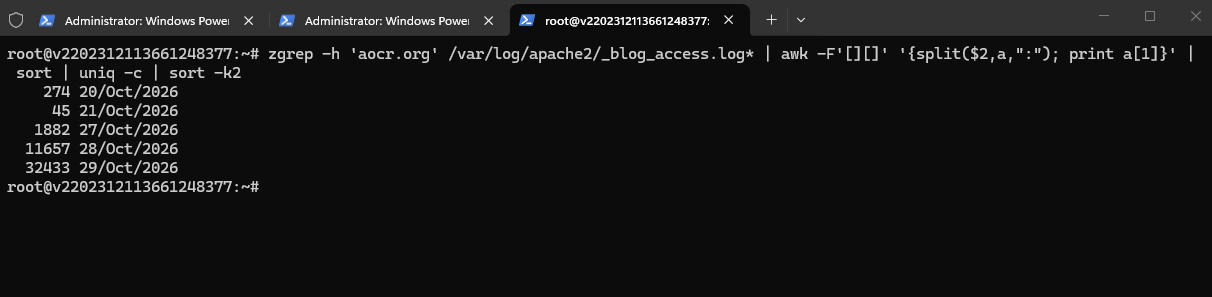
The requests increased dramatically within just a few days.
We also checked which IP addresses generated the requests:
zgrep -h 'aocr.org' /var/log/apache2/_blog_access.log* | awk '{print $1}' | sort | uniq -c | sort -nr | head -20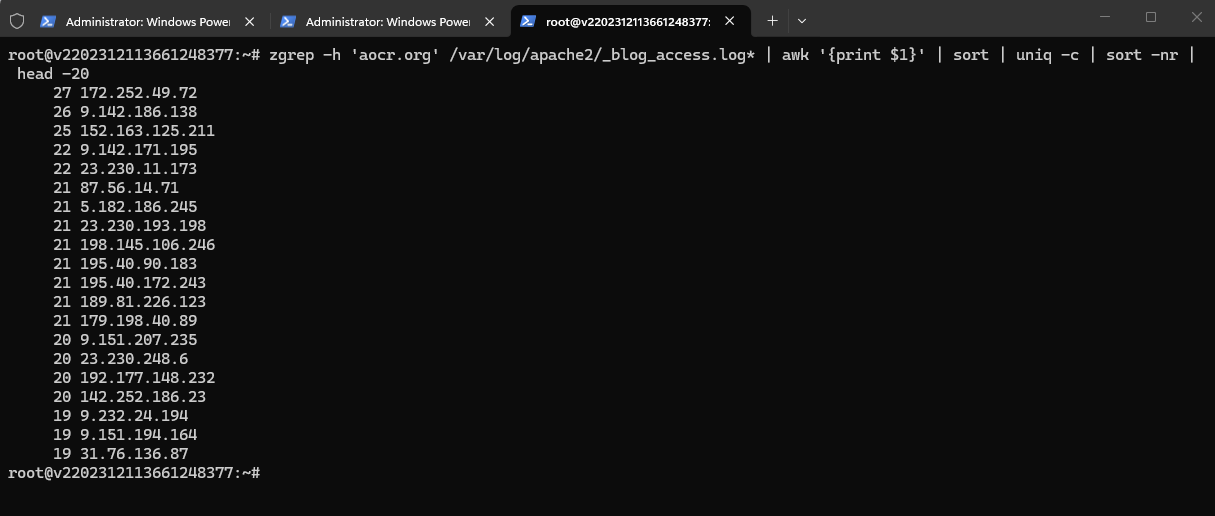
The requests originated from numerous IP addresses, with relatively few requests per individual address.
Furthermore, the traffic targeted many unrelated technical articles rather than a single popular page.
These findings strongly suggested distributed automated traffic using a potentially spoofed HTTP Referer header.
A Referer header identifies the page from which a client claims to have navigated. However, because HTTP clients can freely modify this header, it cannot be considered proof of the actual traffic source.
Checking Apache Server Resource Utilization
Before implementing any blocking rules, we checked whether the suspicious requests were affecting server performance.
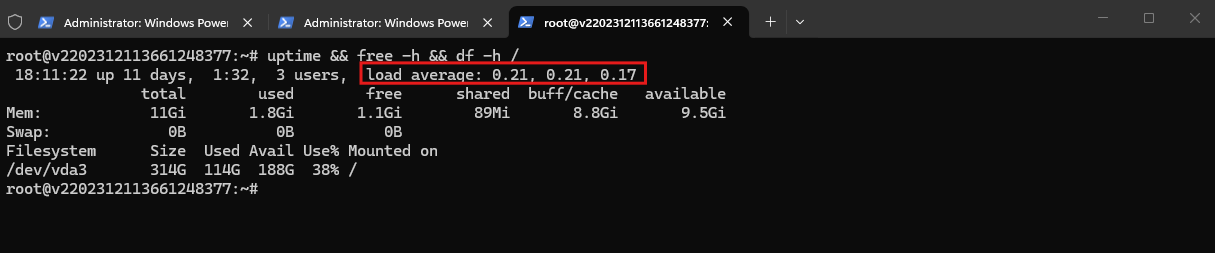
The following command provides a quick overview of the system load, available memory, and root filesystem utilization:
The output provides the system uptime and load averages, available memory, and filesystem utilization. In our case, the server showed no signs of resource exhaustion.
The load averages of
0.21,0.21, and0.17represent the average system load over the last1,5, and15 minutes, respectively. These consistently low values indicate that the server is operating comfortably without noticeable resource pressure, despite the unusually high number of suspicious HTTP requests.Linux load averages represent the average number of tasks running, waiting for CPU time, or waiting in uninterruptible sleep (typically I/O) over the last 1, 5, and 15 minutes, respectively.
uptime && free -h && df -h /
Next, we calculated the percentage of suspicious requests in the current Apache access log:
This confirms that 32,455 out of 108,889 HTTP requests (29.8%) recorded in today’s Apache access log contained the suspicious
aocr.orgreferrer, demonstrating the significant proportion of potentially automated traffic affecting the website.
awk '/29\/Oct\/2026/ {total++; if ($0 ~ /aocr\.org/) suspicious++} END {printf "Total: %d | Suspicious: %d | Percentage: %.1f%%\n", total, suspicious, total ? suspicious/total*100 : 0}' /var/log/apache2/_blog_access.log
Although the server was handling the load without issues, I decided to block these requests before they reached WordPress.
Blocking HTTP Referrer Spam Using Apache
Since Apache already had mod_rewrite enabled, we added a simple rule to the existing HTTPS VirtualHost configuration.
The rule was placed immediately after RewriteEngine on, before the existing domain redirection rules.
RewriteEngine on

# Block suspicious AOCR referral spam
RewriteCond %{HTTP_REFERER} ^https?://(www\.)?aocr\.org(/|$) [NC]
RewriteRule ^ - [F,L]
The RewriteCond directive checks the incoming HTTP Referer header for the specified domain.
The [NC] flag makes the comparison case-insensitive, while [F,L] returns HTTP 403 Forbidden and stops further processing of the rewrite rules.
This approach blocks requests presenting the specified referrer without blocking the originating IP addresses.
After modifying the VirtualHost configuration, we validated and reloaded Apache:
apache2ctl configtest && systemctl reload apache2

Verifying the Blocking Rule
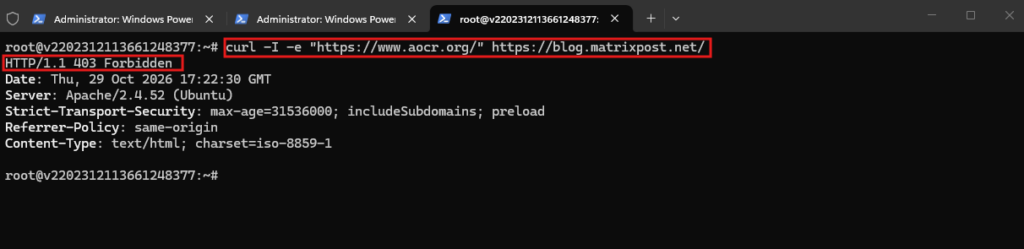
To test the rule, we used curl to simulate an HTTP request containing the suspicious referrer:
Apache correctly returned:
HTTP/1.1 403 Forbidden
curl -I -e "https://www.aocr.org/" https://blog.matrixpost.net/
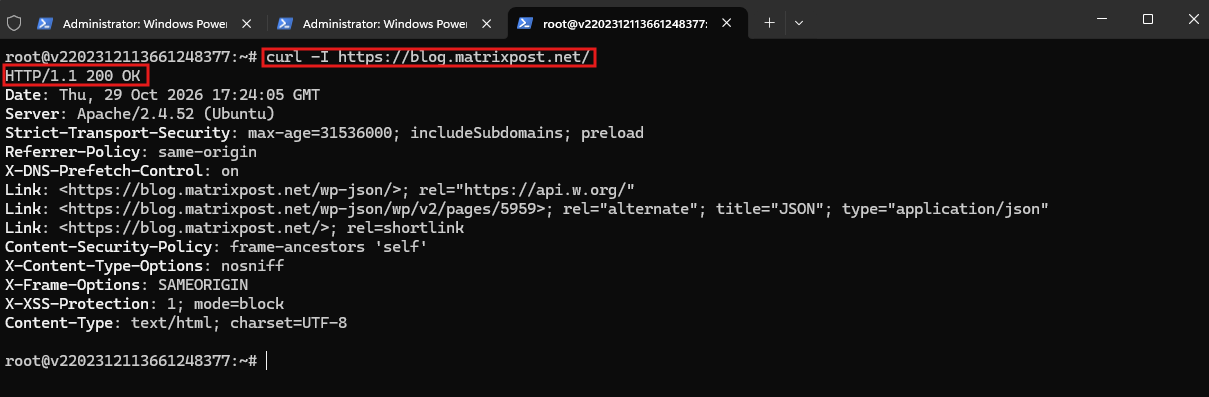
Next, we verified that ordinary requests without the suspicious referrer were still accepted:
Looks good:
HTTP/1.1 200 OK
curl -I https://blog.matrixpost.net/
Finally, we can monitor the Apache access log to identify requests still presenting the suspicious referrer:
Using
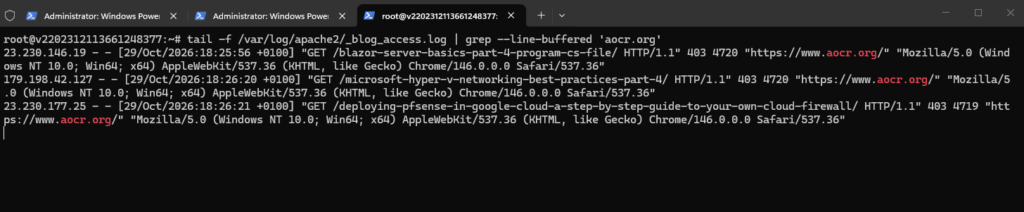
tail -ftogether withgrep --line-buffered, we can monitor incoming HTTP requests containing the suspicious referrer in real time.As shown below, Apache now consistently returns HTTP 403 Forbidden, confirming that the blocking rule is successfully rejecting these requests.
tail -f /var/log/apache2/_blog_access.log | grep --line-buffered 'aocr.org'
Or summarize their HTTP response codes:
Finally, we analyzed the last 1,000 Apache access log entries to summarize the HTTP response codes associated with the suspicious referrer.
All 19 matching requests returned HTTP 403 Forbidden, confirming that Apache successfully blocked them before they reached WordPress.
tail -n 1000 /var/log/apache2/_blog_access.log | grep 'aocr.org' | awk '{print $9}' | sort | uniq -c
Conclusion
A sudden increase in website visitors does not necessarily indicate genuine traffic growth.
In our case, Google Analytics 4 revealed a substantial number of suspicious referral sessions. Further investigation of the Apache access logs confirmed numerous HTTP requests containing the same unrelated referrer.
Although the server was not experiencing performance issues, we implemented an Apache rewrite rule to reject these requests before they reached WordPress.
The blocking rule was successfully verified using curl, without restarting Apache or interrupting normal website access.
Note: Blocking a specific HTTP Referer header does not prevent automated clients from changing or omitting that header. It is therefore a targeted mitigation rather than comprehensive bot protection. Historical GA4 statistics are also not automatically corrected by blocking subsequent requests.
Links
Apache Module mod_rewrite
https://httpd.apache.org/docs/2.4/mod/mod_rewrite.htmlRewriteRule Flags
https://httpd.apache.org/docs/2.4/rewrite/flags.htmlLog Files
https://httpd.apache.org/docs/2.4/logs.htmlReferer header
https://developer.mozilla.org/en-US/docs/Web/HTTP/Reference/Headers/Referer[GA4] Traffic acquisition report
https://support.google.com/analytics/answer/12923437