VMware VMFS Space Reclamation and Dell PowerVault ME5 – Understanding SCSI UNMAP
Thin provisioning allows storage arrays to allocate physical capacity on demand rather than reserving the entire provisioned volume size upfront. However, what happens when virtual machines are migrated or deleted from VMware VMFS datastores? Does the underlying storage array automatically reclaim the released capacity?
While investigating storage utilization on a Dell PowerVault ME5024 connected to a VMware vSphere environment, I took a closer look at how VMFS6 space reclamation, VMware VAAI, and SCSI UNMAP work together.
In this article, we’ll explore how to verify UNMAP support from ESXi, why supported space reclamation doesn’t necessarily mean automatic reclamation, and how unused storage capacity can be returned to the underlying Dell PowerVault storage pool.
Thin Provisioning: VMware vs. Dell PowerVault ME5
Thin provisioning can be implemented at different layers of a virtualized storage infrastructure. In our environment, a Dell PowerVault ME5024 provides block storage to VMware ESXi hosts through LUNs formatted with VMFS6.
An important distinction is that thin provisioning on the storage array is independent of the provisioning format used for VMware virtual disks (VMDKs).
Thin Provisioning on Dell PowerVault ME5
The Dell PowerVault ME5 series supports thin-provisioned volumes, allowing administrators to present logical storage capacity to connected hosts without immediately allocating the entire capacity from the underlying physical storage pool.
For example, a 10 TB LUN can be presented to an ESXi host while initially consuming significantly less physical capacity on the storage array. Physical storage is allocated as data is written.
This provides several advantages:
- More efficient utilization of physical storage capacity.
- The ability to provision logical capacity beyond currently installed physical capacity.
- Flexible allocation of storage resources across multiple volumes and hosts.
However, thin provisioning also introduces the risk of storage overcommitment. If the physical storage pool runs out of available capacity, additional writes may fail even though the VMFS datastore still reports free space.
Thin vs. Thick Provisioning in VMware
VMware supports different virtual disk provisioning formats independently of the underlying storage array.
| VMDK provisioning | Description |
|---|---|
| Thin Provision | Physical datastore space is consumed as data is written to the virtual disk. |
| Thick Provision Lazy Zeroed | The full VMDK capacity is allocated on the datastore, but blocks are zeroed when first written. |
| Thick Provision Eager Zeroed | The full VMDK capacity is allocated and zeroed when the virtual disk is created. |
In our environment, the virtual machines use Thick Provision Eager Zeroed virtual disks, while the underlying Dell PowerVault volumes are thin-provisioned.
This means that VMware allocates the complete virtual disk capacity at the VMFS layer, while the Dell storage array independently manages physical block allocation. Depending on how zeroed blocks are handled by the array and VMware’s VAAI integration, physical consumption may differ from the logical VMDK capacity.
Why This Matters for Space Reclamation
When a virtual machine or its virtual disks are deleted or migrated to another datastore, VMware releases the corresponding space within the source VMFS filesystem.
However, free space reported by VMFS does not necessarily mean that the underlying Dell storage pool has recovered the same amount of physical capacity.
For the storage array to reclaim previously allocated blocks, the host must communicate which blocks are no longer in use.
This is where SCSI UNMAP and VMware VAAI come into play, which we’ll examine in the next section.
Understanding SCSI UNMAP and VMware VAAI
As explained in the previous section, deleting or migrating virtual disks from a VMFS datastore does not necessarily release the corresponding physical capacity on the underlying storage array.
To address this, VMware uses SCSI UNMAP, a command that allows the host to inform the storage array which logical blocks are no longer in use.
What Is SCSI UNMAP?
SCSI UNMAP is part of the SCSI command set and is used to reclaim unused storage blocks on thin-provisioned storage devices.
When files or virtual disks are deleted from a VMFS datastore, the filesystem marks their occupied blocks as free. However, the underlying storage array may still consider these blocks allocated because it is unaware that the data is no longer needed.
By issuing SCSI UNMAP commands, ESXi can notify the storage array that specific logical block ranges are no longer required.
The storage array can then release the corresponding physical allocations back to its storage pool, provided the array supports reclamation and the blocks meet its allocation-granularity requirements.
How SCSI UNMAP Works
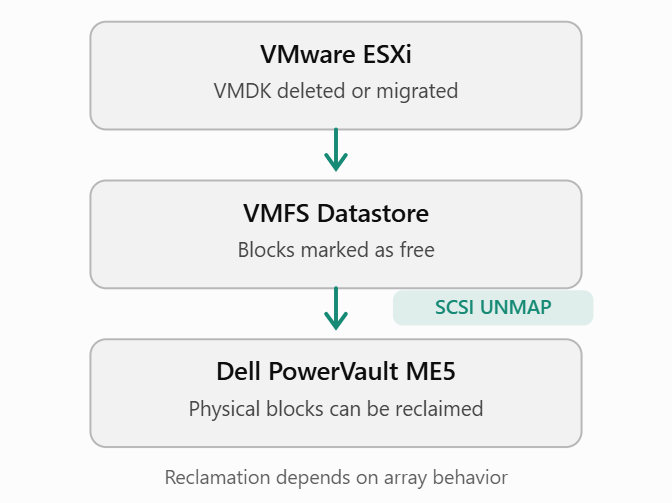
The process involves three main steps:
- VMFS releases blocks: A VMDK is deleted or migrated, making its previously occupied blocks available for reuse within the datastore.
- ESXi issues SCSI UNMAP: The host communicates unused logical block ranges to the storage array, either through automatic reclamation or a manually initiated operation.
- The storage array reclaims capacity: The array processes the UNMAP requests and may return the corresponding physical storage allocations to its available pool capacity.
What Is VMware VAAI?
VMware vStorage APIs for Array Integration (VAAI) provide a set of storage offloading capabilities that allow ESXi hosts to delegate certain storage operations to compatible storage arrays.
Instead of processing every operation directly on the ESXi host, supported operations can be handled more efficiently by the storage array.
The most relevant VAAI capabilities include:
| VAAI capability | Description |
|---|---|
| ATS (Atomic Test and Set) | Hardware-assisted locking for VMFS metadata operations. |
| Clone (XCOPY) | Offloads supported block-copy operations to the storage array. |
| Zero (WRITE SAME) | Offloads supported block-zeroing operations to the array. |
| Delete (UNMAP) | Allows unused logical blocks to be released for potential physical space reclamation. |
For thin-provisioned Dell PowerVault volumes, the Delete (UNMAP) capability is particularly important because it provides the mechanism through which ESXi can communicate unused storage blocks to the array.
However, VAAI support does not automatically guarantee that physical capacity is reclaimed immediately.
The actual behavior depends on the storage array, its firmware, allocation granularity, and VMware’s space reclamation configuration.
In the next section, we’ll verify which VAAI capabilities are supported by our Dell PowerVault ME5024 directly from an ESXi host.
Checking SCSI UNMAP Support on VMware ESXi
Before relying on space reclamation, we should verify whether the underlying storage array exposes the required VMware VAAI capabilities to the ESXi hosts.
VMware provides the esxcli command-line utility to inspect these capabilities directly.
Identifying the Datastore’s Storage Device
First, connect to an ESXi host using SSH and list the VMFS datastores along with their corresponding storage devices.
esxcli storage vmfs extent list
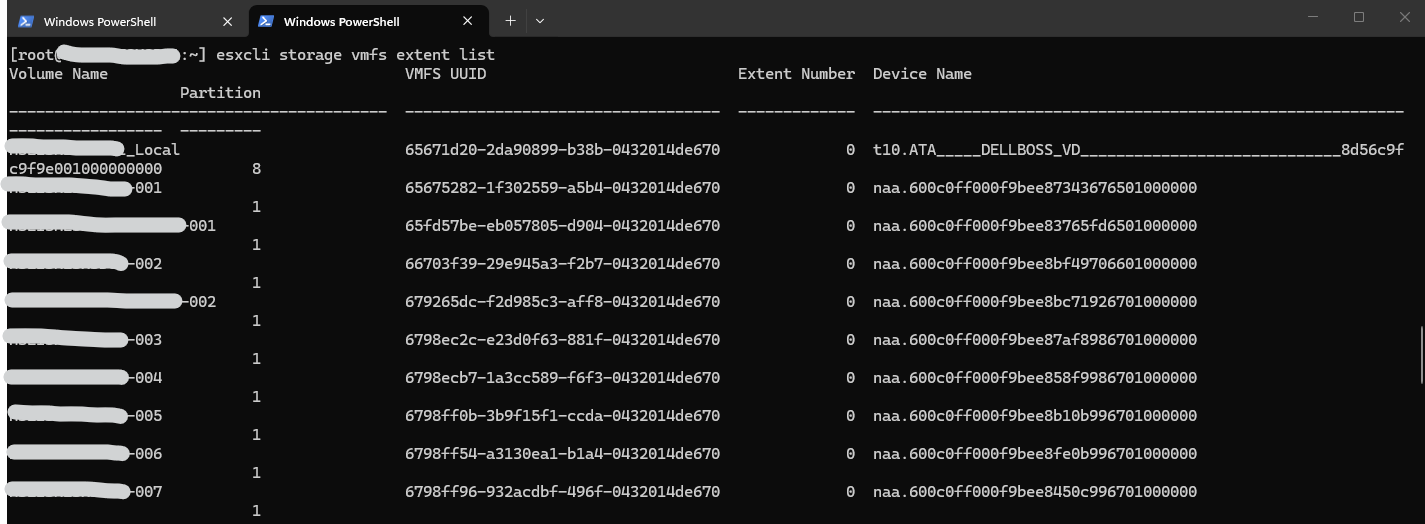
The output includes the datastore name, VMFS UUID, partition number, and the associated storage device identifier (naa.*).
The NAA identifier is particularly important because it uniquely identifies the storage device presented by the Dell PowerVault array.
Checking VAAI Capabilities
Once the corresponding NAA identifier has been identified, execute the following command:
esxcli storage core device vaai status get -d naa.600c0ff000f9bee814e3c16701000000
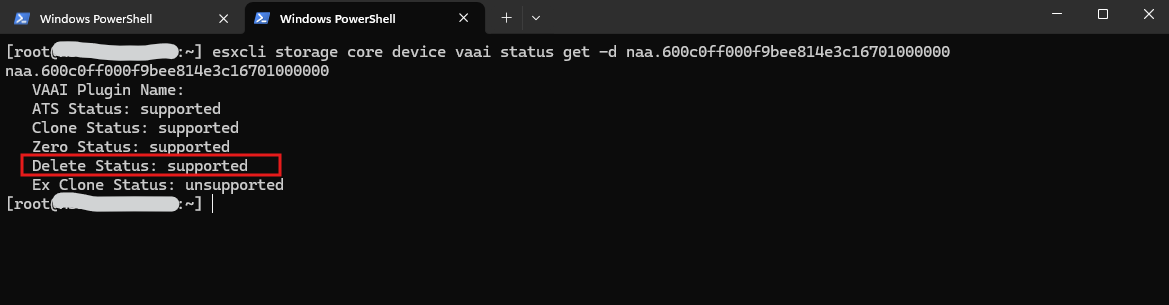
The most important entry for our investigation is:
Delete Status: supported
This confirms that VMware ESXi recognizes SCSI UNMAP support on the Dell PowerVault ME5024 LUN.
The output also confirms support for ATS, hardware-assisted cloning, and block zeroing. Extended cloning is reported as unsupported, which does not affect the availability of SCSI UNMAP.
Understanding the Delete Status
Depending on the storage device and its capabilities, ESXi may report different values:
| Status | Meaning |
|---|---|
| supported | The device advertises SCSI UNMAP capability to ESXi. |
| unsupported | ESXi reports that the device does not support the operation. |
| unknown | ESXi cannot determine the capability. |
However, there is an important distinction between supporting SCSI UNMAP and automatically executing space reclamation.
Even when Delete Status: supported is reported, the underlying storage array may have limitations that prevent VMware’s automatic VMFS6 space reclamation mechanism from working as expected.
This is particularly relevant for the Dell PowerVault ME5 series, which we’ll examine in the next section.
VMFS6 Automatic vs. Manual Space Reclamation
As we confirmed in the previous section, the Dell PowerVault ME5024 supports SCSI UNMAP, and VMware ESXi recognizes this capability through VAAI.
However, SCSI UNMAP support does not necessarily mean that unused storage capacity is automatically reclaimed.
VMware VMFS6 supports automatic space reclamation, but its behavior also depends on the capabilities and allocation characteristics of the underlying storage array.
Automatic Space Reclamation in VMFS6
VMFS6 introduced automatic space reclamation, allowing ESXi to issue SCSI UNMAP commands in the background when storage blocks become unused.
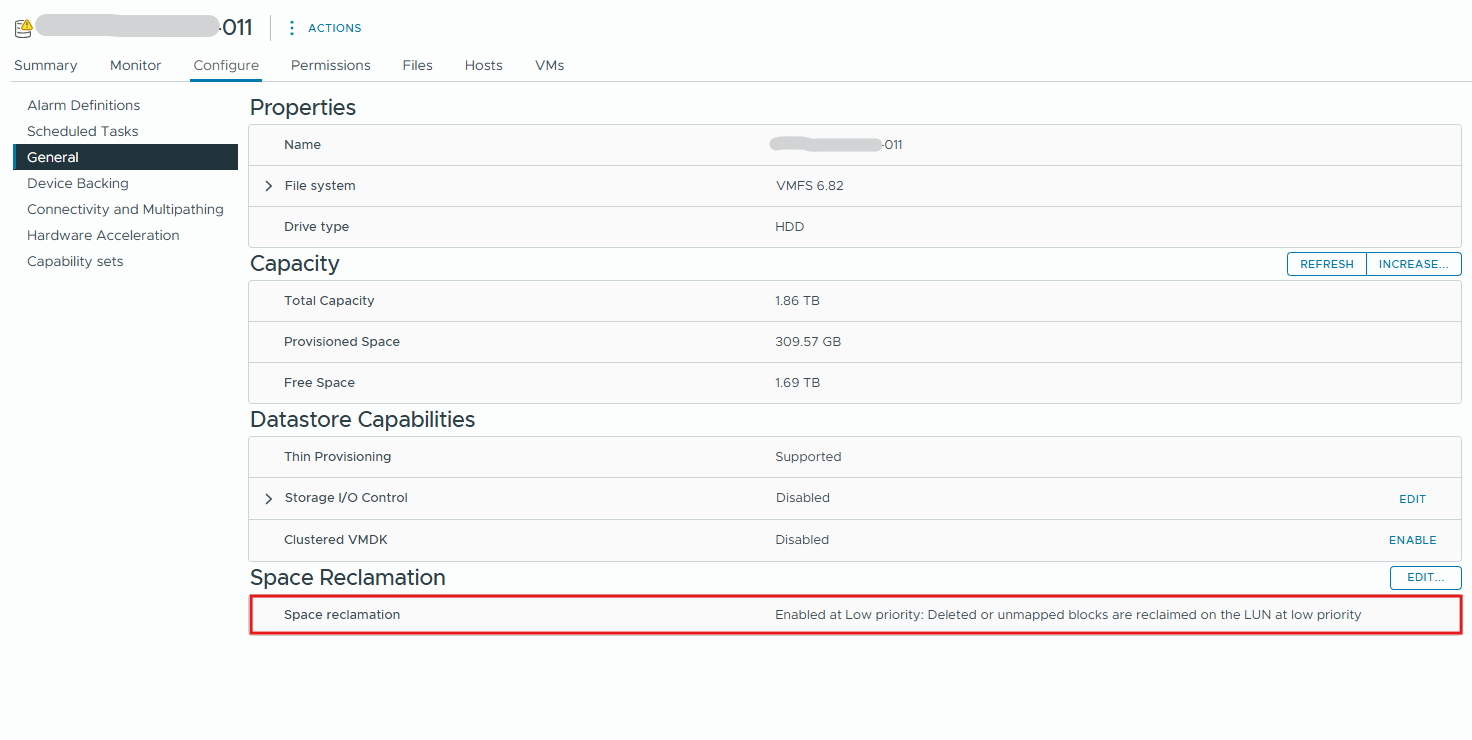
The configuration can be checked in the vSphere Client:
In our environment, the datastore reports:
Enabled at Low priority: Deleted or unmapped blocks are reclaimed on the LUN at low priority.This indicates that automatic space reclamation is enabled at the VMFS level. However, this setting alone does not guarantee that the storage array can process automatic UNMAP requests successfully.
Datastore → Configure → General → Space Reclamation
Dell PowerVault ME5 and the 4 MB Allocation Page Limitation
The Dell PowerVault ME5 series manages physical storage using 4 MB allocation pages.
According to Dell’s documentation, this allocation granularity is incompatible with VMware’s automatic VMFS6 space reclamation mechanism.
Consequently, even though ESXi reports:
Delete Status: supported
and the VMFS datastore has automatic space reclamation enabled, unused capacity may not be returned to the Dell storage pool automatically.
Dell therefore recommends using manual SCSI UNMAP to reclaim unused physical capacity.
A practical test involving the migration of two virtual machines between datastores on different Dell storage pools confirmed this behavior: While VMware successfully released the occupied datastore space, the corresponding physical capacity was not immediately reclaimed by the Dell PowerVault ME5024.
Performing Manual Space Reclamation
VMware ESXi provides the following command to initiate space reclamation manually:
esxcli storage vmfs unmap --volume-label=<datastore_name>
Alternatively, the datastore’s VMFS UUID can be specified:
esxcli storage vmfs unmap --volume-uuid=<vmfs_uuid>
The command instructs ESXi to identify free blocks within the VMFS datastore and issue UNMAP requests to the underlying storage device.
If the Dell array can reclaim the corresponding allocations, the physical storage pool’s available capacity may increase.
Important: Manual UNMAP is an active storage operation that can generate additional I/O load. It should be scheduled during an appropriate maintenance window, particularly in production environments.
Furthermore, the amount of physical capacity recovered depends on the underlying allocation granularity and whether entire allocation pages can be released.
Verifying Space Reclamation
After executing manual UNMAP, the results can be checked in the Dell PowerVault Manager:
Dashboard → Capacity
Compare the physical pool utilization before and after the operation.
A successful reclamation should result in reduced physical storage consumption, provided that reclaimable allocation pages exist.
In this investigation, we only verified SCSI UNMAP support and the VMFS6 configuration. No manual UNMAP operation or storage migration was performed.
Links
PowerVault ME4, ME5: Host operating system space consumption does not match pool space consumption
https://www.dell.com/support/kbdoc/en-us/000227620/powervault-me4-me5-host-operating-system-space-consumption-does-not-match-pool-space-consumptionStorage array space not reclaimed after Guest OS cleanup on VMFS
https://knowledge.broadcom.com/external/article/323112Space reclamation (UNMAP) is slow on Storage array
https://knowledge.broadcom.com/external/article/452963/space-reclamation-unmap-is-slow-on-stora.html