How Windows Server October 2026 Updates Break NetApp ONTAP LDAP Authentication – Kerberos, SPNs, and LDAP Signing Explained
The October 2026 Windows Server security updates introduced changes to LDAP authentication that can affect NetApp ONTAP environments integrated with Microsoft Active Directory. Previously working LDAP connections may suddenly fail after domain controllers receive these updates, even though no configuration changes have been made on the ONTAP side.
In addition to the October 2026 security update, Windows Server 2025 introduces another LDAP security hardening mechanism: LDAP signing is enforced by default on newly deployed domain controllers, independently of the October update. Although this can also cause LDAP authentication failures when ONTAP uses session-security-for-ad-ldap none, the underlying cause is different. Both issues can be resolved by configuring session-security-for-ad-ldap sign on ONTAP, enabling LDAP signing and using the appropriate Kerberos LDAP service principal.
In this article, we reproduce both issues in a controlled lab environment using NetApp ONTAP Select and Windows Server 2022 and 2025 domain controllers. By comparing authentication behavior before and after installing the security update, we examine what actually happens behind the scenes.
We will explore the differences between ONTAP’s session-security-for-ad-ldap none and sign settings, investigate Kerberos authentication and Service Principal Names (SPNs), and examine the role of DNS reverse lookups (PTR records). Using network packet captures and authentication logs from both Windows Server and ONTAP, we will trace the authentication process, distinguish Kerberos from NTLM, and identify why previously accepted LDAP authentication attempts can fail.
Finally, we will demonstrate how to resolve these issues and explain the underlying authentication mechanisms rather than simply applying a configuration workaround.
- Solution – Fixing LDAP Authentication Failures in NetApp ONTAP
- Understanding the Role of LDAP in SMB and NFS Authentication
- NTLM vs. Kerberos vs. LDAP – Authentication Protocols and Network Ports
- Understanding Service Principal Names (SPNs) in Kerberos Authentication
- LDAP Authentication Before the October 2026 Windows Server Security Update
- Lab Environment – NetApp ONTAP Select and Active Directory
- Current ONTAP Select configuration
- Verifying SMB Share Access and Active Directory Connectivity
- Capture the existing LDAP configuration
- Configuring the Preferred Active Directory Domain Controller
- Capturing LDAP and Kerberos Authentication Traffic
- LDAP Authentication After the October 2026 Windows Server Security Update
- Analyzing LDAP Authentication Failures Using ONTAP SECD Logs
- Potential Impact of LDAP Authentication Failures on ONTAP Workloads
- Links
Solution – Fixing LDAP Authentication Failures in NetApp ONTAP
NetApp addresses this issue in its official Customer Bulletin SU628, which provides the recommended remediation steps, including the required ONTAP configuration changes and DNS PTR record verification.
NetApp distinguishes between a configuration-based workaround and a permanent software fix for this issue.
The recommended workaround is to configure the affected Storage Virtual Machine (SVM) to use LDAP signing (sign) or sealing (seal) instead of none.
The permanent solution is to upgrade to an ONTAP release containing the fix for CONTAP-821088, which addresses the Kerberos SPN compatibility issue introduced by the October 2026 Windows Server security updates. The affected ONTAP versions and corresponding fixed releases are documented in NetApp Customer Bulletin SU628.
vserver cifs security modify -vserver <SVM_NAME> -session-security-for-ad-ldap sign
Verify the configuration:
vserver cifs security show -vserver <SVM_NAME> -fields session-security-for-ad-ldap
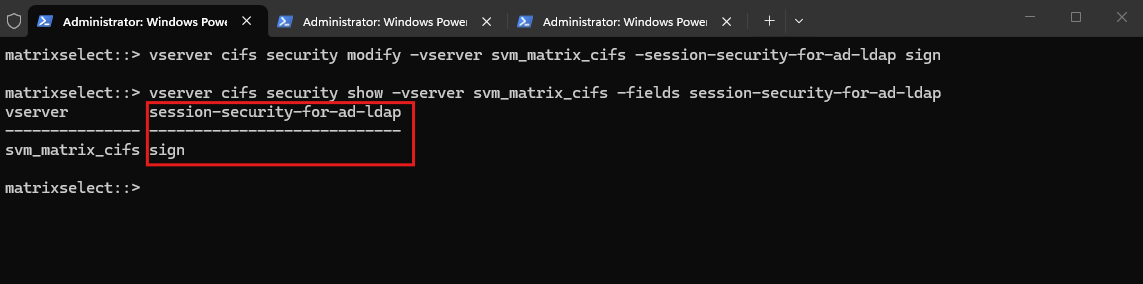
Ensure that the domain controllers have valid forward and reverse DNS records, including PTR records, and verify Active Directory connectivity from each ONTAP node:
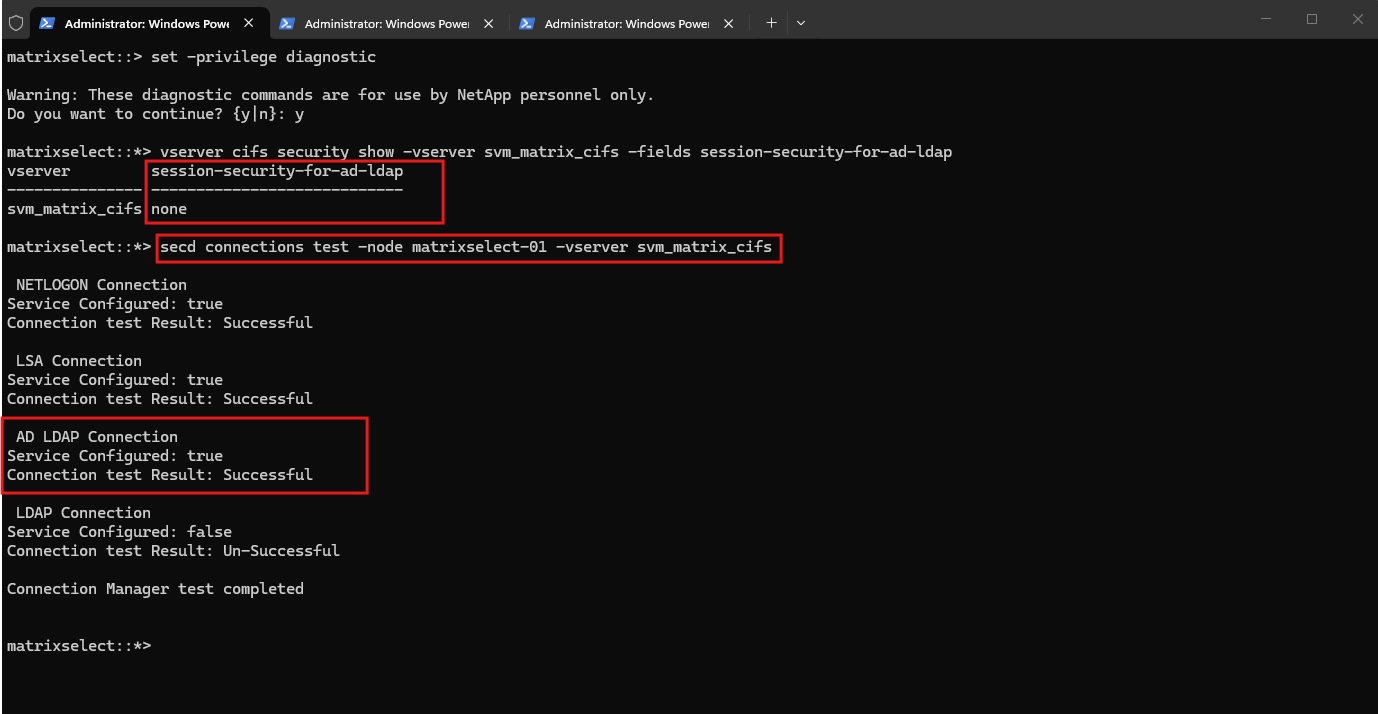
set -privilege diagnostic
secd connections test -node <NODE_NAME> -vserver <SVM_NAME>
The AD LDAP Connection should report Successful.
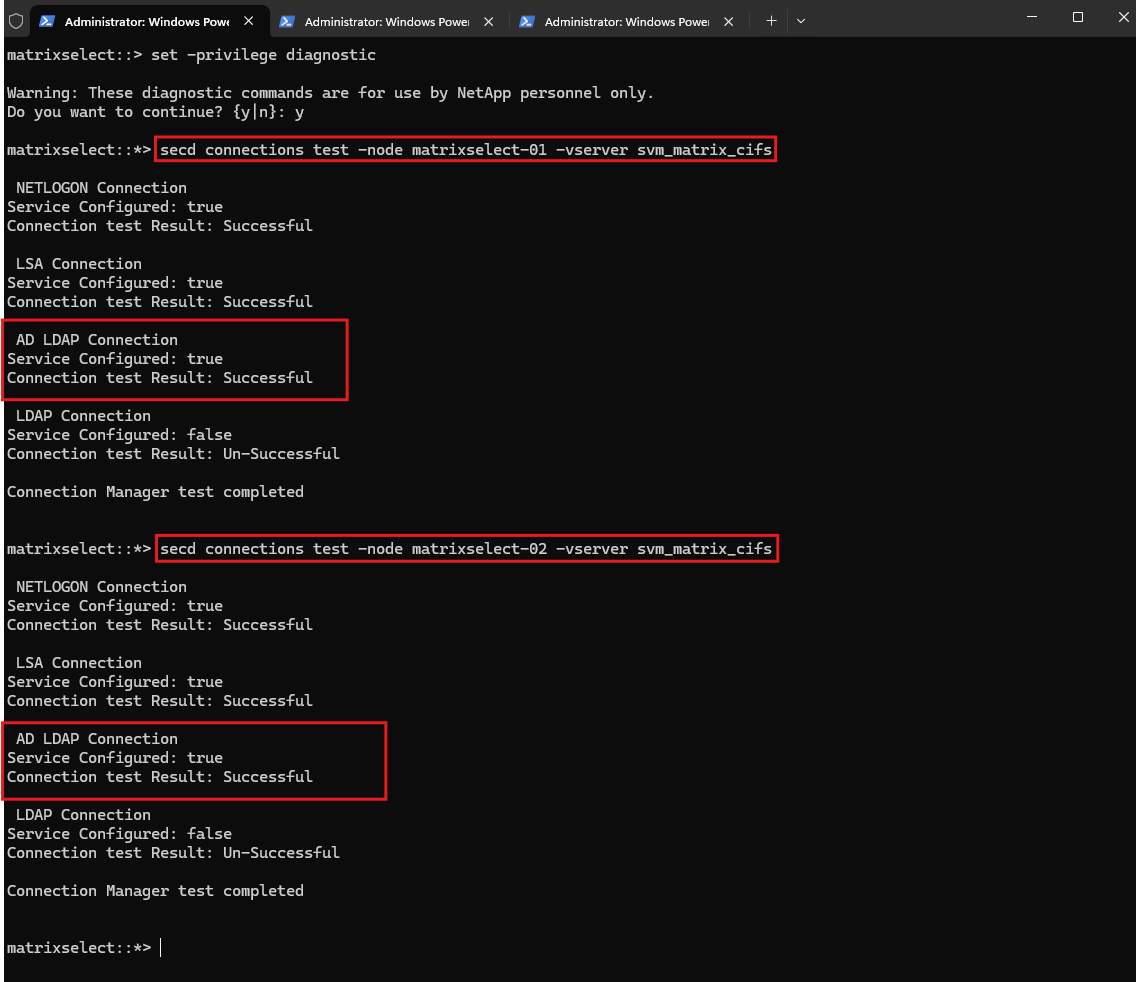
The AD LDAP Connection should report Successful.
With LDAP signing enabled, ONTAP uses the appropriate ldap/ Kerberos Service Principal Name (SPN), resolving the authentication failure without weakening the domain controller’s security settings.
In the following sections, we will reproduce the failures using NetApp ONTAP Select and Windows Server 2022/2025 domain controllers. Using Wireshark captures, Kerberos service tickets, LDAP responses, and ONTAP SECD logs, we will examine exactly why authentication fails and how LDAP signing resolves the issue.
Important: DNS PTR Records When Enabling LDAP Signing
Unlike session-security-for-ad-ldap=none, the sign setting uses reverse DNS (PTR) resolution to determine the domain controller’s hostname when constructing the Kerberos LDAP service principal.
If the PTR record is missing or incorrect, ONTAP may fail to obtain the appropriate ldap/<DC-FQDN> service ticket, even when the LDAP SPN is correctly registered in Active Directory. Therefore, valid PTR records for all relevant domain controllers are an important prerequisite before switching to LDAP signing.
Understanding the Role of LDAP in SMB and NFS Authentication
Before examining the impact of Microsoft’s October 2026 LDAP security hardening, it is important to distinguish between client authentication and Active Directory LDAP operations.
When Windows clients access SMB shares hosted by NetApp ONTAP, authentication typically relies on Kerberos or NTLM, rather than LDAP itself.
For NFS clients, authentication works differently. Traditional NFSv3 and NFSv4 deployments commonly use AUTH_SYS, where the client supplies UNIX user and group identifiers (UID/GID). NFSv4 can also use Kerberos through RPCSEC_GSS for stronger authentication, as described in my separate article below.
Neither SMB nor NFS inherently requires LDAP as its primary authentication protocol.
However, ONTAP can use LDAP for directory-related operations, including:
- Retrieving user and group information from Active Directory or UNIX LDAP directories.
- Resolving identities and performing Windows-to-UNIX or UNIX-to-Windows name mapping, as covered in my previous articles on NetApp ONTAP Name Mapping.
- Supporting authorization and access control, particularly in multiprotocol SMB/NFS environments.
Consequently, an unavailable LDAP connection does not necessarily prevent Windows SMB clients or NFS clients from accessing their shares and exports. Whether access succeeds depends on the authentication mechanism, identity configuration, cached information, and directory dependencies.
This behavior was confirmed for Windows SMB access in my lab: Even though both domain controllers were marked unavailable for MS-LDAP connections, a Windows client successfully established a new SMB session after its previous session had been explicitly terminated on ONTAP.
vserver cifs domain discovered-servers show -vserver svm_matrix_cifs
vserver cifs session show -vserver svm_matrix_cifs
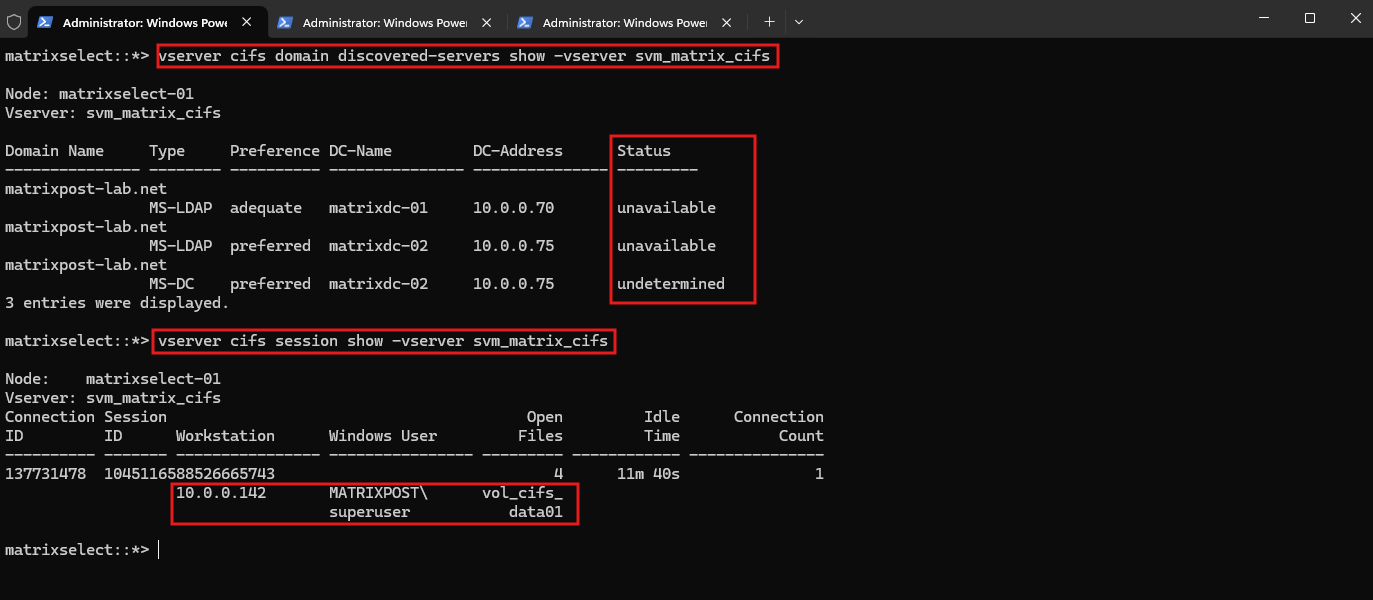
Nevertheless, LDAP remains an important dependency for certain directory and identity operations. Microsoft’s October 2026 LDAP SPN hardening, as well as the default LDAP signing enforcement introduced with Windows Server 2025, can therefore affect SMB workloads and potentially multiprotocol environments that depend on Active Directory LDAP, even though LDAP is not the primary SMB or NFS authentication protocol. Both security mechanisms operate independently but can cause LDAP authentication failures when ONTAP is configured with session-security-for-ad-ldap none.
NTLM vs. Kerberos vs. LDAP – Authentication Protocols and Network Ports
Although NTLM, Kerberos, and LDAP are frequently mentioned together in Microsoft Active Directory environments, they serve different purposes.
- NTLM (NT LAN Manager): A challenge-response authentication protocol. For domain accounts, an SMB server such as NetApp ONTAP can validate NTLM authentication through the domain controller’s NETLOGON service.
- Kerberos: A ticket-based authentication protocol. Clients obtain tickets from the domain controller’s Key Distribution Center (KDC) and present service tickets to access resources such as SMB shares.
- LDAP (Lightweight Directory Access Protocol): A directory access protocol used to query and manage information such as users, groups, and directory attributes. LDAP also supports authentication binds, but it is not the SMB authentication protocol itself.
Common Network Ports and Services
| Protocol / Service | Port | Purpose |
|---|---|---|
| SMB / CIFS | TCP 445 | Client access to SMB shares |
| Kerberos / KDC | TCP/UDP 88 | Kerberos authentication and ticket requests |
| Kerberos password change | TCP/UDP 464 | Password changes using Kerberos |
| LDAP | TCP/UDP 389 | Active Directory directory queries and LDAP authentication |
| LDAPS | TCP 636 | LDAP over TLS |
| Global Catalog | TCP 3268 | Forest-wide directory searches |
| Global Catalog over TLS | TCP 3269 | Encrypted Global Catalog access |
| DNS | TCP/UDP 53 | Domain controller discovery and name resolution |
| RPC Endpoint Mapper | TCP 135 | Locating RPC services on domain controllers |
| NETLOGON / MSRPC | TCP 445, RPC dynamic ports | Domain authentication services, including NTLM validation |
| NFS | TCP 2049 | NFS client access to exported file systems |
Important: NTLM does not have its own dedicated TCP or UDP port. It is an authentication mechanism carried within protocols such as SMB, while domain authentication validation can involve NETLOGON over RPC.
For example, when signing in to a domain-joined Windows client using NTLM, the computer communicates with an Active Directory domain controller through its NETLOGON secure channel, commonly using TCP 445 (RPC over SMB via
\PIPE\NETLOGON). Depending on the RPC transport, TCP 135 and dynamic RPC ports may also be involved.The NETLOGON secure channel is authenticated using the computer’s Active Directory machine account. LDAP is not required for the actual NTLM credential validation, although it may be used for other Active Directory operations.
Similarly, Kerberos authentication does not inherently require an LDAP connection. However, NetApp ONTAP may still need LDAP for identity resolution, group information, name mapping, and authorization.
For NFS, AUTH_SYS authentication uses UNIX UID/GID information, while Kerberos-enabled NFS uses RPCSEC_GSS. LDAP may be involved in resolving identities, but it is not required for every NFS connection.
This distinction becomes particularly important when troubleshooting Microsoft’s October 2026 LDAP SPN hardening: An LDAP connection failure does not automatically mean that Kerberos, NTLM, SMB, or NFS authentication must fail.
Understanding Service Principal Names (SPNs) in Kerberos Authentication
A Service Principal Name (SPN) uniquely identifies a service instance in Active Directory and allows Kerberos clients to request a service ticket for that particular service.
An SPN typically consists of a service class and a hostname, for example:
cifs/matrixdc-01.matrixpost-lab.net– identifies the SMB/CIFS service.ldap/matrixdc-01.matrixpost-lab.net– identifies the LDAP service.
When a client requests a Kerberos service ticket, the Key Distribution Center (KDC) uses the requested SPN to locate the corresponding service account and issue a ticket for that service.
This distinction is particularly important for the October 2026 Windows Server security updates. With session-security-for-ad-ldap=none, affected ONTAP versions can use a Kerberos ticket targeting the cifs/ SPN when authenticating to Active Directory LDAP.
Following Microsoft’s security hardening, patched domain controllers require the appropriate ldap/ SPN for LDAP authentication and reject the mismatched service ticket, resulting in LDAP error 49 (invalidCredentials).
Configuring session-security-for-ad-ldap=sign changes ONTAP’s LDAP authentication behavior to use the appropriate LDAP service principal, allowing authentication to succeed when the other requirements are satisfied.
LDAP Authentication Before the October 2026 Windows Server Security Update
Before installing the October 2026 Windows Server security updates, NetApp ONTAP could successfully authenticate against Windows Server 2022 Active Directory domain controllers with session-security-for-ad-ldap configured as none, provided LDAP signing was not enforced.
In this first section, we examine the authentication behavior using NetApp ONTAP Select and an unpatched Windows Server 2025 domain controller, with its additional LDAP signing enforcement policy disabled to reproduce the behavior of an unpatched Windows Server 2022 domain controller.
We will verify the existing ONTAP configuration, establish a successful LDAP connection, and capture the authentication traffic to understand which Kerberos service tickets are requested and accepted by the domain controller.
This provides a baseline for comparing the authentication behavior after installing the October 2026 security update.
Lab Environment – NetApp ONTAP Select and Active Directory
My lab environment consists of a two-node NetApp ONTAP Select cluster named matrixselect, running on VMware vSphere.
The cluster hosts two Storage Virtual Machines (SVMs), one providing SMB/CIFS services and the other providing NFS services. Both SVMs are operational, with dedicated management and data interfaces.
For our LDAP authentication tests, we will use the CIFS SVM (svm_matrix_cifs) connected to the Active Directory domain MATRIXPOST-LAB.NET.
The environment also includes two Microsoft Active Directory domain controllers:
- MatrixDC-01:
Windows Server 2022, with the October 2026 security update installed. - MatrixDC-02:
Windows Server 2025, running the July 2026 patch level (OS build26100.33158), without the October 2026 security update.
This configuration allows us to compare LDAP authentication behavior before and after Microsoft’s October security hardening.
About how to deploy NetApp ONTAP Select in VMware vSphere, you can read my following two part article series.
Current ONTAP Select configuration
| Component | Configuration |
|---|---|
| Cluster | matrixselect |
| Nodes | matrixselect-01, matrixselect-02 |
| Cluster management | 10.0.0.101 |
| CIFS SVM | svm_matrix_cifs |
| CIFS data LIFs | 10.0.0.106, 10.0.0.107 |
| CIFS SVM management | 10.0.0.105 |
| NFS SVM | svm_matrix_nfs |
| NFS data LIFs | 10.0.0.109, 10.0.0.111 |
vserver show
network interface show
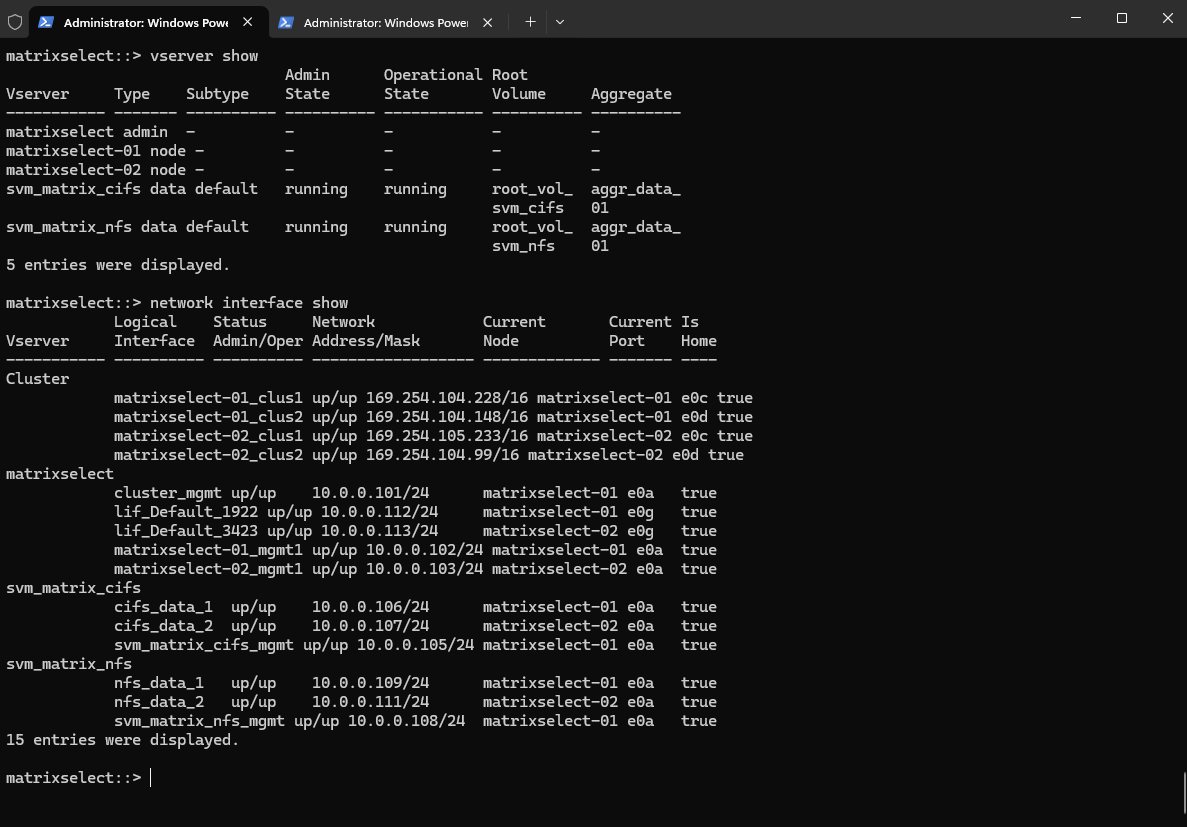
Verifying SMB Share Access and Active Directory Connectivity
Before accessing the SMB share from our Windows client, we first checked the existing LDAP authentication configuration on the CIFS SVM.
The session-security-for-ad-ldap parameter was configured as none, meaning ONTAP did not require LDAP signing or sealing for its Active Directory LDAP sessions.
LDAP Signing: Ensures the integrity and authenticity of LDAP messages by applying cryptographic signatures. This protects against message tampering but does not encrypt the LDAP data.
LDAP Sealing: Provides message integrity and confidentiality by encrypting LDAP messages using the negotiated authentication security context. This prevents attackers from reading or modifying the protected LDAP traffic.Both mechanisms can use Kerberos authentication. LDAP signing and sealing are separate from Kerberos authentication itself and do not determine which Service Principal Name (SPN) is requested.
Interestingly, the vserver cifs domain discovered-servers show command initially returned no entries. At this point, ONTAP had no domain controllers listed in its discovered-server table.
This does not necessarily indicate an Active Directory connectivity problem. Since my lab environment had no active SMB sessions before the test, ONTAP had not yet populated its domain controller discovery information, which can be dynamically updated when Active Directory services are needed.
vserver cifs security show -vserver svm_matrix_cifs -fields session-security-for-ad-ldap
vserver cifs domain discovered-servers show -vserver svm_matrix_cifs
There are no entries matching your query.

After accessing the SMB share from our Windows client, ONTAP displayed both Active Directory domain controllers in its discovered server list.
The
undeterminedstatus indicates that ONTAP has discovered the domain controller but has not yet established or verified its current availability for the corresponding service.It does not necessarily indicate a connectivity or authentication failure; the status may change once ONTAP performs the relevant service communication or connectivity checks.
Although both ONTAP nodes are serving the same CIFS SVM (
svm_matrix_cifs), each node independently maintains its own domain controller discovery information through its local security services (SECD). Therefore, the command displays discovered domain controllers separately formatrixselect-01andmatrixselect-02, ensuring that both nodes can communicate with Active Directory independently.An SVM is a logical storage server that can span multiple cluster nodes simultaneously, rather than running exclusively on one node. Its logical network interfaces (LIFs) can be hosted on different nodes, using their underlying physical network ports and network infrastructure to communicate with Active Directory. In contrast, an aggregate is owned and managed by a specific node at any given time, with its storage resources potentially taken over by the HA partner during a failover.
vserver cifs domain discovered-servers show -vserver svm_matrix_cifs
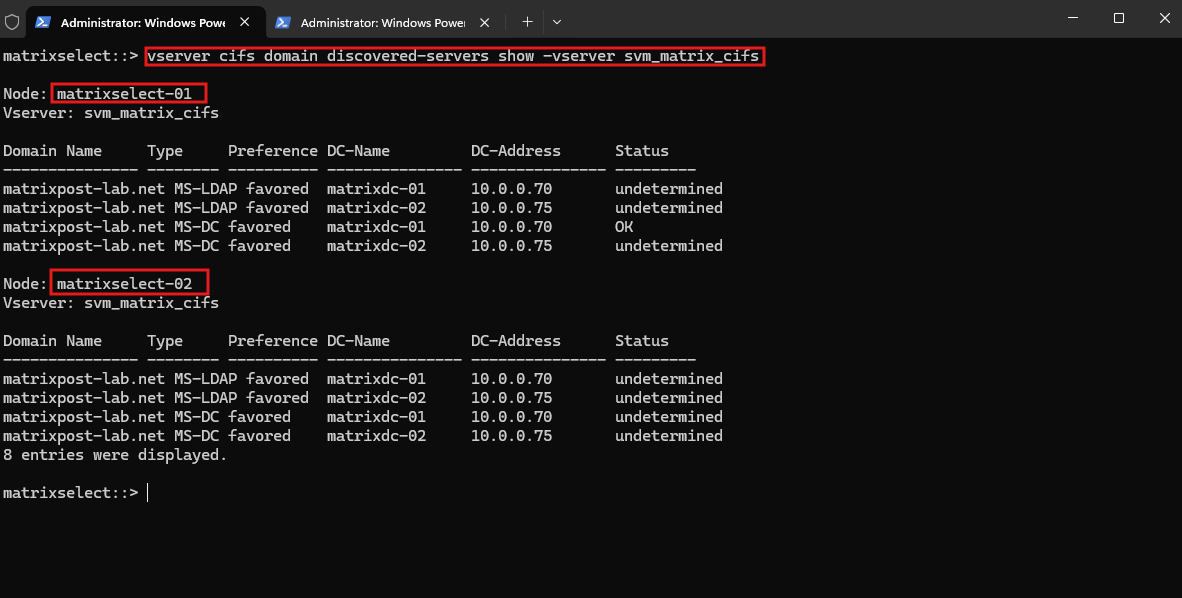
Initially, the list was empty. Following SMB access, ONTAP had populated the list with both domain controllers, identifying them as potential Microsoft LDAP (MS-LDAP) and domain controller (MS-DC) endpoints.
This demonstrates how ONTAP maintains a dynamically discovered list of Active Directory services. However, the discovery results alone do not confirm which domain controller handled authentication or whether an LDAP bind succeeded.
Capture the existing LDAP configuration
Next, we examine the existing LDAP authentication configuration of our CIFS SVM (svm_matrix_cifs) before installing the October 2026 Windows Server security update.
The session-security-for-ad-ldap parameter is currently set to none, meaning ONTAP does not require LDAP signing or sealing when communicating with Active Directory domain controllers.
vserver cifs security show -vserver svm_matrix_cifs -fields session-security-for-ad-ldap

With this configuration, ONTAP can use Kerberos authentication for LDAP connections without requiring LDAP message signing or encryption.
In the following tests, we will examine which Kerberos Service Principal Name (SPN) ONTAP requests, how the domain controller processes the authentication, and why this behavior changes after the October 2026 Windows Server security update.
Configuring the Preferred Active Directory Domain Controller
To ensure that our initial LDAP authentication tests use the Windows Server 2025 domain controller without the October 2026 security update, we configure MatrixDC-02 (10.0.0.75) as the preferred domain controller for our CIFS SVM.
Configuring a preferred domain controller does not guarantee that ONTAP will communicate exclusively with that DC, as other available domain controllers may still be selected. Therefore, to ensure that our initial tests communicate only with the unpatched MatrixDC-02, I will additionally disconnect the virtual network adapter of the patched MatrixDC-01 in my lab VMware vSphere, temporarily making it unreachable.
This allows us to investigate the original LDAP authentication behavior before introducing Microsoft’s October security hardening.
First, we can check whether a preferred DC is already configured:
vserver cifs domain preferred-dc show -vserver svm_matrix_cifs
Then I will configure MatrixDC-02 (W2K25 without October security hardening) as preferred domain controller.
vserver cifs domain preferred-dc add -vserver svm_matrix_cifs -domain matrixpost-lab.net -preferred-dc 10.0.0.75
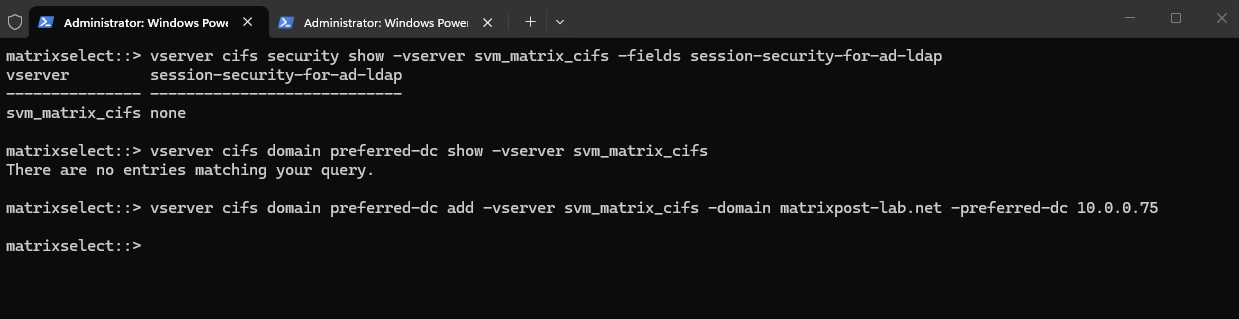
Verify:
Important: A preferred DC is not an exclusive DC. ONTAP may still contact MatrixDC-01 (
10.0.0.70), which already has the October update installed.
vserver cifs domain preferred-dc show -vserver svm_matrix_cifs
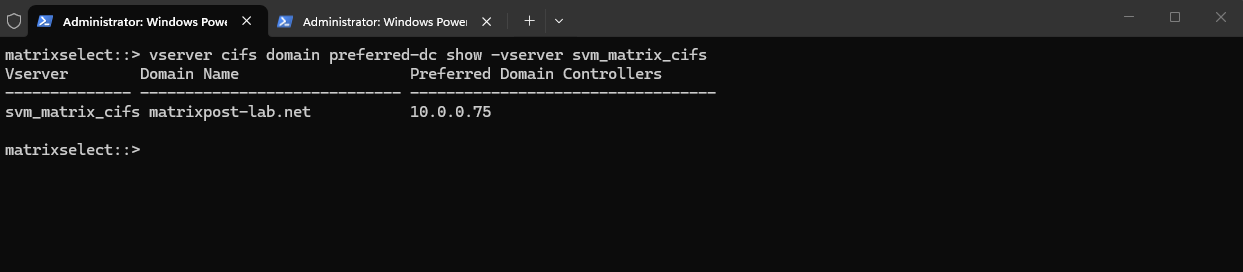
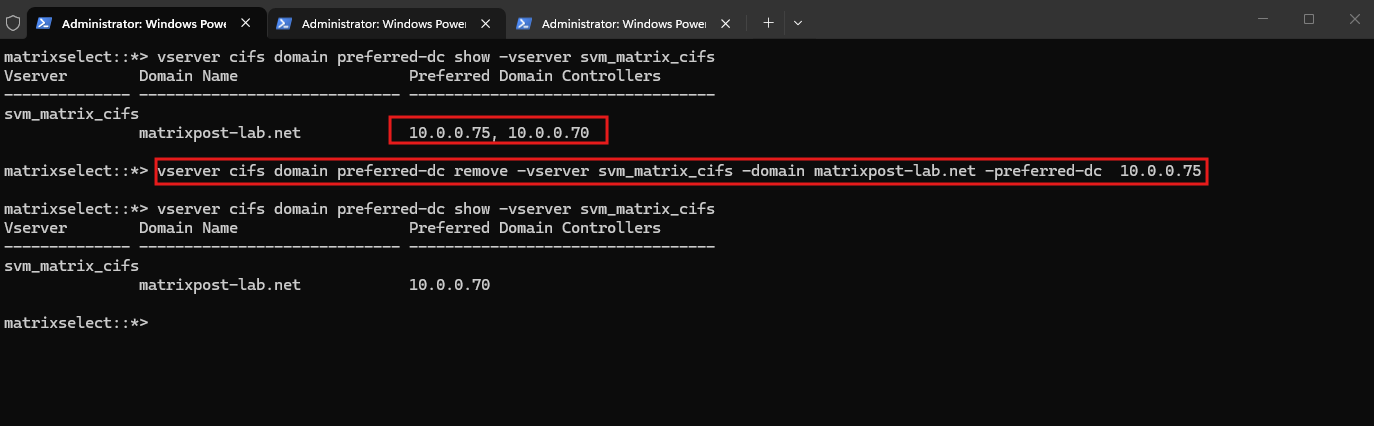
To remove a preferred domain controller we can run:
vserver cifs domain preferred-dc remove -vserver svm_matrix_cifs -domain matrixpost-lab.net -preferred-dc 10.0.0.75
Capturing LDAP and Kerberos Authentication Traffic
With MatrixDC-02 configured as the preferred domain controller, we can now investigate the authentication process between NetApp ONTAP Select and Active Directory.
For this purpose, we capture network traffic on our Windows Server 2025 domain controller using Wireshark.
Our primary focus is on Kerberos (TCP/UDP 88) and LDAP (TCP 389). By examining these protocols, we can identify the Kerberos Service Principal Name (SPN) requested by ONTAP and determine how the domain controller processes the subsequent LDAP authentication.
This capture will serve as our baseline before installing the October 2026 Windows Server security update.
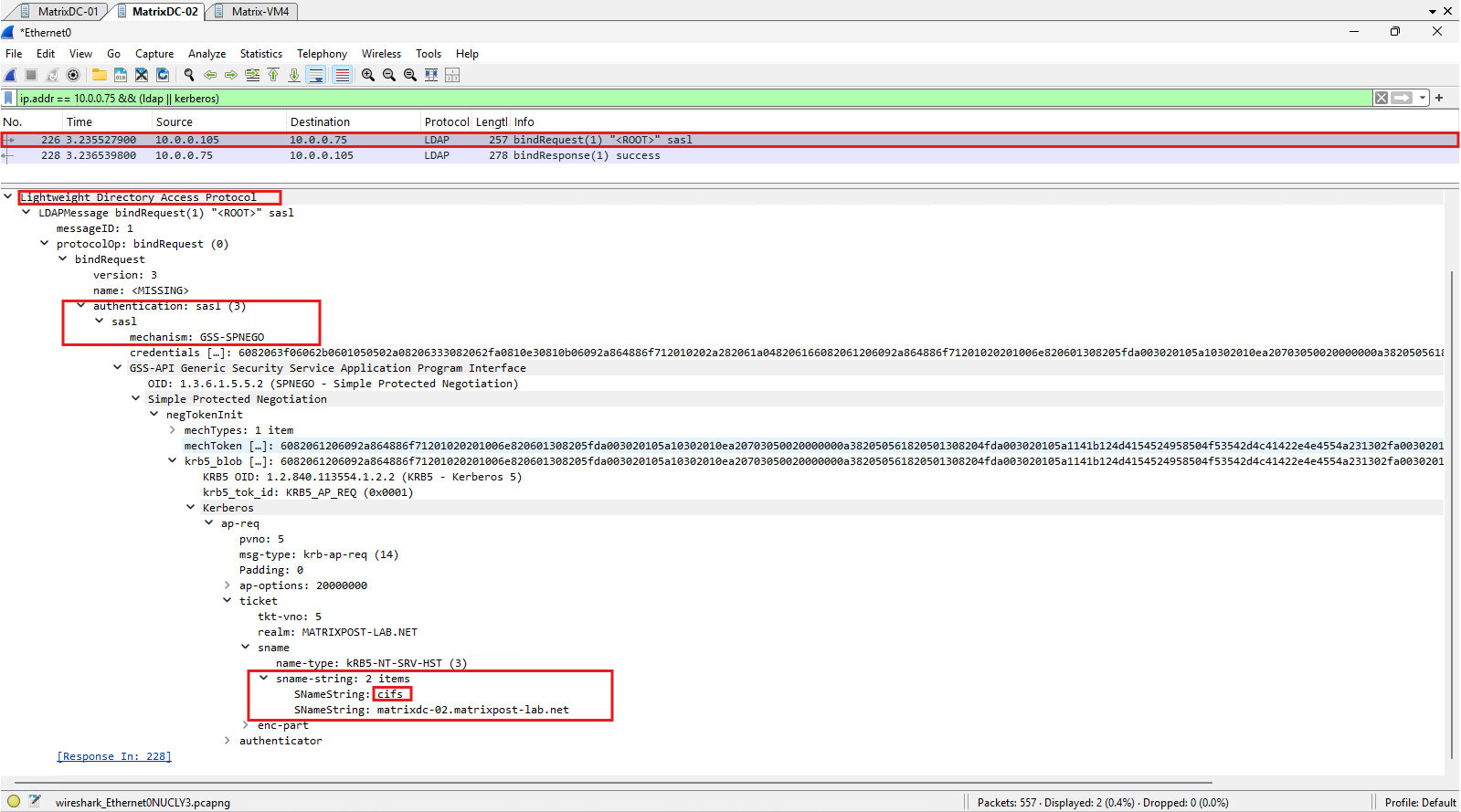
To trigger LDAP authentication traffic, we execute the secd connections test command on NetApp ONTAP Select. This initiates an AD LDAP connection test against the domain controller, allowing us to capture and analyze the authentication process using Wireshark.
secd connections test -node matrixselect-01 -vserver svm_matrix_cifs
The Wireshark capture shows that ONTAP performs an LDAP SASL bind using GSS-SPNEGO with a Kerberos service ticket for cifs/matrixdc-02.matrixpost-lab.net.
The unpatched domain controller accepts this authentication and responds with LDAP
success (0), confirming successful authentication using the legacycifs/SPN.
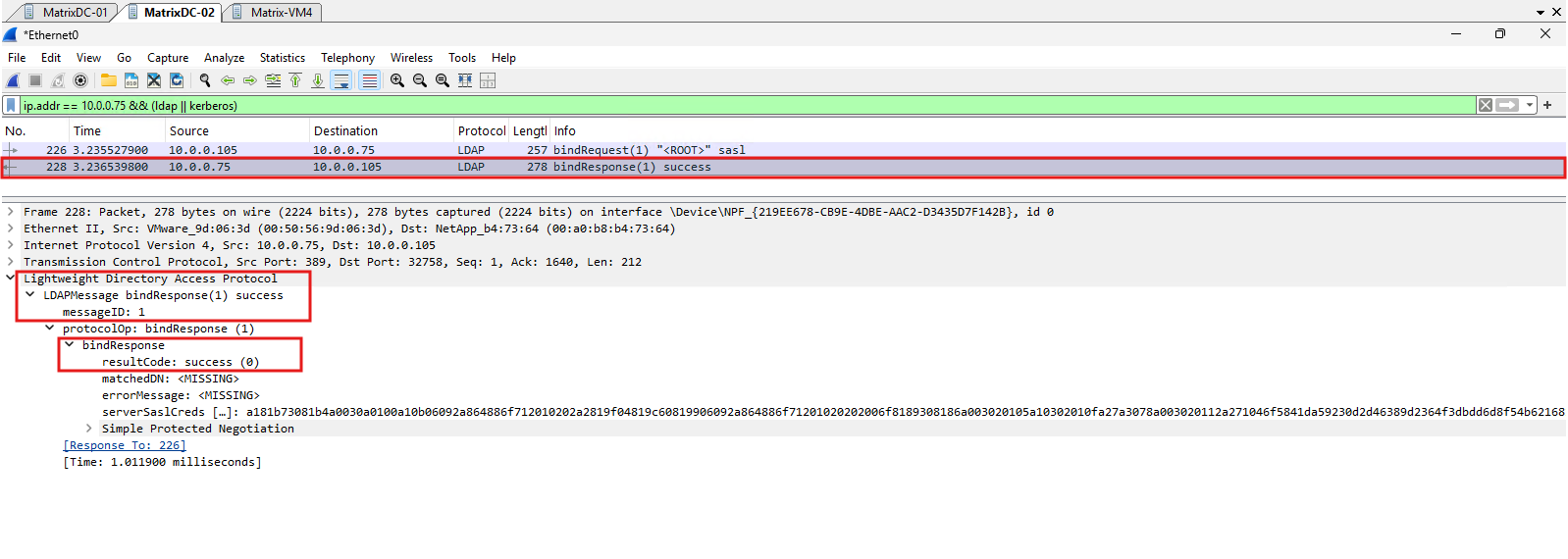
The domain controller confirms successful Kerberos-based LDAP authentication by returning LDAP success (0) in its SASL bind response.
This test was performed after explicitly disabling LDAP signing enforcement on our unpatched Windows Server 2025 domain controller shown below.
Unlike Windows Server 2022, Windows Server 2025 introduces an additional policy that enforces LDAP signing by default, even without the October 2026 security update and even when the policy is set to Not Defined.
Windows Server 2025 or later requires LDAP signing by default for new Active Directory deployments.
https://learn.microsoft.com/en-us/windows-server/identity/ad-ds/ldap-signing
Windows Server 2025 – LDAP Signing Enforcement Before the October 2026 Security Update
Microsoft officially documents this behavior in its LDAP Signing Group Policy documentation, confirming that Windows Server 2025 enforces LDAP signing by default on new Active Directory deployments, even when the enforcement policy is not explicitly configured.
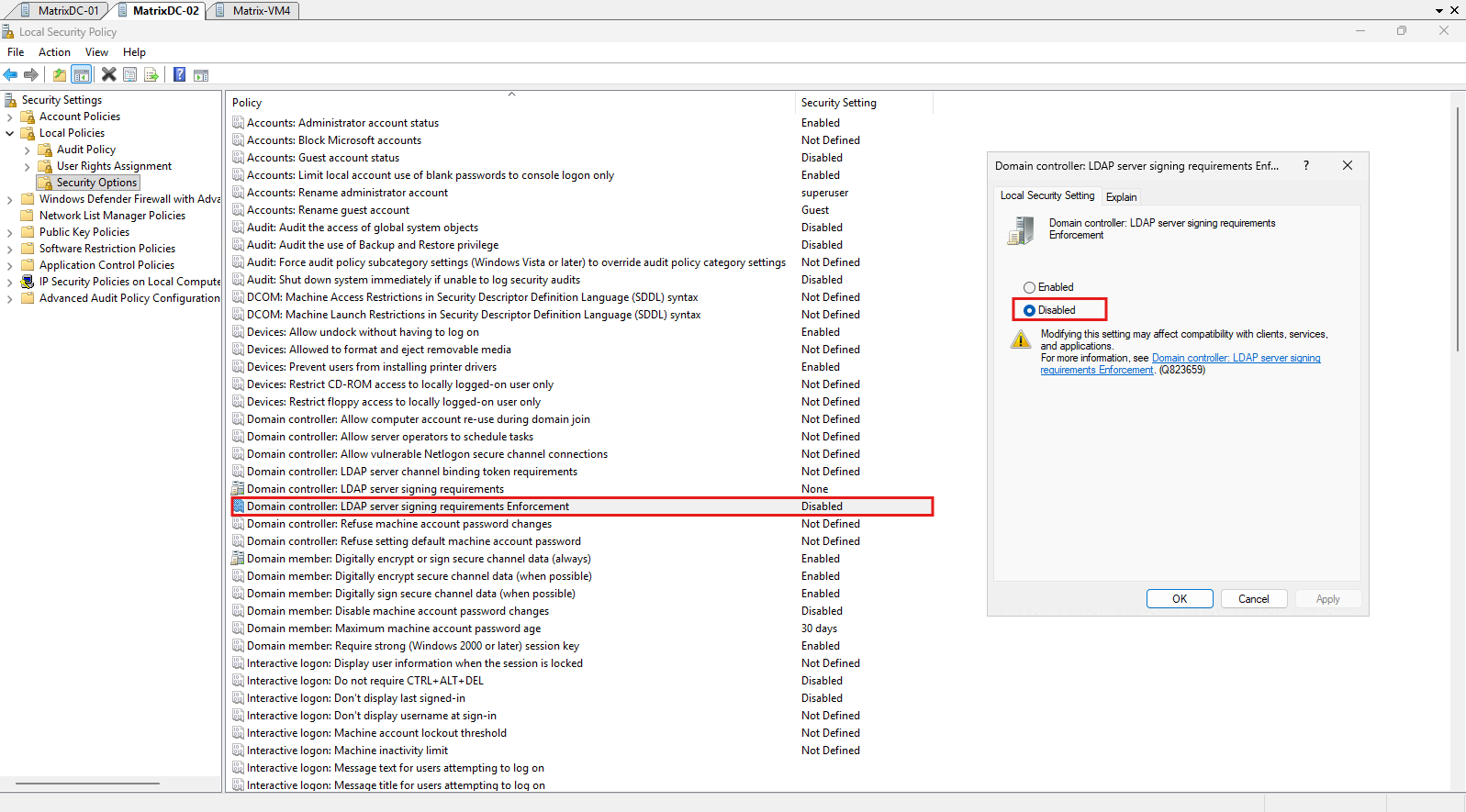
To reproduce the LDAP authentication behavior of an unpatched Windows Server 2022 domain controller, we first had to adjust an additional security setting on our unpatched Windows Server 2025 domain controller.
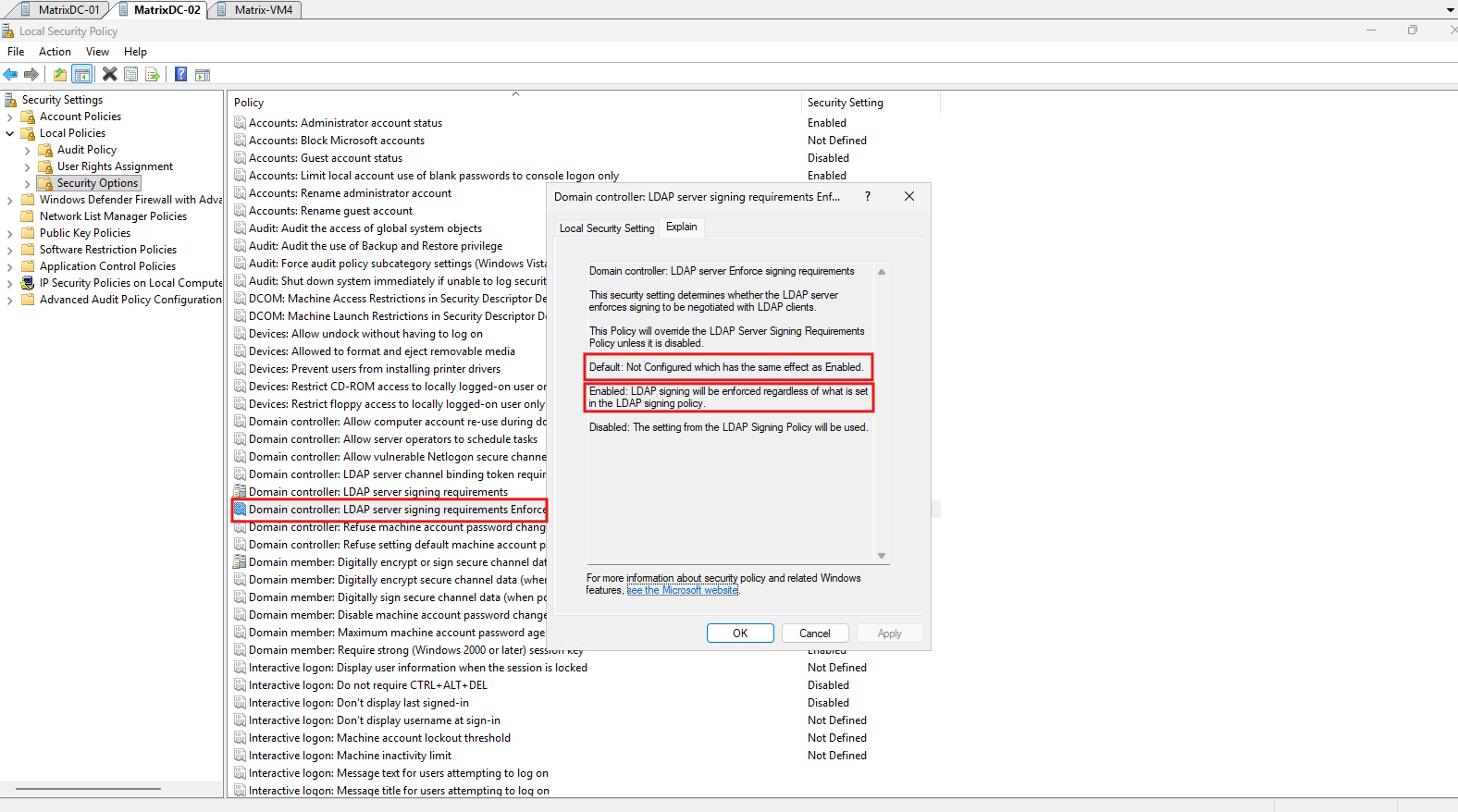
Unlike Windows Server 2022, Windows Server 2025 includes the policy Domain controller: LDAP server signing requirements Enforcement, which enforces LDAP signing by default even when the policy is Not Defined and the traditional LDAP signing requirement is set to None.
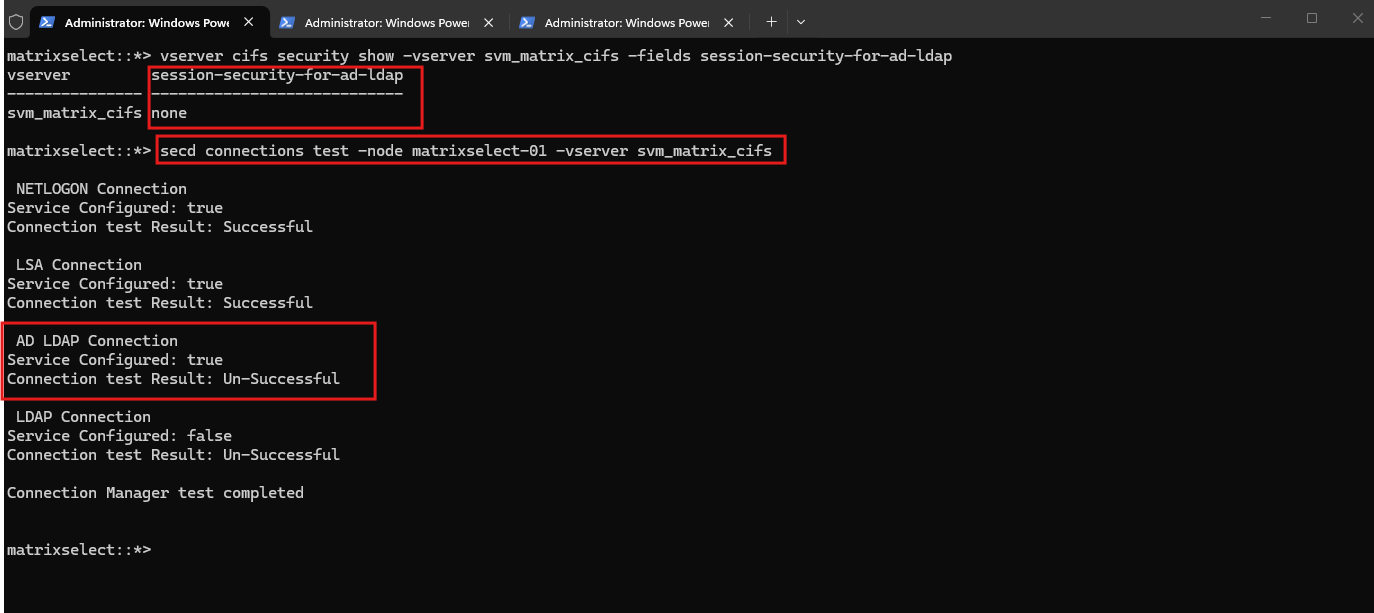
Before disabling this enforcement policy, our ONTAP connection test with session-security-for-ad-ldap none failed, and Wireshark showed the LDAP response strongAuthRequired (8). After explicitly setting enforcement to Disabled, the domain controller accepted the same Kerberos-based LDAP authentication using the legacy cifs/ SPN as shown above.
This allows us to establish a comparable pre-update baseline before examining the impact of the October 2026 LDAP SPN hardening.
These are the default LDAP signing policy settings on our unpatched Windows Server 2025 domain controller.
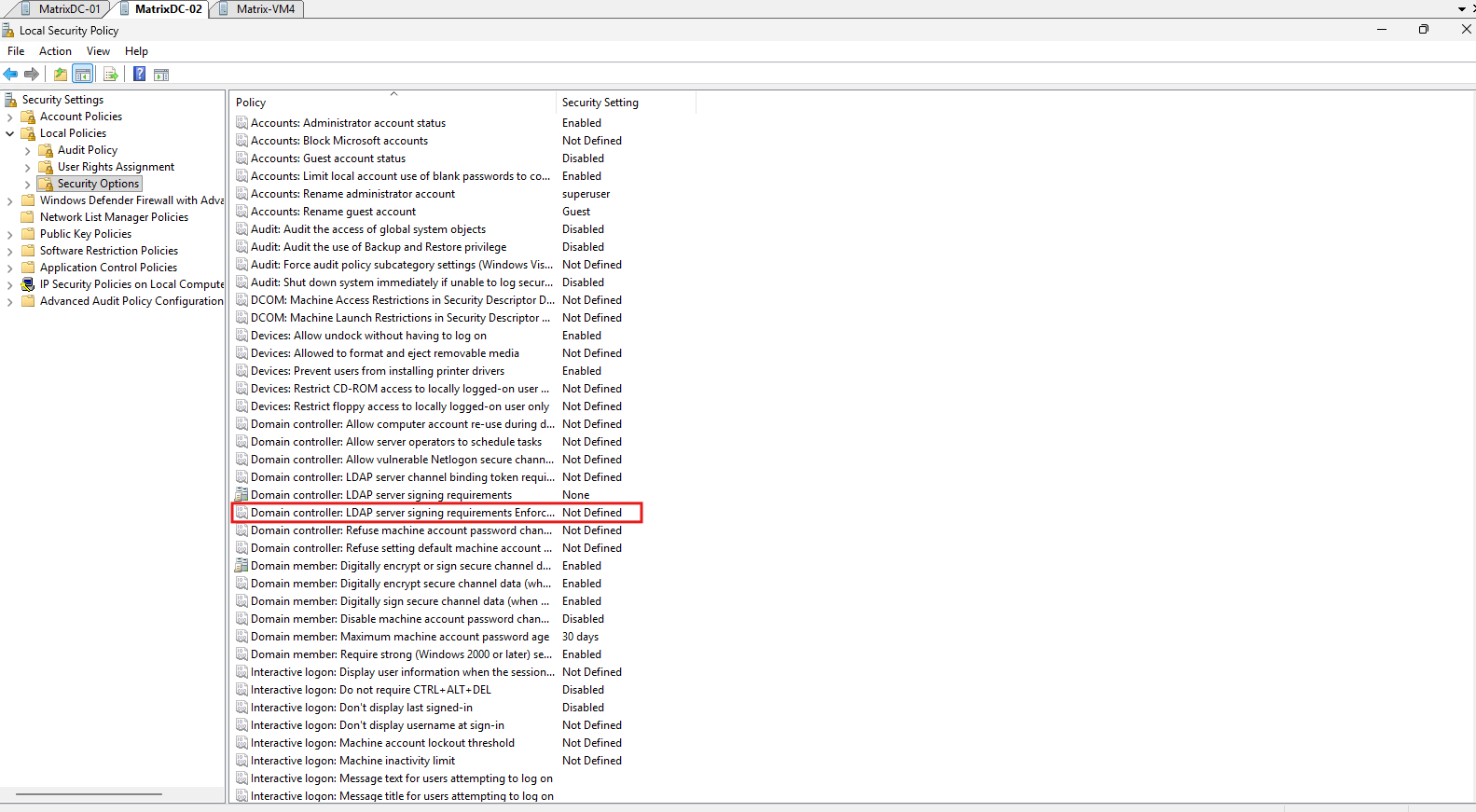
To simulate the LDAP authentication behavior of an unpatched Windows Server 2022 domain controller, we explicitly set LDAP server signing requirements Enforcement to Disabled on our Windows Server 2025 domain controller, allowing the traditional LDAP signing policy set to None to take effect.
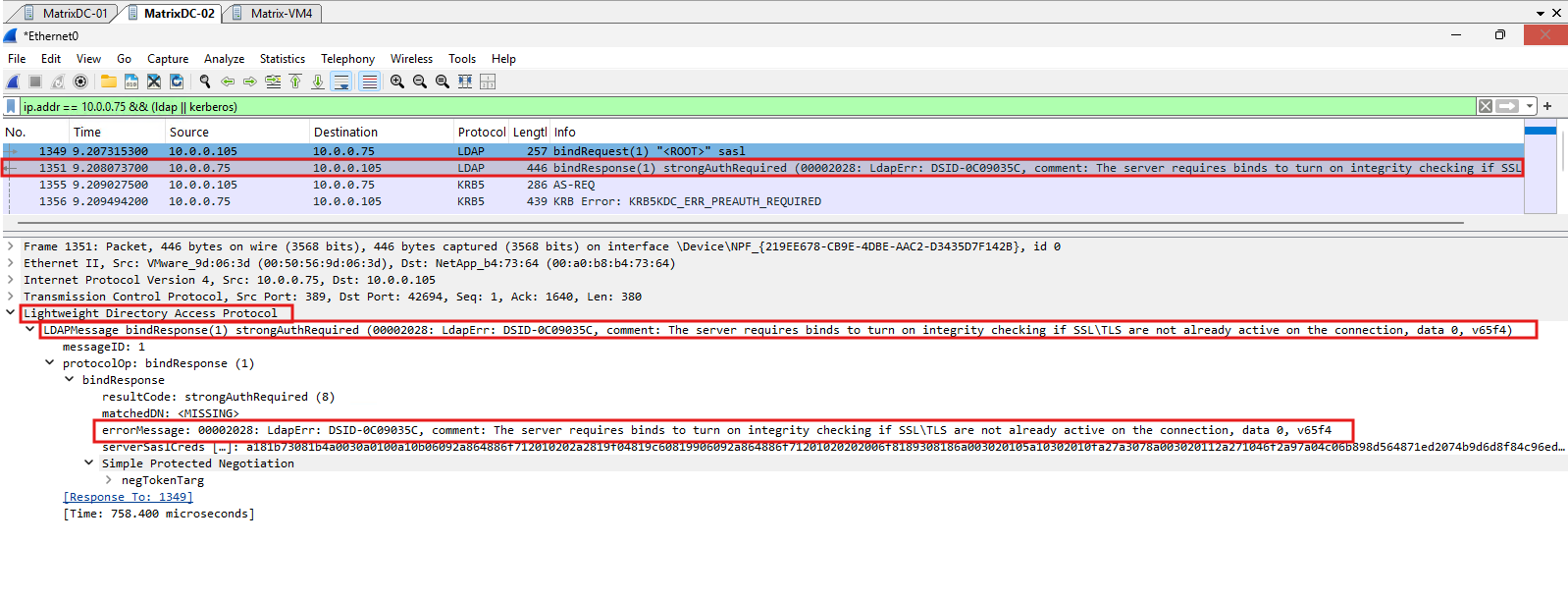
Even without the October 2026 Windows Server security update, the LDAP authentication test fails when the Windows Server 2025 LDAP signing enforcement policy remains at its default setting of Not Defined, which effectively enforces LDAP signing despite the traditional signing policy being set to None.
The Wireshark capture confirms that ONTAP still attempts Kerberos-based LDAP authentication using GSS-SPNEGO and the legacy cifs/matrixdc-02.matrixpost-lab.net SPN.
However, the domain controller rejects the LDAP bind with
strongAuthRequired (8), indicating that LDAP signing or another form of connection integrity protection is required.As we will see further below, this rejection differs from the behavior after installing the October 2026 Windows Server security update, where LDAP authentication fails with
invalidCredentials (49)because the Kerberos service principal does not match a registered LDAP SPN on the domain controller. This distinction is important because the two failures result from different security enforcement mechanisms.
ip.addr == 10.0.0.75 && (ldap || kerberos)
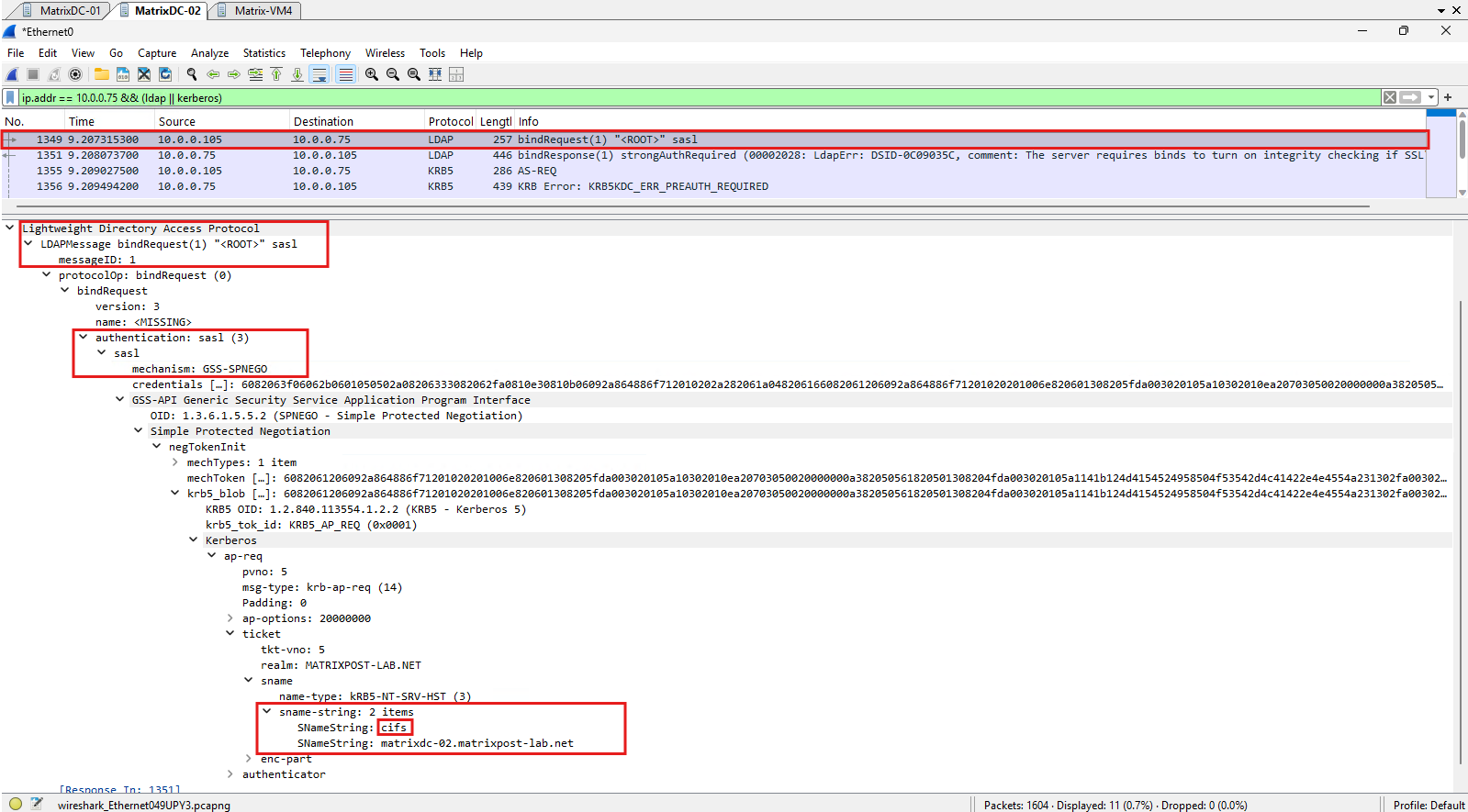
The LDAP bind response explicitly returns strongAuthRequired (8), with the diagnostic message stating that the server requires integrity checking when SSL/TLS is not active.
This confirms that authentication is rejected due to LDAP signing enforcement on Windows Server 2025 by default, independently of the October 2026 LDAP SPN hardening.
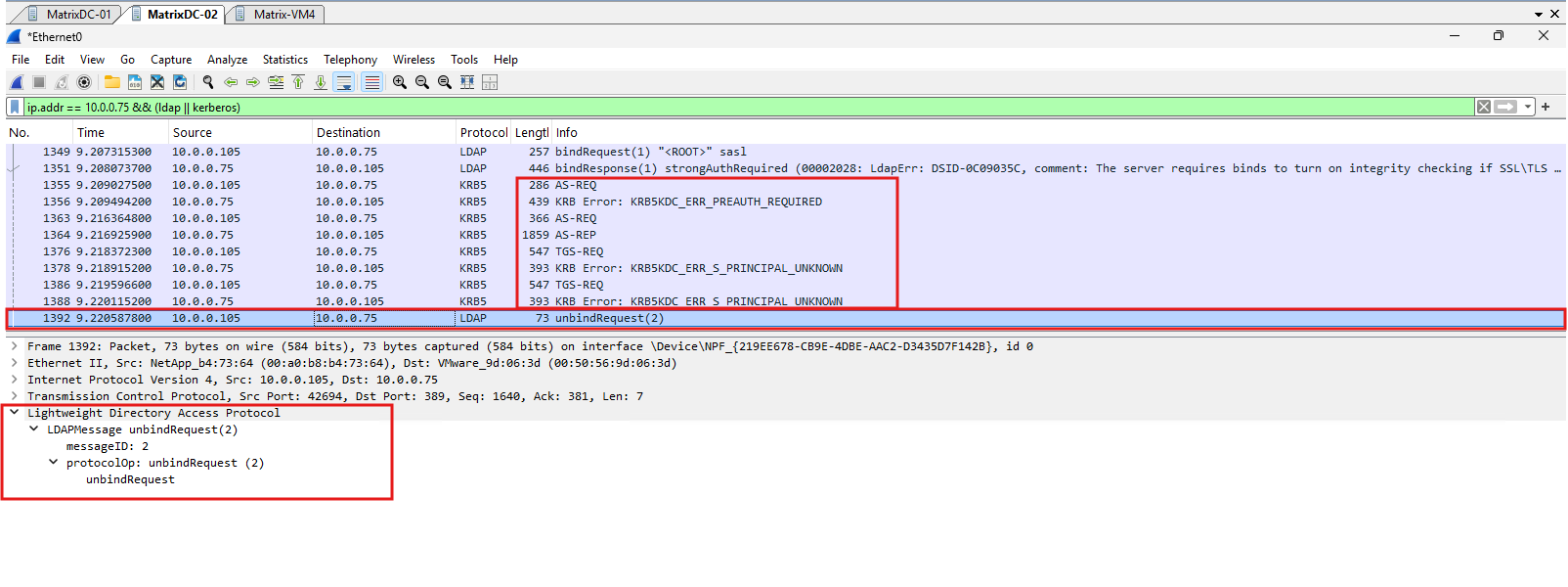
After the LDAP bind is rejected, ONTAP performs additional Kerberos authentication attempts, including TGS requests that receive KRB5KDC_ERR_S_PRINCIPAL_UNKNOWN responses.
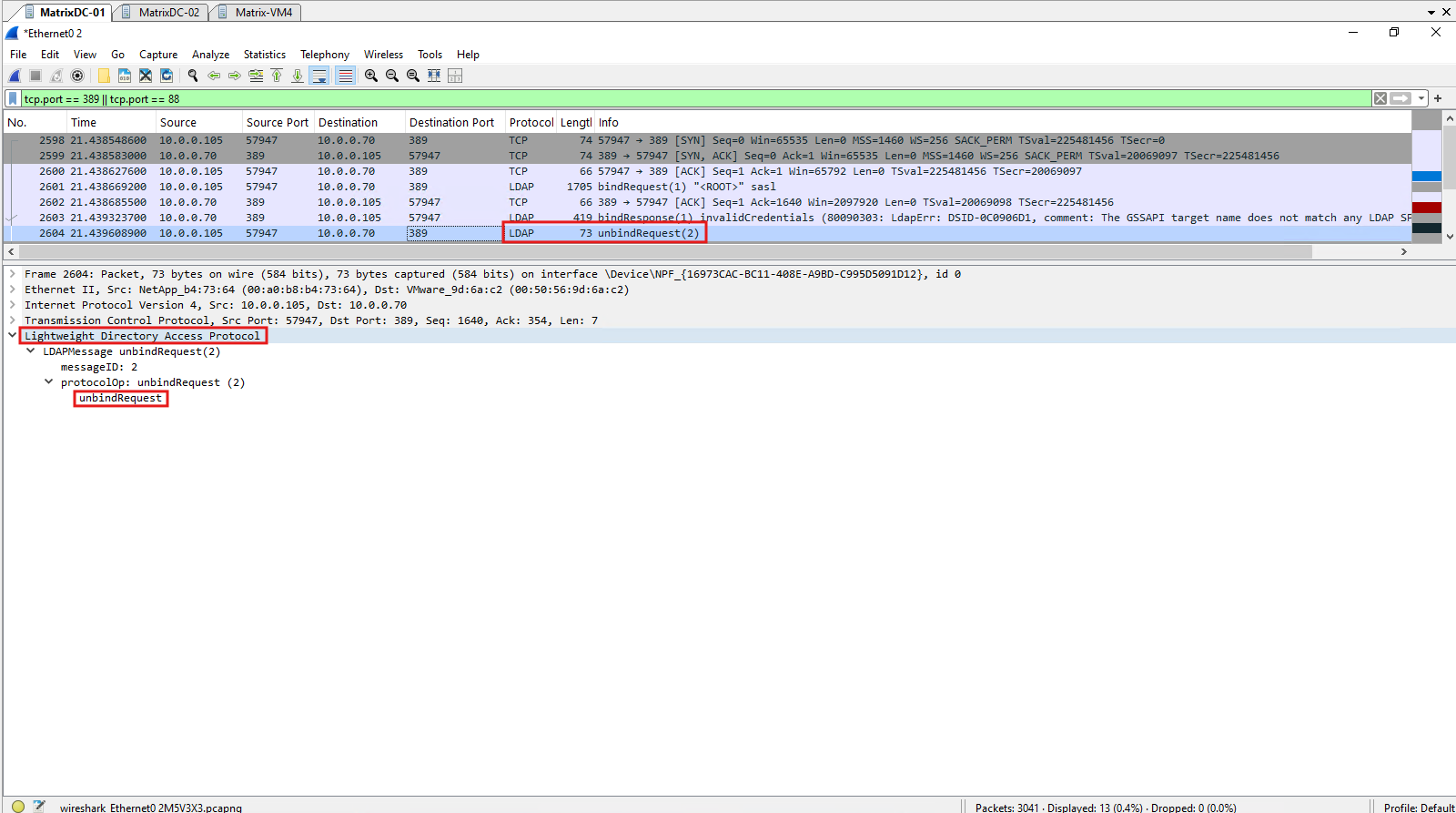
Finally, ONTAP sends an LDAP UnbindRequest, terminating the unsuccessful LDAP session.
LDAP Authentication After the October 2026 Windows Server Security Update
After examining how NetApp ONTAP authenticates against Active Directory using Kerberos and LDAP before Microsoft’s October 2026 security update, we will now investigate the behavior after the update has been installed.
For this comparison, my lab environment contains two domain controllers with different patch levels: MatrixDC-01, running Windows Server 2022 with the October 2026 security update installed, and MatrixDC-02, running Windows Server 2025 without the corresponding update.
LDAP Authentication with session-security-for-ad-ldap=none – Failed
Using the existing ONTAP configuration, we first test LDAP authentication against the patched domain controller.
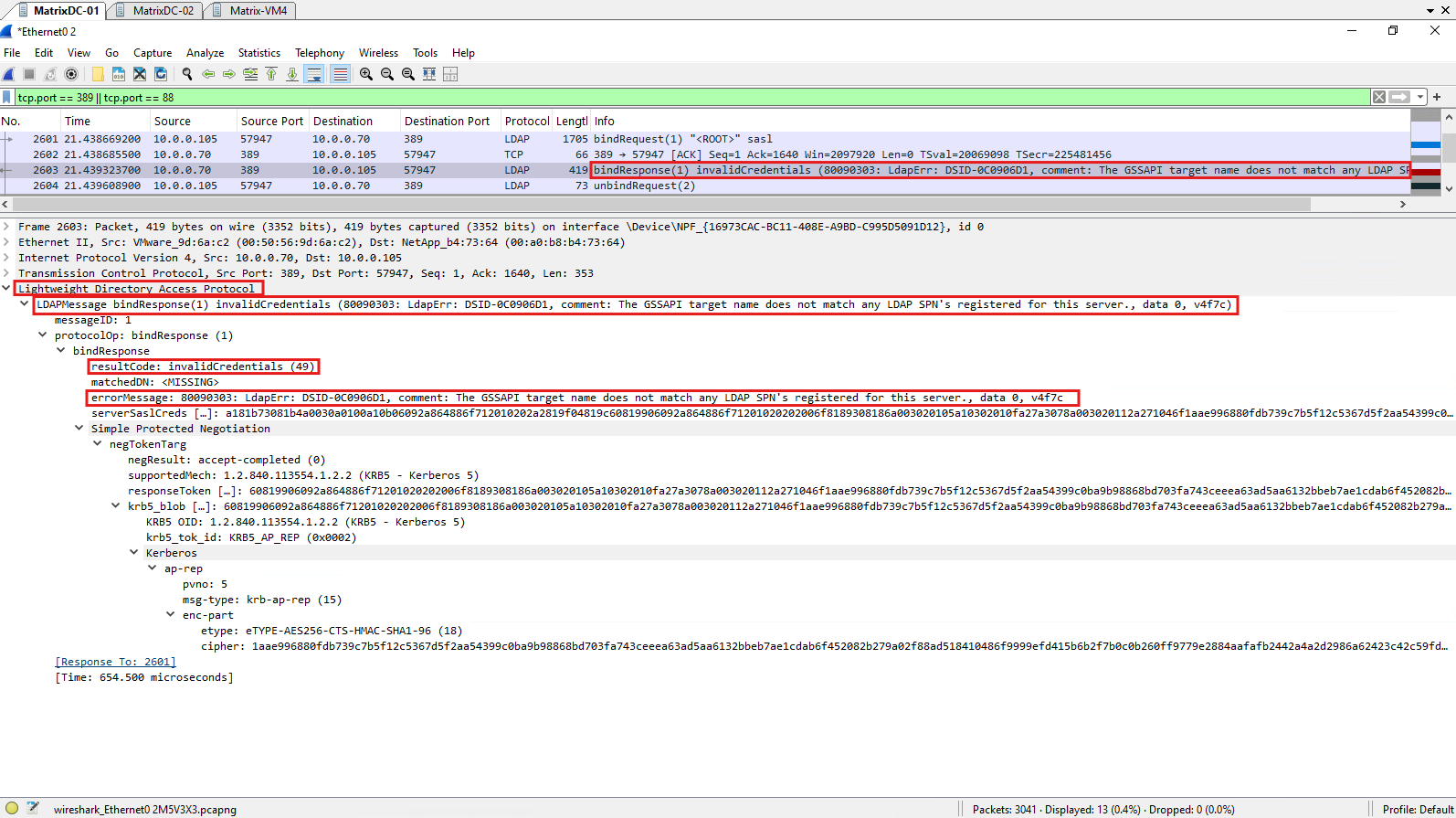
Wireshark reveals that ONTAP uses SASL GSS-SPNEGO with Kerberos, presenting a service ticket targeting the CIFS SPN rather than the LDAP service.
The domain controller rejects the LDAP bind with invalidCredentials (49) because the Kerberos target does not match a registered LDAP SPN.
With the unpatched MatrixDC-02 disconnected, ONTAP communicates exclusively with the patched MatrixDC-01.
Using
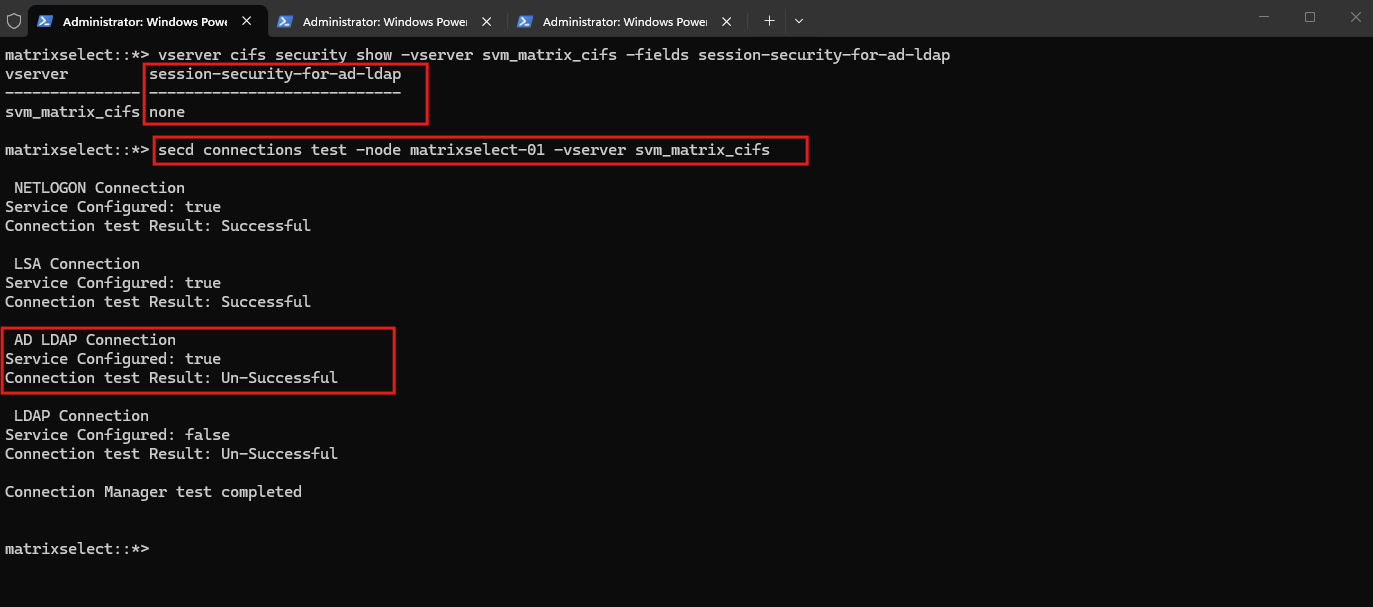
session-security-for-ad-ldap=none, the connection test fails for AD LDAP, while NETLOGON and LSA remain successful, demonstrating that the LDAP authentication failure does not prevent these services from operating.The LSA (Local Security Authority) connection in ONTAP uses Microsoft’s LSA RPC interfaces to communicate with Active Directory domain controllers, primarily for retrieving domain security information and resolving security identifiers (SIDs) to account names and vice versa. Unlike Windows LSASS, which manages local and domain logon security, ONTAP uses these interfaces to support Windows-compatible identity and authorization operations.
vserver cifs security show -vserver svm_matrix_cifs -fields session-security-for-ad-ldap
secd connections test -node matrixselect-01 -vserver svm_matrix_cifs
The Wireshark capture shows ONTAP initiating an LDAP SASL bind using GSS-SPNEGO with Kerberos authentication. However, the Kerberos service ticket targets cifs/matrixdc-01.matrixpost-lab.net rather than an LDAP-specific SPN, which the patched domain controller rejects during LDAP authentication as we will see next.
SASL (Simple Authentication and Security Layer) provides the authentication framework for LDAP, while GSS-SPNEGO negotiates an authentication mechanism, such as Kerberos or NTLM. With
session-security-for-ad-ldap=none, ONTAP uses SASL with GSS-SPNEGO and presents a Kerberos ticket targeting theCIFS SPN; withsign, ONTAP uses SASL GSSAPI (Kerberos) with LDAP signing and an LDAP-specific service principal.
tcp.port == 389 || tcp.port == 88
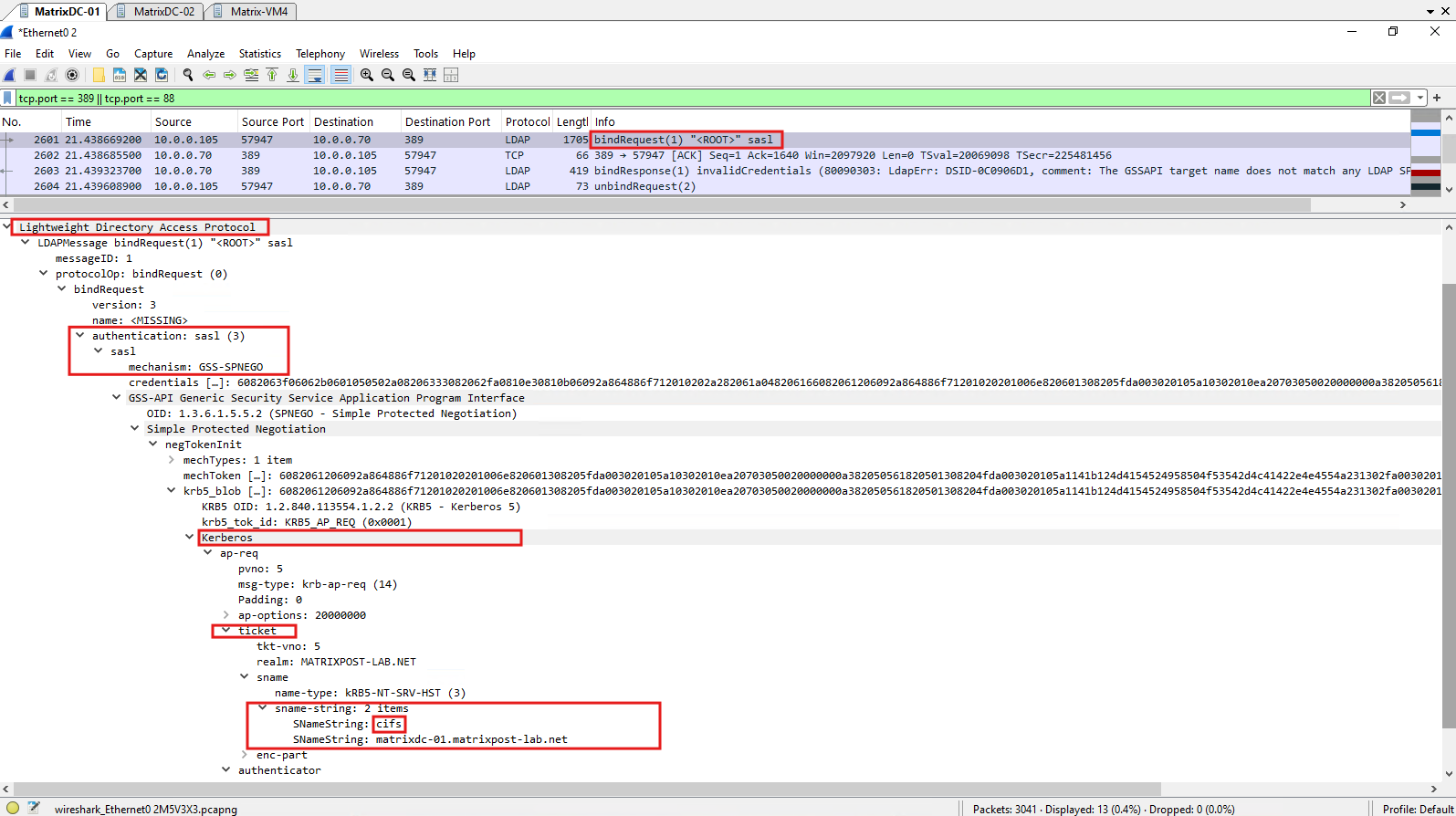
The patched domain controller rejects the previous LDAP bind request with LDAP result code 49 (invalidCredentials) and error 80090303. The response explicitly states “The GSSAPI target name does not match any LDAP SPN’s registered for this server”, confirming that the CIFS service principal presented by ONTAP is no longer accepted for LDAP authentication.
tcp.port == 389 || tcp.port == 88
Following the rejected LDAP bind with invalidCredentials (49), ONTAP sends an LDAP UnbindRequest to the patched domain controller. This terminates the unsuccessful LDAP session after the Kerberos service ticket targeting the CIFS SPN was rejected.
LDAP Authentication with session-security-for-ad-ldap=sign – Successful
After changing the ONTAP configuration to sign, we repeat the authentication test against the same patched domain controller.
This time, ONTAP uses SASL GSSAPI with Kerberos, presenting a service ticket targeting ldap/matrixdc-01.matrixpost-lab.net. The LDAP bind completes successfully with success (0), demonstrating that ONTAP can authenticate against the hardened domain controller using the correct LDAP service principal.
With
session-security-for-ad-ldap=signenabled, the ONTAP connection test confirms successful AD LDAP authentication against the patched domain controller MatrixDC-01.Both NETLOGON and LSA connections also remain successful, demonstrating that the configuration change restores LDAP connectivity.
Configuring
session-security-for-ad-ldap=signalso resolves LDAP authentication failures caused by the default LDAP signing enforcement in Windows Server 2025, without requiring any changes to the domain controller’s security policies. This addresses both security hardening mechanisms while maintaining LDAP signing enforcement.
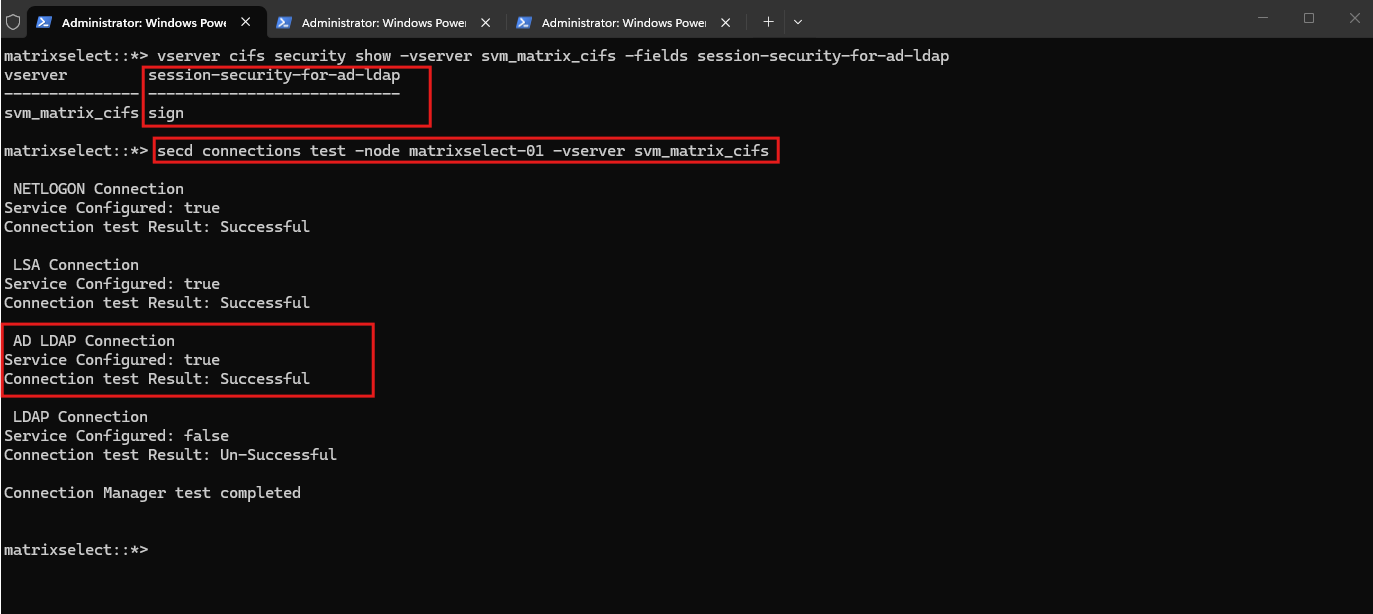
With session-security-for-ad-ldap=sign enabled, the Wireshark capture shows the complete authentication sequence between ONTAP (10.0.0.105) and the patched domain controller MatrixDC-01 (10.0.0.70).
The communication begins with a Kerberos AS-REQ, followed by the expected
KRB5KDC_ERR_PREAUTH_REQUIREDresponse. ONTAP then submits another AS-REQ with preauthentication information and receives an AS-REP, completing the initial Kerberos authentication exchange.The Kerberos authentication process involves three important message types:
AS-REQ / AS-REP:Obtain the initial Kerberos Ticket Granting Ticket (TGT).TGS-REQ / TGS-REP:Obtain a service ticket for a particular service.AP-REQ:Present that service ticket during authentication, such as an LDAP SASL bind.ONTAP subsequently initiates an LDAP SASL bind over TCP port 389. The domain controller responds twice with
saslBindInProgresswhile the authentication exchange continues, before finally returningsuccess (0), confirming that LDAP authentication succeeds with thesignconfiguration.
ip.addr == 10.0.0.70 && (ldap || kerberos)
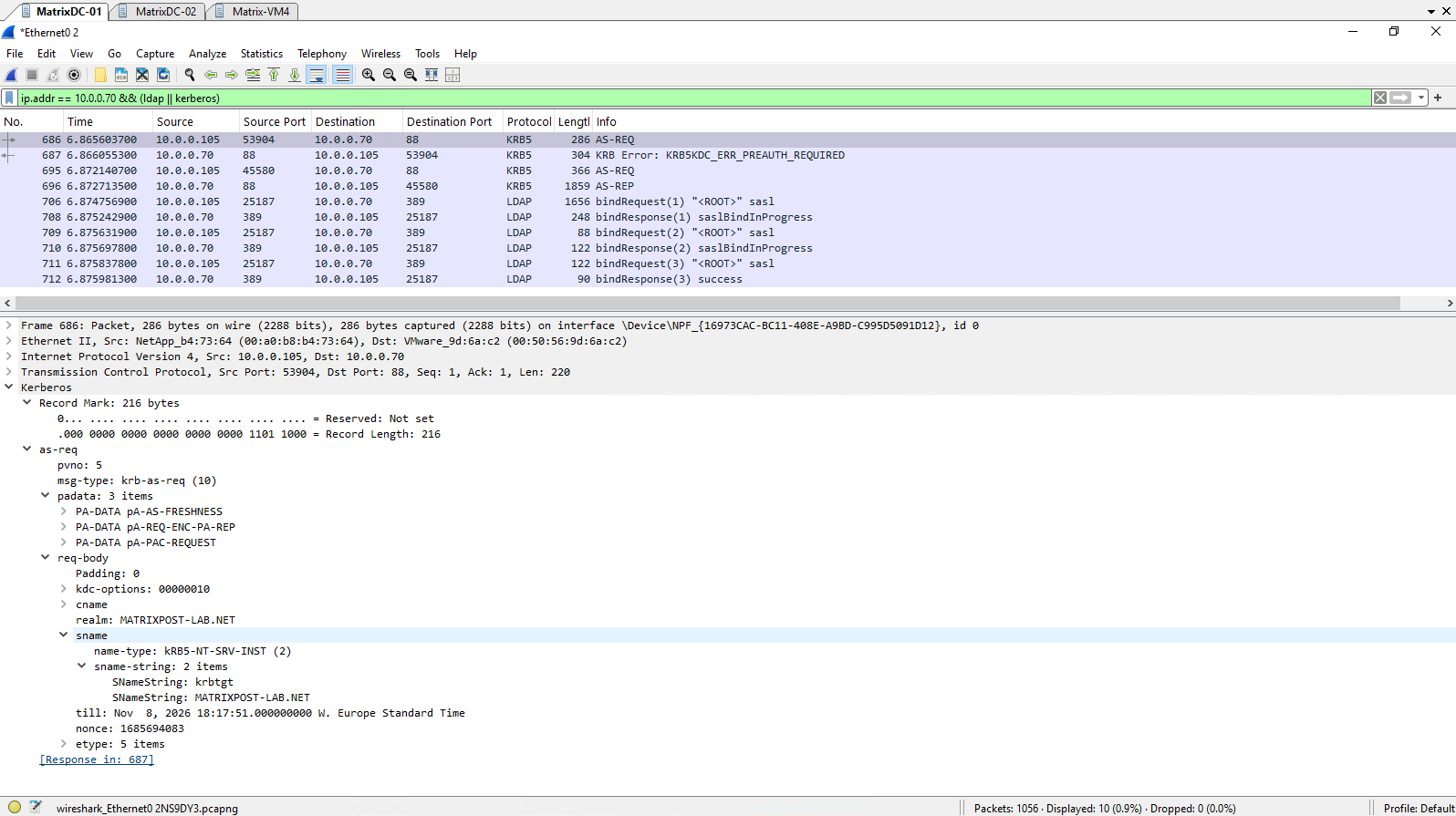
The Wireshark capture reveals two important differences compared to the previous configuration with session-security-for-ad-ldap=none.
With
sign, ONTAP uses the SASL GSSAPI mechanism instead of GSS-SPNEGO, while still authenticating through Kerberos. More importantly, the Kerberos service ticket now explicitly targetsldap/matrixdc-01.matrixpost-lab.netrather than the CIFS service principal, allowing the patched domain controller to accept the LDAP authentication request.
ip.addr == 10.0.0.70 && (ldap || kerberos)
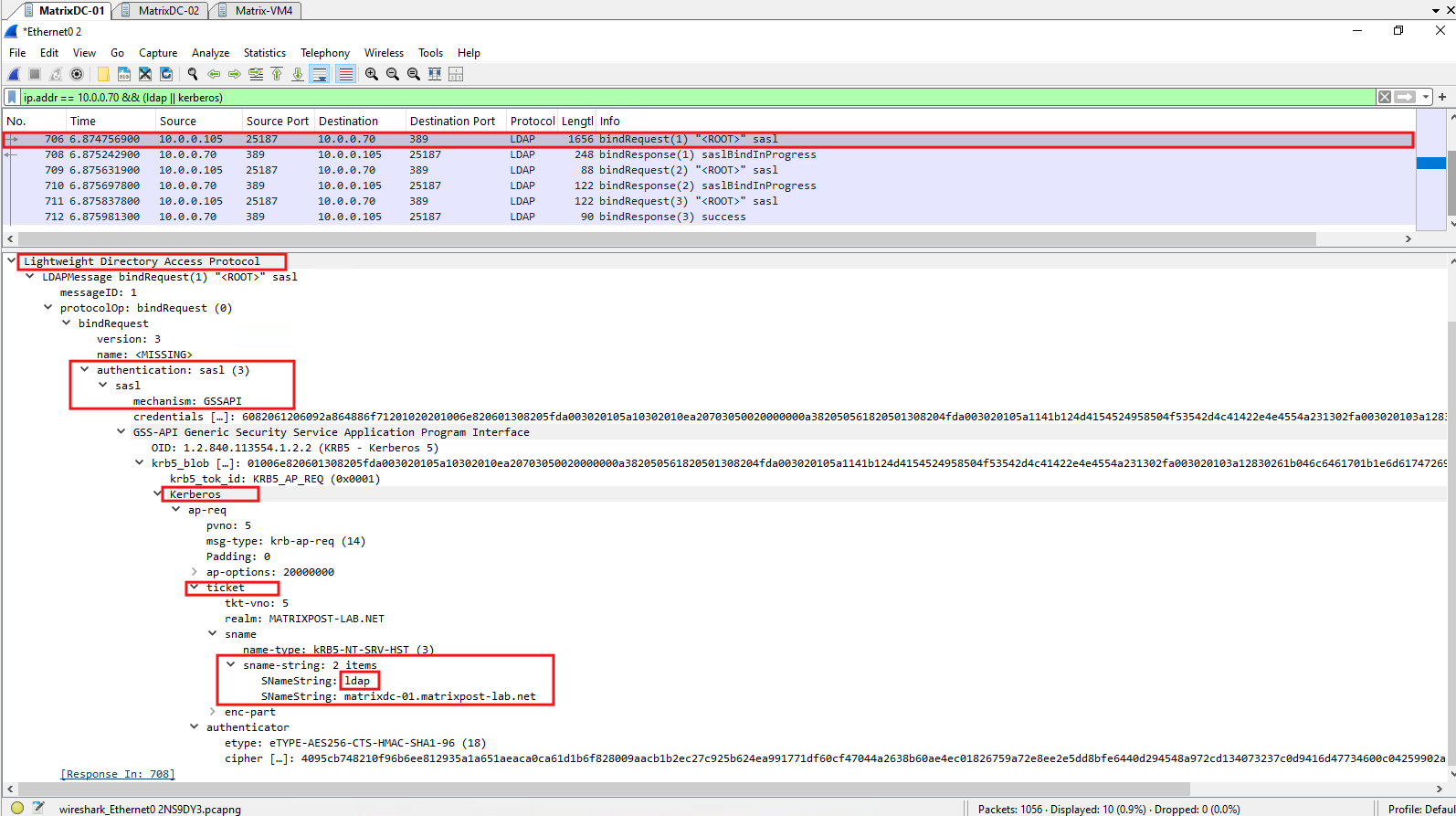
The final LDAP SASL bind response from the patched domain controller returns success (0), confirming that authentication completes successfully with session-security-for-ad-ldap=sign.
Unlike the previous
noneconfiguration, the domain controller accepts the Kerberos authentication using the dedicated LDAP service principal.
ip.addr == 10.0.0.70 && (ldap || kerberos)
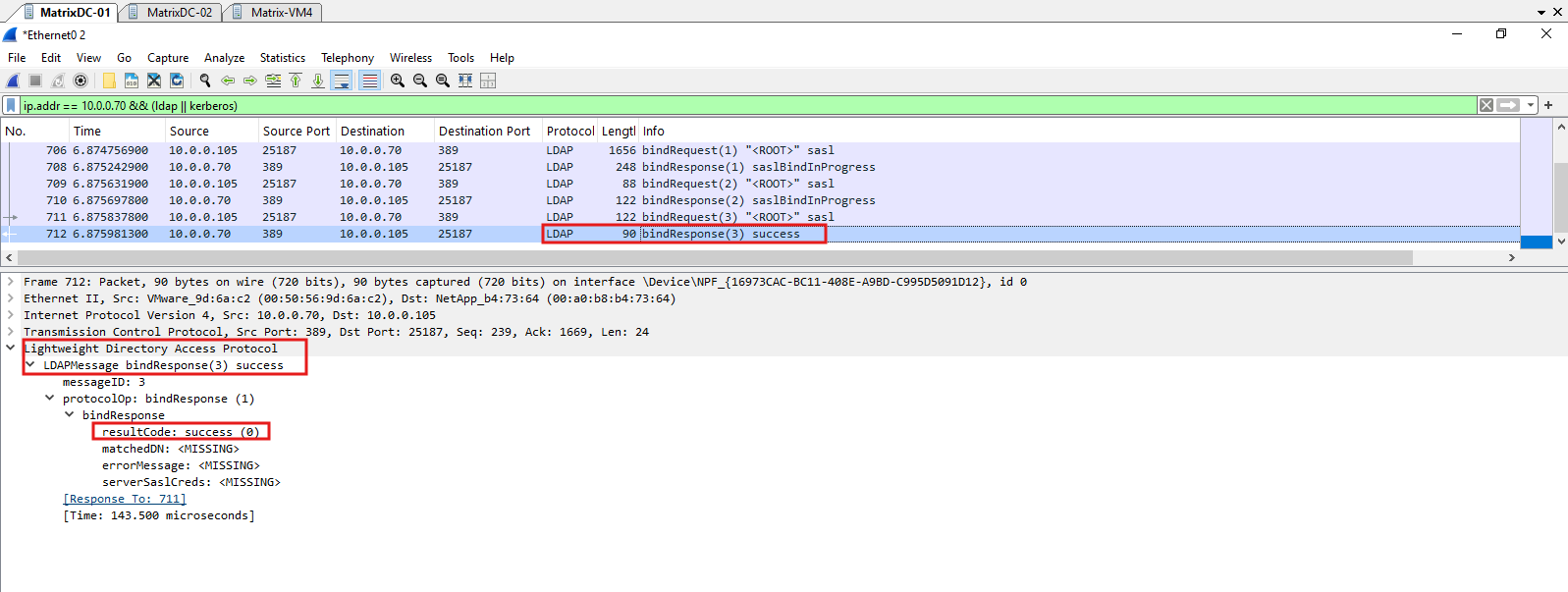
Microsoft’s October 2026 LDAP SPN hardening does not change the documented support for SASL GSS-SPNEGO or GSSAPI, both of which can use Kerberos authentication. Instead, the critical requirement is that the Kerberos service ticket presented during LDAP authentication targets a valid LDAP service principal, such as ldap/matrixdc-01.matrixpost-lab.net, rather than a CIFS service principal.
Our Wireshark captures demonstrate that ONTAP uses GSS-SPNEGO with a CIFS service ticket when configured with
none, whereassignuses GSSAPI with an LDAP service ticket. The October update enforces LDAP SPN validation, not a general restriction on GSS-SPNEGO, although we have not independently tested GSS-SPNEGO with an LDAP ticket against the patched domain controller.
Analyzing LDAP Authentication Failures Using ONTAP SECD Logs
In addition to analyzing LDAP authentication traffic with Wireshark, NetApp ONTAP provides detailed diagnostic logs that can help identify authentication failures and Active Directory connectivity issues.
The SECD (Security Daemon) logs contain information about authentication requests, Kerberos operations, LDAP communication, and interactions with Active Directory domain controllers.
These logs can be accessed through the ONTAP Service Processor Interface (SPI) using the cluster management IP address.
https://<cluster IP>/spi/matrixselect-01/etc/log/mlog
In my case this is https://10.0.0.101/spi/matrixselect-01/etc/log/mlog.
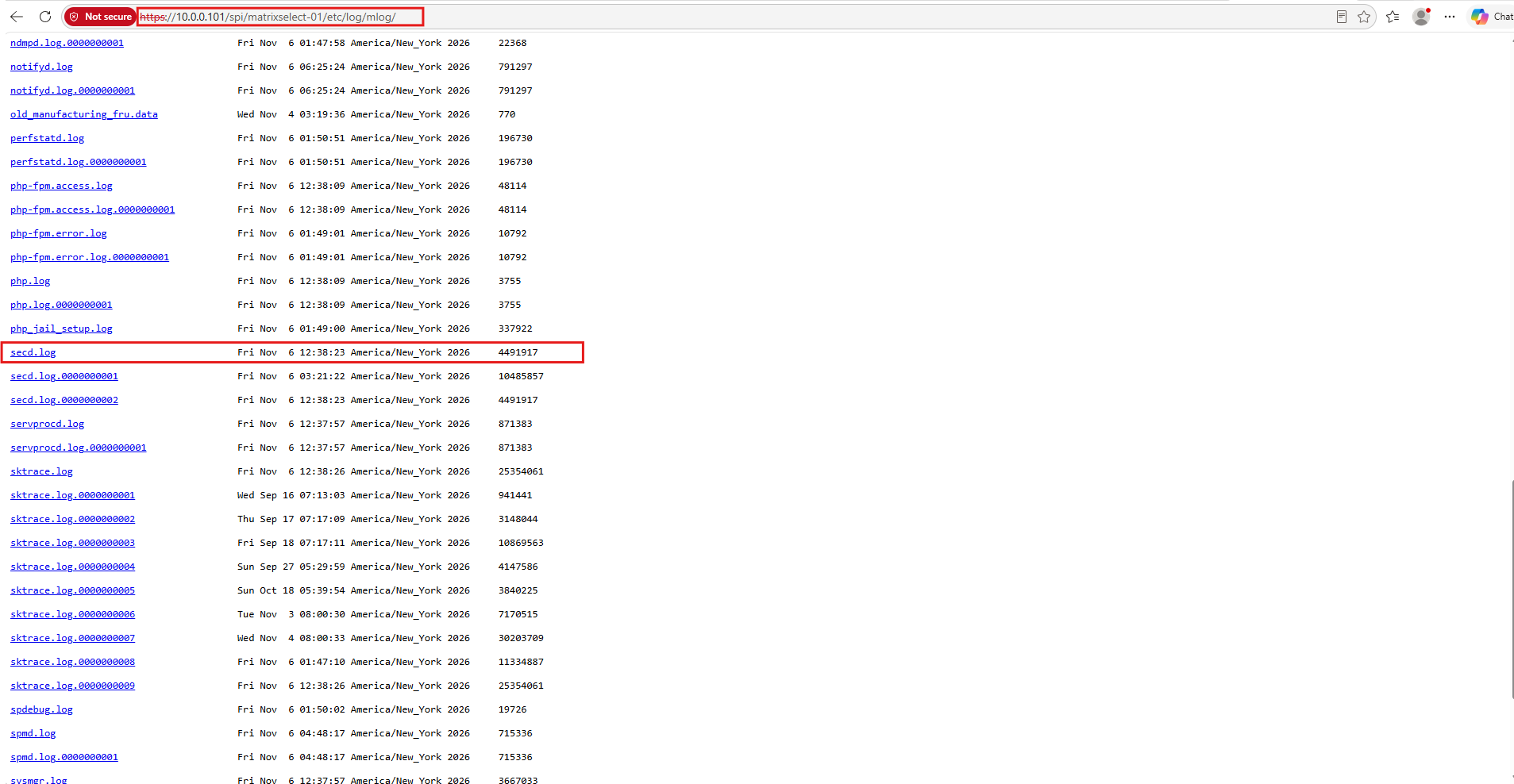
The following excerpts from the ONTAP SECD logs demonstrate how authentication failures can be investigated directly on the storage system.
In particular, they reveal the selected domain controller, LDAP security configuration, Kerberos service principal, and detailed error messages returned during authentication.
LDAP SPN mismatch after the October 2026 security update
LDAP security level is NONE, attempting bind using SPNEGO
Getting credentials CIFS-M-SELECT$@MATRIXPOST-LAB.NET -> cifs/matrixdc-01.matrixpost-lab.net@
ldap_sasl_bind_s returned 49
Additional Error Message: 80090303: LdapErr: DSID-0C0906D1,
comment: The GSSAPI target name does not match any LDAP SPN's registered for this server.
ldapSaslBindSpnego: LDAP Error: (49): 'Invalid credentials'
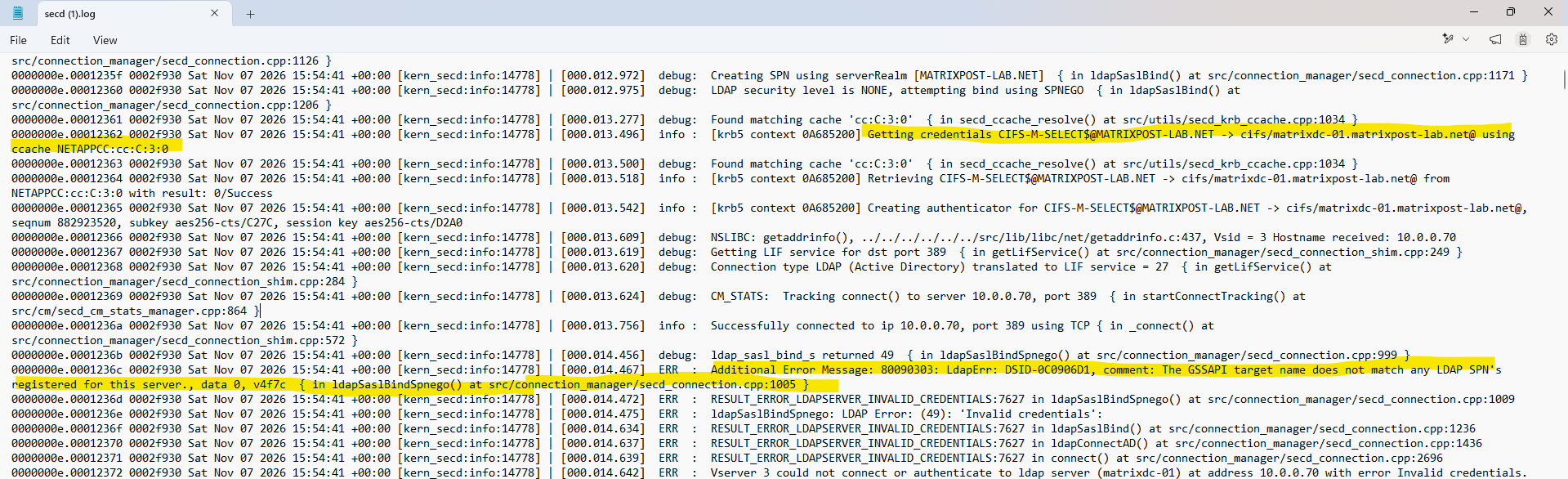
The log confirms that ONTAP attempts LDAP authentication using a Kerberos ticket targeting the cifs/ SPN. The patched domain controller rejects this authentication because the service principal does not match an LDAP SPN registered for the server.
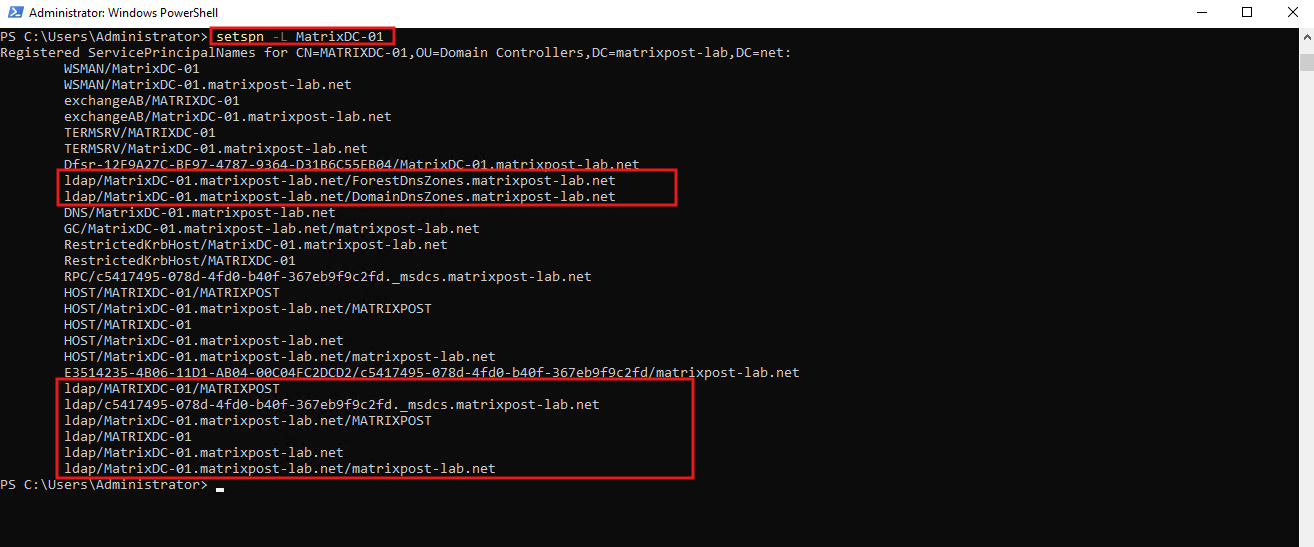
The setspn -L MatrixDC-01 output confirms that the domain controller has the required LDAP Service Principal Names (SPNs) registered in Active Directory, including ldap/MatrixDC-01.matrixpost-lab.net.
This confirms that the authentication failure after the October 2026 security update is not caused by a missing LDAP SPN, but by ONTAP presenting a Kerberos ticket targeting
cifs/instead ofldap/whensession-security-for-ad-ldap=noneis configured.Note: Even if a
cifs/<DC-FQDN>SPN is registered in Active Directory, LDAP authentication will still fail after the October 2026 security update because the Kerberos ticket must target a validldap/SPN. Therefore, the issue is not a missing SPN registration but the incorrect service principal used for LDAP authentication.
setspn -L MatrixDC-01
Windows Server 2025 LDAP signing enforcement
LDAP security level is NONE, attempting bind using SPNEGO
ldap_sasl_bind_s returned 8
Additional Error Message: 00002028: LdapErr: DSID-0C09035C,
comment: The server requires binds to turn on integrity checking
if SSL\TLS are not already active on the connection
Unlike the October 2026 SPN mismatch, Windows Server 2025 rejects this authentication with strongAuthRequired (8) because the LDAP connection does not satisfy the domain controller’s signing requirements. This is a separate security enforcement mechanism.
Successful LDAP authentication with session-security-for-ad-ldap=sign
LDAP security level is SIGN, attempting bind using GSSAPI
Getting credentials CIFS-M-SELECT$@MATRIXPOST-LAB.NET -> ldap/matrixdc-01.matrixpost-lab.net@
TGS request result: 0/Success
Received creds for desired service ldap/matrixdc-01.matrixpost-lab.net@MATRIXPOST-LAB.NET
ldap_sasl_interactive_bind_s returned 0
Successfully authenticated over LDAP with matrixdc-01.matrixpost-lab.net
After enabling LDAP signing, ONTAP requests a Kerberos service ticket for the correct ldap/ SPN, and the LDAP bind completes successfully.
These examples demonstrate that ONTAP SECD logs provide valuable diagnostic information beyond the general success or failure reported by secd connections test, making them particularly useful when troubleshooting Active Directory authentication and LDAP security hardening.
Potential Impact of LDAP Authentication Failures on ONTAP Workloads
The October 2026 Windows Server security update can cause LDAP authentication failures when NetApp ONTAP uses session-security-for-ad-ldap=none.
However, a failed LDAP connection does not necessarily interrupt normal SMB or NFS client access. The actual impact depends on whether the workload requires Active Directory LDAP communication for authentication, identity resolution, or name mapping.
Depending on the ONTAP configuration and the operations performed, LDAP authentication failures may affect:
- SMB authentication using UPN or FQDN-style usernames, where LDAP-based domain-name resolution is required.
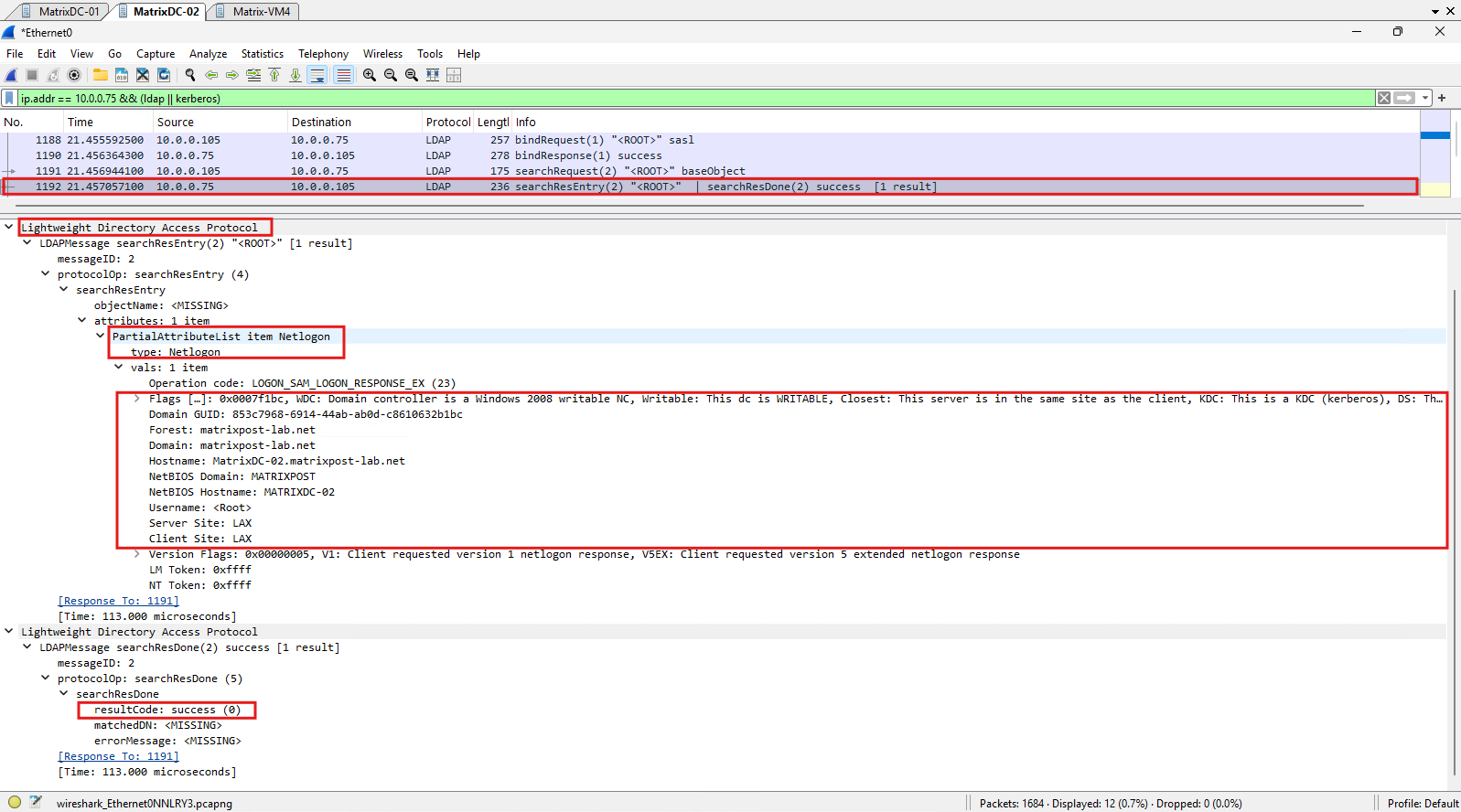
- Active Directory domain controller and site discovery, as demonstrated in my Wireshark capture below, potentially affecting DC selection and connectivity.
- User and group lookups that depend on LDAP, particularly UNIX identity resolution when
passwdandgroupare configured to useldapin the ONTAP name-service switch (ns-switch). In my lab, both usefilesonly, so these UNIX lookups are resolved locally without LDAP. - Certain CIFS administration operations requiring LDAP communication with Active Directory.
- Multiprotocol identity resolution, where a separately configured LDAP name-service client is affected by its own authentication or signing configuration.
Normal SMB authentication using Kerberos or NTLM, as well as NFS access relying exclusively on local UNIX identity information, may continue working. The actual impact depends on the LDAP dependencies of each workload.
To demonstrate an example of an operation that requires LDAP communication with Active Directory, we can deliberately trigger new LDAP traffic for our Wireshark capture using vserver cifs domain discovered-servers reset-servers -vserver svm_matrix_cifs.
This command schedules a new domain controller discovery process on all ONTAP nodes, allowing us to observe the LDAP authentication and Netlogon discovery requests exchanged with Active Directory.
vserver cifs domain discovered-servers reset-servers -vserver svm_matrix_cifs
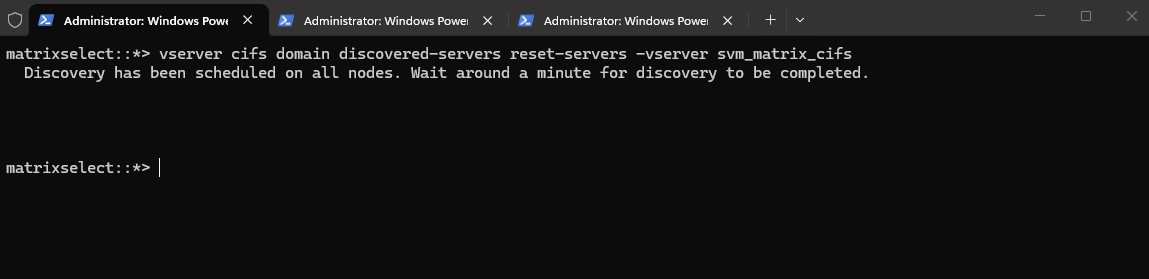
After resetting the discovered domain controllers, ONTAP initiates a new Active Directory discovery process using LDAP.
The Wireshark capture shows a successful SASL LDAP bind followed by a Netlogon query, through which ONTAP retrieves the domain controller’s identity, capabilities, and Active Directory site information.
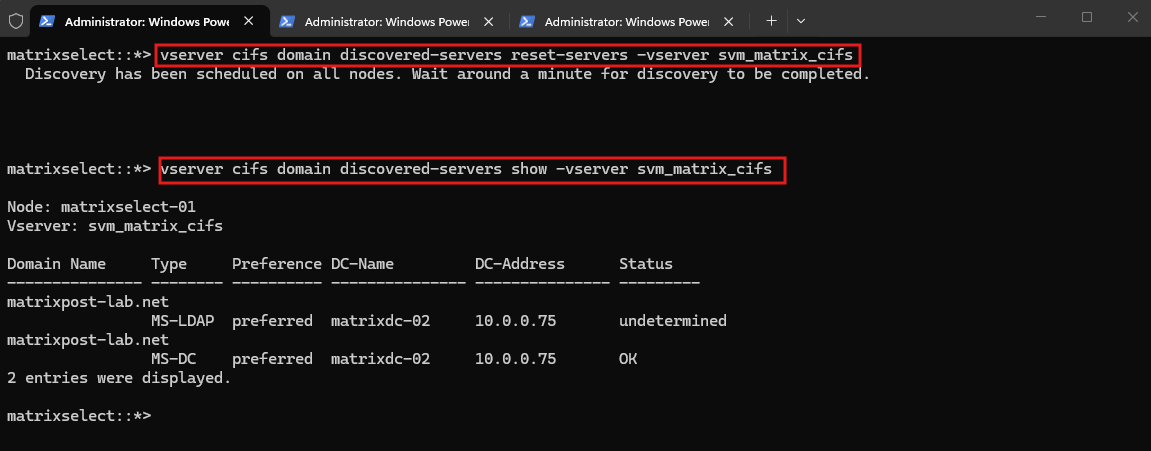
For this test, we deliberately disconnected MatrixDC-01, which already has the October 2026 Windows Server security update installed, leaving the unpatched MatrixDC-02 available.
With
session-security-for-ad-ldapstill set tonone, ONTAP successfully discovers MatrixDC-02 (10.0.0.75) as the preferred domain controller, providing our baseline for comparison with the patched DC.
vserver cifs domain discovered-servers show -vserver svm_matrix_cifs
Links
SU628: [Impact Critical] LDAP connections to Active Directory fail with Invalid Credentials after Microsoft October 2026 domain controller updates when session-security-for-ad-ldap is “none”
https://kb.netapp.com/Support_Bulletins/Customer_Bulletins/SU628CONTAP-821088: LDAP connections to Active Directory fail with Invalid Credentials after Microsoft October 2026 domain controller updates when session-security-for-ad-ldap is “none”
https://kb.netapp.com/on-prem/ontap/da/NAS/NAS-Issues/CONTAP-821088Access to NetApp SMB shares might fail after installing the October 2026 Windows security update
https://support.microsoft.com/en-us/servicing/os/windows/docs/2026/10/access-to-netapp-smb-shares-might3.1.1.3.4.5.2 GSS-SPNEGO
https://learn.microsoft.com/en-us/openspecs/windows_protocols/ms-adts/e1cbe214-d73b-4c58-aad2-bee399ccdfb8LDAP signing overview for Active Directory Domain Services
https://learn.microsoft.com/en-us/windows-server/identity/ad-ds/ldap-signingConfigure LDAP signing by using Group Policy for Active Directory Domain Services
https://learn.microsoft.com/en-us/windows-server/identity/manage-ldap-signing-group-policy