NetApp ONTAP Disk Replacement Fails: Troubleshooting a Disk with Unknown Status
Replacing failed disks in ONTAP is usually a straightforward process. The replacement drive is inserted, ownership is assigned automatically, and the disk becomes available as a spare or immediately participates in RAID reconstruction.
In one of my environments, however, one replacement disk behaved differently. Although the cluster remained healthy and all aggregates were online, the disk appeared with an unknown owner originating from another ONTAP system. Attempts to remove the ownership failed with the messages “Cannot remove owner because it is shared” and “Unable to determine the sharing method”.
Before you remove a spare disk or its shelf from a node, you should remove its ownership information so that it can be properly integrated into another node.
Source: https://docs.netapp.com/us-en/ontap/disks-aggregates/remove-ownership-disk-task.html
In this post, we will walk through the investigation process, examine the relevant ONTAP commands, and discuss why the disk ultimately had to be replaced even though it was physically healthy.
- Initial Situation
- Verify Automatic Disk Assignment
- Checking the Failed and Unassigned Disks
- Checking the Failed and Unassigned Disks
- Verifying Aggregate Health
- Investigating the Unknown Disk Owner
- Why storage disk removeowner Command Failed
- Assigning the Remaining Replacement Disks
- Identifying the Physical Disk for Replacement (LED Blinking)
- Final Recommendation
- Links
Initial Situation
While reviewing the health status of an ONTAP cluster, three of four disks were reported as failed and subsequently replaced.
After the replacement, the cluster health returned to normal and the failed disk alerts disappeared from ONTAP System Manager. However, the replacement process did not complete as expected. Three of the replacement disks appeared as unassigned, while one disk showed an unknown container type and ownership information originating from another ONTAP system.
The fields Owner and Home are ONTAP-specific metadata. In this case, the disk reported
Test-01as its owner, which was not a node of the current cluster and therefore resulted in an unknown disk status.
Although all aggregates remained online and no RAID reconstruction was active, the unexpected disk state required further investigation to determine whether the replacement disk could safely be used as a spare disk or had to be replaced again.
Verify Automatic Disk Assignment
Since three of four replacement disks appeared as unassigned, the first step was to verify the automatic disk assignment configuration.
Under normal circumstances, newly installed disks without existing ownership information are automatically assigned to a cluster node and become available as spare disks.
To verify the automatic disk assignment configuration, the following command was executed:
The output confirmed that automatic disk assignment was enabled on both cluster nodes:
::> storage disk option show

Despite automatic disk assignment being enabled, the three replacement disks still appeared as unassigned, indicating that additional investigation was required to determine why the disks had not been assigned automatically.
Checking the Failed and Unassigned Disks
The next step was to verify the current disk state from the ONTAP CLI.
The following command lists all disks that currently do not have an owner assigned:
On my ONTAP Select (using virtual disks) lab environment there are no unassigned disks reported below.
matrixselect::> storage disk show -container-type unassigned

The issue was on the the physical ONTAP system as mentioned and showed below.

The three replacement disks above were successfully detected by the system but had not yet been assigned to a cluster node. As a result, they were not yet available as spare disks.
To investigate the fourth replacement disk, the following command was used:
::> storage disk show -disk 2.10.4 -instance
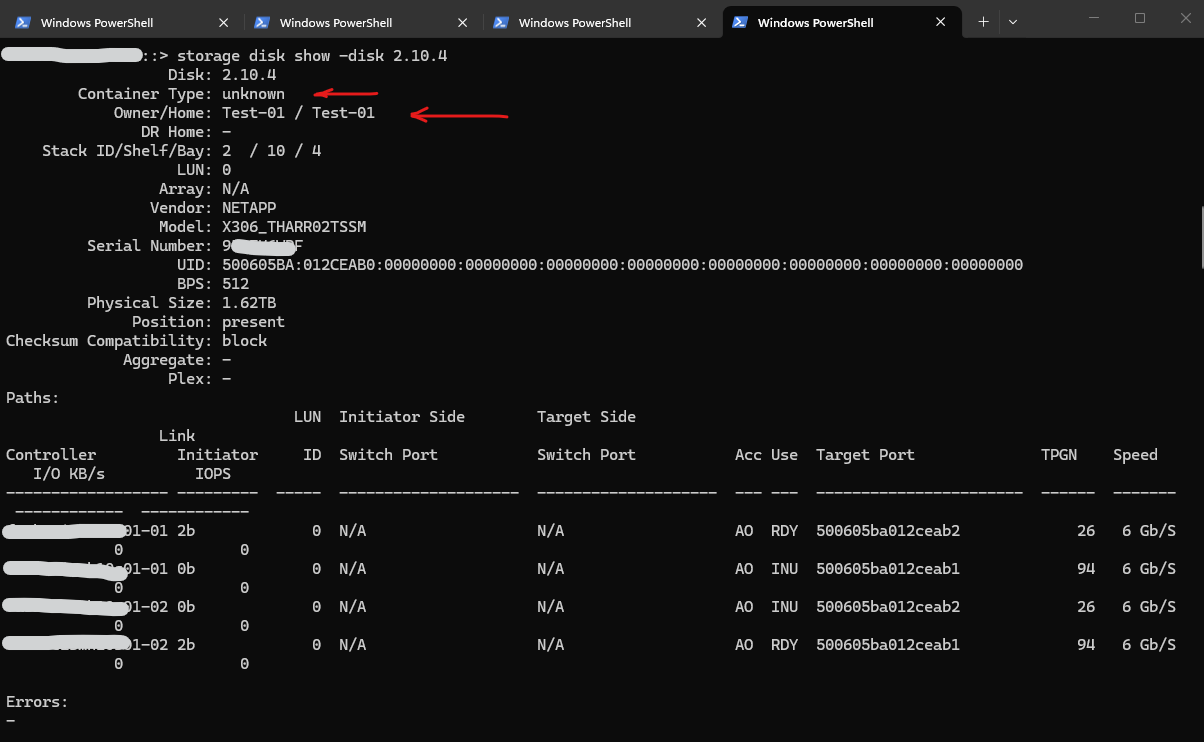
The output revealed a different state:
Container Type: unknown
Owner/Home: Test-01 / Test-01
Aggregate: -
Plex: -
Errors: -
Although the disk itself appeared healthy and all paths were operational, the disk contained ownership information that could not be associated with any node of the current cluster.
The fields Owner and Home are ONTAP-specific metadata used to identify the owning and home node of a disk. Since the reported owner Test-01 was not part of the current cluster, ONTAP classified the disk with an unknown container type.
Newly installed disks that do not contain existing ownership metadata can normally be assigned automatically if
disk auto-assignmentisenabled.
At this point, the cluster itself was already healthy again, but the unexpected ownership information required further investigation.
Under normal circumstances, newly installed disks or disks that do not contain any existing ownership information are automatically assigned to a cluster node if disk auto-assignment is enabled. The disk then becomes available as a spare disk without requiring any manual intervention.
Since automatic disk assignment was enabled on both nodes in this environment, the three replacement disks would normally have been expected to become spare disks automatically. However, one replacement disk still contained ONTAP ownership metadata that could not be associated with any node in the current cluster, resulting in the unexpected unknown status.
Checking the Failed and Unassigned Disks
To determine whether the affected disk was recognized as a foreign disk, the following commands were executed:
::> storage disk show -container-type foreign
::> storage disk show -container-type unknown

While the first command returns no result, the second command identified disk 2.10.4 as the only affected disk.
This confirmed that the disk was not detected as a foreign disk but instead appeared with an unknown container type and ownership information that could not be associated with any node in the current cluster.
A disk with the container type
foreigncontains ownership information that ONTAP recognizes as belonging to another storage system or cluster.In contrast, the container type
unknownindicates that ownership information exists, but ONTAP cannot determine how the disk was previously configured or assigned.
Verifying Aggregate Health
Although the cluster health was still reporting a problem because of the unassigned and unknown disks, the next step was to verify the health of the aggregates and RAID groups. This is an important step after multiple disk failures because it quickly reveals whether the issue affects the actual data aggregates or only the spare disks.
The following command provides a detailed view of all aggregates, RAID groups, and their member disks:
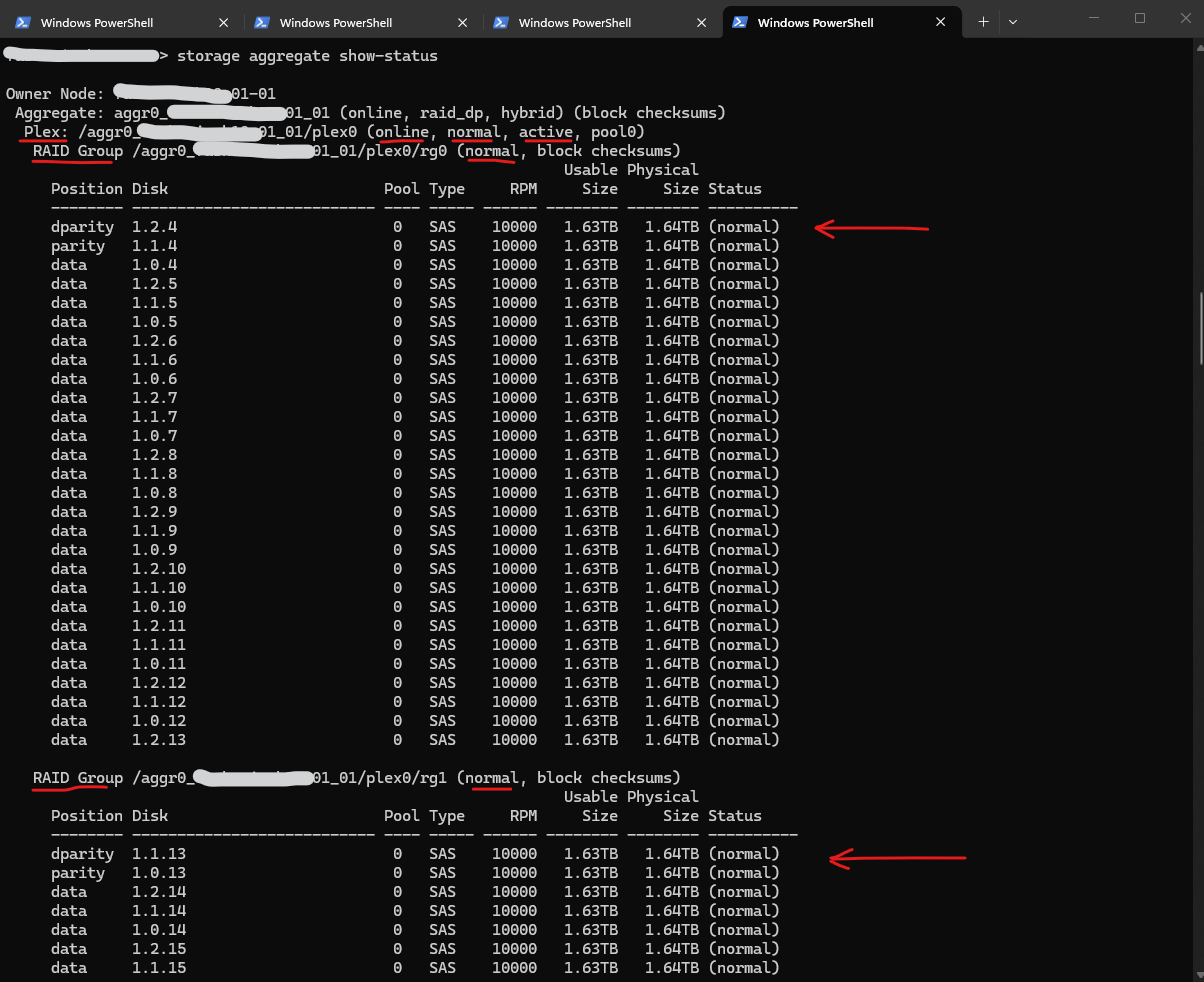
The output below was taken from the affected production system and confirmed that all aggregates, plexes, and RAID groups were healthy.
Despite the remaining disk issues and the degraded cluster health status, no missing disks, degraded aggregates, or active RAID reconstructions were reported.
The normal state indicates that the RAID group is healthy and operating without any degraded or missing disks. The block checksums entry shows that the RAID group uses block-level checksums to detect data corruption, which is the standard checksum type used by modern ONTAP aggregates.
::> storage aggregate show-status
Reviewing the Plex Configuration
A plex represents a collection of RAID groups that make up an aggregate. Standard ONTAP aggregates typically consist of a single plex (plex0), while mirrored configurations such as SyncMirror use two independent plexes to provide additional protection against shelf or disk failures.
In standard ONTAP aggregates, which consist of a single plex (plex0), the plex primarily acts as a logical container for the RAID groups. The often-used description of a plex as a “copy of the aggregate data” only becomes true when multiple plexes exist, such as in SyncMirror or MetroCluster configurations, where each plex contains an independent copy of the aggregate data.
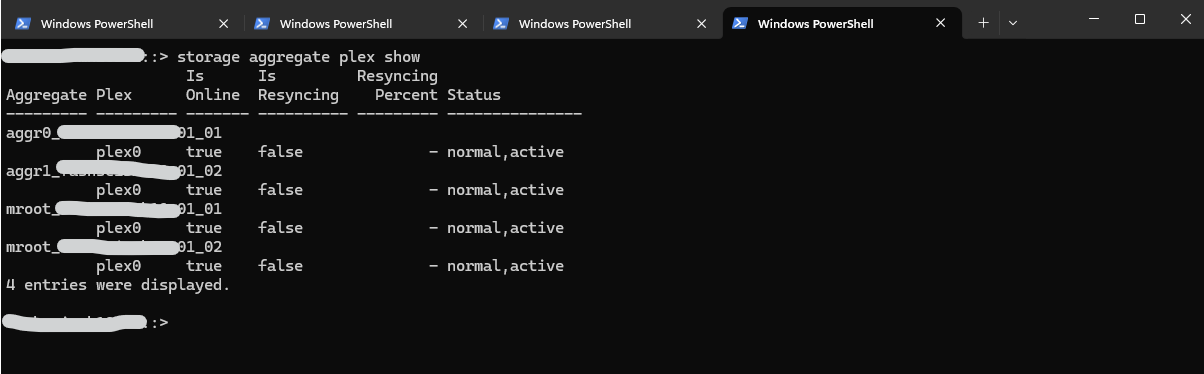
The following output from the affected system shows that all aggregates consist of a single plex (plex0). Since only a single plex exists for each aggregate, no additional mirrored copy of the aggregate data is present.
::> storage aggregate plex show
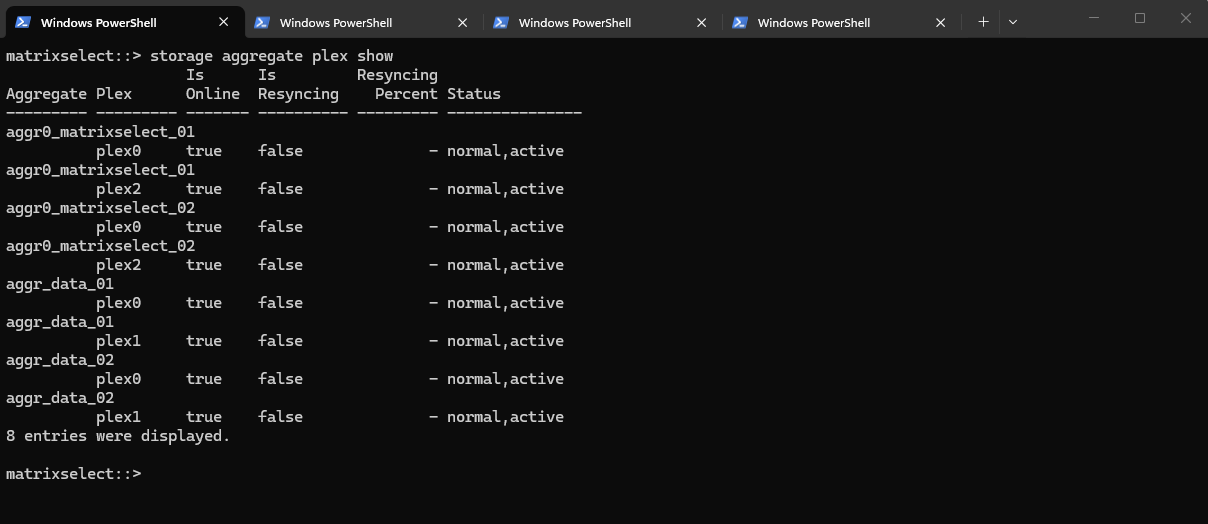
In my ONTAP Select lab environment, the aggregates are configured differently and contain multiple plexes:
matrixselect::> storage aggregate plex show
aggr_data_01
        plex0
        plex1

aggr_data_02
        plex0
        plex1
In contrast to the physical system shown above, these aggregates are mirrored and therefore contain two independent plexes. In such configurations, each plex represents a complete copy of the aggregate data, providing additional protection against disk or node failures.
Standard physical ONTAP systems typically consist of a single plex (plex0), which primarily acts as a logical container for the underlying RAID groups. Only when multiple plexes exist, such as in ONTAP Select, SyncMirror, or MetroCluster environments, does the often-used description of a plex as a “copy of the aggregate data” become applicable.
The ONTAP HA model is built on the concept of HA partners. ONTAP Select extends this architecture into the nonshared commodity server world by using the RAID SyncMirror (RSM) functionality that is present in ONTAP to replicate data blocks between cluster nodes, providing two copies of user data spread across an HA pair.
An ONTAP Select cluster is composed of two to twelve nodes. Each HA pair contains two copies of user data, synchronously mirrored across nodes over an IP network. This mirroring is transparent to the user, and it is a property of the data aggregate, which is automatically configured during the data aggregate creation process.
The local and mirror disks used to build a mirrored aggregate must be the same size. These aggregates are referred to as
plex 0andplex 1(to indicate the local and remote mirror pairs, respectively). The actual plex numbers can be different in your installation.Source: https://docs.netapp.com/us-en/ontap-select/concept_ha_mirroring.html
Investigating the Unknown Disk Owner
While the three replacement disks appeared as unassigned, disk 2.10.4 reported a different state and therefore required further investigation.
The following command was used to display the detailed disk information:
::> storage disk show -disk 2.10.4
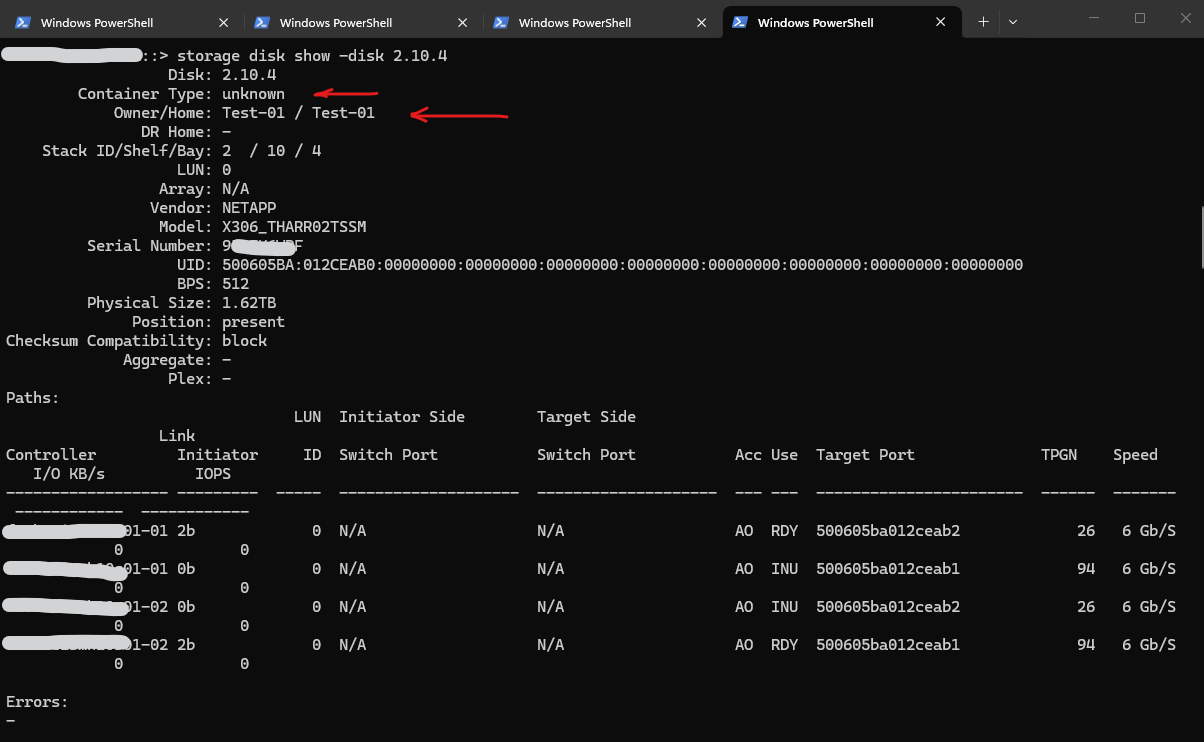
Although the disk itself appeared healthy and all disk paths were operational, the reported owner Test-01 could not be associated with any node of the current cluster.
The fields Owner and Home are ONTAP-specific metadata used to identify the owning and home node of a disk. Since the reported owner was not part of the current cluster, ONTAP classified the disk with an unknown container type.
The output also confirmed that the disk was not a member of any aggregate or RAID group:
Aggregate:       -
Plex:            -
Errors:         -
Therefore, the issue was not related to an active RAID reconstruction or a degraded aggregate, but rather to the ownership information stored on the disk itself.
At this stage, the next step was to determine whether the existing ownership information could be removed and the disk returned to an unassigned state.
Why storage disk removeowner Command Failed
After identifying the unexpected ownership information, the next step was to remove the existing disk owner and return the disk to an unassigned state.
The following command was executed:
However, ONTAP returned the following error message:
Error: command failed: Failed to remove the owner of disk “2.10.4”. Reason: Cannot remove owner of disk “2.10.4” because it is shared.
::> set -privilege advanced
::*> storage disk removeowner -disk 2.10.4
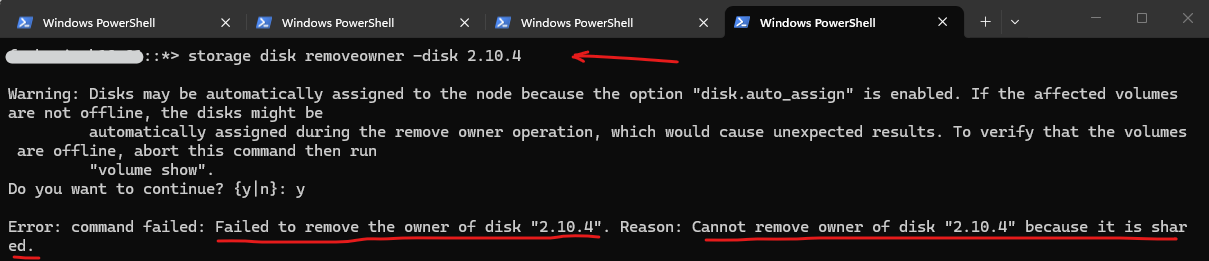
Since the disk was not part of any aggregate and no active RAID reconstruction was taking place, the message was unexpected. The term shared typically indicates that ONTAP detected ownership information that could not be interpreted as a standard unowned disk.
Since the standard ownership removal failed, an additional attempt was made using the available partition-specific options. These options are typically used with partitioned disks and were tested to determine whether ONTAP interpreted the disk as a shared or partitioned device.
Standard disks contain a single ownership record for the entire physical disk, whereas partitioned disks can maintain separate ownership information for individual
rootanddata partitions. This is why ONTAP provides additional ownership commands such as-root,-data,-data1, and-data2.
::*> storage disk removeowner -disk 2.10.4 -root true

Error: command failed: Internal error. Unable to determine the sharing method for disk “2.10.4”.
At this point, it became clear that ONTAP was unable to interpret the ownership information stored on the disk. Although the disk itself was healthy and all paths were operational, the ownership metadata could neither be associated with a node of the current cluster nor be removed successfully.
The exact origin of the ownership information could not be determined. However, the fields Owner and Home are ONTAP-specific metadata, indicating that the disk contained ownership information from a previous ONTAP environment or inconsistent ownership metadata that the current cluster could no longer interpret.
As a result, the disk could not be returned to an unassigned state and therefore could not be used as a spare disk within the cluster.
Although additional recovery options such as maintenance mode or vendor-assisted troubleshooting may exist, replacing the disk was considered the safest and least disruptive solution. Since the cluster was fully operational and sufficient spare capacity was available, replacing the affected disk eliminated the remaining ownership issue without further risk to the production system.
Assigning the Remaining Replacement Disks
After confirming that all aggregates and RAID groups were healthy, the remaining three replacement disks could safely be assigned to the owning node. Unlike disk 2.10.4, these disks did not contain any ownership information and appeared as unassigned.
The following commands were used to assign the disks to node 01-02:
The replacement disks were assigned to node
01-02because the affected shelves and the existing BSAS spare pool were already primarily owned by this node, ensuring a consistent ownership layout and spare disk distribution within the cluster.
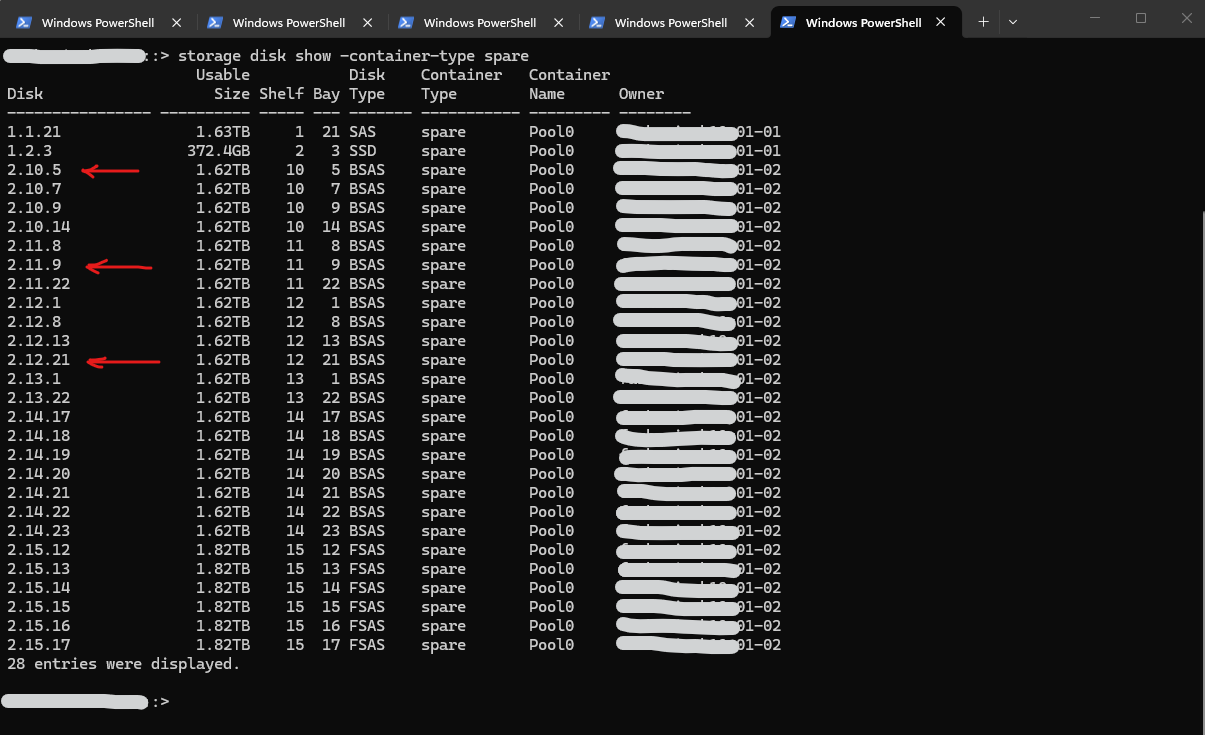
::*> storage disk assign -disk 2.10.5 -owner 01-02
::*> storage disk assign -disk 2.11.9 -owner 01-02
::*> storage disk assign -disk 2.12.21 -owner 01-02

After assigning the disks, they immediately became available as spare disks:
::> storage disk show -container-type spare
Identifying the Physical Disk for Replacement (LED Blinking)
When replacing hardware, the last thing you want to do is accidentally pull a healthy drive because you miscounted slots in a dark data center rack. Before pulling any disk, it is best practice to physically flash its LED to double-check its location.
While the ONTAP System Manager GUI has a graphical hardware map, you cannot use it to trigger individual slot locator lights.
Instead, you can use the ONTAP CLI to turn on the drive’s beacon light.
Use the
storage disk set-ledcommand. It is highly recommended to include a-durationflag (defined in minutes 1-60) so the light automatically turns off later, preventing someone from leaving it on indefinitely.
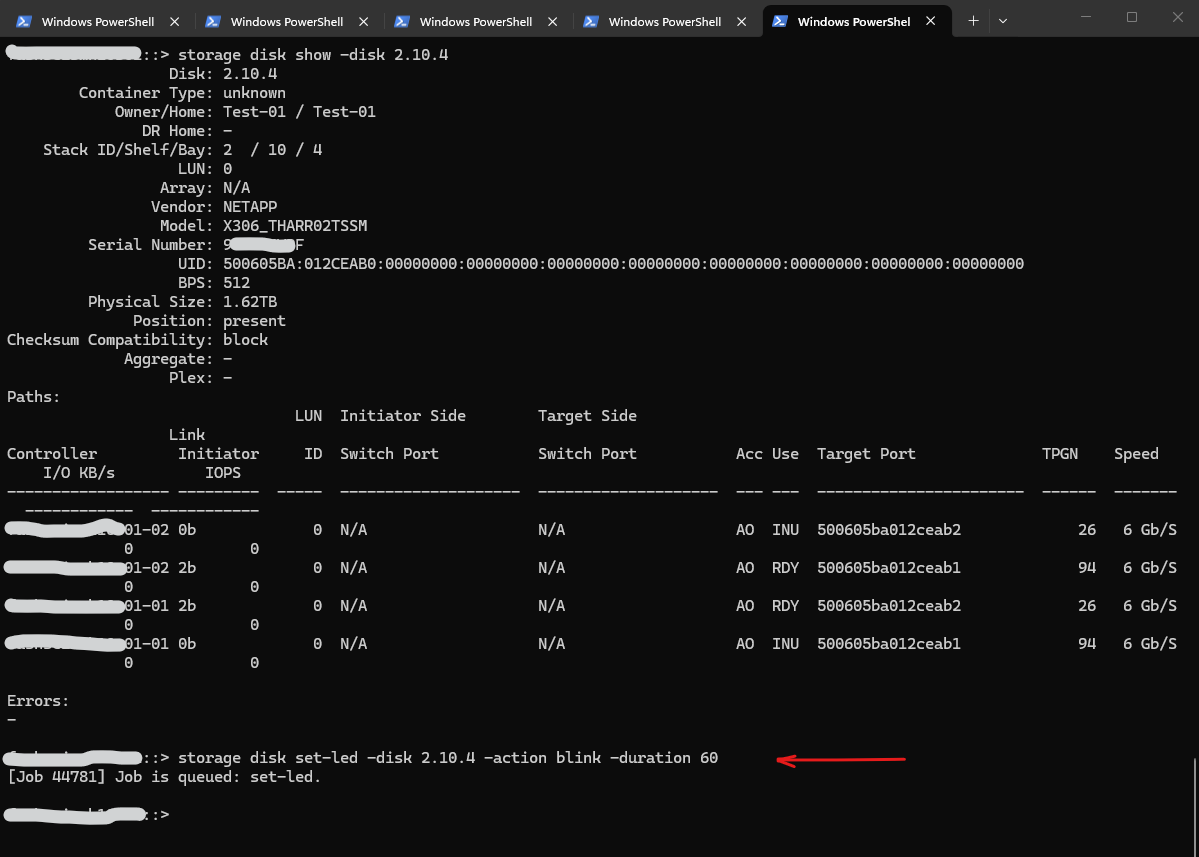
To start blinking a disk (e.g., disk 2.10.4) for 60 minutes (max) while you walk over to the server room, run:
::> storage disk show -disk 2.10.4
::> storage disk set-led -disk 2.10.4 -action blink -duration 60
If you locate the drive immediately and want to turn the flashing light off before the timer expires, use the blinkoff action:
::> storage disk set-led -disk 2.10.4 -action blinkoff
If you are dealing with multiple stacked disk shelves and aren’t even sure which drawer to look at, you can blink the entire shelf’s locator LED to find the right enclosure first:
::> storage shelf location-led modify -shelf-name <shelf_id> -led-status on
Once you have identified the right shelf, you can turn that locator off (-led-status off) and use the individual disk blink command above to pinpoint the exact slot.
When you run storage disk set-led -disk <disk name> -action, your options do the following:
on: Turns the amber fault LED on solid (steady amber).blink: Makes the amber fault LED flash/blink.off: Turns the solid amber LED off (used if you turned it on with-action on).blinkoff: Turns the flashing LED off (used if you turned it on with-action blink).

Final Recommendation
The investigation confirmed that the storage aggregates, RAID groups, and data availability were not affected by the disk replacement issue. The three replacement disks were successfully assigned and added to the spare pool, restoring the overall cluster health.
Disk 2.10.4, however, remained in an unknown state and contained ownership information that could not be associated with any node of the current cluster. Multiple attempts to remove the ownership information failed because ONTAP was unable to determine the disk’s ownership or sharing method.
Although the disk itself appeared to be physically healthy, it could not be returned to an unassigned state and therefore could not be used as a spare disk. While additional troubleshooting steps such as maintenance mode or vendor-assisted recovery may be possible, replacing the disk represented the safest and least disruptive solution.
As a result, we finally will replace disk 2.10.4 with another replacement disk and assign it to the appropriate node, allowing it to become available as a spare disk within the cluster.
Links
storage aggregate plex show
https://docs.netapp.com/us-en/ontap-cli/storage-aggregate-plex-show.htmlMirrored and unmirrored local tiers
https://docs.netapp.com/us-en/ontap/concepts/mirrored-unmirrored-aggregates-concept.htmlONTAP Select HA RSM and mirrored aggregates
https://docs.netapp.com/us-en/ontap-select/concept_ha_mirroring.htmlManage the ownership of ONTAP disks and partitions
https://docs.netapp.com/us-en/ontap/disks-aggregates/disk-partition-ownership-overview-concept.htmlRemove ONTAP ownership from a disk
https://docs.netapp.com/us-en/ontap/disks-aggregates/remove-ownership-disk-task.htmlstorage disk removeowner
https://docs.netapp.com/us-en/ontap-cli/storage-disk-removeowner.htmlstorage disk set-led
https://docs.netapp.com/us-en/ontap-cli/storage-disk-set-led.html