Protecting NetApp ONTAP Workloads with Autonomous Ransomware Protection (ARP) – Part 1 – Fundamentals
This post is Part 1 of a four-part series about NetApp ONTAP Autonomous Ransomware Protection (ARP).
NetApp ONTAP provides built-in ransomware protection through Autonomous Ransomware Protection (ARP). Rather than relying solely on traditional antivirus software, ARP analyzes workload behavior, detects anomalies that may indicate ransomware attacks, and automatically creates dedicated recovery snapshots.
ARP does not prevent ransomware from encrypting files in the first place. Instead, it is primarily a detection and recovery technology designed to identify ransomware-like activity and preserve recovery points that can be used to restore affected data.
In this first part, we’ll explore the fundamentals of ARP, including how it works, how to enable it, licensing requirements, and the protection mechanisms operating behind the scenes.
In Part 2, we’ll validate ARP in a VMware vSphere lab by simulating a ransomware attack against a VMFS datastore backed by an ONTAP iSCSI LUN.
In Part 3, we cover the NetApp Console Ransomware Resilience service, which extends native ONTAP Autonomous Ransomware Protection (ARP) with centralized protection, ransomware detection, orchestration, and recovery capabilities for VMware SAN workloads.
In Part 4, we cover the protection, detection, and recovery of SMB (CIFS) file workloads using NetApp Console Ransomware Resilience, demonstrating how it extends native ONTAP Autonomous Ransomware Protection (ARP) with centralized visibility, orchestration, and recovery capabilities.
All examples throughout this series are demonstrated using a two-node NetApp ONTAP Select cluster running in my VMware vSphere lab environment. If you would like to build a similar lab, you can follow my step-by-step guide in Deploying NetApp ONTAP Select in VMware vSphere, which covers the complete deployment and initial configuration of the cluster.
The ONTAP Select cluster is also onboarded to NetApp Console, which is a prerequisite for using the NetApp Console Ransomware Resilience service demonstrated in Parts 3 and Part 4 of this series. If you are running an on-premises ONTAP system, you can follow my post below, which explains how to onboard an ONTAP cluster to NetApp Console before enabling the Ransomware Resilience service.
In addition to ransomware protection, ONTAP supports antivirus integration through VSCAN. Rather than performing the malware scan itself, VSCAN provides the framework to notify and trigger an external antivirus solution to scan files on SMB/CIFS shares. For more information, refer to my following post.
- Native ONTAP Autonomous Ransomware Protection (ARP)
- Determine if ARP is enabled
- Enable ARP
- ARP Locked Snapshots
- Why Regular ONTAP Snapshot Copies are also Safe from Ransomware
- Disable ARP
- ONTAP Autonomous Ransomware Protection Auto Enablement Cluster-Wide
- Verifying Autonomous Ransomware Protection Licensing
- Links
Native ONTAP Autonomous Ransomware Protection (ARP)
Beginning with ONTAP 9.10.1, ONTAP administrators can enable Autonomous Ransomware Protection (ARP) to perform workload analysis in NAS (NFS and SMB) environments to proactively detect and warn about abnormal activity that might indicate a ransomware attack.
ARP is built directly into ONTAP, ensuring integrated control and coordination with ONTAP’s other features. ARP operates in real-time, processing data as it’s written to or read from the file system, and detecting and responding to potential ransomware attacks quickly.
ARP creates locked snapshots at regular intervals in addition to scheduled snapshots. Snapshot retention is adjusted dynamically: snapshots are recycled quickly when no unusual activity is detected, and snapshots taken before a detected attack are retained longer for investigation and recovery.
Source: https://docs.netapp.com/us-en/ontap/anti-ransomware/index.html
Determine if ARP is enabled
Run the following command to see the ransomware protection state for your volumes:
matrixselect::> security anti-ransomware volume show
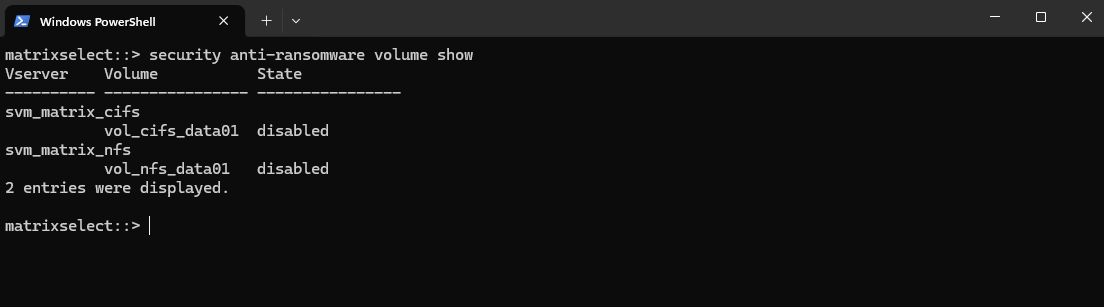
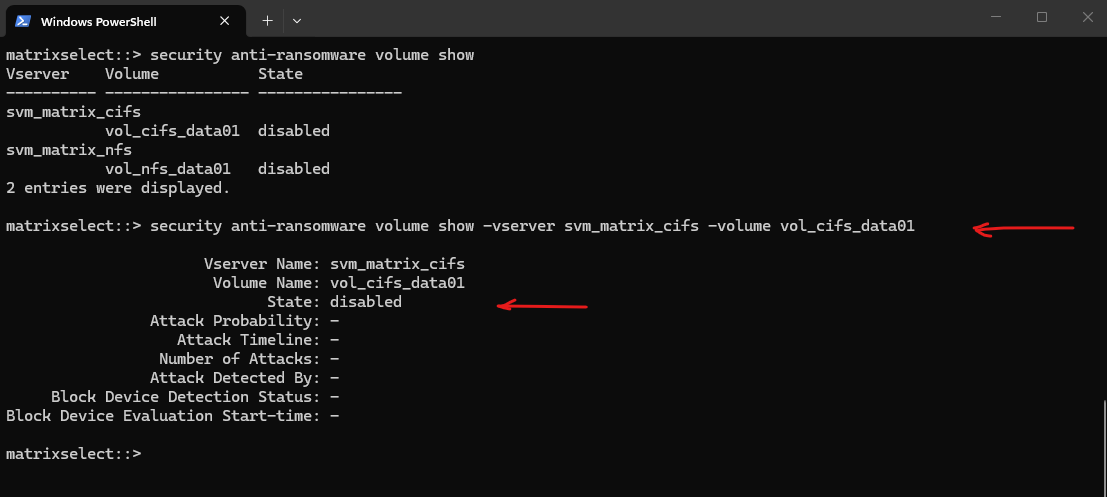
To check a specific volume on a particular Storage VM (SVM), filter the command like this:
matrixselect::> security anti-ransomware volume show -vserver svm_matrix_cifs -volume vol_cifs_data01
Enable ARP
Beginning with ONTAP 9.10.1, you can enable Autonomous Ransomware Protection (ARP) on an existing volume or create a new volume and enable ARP from the beginning.
You can enable ARP on NAS FlexVol volumes using System Manager or the ONTAP CLI. The process differs based on your ONTAP version.
Beginning with ONTAP 9.16.1, ARP/AI is active immediately with no learning period required.
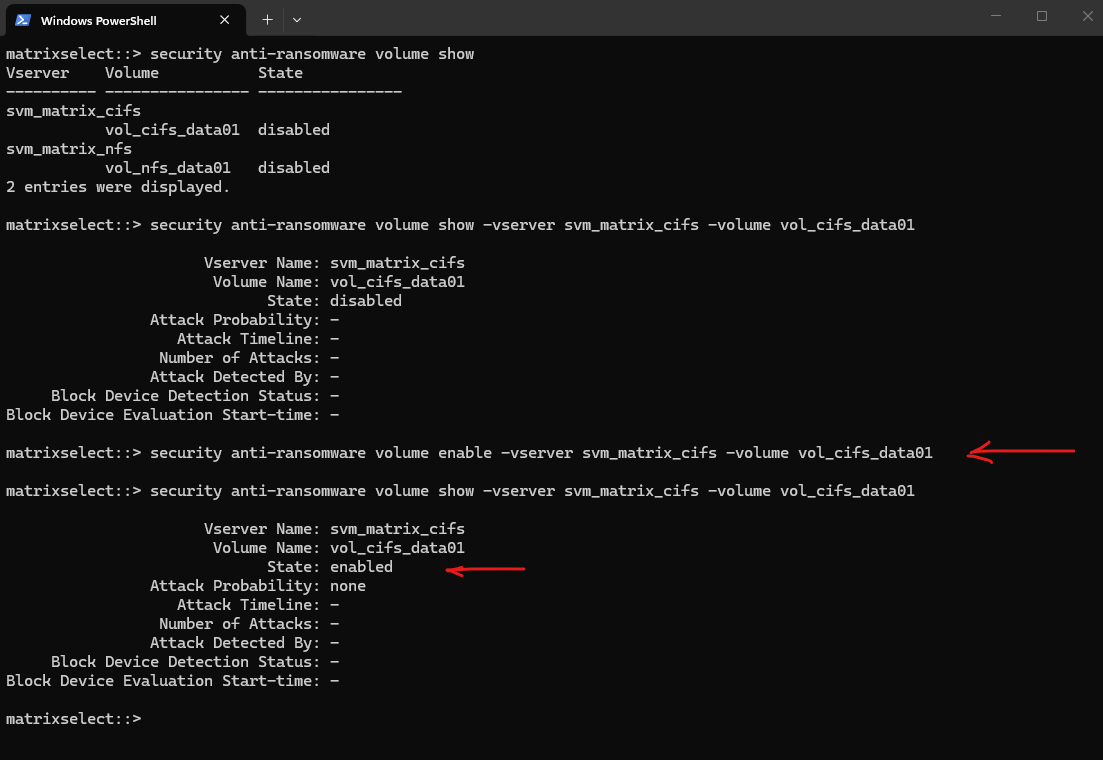
# Enable
matrixselect::> security anti-ransomware volume enable -vserver svm_matrix_cifs -volume vol_cifs_data01

# Verify:
matrixselect::> security anti-ransomware volume show -vserver svm_matrix_cifs -volume vol_cifs_data01
We can also enable or disable ARP on a NAS volume by using the ONTAP System Manager.
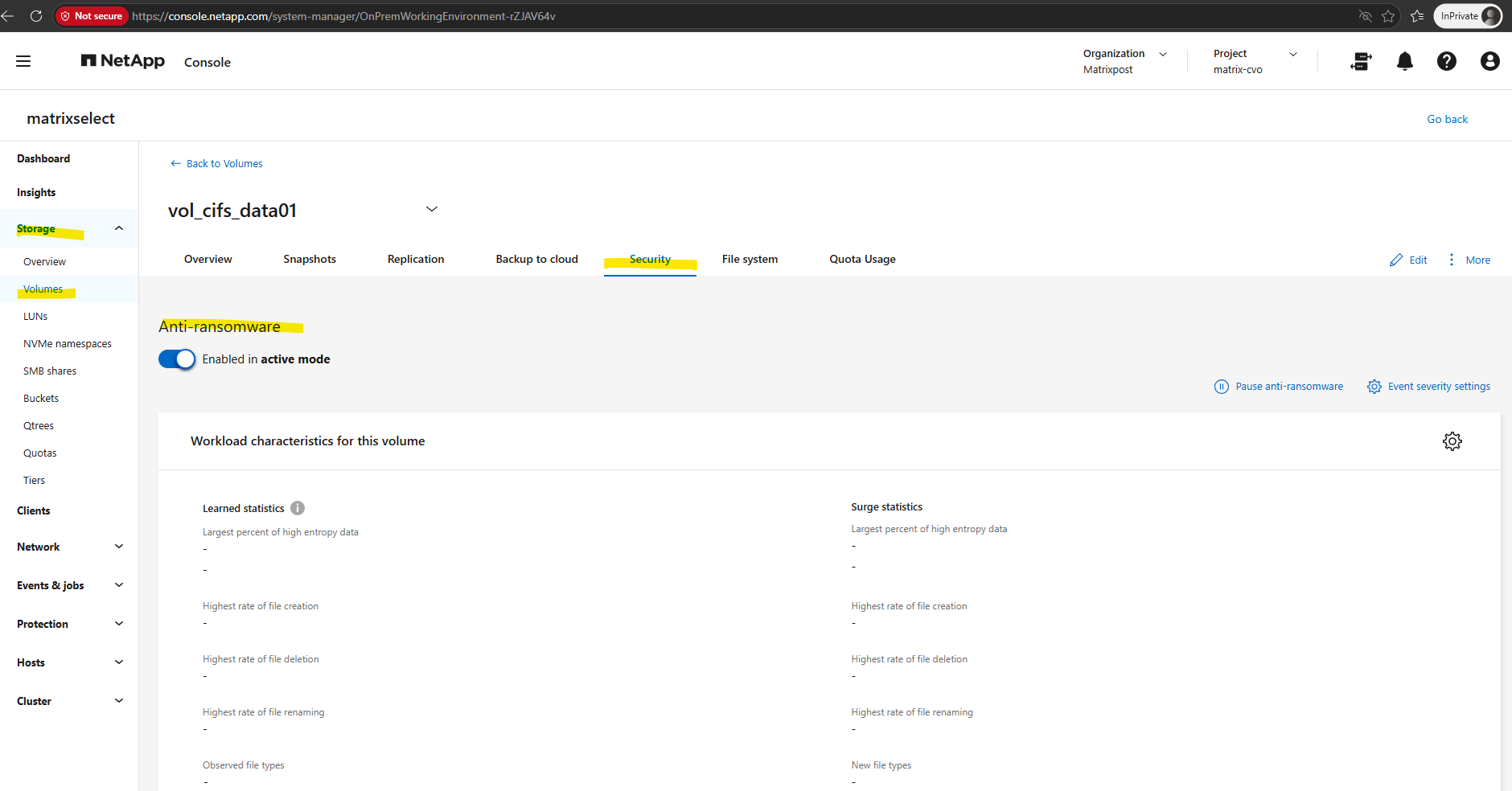
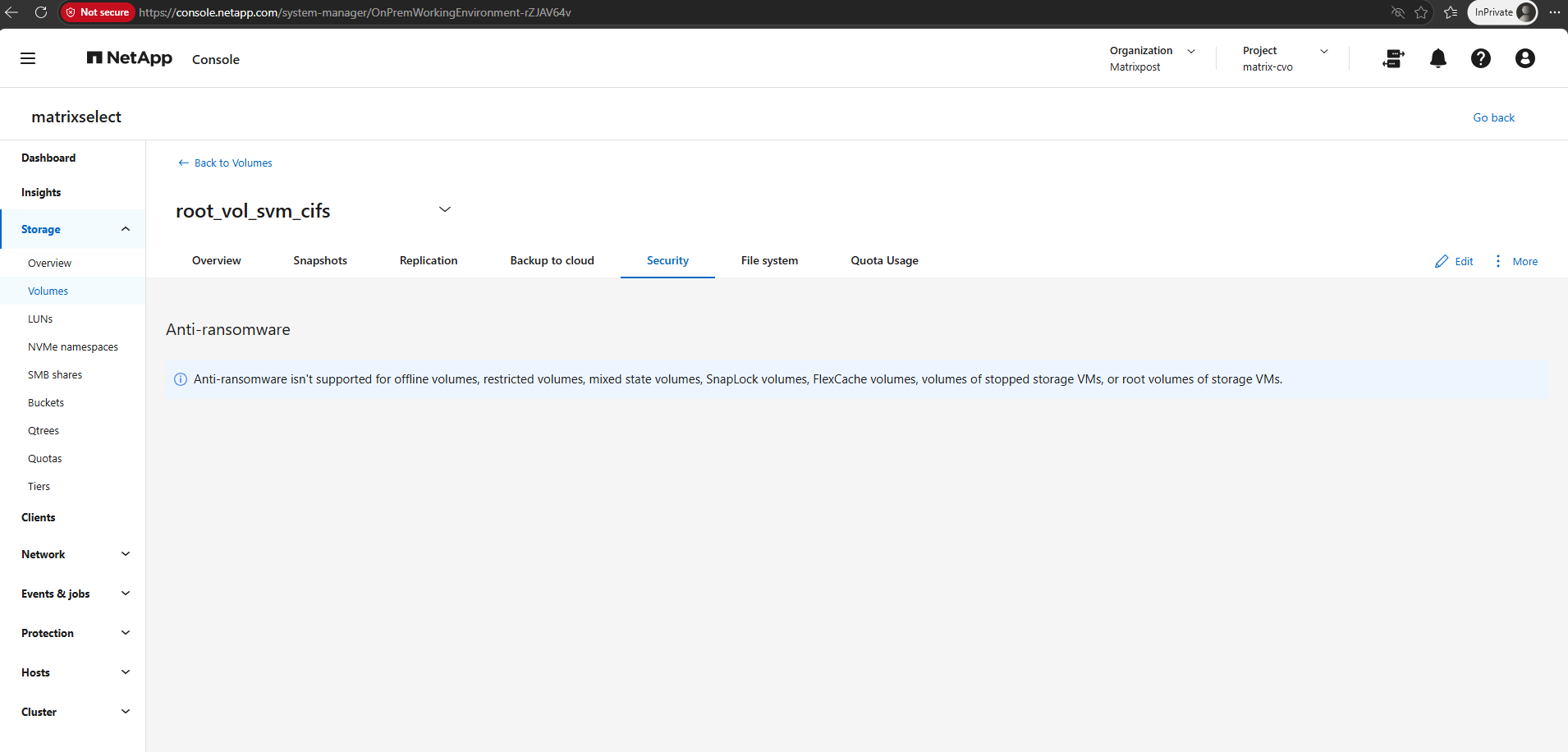
Below, for example, I selected the root volume of the CIFS SVM, where Autonomous Ransomware Protection (ARP) is not supported.
Anti-ransomware isn’t supported for offline volumes, restricted volumes, mixed state volumes, SnapLock volumes, FlexCache volumes, volumes of stopped storage VMs, or root volumes of storage VMs.
ARP Locked Snapshots
ARP creates locked snapshots at regular intervals in addition to scheduled snapshots.
Snapshot retention is adjusted dynamically.
Snapshots are recycled quickly when no unusual activity is detected, and snapshots taken before a detected attack are retained longer for investigation and recovery.
The ARP snapshots are normal ONTAP snapshots with a special naming convention, so we can list them. as usual by running the following command.
There isn’t a separate locked column in the standard snapshot listing. The lock is an internal protection mechanism used by ARP.
This is exactly the naming convention introduced in newer ONTAP releases.
NetApp distinguishes between:Anti_ransomware_periodic_backup…Anti_ransomware_attack_backup…The first is a periodic ARP snapshot, while the second would be created in response to a suspected ransomware attack.
matrixselect::> volume snapshot show -vserver svm_matrix_cifs -volume vol_cifs_data01
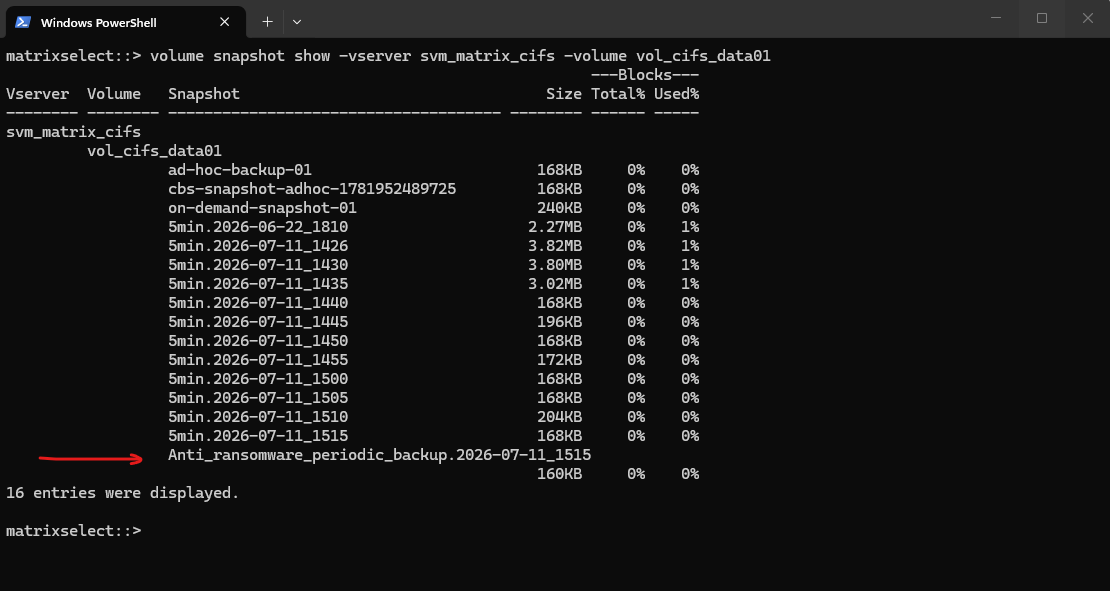
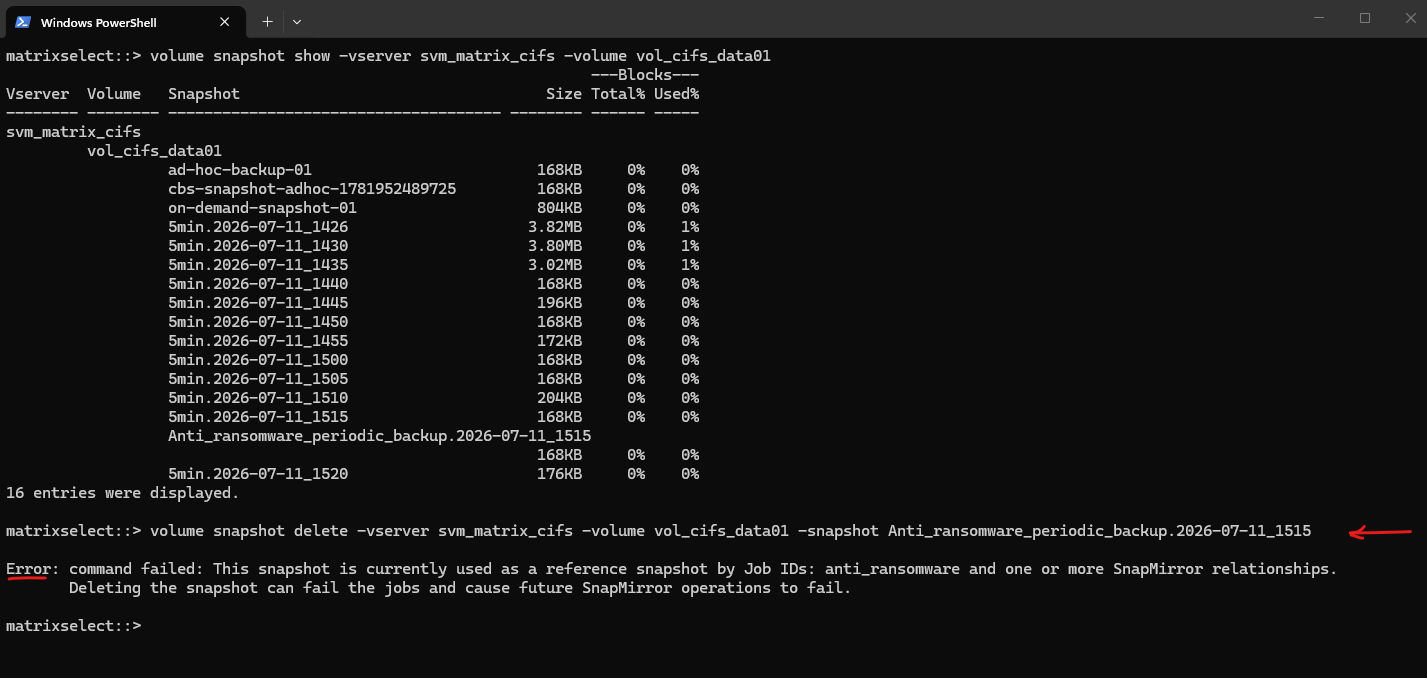
In ONTAP 9.18.1, ARP creates dedicated Anti_ransomware_* snapshots with an automatically managed expiry time. Although they appear as regular Snapshot copies, they are protected by the ARP subsystem and cannot be deleted while still referenced by the anti-ransomware process.
matrixselect::> volume snapshot delete -vserver svm_matrix_cifs -volume vol_cifs_data01 -snapshot Anti_ransomware_periodic_backup.2026-07-11_1515
Source: https://docs.netapp.com/us-en/ontap/anti-ransomware/
Why Regular ONTAP Snapshot Copies are also Safe from Ransomware
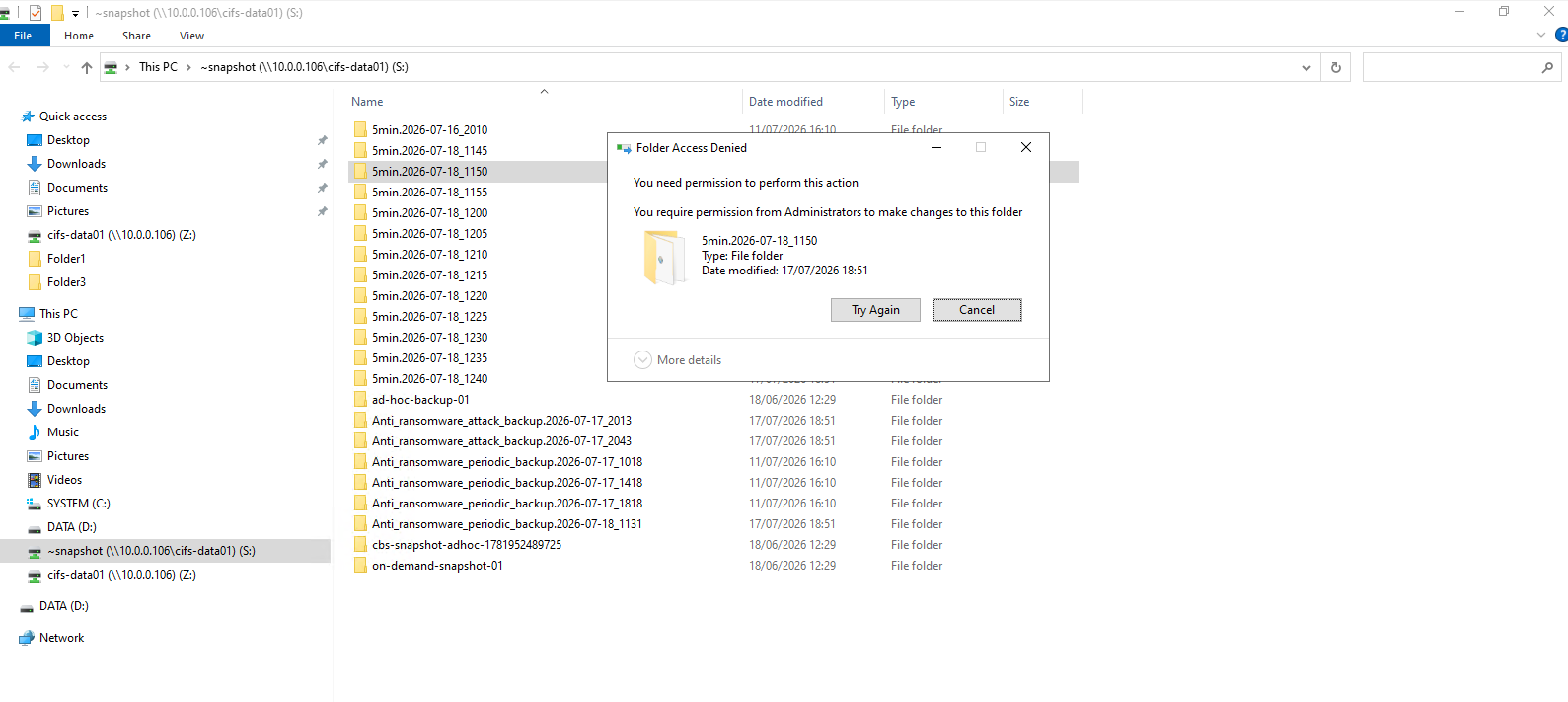
Regular ONTAP Snapshot copies are immutable and exposed as read-only, meaning ransomware can neither modify nor encrypt them, even when Snapshot directory access (~snapshot) is enabled for SMB shares.
In addition to regular scheduled Snapshot copies, ARP automatically creates locked Snapshot copies at regular intervals like shown in the previous section.
These snapshots are also protected against deletion directly in ONTAP and their retention is adjusted dynamically, allowing snapshots taken before a detected attack to be preserved longer for investigation and recovery.
This clearly distinguishes the two protections:
- Regular Snapshot copies: cannot be encrypted, modified, or deleted by SMB clients, even if
~snapshotis visible, because they areread-only. - ARP locked Snapshot copies: additionally protected against deletion within ONTAP itself, preventing even administrators or automated processes from deleting them until their retention expires (subject to the ARP locking mechanism).
Trying to delete a regular ONTAP Snapshot copy through the SMB ~snapshot directory results in an Access Denied error. Snapshot copies are exposed as read-only and therefore cannot be deleted or modified by SMB clients.
Disable ARP
To disable Autonomous Ransomware Protection (ARP) for a volume, run the command below. The operation is performed asynchronously, and the volume temporarily enters the disable-in-progress state before ARP is fully disabled.
# Disable ARP
matrixselect::> security anti-ransomware volume disable -vserver svm_matrix_cifs -volume vol_cifs_data01

# Verify
matrixselect::> security anti-ransomware volume show -vserver svm_matrix_cifs -volume vol_cifs_data01
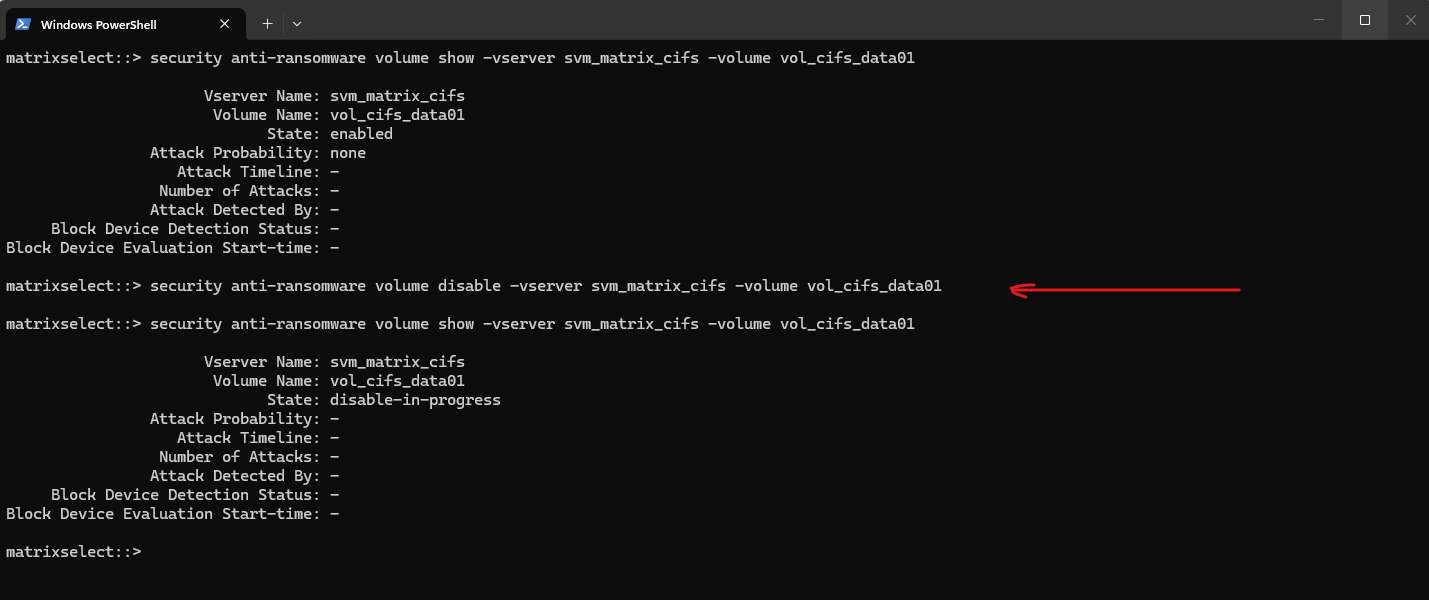
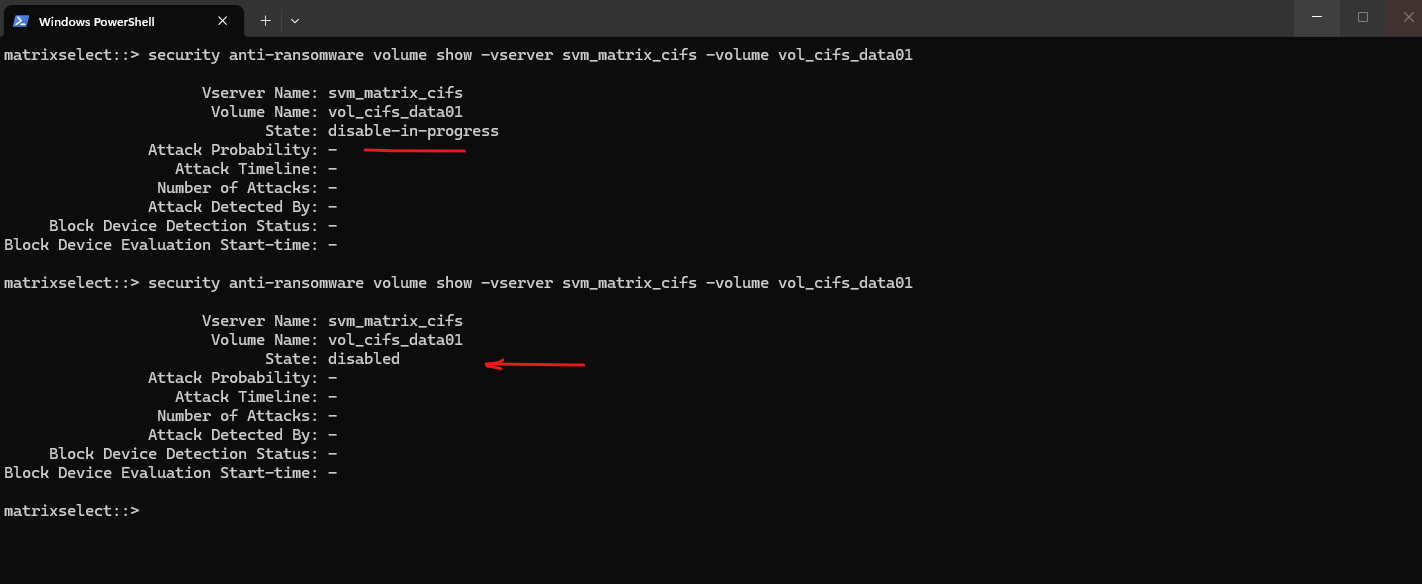
After a few minutes, the asynchronous operation completed and the volume state changed from
disable-in-progresstodisabled, indicating that Autonomous Ransomware Protection (ARP) had been successfully disabled.
ONTAP Autonomous Ransomware Protection Auto Enablement Cluster-Wide
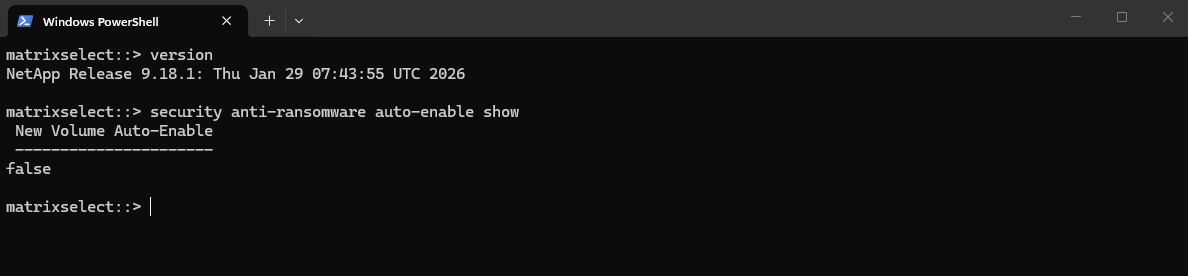
Beginning with ONTAP 9.18.1, Autonomous Ransomware Protection (ARP) is automatically enabled by default on all new volumes for AFF A-series and AFF C-series, ASA, and ASA r2 systems after a 12-hour warmup period following an upgrade or new installation, provided an ARP license is installed. You can opt out of this default enablement during or after the 12-hour grace period using System Manager or the ONTAP CLI.
In my lab I will use ONTAP Select version 9.18.1 on which auto-enable is not enabled by default.
matrixselect::> version

We can check the default enablement status by running:
matrixselect::> security anti-ransomware auto-enable show
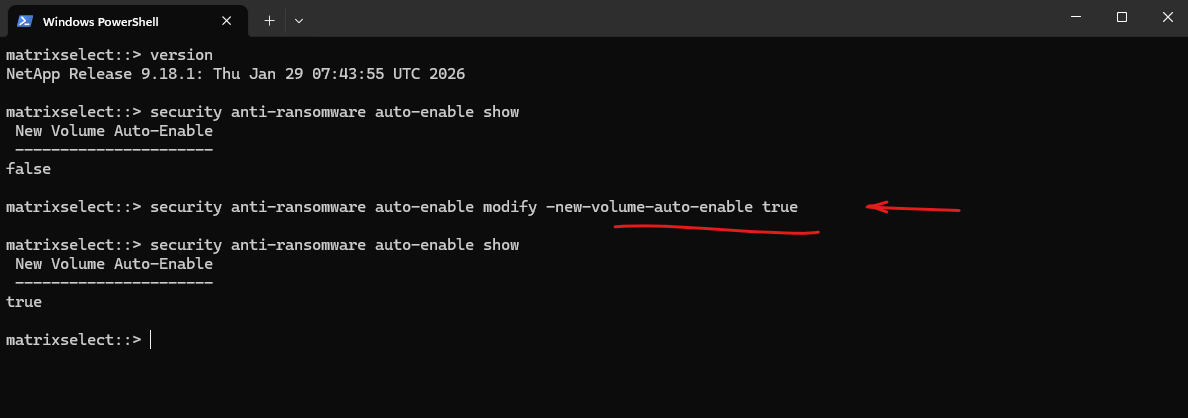
We can enable default enablement for new volumes by running:
matrixselect::> security anti-ransomware auto-enable modify -new-volume-auto-enable true

# to disable
matrixselect::> security anti-ransomware auto-enable modify -new-volume-auto-enable false
Source: https://docs.netapp.com/us-en/ontap/anti-ransomware/default-enable-change.html
Auto-Enablement on Storage VMs (SVMs)
In addition to the cluster-wide default auto-enablement introduced in ONTAP 9.18.1, Autonomous Ransomware Protection (ARP) can also be configured individually for each Storage Virtual Machine (SVM).
This allows you to automatically enable ARP for all newly created supported volumes within a specific SVM, regardless of the cluster-wide default setting.
If automatic enablement is disabled at the cluster level, you can still choose to enable it selectively for individual SVMs.
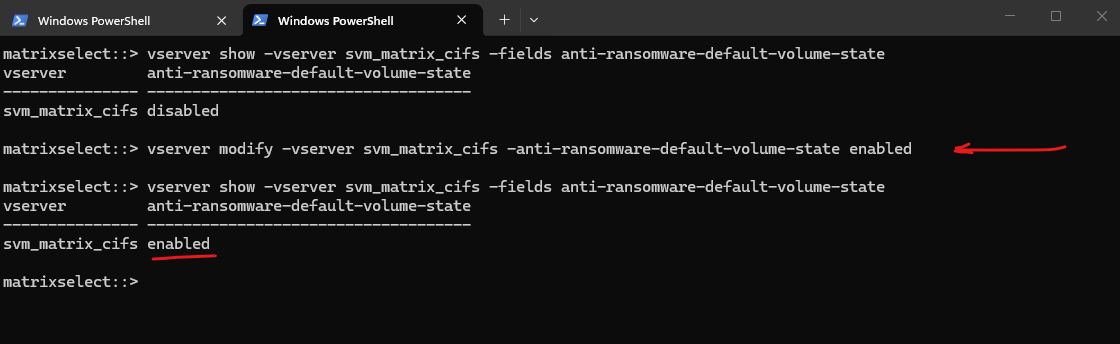
The current configuration for an SVM can be displayed by running:
matrixselect::> vserver show -vserver svm_matrix_cifs -fields anti-ransomware-default-volume-state

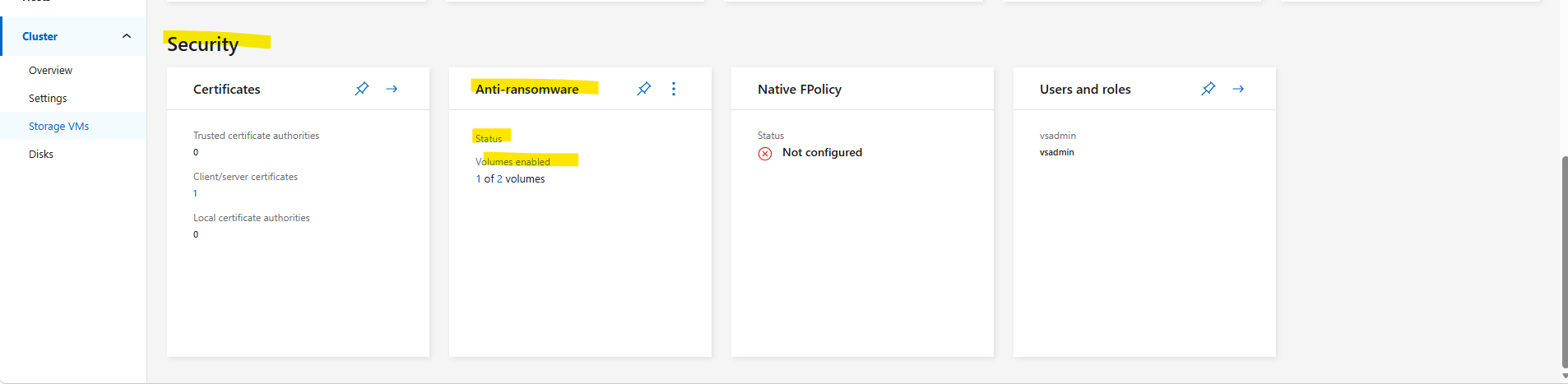
Or by using the System Manager within Cluster -> Storage VM select the desired SVM and scroll down to Security -> Anti-ransomware as shown below.
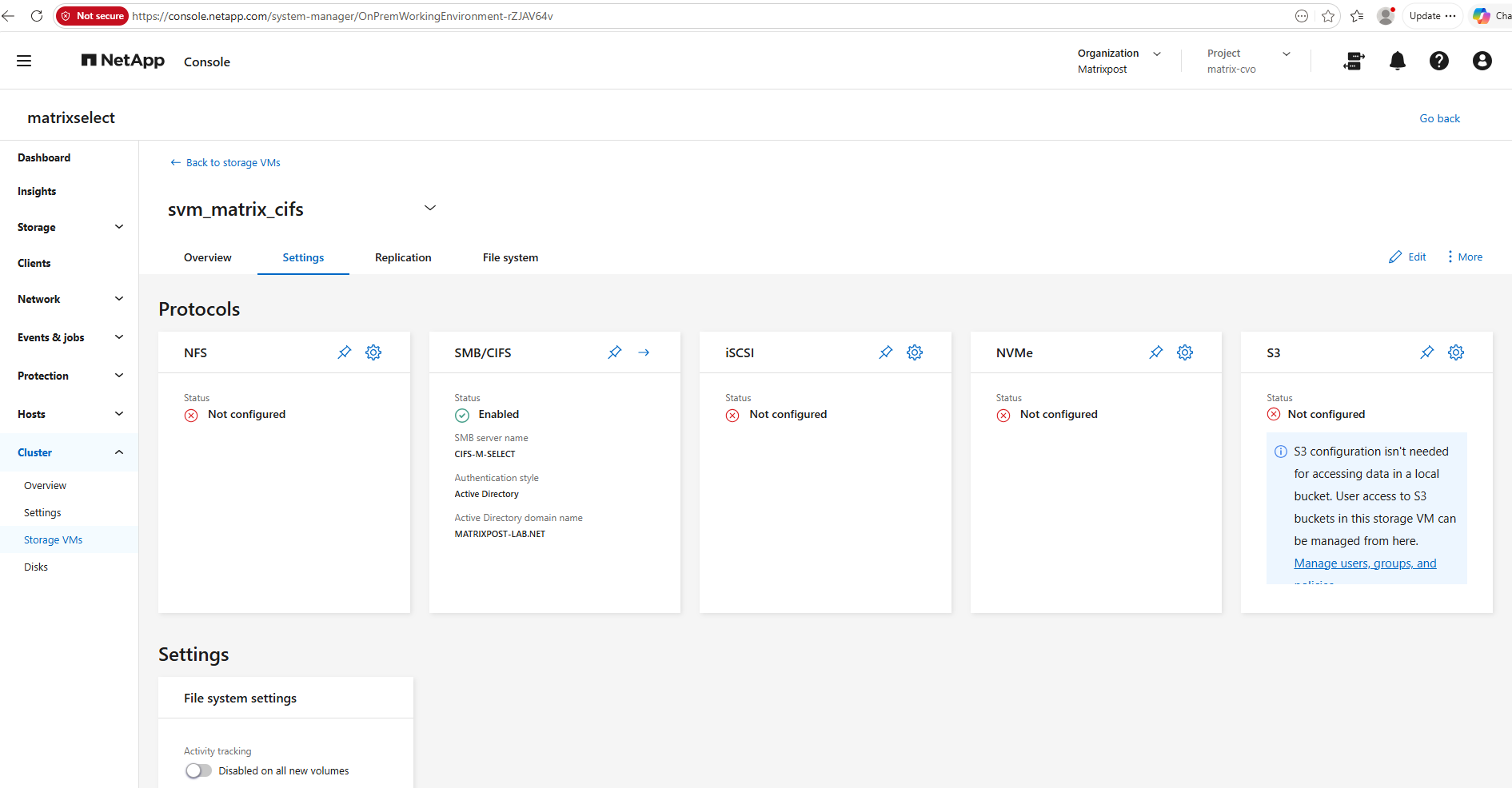
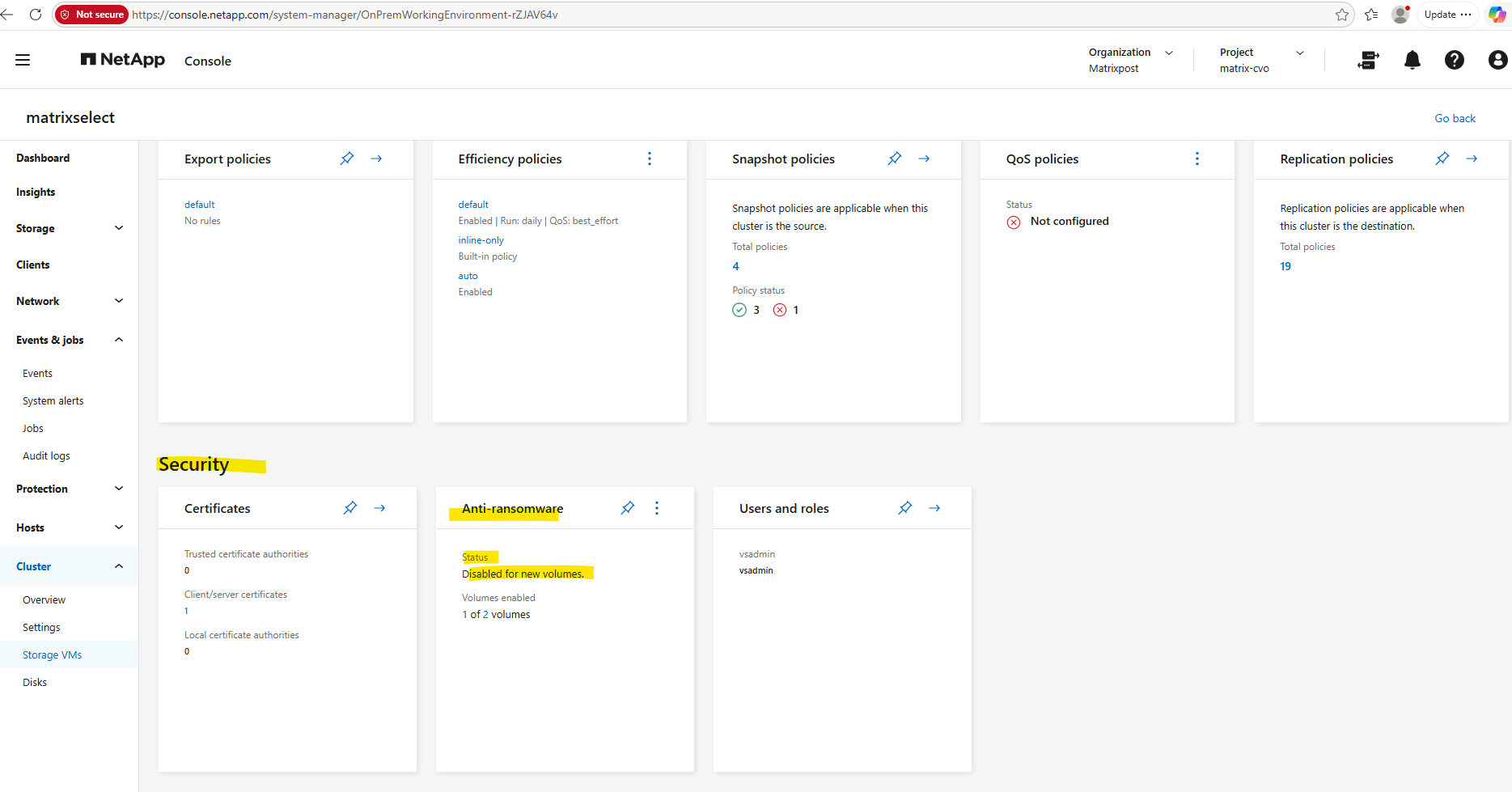
We can also edit the settings here.
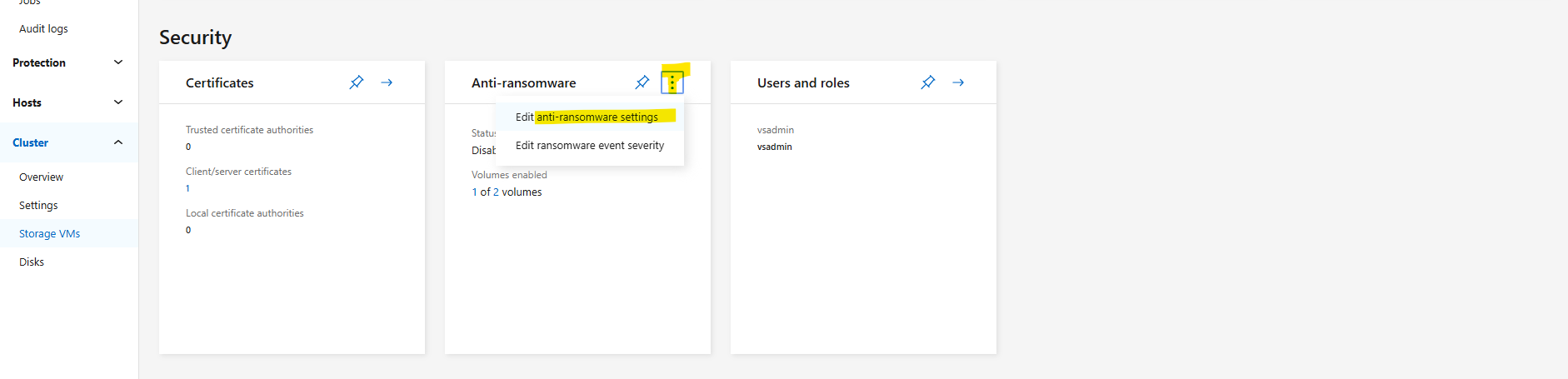
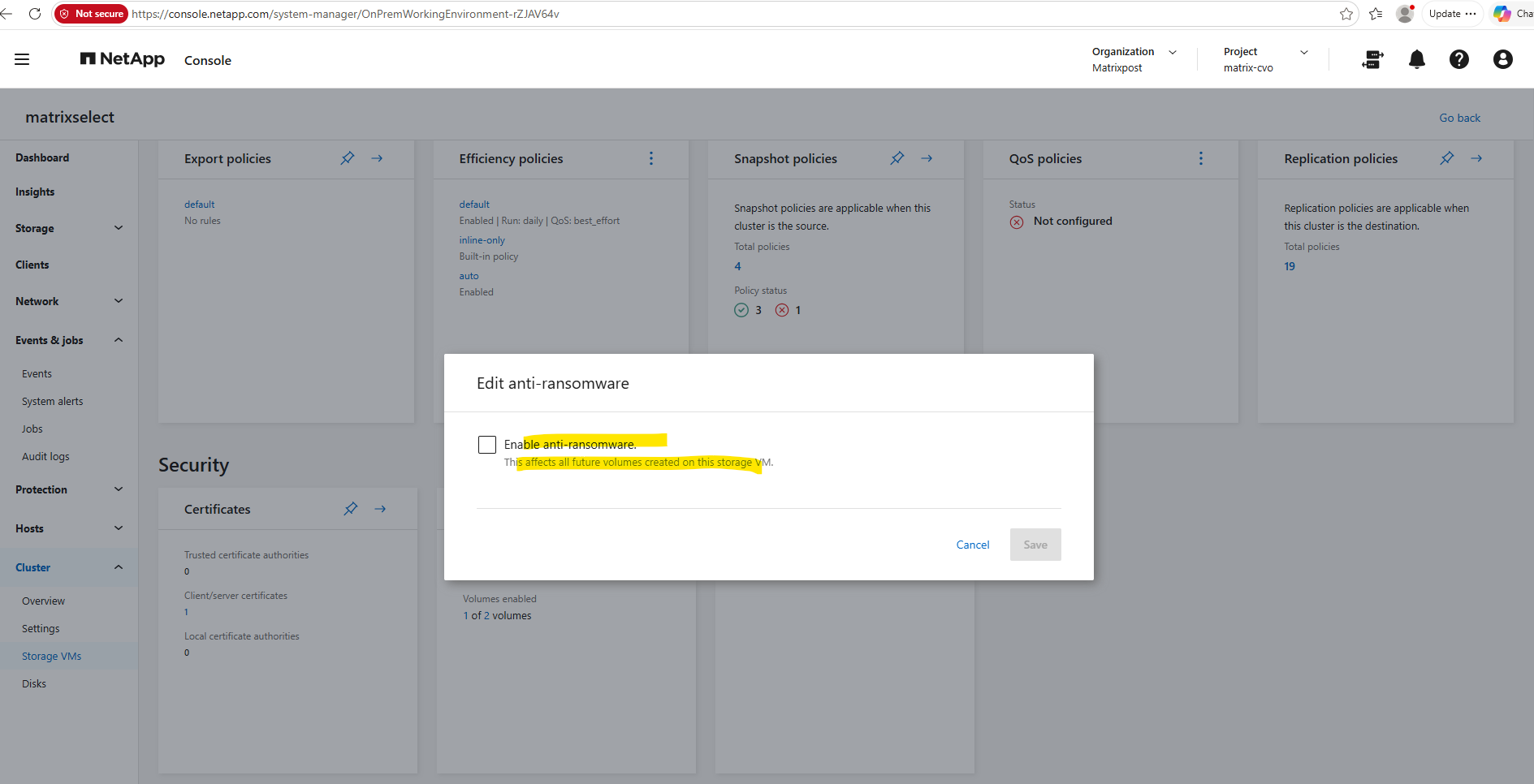
To enable ARP by default for all newly created supported volumes in an existing SVM, run:
matrixselect::> vserver modify -vserver svm_matrix_cifs -anti-ransomware-default-volume-state enabled

# verify
matrixselect::> vserver show -vserver svm_matrix_cifs -fields anti-ransomware-default-volume-state
Verifying Autonomous Ransomware Protection Licensing
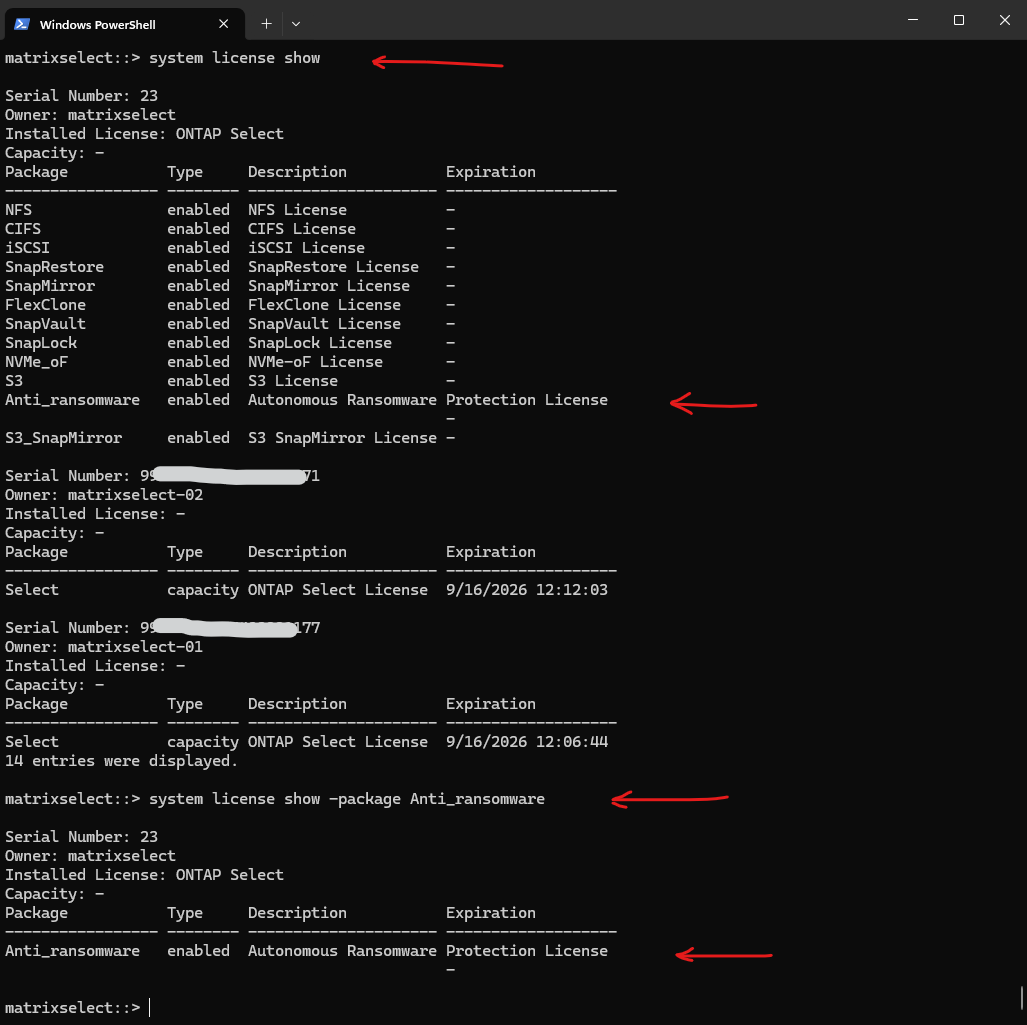
ARP licensing can be verified using the system license show command. On my ONTAP Select 9.18.1 lab, the feature is provided by the dedicated Anti_ransomware license package, which is listed as enabled.
matrixselect::> system license show
matrixselect::> system license show -package Anti_ransomware
Links
Learn about ONTAP Autonomous Ransomware Protection
https://docs.netapp.com/us-en/ontap/anti-ransomware/Enable ONTAP Autonomous Ransomware Protection on a volume
https://docs.netapp.com/us-en/ontap/anti-ransomware/enable-task.htmlEnable ONTAP Autonomous Ransomware Protection by default in new volumes
https://docs.netapp.com/us-en/ontap/anti-ransomware/enable-default-task.htmlOpt out of ONTAP Autonomous Ransomware Protection default enablement
https://docs.netapp.com/us-en/ontap/anti-ransomware/default-enable-change.htmlSwitch to active mode in ONTAP ARP after a learning period
https://docs.netapp.com/us-en/ontap/anti-ransomware/switch-learning-to-active-mode.htmlSecurity and data encryption
https://docs.netapp.com/us-en/ontap/security-encryption/index.htmlLicenses and enablement
https://docs.netapp.com/us-en/ontap/anti-ransomware/Autonomous Ransomware Protection for NFS and VMFS
https://docs.netapp.com/us-en/netapp-solutions-virtualization/vmware/vmw-arp-nfs-vmfs.htmlRestore data from ONTAP ARP snapshots after a ransomware attack
https://docs.netapp.com/us-en/ontap/anti-ransomware/recover-data-task.html